Welcome Guest ( Log In | Register )

Outline · [ Standard ] · Linear+

 Android / Other TV Box, see Page 1 first... V2

views
     
voncrane
post Apr 28 2021, 05:47 AM

Noir et fier!
*******
Senior Member
7,120 posts

Joined: Oct 2011
From: Wakanda


QUOTE(chanhin @ Apr 25 2021, 04:41 PM)
Any suggestions or good options for box that can watch China TV series? Hope is android boxes
*
Most boxes can.. Question is the source... Find the source, then seek boxes that can play it.

QUOTE(coolguy_0925 @ Apr 26 2021, 02:32 AM)
Any member using an Android tv box to view olevod? I realised they have apk for it

Will the video quality be as clear as the version watched on browser?
*
Tried installing their app on 2 phones.. App refuses to launch so I discontinued the test.. sweat.gif

QUOTE(Scissorshand @ Apr 27 2021, 07:12 PM)
I know KM6 KM9 Pro (screenshot below) and KM1 now can play Netflix with 5.1 in 1080p at least.

Read the latest...

https://forum.freaktab.com/forum/tv-player-...ices#post823094
*
Nice... Mice race ahead again.

QUOTE(Vanquish_08 @ Apr 27 2021, 10:41 PM)
Silly question but apart from the Nvidia and Amazon products discussed here, how do the other boxes recommended here handle Netflix 4K / Youtube 4K?
I am looking at the Mi Box S but the lack of RAM and positively ancient GPU is giving me some cause for concerns.

Cheers,
V.
*
This be the thing.. Good soup costs more.. There's the Google Chromecast lineup and the recently released Mecool KM2. No much info or real-world performance data on the KM2 yet.. But we'll know soon enough.

QUOTE(deepan84 @ Apr 27 2021, 10:59 PM)
Need some help. When I am viewing 1080P videos on T9 box, the colours become double or the red is separated. Abit weird. How to solve this.

user posted image
*
Can you confirm that this doesn't happen with other input sources? Maybe try another HDMI cable too... Hopefully, it's not a TV issue.
voncrane
post Apr 28 2021, 05:49 AM

Noir et fier!
*******
Senior Member
7,120 posts

Joined: Oct 2011
From: Wakanda


QUOTE(GuyM @ Apr 25 2021, 12:08 PM)
Damned bubba! They no respect msian YouTuber
*
What to do.. I'm still Ikan bilis.. sweat.gif

QUOTE(naTTan @ Apr 27 2021, 11:11 PM)
Sorry got the link?
*
He reposted with the url...
voncrane
post Apr 29 2021, 09:06 PM

Noir et fier!
*******
Senior Member
7,120 posts

Joined: Oct 2011
From: Wakanda


QUOTE(deepan84 @ Apr 28 2021, 12:05 PM)
its not a tv issue. Because netflix and youtube from tv (LG UN73) works fine. Its only this app. Did some googling and found out that others have soe issues. -> https://www.facebook.com/groups/tukangapaha...380982696375676
*
Hmmm... Truly weird.. I suggest you try a factory reset, if you haven't already done so.. If still no good? Reflash the stock ROM perhaps?

QUOTE(Vanquish_08 @ Apr 28 2021, 02:58 PM)
Thanks! The earlier KM boxes looked pretty darn up to date with specs but there was the issue of SD only Netflix playback while a couple
of them finally have a fix for FHD playback. The reason I wanted to run Netflix off the box is to have VPN installed but I could still look at
installing it at the router level too. The KM2 looks decent on paper though they seem to have skimped a bit on general specs but at least
it's Netflix certified. Will hold off the purchase until reviews and user feedback is available ...
*
Yeah I agree... MeCool did skimp on the KM2 specs a bit.. Fairly certain that they'll release a 3/4GB RAM +32GB/64GB storage option in the near future. Unsure why they didn't do that right away from the get go.. hmm.gif .. Chuck in a more powerful SoC, additional cooling and that would have easily placed them ahead of the competition d. Having to not worry about Netflix on a Mecool device is a big deal IMO... Alternatively as Scissorshand reported, you can get the other Mecool boxes like the KM9 Pro or KM1 variants, and use the special Netflix app. Can get 1080p with 5.1 passthru with that confirmed.. I can attest to the KM1 Deluxe being a solid streamer.

Regarding the VPN bit, havign it on the router level IMO is the better bet. Even better if you use a dedicated router or a router with a firmware that allows you to separate the connections. Route specific devices thru the VPN connection, and others through the non-VPN option. This set it and forget it method is very good for keeping your home network protected. Although, don't forget to regularly check the connection as sometimes, the VPN service goes down.
Attached Image

QUOTE(GuyM @ Apr 28 2021, 04:59 PM)
Finally... thumbup.gif
voncrane
post May 4 2021, 02:41 AM

Noir et fier!
*******
Senior Member
7,120 posts

Joined: Oct 2011
From: Wakanda


QUOTE(ntw @ May 4 2021, 01:21 AM)
Any recommendation to rejuvenate a 2 year old A95X MAX with S905X2 SOC and 4GB ram?

It has a few problems:
1. Laggy when navigating around the menu
2. Blank screen when I turn on the tvbox, need to restart a few times
3. Stuck in boot logo, especially if I didn't exit from Kodi or iptv apps before turning off the tvbox
*
Probably dealing with excess junk... Especially if you haven't spring cleaned in awhile. But first, what ROM version are you running and is it the latest? Searched around and this seems to be the last stock firmware available for the device. Stock Android Oreo 8.1. Sometimes, all that is needed is a factory reset to clear stuff. However, I would recommend just USB flashing this over what you have now. Should help. Alternatively, you can go down the custom ROM route. Perhaps try this atvXperience v3 custom ROM. It's based on Android TV OS..Download links here....
voncrane
post May 6 2021, 11:08 AM

Noir et fier!
*******
Senior Member
7,120 posts

Joined: Oct 2011
From: Wakanda


This is the full review and live demo of the Cobra4TV IPTV service. It boasts about 11,000 Live IPTV channels and over 30,000 VOD (Movies & TV Shows) from from all over the world in various languages. Find out how it performs on iOS, Android, Windows, & Samsung SmartHub OS. It is also compatible with LG's WebOS, Mac OS X, and many more. Basically, further cementing my love for Sammy & LG Smart TVs. No external TV Box or Media Player required... Nice!


Addtional Info & Support
Official Website

Apps Installation URLs
Windows IPTV Player 3.0
XCIPTV Player (Google Play Store)
IPTV Smarters Player
GSE SMART IPTV (Apple App Store)

I welcome any questions or concerns regarding the service. However, best to comment over at the dedicated thread la.. So not off-topic here... notworthy.gif
voncrane
post May 7 2021, 06:52 AM

Noir et fier!
*******
Senior Member
7,120 posts

Joined: Oct 2011
From: Wakanda


QUOTE(GuyM @ May 6 2021, 12:33 PM)
Once you go ATV version all others like meh....👎👎👎
*
Hey...subjective la... But yes.... innocent.gif whistling.gif

QUOTE(ntw @ May 6 2021, 12:38 PM)
Loaded the atvxperience, but no time to explore yet. Home screen is now very clean, only uses Kodi and SyberTV app. Need to test if Unifi Play TV works
*
There are 2 versions of the Unifi PlayTV app. The regular Android OS version & the ATV OS type.. Try the ATV OS version first. Hopefully, the latest version just works well. Take your time and explore it... Poke here there to see how stable it is and if it can do all you want doing.. If yes? bravo, no need to spend another dime getting a new box.. Enjoy!

QUOTE(ntw @ May 6 2021, 11:28 PM)
Any junk file cleaner apps recommended for ATV? I have downloaded CCleaner from Aptoide but the junk file scanning is very slow and stuck at 70%, force restart a few times also stuck at 40%/ 70%
*
As long as it's Android, I swear by the app SD Maid by D4rken. There's the free version, which if it works well? I recommend you spring for the pro version. I've been using this app since forever and is one of the first few apps I install onto any Android device I own. You can get it from the Google Play Store here or from sites like apkmirror.

SD Maid allows you to:
• Browse your whole device and manipulate files through a full-fledged file explorer.
• Remove superfluous files from your system.
• Manage installed user and system apps.
• Detect files formerly belonging to uninstalled apps.
• Search for files by name, content, or date.
• Obtain a detailed overview of your device's storage.
• Optimize databases.
• Do actual app cleaning and remove expendable files, which supersedes what others may call 'cache cleaning'.
• Detect duplicate pictures, music, or documents, independent of name or location.
• Run tools automatically on a schedule or via widgets.


This post has been edited by voncrane: May 7 2021, 06:54 AM
voncrane
post May 10 2021, 10:28 PM

Noir et fier!
*******
Senior Member
7,120 posts

Joined: Oct 2011
From: Wakanda


QUOTE(coolguy99 @ May 9 2021, 05:55 PM)
Anyone facing issue when installing app from shafa market? I keep getting install failed every time when trying to install after download..

Tried to grant install app from unknown source for shafa market app but the app isn’t there...

Any help will be appreciated
*
Hmm, I don’t use Shafa Market but perhaps you are trying to install an app version over an existing version that’s problematic.. Some “unknown sources” installs can be like that. If so, you’ll have to first uninstall the installed version before you can install the new one.

Another issue could be trying to install an incompatible app architecture such as v8 on v7a only hardware & OS... or just corrupted downloads.
voncrane
post May 25 2021, 12:31 PM

Noir et fier!
*******
Senior Member
7,120 posts

Joined: Oct 2011
From: Wakanda


QUOTE(hehe86 @ May 24 2021, 04:44 PM)
Ah. Currently my case is using wifi, so got buffering issue. That's why not sure is it my router issue or not
Yea that's the thing, is there anyway to know is it server issue or the connection itself?

Thanks for the replies guys
*
500Mbps is enough. However, as others commented.. Server side capability is more important. You try stream Netflix & YouTube on different devices. I guarantee it’ll play smoothly. Those are good tests for your network connection, they have stable reliable servers to handle viewers. Other ehem stuff? Performance depends on their servers..

As always, I recommend running cables instead of WiFi. You should test the same device that’s buffering using a cabled connection. If still buffering? Most likely it’s the service issue. Especially if the device can reliably stream YouTube or Netflix 4K..
voncrane
post Jun 1 2021, 04:27 PM

Noir et fier!
*******
Senior Member
7,120 posts

Joined: Oct 2011
From: Wakanda


QUOTE(Dickong @ May 27 2021, 12:38 PM)
Is Zidoo Z9X a good media player,  n secondly my question is 2/16 ram n memory enough.tq
*
Not a fan of non-AMLogic SoCs (cuz flashy flashy me).. BUT in Zidoo's case, I make an exception as the bundled chipset is decent AND the guys at Zidoo know their stuff.. So yeah, if you are a light user (think storage-wise, mostly just streams stuff and no heavy 3D gaming), the 2/16GB config will be sufficient. What you need to understand is that the 16GB stated doesn't mean you have actual 16GB to play with.. The firmware, system & some bundled third-party apps will take up some space. Typically, I would expect you would have around 8 - 10GB of actual usable space to play with. Install a bunch of apps, they run a bit and you should see that number drop. Especially say Kodi, Kodi can easily gulp over 1GB space after a couple of months and depending on the number of addons, thumbnails etc.. basically its own data.. Kodi and other typically streaming-only apps such as YouTube, Netflix, etc.. just need enough room to breathe while streaming content. So I reckon as long as you have a few GB left storage space left after installing all the apps you need. You should be fine. You just won't be able to stream high bitrate files though using addons like Elementum in Kodi...Cuz those are usually larger and won't play if you don't have enough available space to cache while it "streams".

This post has been edited by voncrane: Jun 1 2021, 04:27 PM
voncrane
post Jun 5 2021, 08:57 AM

Noir et fier!
*******
Senior Member
7,120 posts

Joined: Oct 2011
From: Wakanda


QUOTE(rx330 @ Jun 3 2021, 10:07 AM)
ah shifu ar... u got any idea how to get Disney + to work on the zidoo z9s or hi media boh....
*
Hmm, you meant the new Disney+ Hotstar combo? I haven't tried it myself, but reckon it should be available for direct install from the Google Play Store? I assumed it will. Well, if it isn't, there's the usual download from apkmirror type sites and manually install. Can't speak for performance just yet.

QUOTE(snowcrash @ Jun 5 2021, 12:31 AM)
Hi all, looking for a recommendation on Android TV box. Thought about getting chromecast, but apparently it doesnt support builtin VPN (am planning on using ExpressVPN).

Requirements are:
1. LAN port (prefer cabled connection)
2. Interface in English (got a TV Box many years ago, damn frust cos every now and then will suddenly default to menu in Chinese)
3. Easy to use remote/ navigation interface - the kids will also be using it, so if the UI needs to be easy to use/ simple.
4. Native support for VPN apps
5. Good heat management - the old box tended to overheat quite frequently.

I'm also willing to consider (actually would prefer) a HTPC setup, but am scared that those might be way too expensive/ hard to maintain. Any thoughts/ recommendations?
*
Hi....As nice as the Chromecast is? Yeah, not an ideal option.. Similarly, with an HTPC, you'll need a significantly expensive model to match the media playing performance of a sub-RM300 Android TV Box. I'd recommend getting a box that ships with pure Android TV OS rather than the normal Android or a themed one. Typically, I'd also recommend the Xiaomi Mi Box S, but since you prefer it wired (I do too..always), it best to skip that.. next up would be either the recently released Google & Netflix certified Mecool KM2 or if your TV already supports Netflix and or you don't need it? Consider the "older" &slightly cheaper Google certified Mecool KM1 Deluxe (no official Netflix certification here). Android TV OS UI is super easy to use and you can further customize it for your kids, so only the safe stuff is displayed on the homescreen. Even if for some reason, you do not like the default launcher, There are other ATV OS-compatible launchers you can install. You can watch my review below to find out how well it works...got timestamps n everything for convenience... And I can guarantee that it ticks all 5 of your concerns.

P.S. There are talks about a new Mi Box S being launched soon.. Just got registered with the FCC all.. But rumors have it that it shares the same externals (meaning no LAN port, etc) and still the same old Amlogic S905-H quad-core processor that powers the original Mi Box and the Mi Box S. So I wouldn't call that an upgrade or a successor even..


voncrane
post Jun 5 2021, 09:06 AM

Noir et fier!
*******
Senior Member
7,120 posts

Joined: Oct 2011
From: Wakanda


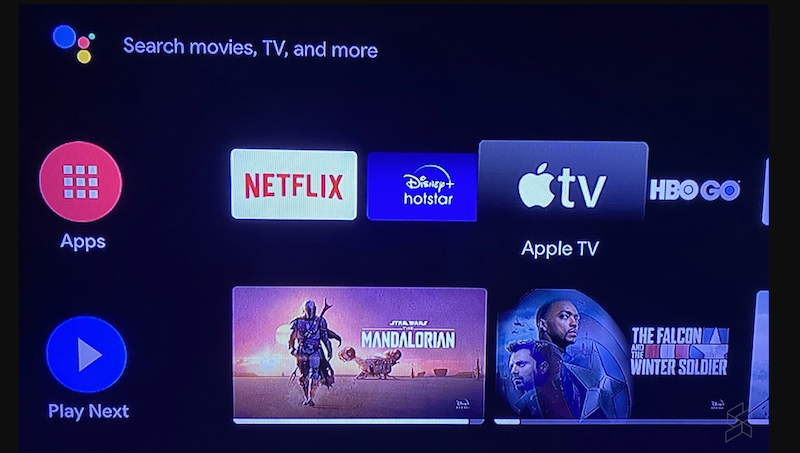
On another note, Apple TV and Apple TV+ are now available on all Android TV devices. This is a huge move on Apple's part, cuz with its availability on the Android TV platform, even more people can subscribe to Apple’s streaming service without the need of purchasing an Apple device. That last part I'm sure is crucial. Hopefully, enough ppl join it, making Apple see the appeal to release it for regular Android too. One's device still needs to support Apple's DRM for the app to work properly though. Baby steps.. thumbup.gif

user posted image
voncrane
post Jun 5 2021, 07:00 PM

Noir et fier!
*******
Senior Member
7,120 posts

Joined: Oct 2011
From: Wakanda


QUOTE(KopiChia @ Jun 5 2021, 04:48 PM)
Thinking getting mecool km2. It's currently best after nvidia right? If so I will likely get frm Lazada.
*
I wouldn't say it's the best after Nvidia.. There are definitely more powerful or better boxes out there. It's just a game-changer thanks to the Netflix certification.
voncrane
post Jun 7 2021, 07:16 PM

Noir et fier!
*******
Senior Member
7,120 posts

Joined: Oct 2011
From: Wakanda


QUOTE(Scissorshand @ Jun 5 2021, 09:55 PM)
BTW is it me only that thinks if one were to pair a good atv box with smart TV, somehow the TV tends to last much longer...

I dunno all my TVs ain't dying yet which doesnt give me reason to change upgrade etc... 🤔🤔🤔
*
You might be onto something there... biggrin.gif

QUOTE(snowcrash @ Jun 7 2021, 11:06 AM)
Wow, nice site/reviews, and thanks for the Meccol KM2 recommendation, wasn't on my radar but definitely will keep an eye out on it. Couple of questions:

1. Installing ExpressVPN (or any other VPN app) should be easy (ie straight from Play Store) right? Or have to sideload?
2. Do you know if the remote is good? I see most of the Shopee/ Lazada sellers are pairing it with one of those airmouse remotes, wondering if thats a must or just a good-to-have.
*
Thanks for the compliments... notworthy.gif

1. Yes, all you'll have to do is launch the Google Play Store and search for ExpressVPN.. Hit Install. I used it myself during the review and confirms it works to unlock stuff.. innocent.gif
2. Sure the remote is a good one. If you like, you can get a closer look at the physical remote around the 4:45 section in the video, as I share my thoughts on it. Basically, if you plan to stick to only ATV OS apps? Then you should have no serious need for a third-party airmouse or regular mouse combo. Because apps for ATV OS are built without touching the screen in mind. Everything is mostly accomplished with the buttons on the remote. You can even play some games on the box using the remote itself. However, if you plan to enter long texts (like a long url for internet browsing on the TV...but why? tongue.gif...) or run side-loaded non-ATV OS apps that require touchscreen simulations? Then yes, you'll need to get a different airmouse remote or some regular wireless keyboard+mouse combo.
voncrane
post Jun 8 2021, 08:06 PM

Noir et fier!
*******
Senior Member
7,120 posts

Joined: Oct 2011
From: Wakanda


QUOTE(kkm @ Jun 8 2021, 11:04 AM)
Other than the Netflix compatibility, any other reason for getting the KM2 over the KM6?
*
Nothing really... Except perhaps the KM6 was released around Q4 last year vs the KM2 this year. If your TV is Netflix certified.. Honestly, you are better off using that for Netflix.

QUOTE(rx330 @ Jun 8 2021, 02:48 PM)
ah shifu ar.. mine don't have google store

and then hor.. I use apk, but it says need google play serbis

after that hor I do google play liao.. still kenot....

apa lah....
*
Erm, what box are you using? Firmware?
voncrane
post Jun 9 2021, 01:06 PM

Noir et fier!
*******
Senior Member
7,120 posts

Joined: Oct 2011
From: Wakanda


QUOTE(rx330 @ Jun 9 2021, 08:55 AM)
eh... tat day I testing on the Z9s
firmware I need to double check though
*
The Zidoo Z9S should ship with the Google Play Store. Yeah, double-check your device.. Where did you get the box from? Cuz reads like it's running some "made for China market only" ROM or its some custom ROM without Google services on it.
voncrane
post Jun 10 2021, 11:49 PM

Noir et fier!
*******
Senior Member
7,120 posts

Joined: Oct 2011
From: Wakanda


QUOTE(rx330 @ Jun 9 2021, 03:02 PM)
elek, no google store one

last time bought from a seller from fesbuk
*
QUOTE(rx330 @ Jun 10 2021, 12:02 PM)
my fw updated for sure, cos trying to fix some issue previously

website for sure no visit for google store hahaha  tongue.gif

okok, I go look see look see later
*
Not to worry... As long as your hardware is legit... Get stock ROM and manually flash over what you have.. You can download the latest stock fw version from here... Latest is v2.3.35 from October 2020.. try that first.
voncrane
post Aug 18 2021, 12:24 PM

Noir et fier!
*******
Senior Member
7,120 posts

Joined: Oct 2011
From: Wakanda


QUOTE(plushie @ Aug 15 2021, 01:18 PM)
Just wondering, whats the best value box right now? Saw the discussion about KM2.
For my usage, I think I just want to cast screen from my PC (both MacOS and Windows), stream game from PC, access my NAS to play some movies I own.
Is TVBox an overkill or I should just settle with some simple casting device?

Edit: I'd also prefer something that works out of the box, getting too old to play around with workaround n stuffs  icon_rolleyes.gif
*
Once this makes your list....There can be only one.. Get the Nvidia Shield and call it a day. Here are the basic requirements..

GPU Desktop: Any GeForce RTX, GeForce GTX 650 or higher
Notebook: Any GeForce RTX, GTX 700M or higher, and select (Kepler-based) GTX 600M GPUs
CPU: Intel Core i3-2100 3.1GHz or AMD Athlon II X4 630 2.8GHz or higher
System Memory: 4GB or higher
OS: Windows 7 or later
Software: Latest GeForce Display Drivers (www.geforce.com)
The latest version of GeForce Experience (Installed with Driver)
Network (Recommended): Connected via wired Ethernet directly to your home network
Minimum: 5GHz 802.11ac router.

Yes, your PC has to have an Nvidia GPU.

61 Pages « < 59 60 61Top
 

Change to:
| Lo-Fi Version
0.3029sec    0.75    7 queries    GZIP Disabled
Time is now: 11th December 2025 - 05:18 AM