

QUOTE(monkiwa @ Feb 7 2017, 10:56 PM)
Other way you can type this number in your dial application
*#*#2846579#*#* then select update from SD card

Yes. That one also can. *#*#2846579#*#* then select update from SD card

Huawei Huawei Mate 8 forum discussion V3, The truly premium flagship?
|
|
 Feb 7 2017, 11:00 PM Feb 7 2017, 11:00 PM
Return to original view | Post
#21
|
 
Junior Member
88 posts Joined: Aug 2008  
|
QUOTE(monkiwa @ Feb 7 2017, 10:56 PM) Other way you can type this number in your dial application Yes. That one also can. *#*#2846579#*#* then select update from SD card |
|
|
|
|
|
Feb 24 2017, 10:31 PM
Return to original view | Post
#22
|
|
Junior Member
88 posts Joined: Aug 2008
|
QUOTE(plain_white @ Feb 24 2017, 09:41 PM) Seems like there are new version B563 detected in firmware finder Yes. Downloading ...Attached thumbnail(s) 
|
|
|
Feb 25 2017, 10:12 PM
Return to original view | Post
#23
|
|
Junior Member
88 posts Joined: Aug 2008
|
Got OTA B563 without using Firmware Finder. Now downloading the full ota 2.10gb
|
|
|
Feb 25 2017, 10:46 PM
Return to original view | Post
#24
|
|
Junior Member
88 posts Joined: Aug 2008
|
QUOTE(plain_white @ Feb 25 2017, 10:40 PM) My OTA without using firmware finder is just 504mb. So weird... Yes. I'm updating from B521 and yes I got 504mb before but I wanted full package. You can download full package by clicking the "Download latest full package" refer as picture attached.R u updating from b521? Attached thumbnail(s) 
|
|
|
Feb 26 2017, 06:31 PM
Return to original view | Post
#25
|
|
Junior Member
88 posts Joined: Aug 2008
|
QUOTE(plain_white @ Feb 26 2017, 05:58 PM) I got it from OTA. If u don't have any update then u might try to download the firmware and use dload method. Yes. The latest firmware B563 only push to those who have pushed the first Nougat B521.I have signed up for beta tester last time. But due to my previous firmware is B321 I can't receive the beta version and thus I use the FF to install to B521. Don't know if this B563 is pushed out to registered beta users. Anyone else who received OTA update to B563 can confirm? http://update.hicloud.com:8180/TDS/data/fi...full/update.zip |
|
|
Feb 26 2017, 11:53 PM
Return to original view | Post
#26
|
|
Junior Member
88 posts Joined: Aug 2008
|
QUOTE(plain_white @ Feb 26 2017, 07:39 PM) Any difference between installing the full version and the lesser (504mb) version? Full package install 3 zip files update, update_data & public . Not sure if got any difference. Maybe extra apks? |
|
|
|
|
|
Mar 4 2017, 02:50 AM
Return to original view | Post
#27
|
|
Junior Member
88 posts Joined: Aug 2008
|
QUOTE(funnyman @ Mar 2 2017, 10:12 PM) [attachmentid=8547116] I'm sorry. I seldom visit lowyat forum. Always at xda. Bro dexz, I had downloaded the update file from your Mega link and I am still in 4.1 instead of roll down to 4.0, so any suggestion? I am now on NXT-L29C900B300 I downloaded the B211 and fit it into dload folder to run but not successful. So any suggestion? Yes the roll back make your build number become NXT-L29C900B300 then only you can downgrade via dload. Anyway what's the error you got? Did you extract and copy the update.app (B211) into dload folder? Once you have successfully dload. Make sure do a factory reset or else you will stuck at huawei logo. Cheers. This post has been edited by dexz: Mar 4 2017, 02:51 AM |
|
|
Mar 4 2017, 09:01 PM
Return to original view | IPv6 | Post
#28
|
|
Junior Member
88 posts Joined: Aug 2008
|
QUOTE(Str33tBoY @ Mar 4 2017, 12:36 PM) Is there 2 version of B521? There's no other version for B521. Bubble splash screen is B563Coz i was with b521 with d ori splash screen... Jz updated dis morninf with another firmware... Notice is B521,but with bubble splash screen... Kinda confuse here... |
|
|
Mar 4 2017, 09:02 PM
Return to original view | IPv6 | Post
#29
|
|
Junior Member
88 posts Joined: Aug 2008
|
QUOTE(funnyman @ Mar 4 2017, 12:02 PM) Thanks bro plain_white and dexz for the advice. Good luck.I will give it a go tonight and report in after. |
|
|
Mar 5 2017, 02:00 AM
Return to original view | Post
#30
|
|
Junior Member
88 posts Joined: Aug 2008
|
QUOTE(Str33tBoY @ Mar 4 2017, 11:55 PM) ic,so means i am on B563? If your build number is B521 then you are still B521. Did you receive B563 OTA?coz my system update there show B521... |
|
|
Mar 5 2017, 02:46 PM
Return to original view | Post
#31
|
|
Junior Member
88 posts Joined: Aug 2008
|
QUOTE(Str33tBoY @ Mar 5 2017, 02:22 PM) No bro,i update through download... If you have bubble screen and duo then confirm is B563. Did you install update.zip and update_data.zip?Jz kinda weird Y it shows B521,while i formatted to B563... I have d bubble screen & also d duo apps... |
|
|
Mar 5 2017, 10:15 PM
Return to original view | Post
#32
|
|
Junior Member
88 posts Joined: Aug 2008
|
QUOTE(Str33tBoY @ Mar 5 2017, 06:01 PM) I think i install 1 onli,d bigger file... You need both files. Install update_data.zip first(do not reboot) then update.zipSmall one i nv install... I try again and see how... |
|
|
Mar 6 2017, 01:17 AM
Return to original view | Post
#33
|
|
Junior Member
88 posts Joined: Aug 2008
|
QUOTE(Str33tBoY @ Mar 5 2017, 11:41 PM) ani link to download? I downloaded it from Firmware Finder. The one with 2.098gbcoz i can't find back d link now... i reali feel like i macam stuck in d middle... half way done... haiz... |
|
|
|
|
|
Mar 6 2017, 09:41 AM
Return to original view | IPv6 | Post
#34
|
|
Junior Member
88 posts Joined: Aug 2008
|
QUOTE(funnyman @ Mar 6 2017, 07:21 AM) Bro, put both the file into dload folder and boot at the same time? Try install using Firmware Finder first. If you can't then install the 2 files via twrp. |
|
|
Mar 6 2017, 04:42 PM
Return to original view | Post
#35
|
|
Junior Member
88 posts Joined: Aug 2008
|
QUOTE(Str33tBoY @ Mar 6 2017, 03:16 PM) Anyone one know how to rollback from B521 / B563 to B211? Or B330... HUAWEI Mate8 Rollback Package (NXT-L29, from EMUI5.0+Android7.0 rollback to EMUI4.0+Android 6.0, C900B500)Coz I plan to rollback and update again... 2016-11-9 , 84.47 MB http://m.huawei.com/mymobile/consumer/supp...loads/index.htm Extract update.app from update.zip then copy to dload folder (SDCard). Do dload method. Once complete. It will return to system. Now extract update.app from update.zip (B211 firmware) then copy to dload folder (SDCard). Do dload method. Once complete. Do factory reset. That's all. |
|
|
Mar 6 2017, 05:40 PM
Return to original view | IPv6 | Post
#36
|
|
Junior Member
88 posts Joined: Aug 2008
|
QUOTE(Str33tBoY @ Mar 6 2017, 05:13 PM) hi bro... I don't think you can upgrade nougat from EMUI 4.1. Find B211 full firmware or else install B180/B193thx... yes i did dis... buit B211 not working... i jz done B330,in B330 now... can,t update directly to B563,says update fails... now trying B521... This post has been edited by dexz: Mar 6 2017, 05:41 PM |
|
|
Mar 6 2017, 06:43 PM
Return to original view | IPv6 | Post
#37
|
|
Junior Member
88 posts Joined: Aug 2008
|
QUOTE(Str33tBoY @ Mar 6 2017, 06:37 PM) ic,like that ar... Same method but different Rollback package.reali gg then... if wana downgrade from B330 to B211... nid to use what method? same method also? HUAWEI Mate8 Rollback Package (EMUI 4.1 to EMUI 4.0) https://goo.gl/tNb1Hv |
|
|
Mar 6 2017, 09:34 PM
Return to original view | Post
#38
|
|
Junior Member
88 posts Joined: Aug 2008
|
QUOTE(funnyman @ Mar 6 2017, 07:03 PM) bro dexz, I'm ok with that but I don't think I got the time. My weekends are with my family. My weekdays are with my employer i am wondering, could I buy you a coffee and get you to teach me how to do all these updates ah? I believed many of us would appreciate if we could meet you for once, face-to-face, to get your expert guidance. what do you say? P/S: Every night is with my part time job. This post has been edited by dexz: Mar 6 2017, 09:36 PM |
|
|
Mar 7 2017, 08:35 AM
Return to original view | IPv6 | Post
#39
|
|
Junior Member
88 posts Joined: Aug 2008
|
QUOTE(Str33tBoY @ Mar 7 2017, 01:01 AM) Need help bro... Do factory reset. If you haven't done it.Ani link for full B211 firmware? Coz i my phone can't go through full B193... It jz stucked on d splash screen... |
|
|
Mar 7 2017, 08:49 AM
Return to original view | IPv6 | Post
#40
|
|
Junior Member
88 posts Joined: Aug 2008
|
My B563 battery performance
Attached thumbnail(s) 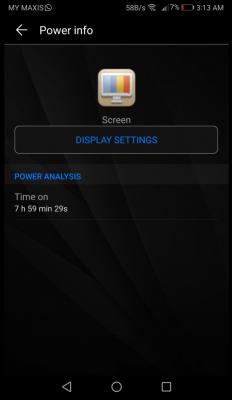
|
| Change to: |  0.0571sec 0.0571sec
 0.33 0.33
 7 queries 7 queries
 GZIP Disabled GZIP Disabled
Time is now: 8th December 2025 - 11:24 PM |
 Quote
Quote