Welcome Guest ( Log In | Register )

Outline · [ Standard ] · Linear+

 Tutorial on Ubiquiti Edgerouter for unifi/maxis, Edgerouter settings ftw

views
     
teohes
post Jan 29 2019, 03:49 PM

New Member
*
Junior Member
17 posts

Joined: Jan 2010


Reviving this note ... I hope its the right place to do it. If not, Please point me in the right direction...

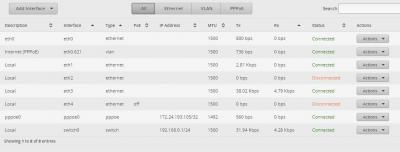
I just got Maxis Fibre and am setting up an Edgerouter-X following the excellant original instructions of this post. I have upgraded the ER-X to 1.10.8. Using Basic Setup, I have setup the PPPOE and VLAN (621) and appears to be connecting to MAXIS OK. (see the attached screen shots below)

I am able to ping both the pppoe addresses but I don't seem to be able to access the internet (feels like there's no route out). I have attached the ip route and ping outputs below.

The tutorial is clear and simple enough to follow and I am at a loss of what else to try. Anyone can help ? Thanks

---------------------outAttached Image Attached Image put from CLI ----------

ttt@ubnt:~$ ip route
default dev pppoe0 scope link
172.24.193.105 dev pppoe0 proto kernel scope link
172.24.193.254 dev pppoe0 proto kernel scope link src 172.24.193.105
192.168.0.0/24 dev switch0 proto kernel scope link src 192.168.0.1

ttt@ubnt:~$ ping 192.168.0.1
PING 192.168.0.1 (192.168.0.1) 56(84) bytes of data.
64 bytes from 192.168.0.1: icmp_req=1 ttl=64 time=0.297 ms
64 bytes from 192.168.0.1: icmp_req=2 ttl=64 time=0.228 ms
^C
--- 192.168.0.1 ping statistics ---
2 packets transmitted, 2 received, 0% packet loss, time 999ms
rtt min/avg/max/mdev = 0.228/0.262/0.297/0.038 ms

ttt@ubnt:~$ ping 172.24.193.105
PING 172.24.193.105 (172.24.193.105) 56(84) bytes of data.
64 bytes from 172.24.193.105: icmp_req=1 ttl=64 time=0.272 ms
64 bytes from 172.24.193.105: icmp_req=2 ttl=64 time=0.260 ms
^C
--- 172.24.193.105 ping statistics ---
2 packets transmitted, 2 received, 0% packet loss, time 999ms
rtt min/avg/max/mdev = 0.260/0.266/0.272/0.006 ms

ttt@ubnt:~$ ping 172.24.193.254
PING 172.24.193.254 (172.24.193.254) 56(84) bytes of data.
64 bytes from 172.24.193.254: icmp_req=1 ttl=255 time=1.49 ms
64 bytes from 172.24.193.254: icmp_req=2 ttl=255 time=0.597 ms
^C
--- 172.24.193.254 ping statistics ---
2 packets transmitted, 2 received, 0% packet loss, time 1001ms
rtt min/avg/max/mdev = 0.597/1.048/1.499/0.451 ms
teohes
post Jan 29 2019, 05:19 PM

New Member
*
Junior Member
17 posts

Joined: Jan 2010


Thanks for quick suggestion ....

Yes, mss-clamp set at 1452 and "All" selected.

Edit: I forgot to mention ... it didn't work. Do I need to set the MTU manually to 1492?
Edit2: Changed MTU on pppoe to 1492 , still no joy !

This post has been edited by teohes: Jan 29 2019, 06:47 PM


Attached thumbnail(s)
Attached Image
teohes
post Jan 31 2019, 12:34 PM

New Member
*
Junior Member
17 posts

Joined: Jan 2010


Ok....I have tried all the above suggestions (numerous times) with no success. I have even tried V1.9.1 (that was the version in the tutorial above.)

This is where I am at with the following settings:

Tried ER-X version 1.10.8, 1.9.7 hotfix 3, 1.9.1
Tried MSS 1452, 1412
NS =1.1.1.1


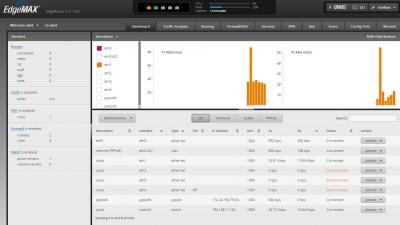
I am seriously out of idea. I am attaching the latest ER-X Dashboard and Routing screenshot and also a txt file from "show configuration" in the hope that someone can shed so light on this.

One thing I noticed is there don't seem to be a gateway configuration in the show configuration.


Attached thumbnail(s)
Attached Image Attached Image

Attached File(s)
Attached File  ERX_v1.10.8_ShowConfig.txt ( 4.13k ) Number of downloads: 25
teohes
post Jan 31 2019, 12:57 PM

New Member
*
Junior Member
17 posts

Joined: Jan 2010


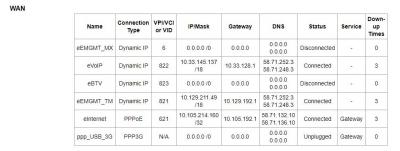
Looking at my MAXIS TP-LINK ArcherC5v modem settings, I noticed the following in the WAN setting that is not in the ERX "show configuration" txt file.

The MAXIS modem setting has the PPPoE/621 with GW 10.105.192.1 See attached screenshot of the WAN Status on the ArcherCv5

BTW: Would really be useful if someone with Edgerouter on Maxis Fibre can kindly post their "show configuration" output (or Please PM me with the file if you do not wish to share the file publicly ?)


Attached thumbnail(s)
Attached Image
teohes
post Jan 31 2019, 03:09 PM

New Member
*
Junior Member
17 posts

Joined: Jan 2010


Good news! @wanttotree

You were spot on ! when you wrote: " From this info, my guess is either your user-id and password might be wrongly typed."

I just called MAXIS to verify my account login details and it appears the technician who installed my MAXIS fibre wrote it down in-correctly !

SO THANK YOU VERY MUCH for your help! I just got it working.

This post has been edited by teohes: Jan 31 2019, 03:26 PM
teohes
post Jan 31 2019, 03:32 PM

New Member
*
Junior Member
17 posts

Joined: Jan 2010


FWIW: I just did a ping checking for MTU now that my MAXIS PPPoE is working.

>ping yahoo.com -f -l 1464

Pinging yahoo.com [72.30.35.9] with 1464 bytes of data:
Reply from 72.30.35.9: bytes=1464 time=264ms TTL=47

Ping statistics for 72.30.35.9:
Packets: Sent = 4, Received = 4, Lost = 0 (0% loss),
Approximate round trip times in milli-seconds:
Minimum = 264ms, Maximum = 264ms, Average = 264ms

>ping yahoo.com -f -l 1465

Pinging yahoo.com [72.30.35.9] with 1465 bytes of data:
Reply from 192.168.1.1: Packet needs to be fragmented but DF set.
Packet needs to be fragmented but DF set.

Ping statistics for 72.30.35.9:
Packets: Sent = 3, Received = 1, Lost = 2 (66% loss),

So I guess MAXIS PPPoE MTU is 1464 and MSS-Clamp should be 1424 ?
teohes
post Jan 31 2019, 04:53 PM

New Member
*
Junior Member
17 posts

Joined: Jan 2010


Will look into pppoe, vlan and ipv6 offload (have not looked at this yet)

Busy configuring my raspi-hole ( https://pi-hole.net/ ....an opensource ad blocker running on the raspberry pi). Done !!

Also just setup ubiquiti controller on raspi and configuring my UAP-AC-PRO now.

Need to figure out all the vlan stuff next as I have over 30 IOT devices, kids streaming, NAS etc....

BTW: I missed your ipv6 tutorial so that is a must read. Ha..... I just found it !

This post has been edited by teohes: Jan 31 2019, 04:56 PM


Change to:
| Lo-Fi Version
0.0240sec    0.47    7 queries    GZIP Disabled
Time is now: 4th December 2025 - 03:23 PM