Welcome Guest ( Log In | Register )

Outline · [ Standard ] · Linear+

 Tutorial on Ubiquiti Edgerouter for unifi/maxis, Edgerouter settings ftw

views
     
jongoz
post Jun 28 2020, 11:10 AM

New Member
*
Junior Member
33 posts

Joined: Jan 2003


Hi all,
I am trying to get ER-X to work nicely with VOIP setup on the old Archer c5v (i've given up the BTU HG8240H route)

Previously I'm on Openwrt setup and it was working nicely. Plug Archer c5v to Wan port and the er-x port (eth1) that has untag vlan 821/822.

I've followed the tutorial here but somehow the archer c5v is not communicating. here's the step i have done:


Followed the previous setup to create 'local 2' and disabled secondary IP - in the ER-X its now eth1 (not eth2).

Setup Vlan 821 and 822. tag to eth0 (CPU)

user posted image

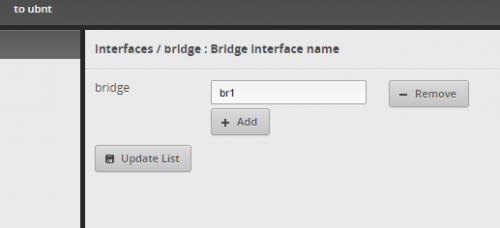
Setup Bridge - br1

user posted image

Then i link the vlan 821 and 822 into vif br1
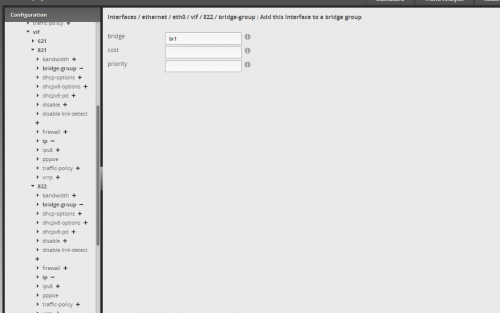
user posted image

After that i link br1 into the eth1 port
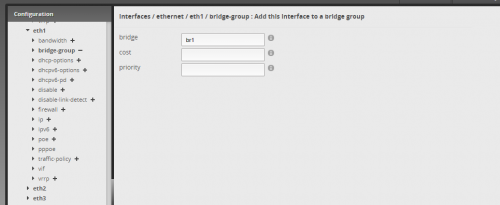
user posted image

reboot both er-x and archer. still not connected.

anybody can help? what am i doing wrong?
jongoz
post Jun 28 2020, 12:13 PM

New Member
*
Junior Member
33 posts

Joined: Jan 2003


whoa thanks for the quick reply

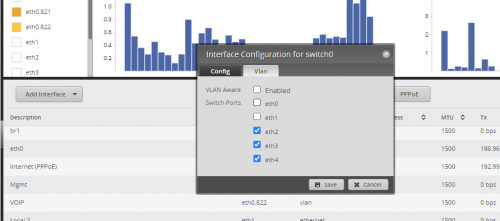
this is my current setup.
switc0 is only for eth2,eth3,eth4.
eth1 is currently not setup

what should i do?

user posted image


QUOTE(wanttotree @ Jun 28 2020, 11:55 AM)
Have you made sure that your eth1 is at pvid(untag) instead of vid(tag)?
That setting is at = Dashboard > switch0 > Actions > Config > VLAN
I figure you might not have checked that cz i didnt see any of it mentioned in your post.
*
jongoz
post Jun 28 2020, 12:25 PM

New Member
*
Junior Member
33 posts

Joined: Jan 2003


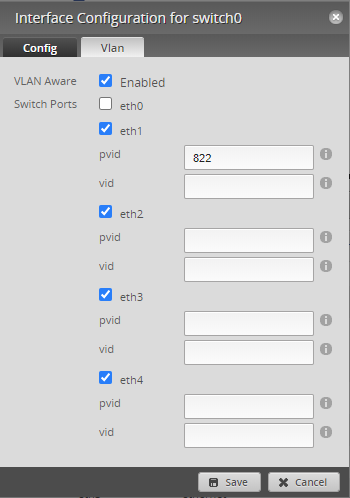
i made changes like this, rebooted archer but also not connecting.

user posted image

QUOTE(jongoz @ Jun 28 2020, 12:13 PM)
whoa thanks for the quick reply

this is my current setup.
switc0 is only for eth2,eth3,eth4.
eth1 is currently not setup

what should i do?

user posted image
*
jongoz
post Jun 28 2020, 12:50 PM

New Member
*
Junior Member
33 posts

Joined: Jan 2003


it doesn't allow me to tick eth0 for switch.

i think the only way to do it is a proper vlan setup for all switch ports. maybe i need to setup local vlan = 1, bridge it so that it does the routing properly.

hope to get some light at the end of the tunnel... right now have to live without VOIP for a while

QUOTE(wanttotree @ Jun 28 2020, 12:30 PM)
Make sure eth0 is on vid. Uncheck other port not used for vlan. Im no longer using maxis, so maybe voip is on 821. Try that. I also saw your eth0 is not enabled for vlan aware.
*
jongoz
post Jun 28 2020, 09:36 PM

New Member
*
Junior Member
33 posts

Joined: Jan 2003


OMG!! it works! thank you bro. now can move on to other mini project

QUOTE(Anime4000 @ Jun 28 2020, 09:08 PM)
This is what I did with ER-X:
[attachmentid=10525031]
[attachmentid=10525030]

eth0.821--br0--eth4.821
eth0.822--br1--eth4.822

It works just fine biggrin.gif
*


Change to:
| Lo-Fi Version
0.0237sec    0.35    7 queries    GZIP Disabled
Time is now: 3rd December 2025 - 01:32 PM