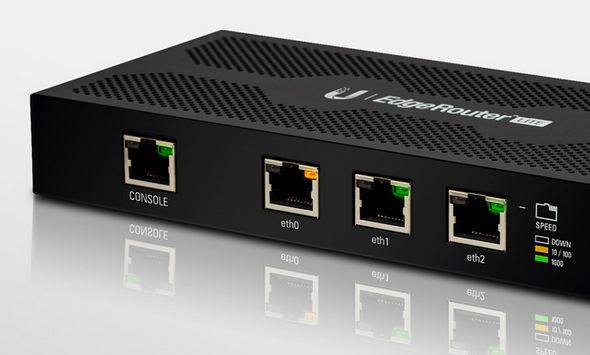
Hey guys! A few months ago i posted a topic regarding edgerouter lite and how i finally set it up to use with my tm unifi with hypptv. I got involved with ubiquiti forum(amazing forum btw), asked around and had many experiments with the settings including cli based settings. Dont be afraid though. I had a discussion a few months ago with ubiquiti engineer and they agree that they should implement vlan based connection. Lo and behold, firmware 1.9 came out with a wizard that set up PPPoE connection with vlan tag! Pretty awesome of them to hear an opinion from a couple of forumer in Malaysia. I say kudos to Ubiquiti. This is important to all users in Malaysia that mainly connect to the internet the 'vlan' way.LOL.
Enough background check, lets get to it. In this tutorial, i will be using edgerouter-lite as reference. Lets hit it!
1) Download the latest firmware from (
https://www.ubnt.com/download/edgemax ). As of the day im writing this, the latest firmware is at 1.9.1
2) Log into your router page at 192.168.1.1, click system, click 'upload a file' on upload system image, wait a few seconds and the router will ask to reboot, then reboot. =)
3) After aprox 3 minutes the router will finish booting, login into the router again then click wizards, then click;
a) basic setup
b) PPPoE
c) fill in your unifi/maxis/time account name and password
d) click to check vlan, fill in vlan according to your isp (eg: unifi= 500 / maxis fiber= 621)
e) click 'configure this section' on (Optional) Secondary LAN port (eth2)
f) uncheck 'Enable the DHCP server'
g) under 'user setup' choose 'create new admin user', fill in your new user and password(dont use default ubnt, change your password! very important)
h) click apply and reboot.
Viola! your router is set up for internet use! enjoy!!!
Part one of the setup is done, this is mainly for people who doesnt care about iptv like hypptv or astro via maxis fiber. U can hop away and start your beautiful day with the edgerouter! Now moving on to part two where we will set up iptv, hypptv and astro via maxis fiber. lets go!
1) On the router dashboard page click on
a) Add interface
b) Add Vlan
c) Fill in Vlan id (eg: unifi= 600 / maxis fiber= 823)
d) Select eth0 on 'interface'
e) Fill in 'Hyyptv' or 'astro' according to your iptv
f) Click save
2) At 'Local 2', click on 'actions', 'config', change 'manually define ip address' to 'no address', click save.
3) Click on 'Config tree',
a) click interfaces, bridge, click add, fill in 'br0'
b) click ethernet, eth0, vif, 600, bridge-group, fill in 'br0' in 'bridge'
c) click eth2, bridge-group, fill in 'br0' in 'bridge'
d) click 'preview' and 'apply'
4) At this point you can plug your iptv cable to eth2 of your router, make sure restart the iptv box after plugging it in.
Thats it guys! its not as complicated as u think. sure if i were to make a tutorial using cli then that would be a slightly different story. LOL.
I hope u guys enjoy the tutorial! Please point out something that i missed or mistakes.
This wraps up this tutorial, please tell me if any of u guys need to set up ipv6 and set up dns forwarding, ipv6 forwarding, upnp or upnp2 with nat-pmp. These can be done on the next one. Cheers!
Hi, I need help. I'm currently using edgerouter X. I cannot get tm hypptv to work. I've tried following your guide. Internet works now.
hypptv still wont work. am i doing anything wrong?
appreciate your advice. thanks.


 Sep 26 2017, 11:53 PM


 I'm still pretty new to this. Trying to move out from using the off the shelf consumer routers.
 Quote
Quote

 0.0238sec
 1.21
1.21
 7 queries
 GZIP Disabled