Outline ·
[ Standard ] ·
Linear+
Samsung Samsung pay beta launched!
|
NightFelix
|
 Dec 3 2017, 03:44 PM Dec 3 2017, 03:44 PM
|

|
QUOTE(dr2k3 @ Dec 2 2017, 11:28 PM) most of the time is cashier blocked, not really not support. Even cashier themselves not sure. i forced alot transaction even when the cashier say not support, most of it passed through. I ask those cashier can't you just key in the amount before I put my card since he insists physical card and no wave. So I can slap the fact on that face. Because I saw the side got magnetic slider. Damn those ignorant cashier |
|
|
|
|
|
NightFelix
|
Dec 7 2017, 07:10 PM
|
|
|
QUOTE(AIZZAMIL @ Dec 7 2017, 03:55 PM) Have you turn on the NFC? NFC will auto turn on even u turn off. |
|
|
|
|
|
NightFelix
|
Dec 9 2017, 04:14 PM
|
|
|
QUOTE(boonhan @ Dec 9 2017, 11:54 AM) I used mst. On receipt written swipe entry, with signature required. Paywave will show contactless entry. So eventually end up physical signature or? |
|
|
|
|
|
NightFelix
|
Dec 11 2017, 10:05 AM
|
|
|
QUOTE(wingchiew @ Dec 11 2017, 12:11 AM) If not mistaken, the light on the terminal indicates that NFC is ready (See "LEDs for Contactless cards"). If there's light blinking after cashier keys in the amount, means you can use NFC (aka "paywave") and tap your phone at the "contactless card area". 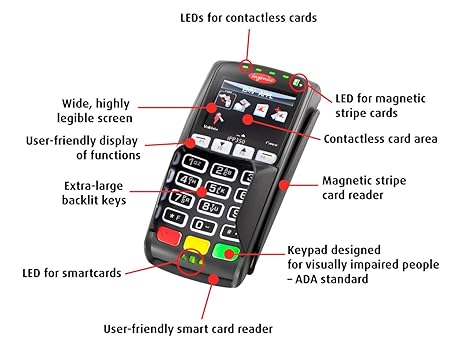 If no light, then you can tap your phone at the "Magnetic stripe card reader" to use MST. At least that's how I differentiate which to use.. With the photo you shared above. I wonder why some machine (same design) doesn't come with you pay wave and the fella cashier insist to use bottom smart card area to plug in our card. Can't just he/she swipe the MST? I never been cashier before so I have no idea how does the machine work. Lol. |
|
|
|
|
|
NightFelix
|
Dec 11 2017, 10:52 AM
|
|
|
QUOTE(ben3003 @ Dec 11 2017, 10:37 AM) If u dont know,malaysia has banned swiping card and movin on to pin type because too many fraud case using swipe type. So most of the terminal mst side is disabled. no wonder the swipe have been disabled. thanks for the info. |
|
|
|
|
|
NightFelix
|
Dec 11 2017, 12:26 PM
|
|
|
QUOTE(ben3003 @ Dec 11 2017, 11:44 AM) Yes, that's why country like US they just moved into using smart card type, previously they using swipe only. For them, MST is soooo convenient because not all card machine accept Paywave, i blame the bank and bank negara never push hard enough to make this happen. Even country like Brunei also they use swipe only. Got this knowledge 8-9 years ago while working as a storekeeper. My boss tell me if bruneian use their card, normally is swipe, they have to leave their passport number and name must same as the card. Swiping easy can fraud because the magnetic stripe can tamper, but smart card type very hard. As for smartcard type. I wonder why they have to plug in the smartcard, then key in the amount, then only we key in pin and pay to proceed. Cant just we ask them to key in the amount, then we only hand over the smartcard plug in? |
|
|
|
|
|
NightFelix
|
Dec 11 2017, 04:22 PM
|
|
|
QUOTE(moonsatelite @ Dec 11 2017, 12:33 PM) Because the cashiers aren't trained to do their job well, and it's easier to insert the card to trigger the amount selection rather that pressing F2 on the card machine. You want you can blame it on the higher management team, this is why Samsung Pay is so hard to use with idiots running the companies that don't train or the higher management themselves are stupid and ignorant of how to use a card machine. Even if there is no connection like "No Signal", "Timed-out" or landline is unusable, card transactions can still be processed offline. So many instructions on how to process a card transaction offline on YouTube. QUOTE(Theoutspokenguy @ Dec 11 2017, 02:09 PM) this is totally incorrect. Swipe have not been disabled. If MST works its consider as swipe. Lemme today try to disable/turn off the NFC and use MST method on Watson. Watson staff are much more friendly when I tell them I'm using SamsungPay. |
|
|
|
|
|
NightFelix
|
Dec 16 2017, 02:22 PM
|
|
|
QUOTE(iamshf @ Dec 16 2017, 11:50 AM) Not enough points .. Next round ba This. Ayam wait for February CNY |
|
|
|
|
|
NightFelix
|
Dec 19 2017, 12:27 AM
|
|
|
QUOTE(Alexdino @ Dec 18 2017, 10:55 PM) wtf.. cashier said paywave no problem, samsung pay cannot  please slap the fact on his face by using it SamsungPay |
|
|
|
|
|
NightFelix
|
Dec 20 2017, 12:14 AM
|
|
|
Wrong quote person.
This post has been edited by NightFelix: Dec 20 2017, 12:15 AM
|
|
|
|
|
|
NightFelix
|
Dec 20 2017, 12:14 AM
|
|
|
QUOTE(kungpow @ Dec 19 2017, 11:33 AM) anyone tried redeem baskin robbin? i already add card, then i use spay for 1 transaction, then how? Scroll down to the promotion page, select participate in this program. Then redo what you just did earlier. This post has been edited by NightFelix: Dec 20 2017, 12:15 AM |
|
|
|
|
|
NightFelix
|
Dec 21 2017, 10:16 AM
|
|
|
QUOTE(lawrencek @ Dec 21 2017, 10:08 AM) Hooray!!! Managed to redeem the Gear S3 secure it at what time? |
|
|
|
|
|
NightFelix
|
Jan 2 2018, 01:23 PM
|
|
|
QUOTE(fouzhi @ Jan 1 2018, 05:02 PM) That is why Samsung giving out prizes to the Spay user to educate those merchant's cashier that all the wave enabled and supported credit card machine should support Spay seamlessly because it use MST instead of NFC (Android/Apple pay). Just imagine if Samsung launch their pay system without any marketing strategy like prizes and etc. then who is going to kick started since like you said quite troublesome when those cashier still had old mindset. Myself did educate few aunties cashier on this, at first they see me like one kind but after I proof it to her she show respect. I would say if we want our life getting easier in future we might consider to be part of the contribution however if you think this is not your job then you may only consider to use it until the system widely deployed and all the merchants are ready but it would take some time though. Still couldn't able to figure out how to educate those stuborn cashier that ask me to put my card in PIN&PAY(because the machine doesn't support NFC/PayWave). duh... |
|
|
|
|
|
NightFelix
|
Jan 2 2018, 05:15 PM
|
|
|
QUOTE(fouzhi @ Jan 2 2018, 03:42 PM) I did complaint once to Petronas by calling their hotline, problem settle they promised that particular cashier will master it within 3 days very effective. The auntie later told me.....I've been work here for 8 years....never receive any complaint one but you are the first one......lol If you want to work here....have to keep on learning, right! Another case....cashier insist at least spend RM30 and above in order to pay by Samsung Pay. Same approach, call their hotline again ask about minimum spending guideline and the guy said they can't impose minimum spending in order to use Samsung Pay one. Again, the headquarter of Petronas call that branch and hantam them. Problem solved on my next visit. Escalate = Educate (as you said some people really stubborn one, let their boss educate them...lol) Talking about minimum spending guideline, is the BNM stated that merchant are not allow to imposed their own decision that minimum spending of RM10/20/30/50 before we can swipe are still valid today in 2018? I go through few restaurant, some of them told me only can use my card when above RM30~50. |
|
|
|
|
|
NightFelix
|
Jan 5 2018, 10:22 AM
|
|
|
QUOTE(fouzhi @ Jan 5 2018, 08:35 AM) Maybe try not to tell them you want to pay by "Samsung Pay" just tell them I want to pay by "Pay Wave" when they set everything ready then only flag out the phone and tap on it, they got nothing to say by then They would reply you the following: 1. Sorry, our machine doesn't support Pay Wave. 2. Can I have your card please? 3. If you have less than amount they require, Sorry Sir, minimum spending is RM30. etc... (repeat above 1 or 2) |
|
|
|
|
|
NightFelix
|
Jan 6 2018, 04:33 PM
|
|
|
QUOTE(netnetpop @ Jan 5 2018, 07:23 PM) giant before make payment i ask cashier accept paywave??? cashier answer yes after i show my samsung pay...she say need insert CC then she ask supervisor come, ok supervisor want to try but after that supervisor also say want insert CC hahahahaha i tell them i dont have cash lol. paywave still need card? wave saje right? |
|
|
|
|
|
NightFelix
|
Jan 9 2018, 12:28 PM
|
|
|
QUOTE(tky1993 @ Jan 8 2018, 07:07 PM) What if next round ask for 10k pts to redeem lol. keep increasing the pts. die la. |
|
|
|
|
|
NightFelix
|
Jan 9 2018, 04:41 PM
|
|
|
QUOTE(donhue @ Jan 9 2018, 01:33 PM) Well, I'm quite sure that the cashier at the Padini outlet knows what he's talking about.. After he told me that they accepted wave, I was reaching for my phone.. Cashier saw me doing that and told me, "but we need the physical card to wave, cannot use samsung pay".. laugh die me. Why can't use? janji the receipt can come out what |
|
|
|
|
|
NightFelix
|
Jan 17 2018, 11:18 PM
|
|
|
QUOTE(David83 @ Jan 17 2018, 10:26 PM) I'm not referring to my phone. I already added. I'm referring to cashier side. I face this same issues regarding the Watson Membercard on certain branch as well. Some can just scan my barcode, but some they told me system dont support, she keep scan and nothing come out. key in also can't. |
|
|
|
|
|
NightFelix
|
Jan 20 2018, 11:44 AM
|
|
|
QUOTE(CyberKewl @ Jan 20 2018, 11:11 AM) for those that do lots of transaction in same shop, did samsung ever kacau you or terminate your account? for sure no. |
|
|
|
|



 Quote
Quote
 0.1610sec
 0.53
0.53
 7 queries
 GZIP Disabled