Welcome Guest ( Log In | Register )

Bump Topic Topic Closed RSS Feed

Outline · [ Standard ] · Linear+

 Club VAIO

views
     
silverwave
post Dec 14 2008, 02:06 AM

Look at all my stars!!
*******
Senior Member
4,082 posts

Joined: Apr 2006


QUOTE(Cheapodude @ Dec 14 2008, 01:52 AM)
Doing the recovery is best using DVDR... need 3 disk... as for the partition.. just search in Google "partition using vista".

Didn't get the Office pack though.. though I could easily get the 'ahem' version smile.gif
*
Yea, i have the ahem version too, wondering what to do with this.

I don't have DVDR at the moment, so i was wondering whether can use external hdd.
silverwave
post Dec 14 2008, 01:42 PM

Look at all my stars!!
*******
Senior Member
4,082 posts

Joined: Apr 2006


QUOTE(Cheapodude @ Dec 14 2008, 12:52 PM)
Not sure.... I guess it could. Just go to the VAIO Recovery Center install inside your laptop before doing major changes like installing & partitioning smile.gif
*
Alright, doing that now but i bought some DVD-R's. Any way to transfer data from one laptop to another by firewire? I'm lazy to copy in the external hdd. tongue.gif
silverwave
post Dec 15 2008, 10:49 PM

Look at all my stars!!
*******
Senior Member
4,082 posts

Joined: Apr 2006


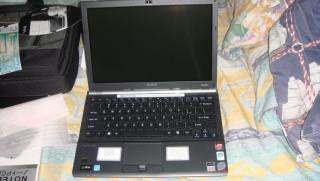
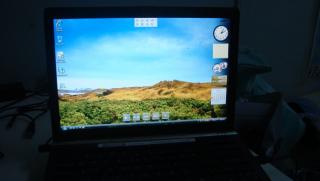
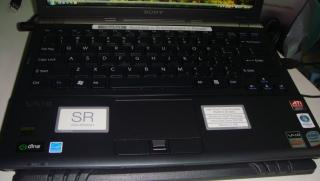
Cheapodude, the photos as u requested.

Pardon me for my noob photography skills. biggrin.gif


Attached thumbnail(s)
Attached Image Attached Image Attached Image Attached Image
silverwave
post Dec 16 2008, 12:25 PM

Look at all my stars!!
*******
Senior Member
4,082 posts

Joined: Apr 2006


QUOTE(aaroneo @ Dec 16 2008, 12:16 PM)
wah the SR photo above got so many stickers, ewww >__<
@willyg88  did you check your wireless function and on your WLAN?
at the bottom right  of the screen
*
The sticker comes with it, i can't do anything about it. sweat.gif
silverwave
post Dec 16 2008, 09:05 PM

Look at all my stars!!
*******
Senior Member
4,082 posts

Joined: Apr 2006


QUOTE(booby @ Dec 16 2008, 06:53 PM)
omg omg just got my SR26 today.

But too bright, i try setting the brightness lower using the fn+F5 button, but the changes WON'T last after i restart. How ar?
*
Ya, i felt the same too. I have to reduce it by two bars. If not my eyes will be pain when i look at another com.
silverwave
post Jan 7 2009, 08:12 PM

Look at all my stars!!
*******
Senior Member
4,082 posts

Joined: Apr 2006


QUOTE(davidmak @ Jan 6 2009, 09:46 PM)
The screen flickering during startup and shutdown especially entering/exiting the welcome and shut down screen could be due to graphics driver problem. I have this problem on my Vaio SR. My desktop PC using ATI 4850 however did not have this problem after I updated the driver. So I think this could be the issue. I've seen pretty a lot of laptops with this flickering issue but this is nothing serious to be honest.
*
Same problem on my SR26.

Btw, anyone registered their Vaio with Sony Style? After filling up the details, it shows server error. I tried this many times over the last one week but there has not been any difference.
silverwave
post Jan 7 2009, 09:43 PM

Look at all my stars!!
*******
Senior Member
4,082 posts

Joined: Apr 2006


QUOTE(Perfect-Stranger @ Jan 7 2009, 09:28 PM)
Sometimes it's all because of their website down, well, i would recommend you to call Sony Style about it.
Meaning because you might lose the 3 months extended warranty simply because you can't register your product through online.
*
Actually i took 2 years extended warranty too, so i have no idea where they are going to slot in the extra 3 months. Yup, i think i will call them since i need to collect my extended warranty form too.
silverwave
post Jan 7 2009, 11:07 PM

Look at all my stars!!
*******
Senior Member
4,082 posts

Joined: Apr 2006


QUOTE(Perfect-Stranger @ Jan 7 2009, 09:48 PM)
You pay RM360 extra for the 2 years extended warranty ?  smile.gif  Rich fellow detected.  tongue.gif
Well, according to my previous working experiences in Sony Style,
3 months warranty will still be added together with the 2 years extended warranty that you paid for it which means

1 year official warranty + 2 years extended warranty + 3 months extra warranty (reward for register through online)

Total up together would be 3 years and 3 months.
Weirdo.  sweat.gif
*
haha, the reason i took extended warranty is because of my past experience with Toshiba. When it was 2 years +, the hdd gave problem and i got it changed for free. There were some minor problems too a couple of times but i got it repaired for free and it was serviced and cleaned each time biggrin.gif . All thanks to the extended 2 yrs warranty but i paid RM700 in 2005. I was a noob that time and the salesperson advised me to take it.

For Sony, Rm360 is for 1yr i think, Rm430 is for 2 years. Not weirdo, precaution tongue.gif
silverwave
post Jan 7 2009, 11:28 PM

Look at all my stars!!
*******
Senior Member
4,082 posts

Joined: Apr 2006


QUOTE(Perfect-Stranger @ Jan 7 2009, 11:10 PM)
Lol, credit goes to Toshiba.  brows.gif
Ops, my wrong, greater amount, RM430  sweat.gif
Are you sure you gonna use it and love it for the next 3 years ?  laugh.gif
*
Well, i have to love it for the price i paid. tongue.gif Anyway, my mum is using the Vaio so it should be fine.

I'm still using the Toshiba. Super solid biggrin.gif

Btw, i just noticed that the extra 3 months warranty need to register within 7 days of purchase. I bought it during the pc fair and the best part is the dealers are suppose to fill the extended warranty and stamp it. They have not filled a thing. Need to call them and clarify this matter plus collect the extended warranty and one of my pending free gift. biggrin.gif
silverwave
post Jan 7 2009, 11:42 PM

Look at all my stars!!
*******
Senior Member
4,082 posts

Joined: Apr 2006


QUOTE(Perfect-Stranger @ Jan 7 2009, 11:37 PM)
Yea, nice one, love it for the price you paid.
Wondering what can i do with RM430  laugh.gif

Yeap, you need to register that product within 7 days after your purchased.
Well, it happens all the time that dealer's negligence for not doing their part to guide customer the right path to register for the extended warranty.
Freebies ? SonyBravia LCD Tv ?  brows.gif
*
If bravia LCD Tv as the free gift, i will be the happiest person biggrin.gif

No, just some Sony headset coz no stock during PC fair. sweat.gif Need to go to Sony Center lowyat since i bought from them in the Pc Fair.
silverwave
post Jan 7 2009, 11:50 PM

Look at all my stars!!
*******
Senior Member
4,082 posts

Joined: Apr 2006


QUOTE(Perfect-Stranger @ Jan 7 2009, 11:45 PM)
Lol, yo, Sony headset is good enough  nod.gif Luckily not mouse pad satu laugh.gif
Well, sweet dream, going to bed  icon_rolleyes.gif
Nitez everyone.. ( Just you and me )  sweat.gif
*
If mousepad, i'll tell them to keep. laugh.gif

Goodnight and thanks for all the info. smile.gif
silverwave
post Jan 8 2009, 10:34 AM

Look at all my stars!!
*******
Senior Member
4,082 posts

Joined: Apr 2006


QUOTE(blackmarket @ Jan 8 2009, 12:48 AM)
eh, i tot perfect stranger only appear in asus thread lol biggrin.gif bout the sonystyle registration, last week when i tried to register it says my product code invalid, i called the number shown in the card, and sony ask me to scan the card and receipt to them and they will register for me ,job done!
*
I'm not sure whether i can scan and send them my card because the dealer has not stamped or filled any details there. sad.gif
silverwave
post Jan 8 2009, 11:04 AM

Look at all my stars!!
*******
Senior Member
4,082 posts

Joined: Apr 2006


I just called Sony Center lowyat. They asked me to bring over the receipt for the extended warranty. About the 3 months warranty, he says that must register within a week of purchase. If not, can't sad.gif

Should i just give sony customer service a call and say that i was not informed of it plus say i've been trying for sometime but always server error?


Added on January 8, 2009, 11:41 amGuys, i called the customer service and said i've been trying for 3 weeks but i could not register. I still got the 3 months warranty. biggrin.gif

This post has been edited by silverwave: Jan 8 2009, 11:41 AM
silverwave
post Jan 11 2009, 10:23 PM

Look at all my stars!!
*******
Senior Member
4,082 posts

Joined: Apr 2006


QUOTE(Perfect-Stranger @ Jan 8 2009, 08:22 PM)
Wow, Nice one  laugh.gif
There you go, another 3 months warranty.  icon_rolleyes.gif
I'm kinda confused now. I got the extended warranty today. It seems they put two years extra from the date of purchase. When i called Sony that day to register, they put 1 year + 3 months warranty in my sony style account but i did not mention anything about the extended warranty because i haven't filled the form. Now i'm a little confused whether the 3 months is together with the extended warranty period. unsure.gif

Anyone have any idea on this?

This post has been edited by silverwave: Jan 11 2009, 10:24 PM
silverwave
post Mar 7 2009, 08:54 PM

Look at all my stars!!
*******
Senior Member
4,082 posts

Joined: Apr 2006


Hi, i have a Sony Vaio SR26. I seem to hear a very very faint buzzing sound on the adapter. Is it normal?
silverwave
post Mar 8 2009, 12:14 PM

Look at all my stars!!
*******
Senior Member
4,082 posts

Joined: Apr 2006


QUOTE(cherryfrut @ Mar 8 2009, 10:46 AM)
hihi.. im not sure this is the right place to enquire bout this.. cant think of anywhere else for now.

i posted here b4 regarding experiencing some "lagness" with my msn or internet explorer b4 while using my vaio (not more than 2 months old).. (ok not sure izzit the msn or ie or the vaio itself)
didn't do much about it after coz that didn't seem to happen anymore...

however.. for this month.. whenever i was halfway using IE or MSN plus (not sure what causes this problem)... the laptop just HANG.. ya as in not responding totally.. which means that i have to restart the whole com again.. this happens for more than 10 times already and am sure is still going to happen... not sure izzit the laptop or the programs themselves...

did any of u experience this? any good advices?

i would really like to go back to the seller.. but currently overseas already >_<..

mine is a SR26GN silver...
*
I'm using a 3 months old SR26 too. No problem so far. You might have installed something that is conflicting with the IE and MSN plus. Try to uninstall some things and test. Hope it helps. smile.gif
silverwave
post Mar 13 2009, 05:19 PM

Look at all my stars!!
*******
Senior Member
4,082 posts

Joined: Apr 2006


Hi guys, i recently update the bluetooth software of my SR26. EVery time i on the com, it says a file called unist.exe is missing. When i click browse and put it somewhere it says unable to start bluetooth stack service. What should i do? It could be something to do with the bluetooth mouse too.

This post has been edited by silverwave: Mar 13 2009, 05:22 PM
silverwave
post Mar 13 2009, 11:37 PM

Look at all my stars!!
*******
Senior Member
4,082 posts

Joined: Apr 2006


QUOTE(tpl @ Mar 13 2009, 11:17 PM)
u try dc or uninstall ur bt mouse n see
*
I remove the mouse and pair it back but still same sad.gif
silverwave
post Mar 14 2009, 03:24 PM

Look at all my stars!!
*******
Senior Member
4,082 posts

Joined: Apr 2006


QUOTE(tpl @ Mar 14 2009, 01:35 AM)
roll back your driver then..
*
Under bluetooth devices, i right click at the mouse icon and only general and services tab are there. The rollback driver is not there.

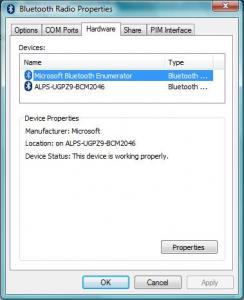
One more way under bluetooth devices, i click on the bluetooth setting and it opens a tab called bluetooth radio properties. Under the hardware there are 2 things, as the picture below. If i click properties, i only can view the driver details. Cannot rollback driver.


Added on March 14, 2009, 3:25 pm
QUOTE(Miyabi @ Mar 14 2009, 09:02 AM)
is the update related to bluetooth driver or the bluetooth peripherals?
as far as i know vaio using toshiba bluetooth stack driver, and until now from my first day using the notebook, theres no update on bluetooth. like tpl said, try rollback driver or system restore to early day before you update.
*
These are the items i updated. Btw, system restore shows only for 5 days. I updated this 1 week ago.

This post has been edited by silverwave: Mar 14 2009, 03:28 PM


Attached thumbnail(s)
Attached Image Attached Image
silverwave
post Mar 15 2009, 02:11 AM

Look at all my stars!!
*******
Senior Member
4,082 posts

Joined: Apr 2006


QUOTE(tpl @ Mar 14 2009, 10:30 PM)
err..... go device manager, right click  bluetooth device and check your driver version n remove it. then refresh windows automatically install back your driver n check again your driver version. If still the updated version use your sony cd n install back the first driver. should be ok kua..
*
Under device manager i managed to rollback driver and the missing shortcut did not appear. Hopefully it's ok. Thank you for your assistance. smile.gif

3 Pages < 1 2 3 >Top
Topic ClosedOptions
 

Change to:
| Lo-Fi Version
0.0391sec    0.28    7 queries    GZIP Disabled
Time is now: 9th December 2025 - 05:22 AM