Welcome Guest ( Log In | Register )

Bump Topic Topic Closed RSS Feed
5 Pages < 1 2 3 4 > » Bottom

Outline · [ Standard ] · Linear+

Xiaomi Xiaomi Redmi Note 3 Discussion V7, MIUI 8 Android 6 available now!

views
     
jack2
post Nov 10 2016, 05:56 PM

Mr
********
All Stars
15,192 posts

Joined: Oct 2004
QUOTE(abubin @ Nov 10 2016, 03:44 PM)
my phone is bootloader unlocked and rooted running global stable rom 8.0.5.0

i clicked on the OTA update but it failed to update. Now it tell me to update with full rom download of 1.2GB. Should I update using OTA full rom or use other method?

Or do I unroot first then can OTA update?
*
QUOTE(azhar75 @ Nov 10 2016, 04:02 PM)
FULL unroot then OTA the 1.2GB. No data lost.
*
Official unlocked bootloader and rooted can't update OTA ka?

How to unroot if using SUPERSU?
jack2
post Nov 10 2016, 08:45 PM

Mr
********
All Stars
15,192 posts

Joined: Oct 2004
QUOTE(azhar75 @ Nov 10 2016, 08:42 PM)
You have to get the PRO version. Scroll all the way to the bottom, there is "FULL UNROOT" option.

user posted image
*
I see. Where can I buy it? The method taught in net is freeware..
jack2
post Nov 10 2016, 08:48 PM

Mr
********
All Stars
15,192 posts

Joined: Oct 2004
QUOTE(azhar75 @ Nov 10 2016, 08:46 PM)
Free also has that option....? I not sure....

user posted image
*
If free has it, then no need to buy I believe.

So whenever needs to perform OTA, must unroot first. Then perform update and root it again?
jack2
post Nov 11 2016, 11:48 AM

Mr
********
All Stars
15,192 posts

Joined: Oct 2004
OCBC code, 15%, max RM100 discount

so RM499-RM70 = RM430.... worth or not?
jack2
post Nov 11 2016, 01:26 PM

Mr
********
All Stars
15,192 posts

Joined: Oct 2004
QUOTE(azhar75 @ Nov 11 2016, 12:45 PM)
If u don't want, gimme the code...LOL...
*
really?

i want mi5

maybank also got
jack2
post Nov 11 2016, 01:42 PM

Mr
********
All Stars
15,192 posts

Joined: Oct 2004
QUOTE(azhar75 @ Nov 11 2016, 01:34 PM)
Maybank got special code mehhh... how come me don't receive one....
*


Attached thumbnail(s)
Attached Image
jack2
post Nov 11 2016, 01:57 PM

Mr
********
All Stars
15,192 posts

Joined: Oct 2004
QUOTE(MGM @ Nov 11 2016, 01:55 PM)
Max RM30 only. Stupid bank I was delayed by this, but luckily still managed to jump to G5 n use HLBM50.
*
WTF with maximum RM30


Then the OCBC is better.

Any good thing to buy ka?
jack2
post Nov 11 2016, 02:03 PM

Mr
********
All Stars
15,192 posts

Joined: Oct 2004
QUOTE(MGM @ Nov 11 2016, 01:58 PM)

*
Link?

MI MAX is better than RD3?
jack2
post Nov 11 2016, 03:13 PM

Mr
********
All Stars
15,192 posts

Joined: Oct 2004
Hello guys,

I wanna confirm again. If I wanna unlock bootloader, then rooted and future is able to perform OTA update, I follow this thread

http://en.miui.com/thread-235865-1-1.html

So I must use fastboot ROM or stock ROM?

I blur
jack2
post Nov 11 2016, 03:45 PM

Mr
********
All Stars
15,192 posts

Joined: Oct 2004
QUOTE(azhar75 @ Nov 11 2016, 03:35 PM)
Just Unlock Bootloader OFFICIALLY and everything is fine after that... focus on this task first....refer to 1st page of this thread....
*
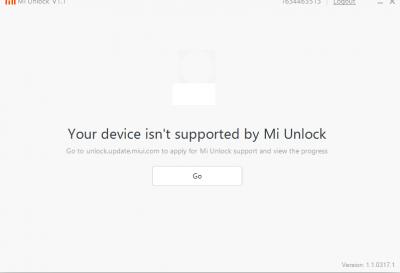
Let me try now to unlock BL which I have applied months ago and received SMS. But stuck at 50%.
jack2
post Nov 11 2016, 03:50 PM

Mr
********
All Stars
15,192 posts

Joined: Oct 2004
QUOTE(azhar75 @ Nov 11 2016, 03:47 PM)
Keyword of the day : "China Dev ROM"
*
If flasing to China Dev ROM, how to go back to Global Stable ROM?

Using this full procedure? > http://en.miui.com/thread-278599-1-1.html ??

I just want to root the phone and future can perform OTA.

This post has been edited by jack2: Nov 11 2016, 03:50 PM
jack2
post Nov 11 2016, 04:00 PM

Mr
********
All Stars
15,192 posts

Joined: Oct 2004
QUOTE(azhar75 @ Nov 11 2016, 03:56 PM)
My summary steps:

1) Flash China Dev ROM via EDL.
2) Unlock bootloader.
3) Flash back to Global Stable ROM via EDL too.
4) Prefer to temporarily sideload TWRP so that maintain stock recovery from Step 3 above. In TWRP, flash SuperSU.
5) Now device is rooted with stock recovery intact.
6) To OTA, FULL UNROOT in SuperSU > Reboot device.
7) Run Xiaomi Updater app to OTA the full image ZIP file (>1.0GB usually). You can't OTA using incremental ZIP file.
8) Once OTA finished, repeat Step 4 to re-root.

Pay attention to image below during EDL Flashing Method:
user posted image

Oh yeah...one more thing... the above is valid for Snapdragon and not for MTK SoC....
*
question 1
step 4, I dont understand. Mind to explain with more details?

question 2
Which version of TWRP and SuperSU I should use?
jack2
post Nov 11 2016, 04:16 PM

Mr
********
All Stars
15,192 posts

Joined: Oct 2004
QUOTE(azhar75 @ Nov 11 2016, 04:04 PM)
Ans. 1:
Step 4 follow Xiaomi EU:
CODE
"fastboot boot recovery.img" and press Enter if you want to use the recovery without flashing it


Ans. 2:
TWRP and SuperSu from Xiaomi EU

You can go for other TWRP and SuperSU.... but I prefer Xiaomi EU for "reliability"...
*
TWRP > https://www.androidfilehost.com/?fid=24421527759888159 > TWRP_hennessy.zip if I am Redmi Note 3 PRO but on Android 5.1?

SuperSU > https://download.chainfire.eu/969/SuperSU/U...60630161323.zip Correct?

This post has been edited by jack2: Nov 11 2016, 04:18 PM
jack2
post Nov 11 2016, 05:28 PM

Mr
********
All Stars
15,192 posts

Joined: Oct 2004
QUOTE(azhar75 @ Nov 11 2016, 04:19 PM)
So long as you don't have the "mystery" KATE variant, you are good to go...

Many IMPORTED RN3Pro nowadays are KATE variant... I dunno why the Importer(s) ditched Kenzo... silly mistake on their end....So, solid choice now is to get the Malaysia Set even though it is "over-priced"...
*
Let me verify this version late.

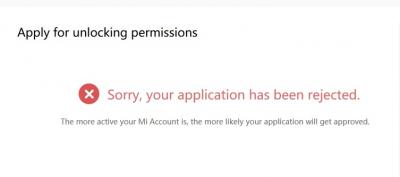
Damn, one month ago I got sms by saying approved. Now I got this.


Can reapply or if there anyway for unofficial BL and can still using OTA like official way without bricking the phone?

This post has been edited by jack2: Nov 11 2016, 05:29 PM


Attached thumbnail(s)
Attached Image
jack2
post Nov 11 2016, 06:00 PM

Mr
********
All Stars
15,192 posts

Joined: Oct 2004
QUOTE(azhar75 @ Nov 11 2016, 05:49 PM)
Try below:
- just flash china dev rom. (not sure if global dev got same settings)
- login same Mi ID
- turn on developer options by tapping multiple times on miui version
- additional settings - developer options - scroll until you see mi unlock status, tap it and add to authorize unlock status (or whatever the button)..then you'll see success or done status.
- Now boot into fastboot, and your phone should be unlocked successfully now.
*
Followed your step. Still same by saying application reject la


Attached thumbnail(s)
Attached Image
jack2
post Nov 11 2016, 06:46 PM

Mr
********
All Stars
15,192 posts

Joined: Oct 2004
anyone got mi account to borrow so i can unlock BL ah?

If i use this reason to apply
My phone is bricked in boot loop mode. Please approve my unlocking request.

can I still online my mi account in my phone?

This post has been edited by jack2: Nov 11 2016, 06:52 PM
jack2
post Nov 11 2016, 07:05 PM

Mr
********
All Stars
15,192 posts

Joined: Oct 2004
Ok I got the SMS granted permission after I created a new account.

Can I unlock now?

----

So good... Unlocked now...

This post has been edited by jack2: Nov 11 2016, 07:12 PM
jack2
post Nov 11 2016, 07:12 PM

Mr
********
All Stars
15,192 posts

Joined: Oct 2004
QUOTE(Velocity @ Nov 11 2016, 07:06 PM)
Seem to be very worth.. I may want to get one too...
jack2
post Nov 11 2016, 07:16 PM

Mr
********
All Stars
15,192 posts

Joined: Oct 2004
QUOTE(azhar75 @ Nov 11 2016, 03:56 PM)
My summary steps:

1) Flash China Dev ROM via EDL.
2) Unlock bootloader.
3) Flash back to Global Stable ROM via EDL too.
4) Prefer to temporarily sideload TWRP so that maintain stock recovery from Step 3 above. In TWRP, flash SuperSU.
5) Now device is rooted with stock recovery intact.
6) To OTA, FULL UNROOT in SuperSU > Reboot device.
7) Run Xiaomi Updater app to OTA the full image ZIP file (>1.0GB usually). You can't OTA using incremental ZIP file.
8) Once OTA finished, repeat Step 4 to re-root.

Pay attention to image below during EDL Flashing Method:
user posted image

Oh yeah...one more thing... the above is valid for Snapdragon (i.e. KENZO and not KATE variant) and not for MTK SoC....
*
Step 1 & 2 were done.

Now going to Step 3.

Oh ya, my version is Snapdragon...
jack2
post Nov 11 2016, 08:09 PM

Mr
********
All Stars
15,192 posts

Joined: Oct 2004
QUOTE(jack2 @ Nov 11 2016, 07:05 PM)
Ok I got the SMS granted permission after I created a new account.

Can I unlock now?

----

So good... Unlocked now...
*
QUOTE(jack2 @ Nov 11 2016, 07:16 PM)
Step 1 & 2 were done.

Now going to Step 3.

Oh ya, my version is Snapdragon...
*
After I flashed to global ROM using edl, my bootloader status is locked... Why?

Or do i need to sign in the mi account first?

5 Pages < 1 2 3 4 > » Top
Topic ClosedOptions
 

Change to:
| Lo-Fi Version
0.0215sec    0.43    7 queries    GZIP Disabled
Time is now: 6th December 2025 - 12:53 AM