

Yes, i know i can just crop out the area. but the quality of the screen capture is too bad if i crop it.
not sure this is caused by the update or not. anybody faced this problem before?
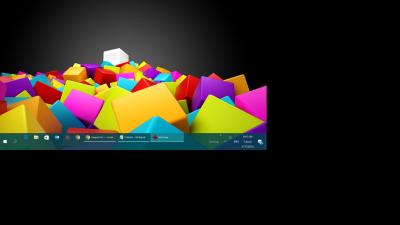
Problem during screen capture, capturing bigger than screen
|
|
 Oct 9 2016, 09:18 AM, updated 10y ago Oct 9 2016, 09:18 AM, updated 10y ago
Show posts by this member only | Post
#1
|
 
Junior Member
234 posts Joined: Jan 2005 From: Puchong   
|
There's a black area everytime I capture my screen. All screen capture software that I use has this problem. i used Irfanview, FastStone and plain PrintScreen button yield the same result.
Yes, i know i can just crop out the area. but the quality of the screen capture is too bad if i crop it. not sure this is caused by the update or not. anybody faced this problem before?
|
|
|
Oct 9 2016, 12:11 PM
Show posts by this member only | Post
#2
|

Senior Member
6,015 posts Joined: Feb 2007
|
Set the output of the capture image format to PNG, not JPEG as JPEG is subject to lossy compression, which sacrificing the quality for lower file size.
So you can edit the image however you want as long as you don't save as jpeg as project/backup. But Jpeg also can be losslessly cropped by using IrfanView, via JPEG Lossless transformation plugin(lossless rotation,cropping). |
|
|
Oct 9 2016, 12:48 PM
Show posts by this member only | Post
#3
|
|
Junior Member
234 posts Joined: Jan 2005 From: Puchong
|
not much difference with png with 0 compressions.

|
| Change to: |  0.0138sec 0.0138sec
 0.78 0.78
 6 queries 6 queries
 GZIP Disabled GZIP Disabled
Time is now: 11th December 2025 - 02:50 AM |
 Quote
Quote