

QUOTE(mikeeeee @ Oct 23 2016, 12:16 PM)
Dam, dunno what happened. Tried OTA and the box says system damage, wireless update disabled.
Anyone got link for the manual update?

do factory reset and update againAnyone got link for the manual update?
BEELINK SEA I / GT1/ ULTIMATE / MX III / MX III-II, BEELINK ANDROID BOX
|
|
 Oct 23 2016, 12:47 PM Oct 23 2016, 12:47 PM
Show posts by this member only | IPv6 | Post
#461
|
 
Senior Member
1,138 posts Joined: May 2010 
|
QUOTE(mikeeeee @ Oct 23 2016, 12:16 PM) Dam, dunno what happened. Tried OTA and the box says system damage, wireless update disabled. do factory reset and update againAnyone got link for the manual update? |
|
|
|
|
|
Oct 23 2016, 12:51 PM
|
|
Senior Member
3,026 posts Joined: Oct 2004 From: KL, Penang & JB 
|
QUOTE(Khalid21 @ Oct 23 2016, 12:47 PM) do factory reset and update again Already factory reset just now. Same error. That's y looking for manual flash, hopefully can over write whatever the actual problem isThis post has been edited by mikeeeee: Oct 23 2016, 12:51 PM |
|
|
Oct 23 2016, 01:11 PM
Show posts by this member only | IPv6 | Post
#463
|
|
Senior Member
1,138 posts Joined: May 2010
|
QUOTE(mikeeeee @ Oct 23 2016, 12:51 PM) Already factory reset just now. Same error. That's y looking for manual flash, hopefully can over write whatever the actual problem is just flash 104 first... download from beelink forum |
|
|
Oct 23 2016, 01:30 PM
|
|
Senior Member
3,026 posts Joined: Oct 2004 From: KL, Penang & JB
|
QUOTE(Khalid21 @ Oct 23 2016, 01:11 PM) just flash 104 first... download from beelink forum ya, trying that now. finger crossed |
|
|
Oct 23 2016, 02:31 PM
|
|
Senior Member
3,026 posts Joined: Oct 2004 From: KL, Penang & JB
|
Damn, manual update also giving error at the end of the flash.
Looks like need to use the amlogic burner but I don't have the 2 headed USB  |
|
|
Oct 23 2016, 02:46 PM
Show posts by this member only | IPv6 | Post
#466
|
|
Senior Member
1,138 posts Joined: May 2010
|
QUOTE(mikeeeee @ Oct 23 2016, 02:31 PM) Damn, manual update also giving error at the end of the flash. can used micro cardLooks like need to use the amlogic burner but I don't have the 2 headed USB |
|
|
|
|
|
Oct 23 2016, 04:49 PM
|

Senior Member
6,040 posts Joined: Jan 2003 From: Cheras, Kuala Lumpur
|
QUOTE(Khalid21 @ Oct 23 2016, 06:41 AM) i just pull out power cable..... Same |
|
|
Oct 23 2016, 06:58 PM
Show posts by this member only | IPv6 | Post
#468
|
|
Senior Member
1,138 posts Joined: May 2010
|
QUOTE(mikeeeee @ Oct 23 2016, 02:31 PM) Damn, manual update also giving error at the end of the flash. wipe data/factory resetLooks like need to use the amlogic burner but I don't have the 2 headed USB This post has been edited by Khalid21: Oct 23 2016, 06:59 PM Attached thumbnail(s) 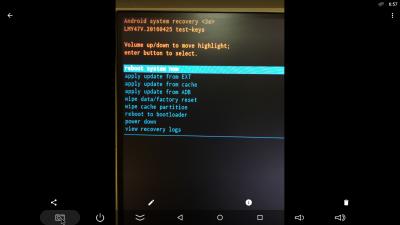
|
|
|
Oct 24 2016, 11:25 AM
|

Junior Member
487 posts Joined: Apr 2008
|
Looks like beelink admit their mistake and close OTA update for 105. Have to wait for another update then
|
|
|
Oct 25 2016, 05:47 PM
|
|
Senior Member
1,138 posts Joined: May 2010
|
latest update on firmware 106 .... to rectify shutdown problem.....
|
|
|
Oct 25 2016, 07:43 PM
|
|
Senior Member
3,026 posts Joined: Oct 2004 From: KL, Penang & JB
|
Kudos to bee link for quick actions
|
|
|
Oct 25 2016, 08:50 PM
|
|
Junior Member
487 posts Joined: Apr 2008
|
Anyone can confirm we still can temporary fix dark scene by play 4k video with firmware 106? If cannot i will stick with 104
|
|
|
Oct 25 2016, 10:13 PM
Show posts by this member only | IPv6 | Post
#473
|
|
Senior Member
1,138 posts Joined: May 2010
|
QUOTE(topeng perak @ Oct 25 2016, 08:50 PM) Anyone can confirm we still can temporary fix dark scene by play 4k video with firmware 106? If cannot i will stick with 104 just snap some movie you think it darker... so we can compare with ours.....sample.. This post has been edited by Khalid21: Oct 25 2016, 10:14 PM Attached thumbnail(s) 
|
|
|
|
|
|
Oct 25 2016, 10:30 PM
|
|
Junior Member
487 posts Joined: Apr 2008
|
QUOTE(Khalid21 @ Oct 25 2016, 10:13 PM) just snap some movie you think it darker... so we can compare with ours..... Unfortunately screenshot unable to show the difference. Only on screen can see it. Can u help to test below picture in GT1?. For my side before play 4k video the number hardly visible. After play 4k file only the number can easily see.sample..  |
|
|
Oct 25 2016, 10:44 PM
Show posts by this member only | IPv6 | Post
#475
|
|
Senior Member
1,138 posts Joined: May 2010
|
QUOTE(topeng perak @ Oct 25 2016, 10:30 PM) Unfortunately screenshot unable to show the difference. Only on screen can see it. Can u help to test below picture in GT1?. For my side before play 4k video the number hardly visible. After play 4k file only the number can easily see. i thought darker only in kodi not in normal usage... i have no problem to see the numberthat why i snap image from kodi... im not playing any 4k movie... you still not update to 106...?... how to compare.... This post has been edited by Khalid21: Oct 25 2016, 10:47 PM |
|
|
Oct 25 2016, 10:47 PM
|
|
Senior Member
6,040 posts Joined: Jan 2003 From: Cheras, Kuala Lumpur
|
QUOTE(Khalid21 @ Oct 25 2016, 05:47 PM) latest update on firmware 106 .... to rectify shutdown problem..... Yayy...
This is new... My first time seeing these screens after OTA update... 

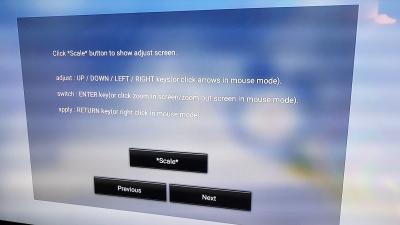

Confirm shutdown working after OTA update... |
|
|
Oct 25 2016, 10:52 PM
Show posts by this member only | IPv6 | Post
#477
|
|
Senior Member
1,138 posts Joined: May 2010
|
QUOTE(blurjoey @ Oct 25 2016, 10:47 PM) Yayy... 1st update
This is new... My first time seeing these screens after OTA update...
Confirm shutdown working after OTA update... after unplug update success Attached thumbnail(s) 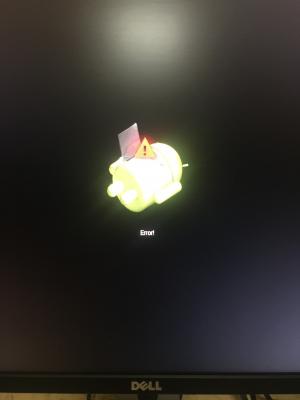
|
|
|
Oct 25 2016, 10:55 PM
|
|
Senior Member
6,040 posts Joined: Jan 2003 From: Cheras, Kuala Lumpur
|
QUOTE(topeng perak @ Oct 25 2016, 10:30 PM) Unfortunately screenshot unable to show the difference. Only on screen can see it. Can u help to test below picture in GT1?. For my side before play 4k video the number hardly visible. After play 4k file only the number can easily see. My TV can't see any number also... Hahaha...
I don't see the dark screens now after the last few updates... Kodi went turn dark... Even in settings don't turn dark anymore... This post has been edited by blurjoey: Oct 25 2016, 10:59 PM |
|
|
Oct 25 2016, 10:56 PM
|
|
Junior Member
487 posts Joined: Apr 2008
|
QUOTE(Khalid21 @ Oct 25 2016, 10:44 PM) i thought darker only in kodi not in normal usage... i have no problem to see the number Hmm...interesting. My dark issue happen not only on Kodi. The reason didn't update yet to 106 because in 105 some user mention play 4k cannot temporary fix anymore. Afraid I will stuck with the darkness. that why i snap image from kodi... im not playing any 4k movie... you still not update to 106...?... how to compare.... Tested with few TVs oso same result. Later will update 106 and see if any changes. But beelink already mention the dark issue still not solve in this fw. |
|
|
Oct 25 2016, 10:57 PM
|
|
Junior Member
487 posts Joined: Apr 2008
|
QUOTE(blurjoey @ Oct 25 2016, 10:55 PM) My TV can't see any number also... Hahaha... Try play 4k video see if number visible after that
|
| Change to: |  0.0291sec 0.0291sec
 0.59 0.59
 6 queries 6 queries
 GZIP Disabled GZIP Disabled
Time is now: 5th December 2025 - 02:55 PM |
 Quote
Quote