

 Aug 31 2016, 02:39 PM, updated 9y ago



World’s first complete, actively updated Ransomware prevention tool that protects your Windows PC against all known Ransomware malware, such as CryptoLocker, CryptoWall, TeslaCrypt, CryptoXXX, CTB-Locker, Zepto and many others.

See it in action
In this lab example we have used one of most popular Ransomware breeds, the notorious TeslaCrypt. First video example has SBGuard PROTECTION ENABLED and second video has it DISABLED.
How it works
By enabling protection, SBGuard Anti-Ransomware injects a large number of restriction mechanisms and modifies some core Windows components to prevent malicious behaviours and executions which Ransomware viruses use to infect the system. As new Ransomware viruses are released, SBGuard team will work hard and fast to protect against any new sneaky techniques these malicious programs use.
Update 30.08.2016
More details about what SBGuard actually does at this stage:
It injects around 700 registry entries to force Windows Group Policy to use inbuilt software execution restriction capabilities in certain locations and prevent certain file types from executing. On top of that it will disable Windows Gadgets (known vulnerability) and disallow several other system actions Ransomware will attempt to perform to encrypt your data. We have gathered all possible tricks Ransomware uses to execute it’s payload and we believe our software will prevent execution of most known Ransomware if not all. We are actively monitoring new ways Ransomware enters the system and we will keep adding more exclusions. We do however have a work in progress on some more advanced techniques that will require SBGuard to run as a service. Another feature on it’s way is to provide live notifications when SBGuard blocks any execution, including from legitimate softwares. This will help novice users to diagnose any issues quickly.
Until the notification system has been implemented, all software blocks can be seen in Windows Event Logs > Application under ID 866
Important: SBGuard Anti-Ransomware could block legitimate programs from installing. It is recommended to disable protection before installing new Windows applications and then re-enabling it back after.
What SBGuard Anti-Ransomware doesn’t do
SBGuard Anti-Ransomware is not an Anti-virus. It is designed to prevent Ransomware infection and documents encryption. It will however help protect against many known viruses which use similar techniques to infect Windows PCs. For maximum possible protection, we recommend a bundle of SBGuard Anti-Ransomware and Bitdefender Endpoint protection. For more information and purchasing please contact us.
Important: SBGuard Anti-Ransomware is actively developed and updated to protect against all known and future Ransomware exploits, however please note that nothing offers 100% protection against Ransomware. It is crucial to stay vigilant when browsing internet and opening emails. “Think before you click”
Requirements and Instructions
Requirements
SBGuard Anti-Ransomware has been tested on Windows 7 Pro & Ultimate (Home edition not tested well enough), 8, 8.1 and 10. Windows XP is not supported
.net framework 3.5 is required to run it. All operating systems after Windows Vista have .net 3.5 inbuilt
SBGuard Anti-Ransomware requires to run with “Administrator” privileges, to be able to modify Windows core components
Instructions
Run setup.exe and follow the instructions
Run SBGuard Anti-Ransomware shortcut on your desktop.
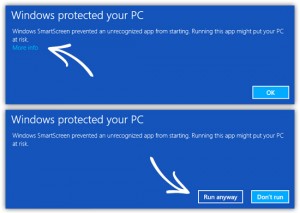
Note: Windows 8 & 10 may display a message “Windows protected your PC” > click More Info > Run Anyway
Read instructions in the application
Click Enable Protection button
Restart your computer for changes to take effect
Open SBGuard Anti-Ransomware and check “Protection Status”, it should be green, meaning protection is enabled
If wish to install new programs it’s advised to Disable Protection > Restart PC > install your program > Enable Protection > Restart PC
Current version
SBGuard Anti-Ransomware v.1.3.0
Source: http://www.sydneybackups.com.au/sbguard-anti-ransomware/
 Quote
Quote




 0.0154sec
 0.81
0.81
 5 queries
 GZIP Disabled