Welcome Guest ( Log In | Register )

Outline · [ Standard ] · Linear+

 My Eyes Hurt from Using Macbook Air 13" 2014, any display reconfiguration advice?

views
     
TSpopsicle toast
post Aug 30 2016, 10:17 PM, updated 10y ago

New Member
*
Junior Member
29 posts

Joined: Dec 2007


I have recently purchased a second hand Macbook Air 13" Early 2014 1.4 GHz Intel Core i5 and mah eyez are killing me and I don't even have bad vision dry.gif

I've run a search online (with great difficulty) only to find that there have been a lot of people who had experienced similar issues reading and using the interface only because the fonts are so thin and hard to read!

I'm a total n00b and am doing my best to describe my situation but I'm really hoping that a Mac God will ascend from his throne and help me configure my display settings so that I can use my Macbook for longer than 15 minutes each time (not even kidding here). The text and font and light grey on grey everything totally strains my eyes and I’ve never experienced this on any computer before.

I've attached a screenshot for a better understanding of what I'm experiencing and also included a link to an article with comments from other users (from year 2014) who went through the same ordeal.

Please please help. I am using this piece of crap for work 8 hours a day.

Additional info:
- Currently running on the latest OS X El Capitan Version 10.11.6
- Resolution at 1440 x 900 (default)
- Please refer to link for a better description of this issue: My Webpagei


Attached thumbnail(s)
Attached Image
TSpopsicle toast
post Aug 30 2016, 10:39 PM

New Member
*
Junior Member
29 posts

Joined: Dec 2007


Any thoughts you guys?
remix2040
post Aug 31 2016, 01:48 AM

Ma! Get the camera!
*******
Senior Member
4,423 posts

Joined: Jun 2014
From: YO-URANUS


I actually love the new San Francisco font by Apple. I praise them for switching it up to it so much easier to read and pleasing to look at.

So I don't have any issues while reading. I actually find the experience much more enjoyable than reading on an windows computer
dragon360
post Sep 1 2016, 07:22 AM

Getting Started
**
Junior Member
140 posts

Joined: Mar 2008


me too...😁
candycrusher
post Sep 1 2016, 08:35 AM

New Member
*
Junior Member
34 posts

Joined: Jan 2014
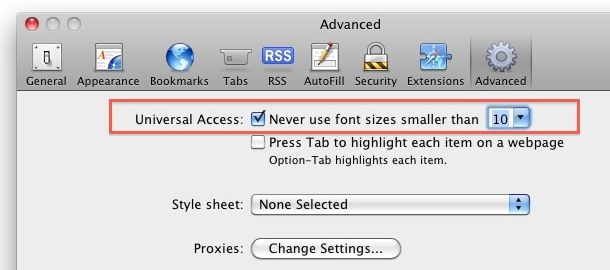
Go set default font size here:

user posted image
aipokovot
post Sep 2 2016, 11:02 PM

New Member
*
Junior Member
8 posts

Joined: Dec 2012
The problem is YOU, not the computer.
We need to fix YOU instead of the computer.(of course some minor adjustment setting of display can be done). Go and see eye doctor. Very simple.
firdausbhari
post Sep 4 2016, 01:47 PM

Look at all my stars!!
*******
Senior Member
2,281 posts

Joined: Feb 2012


QUOTE(aipokovot @ Sep 2 2016, 11:02 PM)
The problem is YOU, not the computer.
We need to fix YOU instead of the computer.(of course some minor adjustment setting of display can be done). Go and see eye doctor. Very simple.
*
Lol +1
sengkin95
post Sep 6 2016, 12:14 PM

#trancefamilia
******
Senior Member
1,492 posts

Joined: Oct 2010


QUOTE(aipokovot @ Sep 2 2016, 11:02 PM)
The problem is YOU, not the computer.
We need to fix YOU instead of the computer.(of course some minor adjustment setting of display can be done). Go and see eye doctor. Very simple.
*
You need to see an ophthalmologist, to be precise tongue.gif
alien3d
post Sep 6 2016, 02:24 PM

Look at all my stars!!
*******
Senior Member
3,740 posts

Joined: Mar 2009
QUOTE(popsicle toast @ Aug 30 2016, 10:17 PM)
I have recently purchased a second hand Macbook Air 13" Early 2014 1.4 GHz Intel Core i5 and mah eyez are killing me and I don't even have bad vision  dry.gif 

I've run a search online (with great difficulty) only to find that there have been a lot of people who had experienced similar issues reading and using the interface only because the fonts are so thin and hard to read!

I'm a total n00b and am doing my best to describe my situation but I'm really hoping that a Mac God will ascend from his throne and help me configure my display settings so that I can use my Macbook for longer than 15 minutes each time (not even kidding here). The text and font and light grey on grey everything totally strains my eyes and I’ve never experienced this on any computer before.

I've attached a screenshot for a better understanding of what I'm experiencing and also included a link to an article with comments from other users (from year 2014) who went through the same ordeal.

Please please help. I am using this piece of crap for work 8 hours a day.

Additional info:
- Currently running on the latest OS X El Capitan Version 10.11.6
- Resolution at 1440 x 900 (default)
- Please refer to link for a better description of this issue: My Webpagei
*
there's a little bit diff mac and windows.
mac seem a bit yellowish a bit..
maybe you could install https://justgetflux.com/ f.lux ..
mochicake
post Sep 7 2016, 03:35 PM

Getting Started
**
Junior Member
258 posts

Joined: Jun 2015
I have the same MBA model/year. No issues even though I am very sensitive to dizziness, headaches if my eyes are aggravated.

Can't really tell what you're trying to show from the screenshot as nothing is blurry at the edges on the same forum.
jumpstat
post Sep 8 2016, 04:25 PM

Regular
******
Senior Member
1,352 posts

Joined: Oct 2010


Retina display the best I have laid my eyes on a monitor. Even better on the Mac 4k monitors. Most importantly is to adjust the text size that suits you. If it is straining that means that the text is too small for you that results in your eyes overworking. Once you get the best setting to your eyes, then it would be good. On the other hand if you have tried adjustments and still straining your eyes, then send the unit in for checking with the experts, All the best bro.
xyrotix
post Sep 8 2016, 08:41 PM

Getting Started
**
Junior Member
252 posts

Joined: Jul 2012
QUOTE(jumpstat @ Sep 8 2016, 04:25 PM)
Retina display the best I have laid my eyes on a monitor. Even better on the Mac 4k monitors. Most importantly is to adjust the text size that suits you. If it is straining that means that the text is too small for you that results in your eyes overworking. Once you get the best setting to your eyes, then it would be good. On the other hand if you have tried adjustments and still straining your eyes, then send the unit in for checking with the experts, All the best bro.
*
So you like the samsung panel huh ? i prefer the lg one .
kevyeoh
post Sep 17 2016, 01:43 PM

Look at all my stars!!
*******
Senior Member
4,721 posts

Joined: Jan 2003


Just try adjust to bigger fonts... I have been using Macbook Air for 3 years and totally no issue with my eyes... smile.gif
alpha0201
post Sep 17 2016, 06:57 PM

¡¡¡llǝ� ǝuoƃ �ou s,�ɐɥ�
*****
Senior Member
911 posts

Joined: Sep 2006
From: Eboladrome


Maybe you need glasses.

My bro also got eye strain when looking at LCD screen (not only MacBook screen) a few years ago & it got gradually bad. So he when for eye check up, then got recommended to wear glasses.

No more eye strain after that.
fabianz03
post Sep 18 2016, 12:59 PM

Look at all my stars!!
*******
Senior Member
4,649 posts

Joined: Aug 2008
From: Tāmaki Makaurau
a lot of people reported that apple's new font is more suited for retina displays. which means that if you've got a low res display say from a macbook air, the clarity will suffer.
it's apples problem not OP's.

that's why they're gonna phase out the Airs and probably replace them with something new.
if you think about it apples notebook lineup is all retina display except the Air. makes a lot of sense


Change to:
| Lo-Fi Version
0.0217sec    0.60    6 queries    GZIP Disabled
Time is now: 21st December 2025 - 08:02 PM