Welcome Guest ( Log In | Register )

Bump Topic Topic Closed RSS Feed
6 Pages « < 3 4 5 6 >Bottom

Outline · [ Standard ] · Linear+

 ILLEGEAR Custom Gaming Laptops v.3, RTX ON! ILLEGEAR RTX Gaming Notebook.

views
     
AZIM@ILLEGEAR
post Nov 13 2018, 03:57 PM

New Member
*
Junior Member
28 posts

Joined: Feb 2017
From: Team ILLEGEAR


QUOTE(IdiuU @ Nov 12 2018, 08:23 PM)
how much for repairing the d9X 4k screen? i think i got dead pixel... 1 tiny pixel sweat.gif

if whole screen black , and there is a bright pixel, means dead pixel, rite?
*
Hi there, PM-ed smile.gif
AZIM@ILLEGEAR
post Nov 27 2018, 02:04 PM

New Member
*
Junior Member
28 posts

Joined: Feb 2017
From: Team ILLEGEAR


QUOTE(miaopurr @ Nov 26 2018, 08:44 PM)
hi. was looking at raven on illegear website. it says
Nvidia GeForce GTX 1050 4GB GDDR5 40%
Nvidia GeForce GTX 970M 6GB GDDR5 60%
Nvidia GeForce GTX 1050Ti 4GB GDDR5 60%
Nvidia GeForce GTX 980M 8GB GDDR5 85%
Nvidia GeForce GTX 1060 6GB GDDR5 100%
what do those percentages mean?

and what is the nits rating of raven monitor display?
*
Hi @miaopurr

We have PM-ed you regarding your enquiry smile.gif
AZIM@ILLEGEAR
post Dec 7 2018, 01:20 PM

New Member
*
Junior Member
28 posts

Joined: Feb 2017
From: Team ILLEGEAR


QUOTE(pandera999 @ Dec 7 2018, 01:11 PM)
Laguna
and
Z7

how much these 2 exact weight?
*
Hi pandera999, in regards to your enquiry:

Laguna weighs at 2.7kg (source:Laguna Product Page) and Z7 weighs at 3.1kg (source:Z7 Product Page)
AZIM@ILLEGEAR
post Dec 19 2018, 05:23 PM

New Member
*
Junior Member
28 posts

Joined: Feb 2017
From: Team ILLEGEAR


QUOTE(pluginbaby @ Dec 19 2018, 04:59 PM)
I have uninstalled, restarted, reinstalled, restarted. Yes issue still persists. some of the settings was reset
*
Hi pluginbaby

Is it possible for you to uninstall the current version & try to install the latest version instead? Kindly use this link for the download: Raven Command Center 1.2.2.2

This post has been edited by AZIM@ILLEGEAR: Dec 19 2018, 05:24 PM
AZIM@ILLEGEAR
post Jan 15 2019, 11:15 AM

New Member
*
Junior Member
28 posts

Joined: Feb 2017
From: Team ILLEGEAR


QUOTE(more2teayap @ Jan 15 2019, 06:32 AM)
Hi Illegear, if i purchase the laptop without a HDD, will Illegear still provide the SATA cable and the 2.5" Hard disk bracket mount?
*
Hi more2teayap
Yes, we will include the 2.5” caddy separately later for the HDD mounting as well as the SATA cable for future drive installation, hope this helps.
AZIM@ILLEGEAR
post Jan 23 2019, 11:09 AM

New Member
*
Junior Member
28 posts

Joined: Feb 2017
From: Team ILLEGEAR


QUOTE(Asgaard @ Jan 21 2019, 07:10 PM)
Rtx2060 coming.. Illegear no price drop for 1060 models?

Want to buy but scared later price drop next day
*
QUOTE(SkyBlue® @ Jan 22 2019, 09:43 AM)
Same here.... still waiting.
*
I would recommend applying into the Performance Acceleration Program since every purchases made under this program would be entitled for an additional 10% discount. Kindly browse through all the applicable models by using this link here: https://store.illegear.com/45-performance-a...eration-program

QUOTE(Zephyrith @ Jan 22 2019, 07:13 PM)
Hi Illegear, can you please tell me what's the difference between Marmaster Control and Matmaster Speed?
*
I would recommend the Matmaster Control for better precision because of the bristly surface but should you prefer a mousepad with a smoother surface, I would recommend the Matmaster Speed instead smile.gif
AZIM@ILLEGEAR
post Jan 25 2019, 04:06 PM

New Member
*
Junior Member
28 posts

Joined: Feb 2017
From: Team ILLEGEAR


QUOTE(adamchen @ Jan 25 2019, 03:58 PM)
when does the selenite restock???
*
Soon~ biggrin.gif

This post has been edited by AZIM@ILLEGEAR: Jan 26 2019, 02:28 PM
AZIM@ILLEGEAR
post Jan 30 2019, 01:12 PM

New Member
*
Junior Member
28 posts

Joined: Feb 2017
From: Team ILLEGEAR


Hi Dylan,

To download the drivers, you would first have to determine the model of your Raven (whether it is running a Kaby Lake CPU or a Coffeelake CPU or a Raven Elite. Kindly find the driver suites for the ILLEGEAR Raven series as provided below:

Raven (Kaby Lake Edition - 7th Gen CPU: http://illegear.com/drivers/Raven.rar
Raven (Coffeelake Edition - 8th Gen CPU): http://illegear.com/drivers/Raven_coffee.rar
Raven Elite: http://illegear.com/drivers/Raven_elite.rar

For extracting the archive, kindly use this software: http://www.7-zip.org/download.html

For the service manual, kindly drop us an email at support@illegear.com and we shall provide the respective documents to you accordingly smile.gif
AZIM@ILLEGEAR
post Jan 30 2019, 04:16 PM

New Member
*
Junior Member
28 posts

Joined: Feb 2017
From: Team ILLEGEAR


QUOTE(Lego Warfare @ Jan 30 2019, 04:06 PM)
What are the chances of Illegear having a trade-in + top up campaign? lol
*
Hi Lego Warfare

At the moment, we do not have any active trade-in programs but we will announce it officially if we organise one soon smile.gif
AZIM@ILLEGEAR
post Mar 6 2019, 05:32 PM

New Member
*
Junior Member
28 posts

Joined: Feb 2017
From: Team ILLEGEAR


QUOTE(Omega5777 @ Mar 5 2019, 10:43 AM)
bro hows the CPU temp when playing dota 2.
I'm getting 90-95C.
*
Hi Omega5777, may I know when was the last time that you have applied the thermal paste for your laptop? Furthermore, may I know if your power option is set to 'Balanced' or 'High Performance'?

QUOTE(pluginbaby @ Mar 6 2019, 08:40 AM)
For Raven coffee users gtx1050, do you have grizzly applied? And what's your temp when gaming? Any underclocking in MSI Afterburner?
*
Hi pluginbaby, the performance of the stock thermal compound for RAVEN is quite close to Thermal Grizzly Kryonaut actually, that's why we didn't offer for the upgrade option. But you can re-apply the thermal paste with the Thermal Grizzly Kryonaut option, perhaps after ±1 year, after the stock thermal paste has dried up.

However in regards to the temperature levels achieved, I will let the RAVEN users to chime in smile.gif
AZIM@ILLEGEAR
post Mar 7 2019, 12:27 PM

New Member
*
Junior Member
28 posts

Joined: Feb 2017
From: Team ILLEGEAR


QUOTE(Omega5777 @ Mar 7 2019, 10:45 AM)
Hi Azim,
I set the power option to High Performance.
Just pick up the laptop last week so thermal paste should still be ok.
Not sure if its game related or not as CPU stays around 75% when playing Apex & Battlefield.
*
Hi Omega5777, thank you very much for the details provided smile.gif

Since the laptop newly received, I believe the issue is rooted to the CPU speed instead. I would recommend to set the power plan to 'Balanced' regardless if the laptop is powered by charger/battery: https://www.howtogeek.com/240840/should-you...lan-on-windows/

This is because the High Performance mode will activate the TurboBoost at all times and this could be causing excess temperature compounded while the laptop is running on idle, hope this clarifies.
AZIM@ILLEGEAR
post Mar 9 2019, 04:40 PM

New Member
*
Junior Member
28 posts

Joined: Feb 2017
From: Team ILLEGEAR


QUOTE(orangutan @ Mar 9 2019, 03:52 PM)
When will i9 be introduced and is there plan for i9 for new model for 17" screen ?
*
Soon smile.gif
AZIM@ILLEGEAR
post Mar 21 2019, 04:40 PM

New Member
*
Junior Member
28 posts

Joined: Feb 2017
From: Team ILLEGEAR


Hi dylan_chng

Kindly note that the two applications listed are native UWP applications and it would be updated via Microsoft Store instead of Windows Updates, hope this clarifies.

For FN+F5, it will toggle the touchpad functionality but for the keyboard backlight's brightness level, it can be toggled by pressing FN+F6 (to decrease) and FN+F7 (to increase), hope this helps smile.gif
AZIM@ILLEGEAR
post Mar 22 2019, 11:25 AM

New Member
*
Junior Member
28 posts

Joined: Feb 2017
From: Team ILLEGEAR


QUOTE(Exeunt @ Mar 22 2019, 10:21 AM)
hi boss,

in this https://store.illegear.com/high-performance...gear-raven.html

why dont have option to select 144hz screen ya ? even after select 1050ti
*
Hi Exeunt, we have completely sold out the 144Hz option for the RAVEN screen panel and it is temporarily out of stock, hope this clarifies! sweat.gif
AZIM@ILLEGEAR
post Mar 26 2019, 07:33 PM

New Member
*
Junior Member
28 posts

Joined: Feb 2017
From: Team ILLEGEAR


QUOTE(zoixc @ Mar 25 2019, 08:48 PM)
Laguna user here, any one using any software to tweak the speaker ? the speaker sound kinda flat
*
Hi zoixc, I would recommend for you to set the Equalizer to 'Powerful' under the Realtek HD Audio Manager to enhance the volume output significantly smile.gif

QUOTE(dylan_chng @ Mar 26 2019, 03:07 PM)
Thank you for the reply. Is there anyway to change the action performed when clicking on the brightness. Default action is cycling between 0%, 25%, 50%, 75% and 100%. Can it be changed to 0%. 10%, 20%, 30%, 40%, 50%, 60%, 70%, 80%, 90% and 100%?
*
Hi dylan_chng, the brightness cadence issue is actually related to Windows 10 actually rather than the hardware since the issue does not persist on Windows 8.1. https://answers.microsoft.com/en-us/windows...87-0cd5cdb2bf85
AZIM@ILLEGEAR
post Mar 26 2019, 08:36 PM

New Member
*
Junior Member
28 posts

Joined: Feb 2017
From: Team ILLEGEAR


QUOTE(Asgaard @ Mar 26 2019, 08:07 PM)
Where is HD realtek audio manager? i dont think its installed in our laptop...
*
Hi Asgaard, the application is only available for the LAGUNA & Z7 models and for the RAVEN, I would recommend for you to tweak the audio settings via the Sound Blaster Cinema 5 application instead to enhance the audio output, hope this helps! smile.gif
AZIM@ILLEGEAR
post Apr 16 2019, 06:52 PM

New Member
*
Junior Member
28 posts

Joined: Feb 2017
From: Team ILLEGEAR


QUOTE(zoixc @ Apr 16 2019, 06:21 PM)
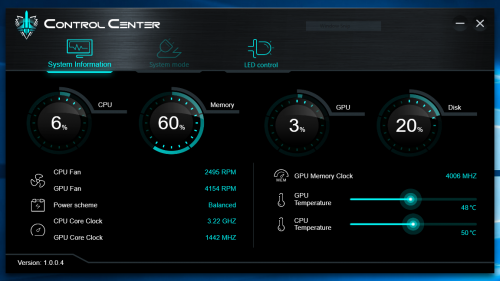
After using the laptop for around 3 hours, the laptop fan seems to stuck at one speed even when the temperature is around 40++ something. This does not happen when the laptop first start up and the fan is quite loud and kinda annoying.

Anyone else having this problem ?

*Illegear Laguna Model
user posted image
*
Hi zoixc, may I know if the issue is still present if the fan is turbo-boosted? You may do so by pressing FN+1 smile.gif

On the other hand, may I know if the behaviour is still happening after the system is rebooted? Aside from the fan boost functionality, kindly find the rest of the LAGUNA Keyboard Shortcuts for your reference as listed below:

FN+1 - Toggle fan speed (auto/max)
FN+3 - Toggle rear led strips
FN+9 - Toggle touchpad light, bottom LED strips
FN+0 - Toggle touchpad light, screen display & led lights
FN+spacebar - Toggle keyboard backlight brightness

The rest are indicated on the F1-F12 keys, hope this helps!

AZIM@ILLEGEAR
post Apr 17 2019, 11:34 AM

New Member
*
Junior Member
28 posts

Joined: Feb 2017
From: Team ILLEGEAR


QUOTE(zoixc @ Apr 16 2019, 07:22 PM)
Yes the issue is still there after press FN + 1, i can see cpu and gpu fan speed up but only the cpu fan slows down after pressing again.

No, the fan speed is normal after rebooting, but will have same issue after certain hour of usage.
*Edit*
After pressing on FN+1, the fan speed when up as expected but when i press again, only the CPU fan speed when down and the GPU fan speed did not changed at all. The fan noise can be heard after rebooting as well, did not encounter this issues before

This is when the fan speed is at max speed.
» Click to show Spoiler - click again to hide... «


This is after i press again FN+1.
» Click to show Spoiler - click again to hide... «

*
Hi zoixc, I've sent you a PM smile.gif
AZIM@ILLEGEAR
post Apr 18 2019, 10:32 AM

New Member
*
Junior Member
28 posts

Joined: Feb 2017
From: Team ILLEGEAR


QUOTE(wingwp @ Apr 17 2019, 10:04 PM)
Azim can my S5 use this control center ..?
*
Hi wingwp, the pictured Control Center is exclusive for LAGUNA models only, hope clarify nod.gif same goes to S-Series & the Raven series, etc.
AZIM@ILLEGEAR
post Apr 20 2019, 06:09 PM

New Member
*
Junior Member
28 posts

Joined: Feb 2017
From: Team ILLEGEAR


QUOTE(wingwp @ Apr 19 2019, 11:52 PM)
whats the latest software/control center for S5? can pm ..
*
Hi wingwp, I've dropped you a PM smile.gif

6 Pages « < 3 4 5 6 >Top
Topic ClosedOptions
 

Change to:
| Lo-Fi Version
0.0304sec    0.52    7 queries    GZIP Disabled
Time is now: 4th December 2025 - 07:27 AM