Welcome Guest ( Log In | Register )

Bump Topic Topic Closed RSS Feed

Outline · [ Standard ] · Linear+

 ILLEGEAR Custom Gaming Laptops v.3, RTX ON! ILLEGEAR RTX Gaming Notebook.

views
     
dylan_chng
post Mar 25 2019, 02:28 PM

On my way
****
Junior Member
693 posts

Joined: Jul 2017
QUOTE(Prince J @ Mar 25 2019, 12:24 PM)
The image projection can be turned off using ILLEGEAR Command Center.
*
The Raven uses Raven Command Center and not Illegear Command Center right?

I know I can turn off the image projection in the command centre but every time I reboot the system/shut down and on again, the image projection is on.
dylan_chng
post Mar 25 2019, 04:22 PM

On my way
****
Junior Member
693 posts

Joined: Jul 2017
QUOTE(AZIM@ILLEGEAR @ Mar 21 2019, 04:40 PM)
*
QUOTE(Prince J @ Mar 25 2019, 12:24 PM)
*
QUOTE(Prince J @ Mar 25 2019, 04:00 PM)
You can try installing the latest ILLEGEAR Command Center. Kindly email support@illegear.com with your serial number.
*
Ok. I will email support@illegear.com. Thank you Illegear for replying to my questions thus far. Much appreciated.
dylan_chng
post Mar 25 2019, 04:24 PM

On my way
****
Junior Member
693 posts

Joined: Jul 2017
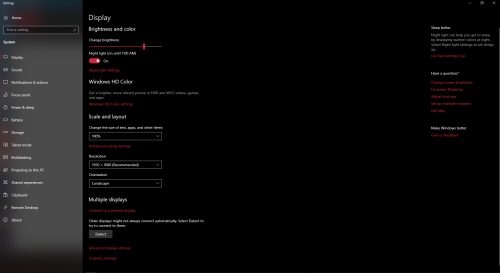
Attached Image

Is there any way to show the display's brightness in the menu shown above?
dylan_chng
post Mar 25 2019, 06:08 PM

On my way
****
Junior Member
693 posts

Joined: Jul 2017
QUOTE(mcloudteo @ Mar 25 2019, 04:53 PM)
You mean brightness percentage?
*
yes
dylan_chng
post Mar 25 2019, 09:11 PM

On my way
****
Junior Member
693 posts

Joined: Jul 2017
QUOTE(zoixc @ Mar 25 2019, 08:48 PM)
Laguna user here, any one using any software to tweak the speaker ? the speaker sound kinda flat
*
QUOTE(Asgaard @ Mar 25 2019, 09:00 PM)
Same. my speaker like no sound. Need to use headphone. raven here
*
Raven user here. Speaker quality is like something is missing. However I find it gets loud enough.

dylan_chng
post Mar 26 2019, 03:07 PM

On my way
****
Junior Member
693 posts

Joined: Jul 2017
QUOTE(mcloudteo @ Mar 26 2019, 07:15 AM)
just click on the notification icon on the lower right corner the screen brightness is over there.

user posted image
*
Thank you for the reply. Is there anyway to change the action performed when clicking on the brightness. Default action is cycling between 0%, 25%, 50%, 75% and 100%. Can it be changed to 0%. 10%, 20%, 30%, 40%, 50%, 60%, 70%, 80%, 90% and 100%?
dylan_chng
post Mar 26 2019, 09:39 PM

On my way
****
Junior Member
693 posts

Joined: Jul 2017
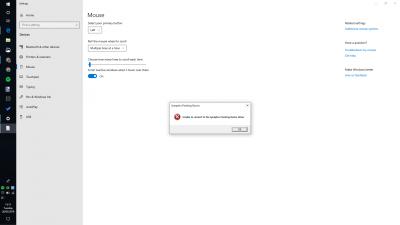
How come every time I go into additional mouse options, this error pops up? I just dismiss it.

This post has been edited by dylan_chng: Mar 26 2019, 09:39 PM


Attached thumbnail(s)
Attached Image
dylan_chng
post Mar 26 2019, 10:34 PM

On my way
****
Junior Member
693 posts

Joined: Jul 2017
QUOTE(prasys @ Mar 26 2019, 10:19 PM)
Right click on Brightness , go to settings and you can tune it at 0 ,10 or some weird numbers you like

user posted image
*
Thank you. I know how to change brightness to a custom value. The Raven also features dedicated function combinations to change the brightness.
dylan_chng
post Mar 28 2019, 03:06 PM

On my way
****
Junior Member
693 posts

Joined: Jul 2017
QUOTE(mcloudteo @ Mar 28 2019, 10:10 AM)
just uninstall it will do the trick it will not affect your touch pad function
*
if I have to uninstall the synaptics pointing device driver, why is it installed in the first place?
dylan_chng
post Apr 1 2019, 11:01 PM

On my way
****
Junior Member
693 posts

Joined: Jul 2017
QUOTE(prasys @ Mar 28 2019, 09:06 PM)
Probably these guys do imaging. So basically they have a generic image for their laptops. So all sorts of drivers gets installed , and your model may not ship with the touchpad of that model...
Keep in mind  these guys are ODM
*
Interesting. However to note that the Raven ships with "Raven Command Centre" opposed to "Illegear Command Centre". "Illegear Command Centre" is not installed and cannot be found any where in the disk. Meaning to say that the image they used on my Raven is exclusively used on Raven's only if not mistaken.
dylan_chng
post Apr 2 2019, 09:41 PM

On my way
****
Junior Member
693 posts

Joined: Jul 2017
QUOTE(Vail @ Apr 2 2019, 09:38 PM)
Is yours Raven or Raven elite? If Elite i can send you the command center. Or you can try to find your model is from which ODM and look for alternative command center from that use same barebone odm. On my case i got the latest of mechrevo site.
*
I'm using normal Raven. It's ok. I'm not looking for a newer version of the command centre. Thanks.
dylan_chng
post Apr 9 2019, 12:36 PM

On my way
****
Junior Member
693 posts

Joined: Jul 2017
Below are questions I had that were answered by emailing Illegear support. Response are not directly quotated but rather my interpration.

Qeustion 1)
QUOTE(dylan_chng @ Mar 23 2019, 02:55 PM)
Where can I view the user's manual for the Raven?[attachmentid=10209206]
*
Answer - Raven does not have user manual for the time being.


Question 2)
QUOTE(dylan_chng @ Mar 24 2019, 09:38 PM)
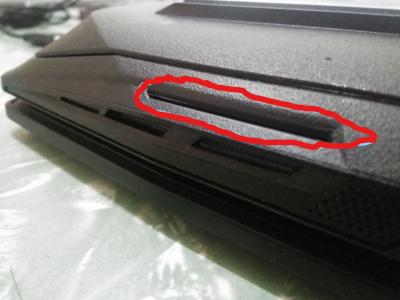
Where is the speakers on an Illegear Raven? I know where the subwoofer is but am wondering where the regular speakers are.
*
Answer - Refer to red circle in image
Attached Image


Question 3)
QUOTE(dylan_chng @ Mar 24 2019, 09:48 PM)
2) How do I pernamently disable the image projection? I turn it off every time my system turns out but the next time I turn on the system, the image projection on.
*
Answer - The pernament solution is to disconnect the cable under the 1st M.2 drive bay.

dylan_chng
post Apr 10 2019, 09:57 AM

On my way
****
Junior Member
693 posts

Joined: Jul 2017
I render videos. The software I use only utilize the CPU, not the GPU.
Obviously, the CPU gets hot under constant load and results into the fans ramping up. However is the intended behaviour for both the CPU and GPU to ramp up together? Meaning to say, are both fans paired. If one slows down, the other slows down and vice versa?

Topic ClosedOptions
 

Change to:
| Lo-Fi Version
0.3319sec    0.66    7 queries    GZIP Disabled
Time is now: 7th December 2025 - 12:39 AM