Outline ·
[ Standard ] ·
Linear+
Official TM ÜniFi High Speed Broadband Thread V26
|
mztang52
|
 Jun 28 2016, 04:53 PM Jun 28 2016, 04:53 PM
|

|
QUOTE(soonwai @ Jun 28 2016, 01:42 PM) Nice catch mztang52, I didn't notice that. The gateway is definitely a private IP address. hellforce what IP address were you assigned (first 2 numbers will good enough to tell from)? If it's also a private address then it'll be the first time I've seen Unifi do this. It'll also explain why your CCTV doesn't work. You are welcome. |
|
|
|
|
|
mztang52
|
Jun 29 2016, 07:46 AM
|
|
|
QUOTE(christina1 @ Jun 28 2016, 08:19 PM) Hi All, Anyone using this router TP link archer c3200 ? If yes please let me know how good it is ...plan to used for my small office. This is a very good router espiacially its WiFi performance. |
|
|
|
|
|
mztang52
|
Jun 29 2016, 05:27 PM
|
|
|
QUOTE(iXora.ix @ Jun 29 2016, 05:21 PM) me too. tried to change ip but still same  Other than changing IP address, is your IPV6 disabled? This post has been edited by mztang52: Jun 29 2016, 05:27 PM |
|
|
|
|
|
mztang52
|
Jun 29 2016, 05:28 PM
|
|
|
--double posted--
|
|
|
|
|
|
mztang52
|
Jun 29 2016, 05:29 PM
|
|
|
QUOTE(iXora.ix @ Jun 29 2016, 06:28 PM) err im using ipv6 now. Oh got issue eh? okay i try after berbuka  TM has problem with youtube by using their own IPV6. |
|
|
|
|
|
mztang52
|
Jun 29 2016, 06:25 PM
|
|
|
QUOTE(jpong1 @ Jun 29 2016, 06:34 PM) I dun think so, mine no problem. Not every one has problem with their IPV6, maybe? You will have the problem when it's the time. |
|
|
|
|
|
mztang52
|
Jun 29 2016, 06:26 PM
|
|
|
QUOTE(jpong1 @ Jun 29 2016, 06:34 PM) I dun think so, mine no problem. Please go search for posts in V25, it is a very common problem. So your doubt is wrong. IPV6 is the factor. |
|
|
|
|
|
mztang52
|
Jun 29 2016, 06:30 PM
|
|
|
QUOTE(sHawTY @ Jun 29 2016, 07:27 PM) I'm having the same problem as well Not for me. On IPv6 here Try to disable your IPV6 please. |
|
|
|
|
|
mztang52
|
Jun 29 2016, 08:30 PM
|
|
|
QUOTE(fruitie @ Jun 29 2016, 08:07 PM) It's certain videos' routing issue. I do have it some times. And no, I'm not on IPv6. Routing issue? Why don't you ask TM to help you to change the routing setting? |
|
|
|
|
|
mztang52
|
Jun 29 2016, 08:34 PM
|
|
|
QUOTE(StuartLee2015 @ Jun 29 2016, 08:42 PM) How to i get Ivp6 for RGX 4400 Router? what's Ivp6 anyway? is it good? IPV6 is auto-enabled on every TM's router. You don't have to do any setting unless you want to disable it. I can't say IPV6 is good or bad because it is a type of IP address. e.g. 10.1.1.101, this is an IPV4 address but IPV6 is more complicated like fe80::12::34::56::8888. |
|
|
|
|
|
mztang52
|
Jun 29 2016, 09:08 PM
|
|
|
QUOTE(StuartLee2015 @ Jun 29 2016, 10:04 PM) I have another problem , NAT problem... the icon stays yellow at Vuze... i have enable unPUP, but it's still yellow? Or can you try to use Utorrent or Bittorrent. Try to port forward it manually if the problem still presist after you enable the UPNP |
|
|
|
|
|
mztang52
|
Jun 29 2016, 09:09 PM
|
|
|
QUOTE(StuartLee2015 @ Jun 29 2016, 10:04 PM) I have another problem , NAT problem... the icon stays yellow at Vuze... i have enable unPUP, but it's still yellow? Or can you try to use Utorrent or Bittorrent. Try to port forward it manually. What did you mean for unPUP? Is it UPNP? |
|
|
|
|
|
mztang52
|
Jun 29 2016, 09:21 PM
|
|
|
QUOTE(StuartLee2015 @ Jun 29 2016, 10:12 PM) ya, ya, i mean UPNP.... How to port forward it? On the router. Go to reserve one fix IP address for your computer and port forward the IP address with the port you see in the Vuze. |
|
|
|
|
|
mztang52
|
Jun 29 2016, 09:27 PM
|
|
|
QUOTE(StuartLee2015 @ Jun 29 2016, 10:24 PM) I don't really know how ... it look like this... This problem i just realised after the TM changed both Router and Modem to the silver one. Key in 192.168.0.1 into your browser please. The username is operator and the password will be h566UniFi This post has been edited by mztang52: Jun 29 2016, 09:27 PM |
|
|
|
|
|
mztang52
|
Jun 29 2016, 09:49 PM
|
|
|
QUOTE(StuartLee2015 @ Jun 29 2016, 10:28 PM) here is the port forwarding... Yup, just fill in every thing like FILL IN THE BLANKS. |
|
|
|
|
|
mztang52
|
Jun 29 2016, 09:50 PM
|
|
|
QUOTE(fruitie @ Jun 29 2016, 10:48 PM) Maxing out 30Mbps for my YouTube 1080p video.  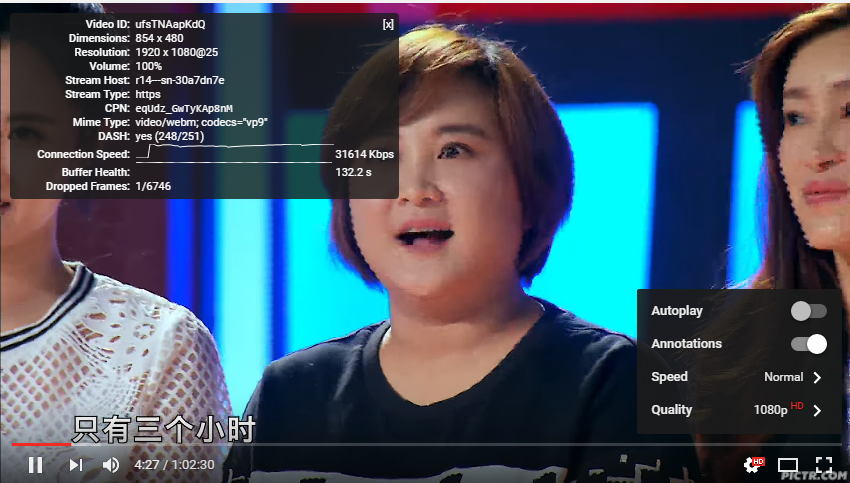 Ya. So IMPRESSIVE... |
|
|
|
|
|
mztang52
|
Jun 29 2016, 11:18 PM
|
|
|
QUOTE(StuartLee2015 @ Jun 29 2016, 11:02 PM) Just realised this here says my Router cannot get port forwarding... http://www.serverlink.com.my/Router_Configuration- The strange thing is see on my torrents health is either yellow or blue and vuze says i may have NAT problem. Not sure how to fix this thing. previously DIR-615 have no issues. Below is the Seed ( i am seeding it but it shows 0, and health is not green ) Apa ini? Every router can do port forwarding... |
|
|
|
|
|
mztang52
|
Jun 30 2016, 05:06 PM
|
|
|
QUOTE(CTU @ Jun 30 2016, 05:50 PM) Well if there isn't a cheaper option, I'd rather be paying what i am right now but getting the high speed that others are getting too. How can i upgrade my speed? Can i call them or should i go to TM Point? Just call 100 and tell them you want to upgrade to UNIFI Advance 30, RM199. This is the cheapest one right now. |
|
|
|
|
|
mztang52
|
Jun 30 2016, 05:27 PM
|
|
|
QUOTE(vergas @ Jun 30 2016, 06:23 PM) I've done it before, one STB is mine, the other one was my brother's and still active, but my brother did not need it. As long as you can get the STB to be registered to someone that is not using it, it should be ok. Yup. You can set the Port 3 and Port 4 to 600 for Hypptv service. |
|
|
|
|
|
mztang52
|
Jun 30 2016, 07:22 PM
|
|
|
QUOTE(StuartLee2015 @ Jun 30 2016, 08:08 PM) Google search "my ip" |
|
|
|
|





 Quote
Quote
 0.1019sec
 0.84
0.84
 7 queries
 GZIP Disabled