

Dah try firmware upgrade ke belum? cuba la upgrade firmware kalau ada latest, mana tau boleh selesai kan masalah ni.
Technical Router's Strick NAT
Technical Router's Strick NAT
|
|
 Jan 1 2009, 07:45 PM Jan 1 2009, 07:45 PM
|
 
Senior Member
700 posts Joined: Dec 2005 From: KL  
|
Dah try firmware upgrade ke belum? cuba la upgrade firmware kalau ada latest, mana tau boleh selesai kan masalah ni.
|
|
|
|
|
|
Jan 2 2009, 12:50 PM
|

Junior Member
10 posts Joined: Jun 2006
|
QUOTE(cannavaro @ Jan 1 2009, 07:42 PM) It's not necessary. If you use manual settings, the DNS on the xbox will override whatever you put in the router. Assuming that every other setting is correct, that should not happen.  QUOTE(Mr Ez @ Jan 1 2009, 07:45 PM) Dah try firmware upgrade ke belum? cuba la upgrade firmware kalau ada latest, mana tau boleh selesai kan masalah ni. cannavaro - i dont know why is it happening? probably you could figure it out instead? I set my IP to manual and all, DNS to AUTO (dns is auto in router as well) but in xbox live test, I can get to my wireless modem, but not the internet.Mr Ez - dah, i baru je update but cannot also. By the way, just thought I want to share this info, if you have the Belkin F5D8633-4 model like I do, you cant find the firmware update on belkin.com, you can find it in belkin.com/uk Guys, i'm about to yank my hair out already? can anyone figure out what I should do? I have tried putting everything on Auto and turning on uPnP on my router. that WILL NOT show strict. However, when playing its still the same, cant join games and all as though it is Strict. I read somewhere that others experience the same as well. How do you check NAT status anyways? I only how to see if its Strict coz the freaking error comes up. |
|
|
Jan 2 2009, 02:59 PM
|

Junior Member
83 posts Joined: Oct 2004
|
Friend, im totally lost and had no more idea how to solve ur problem since i don't have the same router as your but why don't you try emailing Belkin and tell them in complete details whats your problem and what u have done to fix it. Send them altogether with screen shot might help. At least now i know that if i want to buy replacement for my current router i won't buy belkin...
|
|
|
Jan 2 2009, 07:21 PM
|

Senior Member
3,008 posts Joined: Sep 2005 From: T.T.D.I, Bukit Damansara
|
QUOTE(kaypopotamus @ Dec 31 2008, 06:34 PM) Yeah I tried DMZ already and NAT is still strict...i dont know if i am doing it right..but i opened some ports (???) I just noticed. This is not DMZ. This is port forwarding.check attached picture below...: 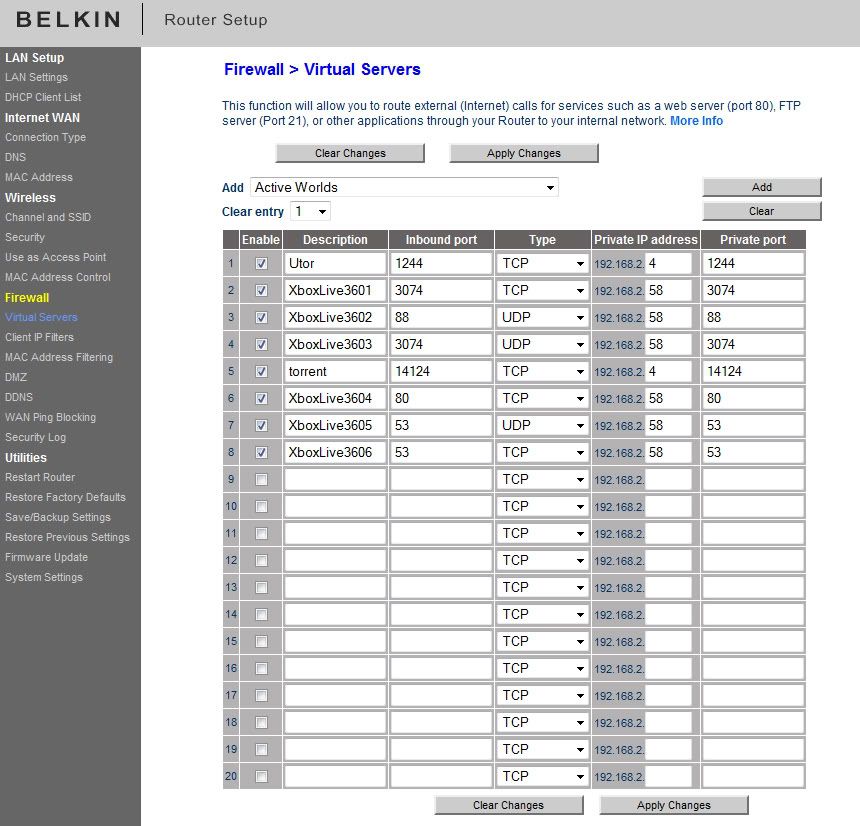 this is the setting on my xbox...: 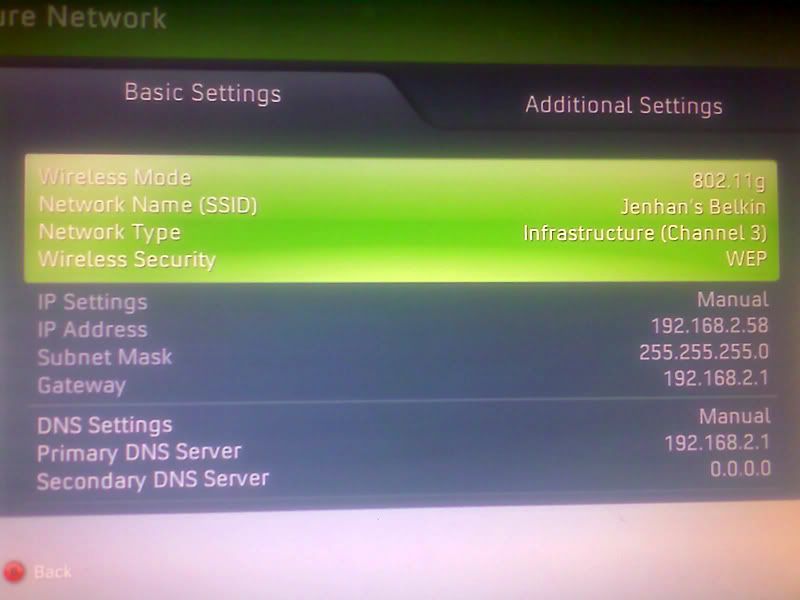  If DMZ doesn't work, I don't know what will.  DMZ is simple. You put your xbox ip on DMZ, all of the ports will be opened. Not a wise thing to do on your internet enabled PC though. |
|
|
Jan 3 2009, 03:54 PM
|
|
Junior Member
10 posts Joined: Jun 2006
|
yeah thats exactly what i did, i emailed belkin and i got another firmware update. i'm just going to try putting everything on Auto and letting uPnP do the job. see how that goes then i'll let you guys know again..
cannavaro, so DMZ means i leave it on auto and i put whatever ip it assigns me as dmz? yeah i also would like to stay away from dmz if possible |
|
|
Jan 3 2009, 07:47 PM
|
|
Senior Member
3,008 posts Joined: Sep 2005 From: T.T.D.I, Bukit Damansara
|
To use DMZ you must set up a static ip address on your xbox. For example if you put your ip on the xbox as 192.168.1.360, all you have to do to enable DMZ is go to the DMZ tab and simple add 192.168.1.360. Then save and reboot router. For some models you don't have to reboot though.
Something like this:  No worries man, no hacker in the right mind would waste his time in trying to gain access to your console. Besides, the architecture is totally different, AFAIK the 360 is not even capable to be used as 'zombies' (as armies for DDoS attacks or such) as they call it. If all else fails DMZ is the way to go. |
|
|
|
|
|
Jan 5 2009, 12:11 AM
|
|
Junior Member
10 posts Joined: Jun 2006
|
thanks cannavaro, will try that later
 anyways, right now i'm just on all Auto with uPnP enabled. doesn't give me a strict NAT but somehow still the same. I also think maybe its too soon to judge right now right? since some major internet cable gone faulty about a week ago? anyways, yeah i will try the DMZ again...if it works, does it mean the NAT Strict error wont appear? |
|
|
Jan 5 2009, 04:05 PM
|

Junior Member
277 posts Joined: Jan 2003
|
i had the same issue with my linksys wireless modem router before. tried portforwarding and all the possible settings, but i still got a strict NAT. i guess some routers arent 100% compatible with xbox live.
finally i gave up and just dmz-ed my 360 and the NAT is always open now. like some have said here, putting yr 360 in the dmz is relatively quite ok. |
|
|
Jan 5 2009, 05:49 PM
|

Junior Member
16 posts Joined: Oct 2006
|
QUOTE(thurtin @ Jan 5 2009, 04:05 PM) i had the same issue with my linksys wireless modem router before. tried portforwarding and all the possible settings, but i still got a strict NAT. i guess some routers arent 100% compatible with xbox live. I just plugged my laptop... compatible all the time.., just afraid to buy the wifi set, if not working with my Belkin 2in1 router...finally i gave up and just dmz-ed my 360 and the NAT is always open now. like some have said here, putting yr 360 in the dmz is relatively quite ok. Have anyone try, connect with proxy, maybe playing XBL at your office... just wondering. Does it work This post has been edited by pakcikkantin: Jan 5 2009, 05:50 PM |
|
|
Jan 13 2009, 05:50 PM
|

Junior Member
456 posts Joined: Sep 2005
|
My son keep complaining that the strict nat is inhibiting his games. Finally I played around with the settings on the Zycel modem and somehow managed to get it to open nat. You have to do some port forwarding. If you interested I can check my model for the setting.s
|
| Change to: |  0.0155sec 0.0155sec
 0.45 0.45
 5 queries 5 queries
 GZIP Disabled GZIP Disabled
Time is now: 14th December 2025 - 09:05 PM |
 Quote
Quote