Outline ·
[ Standard ] ·
Linear+
Technical Router's Strick NAT
|
cannavaro
|
 Jan 1 2009, 07:42 PM Jan 1 2009, 07:42 PM
|

|
QUOTE(kaypopotamus @ Jan 1 2009, 07:18 PM) i tried both, and its still strict.. in my router i put the same DNS as what i put in xbox right? both primary and secondary? if i use openDNS on xbox, i should put openDNS for router too?It's not necessary. If you use manual settings, the DNS on the xbox will override whatever you put in the router. QUOTE also weirdly, when i switch my dns to auto on xbox but leave the streamyx DNS in my router, i cant even connect to the internet on xbox. is this suppose to happen? Assuming that every other setting is correct, that should not happen. |
|
|
|
|
|
cannavaro
|
Jan 2 2009, 07:21 PM
|
|
|
QUOTE(kaypopotamus @ Dec 31 2008, 06:34 PM) Yeah I tried DMZ already and NAT is still strict...i dont know if i am doing it right..but i opened some ports (???) check attached picture below...: 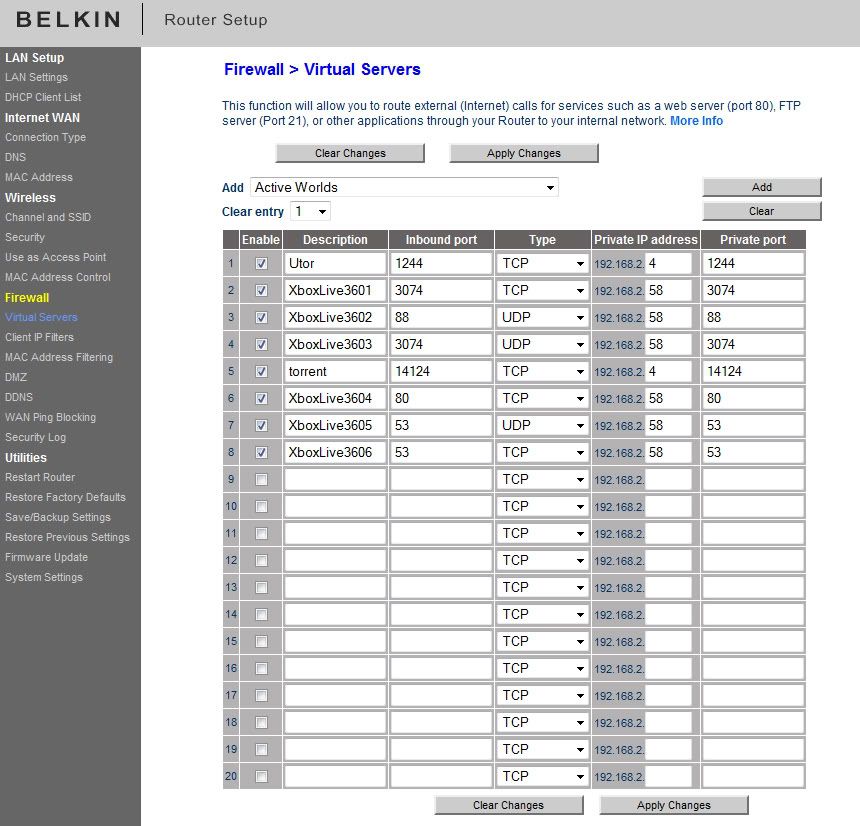 this is the setting on my xbox...: 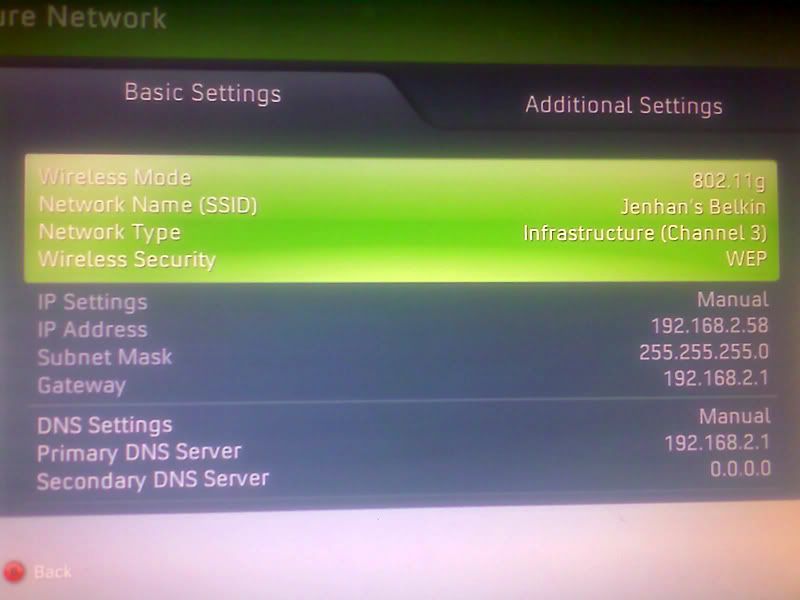  I just noticed. This is not DMZ. This is port forwarding. If DMZ doesn't work, I don't know what will.  DMZ is simple. You put your xbox ip on DMZ, all of the ports will be opened. Not a wise thing to do on your internet enabled PC though. |
|
|
|
|
|
cannavaro
|
Jan 3 2009, 07:47 PM
|
|
|
To use DMZ you must set up a static ip address on your xbox. For example if you put your ip on the xbox as 192.168.1.360, all you have to do to enable DMZ is go to the DMZ tab and simple add 192.168.1.360. Then save and reboot router. For some models you don't have to reboot though. Something like this:  No worries man, no hacker in the right mind would waste his time in trying to gain access to your console. Besides, the architecture is totally different, AFAIK the 360 is not even capable to be used as 'zombies' (as armies for DDoS attacks or such) as they call it. If all else fails DMZ is the way to go. |
|
|
|
|





 Quote
Quote
 0.0165sec
 0.93
0.93
 6 queries
 GZIP Disabled