Welcome Guest ( Log In | Register )

Outline · [ Standard ] · Linear+

Technical Router's Strick NAT

views
     
TSMerlin MY
post Jan 10 2007, 11:13 PM, updated 19y ago

New Member
*
Junior Member
45 posts

Joined: Jan 2007


I'm using a Zyxel P-334WT router and I can't host MP for GOW because of the "STRICT" status which I'm getting for my NAT. I'm already opened port 88 and 3074 but I'm still having a "STRICT" status for my NAT. Other than changing to a new router, is there a solution to this? Anyone else using a Zyxel?
ah_chak
post Jan 10 2007, 11:47 PM

Vroom..
*******
Senior Member
2,341 posts

Joined: Jan 2003
From: Miri


QUOTE(Merlin MY @ Jan 10 2007, 11:13 PM)
I'm using a Zyxel P-334WT router and I can't host MP for GOW because of the "STRICT" status which I'm getting for my NAT. I'm already opened port 88 and 3074 but I'm still having a "STRICT" status for my NAT. Other than changing to a new router, is there a solution to this? Anyone else using a Zyxel?
*
i used to have this problem as well but doing port forwarding should open up ur nut nat.

set your xbox360 to have a static ip first before forwarding the ports, which is TCP 88, TCP 3074, and UDP 3074 smile.gif
TSMerlin MY
post Jan 11 2007, 12:51 AM

New Member
*
Junior Member
45 posts

Joined: Jan 2007


ahchak, i've set the static ip also already and the forwarded the ports. no change in the results.
UnUsUaL
post Jan 11 2007, 12:54 AM

ah jek
Group Icon
VIP
2,064 posts

Joined: Jan 2003
Have you tried DMZ your xbox ip and set the DNS as well into your Xbox DNS setting?
ferricide
post Jan 11 2007, 12:59 AM

Mercenary
****
Senior Member
638 posts

Joined: Jan 2003
From: Petaling Jaya
Some modems just dun seem to like Xbox Live compatible. You should check the list on www.xbox.com

EDIT : Link to Xbox Live Compatible Routers

This post has been edited by ferricide: Jan 11 2007, 01:12 AM
JKEC
post Jan 11 2007, 01:22 AM

Getting Started
**
Junior Member
161 posts

Joined: Jul 2005


disable Firewall setting of Zyxel should help.
ah_chak
post Jan 11 2007, 07:53 AM

Vroom..
*******
Senior Member
2,341 posts

Joined: Jan 2003
From: Miri


QUOTE(ferricide @ Jan 11 2007, 12:59 AM)
Some modems just dun seem to like Xbox Live compatible. You should check the list on www.xbox.com

EDIT : Link to Xbox Live Compatible Routers
*
my home build ClarkConnect Router, which is my old pc which i installed and it became a router, worked like a charm. I don't think that's Xbox Live Compatible, no? laugh.gif

hmm.. TS, try to disable your router's firewall and try again..
Maniac
post Jan 11 2007, 09:32 AM

That Tech Guy Who Use Nikon For Video
Group Icon
VIP
5,938 posts

Joined: Jan 2003
From: Now In The City of Merlion


as long as ur router do forwarding, i think it should be 'compatible', just that u might need to manually tweak them, as for microsoft 'compatible' router, it simply means they tested with it, and it work automatically usually.
maiit
post Jan 11 2007, 11:33 AM

New Member
*
Junior Member
41 posts

Joined: Nov 2005
Sorry to disturb...just want to get some idea here...

What can when wrong if my XBOX360 could not detect my linksys wrt54g ip address. I've set my router settings to DHCP enable.

If just using my streamyx model, no problem at all....??


TSMerlin MY
post Jan 11 2007, 11:52 AM

New Member
*
Junior Member
45 posts

Joined: Jan 2007


I've done portforwarding, disabled router firewall, set static ip, manual dns but still can't host a mp game for GOW. i'm missing something but i don't know what and it's driving me nuts!
un9ku
post Jan 11 2007, 11:59 AM

Casual
***
Junior Member
335 posts

Joined: Jan 2003
From: Milo
QUOTE
Sorry to disturb...just want to get some idea here...

What can when wrong if my XBOX360 could not detect my linksys wrt54g ip address. I've set my router settings to DHCP enable.

If just using my streamyx model, no problem at all....??

did u set a static ip for ur 360? and did a portforward or assign ur 360 to be in DMZ?

This post has been edited by un9ku: Jan 11 2007, 11:59 AM
kaypopotamus
post Dec 31 2008, 03:59 PM

New Member
*
Junior Member
10 posts

Joined: Jun 2006


QUOTE
I've done portforwarding, disabled router firewall, set static ip, manual dns but still can't host a mp game for GOW. i'm missing something but i don't know what and it's driving me nuts!


hey merlin how did yo solve your problem, now the issue is happening to me.

i'm using a Belkin FD58633-4 v1 (Wireness N modem router)

anyone? help?

This post has been edited by kaypopotamus: Dec 31 2008, 04:00 PM
dark lenanza
post Dec 31 2008, 04:49 PM

Probationary DDOSer
******
Senior Member
1,492 posts

Joined: Nov 2007
From: on top of mountain


QUOTE(Merlin MY @ Jan 11 2007, 11:52 AM)
I've done portforwarding, disabled router firewall, set static ip, manual dns but still can't host a mp game for GOW. i'm missing something but i don't know what and it's driving me nuts!
*
how but DMZ??
have u tried it??
kaypopotamus
post Dec 31 2008, 06:34 PM

New Member
*
Junior Member
10 posts

Joined: Jun 2006


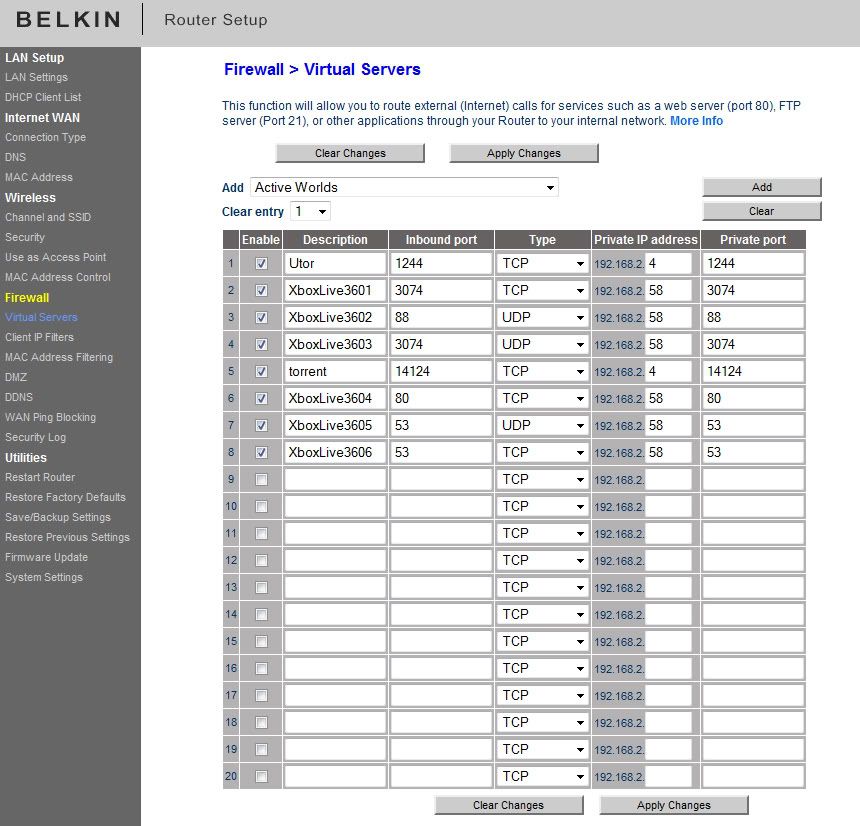
Yeah I tried DMZ already and NAT is still strict...i dont know if i am doing it right..but i opened some ports (???)

check attached picture below...:
user posted image


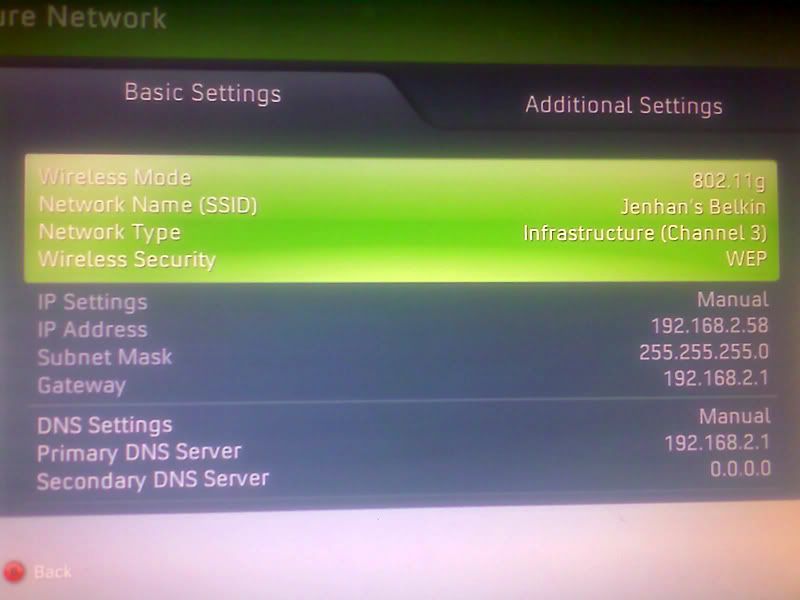
this is the setting on my xbox...:
user posted image
user posted image

anyone can help me? belkin users anyone?
ventriloquist
post Dec 31 2008, 06:43 PM

Getting Started
**
Junior Member
83 posts

Joined: Oct 2004
Try this :http://www.portforward.com/english/routers/port_forwarding/Belkin/F5D8633-4/Xbox_Live_360.htm

hopefully it helps...
Breaktru
post Dec 31 2008, 07:41 PM

== The World ==
******
Senior Member
1,769 posts

Joined: Jan 2003
From: Malaysia


The last thing you can do is putting IP at DMZ . But to be honest , bad news for your Zyxel modem . Ive deal with many modems before , and it seems that Zyxel has the worst compatibility with Xbox LIVE , because I could never get anything other than Strict NAT with the modem .


kaypopotamus
post Jan 1 2009, 11:37 AM

New Member
*
Junior Member
10 posts

Joined: Jun 2006


QUOTE(Breaktru @ Dec 31 2008, 07:41 PM)
The last thing you can do is putting IP at DMZ . But to be honest , bad news for your Zyxel modem . Ive deal with many modems before , and it seems that Zyxel has the worst compatibility with Xbox LIVE , because I could never get anything other than Strict NAT with the modem .
*
I'm not using Zyxel modem. actually this thread was started by someone else a long time ago...and i just posted my problem here again coz i did a search and found this thread..so i though no need to start a new thread.

I'm actually using a Belkin F5D8633-4 v1

any advice?

btw ventriloquist, i think i did those steps already? (check my attached pictures above) doesn't seem to work for me...did i do it wrongly? have a look see and let me know?
ventriloquist
post Jan 1 2009, 12:12 PM

Getting Started
**
Junior Member
83 posts

Joined: Oct 2004
I'm not sure why u use 192.168.2.1 for ur gateway (maybe because im using D-Link and my gateway is 192.168.1.1 and before this im using 192.168.0.1) but what i couldn't understand is ur DNS

Try this :

Streamyx DNS :
PRIMARY : 202.188.0.133
SECONDARY : 202.188.1.5

OpenDNS (currently using since i don't trust Slowmyx/Snailmyx)
PRIMARY : 208.67.222.222
SECONDARY : 208.67.220.220

don't forget to chance the DNS setting at ur router...
Hope its fix ur problem, if not try set DNS to auto

*EDIT : Stupid typo...and another typo...haihh...*

This post has been edited by ventriloquist: Jan 1 2009, 12:18 PM
kaypopotamus
post Jan 1 2009, 07:18 PM

New Member
*
Junior Member
10 posts

Joined: Jun 2006


QUOTE(ventriloquist @ Jan 1 2009, 12:12 PM)
I'm not sure why u use 192.168.2.1 for ur gateway (maybe because im using D-Link and my gateway is 192.168.1.1 and before this im using 192.168.0.1) but what i couldn't understand is ur DNS

Try this :

Streamyx DNS :
PRIMARY      : 202.188.0.133
SECONDARY : 202.188.1.5

OpenDNS (currently using since i don't trust Slowmyx/Snailmyx)
PRIMARY      : 208.67.222.222
SECONDARY : 208.67.220.220

don't forget to chance the DNS setting at ur router...
Hope its fix ur problem, if not try set DNS to auto
*
i tried both, and its still strict.. in my router i put the same DNS as what i put in xbox right? both primary and secondary? if i use openDNS on xbox, i should put openDNS for router too?
also weirdly, when i switch my dns to auto on xbox but leave the streamyx DNS in my router, i cant even connect to the internet on xbox. is this suppose to happen?

thanks anyways for the dns!


cannavaro
post Jan 1 2009, 07:42 PM

CATTENACIO
*******
Senior Member
3,008 posts

Joined: Sep 2005
From: T.T.D.I, Bukit Damansara


QUOTE(kaypopotamus @ Jan 1 2009, 07:18 PM)
i tried both, and its still strict.. in my router i put the same DNS as what i put in xbox right? both primary and secondary? if i use openDNS on xbox, i should put openDNS for router too?
*
It's not necessary. If you use manual settings, the DNS on the xbox will override whatever you put in the router.

QUOTE
also weirdly, when i switch my dns to auto on xbox but leave the streamyx DNS in my router, i cant even connect to the internet on xbox. is this suppose to happen?

Assuming that every other setting is correct, that should not happen.

Mr Ez
post Jan 1 2009, 07:45 PM

Super Cool
*****
Senior Member
700 posts

Joined: Dec 2005
From: KL


Dah try firmware upgrade ke belum? cuba la upgrade firmware kalau ada latest, mana tau boleh selesai kan masalah ni.
kaypopotamus
post Jan 2 2009, 12:50 PM

New Member
*
Junior Member
10 posts

Joined: Jun 2006


QUOTE(cannavaro @ Jan 1 2009, 07:42 PM)
It's not necessary. If you use manual settings, the DNS on the xbox will override whatever you put in the router.
Assuming that every other setting is correct, that should not happen.
*
QUOTE(Mr Ez @ Jan 1 2009, 07:45 PM)
Dah try firmware upgrade ke belum? cuba la upgrade firmware kalau ada latest, mana tau boleh selesai kan masalah ni.
*
cannavaro - i dont know why is it happening? probably you could figure it out instead? I set my IP to manual and all, DNS to AUTO (dns is auto in router as well) but in xbox live test, I can get to my wireless modem, but not the internet.

Mr Ez - dah, i baru je update but cannot also.

By the way, just thought I want to share this info, if you have the Belkin F5D8633-4 model like I do, you cant find the firmware update on belkin.com, you can find it in belkin.com/uk

Guys, i'm about to yank my hair out already? can anyone figure out what I should do? I have tried putting everything on Auto and turning on uPnP on my router. that WILL NOT show strict. However, when playing its still the same, cant join games and all as though it is Strict. I read somewhere that others experience the same as well.

How do you check NAT status anyways? I only how to see if its Strict coz the freaking error comes up.

ventriloquist
post Jan 2 2009, 02:59 PM

Getting Started
**
Junior Member
83 posts

Joined: Oct 2004
Friend, im totally lost and had no more idea how to solve ur problem since i don't have the same router as your but why don't you try emailing Belkin and tell them in complete details whats your problem and what u have done to fix it. Send them altogether with screen shot might help. At least now i know that if i want to buy replacement for my current router i won't buy belkin...
cannavaro
post Jan 2 2009, 07:21 PM

CATTENACIO
*******
Senior Member
3,008 posts

Joined: Sep 2005
From: T.T.D.I, Bukit Damansara


QUOTE(kaypopotamus @ Dec 31 2008, 06:34 PM)
Yeah I tried DMZ already and NAT is still strict...i dont know if i am doing it right..but i opened some ports (???)

check attached picture below...:
user posted image
this is the setting on my xbox...:
user posted image
user posted image
I just noticed. This is not DMZ. This is port forwarding.
If DMZ doesn't work, I don't know what will. rclxub.gif

DMZ is simple. You put your xbox ip on DMZ, all of the ports will be opened.
Not a wise thing to do on your internet enabled PC though.

kaypopotamus
post Jan 3 2009, 03:54 PM

New Member
*
Junior Member
10 posts

Joined: Jun 2006


yeah thats exactly what i did, i emailed belkin and i got another firmware update. i'm just going to try putting everything on Auto and letting uPnP do the job. see how that goes then i'll let you guys know again..

cannavaro, so DMZ means i leave it on auto and i put whatever ip it assigns me as dmz? yeah i also would like to stay away from dmz if possible
cannavaro
post Jan 3 2009, 07:47 PM

CATTENACIO
*******
Senior Member
3,008 posts

Joined: Sep 2005
From: T.T.D.I, Bukit Damansara


To use DMZ you must set up a static ip address on your xbox. For example if you put your ip on the xbox as 192.168.1.360, all you have to do to enable DMZ is go to the DMZ tab and simple add 192.168.1.360. Then save and reboot router. For some models you don't have to reboot though.
Something like this:
user posted image

No worries man, no hacker in the right mind would waste his time in trying to gain access to your console. Besides, the architecture is totally different, AFAIK the 360 is not even capable to be used as 'zombies' (as armies for DDoS attacks or such) as they call it. If all else fails DMZ is the way to go.


kaypopotamus
post Jan 5 2009, 12:11 AM

New Member
*
Junior Member
10 posts

Joined: Jun 2006


thanks cannavaro, will try that later smile.gif

anyways, right now i'm just on all Auto with uPnP enabled. doesn't give me a strict NAT but somehow still the same. I also think maybe its too soon to judge right now right? since some major internet cable gone faulty about a week ago?

anyways, yeah i will try the DMZ again...if it works, does it mean the NAT Strict error wont appear?
thurtin
post Jan 5 2009, 04:05 PM

Getting Started
**
Junior Member
277 posts

Joined: Jan 2003
i had the same issue with my linksys wireless modem router before. tried portforwarding and all the possible settings, but i still got a strict NAT. i guess some routers arent 100% compatible with xbox live.

finally i gave up and just dmz-ed my 360 and the NAT is always open now. like some have said here, putting yr 360 in the dmz is relatively quite ok.


pakcikkantin
post Jan 5 2009, 05:49 PM

New Member
*
Junior Member
16 posts

Joined: Oct 2006


QUOTE(thurtin @ Jan 5 2009, 04:05 PM)
i had the same issue with my linksys wireless modem router before. tried portforwarding and all the possible settings, but i still got a strict NAT. i guess some routers arent 100% compatible with xbox live.

finally i gave up and just dmz-ed my 360 and the NAT is always open now. like some have said here, putting yr 360 in the dmz is relatively quite ok.
*
I just plugged my laptop... compatible all the time.., just afraid to buy the wifi set, if not working with my Belkin 2in1 router...

Have anyone try, connect with proxy, maybe playing XBL at your office... just wondering. Does it work

This post has been edited by pakcikkantin: Jan 5 2009, 05:50 PM
jimliew
post Jan 13 2009, 05:50 PM

Casual
***
Junior Member
456 posts

Joined: Sep 2005
My son keep complaining that the strict nat is inhibiting his games. Finally I played around with the settings on the Zycel modem and somehow managed to get it to open nat. You have to do some port forwarding. If you interested I can check my model for the setting.s


Change to:
| Lo-Fi Version
0.0227sec    0.21    5 queries    GZIP Disabled
Time is now: 15th December 2025 - 08:02 AM