

...
This post has been edited by AVFAN: Apr 13 2019, 09:20 PM
Kodi Official Discussion Thread V2, Free and Open Source (GPL) Media Center
Kodi Official Discussion Thread V2, Free and Open Source (GPL) Media Center
|
|
 Apr 12 2019, 05:11 PM Apr 12 2019, 05:11 PM
|
 
All Stars
24,454 posts Joined: Nov 2010 
|
...
This post has been edited by AVFAN: Apr 13 2019, 09:20 PM |
|
|
|
|
|
Apr 12 2019, 08:19 PM
Show posts by this member only | IPv6 | Post
#5522
|

Senior Member
7,119 posts Joined: Oct 2011 From: Wakanda 
|
QUOTE(rusty27 @ Apr 12 2019, 04:43 PM) Thanks a lot for taking your time n reply my queries..btw i bought this box after your advice only...will try factory reset n see the diff... about the range of wifi connection i'm thinking to buy wifi extender bcz pulling cable from upstair to downhall is messy n tedious.. You are welcome.. Sure, some people find it messy to drill holes and run cables.. I get that.. So yeah, you can try the wifi extender/powerline route. Usually with such, the internet speed is halved. So if you normally get say 100Mbps off the primary router.. the powerline adapters will be getting around 4xMbps tops. Maybe better if it's better equipment, those are pricier. Alternatively, seriously consider getting a single more powerful router, place that in a central position and hopefully cover both floors. Either options is dependent on the size and interference.. Alright... Need to return back on topic.. Just sort out the home network & external storage issue.. Reset the box and setup.. It'll be good. |
|
|
Apr 13 2019, 08:51 PM
|

Junior Member
111 posts Joined: May 2010
|
QUOTE(voncrane @ Apr 12 2019, 08:19 PM) You are welcome.. Sure, some people find it messy to drill holes and run cables.. I get that.. So yeah, you can try the wifi extender/powerline route. Usually with such, the internet speed is halved. So if you normally get say 100Mbps off the primary router.. the powerline adapters will be getting around 4xMbps tops. Maybe better if it's better equipment, those are pricier. Alternatively, seriously consider getting a single more powerful router, place that in a central position and hopefully cover both floors. Either options is dependent on the size and interference.. Brooooo..did factory reset,update Kodi to latest,connect to my 2.4ghz WiFi. All smooth. Sadly quasar not working. Says daemon error. But Elemento working superbly. No lag at all. Asked tm ppl hw much to pull Lan cable from upstairs to down. They said rm180. Thinking to go for that option.Alright... Need to return back on topic.. Just sort out the home network & external storage issue.. Reset the box and setup.. It'll be good. |
|
|
Apr 13 2019, 10:17 PM
Show posts by this member only | IPv6 | Post
#5524
|
|
Senior Member
7,119 posts Joined: Oct 2011 From: Wakanda
|
QUOTE(rusty27 @ Apr 13 2019, 08:51 PM) Brooooo..did factory reset,update Kodi to latest,connect to my 2.4ghz WiFi. All smooth. Sadly quasar not working. Says daemon error. But Elemento working superbly. No lag at all. Asked tm ppl hw much to pull Lan cable from upstairs to down. They said rm180. Thinking to go for that option. Ah.. No surprises there.. I actually forgot or rather I assumed that you'd already tried using the 2.4Ghz network and still got poor results. Nevertheless, you've seen the positives as expected.. Now need to work in that daemon error. If it's the io error.. Just follow the advise given in the previous page or so. Install the modded Quasar zip file over the original. Reboot. That'll fix it right up. Alternatively, since you've got Elementum working superbly, you could just stick with that unless something breaks or it decides to perform badly. But always good to have both options. RM180, IMO..is a small price to pay for a cabled network, especially since you'll be using the device on an almost daily basis. You'd want full stable speeds. Ask TM, does that price include the cables and what type? If it does, ask for a price without the cables.. So you can get the cables yourself. In my case, I was able to get my own cables and only paid a lower price (under RM100) for standard drilling and cable running.. This is a price fixed by TIME themselves for all their installers. Doing this allows you to buy better cables and don't worry about re-running them again in future. Else for mine, they would have given CAT 5e... So since I was getting mine, I got UGREEN's CAT6 cables instead. Better performance. They work great. So I recommend you get them should you go down that route. It'll also help for NAS sharing purposes in future too. |
|
|
Apr 14 2019, 12:14 AM
|
|
Junior Member
111 posts Joined: May 2010
|
QUOTE(voncrane @ Apr 13 2019, 10:17 PM) Ah.. No surprises there.. I actually forgot or rather I assumed that you'd already tried using the 2.4Ghz network and still got poor results. Nevertheless, you've seen the positives as expected.. Now need to work in that daemon error. If it's the io error.. Just follow the advise given in the previous page or so. Install the modded Quasar zip file over the original. Reboot. That'll fix it right up. Alternatively, since you've got Elementum working superbly, you could just stick with that unless something breaks or it decides to perform badly. But always good to have both options. Damnnn I was gonna ask what LAN cable to buy btw.. Thanks for the advance answer. Rm180 include cable. Didn't ask which type. Anyway gonna survey more cz near my house got lot Reno going on. Can ask Indon to do drilling n I'll buy the cables. Thanks again bradaRM180, IMO..is a small price to pay for a cabled network, especially since you'll be using the device on an almost daily basis. You'd want full stable speeds. Ask TM, does that price include the cables and what type? If it does, ask for a price without the cables.. So you can get the cables yourself. In my case, I was able to get my own cables and only paid a lower price (under RM100) for standard drilling and cable running.. This is a price fixed by TIME themselves for all their installers. Doing this allows you to buy better cables and don't worry about re-running them again in future. Else for mine, they would have given CAT 5e... So since I was getting mine, I got UGREEN's CAT6 cables instead. Better performance. They work great. So I recommend you get them should you go down that route. It'll also help for NAS sharing purposes in future too. |
|
|
Apr 14 2019, 01:54 AM
|

Junior Member
282 posts Joined: Jul 2010
|
QUOTE(trumpet @ Apr 12 2019, 03:32 PM) u plan to sell u old devices? if i got new one, might sell the old one... but currently not yet as it still in good shape  |
|
|
|
|
|
Apr 15 2019, 10:28 AM
|

Junior Member
91 posts Joined: Nov 2018
|
QUOTE(jabz @ Apr 14 2019, 01:54 AM) if i got new one, might sell the old one... but currently not yet as it still in good shape good to know it still in service.. by the way.. for future devices.. what kind a must have requirement u might want? |
|
|
Apr 15 2019, 03:40 PM
|
|
Junior Member
282 posts Joined: Jul 2010
|
QUOTE(trumpet @ Apr 15 2019, 10:28 AM) good to know it still in service.. by the way.. for future devices.. what kind a must have requirement u might want? 1) dual band wifi2) minimum 3gb ram 3) minimum 16gb storage (if himedia q10 pro can install external HDD) 4) minimum 5.1 audio surround 5) run on android 7.1 and above and compatible with quasar addons  |
|
|
Apr 15 2019, 05:25 PM
|

Senior Member
4,454 posts Joined: Apr 2006
|
QUOTE(jabz @ Apr 15 2019, 03:40 PM) 1) dual band wifi How efficient is quasar? 2) minimum 3gb ram 3) minimum 16gb storage (if himedia q10 pro can install external HDD) 4) minimum 5.1 audio surround 5) run on android 7.1 and above and compatible with quasar addons Since it's using bt connection |
|
|
Apr 15 2019, 07:08 PM
|
|
All Stars
24,454 posts Joined: Nov 2010
|
QUOTE(alucard89 @ Apr 15 2019, 05:25 PM) How efficient is quasar? v good.Since it's using bt connection i get max 45MBps speed!  QUOTE(jabz @ Apr 15 2019, 03:40 PM) 1) dual band wifi yr requirements are not high for 2019, except the int hdd slot.2) minimum 3gb ram 3) minimum 16gb storage (if himedia q10 pro can install external HDD) 4) minimum 5.1 audio surround 5) run on android 7.1 and above and compatible with quasar addons most new boxes will exceed - android 8 or 9... 3 or 4 + 32 or 64gb. usb3.0, dual wifi 2.4/5ghz. just try not to buy anything below that if u want it to last 5 years. however, only a minority will give u HD audio (dtshdma, ddtruehd, atmos, dtsx) and auto framerate switch. that's a subject in another thread/place, not here. This post has been edited by AVFAN: Apr 15 2019, 07:41 PM |
|
|
Apr 15 2019, 10:47 PM
Show posts by this member only | IPv6 | Post
#5531
|
|
Senior Member
7,119 posts Joined: Oct 2011 From: Wakanda
|
QUOTE(alucard89 @ Apr 15 2019, 05:25 PM) How efficient is quasar? The p2p network is superior (used right) than direct downloads off say a single server or even multiples. It's far superior that P2P CDNs are a thing.Since it's using bt connection 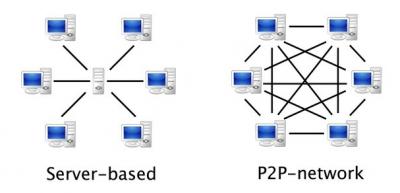
Based off the above image.. You can see that Quasar can and is very efficient at delivering content.  |
|
|
Apr 16 2019, 11:10 AM
|
|
Junior Member
91 posts Joined: Nov 2018
|
QUOTE(jabz @ Apr 15 2019, 03:40 PM) 1) dual band wifi good tips.. thank you2) minimum 3gb ram 3) minimum 16gb storage (if himedia q10 pro can install external HDD) 4) minimum 5.1 audio surround 5) run on android 7.1 and above and compatible with quasar addons |
|
|
Apr 16 2019, 02:12 PM
|
|
Junior Member
282 posts Joined: Jul 2010
|
QUOTE(AVFAN @ Apr 15 2019, 07:08 PM) v good. noted sifu... i get max 45MBps speed! yr requirements are not high for 2019, except the int hdd slot. most new boxes will exceed - android 8 or 9... 3 or 4 + 32 or 64gb. usb3.0, dual wifi 2.4/5ghz. just try not to buy anything below that if u want it to last 5 years. however, only a minority will give u HD audio (dtshdma, ddtruehd, atmos, dtsx) and auto framerate switch. that's a subject in another thread/place, not here.  |
|
|
|
|
|
Apr 23 2019, 06:26 PM
|
|
All Stars
24,454 posts Joined: Nov 2010
|
kodi 18.2 is official, u shud hv got auto updated.
next... kodi 19 M.. guess what will M be?! Magneto Mars Marvel Marvin Matrix Megatron Merlin Metropolis Mordor Morpheus Mother |
|
|
Apr 24 2019, 01:58 PM
|
|
Senior Member
2,329 posts Joined: Jun 2015
|
QUOTE(AVFAN @ Apr 23 2019, 06:26 PM) kodi 18.2 is official, u shud hv got auto updated. since L is Leia...i suspect M is Marthanext... kodi 19 M.. guess what will M be?! Magneto Mars Marvel Marvin Matrix Megatron Merlin Metropolis Mordor Morpheus Mother haha |
|
|
May 2 2019, 11:34 AM
|
|
Junior Member
111 posts Joined: May 2010
|
Guys i want to use SD card for Quasar storage. is there any special folder structure need to be created and format the card to exFAT? or can plug n set the download path in the Quasar addon?
|
|
|
May 2 2019, 12:46 PM
Show posts by this member only | IPv6 | Post
#5537
|
|
Senior Member
7,119 posts Joined: Oct 2011 From: Wakanda
|
QUOTE(rusty27 @ May 2 2019, 11:34 AM) Guys i want to use SD card for Quasar storage. is there any special folder structure need to be created and format the card to exFAT? or can plug n set the download path in the Quasar addon? Not really. Unless you want to store the library files on there too. In which case, yes.. You have to create a Library folder with separate sub folders for tv shows and movies... This in addition to another folder for downloads. exFAT remains the best choice for MicroSD cards. I prefer keeping the library on the faster internal memory.. You can have it set to both internal and external sources..This post has been edited by voncrane: May 2 2019, 12:47 PM |
|
|
May 3 2019, 11:10 PM
|
|
Junior Member
111 posts Joined: May 2010
|
QUOTE(voncrane @ May 2 2019, 12:46 PM) Not really. Unless you want to store the library files on there too. In which case, yes.. You have to create a Library folder with separate sub folders for tv shows and movies... This in addition to another folder for downloads. exFAT remains the best choice for MicroSD cards. I prefer keeping the library on the faster internal memory.. You can have it set to both internal and external sources.. i formatted my sd card thru androidbox n now can set the download path to sd card for Quasar. BTW facing another prob with Quasar addon where i cant click/long press the addon to go for the settings menu. Once i click the screen will freeze. i have to force close Kodi in order to exit. other addons doesnt give this prob. I uninstall kodi and did fresh installation. after that quasar addon seems ok..but today it starts back again. the screen will freeze if w i attempt to go quasar settings. If want to use the addon for view movie or show, it works well. |
|
|
May 4 2019, 05:08 AM
Show posts by this member only | IPv6 | Post
#5539
|
|
Senior Member
7,119 posts Joined: Oct 2011 From: Wakanda
|
QUOTE(rusty27 @ May 3 2019, 11:10 PM) i formatted my sd card thru androidbox n now can set the download path to sd card for Quasar. BTW facing another prob with Quasar addon where i cant click/long press the addon to go for the settings menu. Once i click the screen will freeze. i have to force close Kodi in order to exit. other addons doesnt give this prob. I uninstall kodi and did fresh installation. after that quasar addon seems ok..but today it starts back again. the screen will freeze if w i attempt to go quasar settings. If want to use the addon for view movie or show, it works well. The freezing is a known issue. Try searching this thread with the keyword "freeze". Use your keyboard to pull up the context menu. |
|
|
May 4 2019, 08:58 PM
Show posts by this member only | IPv6 | Post
#5540
|
|
Newbie
3 posts Joined: Jul 2015
|
I just started to use kodi recently. Should i use vpn to mask unofficial kodi addons?
|
| Change to: |  0.0238sec 0.0238sec
 0.30 0.30
 6 queries 6 queries
 GZIP Disabled GZIP Disabled
Time is now: 5th December 2025 - 10:20 PM |
 Quote
Quote