Welcome Guest ( Log In | Register )

Bump Topic Topic Closed RSS Feed

Outline · [ Standard ] · Linear+

TIME [OFFICIAL] TIME Fibre Broadband™ v3.o, 500 Mbps of rocket science

views
     
wirelessbuyer
post Apr 23 2016, 09:08 PM

Casual
***
Junior Member
346 posts

Joined: Jul 2012
Not sure whether this will helps or not, last time when I change the Feature >> QOS setting on the router the speed reduce drastically.

I'm using the same router, DIR-850L

QUOTE(zhiyuen91 @ Apr 23 2016, 08:49 PM)
Hi guys,

Just an update for my previous post on my router giving me very slow speeds on TIME's 300mbps.

The technician came over, identified that connecting directly to the Hua Wei Modem gives me 300 mbps on speedtest.net . Connecting the modem to the router only gives a 7 mbps result on Ethernet. And yea, the technician was still not able to find out what is causing the problem. Will wait for TIME's response on that.

In the mean time, does anyone know any settings on the DLINK router that can cause speed to reduce drastically? I have tested Cat6, Cat5e cables and tried resetting the router. Any help would be much appreciated.
*
wirelessbuyer
post Apr 30 2016, 05:49 PM

Casual
***
Junior Member
346 posts

Joined: Jul 2012
QUOTE(yaseen1979 @ Apr 30 2016, 05:40 PM)
Internet down. Modem can see red light blinking
.Called Cs waited for 40 minutes but no one answering. Area pelangi utama. Please help
*
Ah same issue .. I thought I'm the only one facing this issue .. Call cs for 20 min but nobody pick up too .. tropicana selatan area


wirelessbuyer
post Apr 30 2016, 05:54 PM

Casual
***
Junior Member
346 posts

Joined: Jul 2012
QUOTE(AutoWorld28 @ Apr 30 2016, 05:50 PM)
Same here at damansara pelangi,cs mentioned something spoilt for damansara area and they are fixing
*
I see .. I guess nearby area should be affected as well .. Did they mention any timeline for the fix?
wirelessbuyer
post Jul 12 2016, 09:39 PM

Casual
***
Junior Member
346 posts

Joined: Jul 2012
QUOTE(jeff_0621 @ Jul 12 2016, 09:07 PM)
Currently Im using unifi but think wan to switch to time. So I hv to terminate my unifi b4 apply time?
*
Same question as what I had in my mind before I change to Time last time smile.gif . You don't have to terminate your Unifi untill Time is fully installed in your unit.
wirelessbuyer
post Jul 29 2016, 01:44 AM

Casual
***
Junior Member
346 posts

Joined: Jul 2012
QUOTE(kcirdenk @ Jul 25 2016, 12:46 PM)
Anyone living in Bayu Puteri Apartment, PJ using TIME? How is the speed there?
*
Me! I'm staying in block A. The speed is very stable and I can say always getting 90-100 mbps consistent on 100mbps plan with LAN. thumbsup.gif thumbsup.gif

The only thing that I miss from unifi is the hypptv. Well might be still okay since my tv have the build in dvb-t2 tuner and i just plug into the building centralize antenna and enjoy the free digital dtt channels. tongue.gif
wirelessbuyer
post Jul 30 2016, 08:27 AM

Casual
***
Junior Member
346 posts

Joined: Jul 2012
QUOTE(kcirdenk @ Jul 29 2016, 09:07 AM)
Hi. I'm staying in block A as well. biggrin.gif  Did you try using Wifi before & how is the speed? Is it consistent?

When you convert, did you pay any penalty or TIME absorb it for you?

I'm currently on Unifi 30 & I can get the full speed mostly on Wifi but still thinking whether to change to TIME.
*
With dlink 850l, the wifi easily get above 50mbps in all room with door closed. As long as your device device support dual band 5Ghz n or ac then it should be fine. The 2.4Ghz ssid seems abit not stable and consistent but should easily get above 30mbps.

But anyway, for wifi there alot of factor that need to take into consideration. Always use Ethernet cable to achieve full speed! biggrin.gif

You won't regret switching to time if you are not using the Hypptv service. If you're dota player, then there is another good news, the ping average at 9-10ms when using Ethernet cable, compared to my unifi last time average at 60+ms.

I got the rebate credited to my time account from time when i switched(not cash). You can refer to yeapch01 for more details, whether it is still valid.
wirelessbuyer
post Aug 5 2016, 03:34 PM

Casual
***
Junior Member
346 posts

Joined: Jul 2012
QUOTE(nizamalphas @ Aug 5 2016, 11:13 AM)
Im wondering how its time fiber installation?. Do they pull from the telephone riser ? or from the telephone port?.  rclxub.gif  any charges during installation ?.
*
For bayu puteri unit, they will pull the fibre cable from the room near the lift (dunno what room it call) to your house. For me no extra charges and all cover as a part of free installation.

There are 2 options, they will ask you whether want (1) to route the fibre cable under your door or (2) drilling. I choose drilling as I scared the fibre cable will rosak if I choose the option (1) for long run. Yeah, you need to get permission from office to do the drilling process, just in case your neighbor complaining later on laugh.gif
wirelessbuyer
post Sep 24 2016, 04:00 PM

Casual
***
Junior Member
346 posts

Joined: Jul 2012
Anyone here from damansara area got connection issue now? Los lights blinking
wirelessbuyer
post Sep 24 2016, 04:13 PM

Casual
***
Junior Member
346 posts

Joined: Jul 2012
Yeah just called the cs. Earliest they can come and check is on Monday .. :/

Usually what is the issue if los blinking red color?

This post has been edited by wirelessbuyer: Sep 24 2016, 04:18 PM
wirelessbuyer
post Sep 25 2016, 01:32 PM

Casual
***
Junior Member
346 posts

Joined: Jul 2012
QUOTE(sherust @ Sep 24 2016, 09:10 PM)
same with me here....LOS blinking red after 2 hours installation...they said cable faulty.. T_T
*
May I know which area/buildng your unit is?
wirelessbuyer
post Sep 25 2016, 04:49 PM

Casual
***
Junior Member
346 posts

Joined: Jul 2012
QUOTE(CalvinCLK @ Sep 25 2016, 02:21 PM)
LOS on modem is blinking in red. Anyone encounter this? Area Tropicana Selatan
*
Thats my area. Bayu puteri apartment to be exact. Seems that the issue is in tropicana selatan area then.


wirelessbuyer
post Sep 25 2016, 06:01 PM

Casual
***
Junior Member
346 posts

Joined: Jul 2012
QUOTE(CalvinCLK @ Sep 25 2016, 05:49 PM)
Ah. Same place. Bayu Puteri. Has it been resolved now?
*
Not yet, called the CS yesterday and only tomorrow they will come here to check. I guess this issue is related with the apartment connection instead of individual unit.

Have you called ther CS?
wirelessbuyer
post Sep 26 2016, 08:02 PM

Casual
***
Junior Member
346 posts

Joined: Jul 2012
QUOTE(CalvinCLK @ Sep 26 2016, 01:50 PM)
Bro, Time connection is back to normal.
*
Yeah, glad the connection is back now 😁
wirelessbuyer
post Feb 16 2017, 11:04 PM

Casual
***
Junior Member
346 posts

Joined: Jul 2012
Tropicana area.

Direct LAN (100mbps plan)

D: 15 - 20 mbps
U: 100mbps

What happen?
wirelessbuyer
post Feb 17 2017, 09:15 PM

Casual
***
Junior Member
346 posts

Joined: Jul 2012
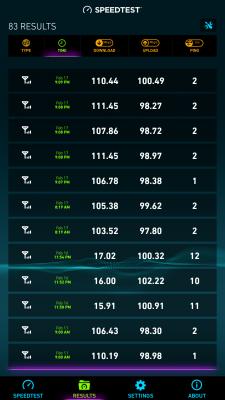
Issue seems fixed since this morning.

Test on android box using LAN. thumbup.gif

Attached Image

This post has been edited by wirelessbuyer: Feb 17 2017, 09:17 PM
wirelessbuyer
post Sep 11 2018, 01:18 PM

Casual
***
Junior Member
346 posts

Joined: Jul 2012
QUOTE(death_nite @ Sep 10 2018, 11:15 PM)
Dissapointed betul with Time. Have a very high expectation with Time but worst than Unifi. Being using Time for 1 month.

Moving in to new house. Only have Time. Hv to terminate my 8 years old Unifi only to find out I cant get full 100mbps when torrenting with Time. 

Max only around 60mbps. Torrent seeder is thousands.

Really miss my unifi. Always get 100% speed when torrenting.

And Time randomly lag cant stream vid; especially in the morning. Whatsapp/wechat smtime cant sync with server. Adoi la.

The only good is speedtest.
*
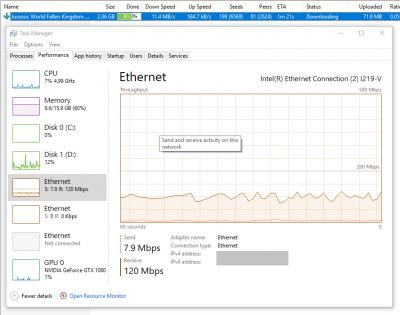
Hi bro, just to share my experience. I'm having no issue at all to get full 100Mbps speed for torrenting but of course it depends on the seeds number itself.

Btw, I'm using DIR-850L with ethernet cable


Attached thumbnail(s)
Attached Image
wirelessbuyer
post Sep 11 2018, 02:12 PM

Casual
***
Junior Member
346 posts

Joined: Jul 2012
QUOTE(death_nite @ Sep 11 2018, 01:55 PM)
You are right. Router is not an issues. That is my point. 🙂 Direct download i can get 100mbps. Only when torrenting not getting full speed. Numbers of seeders is thousands. And I have tried multiple torrents. Still hover around 50-60mbps.
*
My previous screenshot is showing my torrent download speed (not direct) which is hovering stable at 90-100 Mbps. I'm not sure why you can't get it while your torrent seeders is over thousands.

May I know as previous forumer asking, whether you are using wifi or lan?
wirelessbuyer
post Sep 27 2018, 08:53 PM

Casual
***
Junior Member
346 posts

Joined: Jul 2012
Subscribed Feb 2016 and just received the free router email from TIME this evening. Originally was given ZTE router.
wirelessbuyer
post Sep 28 2018, 12:46 PM

Casual
***
Junior Member
346 posts

Joined: Jul 2012
QUOTE(jjj2 @ Sep 28 2018, 12:16 PM)
Yes Guys..it's UP again.... please restart your routers/any PPPOE dialing devices.
*
What is the cause of this downtime this time?
wirelessbuyer
post Sep 30 2018, 08:17 PM

Casual
***
Junior Member
346 posts

Joined: Jul 2012
Btw, the free router that show as popup on my selfcare dashboard redirect me to the url below, you guys can give it a try .. but I dunno whether all can redeem it or not

https://selfcare.time.com.my/userv3/free_router/


Attached thumbnail(s)
Attached Image

2 Pages  1 2 >Top
Topic ClosedOptions
 

Change to:
| Lo-Fi Version
0.2676sec    1.01    7 queries    GZIP Disabled
Time is now: 1st December 2025 - 08:46 AM