Welcome Guest ( Log In | Register )

Outline · [ Standard ] · Linear+

Home Theatre Something you should know before buying a HDTV, LCD, Plasma, RP LCD, SXRD

views
     
TSAlamakLor
post Dec 30 2006, 02:34 AM, updated 19y ago

Look at all my stars!!
Group Icon
Elite
9,856 posts

Joined: Jan 2003
From: Kuala Lumpur, WP


Recently bought a TV and had gone through lots of reading and troubles. Apparently different TV has different "avoidable" problems, I wont mention much about those. As for some technological and manufacturing problems...here are some of them:

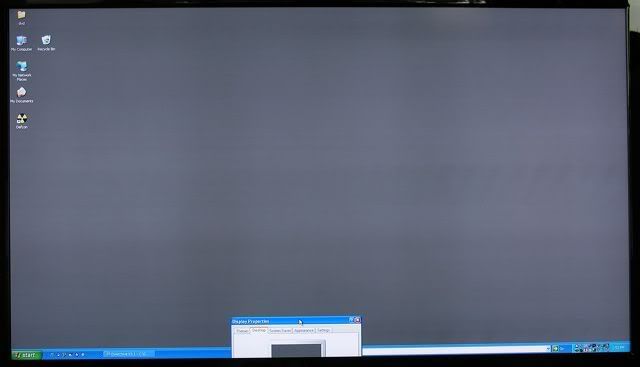
Sharp Aquos 1080p:
user posted image
user posted image
user posted image
*not jsut vertical, but also horizontal banding*

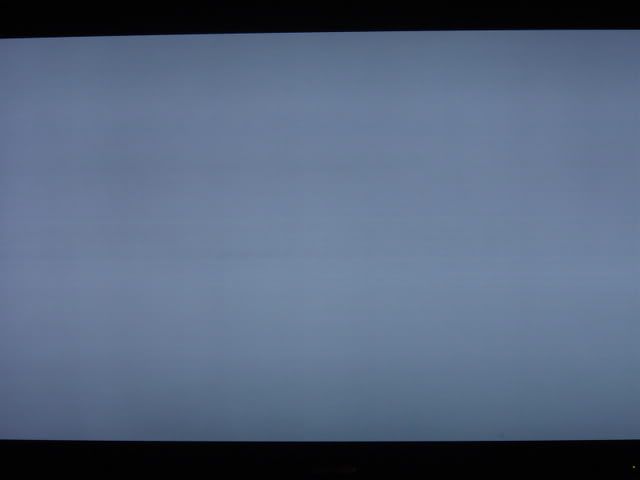
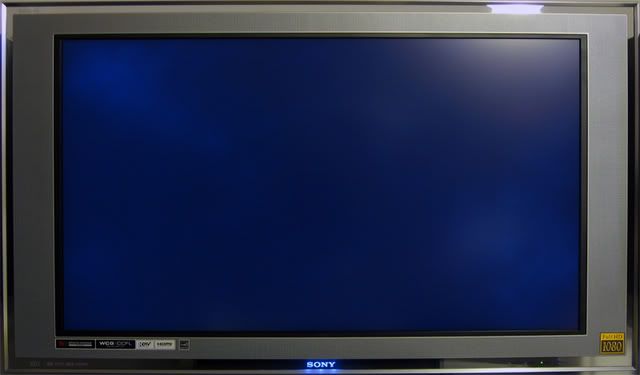
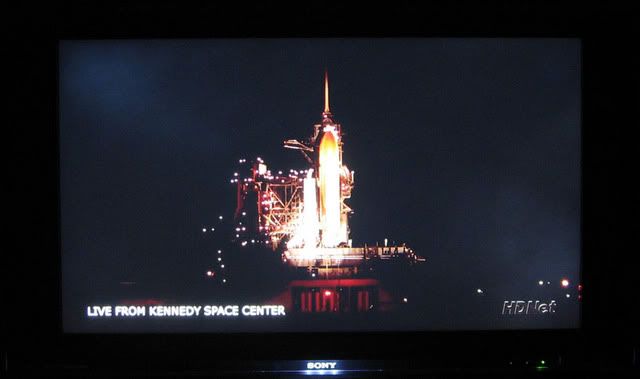
Sony Bravia XBR2 1080p:
user posted image
user posted image
*cloud problem*

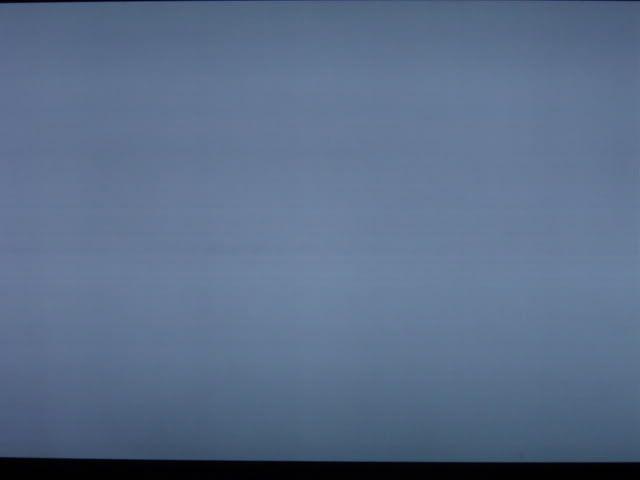
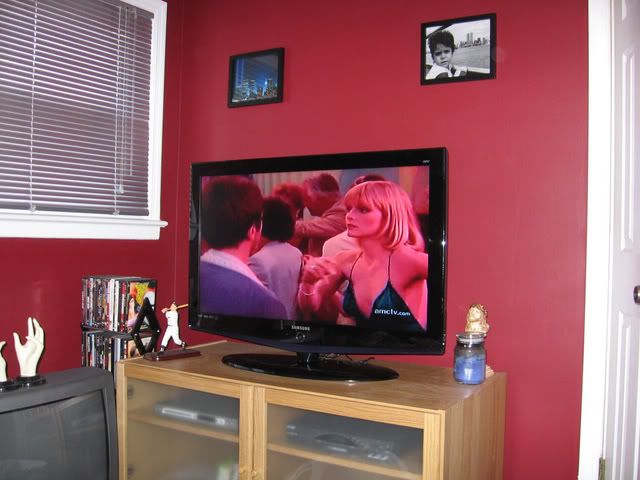
Samsung (dunno what model):
user posted image
user posted image
*common vertical band*

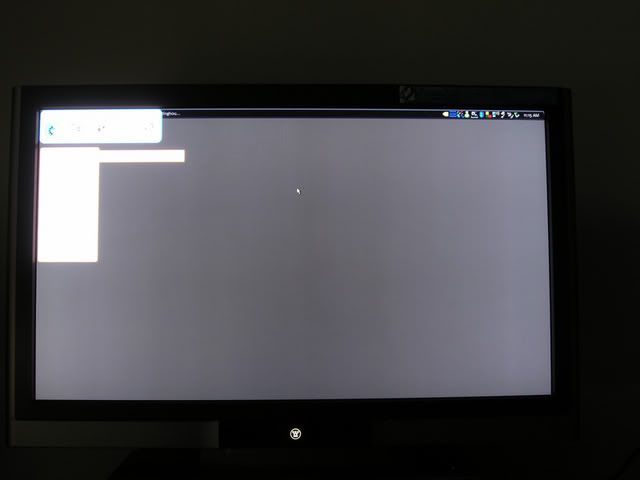
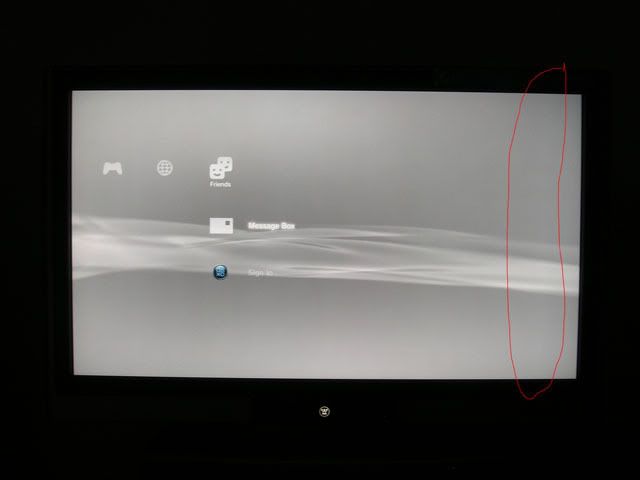
Westinghouse LVM 1080p series (mine):
user posted image
user posted image
*brighter streak*

If you cannot see the banding problems...try scrolling the pages and you will see them easily. Following attatchment is a grey background I made to detect vertical banding, you can adjust your TV's brightness to check it out at different grey level. Vertical banding is not new, but is getting serious. This also applies to LCD Monitor and Projectors as well. Another problem is backlight bleeding, easily detectable under black background. Just look around the boarders and see if it has same brightness as the other areas or do they look significantly brighter.

Pictures are all taken from various thread in AVS forum.

This post has been edited by AlamakLor: Jan 7 2007, 02:27 AM


Attached thumbnail(s)
Attached Image
vincent_audio
post Dec 30 2006, 02:40 AM

Regular
******
Senior Member
1,161 posts

Joined: Dec 2006
From: http://www.vincentpang.ws
great findings, but wrong section i suppose

QUOTE
Audiophiles (13 Active Users)
Subforums: [Musicians]
Fine tuning the decibel gap. Portable MP3 players, high end speakers and all audio gadgets.
QUOTE
Photography, Digital Imaging & Video (4 Active Users)
Subforums: [Photo Gallery], [Trading Guides]
Discussion of video, imaging, photography, and techniques as well as reviews of gears to it
or maybe

QUOTE
Hardware (11 Active Users)
Subforums: [Hardware Questions & Answers]
All the latest peripherals that will burn a hole in your pocket.
This post has been edited by vincent_audio: Dec 30 2006, 02:40 AM
TSAlamakLor
post Dec 30 2006, 02:42 AM

Look at all my stars!!
Group Icon
Elite
9,856 posts

Joined: Jan 2003
From: Kuala Lumpur, WP


The hardware section is mainly PC oriented, Phtography section is imaging and digita video oriented, the audio section is actually Audio Video oriented. Nothing wrong with this thread being in this section.
vincent_audio
post Dec 30 2006, 02:45 AM

Regular
******
Senior Member
1,161 posts

Joined: Dec 2006
From: http://www.vincentpang.ws
QUOTE(AlamakLor @ Dec 30 2006, 02:42 AM)
The hardware section is mainly PC oriented, Phtography section is imaging and digita video oriented, the audio section is actually Audio Video oriented. Nothing wrong with this thread being in this section.
*
but the forum description seems to be describing otherwise smile.gif maybe scotty can amend that. Or stop calling this section audiophiles all together smile.gif
TSAlamakLor
post Dec 30 2006, 02:54 AM

Look at all my stars!!
Group Icon
Elite
9,856 posts

Joined: Jan 2003
From: Kuala Lumpur, WP


QUOTE(vincent_audio @ Dec 29 2006, 03:45 PM)
but the forum description seems to be describing otherwise smile.gif maybe scotty can amend that. Or stop calling this section audiophiles all together smile.gif
*
You can ask scotty or the admins to move it if you want though tongue.gif along with all the LCD TV threads. I founded this section ages ago and it was initially intended for "audio" only. It should have been called Audio Video at the first place but for some reasons it was called Audiophiles. (I didn't name it, I just suggested this section and help to materialize it. Other staff and mods werent quite fond of this section at that time though.)

PS: did you take note of the main title of the "hardware" section...it say "computers". Did you check out the content of the Digital forum? cameras and DV laugh.gif

This post has been edited by AlamakLor: Dec 30 2006, 02:57 AM
DSC
post Dec 30 2006, 03:53 AM

Look at all my stars!!
*******
Senior Member
2,240 posts

Joined: Jan 2003
AlamakLor, is there an LCD TV that doesn't suck at all? laugh.gif tongue.gif

Rather disappointing to see all these problems still occuring. hmm.gif
tong1774
post Dec 30 2006, 05:01 AM

Regular
******
Senior Member
1,065 posts

Joined: Dec 2004
Alamaklor, how much you push the brightness or backlight level before the "brighter streak" show up? My Sharp also got this problem when i turn up the brightness, and certain DVD will exibite some green pixel on the area which is brighter. Wont see it if the DVD quality is good though... Do yours have tis problem too?
TSAlamakLor
post Dec 30 2006, 06:24 AM

Look at all my stars!!
Group Icon
Elite
9,856 posts

Joined: Jan 2003
From: Kuala Lumpur, WP


Usually it is visible at any level of brightness, after all, it is the screen that is uneven which causes the banding, not the backlight placement or the luminosity if the light. As you can see from the first sharp picture, there are 2 thick dark band that is symmetrical, that is actually the "mark" left by the rolling machine when they are flattening the panels. Green pixels? I think ur tv got some serious problems sweat.gif might wanna rma it before warranty habis...these problems cannot be "serviced" so they will usually just examine it and give u another TV, might be new, might be refurb.

@DSC
not too sure, but all of the have this kind of problem...it's just whether the owners noticed it or not. It is pretty much the limits of the technology. Even on a lcd monitor, you'd still notice that the grey is not particularly smooth compared to CRT.
tong1774
post Dec 30 2006, 12:19 PM

Regular
******
Senior Member
1,065 posts

Joined: Dec 2004
QUOTE(AlamakLor @ Dec 30 2006, 06:24 AM)
Usually it is visible at any level of brightness, after all, it is the screen that is uneven which causes the banding, not the backlight placement or the luminosity if the light. As you can see from the first sharp picture, there are 2 thick dark band that is symmetrical, that is actually the "mark" left by the rolling machine when they are flattening the panels. Green pixels? I think ur tv got some serious problems sweat.gif might wanna rma it before warranty habis...these problems cannot be "serviced" so they will usually just examine it and give u another TV, might be new, might be refurb.

@DSC
not too sure, but all of the have this kind of problem...it's just whether the owners noticed it or not. It is pretty much the limits of the technology. Even on a lcd monitor, you'd still notice that the grey is not particularly smooth compared to CRT.
*
The green pixel wont be there all the time, and u cant see it on the desktop wallapepaer even if i push the brightness to max. It will only appear on those bad encoded source which already contain some pixel in it, and the tv make it worst. If the source is good, like D9 and some 1080p downloaded from Microsoft, then u wont see it at all. I am getting Sharp to come over and check it next week, hope that they can change a new one for me.
TSAlamakLor
post Dec 30 2006, 01:09 PM

Look at all my stars!!
Group Icon
Elite
9,856 posts

Joined: Jan 2003
From: Kuala Lumpur, WP


maybe it's some green tint problem...not sure about that. When you get them over...make a huge fuss, tell them that you have checked with many owners online and many ppl have this problem tongue.gif this way, they will really treat it as a problem biggrin.gif
mofonyx
post Dec 30 2006, 01:09 PM

Squatting is the solution to life's problems
*******
Senior Member
2,394 posts

Joined: Jan 2003
From: Bristol, UK


Eih, very noble of you to do this smile.gif Looks like you have a lot of time on your hands. smile.gif

aaronpang
post Dec 30 2006, 11:41 PM

Cat Exterminator
******
Senior Member
1,979 posts

Joined: Jan 2003
From: Kuala Lumpur
I know banding is a common problem for Sharp screens but they still look good and are on top of my shortlist...

Anyway does anyone know if it's a problem for Phillips because I was targetting either an Sharp or Phillips LCD TV for my home... I'm looking for a good 32inch screen biggrin.gif
tong1774
post Dec 30 2006, 11:47 PM

Regular
******
Senior Member
1,065 posts

Joined: Dec 2004
QUOTE(aaronpang @ Dec 30 2006, 11:41 PM)
I know banding is a common problem for Sharp screens but they still look good and are on top of my shortlist...

Anyway does anyone know if it's a problem for Phillips because I was targetting either an Sharp or Phillips LCD TV for my home... I'm looking for a good 32inch screen  biggrin.gif
*
Philips has backlight leakage problem in common, may be the hi-end model is better, but expensive like hell. And the low-end model not worth looking at, example the TA1800 and 7321 series. So unless u have adeep pocket to go for Philips 9XXX series, otherwise look some where else.
aaronpang
post Dec 31 2006, 12:11 AM

Cat Exterminator
******
Senior Member
1,979 posts

Joined: Jan 2003
From: Kuala Lumpur
QUOTE(tong1774 @ Dec 30 2006, 11:47 PM)
Philips has backlight leakage problem in common, may be the hi-end model is better, but expensive like hell. And the low-end model not worth looking at, example the TA1800 and 7321 series. So unless u have adeep pocket to go for Philips 9XXX series, otherwise look some where else.
*
OIC backlight leakage is it really bad?

I'm doing my best to avoid plasmas because of the high power consumption and problems with image getting burned on the screen... mad.gif

Is there such a thing as a perfect LCD TV without a heavy price tag coz I only got like RM5k. icon_question.gif
SUSMike3300
post Dec 31 2006, 12:13 AM

Look at all my stars!!
*******
Senior Member
6,866 posts

Joined: Feb 2005


QUOTE(aaronpang @ Dec 31 2006, 12:11 AM)
OIC backlight leakage is it really bad?

I'm doing my best to avoid plasmas because of the high power consumption and problems with image getting burned on the screen... mad.gif

Is there such a thing as a perfect LCD TV without a heavy price tag coz I only got like RM5k.  icon_question.gif
*
You can get HDTV with that price, but lower screen size.
kelvinyam
post Dec 31 2006, 12:21 AM

May beauty be everywhere around me
******
Senior Member
1,766 posts

Joined: Jan 2003
From: Klang Valley


Regarding to the bending problem, is this the same problem that happened to Dell LCD few years back? So this is a common problem for LCD panel regardless of LCD TV or LCD Monitor?
And is the size of panel got something to do with this defect? I'm using a Dell 19" ultrasharp and I don't have this problem, yet.
tong1774
post Dec 31 2006, 12:35 AM

Regular
******
Senior Member
1,065 posts

Joined: Dec 2004
QUOTE(aaronpang @ Dec 31 2006, 12:11 AM)
OIC backlight leakage is it really bad?

I'm doing my best to avoid plasmas because of the high power consumption and problems with image getting burned on the screen... mad.gif

Is there such a thing as a perfect LCD TV without a heavy price tag coz I only got like RM5k.  icon_question.gif
*
5k can get u a above average 32" LCD, but no where near perfect, even CRT and plasma has are not perfect. But with 5K u better get a decent 32" than a 37" but crappy LCD.
TSAlamakLor
post Dec 31 2006, 01:17 AM

Look at all my stars!!
Group Icon
Elite
9,856 posts

Joined: Jan 2003
From: Kuala Lumpur, WP


QUOTE(kelvinyam @ Dec 30 2006, 01:21 PM)
Regarding to the bending problem, is this the same problem that happened to Dell LCD few years back? So this is a common problem for LCD panel regardless of LCD TV or LCD Monitor?
And is the size of panel got something to do with this defect? I'm using a Dell 19" ultrasharp and I don't have this problem, yet.
*
yeah, the same problem was reported on the dell lcd. Some say it has nothing to do with the sizes, but I think that banding would seem more prominent on larger screens. This is a common problem with LCD technology, but as I said, it is getting more serious nowadays biggrin.gif
piscesguy
post Dec 31 2006, 07:58 AM

ç§ã®åå‰ã¯ã‚Šã‚…ã†ã§ã™
*******
Senior Member
3,965 posts

Joined: Nov 2006
QUOTE(AlamakLor @ Dec 31 2006, 01:17 AM)
yeah, the same problem was reported on the dell lcd. Some say it has nothing to do with the sizes, but I think that banding would seem more prominent on larger screens. This is a common problem with LCD technology, but as I said, it is getting more serious nowadays biggrin.gif
*
Do you know any banding problem exists in Plasma tv? It seems I cannot find it in my plasma. hmm.gif
TSAlamakLor
post Dec 31 2006, 08:05 AM

Look at all my stars!!
Group Icon
Elite
9,856 posts

Joined: Jan 2003
From: Kuala Lumpur, WP


I'm not sure about plasma, I've never really looked into plasma due to the phosphor burning issue...which is going to be inevitable since not many movies are 16:9
SUSgogo2
post Dec 31 2006, 09:32 AM

gogo2
********
All Stars
18,672 posts

Joined: Jan 2003
From: Penang


This means that CRT is still the best. Unfortunately, component only support low bit rate. Maybe should get CRT with HDMI biggrin.gif
http://www.google.com.my/search?hl=en&q=cr...ta=lr%3Dlang_en
htkaki
post Jan 2 2007, 01:24 PM

Maxx Audio Visual
********
Senior Member
14,193 posts

Joined: May 2005
From: Sbn / KL


QUOTE(AlamakLor @ Dec 31 2006, 08:05 AM)
I'm not sure about plasma, I've never really looked into plasma due to the phosphor burning issue...which is going to be inevitable since not many movies are 16:9
*

The issue is a problem when u continuously watch a movie with a logo for a pro-longed period of time. If u switch on and off or sticking to particular channel for less than 5 hrs, i dont think it will be a problem. It has employed the 'picture shift' in it to minimise the problem.

A friend of mine who owns Pioneer plasma doesnt has a problem with this after 3 years.
sunauto
post Jan 2 2007, 01:54 PM

<< Blu-Ray Rocks >>
*******
Senior Member
4,017 posts

Joined: Jun 2006
From: Georgetown, Penang


There's not CRT with HDMI and even if there is you're not getting true HD resolutions, some CRTs support 1080i signals but it doesn't you're getting 1080i resolution.

Well, LCDs or Plasmas might have their own pros and cons but frankly, they're still better looking than a normal CRT when you feed them with HD materials.

QUOTE(gogo2 @ Dec 31 2006, 09:32 AM)
This means that CRT is still the best. Unfortunately, component only support low bit rate. Maybe should get CRT with HDMI biggrin.gif
http://www.google.com.my/search?hl=en&q=cr...ta=lr%3Dlang_en
*
TSAlamakLor
post Jan 2 2007, 02:42 PM

Look at all my stars!!
Group Icon
Elite
9,856 posts

Joined: Jan 2003
From: Kuala Lumpur, WP


QUOTE(htkaki @ Jan 2 2007, 02:24 AM)
The issue is a problem when u continuously watch a movie with a logo for a pro-longed period of time. If u switch on and off or sticking to particular channel for less than 5 hrs, i dont think it will be a problem. It has employed the 'picture shift' in it to minimise the problem.

A friend of mine who owns Pioneer plasma doesnt has a problem with this after 3 years.
*
The new plasma are suppose to no longer have this problem. However, the plasma is still too fragile and great care is needed, if you forgot to turn off the TV or some silly power outage force the tv to turn on upon getting the power back (my CRT does that) it might cause some serious damage to the Tv. Regardless, this is just one problem with plasma there are many more like rainbow effect. None of the Tvs now are close to perfect and I can't help but keep on noticing their flaws.
katunX
post Jan 3 2007, 10:24 AM

Casual
***
Junior Member
391 posts

Joined: Jul 2005
From: Bandar Baru Bangi/ Jalan Klang Lama


is the BRAVIA model supposed to be HD ready? Look disappointed though to look for btter lcd tv...
TSAlamakLor
post Jan 3 2007, 10:27 AM

Look at all my stars!!
Group Icon
Elite
9,856 posts

Joined: Jan 2003
From: Kuala Lumpur, WP


Both the Bravia V2500 and XBR2/3 are 1080p ready. Both suffers from the Mura effect, and both have about 90% chance of getting dead pixels. I didn't pay too much attention to the XBR2 but I've read comments from some other owners that although the black level is better than other LCD TV, the black crush is even more kau.
theofys
post Jan 3 2007, 11:44 AM

New Member
*
Junior Member
31 posts

Joined: Oct 2006
Sony's latest flaghship HDTV XBR3 is amongst the best in the 1080p lcd market. It has a very high contrast ratio ( don't remember the exacts ), dual HDMI ports if not mistaken, but getting deal pixels only applies to the plasmas ? Pls clarify.

Oh well we'll just have to sit and wait and wait. There's no point getting a HDTV yet as Bluray/HD-DVD players and movies are still at birth. Thanks for the short life span of technology.
TSAlamakLor
post Jan 3 2007, 01:40 PM

Look at all my stars!!
Group Icon
Elite
9,856 posts

Joined: Jan 2003
From: Kuala Lumpur, WP


I'm in a dilemma here as I am constantly being bugged by the banding issue with LCD tv...I simply cant stand those damn banding. They look very obvious when the picture is panning left and right as you can see them as haze and they make the screen looks "dirty". I got my TV at a super deal and I'm very very reluctant to return it. But I think LCD technology is just not for me sad.gif
kelvinyam
post Jan 3 2007, 01:45 PM

May beauty be everywhere around me
******
Senior Member
1,766 posts

Joined: Jan 2003
From: Klang Valley


QUOTE(AlamakLor @ Jan 3 2007, 01:40 PM)
I'm in a dilemma here as I am constantly being bugged by the banding issue with LCD tv...I simply cant stand those damn banding. They look very obvious when the picture is panning left and right as you can see them as haze and they make the screen looks "dirty". I got my TV at a super deal and I'm very very reluctant to return it. But I think LCD technology is just not for me sad.gif
*
Just to spam a little. The Garage Sale forum is still available smile.gif
TSAlamakLor
post Jan 3 2007, 01:51 PM

Look at all my stars!!
Group Icon
Elite
9,856 posts

Joined: Jan 2003
From: Kuala Lumpur, WP


QUOTE(kelvinyam @ Jan 3 2007, 02:45 AM)
Just to spam a little. The Garage Sale forum is still available smile.gif
*
want me to ship a 42" 60lbs TV from Canada to Malaysia? I dont think so laugh.gif

EDIT: hmm, after ever more testing, I found out that LCD is not able to provide a perfectly smooth backlighting and brightness regardless of size. If you want to see what I mean, this is what you need to do:

1) clean your lcd monitor, make sure that is is very clean
2) make sure your white and black level is set properly so that nothign is washed out
3) take the following picture, do not put it to maximum but keep it windowed.
4) move the window around with your mouse and you will notice that the screen is 'hazy' and 'dirty' eventhough you have cleaned the screen.

The haze and dirtiness is apparently the uneven backlighting and surface of the panel. I thought it was my screen that's suffering from this phenomenon and apparently this is happening to my LCD monitor too...WTF shocking.gif

Have I became a videophile or did I just become more sensitive and anal? blink.gif
I'm so confused I don't even know what I should do.

This post has been edited by AlamakLor: Jan 9 2007, 08:35 AM


Attached thumbnail(s)
Attached Image
tong1774
post Jan 3 2007, 04:58 PM

Regular
******
Senior Member
1,065 posts

Joined: Dec 2004
QUOTE(AlamakLor @ Jan 3 2007, 01:51 PM)
want me to ship a 42" 60lbs TV from Canada to Malaysia? I dont think so laugh.gif

EDIT: hmm, after ever more testing, I found out that LCD is not able to provide a perfectly smooth backlighting and brightness regardless of size. If you want to see what I mean, this is what you need to do:

1) clean your lcd monitor, make sure that is is very clean
2) make sure your white and black level is set properly so that nothign is washed out
3) take the following picture, do not put it to maximum but keep it windowed.
4) move the window around with your mouse and you will notice that the screen is 'hazz' and 'dirty' eventhough you have cleaned the screen.

The haze and dirtiness is apparently the uneven backlighting and surface of the panel. I thought it was my screen that's suffering from this phenomenon and apparently this is happening to my LCD monitor too...WTF  shocking.gif

Have I became a videophile or did I just become more sensitive and anal?  blink.gif
I'm so confused I don't even know what I should do.
*
I think u are being anal. ha... why dont u just get a CRT instead of LCD or Plasma? As long as u dont move house always, the weight can be ignore. And the sony 36" XBR series Wides creen CRT is still available in US, too bad they dont carry it into Malaysia any more. CRT will has its own problem too, but at least better than plasma or LCD.

TSAlamakLor
post Jan 3 2007, 05:02 PM

Look at all my stars!!
Group Icon
Elite
9,856 posts

Joined: Jan 2003
From: Kuala Lumpur, WP


CRT size is too small. I am moving to another province in the next 6 months, which is why I am leaning towards LCD. If I were to buy the TV a few months later, I would get the 50" KDS50A2000. But for now, I really cant as I will have to pay a great deal for the shipping next time. I'm wondering if I should just return the TV and wait a few months to get the larger sony with less problems. Man, I can't stand my 24" crt with PS3...it is now worse than crap.

EDIT: Screw it, I'm returning it..I can't stand the banding on LCD. I'll get the 50" SXRD a few months later (hopefully no banding), or go for a panny 1080p plasma....

This post has been edited by AlamakLor: Jan 3 2007, 05:26 PM
tong1774
post Jan 3 2007, 05:26 PM

Regular
******
Senior Member
1,065 posts

Joined: Dec 2004
QUOTE(AlamakLor @ Jan 3 2007, 05:02 PM)
CRT size is too small. I am moving to another province in the next 6 months, which is why I am leaning towards LCD. If I were to buy the TV a few months later, I would get the 50" KDS50A2000. But for now, I really cant as I will have to pay a great deal for the shipping next time. I'm wondering if I should just return the TV and wait a few months to get the larger sony with less problems. Man, I can't stand my 24" crt with PS3...it is now worse than crap.
*
Well may be u should just return it and wait for another 6 months, or 6 month later u just sell it to your friend and get a new one. Its up to how much u can tolerate your current lcd, if can not, just return it lo... How far do u sit from your tv, 26" is ok if u sit less than 1 meter away, but if u can not tahan the PQ, then there is nothing u can do.
TSAlamakLor
post Jan 4 2007, 09:27 AM

Look at all my stars!!
Group Icon
Elite
9,856 posts

Joined: Jan 2003
From: Kuala Lumpur, WP


Actually my CRT is only 24" and it can only do 480i....I can barely look at it now but on SD content it still looks ok.

As for the TV, I just came back from Sony Store and some other electronics store. Here are my findings with regards to LCD, RP LCD, and Plasma:

-LCD: Best image of all the technology but poorest black level. Vertical banding is definitely in every single LCD tv out there. I have noticed that both the XBR and V2500 have very even vertical banding. They are all over the screen and are about 1-2 inches apart. I find the VB to be softer compared to other TVs but my GF says that it is even worse than my Westinghouse. The Bravia XBR mura effect is crazy, it is not obvious as long as there is ambient light, and if you are a few ft away. In a totally dark room, you can see the cloud easily and they have different patterns...the one I looked at had a BIG MUTHA ******* Cloud at the left and some smaller ones at the right. sweat.gif

LCD RP: I looked at the 50. 60, and 70" SXRD and boy I must say they suck big time compared to true LCD tv. I did not notice and green blob on any of the SXRD but the sharpness is no where near LCD. The screen is ever so rough in its texture and it looks really noisy. The picture is really soft even if you crank the sharpness to max and the screen looks a little fuzzy. The TVs have all been on for some time and is fully warmed up. Off axis viewing is nightmare... However, the best part is, I can barely see any banding at all. Regardless, I've written off RP, it simply doesnt work for me.

-Plasma: The picture is closest to CRT imho, but requires great care when using them. I noticed that manufaturers have written in the manual that they do not cover image retention, dead pixels, and etc. They did mention in the manual that image retention may occur and encourage users to keep the contrast and brightness low. Another thing to note about plasma is screen reflection. Unlike lcd, there is a coat of glass in the front and obviously you can see your own reflection on the screen as a result of that. Picture wise, I like the samsung quite abit. The color is quite natural and is slightly soft compared to LCD which some ppl find it unnatural. The only problem with Plasma is that it is hard to find 1080p screens that do not blow a hole in your pocket.

I still cannot make up my mind what to do sad.gif maybe i should just keep the LCD tv?
tong1774
post Jan 4 2007, 10:08 AM

Regular
******
Senior Member
1,065 posts

Joined: Dec 2004
QUOTE(AlamakLor @ Jan 4 2007, 09:27 AM)
Actually my CRT is only 24" and it can only do 480i....I can barely look at it now but on SD content it still looks ok.

As for the TV, I just came back from Sony Store and some other electronics store. Here are my findings with regards to LCD, RP LCD, and Plasma:

-LCD: Best image of all the technology but poorest black level. Vertical banding is definitely in every single LCD tv out there. I have noticed that both the XBR and V2500 have very even vertical banding. They are all over the screen and are about 1-2 inches apart. I find the VB to be softer compared to other TVs but my GF says that it is even worse than my Westinghouse. The Bravia XBR mura effect is crazy, it is not obvious as long as there is ambient light, and if you are a few ft away. In a totally dark room, you can see the cloud easily and they have different patterns...the one I looked at had a BIG MUTHA ******* Cloud at the left and some smaller ones at the right. sweat.gif

LCD RP: I looked at the 50. 60, and 70" SXRD and boy I must say they suck big time compared to true LCD tv. I did not notice and green blob on any of the SXRD but the sharpness is no where near LCD. The screen is ever so rough in its texture and it looks really noisy. The picture is really soft even if you crank the sharpness to max and the screen looks a little fuzzy. The TVs have all been on for some time and is fully warmed up. Off axis viewing is nightmare... However, the best part is, I can barely see any banding at all. Regardless, I've written off RP, it simply doesnt work for me.

-Plasma: The picture is closest to CRT imho, but requires great care when using them. I noticed that manufaturers have written in the manual that they do not cover image retention, dead pixels, and etc. They did mention in the manual that image retention may occur and encourage users to keep the contrast and brightness low. Another thing to note about plasma is screen reflection. Unlike lcd, there is a coat of glass in the front and obviously you can see your own reflection on the screen as a result of that. Picture wise, I like the samsung quite abit. The color is quite natural and is slightly soft compared to LCD which some ppl find it unnatural. The only problem with Plasma is that it is hard to find 1080p screens that do not blow a hole in your pocket.

I still cannot make up my mind what to do sad.gif maybe i should just keep the LCD tv?
*
Well if thats the case then u may have to stick with LCD, and a darn good one since u are so anal about perfection. I didnt check out the Philips 9xxx series very closely(Too darn expensive here!), but may be u can give it a try since its one of the best LCD out there which uses Sharp's panel. But if black level is very important to u then there is not much option though. As for the Sony XBR, may be u can try looking for other batch which do not have the mura effects, so u may have to be very "kam cheng" with the sales man so that he could help u find one.

TSAlamakLor
post Jan 4 2007, 10:24 AM

Look at all my stars!!
Group Icon
Elite
9,856 posts

Joined: Jan 2003
From: Kuala Lumpur, WP


The problem is i dont wanna spend more than rm6k for the TV sad.gif I am actually contemplating returning this and get the Hitachi Plasma 720p 42HDS69 1024 X 1080 which accepts native 1080i, Alis panel should be immune to burn in. I can't decide how important is 1080p to me now as I have not seen a 1080p game on ps3 yet. I see no difference between upconverted 720p vs native 720p res. I wanna get the most experience out of GT5 (1080p omg) though..tongue.gif speaking of which, I should look at a downconverted 1080p BD movie...
chamelion
post Jan 4 2007, 10:41 AM

Back to Bricking
*******
Senior Member
2,755 posts

Joined: Dec 2004
SideNote:-
One of the reason why a medical LCD monitor is darn expensive is maker warrant uniform back light panel and all these banding craps. you get a 100% uniform LCD but expect to pay ~rm30k for a 21" 3-Mega Pixel.

cheers
sunauto
post Jan 4 2007, 10:45 AM

<< Blu-Ray Rocks >>
*******
Senior Member
4,017 posts

Joined: Jun 2006
From: Georgetown, Penang


Does the 5 year warranty given by Sony covers the dead pixels as well. I'm not sure about Bravia but for LCD monitors, they guarantee dead pixels free with one to one exchange. Any idea?

QUOTE(AlamakLor @ Jan 3 2007, 10:27 AM)
Both the Bravia V2500 and XBR2/3 are 1080p ready. Both suffers from the Mura effect, and both have about 90% chance of getting dead pixels. I didn't pay too much attention to the XBR2 but I've read comments from some other owners that although the black level is better than other LCD TV, the black crush is even more kau.
*
TSAlamakLor
post Jan 4 2007, 11:16 AM

Look at all my stars!!
Group Icon
Elite
9,856 posts

Joined: Jan 2003
From: Kuala Lumpur, WP


Sony doesn't offer zero dead pixel policy. I did not ask them specifically but as I have stated in one of the threads, the bravia line has 90% chance of getting dead pixel (according to AVSforum), just like how 90% of LCDs have obvious banding issue.

Bear in mind that some of these warranty only covers electronics and parts. Similar to Plasma TV warranty, they cover mainly the electronics and parts, but if the screen developed a bunch of dead pixels...they will need to give you a new TV since they can't repair those dead pixels.

Crutchfieldcanada.com has been very very helpful. I told them my reason for not wanting to get the Sony now and the lady told me that they would do a full refund for me and I can get the Tv from them later. But I'd told her I wont go RP since it sucks big time compared to other HDTV technology tongue.gif Now, really, I think 1080p is not a "must" for the next few years, 1080i should be just as good. I didn't pay too much attention to the PQ but I can't really tell the difference between 1080p and 1080i BD movie. sweat.gif

Hitachi 42HDS69 looks promising (1080i native input)

This post has been edited by AlamakLor: Jan 4 2007, 11:53 AM
tong1774
post Jan 4 2007, 11:45 AM

Regular
******
Senior Member
1,065 posts

Joined: Dec 2004
QUOTE(AlamakLor @ Jan 4 2007, 11:16 AM)
Sony doesn't offer zero dead pixel policy. I did not ask them specifically but as I have stated in one of the threads, the bravia line has 90% chance of getting dead pixel (according to AVSforum), just like how 90% of LCDs have obvious banding issue.

Bear in mind that some of these warranty only covers electronics and parts. Similar to Plasma TV warranty, they cover mainly the electronics and parts, but if the screen developed a bunch of dead pixels...they will need to give you a new TV since they can't repair those dead pixels.

Crutchfieldcanada.com has been very very helpful. I told them my reason for not wanting to get the Sony now and the lady told me that they would do a full refund for me and I can get the Tv from them later. But I'd told her I wont go RP since it sucks big time compared to other HDTV technology tongue.gif Now, really, I think 1080p is not a "must" for the next few years, 1080i should be just as good. I didn't pay too much attention to the PQ but I can't really tell the difference between 1080p and 1080i BD movie. sweat.gif

Hitachi 42HDS69 looks promising (1080i native input)
user posted image
*
As someone said, anything below 50", u cant tell the difference between 1080I & 1080P unless u sit very very close like less than 4 feet. I am not sure though since i only compare them with my 1366x768 Sharp and i cant tell the difference too. So may be Hitachi plasma is the way u should go.

TSAlamakLor
post Jan 4 2007, 11:54 AM

Look at all my stars!!
Group Icon
Elite
9,856 posts

Joined: Jan 2003
From: Kuala Lumpur, WP


horrible...simply horrible...the hitachi has flicker issue...I need to do more research...
tong1774
post Jan 4 2007, 04:05 PM

Regular
******
Senior Member
1,065 posts

Joined: Dec 2004
QUOTE(AlamakLor @ Jan 4 2007, 11:54 AM)
horrible...simply horrible...the hitachi has flicker issue...I need to do more research...
*
Why not check out the Panny PV series plasma, i heard its quite good, any price are lower now, and shouls be cheaper in Canada.
nocar
post Jan 4 2007, 07:39 PM

Enthusiast
*****
Senior Member
752 posts

Joined: Dec 2005


woaaa... so much information to digest. one thing for sure, i wouldn't buy lcd tv or monitor online or bulk sales - i need to see the PQ first by my own eyes! thanks for the info guys.
TSAlamakLor
post Jan 5 2007, 01:23 AM

Look at all my stars!!
Group Icon
Elite
9,856 posts

Joined: Jan 2003
From: Kuala Lumpur, WP


QUOTE(tong1774 @ Jan 4 2007, 05:05 AM)
Why not check out the Panny PV series plasma, i heard its quite good, any price are lower now, and shouls be cheaper in Canada.
*
I think I need to do alot more research...looks like I havent done enough homework just yet. My dilemma here is that I got a PS3, I cannot tahan it on SD TV, and I nee a quick solution to use it and I have a low budget now which is why i picked the westinghouse. While the westinghouse has stellar PQ, even better than the SXRD, but the banding is apparent. So, no more LCD to me...I think I need to clear my mind and take a break from TV then make a rational purchase. Anyway, I am slowly increasing my budget...once I lifted that restriction, I should have alot more choices biggrin.gif I'm eyeing on the Panasonic. It is only 100USD more compared to the westinghouse in the states, but 500CAD more in Canada. vmad.gif

This post has been edited by AlamakLor: Jan 5 2007, 01:24 AM
TSAlamakLor
post Jan 5 2007, 01:38 AM

Look at all my stars!!
Group Icon
Elite
9,856 posts

Joined: Jan 2003
From: Kuala Lumpur, WP


QUOTE(piscesguy @ Dec 30 2006, 08:58 PM)
Do you know any banding problem exists in Plasma tv? It seems I cannot find it in my plasma. hmm.gif
*
I've checked with some guys on AVSforum and seems like plasma doesnt suffer from banding problem rclxms.gif
tong1774
post Jan 5 2007, 02:04 AM

Regular
******
Senior Member
1,065 posts

Joined: Dec 2004
QUOTE(AlamakLor @ Jan 5 2007, 01:38 AM)
I've checked with some guys on AVSforum and seems like plasma doesnt suffer from banding problem  rclxms.gif
*
Plasma main problem is its screen burn, reflextion & resolution, and not very good if u want to connect with your pc. Screen burn and reflextion so far has no solution yet, and plasma with native 1080P is going to burn your pocket kau kau if u really concern about its resolution. My advise is: Dont be too crazy about 1080P, as you are not even sure if u can tell the difference. And even if u can, does it worth the extra penny?
TSAlamakLor
post Jan 5 2007, 02:08 AM

Look at all my stars!!
Group Icon
Elite
9,856 posts

Joined: Jan 2003
From: Kuala Lumpur, WP


yeah, i'm not gonna bother with 1080p on plasma. I'm either getting a 720p or the hitachi 1080i if the flicker issue is solved. I'll be checking on the panasonic PX600 later today. However, I read that the PX60 has horizontal banding issue...doh.gif damn
tong1774
post Jan 5 2007, 02:47 AM

Regular
******
Senior Member
1,065 posts

Joined: Dec 2004
QUOTE(AlamakLor @ Jan 5 2007, 02:08 AM)
yeah, i'm not gonna bother with 1080p on plasma. I'm either getting a 720p or the hitachi 1080i if the flicker issue is solved. I'll be checking on the panasonic PX600 later today. However, I read that the PX60 has horizontal banding issue...doh.gif damn
*
Go check and see it with your own eye, there is no perfect tv, so you can only get something as close to it as possible. Good luck...
TSAlamakLor
post Jan 5 2007, 04:15 AM

Look at all my stars!!
Group Icon
Elite
9,856 posts

Joined: Jan 2003
From: Kuala Lumpur, WP


yeap. I'll have to see them for myself. As long as the banding is as little as the SXRD projection, I'm cool with it. As far as 1080p is concerned, I'm not too worried about it. Even on my TV, the only time I ever use it at 1080p is on some 1080p hdtv content...it has always been 720p in games. I think as long as the TV can accept 1080i or if it does 1080p processing it should be fine for the next few years. Well of course...as long as the conversion doesn't lag..I know of alot of 1080i downconversion to 720p is not real time and the lag can be felt when gaming.
piscesguy
post Jan 5 2007, 07:19 AM

ç§ã®åå‰ã¯ã‚Šã‚…ã†ã§ã™
*******
Senior Member
3,965 posts

Joined: Nov 2006
QUOTE(AlamakLor @ Jan 5 2007, 01:38 AM)
I've checked with some guys on AVSforum and seems like plasma doesnt suffer from banding problem  rclxms.gif
*
I m glad to hear that !! rclxm9.gif
So far I m satisfied using my plasma. Just need to becareful not to let any static image on the screen for more than 8 hours. A decent 42" 1080i screen will costs less than RM 7K nowadays. Regarding 1080p screen, I don't think you can see any difference unless your screen more than 50".
sunauto
post Jan 5 2007, 09:03 AM

<< Blu-Ray Rocks >>
*******
Senior Member
4,017 posts

Joined: Jun 2006
From: Georgetown, Penang


Is it true that plasma consumes more power than lcd tv? As for static images, it's hard to avoid sometimes like the CNN, Channel 8 / 9 logo or if you're playing a RPG like Final Fantasy for hours, stuff like that. However, I believe the current plasma tvs have less of the burn in issues especially those using the Alis technology.

QUOTE(piscesguy @ Jan 5 2007, 07:19 AM)
I m glad to hear that !!  rclxm9.gif
So far I m satisfied using my plasma. Just need to becareful not to let any static image on the screen for more than 8 hours. A decent 42" 1080i screen will costs less than RM 7K nowadays. Regarding 1080p screen, I don't think you can see any difference unless your screen more than 50".
*
piscesguy
post Jan 5 2007, 09:24 AM

ç§ã®åå‰ã¯ã‚Šã‚…ã†ã§ã™
*******
Senior Member
3,965 posts

Joined: Nov 2006
QUOTE(sunauto @ Jan 5 2007, 09:03 AM)
Is it true that plasma consumes more power than lcd tv? As for static images, it's hard to avoid sometimes like the CNN, Channel 8 / 9 logo or if you're playing a RPG like Final Fantasy for hours, stuff like that. However, I believe the current plasma tvs have less of the burn in issues especially those using the Alis technology.
*
LCDs use florescent backlighting to produce images, they require substantially less power to operate than plasmas do. LCD TVs consume about half the power that plasma displays consume. The reason: Plasmas use a lot of electricity to light each and every pixel you see on a screen - even the dark ones. Though plasma manufacturers have improved voltage consumption requirements a plasma TV will consume around a third more power for the same size display.

Actually for playing games, I would recommend LCD. Plasma is NOT designed for connecting to PC. Its best for watching movies. Try not to watch a TV channel with logo for a very long period, but then normally you will get the see all those "nice" advertisement in between which lasts for 1-3 minutes, so thats not a problem.

TSAlamakLor
post Jan 5 2007, 11:42 AM

Look at all my stars!!
Group Icon
Elite
9,856 posts

Joined: Jan 2003
From: Kuala Lumpur, WP


I just got back from extensive testing (3-4 hours sweat.gif) of the Hitachi 42HDT79 (1080i with motorized swivel stand) and Panasonic PX600 (720p). Both are plasma obviously. There is 1 known problem with both of these TV:

Panasonic - horizontal banding *not really a banding, will explain why later
Hitachi - Screen flicker when there is a sharp change in contrast

Apparently the Hitachi flicker can be fix with a firmware, and also can be curb with some settings in the service menu...so it is really not a big problem. I find the hitachi to be more vivid than the panasonic, but also a little noisier...but my GF says that the Hitachi is better and much more natural, very close to a CRT.

The panasonic seems smoother to me, but my GF says the screen sorta looks like it had added photoshop smart blur on the picture and a little unnatural. Having said that, the panasonic is less noisier than the Hitachi.

Anyway, in general, I've found that LCD gives the smoothest picture with virtually 0 noise of it own. Plasma is much noisier and it can be seen easily if you compare an lcd and plasma side by side. As for color reproduction, plasma seems to be better off, and of course...black level as well. I can't decide which TV is better...the Hitachi or the Panasonic. I am actually leaning towards the hitachi as it can take 1080i (not as clean and clear as LCD @ 1080p though). Another thing is the Hitachi looks alot nicer (aesthetic), the panny looks really gross...especially the base. Anyway, at about 8 ft apart, Plasma noise is acceptable and not very significant. I think the panasonic has slightly better black level but the Hitachi black level is not bad at all...much better than my LCD imho. The panasonic is 400 (RM1300) bucks more than the Hitachi.

Anyway, regarding the flicker issue on the Hitachi..I didnt see a thing, but the content I was playing back didnt have a sharp change in contrast. As for the panasonic horizontal banding..It is fairly obvious when you display a pale background. The banding looks like poor gradient to me which causes a bunch of lines on the horizontal axis. I dont think this has anything to do with uneven surface/backlighting...it looks more like color banding to me. It is not visible in shows at all, and these poor gradient is often seen in LCD as well but less severe in projection (due to softer image)

As for the power consumption...yes...plasma suck up almost 150-200% like piscesguy said. If you live in Malaysia...power shouldn't be an issue *cough*. Plasma has poorer resolution and the noisier image makes it not so well to use it as a pc monitor. I've read alot about the newer plasma and image retention issue. It seems that if you burn in the plasma for 200hours or so with alternating color and image, the image retention issue will not appear, even less with Alis panel. However, I can tell you for sure that I saw some image retention on a set of Pioneer earlier. When the scene changes, I still see some text on the screen. But after a min or so the retained image went away.

EDIT: I think I will get the hitachi if they can do RM7.3k for me after 14% tax.

This post has been edited by AlamakLor: Jan 5 2007, 12:37 PM

tong1774
post Jan 5 2007, 02:15 PM

Regular
******
Senior Member
1,065 posts

Joined: Dec 2004
QUOTE(AlamakLor @ Jan 5 2007, 11:42 AM)
I just got back from extensive testing (3-4 hours sweat.gif) of the Hitachi 42HDT79 (1080i with motorized swivel stand) and Panasonic PX600 (720p). Both are plasma obviously. There is 1 known problem with both of these TV:

Panasonic - horizontal banding *not really a banding, will explain why later
Hitachi - Screen flicker when there is a sharp change in contrast

Apparently the Hitachi flicker can be fix with a firmware, and also can be curb with some settings in the service menu...so it is really not a big problem. I find the hitachi to be more vivid than the panasonic, but also a little noisier...but my GF says that the Hitachi is better and much more natural, very close to a CRT.

The panasonic seems smoother to me, but my GF says the screen sorta looks like it had added photoshop smart blur on the picture and a little unnatural. Having said that, the panasonic is less noisier than the Hitachi.

Anyway, in general, I've found that LCD gives the smoothest picture with virtually 0 noise of it own. Plasma is much noisier and it can be seen easily if you compare an lcd and plasma side by side. As for color reproduction, plasma seems to be better off, and of course...black level as well. I can't decide which TV is better...the Hitachi or the Panasonic. I am actually leaning towards the hitachi as it can take 1080i (not as clean and clear as LCD @ 1080p though). Another thing is the Hitachi looks alot nicer (aesthetic), the panny looks really gross...especially the base. Anyway, at about 8 ft apart, Plasma noise is acceptable and not very significant. I think the panasonic has slightly better black level but the Hitachi black level is not bad at all...much better than my LCD imho. The panasonic is 400 (RM1300) bucks more than the Hitachi.

Anyway, regarding the flicker issue on the Hitachi..I didnt see a thing, but the content I was playing back didnt have a sharp change in contrast. As for the panasonic horizontal banding..It is fairly obvious when you display a pale background. The banding looks like poor gradient to me which causes a bunch of lines on the horizontal axis. I dont think this has anything to do with uneven surface/backlighting...it looks more like color banding to me. It is not visible in shows at all, and these poor gradient is often seen in LCD as well but less severe in projection (due to softer image)

As for the power consumption...yes...plasma suck up almost 150-200% like piscesguy said. If you live in Malaysia...power shouldn't be an issue *cough*. Plasma has poorer resolution and the noisier image makes it not so well to use it as a pc monitor. I've read alot about the newer plasma and image retention issue. It seems that if you burn in the plasma for 200hours or so with alternating color and image, the image retention issue will not appear, even less with Alis panel. However, I can tell you for sure that I saw some image retention on a set of Pioneer earlier. When the scene changes, I still see some text on the screen. But after a min or so the retained image went away.

EDIT: I think I will get the hitachi if they can do RM7.3k for me after 14% tax.
*
Well observed, if you still cant make up your mind which one to go with, the first thing to consider is the price, then the warranty terms and after sales service. U dont want to deal with a bunch of axxhole when something go wrong with your tv.

TSAlamakLor
post Jan 5 2007, 03:05 PM

Look at all my stars!!
Group Icon
Elite
9,856 posts

Joined: Jan 2003
From: Kuala Lumpur, WP


The price is definitely still a concern to me. I found out something very interesting. I went to this shop earlier called www.audiotronic.ca, not the online store, but the local store. The guy quoted me 2248.88CAD for the hitachi. When I went to the online store earlier, it is 60CAD cheaper. Im guessing he is putting that in as a commission. I'm gonna try calling another store and tell them about the online price and ask them to do 2000CAD for me. laugh.gif even if it is 2100 CAD, it is still a good price but I am paying 100cad more than the lowest price in the market.

As far as the warranty is concerned, I think there is little thing to warrant about for a plasma. The Hitachi carry 1 year on-site warranty, credit card will carry extra 1 year (whoa damn..almost forgotten about this..I wanted to pay cash) The only thing they really warrant you is the functionality of the electronics anyway.

The after sales service of this store is no where gonna near crutchfield (the place I got my westinghouse) but I can still return it within 15 days full money back guarantee. They have local store near my place so exchanging is not gonna be a problem. The best thing with this TV is that there is alot of user (forum) support for it and the firmware can be user upgradable (same for panasonic)
tong1774
post Jan 5 2007, 03:34 PM

Regular
******
Senior Member
1,065 posts

Joined: Dec 2004
QUOTE(AlamakLor @ Jan 5 2007, 03:05 PM)
The price is definitely still a concern to me. I found out something very interesting. I went to this shop earlier called www.audiotronic.ca, not the online store, but the local store. The guy quoted me 2248.88CAD for the hitachi. When I went to the online store earlier, it is 60CAD cheaper. Im guessing he is putting that in as a commission. I'm gonna try calling another store and tell them about the online price and ask them to do 2000CAD for me. laugh.gif even if it is 2100 CAD, it is still a good price but I am paying 100cad more than the lowest price in the market.

As far as the warranty is concerned, I think there is little thing to warrant about for a plasma. The Hitachi carry 1 year on-site warranty, credit card will carry extra 1 year (whoa damn..almost forgotten about this..I wanted to pay cash) The only thing they really warrant you is the functionality of the electronics anyway.

The after sales service of this store is no where gonna near crutchfield (the place I got my westinghouse) but I can still return it within 15 days full money back guarantee. They have local store near my place so exchanging is not gonna be a problem. The best thing with this TV is that there is alot of user (forum) support for it and the firmware can be user upgradable (same for panasonic)
*
Beside checking about the plasma only, do check if there is any problem when use it in conjunction with PS3, sometimes electronic things are nasty. Do report back after you get yourself the Hitachi/Panasonic.

tong1774
post Jan 5 2007, 09:38 PM

Regular
******
Senior Member
1,065 posts

Joined: Dec 2004
Forgot to ask a question. For those who use LCD without Astro, how is the PQ of the normal channel? I only manage to get sharp picture with TV3 and Channel 8, the rest all either very blur or with lots of interference like noises and lines. Bought a signal booster but the result is worst. I cant install any antenna since i am staying in a condo and all tv/astro channel are coming from dedicated wall socket.

So if i manage to get clear picture with 2 channels, is it possible that the other station's signal are too weak to reach my condo and there is nothing i can do to improve the signal strenght? Beside installing an antenna at my balcony, which may be agaist the rule of my condo.
sunauto
post Jan 5 2007, 09:58 PM

<< Blu-Ray Rocks >>
*******
Senior Member
4,017 posts

Joined: Jun 2006
From: Georgetown, Penang


Yes, I use it to mainly plays games on my XBOX 360 so I got a LCD instead. Can't have the best of both worlds but seriously, LCDs still can't display true blacks yet, it looked like a lighter shade of black and not those deep blacks that you get with plasma displays. Hai ....... Toshiba SED tv where are you? I guess that's probably my answer to get the best of both worlds, picture quality wise, hopefully it's not all talk and no action, worst of all, the project might be canned for good due to cost reasons.

QUOTE(piscesguy @ Jan 5 2007, 09:24 AM)
LCDs use florescent backlighting to produce images, they require substantially less power to operate than plasmas do. LCD TVs consume about half the power that plasma displays consume. The reason: Plasmas use a lot of electricity to light each and every pixel you see on a screen - even the dark ones. Though plasma manufacturers have improved voltage consumption requirements a plasma TV will consume around a third more power for the same size display.

Actually for playing games, I would recommend LCD. Plasma is NOT designed for connecting to PC. Its best for watching movies. Try not to watch a TV channel with logo for a very long period, but then normally you will get the see all those "nice" advertisement in between which lasts for 1-3 minutes, so thats not a problem.
*
htkaki
post Jan 5 2007, 10:53 PM

Maxx Audio Visual
********
Senior Member
14,193 posts

Joined: May 2005
From: Sbn / KL


New plasma models have 'picture shift' being integrated in it to minimise the burn-in effect.
TSAlamakLor
post Jan 6 2007, 02:47 AM

Look at all my stars!!
Group Icon
Elite
9,856 posts

Joined: Jan 2003
From: Kuala Lumpur, WP


I'll be returning my LCD and will be picking up the Hitachi 42HDT79:
user posted image

Btw, here's what my eyes tell me how each different technology look like:
LCDTV
user posted image
Plasma
user posted image
SXRD
user posted image
tong1774
post Jan 6 2007, 04:15 AM

Regular
******
Senior Member
1,065 posts

Joined: Dec 2004
QUOTE(AlamakLor @ Jan 6 2007, 02:47 AM)
I'll be returning my LCD and will be picking up the Hitachi 42HDT79:
user posted image

Btw, here's what my eyes tell me how each different technology look like:
LCDTV
user posted image
Plasma
user posted image
SXRD
user posted image
*
Photoshop? So which one do u like most? Seems to me that LCD is the sharpest in your eye tongue.gif
TSAlamakLor
post Jan 6 2007, 04:37 AM

Look at all my stars!!
Group Icon
Elite
9,856 posts

Joined: Jan 2003
From: Kuala Lumpur, WP


ah yes, LCD is definitely the sharpest. Plasma is almost as sharp but with extra noise and the jagginess around the edges is more prominent than lcd. SXRD RP has the poorest PQ imho.

The Panasonic PX600 plasma looks very ugly imho tongue.gif so ugly that I'm not gonna bother with the PQ laugh.gif
slacx
post Jan 6 2007, 04:50 AM

Casual
***
Junior Member
398 posts

Joined: Dec 2004
From: Am Neckar


QUOTE(AlamakLor @ Jan 6 2007, 04:37 AM)
ah yes, LCD is definitely the sharpest. Plasma is almost as sharp but with extra noise and the jagginess around the edges is more prominent than lcd. SXRD RP has the poorest PQ imho.

The Panasonic PX600 plasma looks very ugly imho tongue.gif so ugly that I'm not gonna bother with the PQ laugh.gif
*
Why i can't see any different between the 3 pictures? am i having so-bad eyes? sweat.gif
TSAlamakLor
post Jan 6 2007, 06:50 AM

Look at all my stars!!
Group Icon
Elite
9,856 posts

Joined: Jan 2003
From: Kuala Lumpur, WP


QUOTE(slacx @ Jan 5 2007, 05:50 PM)
Why i can't see any different between the 3 pictures? am i having so-bad eyes? sweat.gif
*
made a more extreme example:
LCD
user posted image
Plasma
user posted image
RP
user posted image
g5sim
post Jan 6 2007, 07:13 AM

Look at all my stars!!
*******
Senior Member
5,752 posts

Joined: Jan 2003
From: Sri Kembangan


LCD looks kinda "clean" . are movies supposed to look this 'clean'?
TSAlamakLor
post Jan 6 2007, 08:01 AM

Look at all my stars!!
Group Icon
Elite
9,856 posts

Joined: Jan 2003
From: Kuala Lumpur, WP


Yes, pretty close to film, but wthout the sparkling artifacts (forgot what was the correct term) seen in films. Some ppl would find LCD to have a flatter image and less lively compared to plasma and CRT...I'm not so concerned about that myself though.

EDIT: forgot to mention this in my previous posts....Plasma off axis viewing is by far the best...I was looking at the panasonic at 175 degree angle and the color, brightness, and contrast is still the same as if I was viewing it from the front. RP off axis viewing is NIGHTMARE! I was looking at the 60" Bravia XBR SXRD RP at
Sony Store that day..you really need to sit at the front sit and at a proper height to get the best PQ, if you move around, you will see color banding right away. LCD is Second best imho, but still depends on the model itself. My Westinghouse is quite horrible..the screen would look very pale and bright at about >45 degree.

This post has been edited by AlamakLor: Jan 6 2007, 08:08 AM
tong1774
post Jan 6 2007, 03:03 PM

Regular
******
Senior Member
1,065 posts

Joined: Dec 2004
QUOTE(AlamakLor @ Jan 6 2007, 08:01 AM)
Yes, pretty close to film, but wthout the sparkling artifacts (forgot what was the correct term) seen in films. Some ppl would find LCD to have a flatter image and less lively compared to plasma and CRT...I'm not so concerned about that myself though.

EDIT: forgot to mention this in my previous posts....Plasma off axis viewing is by far the best...I was looking at the panasonic at 175 degree angle and the color, brightness, and contrast is still the same as if I was viewing it from the front. RP off axis viewing is NIGHTMARE! I was looking at the 60" Bravia XBR SXRD RP at
Sony Store that day..you really need to sit at the front sit and at a proper height to get the best PQ, if you move around, you will see color banding right away. LCD is Second best imho, but still depends on the model itself. My Westinghouse is quite horrible..the screen would look very pale and bright at about >45 degree.
*
The sparkling artifacts u meant is call film grain, it was on all the movies that shoot on film, and the oldies has bigger grain than the new one due to the technology. If the movie was shoot on HD, then it wont have any grain in it and it looks too clean and fake for some ppl. So they will do some post processing or even transfer it to film to get the film grain look. And why they still wanna shoot on HD? Its a lot cheaper, and cheaper means at least 5 to 6 times cheaper than using film.

Actually for me the SXRD is not as bad as u mentioned. I saw Montser inc on the 60" Sony SXRD and i can see every single detail including Sully's firs and the color and grey scale is very good, they biggest draw back is the viewing angle as u said. But its darn good if use it only for HT and sit tight when u are watch a show, and u will be happy.

This post has been edited by tong1774: Jan 6 2007, 03:07 PM
TSAlamakLor
post Jan 6 2007, 03:46 PM

Look at all my stars!!
Group Icon
Elite
9,856 posts

Joined: Jan 2003
From: Kuala Lumpur, WP


The SXRD is very horrible imho. I've spent lots of time with the game Motorstorm on my LCD and I am very used to LCD's high resolution and definition. Moving to the SXRD is just plain nightmare. As I have mentioned, the image is significantly softer, and the jagginess is alot more obvious on the SXRD. The worst thing about RP besides the poor viewing angle is the texture of the screen. Depending on how sensitive you are, you can see the screen's grain at almost anytime. It is most obvious when you are looking at a single spot and particularly when the screen is on a white background. The gain will look like noise on the plasma, but seems rougher and you can see color reflection within the grains. Unfortunately, they need the grain for the screen to work...I would have prefered a crystal clear glass like the plasma...or better still, anti glare screen with virtually no visible gain like the lcd. The only pros that I can see in RP is screen size vs price. RP will look alright if you are sitting very far away (10ft or so) but at the same size and resolution, plasma will beat it in PQ easily...at a higher price of course. LCD lagi no doubt laugh.gif
tong1774
post Jan 6 2007, 11:51 PM

Regular
******
Senior Member
1,065 posts

Joined: Dec 2004
QUOTE(AlamakLor @ Jan 6 2007, 03:46 PM)
The SXRD is very horrible imho. I've spent lots of time with the game Motorstorm on my LCD and I am very used to LCD's high resolution and definition. Moving to the SXRD is just plain nightmare. As I have mentioned, the image is significantly softer, and the jagginess is alot more obvious on the SXRD. The worst thing about RP besides the poor viewing angle is the texture of the screen. Depending on how sensitive you are, you can see the screen's grain at almost anytime. It is most obvious when you are looking at a single spot and particularly when the screen is on a white background. The gain will look like noise on the plasma, but seems rougher and you can see color reflection within the grains. Unfortunately, they need the grain for the screen to work...I would have prefered a crystal clear glass like the plasma...or better still, anti glare screen with virtually no visible gain like the lcd. The only pros that I can see in RP is screen size vs price. RP will look alright if you are sitting very far away (10ft or so) but at the same size and resolution, plasma will beat it in PQ easily...at a higher price of course. LCD lagi no doubt laugh.gif
*
A 60" SXRD is mean to watch at a distance more than 10 feets anyway, do u observe it in a several store or just 1 particular shop? Beacuse from iwhat saw its not as bad as u mentioned, and i have very sharp eye i can say (I work as a commercial video editor btw) Is it possible that the set u saw was feed with a bad source?
TSAlamakLor
post Jan 7 2007, 12:21 AM

Look at all my stars!!
Group Icon
Elite
9,856 posts

Joined: Jan 2003
From: Kuala Lumpur, WP


I dont consider my ps3 a bad source laugh.gif I've tested both the 50 and 55" model, projection are all the same. It's easy to tell how poor the PQ is, just look at other plasma/lcd with the same source (even without tweaking), the PQ will trounce RP biggrin.gif btw, which part is not that bad? you can't see the projection screen grain? picture not soft? btw, the jagginess can easily be seen in console games, not that obvious in movies.

This post has been edited by AlamakLor: Jan 7 2007, 12:22 AM
tong1774
post Jan 7 2007, 04:49 AM

Regular
******
Senior Member
1,065 posts

Joined: Dec 2004
QUOTE(AlamakLor @ Jan 7 2007, 12:21 AM)
I dont consider my ps3 a bad source laugh.gif I've tested both the 50 and 55"  model, projection are all the same. It's easy to tell how poor the PQ is, just look at other plasma/lcd with the same source (even without tweaking), the PQ will trounce RP biggrin.gif btw, which part is not that bad? you can't see the projection screen grain? picture not soft? btw, the jagginess can easily be seen in console games, not that obvious in movies.
*
I can only see the grain if i am very close like less than 4 feets, but not when i am 10 feets away. As for console, havent try it yet, but movie looks ok though. May be because the console's game is sharper than movie source thats why the jagginess is more obvious. I got to agree that SXRD PQ is not as good as plasma & LCD, but the size/price is really attractive, too bad its not for me because i cant afford to keep my living room dark all the time. So when is your Hitachi arrive? May be u should do a quick review after tested it out.
TSAlamakLor
post Jan 7 2007, 04:58 AM

Look at all my stars!!
Group Icon
Elite
9,856 posts

Joined: Jan 2003
From: Kuala Lumpur, WP


Even at 8 ft away I can still see the grains. But for plasma, the noise will almost be invisible at those distance. I'm still trying to get the best deal out of the Hitachi...most places selling 2100+CAD...i want to get it at 2000CAD biggrin.gif

PS: 50" 1080p SXRD is just a little more...but really no feel for RP blush.gif

EDIT: w00t, best price for hitachi is 2100CAD shipped + 7% tax biggrin.gif that's still cheaper than 2000CAD + 14% tax (if i buy from my province) biggrin.gif

This post has been edited by AlamakLor: Jan 7 2007, 06:41 AM
sunauto
post Jan 7 2007, 10:26 AM

<< Blu-Ray Rocks >>
*******
Senior Member
4,017 posts

Joined: Jun 2006
From: Georgetown, Penang


Heard that all PS3 games doesn't have 4X AA by default for all games unlike the XBOX 360 but honestly, I do see slight jaggies on my XBOX 360 on my LCD, I guess they need to bump 4X to 8X to eliminate the jaggies once and for all but with 8X AA, I guess no next-gen consoles can run without a big impact on the framerates. sweat.gif

QUOTE(AlamakLor @ Jan 7 2007, 12:21 AM)
I dont consider my ps3 a bad source laugh.gif I've tested both the 50 and 55"  model, projection are all the same. It's easy to tell how poor the PQ is, just look at other plasma/lcd with the same source (even without tweaking), the PQ will trounce RP biggrin.gif btw, which part is not that bad? you can't see the projection screen grain? picture not soft? btw, the jagginess can easily be seen in console games, not that obvious in movies.
*
TSAlamakLor
post Jan 7 2007, 11:15 AM

Look at all my stars!!
Group Icon
Elite
9,856 posts

Joined: Jan 2003
From: Kuala Lumpur, WP


no idea, but the graphics is actually very good. It is just alot worse on RP. I'm actually a little hesitant to pick up the plasma due to the burn in issue, I'm wondering if it'd be ok for gaming.
piscesguy
post Jan 7 2007, 12:23 PM

ç§ã®åå‰ã¯ã‚Šã‚…ã†ã§ã™
*******
Senior Member
3,965 posts

Joined: Nov 2006
QUOTE(AlamakLor @ Jan 7 2007, 11:15 AM)
no idea, but the graphics is actually very good. It is just alot worse on RP. I'm actually a little hesitant to pick up the plasma due to the burn in issue, I'm wondering if it'd be ok for gaming.
*
Plasma is NOT OK for gaming.
htkaki
post Jan 7 2007, 06:37 PM

Maxx Audio Visual
********
Senior Member
14,193 posts

Joined: May 2005
From: Sbn / KL


Yes, it is not advisable to use plasma for gaming. But, my friend didnt bother abt it. He is playing his PS2 via plasma for more than 2 yrs. No prob. Or maybe he is lucky.
TSAlamakLor
post Jan 8 2007, 04:43 AM

Look at all my stars!!
Group Icon
Elite
9,856 posts

Joined: Jan 2003
From: Kuala Lumpur, WP


oh really? didnt plasma have picture shift? laugh.gif So far I've read alot about IR, which is quite normal and I have seen it myself on a Pioneer. But it doesnt last long and the next min I look at it, the IR is already gone. I do plan to use my TV for all sorts of things and really, I dont believe watching movie with black boarders for a few hours doesn't have any problems but playing games for the same amount of hours would have problems smile.gif hope I'm right

EDIT: btw, how obvious is the picture shift?

This post has been edited by AlamakLor: Jan 8 2007, 06:35 AM
tong1774
post Jan 8 2007, 03:30 PM

Regular
******
Senior Member
1,065 posts

Joined: Dec 2004
QUOTE(AlamakLor @ Jan 8 2007, 04:43 AM)
oh really? didnt plasma have picture shift? laugh.gif So far I've read alot about IR, which is quite normal and I have seen it myself on a Pioneer. But it doesnt last long and the next min I look at it, the IR is already gone. I do plan to use my TV for all sorts of things and really, I dont believe watching movie with black boarders for a few hours doesn't have any problems but playing games for the same amount of hours would have problems smile.gif hope I'm right

EDIT: btw, how obvious is the picture shift?
*
I dont think u can realise the picture shift, as it will only move in nanometers. And i dont think it will help in all situation, imagine any still image with 1 inch x 1 inch color block, unless the picture shift kau kau, the middle part of the color block will be always there.
sunauto
post Jan 8 2007, 04:44 PM

<< Blu-Ray Rocks >>
*******
Senior Member
4,017 posts

Joined: Jun 2006
From: Georgetown, Penang


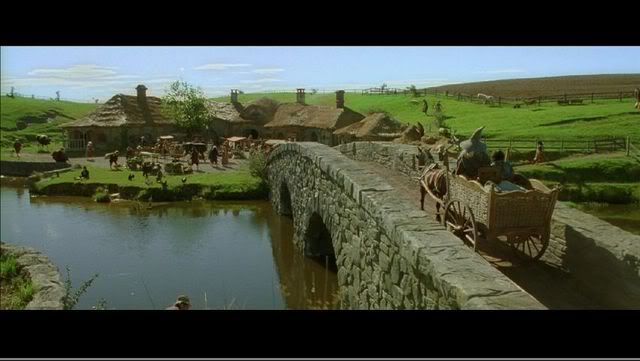
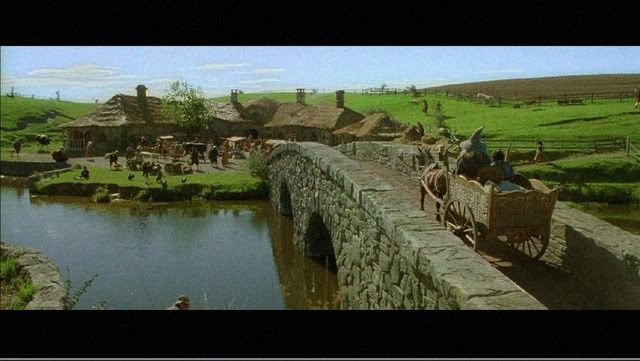
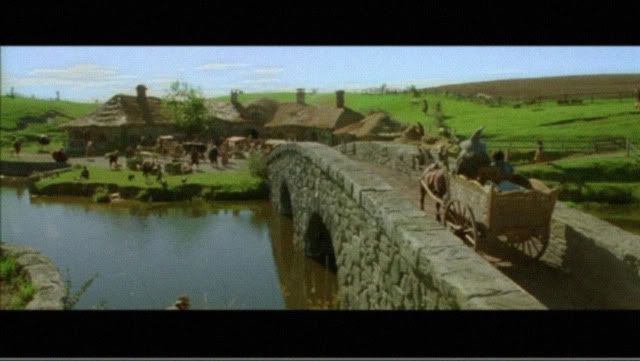
LCD is cleaner but if you look at the roofs and the river banks, the Plasma excels here because it has more shades of gray and the ability to display deep black levels. Of course, frankly speaking, it's a minor issue, I'll choose a LCD anytime. tongue.gif

QUOTE(g5sim @ Jan 6 2007, 07:13 AM)
LCD looks kinda "clean" . are movies supposed to look this 'clean'?
*
redken
post Jan 8 2007, 07:44 PM

- Private Unlimited -
*******
Senior Member
2,352 posts

Joined: Jan 2003
From: Pixelgasm
QUOTE(AlamakLor @ Jan 8 2007, 04:43 AM)
oh really? didnt plasma have picture shift? laugh.gif So far I've read alot about IR, which is quite normal and I have seen it myself on a Pioneer. But it doesnt last long and the next min I look at it, the IR is already gone. I do plan to use my TV for all sorts of things and really, I dont believe watching movie with black boarders for a few hours doesn't have any problems but playing games for the same amount of hours would have problems smile.gif hope I'm right

EDIT: btw, how obvious is the picture shift?
*
They just shift it a few pixels away. BTW, go plasma la. Be the pioneer biggrin.gif
TSAlamakLor
post Jan 9 2007, 04:24 AM

Look at all my stars!!
Group Icon
Elite
9,856 posts

Joined: Jan 2003
From: Kuala Lumpur, WP


I read the hitachi manual...it only shift 1 pixel per row/column. I've tried reproducing this with a 1920 X 1080 wall paper. I made the picture move up by 1 pixel, then down by 1 pixel, then down by 1 pixel, and finally up by 1 pixel back to center. The image "picture shift" was done in every 5 seconds (Hitachi has setting from 5 mins and onwards i think)...as far as the slideshow is concerned, it is noticeable...but if the picture moves every 5 mins, I'd probably not notice it. Pioneer is not the leading brand AFAIK, Fujitsu is biggrin.gif - Hitachi is a partner of Fujitsu

When I get the TV, i'm gonna do a pre-calibration and leave it facing the wall and break it in for 6-7 days staright (200hours), with some time breaks of course. I'll start using it after that. I noticed that only "some" games are a concern for serious IR. Especially those that display a particular pattern of image for long period of time (CS, and some other FPS games). While I was playing Untold Legends yesterday, as well as motorstorm demo, I noticed that the game will take a break itself (go into save menu, loading screen, and etc) in every 10-20 mins. So I'd think those "HUDs" images will not have seriously ill effect on the TV. Btw, I game no more than a few hours in a day (maybe 6 MAX)...I can't stand lying on the bed playing games and wasting time whole day, and I'll automatically take a break once in awhile. Good to have some self control smile.gif

@tong
That's true, I think the picture shift is useless if u are displaying a solid block of color at a particular location biggrin.gif
ijan
post Jan 9 2007, 07:19 AM

The one with a boring life...
*******
Senior Member
3,448 posts

Joined: Jan 2003
From: Sarawak


noticed that alamak changed his westinghouse lcd, hoho! No more the audio-freak alamak, he has become the HT freak xd biggrin.gif
tong1774
post Jan 9 2007, 01:03 PM

Regular
******
Senior Member
1,065 posts

Joined: Dec 2004
QUOTE(AlamakLor @ Jan 9 2007, 04:24 AM)
I read the hitachi manual...it only shift 1 pixel per row/column. I've tried reproducing this with a 1920 X 1080 wall paper. I made the picture move up by 1 pixel, then down by 1 pixel, then down by 1 pixel, and finally up by 1 pixel back to center. The image "picture shift" was done in every 5 seconds (Hitachi has setting from 5 mins and onwards i think)...as far as the slideshow is concerned, it is noticeable...but if the picture moves every 5 mins, I'd probably not notice it. Pioneer is not the leading brand AFAIK, Fujitsu is biggrin.gif - Hitachi is a partner of Fujitsu

When I get the TV, i'm gonna do a pre-calibration and leave it facing the wall and break it in for 6-7 days staright (200hours), with some time breaks of course. I'll start using it after that. I noticed that only "some" games are a concern for serious IR. Especially those that display a particular pattern of image for long period of time (CS, and some other FPS games). While I was playing Untold Legends yesterday, as well as motorstorm demo, I noticed that the game will take a break itself (go into save menu, loading screen, and etc) in every 10-20 mins. So I'd think those "HUDs" images will not have seriously ill effect on the TV. Btw, I game no more than a few hours in a day (maybe 6 MAX)...I can't stand lying on the bed playing games and wasting time whole day, and I'll automatically take a break once in awhile. Good to have some self control smile.gif

@tong
That's true, I think the picture shift is useless if u are displaying a solid block of color at a particular location biggrin.gif
*
So u finally got yourself a Hitachi? Enjoy and keep us update!
TSAlamakLor
post Jan 9 2007, 02:09 PM

Look at all my stars!!
Group Icon
Elite
9,856 posts

Joined: Jan 2003
From: Kuala Lumpur, WP


no I havent received it, I'm still waiting for the refund on the LCD TV before I could order it...otherwise my CC will explode laugh.gif

This post has been edited by AlamakLor: Jan 9 2007, 02:09 PM
highlander8
post Jan 9 2007, 08:38 PM

Getting Started
**
Junior Member
124 posts

Joined: Aug 2005
After going through many rounds of survey to compare between LCD and Plasma, finally my choice still go to Plasma. My observation was better PQ, natural & realistics colours and also clear & crisp fast moving pictures. biggrin.gif

Again, some of my friends think LCD is better but at the end it still comes to individual preference. rolleyes.gif
piscesguy
post Jan 9 2007, 08:41 PM

ç§ã®åå‰ã¯ã‚Šã‚…ã†ã§ã™
*******
Senior Member
3,965 posts

Joined: Nov 2006
QUOTE(highlander8 @ Jan 9 2007, 08:38 PM)
After going through many rounds of survey to compare between LCD and Plasma, finally my choice still go to Plasma. My observation was better PQ, natural & realistics colours and also clear & crisp fast moving pictures.  biggrin.gif

Again, some of my friends think LCD is better but at the end it still comes to individual preference.  rolleyes.gif
*
Yes, u have made the RIGHT choice !! rclxms.gif
I have to agree with u. Plasma is BEST for movies. rclxm9.gif
tong1774
post Jan 9 2007, 09:13 PM

Regular
******
Senior Member
1,065 posts

Joined: Dec 2004
QUOTE(piscesguy @ Jan 9 2007, 08:41 PM)
Yes, u have made the RIGHT choice !!  rclxms.gif
I have to agree with u. Plasma is BEST for movies.  rclxm9.gif
*
Once there is sales man told me that Hitachi product no good and dont buy any plasma because its out dated. I then ask him that if plasma is so outdated, then can he sell me cheap cheap like CRT price since both are also outdated. He is speechless, than i walk out from that shop and will never return.
highlander8
post Jan 9 2007, 09:26 PM

Getting Started
**
Junior Member
124 posts

Joined: Aug 2005
QUOTE(tong1774 @ Jan 9 2007, 09:13 PM)
Once there is sales man told me that Hitachi product no good and dont buy any plasma because its out dated. I then ask him that if plasma is so outdated, then can he sell me cheap cheap like CRT price since both are also outdated. He is speechless, than i walk out from that shop and will never return.
*
Initially I've the similar thought that "plasma is out dated". But after I did the real close comparison and many rounds of survey, then I believe what my eye have seen is the right choice. smile.gif
TSAlamakLor
post Jan 10 2007, 12:52 AM

Look at all my stars!!
Group Icon
Elite
9,856 posts

Joined: Jan 2003
From: Kuala Lumpur, WP


42" 1080p plasma will be launching this year. I suppose there is no reason to wait since there will still be no 1080p HD broadcast yet.

I happen to discover something very interesting today. I noticed that it is actually easier to see if an LCD TV has banding with the TV turned off instead of when it is turned on. If you have the screen turned off and look at it side ways (with some ambient light as you will need the reflection), you should be able to see some darker streaks and some lighter color ones. Those will be the spots that would cause different brightness.
tong1774
post Jan 10 2007, 01:06 AM

Regular
******
Senior Member
1,065 posts

Joined: Dec 2004
QUOTE(AlamakLor @ Jan 10 2007, 12:52 AM)
42" 1080p plasma will be launching this year. I suppose there is no reason to wait since there will still be no 1080p HD broadcast yet.

I happen to discover something very interesting today. I noticed that it is actually easier to see if an LCD TV has banding with the TV turned off instead of when it is turned on. If you have the screen turned off and look at it side ways (with some ambient light as you will need the reflection), you should be able to see some darker streaks and some lighter color ones. Those will be the spots that would cause different brightness.
*
1080p plasma is going to cost u a nuke bro! And something off topic, why i change your avatar to black and white, didnt realise that at first.
TSAlamakLor
post Jan 10 2007, 01:54 AM

Look at all my stars!!
Group Icon
Elite
9,856 posts

Joined: Jan 2003
From: Kuala Lumpur, WP


Coz there was a time where my sig was also black/grey, just wanted to match the theme
TSAlamakLor
post Jan 10 2007, 08:39 AM

Look at all my stars!!
Group Icon
Elite
9,856 posts

Joined: Jan 2003
From: Kuala Lumpur, WP


I'm having second thought on the Hitachi TV. I called them 2 times asking for some concerns and they kept on giving me bull shit...I heard that even Pioneer does that......god...I hate buying stuff nowadays.
tong1774
post Jan 10 2007, 09:29 AM

Regular
******
Senior Member
1,065 posts

Joined: Dec 2004
QUOTE(AlamakLor @ Jan 10 2007, 08:39 AM)
I'm having second thought on the Hitachi TV. I called them 2 times asking for some concerns and they kept on giving me bull shit...I heard that even Pioneer does that......god...I hate buying stuff nowadays.
*
What concerns?
TSAlamakLor
post Jan 10 2007, 09:53 AM

Look at all my stars!!
Group Icon
Elite
9,856 posts

Joined: Jan 2003
From: Kuala Lumpur, WP


the flickering issue. I need to know if they can truely fix it...if they can't fix the problem, i'm not buying their TV. The issue had been raised 3 months ago yet they dont have a solution to it.
jaya_pc87
post Jan 10 2007, 10:46 AM

Workaholic Mode on
*****
Senior Member
748 posts

Joined: Jan 2003
From: KL


Walau we got alot of problem buying display units nowadays

plasma is something i will avoid for sure because of its screen burn issue

lcds seems like having banding issues ...

How about that 2 new technology , LaserTV and AMOLED ... i am waiting for thoose two to be out , this fellas has no refresh rate, flickering or screen burn issues i heard

i am hoping the price is not that expensive than the current one tongue.gif
jaya_pc87
post Jan 10 2007, 10:46 AM

Workaholic Mode on
*****
Senior Member
748 posts

Joined: Jan 2003
From: KL


edit

double post

This post has been edited by jaya_pc87: Jan 10 2007, 10:46 AM
TSAlamakLor
post Jan 10 2007, 11:10 AM

Look at all my stars!!
Group Icon
Elite
9,856 posts

Joined: Jan 2003
From: Kuala Lumpur, WP


There will definitely be some problem of its own besides the price tag. I think I might call off purchasing the Hitachi now and wait for the 1080p Plasma...seems like most of them will have a MSRP of 3.xK usd for 50"-60"+ I think 1080p will definitely be the new standard which explains why the drastic price drop on the 720p/1080i sets now. Sigh...got $$ also cannot buy something good zzzzzzz
oe_kintaro
post Jan 10 2007, 01:27 PM

Look at all my stars!!
*******
Senior Member
2,222 posts

Joined: Jan 2003
From: Penang


investing in a HDTV or home theatre setup is like getting married. Once you take the plunge you shouldn't look at newer models or you will never be satisfied. sweat.gif
tong1774
post Jan 10 2007, 03:29 PM

Regular
******
Senior Member
1,065 posts

Joined: Dec 2004
QUOTE(AlamakLor @ Jan 10 2007, 11:10 AM)
There will definitely be some problem of its own besides the price tag. I think I might call off purchasing the Hitachi now and wait for the 1080p Plasma...seems like most of them will have a MSRP of 3.xK usd for 50"-60"+ I think 1080p will definitely be the new standard which explains why the drastic price drop on the 720p/1080i sets now. Sigh...got $$ also cannot buy something good zzzzzzz
*
So u can tahan your 29" crt ar? whistling.gif
TSAlamakLor
post Jan 11 2007, 12:21 AM

Look at all my stars!!
Group Icon
Elite
9,856 posts

Joined: Jan 2003
From: Kuala Lumpur, WP


I'm waiting for my component to DVI adapter to arrive and hopefully my LCD monitor can tahan for a few months.
TSAlamakLor
post Jan 11 2007, 09:38 PM

Look at all my stars!!
Group Icon
Elite
9,856 posts

Joined: Jan 2003
From: Kuala Lumpur, WP


user posted image
65" 1080p Plasma
MSRP: 3500USD
Street Price: probably 3K USD
Availability: June 2007
http://reviews.cnet.com/8301-12760_7-96723....html?tag=promo

Hitachi P50H401 50" 1080p
MSRP: 2500USD
Availability: Feb 2007 (next month WTF drool.gif )

Pioneer and Panasonic will also have a few affordable 1080p plasma this year, mostly available in summer (July 2007). I guess it is definitely worth the wait for these 1080p TVs! rclxms.gif
htkaki
post Jan 17 2007, 05:24 PM

Maxx Audio Visual
********
Senior Member
14,193 posts

Joined: May 2005
From: Sbn / KL


then, the 720p LCD or plasma sld be cheaper by then. hehe

TSAlamakLor
post Jan 19 2007, 02:07 AM

Look at all my stars!!
Group Icon
Elite
9,856 posts

Joined: Jan 2003
From: Kuala Lumpur, WP


Even samsung LCDs have the SAME cloud issue as the Sony XBR:
http://www.avsforum.com/avs-vb/showthread....8&page=11&pp=30

And most surprisingly...people are planning a class action law suit on Sharp for those crazy banding found on the Aquos laugh.gif these companies gotta stop selling F***ed up TVs.

I'm gonna sit tight and live with my 172x Monitor and see what's really good this year biggrin.gif

HOLY SH1T!!!! Sony V2500 46" 1080p
user posted image
I can't stop laughing at people who bought these TVs and are being very proud of owning them haHAHAHAAHAHAHAHAHAHAH laugh.gif

This post has been edited by AlamakLor: Jan 19 2007, 02:17 AM
LittleGhost
post Jan 19 2007, 12:05 PM

臭å°é¬¼
*******
Senior Member
4,234 posts

Joined: Nov 2004


alamaklor, if we don't purchase LCD TVs, what other choices do we have? Good ol CRTS?
TSAlamakLor
post Jan 19 2007, 01:14 PM

Look at all my stars!!
Group Icon
Elite
9,856 posts

Joined: Jan 2003
From: Kuala Lumpur, WP


nope, just stick to whatever you have and wait for something this year biggrin.gif and plasma is far more perfect than lcd now imho
piscesguy
post Jan 19 2007, 02:11 PM

ç§ã®åå‰ã¯ã‚Šã‚…ã†ã§ã™
*******
Senior Member
3,965 posts

Joined: Nov 2006
I think LCD technology is just good to use as computer monitor screen.
To use as a TV, LCD is still a long way to match up with CRT or even plasma. brows.gif
highlander8
post Jan 19 2007, 06:22 PM

Getting Started
**
Junior Member
124 posts

Joined: Aug 2005
That's why I have just bought plasma right after a few round of survey........

So far very satisfied with plasma performance. Another friend of mine initially also thinking to get LCD but changed the mind after seeing Plasma. thumbup.gif
redken
post Jan 21 2007, 08:45 PM

- Private Unlimited -
*******
Senior Member
2,352 posts

Joined: Jan 2003
From: Pixelgasm
QUOTE(piscesguy @ Jan 19 2007, 02:11 PM)
I think LCD technology is just good to use as computer monitor screen.
To use as a TV, LCD is still a long way to match up with CRT or even plasma. brows.gif
*
More like LCD has not much left to turn and even less left to go.
kelvinyam
post Jan 22 2007, 11:14 PM

May beauty be everywhere around me
******
Senior Member
1,766 posts

Joined: Jan 2003
From: Klang Valley


My dad bought a 32" Sharp Aquos LCD and I couldn't see any banding. I even switch off the living hall light at night and look very hard on it. Nope, no banding on my unit.

Just one thing, ASTRO image sucks on this LCD.
sunauto
post Jan 23 2007, 12:56 AM

<< Blu-Ray Rocks >>
*******
Senior Member
4,017 posts

Joined: Jun 2006
From: Georgetown, Penang


Speaking of Sharp LCDs, it did receive very good reviews from CNET Singapore, could it be that our Sharp LCDs for Asian market is different from other regions? Even Hitachi and Toshiba were highly recommended too. I guess it's pretty subjective so I guess we just see and buy what we like than to rely on reviews alone. sweat.gif

QUOTE(kelvinyam @ Jan 22 2007, 11:14 PM)
My dad bought a 32" Sharp Aquos LCD and I couldn't see any banding. I even switch off the living hall light at night and look very hard on it. Nope, no banding on my unit.

Just one thing, ASTRO image sucks on this LCD.
*
saiga
post Jan 23 2007, 05:53 PM

Fear of the Dark
****
Senior Member
584 posts

Joined: Aug 2006
From: Skudai, Johor
QUOTE(highlander8 @ Jan 19 2007, 06:22 PM)
That's why I have just bought plasma right after a few round of survey........

So far very satisfied with plasma performance. Another friend of mine initially also thinking to get LCD but changed the mind after seeing Plasma. thumbup.gif
*
but cannot get plasma tv in RM4K range la sad.gif
tong1774
post Jan 23 2007, 06:32 PM

Regular
******
Senior Member
1,065 posts

Joined: Dec 2004
QUOTE(sunauto @ Jan 23 2007, 12:56 AM)
Speaking of Sharp LCDs, it did receive very good reviews from CNET Singapore, could it be that our Sharp LCDs for Asian market is different from other regions? Even Hitachi and Toshiba were highly recommended too. I guess it's pretty subjective so I guess we just see and buy what we like than to rely on reviews alone.  sweat.gif
*
the 8 out of 10 point given in Cnet Asia is from a user, not the editor rating.
TSAlamakLor
post Jan 23 2007, 07:49 PM

Look at all my stars!!
Group Icon
Elite
9,856 posts

Joined: Jan 2003
From: Kuala Lumpur, WP


the easiest way to check for banding is to play some games on it biggrin.gif
sunauto
post Jan 23 2007, 08:35 PM

<< Blu-Ray Rocks >>
*******
Senior Member
4,017 posts

Joined: Jun 2006
From: Georgetown, Penang


QUOTE(saiga @ Jan 23 2007, 05:53 PM)
but cannot get plasma tv in RM4K range la  sad.gif
*
Can gua, maybe buy those Cap Ayam brands lor. sweat.gif


QUOTE(tong1774 @ Jan 23 2007, 06:32 PM)
the 8 out of 10 point given in Cnet Asia is from a user, not the editor rating.
*
Maybe the CNET Editor is AlamakLor so he dun wanna review a Sharp LCD lor. brows.gif I was just kidding. notworthy.gif


QUOTE(AlamakLor @ Jan 23 2007, 07:49 PM)
the easiest way to check for banding is to play some games on it biggrin.gif
*
What type of games should be play on it to test it? Ridge Racer?
sunauto
post Jan 23 2007, 09:04 PM

<< Blu-Ray Rocks >>
*******
Senior Member
4,017 posts

Joined: Jun 2006
From: Georgetown, Penang


Ohhhhh yahhhhh, just went to check CNET Singapore again, the review was indeed from CNET Editor, here's da link, http://asia.cnet.com/reviews/home_av/tvs/0...9272240p,00.htm

Editor's award somemore, dun play play. sweat.gif


QUOTE(tong1774 @ Jan 23 2007, 06:32 PM)
the 8 out of 10 point given in Cnet Asia is from a user, not the editor rating.
*
tong1774
post Jan 23 2007, 09:47 PM

Regular
******
Senior Member
1,065 posts

Joined: Dec 2004
QUOTE(sunauto @ Jan 23 2007, 09:04 PM)
Ohhhhh yahhhhh, just went to check CNET Singapore again, the review was indeed from CNET Editor, here's da link, http://asia.cnet.com/reviews/home_av/tvs/0...9272240p,00.htm

Editor's award somemore, dun play play.  sweat.gif
*
I tot u are talking about this one.
Review?
redken
post Jan 23 2007, 10:23 PM

- Private Unlimited -
*******
Senior Member
2,352 posts

Joined: Jan 2003
From: Pixelgasm
QUOTE(saiga @ Jan 23 2007, 05:53 PM)
but cannot get plasma tv in RM4K range la  sad.gif
*
Haier got plasma at 3k+ wat. BTW, people shouldnt be talking about performance alone, more like performance/price ratio which is more rational. For instance if i had all the money in the world, i would get myself a new pair of eyes, with 100X zoom, nightvision, and gazillion hertz processor. Who needs a 2 dimension display anyway.
TSAlamakLor
post Jan 23 2007, 10:56 PM

Look at all my stars!!
Group Icon
Elite
9,856 posts

Joined: Jan 2003
From: Kuala Lumpur, WP


When testing it with some games, the game background should be very monotonous in color...it can be any color, but grey is most obvious...(actually light blue was most obvious for me...i.e. sky) when you pan the screen slowly...try to look at the screen as a whole and you can easily detect the banding. The banding can be very obvious or very faint and not particularly noticeable, but I have not seen a single LCD TV that does not have banding issue. If you don't see it, chances are you just couldn't see it...I might be able to show them to you if I was there tongue.gif

It wasnt easy to detect in Ridge racer. When you drift the car, it spins too damn much and there are alot of things going on in the background. I've found motorstorm the best game to test banding, but that's a ps3 title. I've read alot about ppl seeing banding with Splinter cell and FEAR as well.

Banding is very hard to detect in most movies.
saiga
post Jan 23 2007, 11:42 PM

Fear of the Dark
****
Senior Member
584 posts

Joined: Aug 2006
From: Skudai, Johor
just visited senq and take a look at the lcd tv from various brands. couldn't noticed any banding on Sharp Aquos... or izzit because my eyes automatically "enhanced" the picture? tongue.gif
sunauto
post Jan 24 2007, 12:14 AM

<< Blu-Ray Rocks >>
*******
Senior Member
4,017 posts

Joined: Jun 2006
From: Georgetown, Penang


QUOTE(tong1774 @ Jan 23 2007, 09:47 PM)
I tot u are talking about this one.
Review?
*
Hehehe, misunderstand aje, small matter ....... notworthy.gif

QUOTE(redken @ Jan 23 2007, 10:23 PM)
Haier got plasma at 3k+ wat. BTW, people shouldnt be talking about performance alone, more like performance/price ratio which is more rational. For instance if i had all the money in the world, i would get myself a new pair of eyes, with 100X zoom, nightvision, and gazillion hertz processor. Who needs a 2 dimension display anyway.
*
Haier ain't that bad, budget use lah but still quite decent for the price.

QUOTE(AlamakLor @ Jan 23 2007, 10:56 PM)
When testing it with some games, the game background should be very monotonous in color...it can be any color, but grey is most obvious...(actually light blue was most obvious for me...i.e. sky) when you pan the screen slowly...try to look at the screen as a whole and you can easily detect the banding. The banding can be very obvious or very faint and not particularly noticeable, but I have not seen a single LCD TV that does not have banding issue. If you don't see it, chances are you just couldn't see it...I might be able to show them to you if I was there tongue.gif

It wasnt easy to detect in Ridge racer. When you drift the car, it spins too damn much and there are alot of things going on in the background. I've found motorstorm the best game to test banding, but that's a ps3 title. I've read alot about ppl seeing banding with Splinter cell and FEAR as well.

Banding is very hard to detect in most movies.
*
Yeah, you're right about using FEAR and Splinter Cell, those games will show the banding flaws much more obvious, Call Of Duty 3, Need For Speed Carbon, Fatal Frame 3 can be used as well too but colourful games like DOAX2, Rayman Raving Rabbits, etc are best avoided, you're unlikely to notice the banding issues. Anyway, despite the flaws, I still prefer a LCD as it's brighter.


QUOTE(saiga @ Jan 23 2007, 11:42 PM)
just visited senq and take a look at the lcd tv from various brands. couldn't noticed any banding on Sharp Aquos... or izzit because my eyes automatically "enhanced" the picture?  tongue.gif
*
I guess you ain't buying what you see as normally they will use those kickass demos to get you hooked. You're less likely to notice these flaws if the demo was showing sexy girls with bikini. doh.gif
yuheng
post Jan 24 2007, 12:25 AM

Audio=Enjoy
*******
Senior Member
2,753 posts

Joined: Jul 2006
From: Metropolitan College(KL) or JB Johor Bahru


i thought Sony is using Samsung components, so there share with same problem, other than that. LCD TV Technology may need couple of years for improvement.....i would think like Plasma Technology better right now in malaysia
kelvinyam
post Jan 24 2007, 07:53 AM

May beauty be everywhere around me
******
Senior Member
1,766 posts

Joined: Jan 2003
From: Klang Valley


QUOTE(AlamakLor @ Jan 23 2007, 10:56 PM)
When testing it with some games, the game background should be very monotonous in color...it can be any color, but grey is most obvious...(actually light blue was most obvious for me...i.e. sky) when you pan the screen slowly...try to look at the screen as a whole and you can easily detect the banding. The banding can be very obvious or very faint and not particularly noticeable, but I have not seen a single LCD TV that does not have banding issue. If you don't see it, chances are you just couldn't see it...I might be able to show them to you if I was there tongue.gif

It wasnt easy to detect in Ridge racer. When you drift the car, it spins too damn much and there are alot of things going on in the background. I've found motorstorm the best game to test banding, but that's a ps3 title. I've read alot about ppl seeing banding with Splinter cell and FEAR as well.

Banding is very hard to detect in most movies.
*
I check the bending on my LCD by switching off the input, so the background is grey color, just like soem photos posted at the first page. No bending that I could detect on my 32" LCD.
The thing is, if it's very difficult to find the bending, I think it's fine.
TSAlamakLor
post Jan 24 2007, 08:13 AM

Look at all my stars!!
Group Icon
Elite
9,856 posts

Joined: Jan 2003
From: Kuala Lumpur, WP


As long as you don't see it, that is good enough. Another way of checking for banding is to turn the whole tv off, leave some ambient light on and look at the screen from the side. If there is banding, you'd be able to see different darkness on the screen, with certain pattern (vertical/horizontal) stripes. If it has perfectly even gradient, then it has probably no banding.
johnho10
post Jan 24 2007, 04:34 PM

New Member
*
Junior Member
8 posts

Joined: Nov 2005
kelvinyam, try using s-video cable for your ASTRO connection, it should help to improve the quality of the picture & make sure you have about 7 to 10 feet of viewing distance.

QUOTE(kelvinyam @ Jan 22 2007, 11:14 PM)
My dad bought a 32" Sharp Aquos LCD and I couldn't see any banding. I even switch off the living hall light at night and look very hard on it. Nope, no banding on my unit.

Just one thing, ASTRO image sucks on this LCD.
*
hackinz
post Jan 24 2007, 05:42 PM

Getting Started
**
Junior Member
135 posts

Joined: Nov 2005


QUOTE(johnho10 @ Jan 24 2007, 04:34 PM)
kelvinyam, try using s-video cable for your ASTRO connection, it should help to improve the quality of the picture & make sure you have about 7 to 10 feet of viewing distance.
*
Tumbang for question ya... cool2.gif

What is the min & max viewing distance range for 42" LCD?
greyshadow
post Jan 26 2007, 03:49 PM

I bleed it out, Diggin' deeper just to throw it away!
******
Senior Member
1,844 posts

Joined: Jan 2003
From: Kingdom of Sarawak


hmm... tested a Haier 32" LCD today for my company
surprisingly it can support up to 1080i, tested the 1080i using PS2's GT4 with component input as we don't have DVD player with HDMI

I notice there's the curvy shadow on the screen, which looks like a curve cloud... a smile shape, is that consider banding? It's there all the time, even when it's off. It looks a bit like uneven surface, but when I check the surface from the side, it's flat.

btw, this Haier TV has worst quality among all of the branded 32" TV I've seen, the color bleeds, graphics gotten worse at higher res, grainy pictures, extremely slow response time, and lousy speaker.
But their offer is the best among all, which they promised 5 years warranty and zero dead pixel warranty, the price also is cheapest among all brand. I can't close my jaw when I heard the bulk price they are offering to my company... which there's no way you can get that price in retail market even after heavy discount.

Now trying to persuade management to go for Sony Bravia... tongue.gif
kelvinyam
post Jan 26 2007, 05:16 PM

May beauty be everywhere around me
******
Senior Member
1,766 posts

Joined: Jan 2003
From: Klang Valley


QUOTE(johnho10 @ Jan 24 2007, 04:34 PM)
kelvinyam, try using s-video cable for your ASTRO connection, it should help to improve the quality of the picture & make sure you have about 7 to 10 feet of viewing distance.
*
I don't think s-video will help much. The problem is resolution. Unless the resolution of the source matches the LCD native resolution, like those demo video specially made for particular model, there's no way to enjoy great PQ on LCD.

Even with DVD, both resolution of 720 × 480 (30Hz) and 720 × 576 (25Hz) doesn't match the LCD's native resolution, the PQ won't be better than CRT. LCD is meant for HDTV, Xbox and PS3.

For me, the only benefit of buying a LCD is that it looks cool in my living hall smile.gif

1080i LCD? I think it's pretty useless at the moment.
ramuk
post Jan 26 2007, 05:57 PM

Casual
***
Junior Member
352 posts

Joined: Jan 2003
From: Kuantan


does anyone know whats Samsung LA40F71B price?

This post has been edited by ramuk: Jan 26 2007, 05:58 PM
sunauto
post Jan 26 2007, 07:21 PM

<< Blu-Ray Rocks >>
*******
Senior Member
4,017 posts

Joined: Jun 2006
From: Georgetown, Penang


Unless you view all full aspect ratio movies in stretched mode to avoid the burning issue.

QUOTE(AlamakLor @ Dec 31 2006, 08:05 AM)
I'm not sure about plasma, I've never really looked into plasma due to the phosphor burning issue...which is going to be inevitable since not many movies are 16:9
*
hmwong
post Jan 27 2007, 12:48 AM

Casual
***
Junior Member
387 posts

Joined: Oct 2006


QUOTE(kelvinyam @ Jan 26 2007, 05:16 PM)
I don't think s-video will help much. The problem is resolution. Unless the resolution of the source matches the LCD native resolution, like those demo video specially made for particular model, there's no way to enjoy great PQ on LCD.

Even with DVD, both resolution of 720 × 480 (30Hz) and 720 × 576 (25Hz) doesn't match the LCD's native resolution, the PQ won't be better than CRT. LCD is meant for HDTV, Xbox and PS3.

For me, the only benefit of buying a LCD is that it looks cool in my living hall smile.gif

1080i LCD? I think it's pretty useless at the moment.
*
I intend to buy a LCD TV (either JVC SX6 or Toshiba 40") but quite concern about the PQ of Astro. Can anyone advise me how bad is the PQ. The local showrooms /dealers do not put on Astro programs.

Would s-video cable help? What's the difference like?
sunauto
post Jan 27 2007, 02:02 AM

<< Blu-Ray Rocks >>
*******
Senior Member
4,017 posts

Joined: Jun 2006
From: Georgetown, Penang


Well, not entirely true because some dvd players can upscale to 720p, 1080i & 1080p too. Even at normal 480p, the picture is quite decent. Most shops here use a normal dvd player, I guess you wouldn't complain about the picture quality.

Besides this, you can view your digital camera pictures, view your HD camcorder movies on your LCD too. S-video will reduce the dot crawl problem but it's still inferior to component videos.


QUOTE(kelvinyam @ Jan 26 2007, 05:16 PM)
I don't think s-video will help much. The problem is resolution. Unless the resolution of the source matches the LCD native resolution, like those demo video specially made for particular model, there's no way to enjoy great PQ on LCD.

Even with DVD, both resolution of 720 × 480 (30Hz) and 720 × 576 (25Hz) doesn't match the LCD's native resolution, the PQ won't be better than CRT. LCD is meant for HDTV, Xbox and PS3.

For me, the only benefit of buying a LCD is that it looks cool in my living hall smile.gif

1080i LCD? I think it's pretty useless at the moment.
*
highlander8
post Jan 27 2007, 09:11 AM

Getting Started
**
Junior Member
124 posts

Joined: Aug 2005
QUOTE(hmwong @ Jan 27 2007, 12:48 AM)
I intend to buy a LCD TV (either JVC SX6 or Toshiba 40") but quite concern about the PQ of Astro. Can anyone advise me how bad is the PQ. The local showrooms /dealers do not put on Astro programs.

Would s-video cable help? What's the difference like?
*
During my search for a HDTV, I also discovered almost all showrooms will not hook up HDTV with Astro and they will tell you thousand of reasons why it's not there. They are afraid to turn down your appetice of getting HDTV. mad.gif

Instead of letting showroom promoter to influence what they want you to watch, I have recorded some channels from Astro into DVD disk, some digital photos converted into DVD quality slide show format and recorded into DVD disk as well, then I go to the shop and play the disks on LCD and plasma HDTV. Also tried at different brand and model. Right after that, your naked eye will give you the right answer. You could repeat the same process in another 1-2 different shops. At the end you will receive pretty consistent answer of whether to chose LCD or Plasma TV, which model & etc. rclxms.gif

Yes, Astro picture quality is definitely can't match with DVD quality disk but at least we want to know at what acceptable level if showing on HDTV. Overall I could say it's OK and the quality will vary from one channel to channel. But for those live telecast sport programs, it's always have better picture quality. We believe Astro has done certain level of compression.

In fact the thrill of having a big scree TV, at least > 40" screen is the effect of feeling more engaging and more invovled. It's also making your eye feel more pleasant to watch the programs/movies. Another biggest plus is if you have a lot of digital photos, you could compile it into DVD quality slide show format and play on DVD player, it's like enlarge your digital photos to the biggest size that we've ever seen with great picture quatlity. Recall back all the past sweet memories........... rclxm9.gif

kelvinyam
post Jan 27 2007, 03:55 PM

May beauty be everywhere around me
******
Senior Member
1,766 posts

Joined: Jan 2003
From: Klang Valley


QUOTE(sunauto @ Jan 27 2007, 02:02 AM)
Well, not entirely true because some dvd players can upscale to 720p, 1080i & 1080p too. Even at normal 480p, the picture is quite decent.
*
I always believe garbage in garbage out. Upscaling is no difference from interpolation where most people will avoid it.

QUOTE(highlander8 @ Jan 27 2007, 09:11 AM)
During my search for a HDTV, I also discovered almost all showrooms will not hook up HDTV with Astro and they will tell you thousand of reasons why it's not there. They are afraid to turn down your appetice of getting HDTV.  mad.gif
*
Best Denki at Mid Valley does let you try out their LCD with Astro. Since my dad watches football a lot, he get a chance to check on one of the sport channel from Astro. He told me he could see the ball clearly (no pun intended) smile.gif

highlander8
post Jan 27 2007, 08:08 PM

Getting Started
**
Junior Member
124 posts

Joined: Aug 2005
QUOTE(kelvinyam @ Jan 27 2007, 03:55 PM)
Best Denki at Mid Valley does let you try out their LCD with Astro. Since my dad watches football a lot, he get a chance to check on one of the sport channel from Astro. He told me he could see the ball clearly (no pun intended) smile.gif
*
Nice to know that.

But I still think to burn Astro programs into DVD disk will be the most convenient way to check on the HDTV performance since you're able to load it on any DVD players and play on any HDTV as you wish. Besides, you're using the same source all the time then it's much easier to make comparison in terms of PQ, clearity for fast moving actions & etc. smile.gif
hmwong
post Jan 28 2007, 06:28 PM

Casual
***
Junior Member
387 posts

Joined: Oct 2006


QUOTE(highlander8 @ Jan 27 2007, 08:08 PM)
Nice to know that.

But I still think to burn Astro programs into DVD disk will be the most convenient way to check on the HDTV performance since you're able to load it on any DVD players and play on any HDTV as you wish. Besides, you're using the same source all the time then it's much easier to make comparison in terms of PQ, clearity for fast moving actions & etc.  smile.gif
*
Thnks Higlander8 and Kelvin. Too bad I don't have Astro Max but I do have some home videos in DVD format. Think I run meself to Midvalley this Thursday to do some serious checking.

BTW, since you have done your research, could you share some thoughts on the brand and models of LCD TVs? Could not decide between JVC, Toshiba, Sharp and Samsung.
highlander8
post Jan 28 2007, 09:45 PM

Getting Started
**
Junior Member
124 posts

Joined: Aug 2005
Different people will have different selection criteria and taste. It's better for you to conduct your own survey.

For me, I've selected Plasma HDTV as my final choice based on PQ, color and motion clearity. smile.gif
abcdee
post Jan 29 2007, 03:33 PM

New Member
*
Junior Member
29 posts

Joined: May 2005
Alamaklor, just wondering, reading through this topic, it seems like you are/were insterested with the Hitachi, seeing that Hitachi and Fujitsu's should be using the same PDP, does that mean Fujitsu is as good? Any ideas?

Coz I was in Jakarta recently and the Fujitsu's looked good and affordable, also realised they were made here in Malaysia, but can't seem to find them at home here, I think they're made here for export, sad but true..
TSAlamakLor
post Jan 29 2007, 04:03 PM

Look at all my stars!!
Group Icon
Elite
9,856 posts

Joined: Jan 2003
From: Kuala Lumpur, WP


Fujitsu is one of the very best. As for whether they share the same panels...i'm not really sure but it is not implausible. After all, panel is one thing, the processor and circuit makes a big difference in PQ. Malaysia manufacture alot of things, you'd find alot of stuff in north america are actually made in malaysia...sometimes i see more stuff made in malaysia than in china. It's pretty hard to find fujitsu here too, it's easier to get them online though.
abcdee
post Jan 29 2007, 04:40 PM

New Member
*
Junior Member
29 posts

Joined: May 2005
Thanks for the info, didn't know that the processors and circuits can make a big diff in PQ...

That's what I captured from researching online that Fujitsu is one of the very best, but weird enough, in Indonesia, they are cheap... lucky bastards...

Not sure if you know much on LG Plasma's since you are in the US, but what do you make of them since you seem to be the master of flat panel displays..

Cheers mate..

QUOTE(AlamakLor @ Jan 29 2007, 04:03 PM)
Fujitsu is one of the very best. As for whether they share the same panels...i'm not really sure but it is not implausible. After all, panel is one thing, the processor and circuit makes a big difference in PQ. Malaysia manufacture alot of things, you'd find alot of stuff in north america are actually made in malaysia...sometimes i see more stuff made in malaysia than in china. It's pretty hard to find fujitsu here too, it's easier to get them online though.
*
TSAlamakLor
post Jan 29 2007, 04:51 PM

Look at all my stars!!
Group Icon
Elite
9,856 posts

Joined: Jan 2003
From: Kuala Lumpur, WP


Im not master buddy sweat.gif, I'm merely sharing and documenting all the information I gathered while searching and researching for HDTV. I haven't really looked at LG's TV, for some reasons it doesnt interest me too much. I believe LG shares similar panels with Philips...well since they are one company now. I did, however, looked at a the PX60 plasma vs one of the LG EDTV displaying the same resolution...the PX60 seems better than the LG in most cases, the picture is smoother and sharper, the LG seems a little blury in comparison. Anyway, I don't suppose LG's main selling point is PQ but the price instead. Personally, I'd choose something that is above par, especially some huge @ss TV since it is not something that you'd change very often. I still haven't found the TV I wanted, currently waiting for 2007 lineup from various companies to be available.
abcdee
post Jan 29 2007, 05:40 PM

New Member
*
Junior Member
29 posts

Joined: May 2005
Yeah, same here, I'm also waiting for some new stuff to come along, there is a 50" LG i'm interested in and like you mentioned, the thing about LG is the price that interests me.. though i dont do thorough testing like you do, all i check for is how 'astro' looks on it and somehow that 50" that I'm interested in looks good with astro.. haha.. but i forgot what the model is, should go back to the shop to jot it down..

Anyway, its a great topic you have here, thanks for sharing..
willis60
post Mar 5 2007, 11:41 AM

New Member
*
Newbie
2 posts

Joined: Mar 2007
I am also in the market for Hitachi Ultravision 42HDS69 42" Plasma TV. I have been reading expert reviews and that has been useful to me. It may be help you too. I had been using PCWorld.com, cnet.com to find reviews. Yesterday I also used PriceGrabber's expert review tab (http://www.pricegrabber.com/info_expertreviews.php/masterid=21254268) and found a site (www.smartratings.com) that aggregates expert reviews. It only covers a few categories but it is pretty neat. Just my $.02.

hmwong
post Mar 7 2007, 10:29 PM

Casual
***
Junior Member
387 posts

Joined: Oct 2006


QUOTE(willis60 @ Mar 5 2007, 11:41 AM)
I am also in the market for Hitachi Ultravision 42HDS69 42" Plasma TV. I have been reading expert reviews and that has been useful to me. It may be help you too. I had been using PCWorld.com, cnet.com to find reviews. Yesterday I also used PriceGrabber's expert review tab (http://www.pricegrabber.com/info_expertreviews.php/masterid=21254268) and found a site (www.smartratings.com) that aggregates expert reviews. It only covers a few categories but it is pretty neat. Just my $.02.
*
It is difficult to use overseas reviews b'cos the model numbers used differ from those in M'sia even though they are the same model. Is there any way we can find the equivalent model numbers for local sets sold locally of those review in these overseas websites?
bysquashy
post Mar 8 2007, 12:02 AM

Wireless Bliss [3GPP R14]
*******
Senior Member
2,884 posts

Joined: Sep 2006
From: Mummy


QUOTE(hmwong @ Mar 7 2007, 10:29 PM)
It is difficult to use overseas reviews b'cos the model numbers used differ from those in M'sia even though they are the same model. Is there any way we can find the equivalent model numbers for local sets sold locally of those review in these overseas websites?
*
Usually manufacturer name the models differently because specs such as power supply is different. QC for some market is stringent while some is barely at minimal. Different quality of parts are used for different market so that the price is competitive.
john_125
post Mar 21 2007, 04:55 PM

New Member
*
Junior Member
16 posts

Joined: Dec 2006


Dudes,

Notice that there's a bit of price war goin on between Samsung, Sony and Toshiba.

Saw the Samsung LA46N71B (current Mosel series) for sale at Harvey Norman. Priced at RM9,999. Can't believe my eyes! From a price and quality perspective, no other model from any manufacturer can compete. Take that Sony! Good for us consumers. flex.gif
willis60
post Apr 2 2007, 04:31 PM

New Member
*
Newbie
2 posts

Joined: Mar 2007
QUOTE(hmwong @ Mar 7 2007, 10:29 PM)
It is difficult to use overseas reviews b'cos the model numbers used differ from those in M'sia even though they are the same model. Is there any way we can find the equivalent model numbers for local sets sold locally of those review in these overseas websites?
*
The only thing I can think of is to check the released date of the product of interest. If there is that match with one of those listed in overseas websites, it's very likely they're the same. They may be of different model numbers, but they are released on the same day. Just my $0.02 cents.
sunauto
post Apr 3 2007, 12:36 AM

<< Blu-Ray Rocks >>
*******
Senior Member
4,017 posts

Joined: Jun 2006
From: Georgetown, Penang


The price war is a good thing. Sony just reduced the price of their Bravia series, some models cheaper by RM1500. That's a good start and if Samsung keeps on slashing their prices, one day, we can expect to get a big LCD at a good price.

QUOTE(john_125 @ Mar 21 2007, 04:55 PM)
Dudes,

Notice that there's a bit of price war goin on between Samsung, Sony and Toshiba.

Saw the Samsung LA46N71B (current Mosel series) for sale at Harvey Norman. Priced at RM9,999. Can't believe my eyes! From a price and quality perspective, no other model from any manufacturer can compete. Take that Sony! Good for us consumers.  flex.gif
*
yuheng
post Apr 3 2007, 01:52 AM

Audio=Enjoy
*******
Senior Member
2,753 posts

Joined: Jul 2006
From: Metropolitan College(KL) or JB Johor Bahru


new model coming...for SAMSUNG is like fews days later in KLCC....and some model has discon...co slashing prices happened...no worry...sony do the same thing...as same panel been used!
Semi3eb
post Apr 11 2007, 04:06 PM

Getting Started
**
Junior Member
125 posts

Joined: Jan 2003
Hi guys sorry to bump in here, i've just did a price check on the Samsung LA46N71B and i've an offer for RM8699.

Will this be a good buy since this is the 1st time i'll be switching to LCD TV. I use this for ASTRO and also a lot of DVD viewing. I've heard that the bigger the screen, u'll experience quality loss & stretching. Can any1 clarify on this?

Im kinda stuck between this and a smaller SHARP 42" BX5 for RM6999.
yuheng
post Apr 12 2007, 01:44 AM

Audio=Enjoy
*******
Senior Member
2,753 posts

Joined: Jul 2006
From: Metropolitan College(KL) or JB Johor Bahru


LCD face quality issue with ASTRO lah bro.....
doh.gif
bysquashy
post Apr 12 2007, 10:39 AM

Wireless Bliss [3GPP R14]
*******
Senior Member
2,884 posts

Joined: Sep 2006
From: Mummy


QUOTE(Semi3eb @ Apr 11 2007, 04:06 PM)
Hi guys sorry to bump in here, i've just did a price check on the Samsung LA46N71B and i've an offer for RM8699.

Will this be a good buy since this is the 1st time i'll be switching to LCD TV. I use this for ASTRO and also a lot of DVD viewing. I've heard that the bigger the screen, u'll experience quality loss & stretching.  Can any1 clarify on this?

Im kinda stuck between this and a smaller SHARP 42" BX5 for RM6999.
*
Yes, for LCD bigger than or equals to 42", I would suggest FullHD.
john_125
post Apr 12 2007, 12:00 PM

New Member
*
Junior Member
16 posts

Joined: Dec 2006


QUOTE(Semi3eb @ Apr 11 2007, 04:06 PM)
Hi guys sorry to bump in here, i've just did a price check on the Samsung LA46N71B and i've an offer for RM8699.

Will this be a good buy since this is the 1st time i'll be switching to LCD TV. I use this for ASTRO and also a lot of DVD viewing. I've heard that the bigger the screen, u'll experience quality loss & stretching.  Can any1 clarify on this?

Im kinda stuck between this and a smaller SHARP 42" BX5 for RM6999.
*
hey Semi3eb,

Wah, that's cheap..can tell us where we can get that price/ pm me-ya? Cos i'm lookin at that model as well. Prefer the Samsung cos I like the blacks on this one. Juz get the one that fits your budget. Check out their warranty specs, see which offer more support.

Stretching occurs cos Astro broadcast is still 4:3 (square shape) while LCD is widescreen 16:9. Juz set the mode on LCD to squeeze the Astro pic . Most have this mode. It will have black bars on the sides instead top and bottom, that way, the Astro pic will remain as a square. LCD more suited to DVD viewing cos it's coded at 480p and widescreen, but still slight quality loss cos LA46N71B is at native 720p resolution. Can sit further away. Problem solved! icon_rolleyes.gif


Semi3eb
post Apr 13 2007, 12:32 AM

Getting Started
**
Junior Member
125 posts

Joined: Jan 2003
QUOTE(john_125 @ Apr 12 2007, 12:00 PM)
hey Semi3eb,

Wah, that's cheap..can tell us where we can get that price/ pm me-ya? Cos i'm lookin at that model as well. Prefer the Samsung cos I like the blacks on this one. Juz get the one that fits your budget. Check out their warranty specs, see which offer more support.

Stretching occurs cos Astro broadcast is still 4:3 (square shape) while LCD is widescreen 16:9. Juz set the mode on LCD to squeeze the Astro pic . Most have this mode. It will have black bars on the sides instead top and bottom, that way, the Astro pic will remain as a square. LCD more suited to DVD viewing cos it's coded at 480p and widescreen, but still slight quality loss cos LA46N71B is at native 720p resolution. Can sit further away. Problem solved!  icon_rolleyes.gif
*
Big problemo la like this , Astro & DVD also have problem on 46". Will these issues happen on a 42" LCD ? I think i'll brin few DVD and test on the spot.

I have just sent u a PM, John.
john_125
post Apr 13 2007, 04:25 PM

New Member
*
Junior Member
16 posts

Joined: Dec 2006


QUOTE(Semi3eb @ Apr 13 2007, 12:32 AM)
Big problemo la like this , Astro & DVD also have problem on 46". Will these issues happen on a 42" LCD ? I think i'll brin few DVD and test on the spot.

I have just sent u a PM, John.
*
Hehe..same effect. Think all current LCD TVs here is 720p panel. When display a 480p source on a 720p native resolution TV, sure have some downconverting goin on somewhere. whistling.gif
shipal
post Apr 13 2007, 10:55 PM

Getting Started
**
Validating
247 posts

Joined: Apr 2006
No need to research so much lah.

If you watch lots of ASTRO, just buy big RPTV or 3LCD kind of tvs enough.

But if you really love your dvd movie watching, invest in a LCD/plasma/projector.

Forget about what brand is good, just go to shop and compare with own eyes.
htkaki
post Apr 14 2007, 12:17 PM

Maxx Audio Visual
********
Senior Member
14,193 posts

Joined: May 2005
From: Sbn / KL


QUOTE(yuheng @ Apr 12 2007, 01:44 AM)
LCD face quality issue with ASTRO lah bro.....
doh.gif
*

Every other single HD display panels out there will have PQ issue when comes to Astro signal. Thanks to poor Astro PQ. sad.gif

MattJ
post Apr 14 2007, 09:18 PM

Enthusiast
*****
Senior Member
769 posts

Joined: Sep 2006
From: Hotel California


Reason is Astro is still using analog signal, hence PQ on any LCD for that matter will not be as good as DVD movies. Worst, you'll try to compare against DVD demos at SenQ, HSL and HN, of couse all LCDs look good coz they trying to sell these to us....
shipal
post Apr 14 2007, 10:33 PM

Getting Started
**
Validating
247 posts

Joined: Apr 2006
If desperate about Astro, get a scaler .... scale the astro vcd quality to higher resolution. hehehe
john_125
post Apr 16 2007, 10:08 AM

New Member
*
Junior Member
16 posts

Joined: Dec 2006


Saw the 50" LG Plasma, not the Time Machine model, older model..at the PC Fair, selling at RM8499 rclxms.gif one more choice to consider..

sunauto
post Apr 16 2007, 01:44 PM

<< Blu-Ray Rocks >>
*******
Senior Member
4,017 posts

Joined: Jun 2006
From: Georgetown, Penang


A scaler doesn't do miracles, the picture might be sharper but it won't turn it to true HD quality.

QUOTE(shipal @ Apr 14 2007, 10:33 PM)
If desperate about Astro, get a scaler .... scale the astro vcd quality to higher resolution. hehehe
*
OCMAX
post Apr 16 2007, 08:11 PM

Enthusiast
*****
Senior Member
858 posts

Joined: Jan 2003


QUOTE(sunauto @ Apr 16 2007, 01:44 PM)
A scaler doesn't do miracles, the picture might be sharper but it won't turn it to true HD quality.
*
Yeap........totally true......only the PQ is much better but can't compare with real HD PQ............ cry.gif
Semi3eb
post Apr 16 2007, 09:07 PM

Getting Started
**
Junior Member
125 posts

Joined: Jan 2003
The Samsung LA46N71B rocks, arrived today, no problem with Astro & DVDs.
Just don't understand why it keeps reverting back to the original picture setting every 1 hours blink.gif Gotta read the manual
nicholas_1213
post Apr 16 2007, 09:50 PM

Music is how feeling sounds like..
******
Senior Member
1,140 posts

Joined: Sep 2005
From: Equine Park


How about those samsung LCD series LA32R81B or LA37R81B? anyone had tried them out?
htkaki
post Apr 17 2007, 09:03 PM

Maxx Audio Visual
********
Senior Member
14,193 posts

Joined: May 2005
From: Sbn / KL


QUOTE(nicholas_1213 @ Apr 16 2007, 09:50 PM)
How about those samsung LCD series LA32R81B or LA37R81B? anyone had tried them out?
*

It's an improvement model replacing the outgoing R7. I am still waiting the unit to arrive for a comparison test against R7. smile.gif

nicholas_1213
post Apr 18 2007, 07:28 AM

Music is how feeling sounds like..
******
Senior Member
1,140 posts

Joined: Sep 2005
From: Equine Park


QUOTE(htkaki @ Apr 17 2007, 09:03 PM)
It's an improvement model replacing the outgoing R7. I am still waiting the unit to arrive for a comparison test against R7. smile.gif
*
oh.. but they are on the market already rite? bcos my dad is planning to buy one for his new house.. hehe htkaki are you selling them? brows.gif
htkaki
post Apr 18 2007, 11:18 AM

Maxx Audio Visual
********
Senior Member
14,193 posts

Joined: May 2005
From: Sbn / KL


Yes. Will create a thread for this new babies by today

lousycar
post May 7 2007, 09:53 PM

Getting Started
**
Junior Member
234 posts

Joined: Dec 2006
From: Penang
How about Panasonic? Checked out TH-42PV60H. Can get it at about 7k or lesser is it worth it?
htkaki
post May 8 2007, 09:19 PM

Maxx Audio Visual
********
Senior Member
14,193 posts

Joined: May 2005
From: Sbn / KL


QUOTE(lousycar @ May 7 2007, 09:53 PM)
How about Panasonic? Checked out  TH-42PV60H. Can get it at about 7k or lesser is it worth it?
*

Can get about a grand less than you tongue.gif

lousycar
post May 8 2007, 10:05 PM

Getting Started
**
Junior Member
234 posts

Joined: Dec 2006
From: Penang
QUOTE(htkaki @ May 8 2007, 08:19 PM)
Can get about a grand less than you  tongue.gif
*
got your pm.. thanks!

Is this any good? for this price range.. any known probs with this panny?
should i get this or get the 70h?
htkaki
post May 9 2007, 03:19 PM

Maxx Audio Visual
********
Senior Member
14,193 posts

Joined: May 2005
From: Sbn / KL


So far so good. No complain from customers
cristiano7mu
post May 19 2007, 05:32 PM

Look at all my stars!!
*******
Senior Member
2,588 posts

Joined: Nov 2005


hi, i wanna buy a new LCD tv, so wat kinda features/functions are important for a LCD tv?

purpose= watch astro/dvd hm...think tats all.

saw many of u complaint astro not good on lcd tv (astro or LCD problem) and d "cloud" thing
is it all LCD tv hav this problem? or certain brand. my dad looking for sony bravia, maybe V series ( er V is d newer series rite? )

sorry, i'm noob on lcd/plasma stuff.

This post has been edited by cristiano7mu: May 19 2007, 05:35 PM
shipal
post May 19 2007, 11:25 PM

Getting Started
**
Validating
247 posts

Joined: Apr 2006

For ASTRO viewing, no display will ever improve its quality, that's why you won't get ASTRO demos in stores. But for dvd , get what your budget can offer based on own demos, forget about what others' preferences are.
htkaki
post May 20 2007, 06:24 PM

Maxx Audio Visual
********
Senior Member
14,193 posts

Joined: May 2005
From: Sbn / KL


Not to mention those 2 black bars at both side when u watch Astro in 4:3 format
sunauto
post May 20 2007, 09:05 PM

<< Blu-Ray Rocks >>
*******
Senior Member
4,017 posts

Joined: Jun 2006
From: Georgetown, Penang


QUOTE(htkaki @ May 20 2007, 06:24 PM)
Not to mention those 2 black bars at both side when u watch Astro in 4:3 format
*
If you get a 32' LCD, viewing Astro in 4:3 format, the picture is even smaller, unless you choose to view all full screen sources to fit the 16:9 screen in full.
htkaki
post May 21 2007, 08:57 AM

Maxx Audio Visual
********
Senior Member
14,193 posts

Joined: May 2005
From: Sbn / KL


but, the picture will be stretched to fill the screen, which I find it quite irritating. Astro does have this so-called 'wide' setting for the aspect ratio. However, this is only meant for 'future' upgrades.
sunauto
post May 21 2007, 09:42 PM

<< Blu-Ray Rocks >>
*******
Senior Member
4,017 posts

Joined: Jun 2006
From: Georgetown, Penang


QUOTE(htkaki @ May 21 2007, 08:57 AM)
but, the picture will be stretched to fill the screen, which I find it quite irritating. Astro does have this so-called 'wide' setting for the aspect ratio. However, this is only meant for 'future' upgrades.
*
Some LCDs do a good job stretching full screen sources to fit the screen but if you have a 40 inch LCD and above, then, there's no problem displaying in true 4:3 aspect ratio, on a 32 incher, the picture might very small if 4:3 aspect ratio is chosen.
ASAP
post May 30 2007, 05:10 PM

Regular
******
Senior Member
1,645 posts

Joined: Jan 2003


Recently I have came across Sony SXRD TV and wondering is it a good TV? Anything I should aware of this new technology? I have checked thru the Internet but mostly only on the good side?
kaichia
post May 31 2007, 09:23 AM

Getting Started
**
Junior Member
77 posts

Joined: Jun 2006
Need advise should i get a Plasma or LCD TV? I use it to watch Satelite channels and DVD.
htkaki
post May 31 2007, 09:41 AM

Maxx Audio Visual
********
Senior Member
14,193 posts

Joined: May 2005
From: Sbn / KL


QUOTE(kaichia @ May 31 2007, 09:23 AM)
Need advise should i get a Plasma or LCD TV? I use it to watch Satelite channels and DVD.
*

What's ur budget and screen size? Both have its pro n cons. At the moment, LCD price is very attractive

kaichia
post May 31 2007, 10:43 AM

Getting Started
**
Junior Member
77 posts

Joined: Jun 2006
Budget around 6000. Current target are 42 inch Panasonic plasma, 40 inch samsung and 37 inch sharp LCD. Did compared side by side, i found plasma better PQ displaying astro. Does LG a reliable brand/ easier faulty because the price very attractive with moderate quality?
Any other recommendation are welcome. hmm.gif


QUOTE(htkaki @ May 31 2007, 09:41 AM)
What's ur budget and screen size? Both have its pro n cons. At the moment, LCD price is very attractive
*
This post has been edited by kaichia: May 31 2007, 10:59 AM
htkaki
post May 31 2007, 02:20 PM

Maxx Audio Visual
********
Senior Member
14,193 posts

Joined: May 2005
From: Sbn / KL


PQ wise, of course LG is only moderate if to compare to those more well-known brands. You mean the latest Panasonic PV70 plasma?
kaichia
post May 31 2007, 04:05 PM

Getting Started
**
Junior Member
77 posts

Joined: Jun 2006
Not the latest model. Model PA60 if i am not wrong. I prefer the plasma but worry the life spent and burn in effect.
piscesguy
post May 31 2007, 11:23 PM

ç§ã®åå‰ã¯ã‚Šã‚…ã†ã§ã™
*******
Senior Member
3,965 posts

Joined: Nov 2006
QUOTE(kaichia @ May 31 2007, 10:43 AM)
Budget around 6000. Current target are 42 inch Panasonic plasma, 40 inch samsung and 37 inch sharp LCD. Did compared side by side, i found plasma better PQ displaying astro. Does LG a reliable brand/ easier faulty because the price very attractive with moderate quality?
Any other recommendation are welcome.  hmm.gif
*
LG plasma is quite reliable, got mine on Jan-2006 and its working fine until now.
kaichia
post Jun 1 2007, 03:30 PM

Getting Started
**
Junior Member
77 posts

Joined: Jun 2006
Ok bro, will consider LG plasma since it's about 1k cheaper. Does burn in easier to happen during your usage? Currently 42" LG plasma got model 42PC1R, 42PC3RV and time machine 42PC1RR. hmm.gif

QUOTE(piscesguy @ May 31 2007, 11:23 PM)
LG plasma is quite reliable, got mine on Jan-2006 and its working fine until now.
*
This post has been edited by kaichia: Jun 1 2007, 03:31 PM
sunauto
post Jun 1 2007, 06:48 PM

<< Blu-Ray Rocks >>
*******
Senior Member
4,017 posts

Joined: Jun 2006
From: Georgetown, Penang


QUOTE(kaichia @ May 31 2007, 04:05 PM)
Not the latest model. Model PA60 if i am not wrong. I prefer the plasma but worry the life spent and burn in effect.
*
Lifespan is 60,000 hours for Plasma and with 8 hours per day, it can simply last around 20 years, that's a very long time, who knows, you might have changed another model by then. The burn in effect is a thing of a past as the latest technology prevents these burnt in issues like Hitachi's Alis technology. The only difference is the backlight for LCDs are replaceable but to be honestly, if LCDs also last about 60,000 hours, if 20 years later, I seriously doubt that spare parts are still available for a 20 year obsolete model so to be honest, the backlight of a LCD can be replaced won't be perceived as an advantage in actual usage.
htkaki
post Jun 2 2007, 04:20 PM

Maxx Audio Visual
********
Senior Member
14,193 posts

Joined: May 2005
From: Sbn / KL


QUOTE(kaichia @ Jun 1 2007, 03:30 PM)
Ok bro, will consider LG plasma since it's about 1k cheaper. Does burn in easier to happen during your usage? Currently 42" LG plasma got model 42PC1R, 42PC3RV and time machine 42PC1RR.  hmm.gif
*

Burn-in is not so easy to happen unless you are watching for long hours everyday, which is not really possible. If you interested in LG, PM me.

Btw, I find Pana PV70 PQ is quite good even on Astro signal. Tried Wah Lai Toi using the 'stretch mode'. juz as found in Sharp. Picture looks good.

kaichia
post Jun 2 2007, 04:53 PM

Getting Started
**
Junior Member
77 posts

Joined: Jun 2006
Thanks guys for your kind help. I just bought a LG Plama this morning 4k+ cash. Enjoying now. smile.gif
piscesguy
post Jun 2 2007, 05:21 PM

ç§ã®åå‰ã¯ã‚Šã‚…ã†ã§ã™
*******
Senior Member
3,965 posts

Joined: Nov 2006
QUOTE(kaichia @ Jun 2 2007, 04:53 PM)
Thanks guys for your kind help. I just bought a LG Plama this morning 4k+ cash. Enjoying now. smile.gif
*
Which model and where did u buy it? Any discount? drool.gif
kaichia
post Jun 2 2007, 06:40 PM

Getting Started
**
Junior Member
77 posts

Joined: Jun 2006
42PC3RV, the model that selling 4999 at HSL. Got it 4.2k by cash at Sarawak. nod.gif
The Plasma 10Wx2 speaker sound a bit low bass comparing my Sony CRT's speaker but more function like user define equalizer. But is ok since i can connect to my home theather system sometimes. smile.gif

QUOTE(piscesguy @ Jun 2 2007, 05:21 PM)
Which model and where did u buy it? Any discount? drool.gif
*
This post has been edited by kaichia: Jun 3 2007, 10:26 PM
htkaki
post Jun 4 2007, 10:39 AM

Maxx Audio Visual
********
Senior Member
14,193 posts

Joined: May 2005
From: Sbn / KL


Good to hear that you finally bought it. The SD plasma really a bargain right now since the HD plasma price has dropped. rclxms.gif
sunauto
post Jun 4 2007, 01:21 PM

<< Blu-Ray Rocks >>
*******
Senior Member
4,017 posts

Joined: Jun 2006
From: Georgetown, Penang


QUOTE(kaichia @ Jun 2 2007, 06:40 PM)
42PC3RV, the model that selling 4999 at HSL. Got it 4.2k by cash at Sarawak. nod.gif
The Plasma 10Wx2 speaker sound a bit low bass comparing my Sony CRT's speaker but more function like user define equalizer. But is ok since i can connect to my home theather system sometimes. smile.gif
*
Some plasmas have audio out, if yes, you can connect to an external active subwoofer like those from Yamaha & B&W. nod.gif
kaichia
post Jun 4 2007, 02:47 PM

Getting Started
**
Junior Member
77 posts

Joined: Jun 2006
Yes bro, got 1 variable audio out for that purpose. nod.gif

QUOTE(sunauto @ Jun 4 2007, 01:21 PM)
Some plasmas have audio out, if yes, you can connect to an external active subwoofer like those from Yamaha & B&W.  nod.gif
*
Thanks. Will upgrade to Full HD panel when RTM/Satelite TV implement the HD channel or when Blueray/HDDVD more common in the market. That time the price should be more stable already. icon_idea.gif smile.gif

QUOTE
Good to hear that you finally bought it. The SD plasma really a bargain right now since the HD plasma price has dropped. 


This post has been edited by kaichia: Jun 5 2007, 12:59 AM
htkaki
post Jun 5 2007, 03:01 PM

Maxx Audio Visual
********
Senior Member
14,193 posts

Joined: May 2005
From: Sbn / KL


cheap and does the job well : Wharfedale SW150 for abt RM1K+
kaichia
post Jun 7 2007, 12:13 AM

Getting Started
**
Junior Member
77 posts

Joined: Jun 2006
Maybe you guys already knew about this Samsung LCD TV promotion from MBF card. Good deal from them just the terms and condition bit troublesome. smile.gif
http://www.mbfcards.com/
sunauto
post Jun 7 2007, 09:50 AM

<< Blu-Ray Rocks >>
*******
Senior Member
4,017 posts

Joined: Jun 2006
From: Georgetown, Penang


QUOTE(htkaki @ Jun 5 2007, 03:01 PM)
cheap and does the job well : Wharfedale SW150 for abt RM1K+
*
What's the price for Wharfedale SW250? I saw it the other day, the control panel looks pretty cool.
kaichia
post Jun 7 2007, 04:33 PM

Getting Started
**
Junior Member
77 posts

Joined: Jun 2006
New Sony Bravia model again. rclxms.gif
http://www.lowyat.net/v2/latest/sony-adds-...l-lcd-line.html

This post has been edited by kaichia: Jun 7 2007, 04:35 PM
htkaki
post Jun 7 2007, 04:51 PM

Maxx Audio Visual
********
Senior Member
14,193 posts

Joined: May 2005
From: Sbn / KL


QUOTE(sunauto @ Jun 7 2007, 09:50 AM)
What's the price for Wharfedale SW250? I saw it the other day, the control panel looks pretty cool.
*

If not mistaken, it is abt RM2.2K-RM2.4K+.

schizophrenic
post Jun 8 2007, 10:31 PM

Tribute to Tun Mohamed Suffian Hashim (1917-2000)
******
Senior Member
1,645 posts

Joined: Oct 2005
From: London


I think Warfey's SW250 is better
comes with remote too and the sub is shooting downwards

too bad no $$ so using wharfey's center speaker only

htkaki
post Jun 9 2007, 11:12 AM

Maxx Audio Visual
********
Senior Member
14,193 posts

Joined: May 2005
From: Sbn / KL


bro schizo, slowly but surely u ll own that baby.
schizophrenic
post Jun 9 2007, 09:48 PM

Tribute to Tun Mohamed Suffian Hashim (1917-2000)
******
Senior Member
1,645 posts

Joined: Oct 2005
From: London


yea now saving to get the pioneer dvd upconversion player to pair with my new baby(R81). Hard earned cash.
Used to connect my old pc monitor as a television.
sunauto
post Jun 11 2007, 11:09 AM

<< Blu-Ray Rocks >>
*******
Senior Member
4,017 posts

Joined: Jun 2006
From: Georgetown, Penang


QUOTE(schizophrenic @ Jun 8 2007, 10:31 PM)
I think Warfey's SW250 is better
comes with remote too and the sub is shooting downwards

too bad no $$ so using wharfey's center speaker only
*
You want a sub that shoot forwards? Downward firing sub might be a problem sometimes, the vibration can spread to all your glass panels in your house including your windows and sometimes to your cabinets, tables and sofa too. Tweaking the controls don't help much but a front firing sub is still the bass, less placement problems.

Well, you're not alone, everybody needs to save $$$ to buy the stuff that they want. I'm sure one day, your hi-fi system will be a very high end one. Think positive, nothing is impossible.
htkaki
post Jun 11 2007, 11:09 AM

Maxx Audio Visual
********
Senior Member
14,193 posts

Joined: May 2005
From: Sbn / KL


Pioneer DV-696?
kaichia
post Jun 11 2007, 05:37 PM

Getting Started
**
Junior Member
77 posts

Joined: Jun 2006
For my Kenwood active sub also with remote control but i seldom use it because can adjust volume thru the dts decoder. When too loud, many thing will vibrate especially door.
sunauto
post Jun 12 2007, 10:44 AM

<< Blu-Ray Rocks >>
*******
Senior Member
4,017 posts

Joined: Jun 2006
From: Georgetown, Penang


QUOTE(kaichia @ Jun 11 2007, 05:37 PM)
For my Kenwood active sub also with remote control but i seldom use it  because can adjust volume thru the dts decoder.  When too loud, many thing will vibrate especially door.
*
Sometimes, my aquarium stand will also vibrate until my flowerhorn turned pale. He thought tsunami was coming. tongue.gif
htkaki
post Jun 12 2007, 11:19 AM

Maxx Audio Visual
********
Senior Member
14,193 posts

Joined: May 2005
From: Sbn / KL


Aint that a distraction, bro?
kaichia
post Jun 12 2007, 01:54 PM

Getting Started
**
Junior Member
77 posts

Joined: Jun 2006
Wall already vibrating. Sure distraction to user and neighbour. biggrin.gif
sunauto
post Jun 16 2007, 01:55 AM

<< Blu-Ray Rocks >>
*******
Senior Member
4,017 posts

Joined: Jun 2006
From: Georgetown, Penang


QUOTE(htkaki @ Jun 12 2007, 11:19 AM)
Aint that a distraction, bro?
*
Hahaha, maybe to some but not to me, sometimes a fish might get bored swimming in the same old tank, that's the time to let it watch some Hollywood movies to stimulate some mental activity. tongue.gif


QUOTE(kaichia @ Jun 12 2007, 01:54 PM)
Wall already vibrating. Sure distraction to user and neighbour. biggrin.gif
*
Luckily my walls are thick enough, the vibration is not that great but it gives you the impact and feeling of being inside the movie especially when you're watching those natural disaster movies. nod.gif
catsper
post Jun 21 2007, 08:42 PM

Elite
******
Senior Member
1,241 posts

Joined: Jan 2003
From: KL


Hi there. I came across this 42in Plasma from Samsung (ppm42m6h). Anyone has any comment on this model? It it recommended to grab it at RM 4k?

Thanks.


Added on June 21, 2007, 8:43 pmHi there. I came across this 42in Plasma from Samsung (ppm42m6h). Anyone has any comment on this model? Is it recommended to grab it at RM 4k?

Thanks.

This post has been edited by catsper: Jun 21 2007, 08:44 PM
TSAlamakLor
post Jul 18 2007, 03:15 AM

Look at all my stars!!
Group Icon
Elite
9,856 posts

Joined: Jan 2003
From: Kuala Lumpur, WP


I just noticed the 1080p Panasonic Vierra plasma is out!!! CAD4000 for 50" around RM12,500...gonna do a little research on that and hopefully it doesnt have all the problems that I hate biggrin.gif I want it!!!! drool.gif
piscesguy
post Jul 18 2007, 08:37 AM

ç§ã®åå‰ã¯ã‚Šã‚…ã†ã§ã™
*******
Senior Member
3,965 posts

Joined: Nov 2006
QUOTE(AlamakLor @ Jul 18 2007, 03:15 AM)
I just noticed the 1080p Panasonic Vierra plasma is out!!! CAD4000 for 50" around RM12,500...gonna do a little research on that and hopefully it doesnt have all the problems that I hate biggrin.gif I want it!!!! drool.gif
*
I might be interested if the price drop below 10K. icon_idea.gif
yuheng
post Jul 18 2007, 09:44 AM

Audio=Enjoy
*******
Senior Member
2,753 posts

Joined: Jul 2006
From: Metropolitan College(KL) or JB Johor Bahru


QUOTE(piscesguy @ Jul 18 2007, 08:37 AM)
I might be interested if the price drop below 10K. icon_idea.gif
*
but it is not launched in malaysia yet ah doh.gif
htkaki
post Jul 18 2007, 10:38 AM

Maxx Audio Visual
********
Senior Member
14,193 posts

Joined: May 2005
From: Sbn / KL


QUOTE(catsper @ Jun 21 2007, 08:42 PM)
Hi there. I came across this 42in Plasma from Samsung (ppm42m6h). Anyone has any comment on this model? Is it recommended to grab it at RM 4k?

Thanks.
*

Haven't come across this. Maybe it is rather old model. Better do a checking 1st b4 parting with the money.

tungstenx
post Jul 25 2007, 08:18 PM

New Member
*
Junior Member
41 posts

Joined: Jan 2003
hellooooo.....

from seng heng

Sony KLV-32V300A - RM3999 free HDMI cable
Sony KLV-32S200A - RM3699 free HDMI cable n sony DVD player

Which one better? cool2.gif
htkaki
post Jul 26 2007, 12:20 PM

Maxx Audio Visual
********
Senior Member
14,193 posts

Joined: May 2005
From: Sbn / KL


I wld go for V300A.
dracula81
post Sep 30 2007, 12:32 PM

New Member
*
Newbie
3 posts

Joined: Jul 2007


hey lcd experts over here,i am planning to buy a new lcd tv in next few days,would like to check with you all whether the banding, clouding and dead pixel problem will be covered by the warranty or not? many thanks...
Moogle Stiltzkin
post Sep 30 2007, 12:57 PM

Look at all my stars!!
*******
Senior Member
4,474 posts

Joined: Jan 2003
bruce.gif

This post has been edited by Moogle Stiltzkin: Jul 14 2017, 03:42 PM
iman_210
post Sep 30 2007, 01:30 PM

1.0 bar @ 221WHP
*******
Senior Member
2,684 posts

Joined: Mar 2005
From: Central Region


i have recnetly purchased the 32 inc s310 from sony...yes playing it with astro does not win over crt...but stil bearable...but on a dvd with an upscaler player (sony ns76h) ...it is beautiful to my eyes...

checked with the sales person the 100mhz is just a marketing gimmick...cant c much difference with my native eye though...
otherwise
post Oct 1 2007, 12:12 AM

Casual
***
Junior Member
496 posts

Joined: Jan 2003


im planning to buy 37" lcd, which one you recommend me to buy? I will use the lcd to watch astro,dvd and play ps3. Hope you can advice me.My budget is around RM4k .Thank you

sunauto
post Oct 1 2007, 12:39 AM

<< Blu-Ray Rocks >>
*******
Senior Member
4,017 posts

Joined: Jun 2006
From: Georgetown, Penang


QUOTE(iman_210 @ Sep 30 2007, 01:30 PM)
i have recnetly purchased the 32 inc s310 from sony...yes playing it with astro does not win over crt...but stil bearable...but on a dvd with an upscaler player (sony ns76h) ...it is beautiful to my eyes...

checked with the sales person the 100mhz is just a marketing gimmick...cant c much difference with my native eye though...
*
Never trust what a sales person say. They don't even know how 100mhz works and how it is applied in LCD technology and don't forget one thing, the D series come with a 10-bit S-PVA panel even for the 32 inch model and in addition, all models will have 3 HDMI inputs. For the V series, the 40 inch and above sizes will get the 10-bit panel. S series no need to say lah, that one is purely entry level so no 10-bit panels or extra wide gamut thingy as well.

Most of the sales person wouldn't know the finer details as I've requested for a brochure on the latest Sony products from the folks at Sony Malaysia. I'll just do some reading and research on my own. I usually test the panels with my own materials and if it's a must, I'll carry my XBOX 360 and or my brother's PS3 there to test it kaw kaw before buying. I can't do that in KL but not a problem at my friend's shop in Penang. He'll allow me to test whatever I want until I'm happy to buy one. tongue.gif
ken3011
post Oct 28 2007, 01:03 PM

Casual
***
Junior Member
317 posts

Joined: Jan 2007
From: Malaysia Ipoh


erm better buy a monitor tat support hdmi at least 24" inch onli support tat
sinclairZX81
post Dec 9 2007, 11:46 AM

Change for the better
*******
Senior Member
2,013 posts

Joined: Aug 2007
From: USJ
Any updates from the sifus on the latest models of LCD tv? notworthy.gif


Change to:
| Lo-Fi Version
0.0847sec    0.89    6 queries    GZIP Disabled
Time is now: 14th December 2025 - 06:56 AM