Outline ·
[ Standard ] ·
Linear+
Home Theatre Something you should know before buying a HDTV, LCD, Plasma, RP LCD, SXRD
|
TSAlamakLor
|
 Dec 30 2006, 02:34 AM, updated 19y ago Dec 30 2006, 02:34 AM, updated 19y ago
|
Look at all my stars!!


|
Recently bought a TV and had gone through lots of reading and troubles. Apparently different TV has different "avoidable" problems, I wont mention much about those. As for some technological and manufacturing problems...here are some of them: Sharp Aquos 1080p: 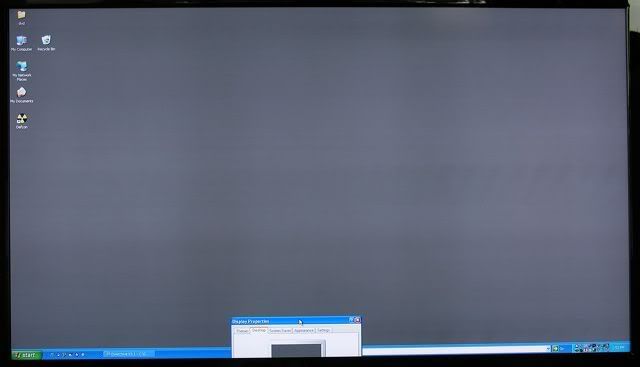 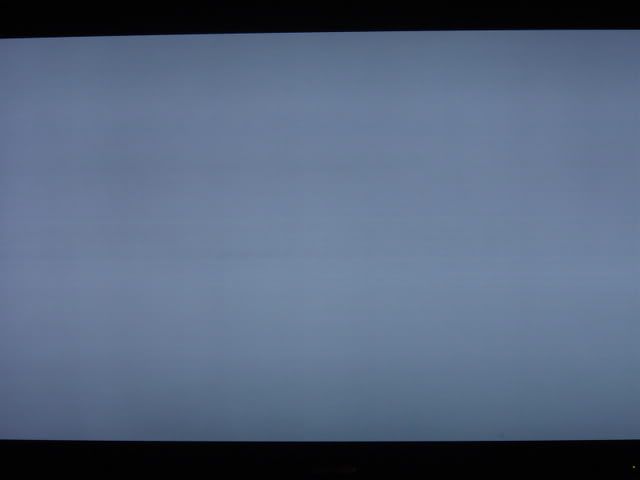 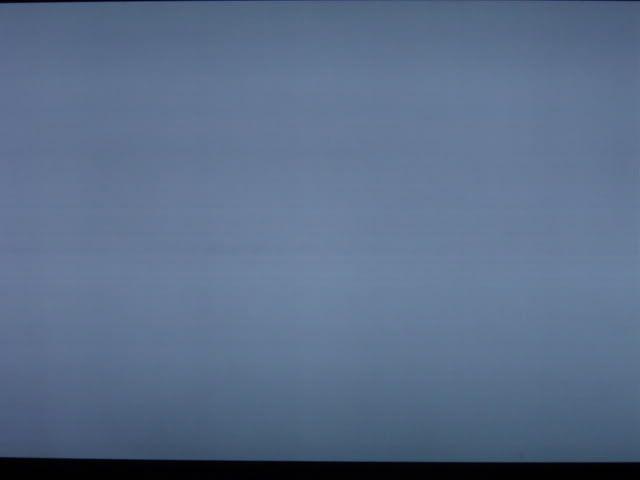 *not jsut vertical, but also horizontal banding* Sony Bravia XBR2 1080p: 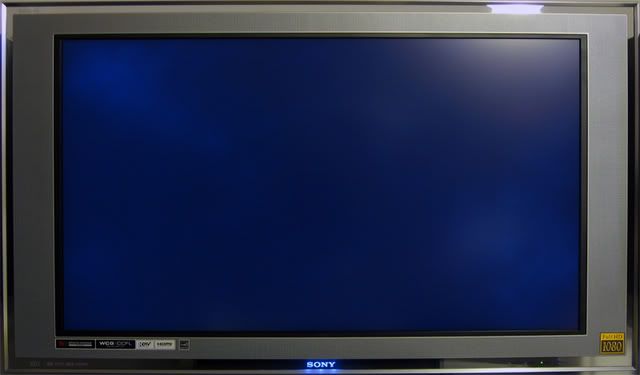 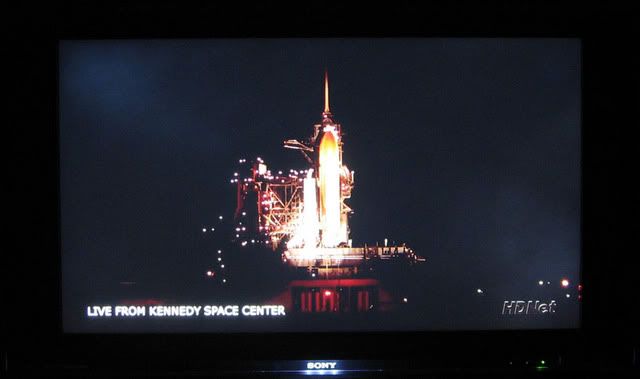 *cloud problem* Samsung (dunno what model): 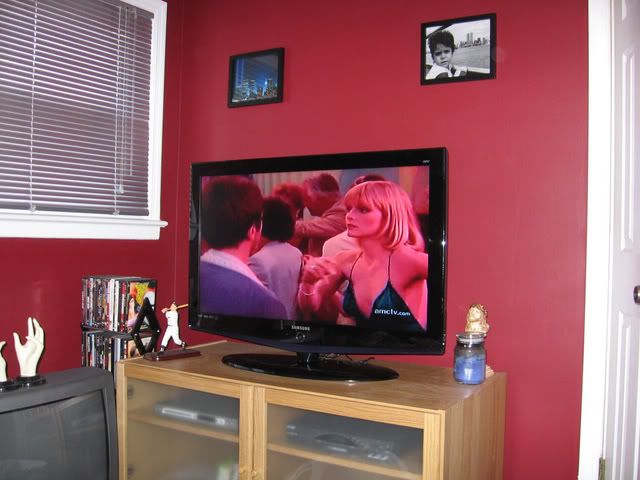  *common vertical band* Westinghouse LVM 1080p series (mine): 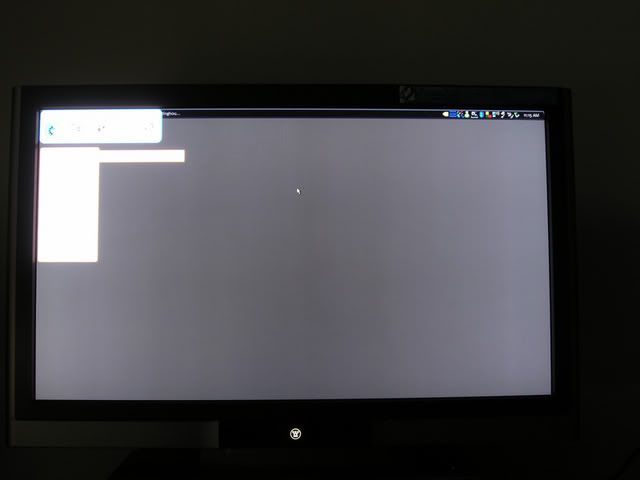 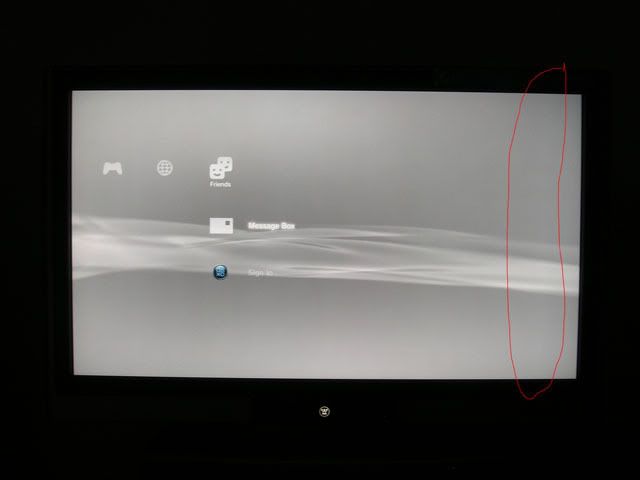 *brighter streak* If you cannot see the banding problems...try scrolling the pages and you will see them easily. Following attatchment is a grey background I made to detect vertical banding, you can adjust your TV's brightness to check it out at different grey level. Vertical banding is not new, but is getting serious. This also applies to LCD Monitor and Projectors as well. Another problem is backlight bleeding, easily detectable under black background. Just look around the boarders and see if it has same brightness as the other areas or do they look significantly brighter. Pictures are all taken from various thread in AVS forum. This post has been edited by AlamakLor: Jan 7 2007, 02:27 AM Attached thumbnail(s)
|
|
|
|
|
|
vincent_audio
|
Dec 30 2006, 02:40 AM
|
|
|
great findings, but wrong section i suppose QUOTE Audiophiles (13 Active Users)
Subforums: [Musicians]
Fine tuning the decibel gap. Portable MP3 players, high end speakers and all audio gadgets. QUOTE Photography, Digital Imaging & Video (4 Active Users)
Subforums: [Photo Gallery], [Trading Guides]
Discussion of video, imaging, photography, and techniques as well as reviews of gears to it or maybe QUOTE Hardware (11 Active Users)
Subforums: [Hardware Questions & Answers]
All the latest peripherals that will burn a hole in your pocket. This post has been edited by vincent_audio: Dec 30 2006, 02:40 AM |
|
|
|
|
|
TSAlamakLor
|
Dec 30 2006, 02:42 AM
|
Look at all my stars!!
|
The hardware section is mainly PC oriented, Phtography section is imaging and digita video oriented, the audio section is actually Audio Video oriented. Nothing wrong with this thread being in this section.
|
|
|
|
|
|
vincent_audio
|
Dec 30 2006, 02:45 AM
|
|
|
QUOTE(AlamakLor @ Dec 30 2006, 02:42 AM) The hardware section is mainly PC oriented, Phtography section is imaging and digita video oriented, the audio section is actually Audio Video oriented. Nothing wrong with this thread being in this section. but the forum description seems to be describing otherwise  maybe scotty can amend that. Or stop calling this section audiophiles all together |
|
|
|
|
|
TSAlamakLor
|
Dec 30 2006, 02:54 AM
|
Look at all my stars!!
|
QUOTE(vincent_audio @ Dec 29 2006, 03:45 PM) but the forum description seems to be describing otherwise maybe scotty can amend that. Or stop calling this section audiophiles all together You can ask scotty or the admins to move it if you want though  along with all the LCD TV threads. I founded this section ages ago and it was initially intended for "audio" only. It should have been called Audio Video at the first place but for some reasons it was called Audiophiles. (I didn't name it, I just suggested this section and help to materialize it. Other staff and mods werent quite fond of this section at that time though.) PS: did you take note of the main title of the "hardware" section...it say "computers". Did you check out the content of the Digital forum? cameras and DV  This post has been edited by AlamakLor: Dec 30 2006, 02:57 AM This post has been edited by AlamakLor: Dec 30 2006, 02:57 AM |
|
|
|
|
|
tong1774
|
Dec 30 2006, 05:01 AM
|
|
|
Alamaklor, how much you push the brightness or backlight level before the "brighter streak" show up? My Sharp also got this problem when i turn up the brightness, and certain DVD will exibite some green pixel on the area which is brighter. Wont see it if the DVD quality is good though... Do yours have tis problem too?
|
|
|
|
|
|
TSAlamakLor
|
Dec 30 2006, 06:24 AM
|
Look at all my stars!!
|
Usually it is visible at any level of brightness, after all, it is the screen that is uneven which causes the banding, not the backlight placement or the luminosity if the light. As you can see from the first sharp picture, there are 2 thick dark band that is symmetrical, that is actually the "mark" left by the rolling machine when they are flattening the panels. Green pixels? I think ur tv got some serious problems  might wanna rma it before warranty habis...these problems cannot be "serviced" so they will usually just examine it and give u another TV, might be new, might be refurb. @DSC not too sure, but all of the have this kind of problem...it's just whether the owners noticed it or not. It is pretty much the limits of the technology. Even on a lcd monitor, you'd still notice that the grey is not particularly smooth compared to CRT. |
|
|
|
|
|
tong1774
|
Dec 30 2006, 12:19 PM
|
|
|
QUOTE(AlamakLor @ Dec 30 2006, 06:24 AM) Usually it is visible at any level of brightness, after all, it is the screen that is uneven which causes the banding, not the backlight placement or the luminosity if the light. As you can see from the first sharp picture, there are 2 thick dark band that is symmetrical, that is actually the "mark" left by the rolling machine when they are flattening the panels. Green pixels? I think ur tv got some serious problems might wanna rma it before warranty habis...these problems cannot be "serviced" so they will usually just examine it and give u another TV, might be new, might be refurb. @DSC not too sure, but all of the have this kind of problem...it's just whether the owners noticed it or not. It is pretty much the limits of the technology. Even on a lcd monitor, you'd still notice that the grey is not particularly smooth compared to CRT. The green pixel wont be there all the time, and u cant see it on the desktop wallapepaer even if i push the brightness to max. It will only appear on those bad encoded source which already contain some pixel in it, and the tv make it worst. If the source is good, like D9 and some 1080p downloaded from Microsoft, then u wont see it at all. I am getting Sharp to come over and check it next week, hope that they can change a new one for me. |
|
|
|
|
|
TSAlamakLor
|
Dec 30 2006, 01:09 PM
|
Look at all my stars!!
|
maybe it's some green tint problem...not sure about that. When you get them over...make a huge fuss, tell them that you have checked with many owners online and many ppl have this problem this way, they will really treat it as a problem  |
|
|
|
|
|
mofonyx
|
Dec 30 2006, 01:09 PM
|
|
|
Eih, very noble of you to do this Looks like you have a lot of time on your hands. |
|
|
|
|
|
aaronpang
|
Dec 30 2006, 11:41 PM
|
|
|
I know banding is a common problem for Sharp screens but they still look good and are on top of my shortlist... Anyway does anyone know if it's a problem for Phillips because I was targetting either an Sharp or Phillips LCD TV for my home... I'm looking for a good 32inch screen |
|
|
|
|
|
tong1774
|
Dec 30 2006, 11:47 PM
|
|
|
QUOTE(aaronpang @ Dec 30 2006, 11:41 PM) I know banding is a common problem for Sharp screens but they still look good and are on top of my shortlist... Anyway does anyone know if it's a problem for Phillips because I was targetting either an Sharp or Phillips LCD TV for my home... I'm looking for a good 32inch screen Philips has backlight leakage problem in common, may be the hi-end model is better, but expensive like hell. And the low-end model not worth looking at, example the TA1800 and 7321 series. So unless u have adeep pocket to go for Philips 9XXX series, otherwise look some where else. |
|
|
|
|
|
aaronpang
|
Dec 31 2006, 12:11 AM
|
|
|
QUOTE(tong1774 @ Dec 30 2006, 11:47 PM) Philips has backlight leakage problem in common, may be the hi-end model is better, but expensive like hell. And the low-end model not worth looking at, example the TA1800 and 7321 series. So unless u have adeep pocket to go for Philips 9XXX series, otherwise look some where else. OIC backlight leakage is it really bad? I'm doing my best to avoid plasmas because of the high power consumption and problems with image getting burned on the screen...  Is there such a thing as a perfect LCD TV without a heavy price tag coz I only got like RM5k.  |
|
|
|
|
|
SUSMike3300
|
Dec 31 2006, 12:13 AM
|
|
|
QUOTE(aaronpang @ Dec 31 2006, 12:11 AM) OIC backlight leakage is it really bad? I'm doing my best to avoid plasmas because of the high power consumption and problems with image getting burned on the screen... Is there such a thing as a perfect LCD TV without a heavy price tag coz I only got like RM5k. You can get HDTV with that price, but lower screen size. |
|
|
|
|
|
kelvinyam
|
Dec 31 2006, 12:21 AM
|
|
|
Regarding to the bending problem, is this the same problem that happened to Dell LCD few years back? So this is a common problem for LCD panel regardless of LCD TV or LCD Monitor?
And is the size of panel got something to do with this defect? I'm using a Dell 19" ultrasharp and I don't have this problem, yet.
|
|
|
|
|
|
tong1774
|
Dec 31 2006, 12:35 AM
|
|
|
QUOTE(aaronpang @ Dec 31 2006, 12:11 AM) OIC backlight leakage is it really bad? I'm doing my best to avoid plasmas because of the high power consumption and problems with image getting burned on the screen... Is there such a thing as a perfect LCD TV without a heavy price tag coz I only got like RM5k. 5k can get u a above average 32" LCD, but no where near perfect, even CRT and plasma has are not perfect. But with 5K u better get a decent 32" than a 37" but crappy LCD. |
|
|
|
|
|
TSAlamakLor
|
Dec 31 2006, 01:17 AM
|
Look at all my stars!!
|
QUOTE(kelvinyam @ Dec 30 2006, 01:21 PM) Regarding to the bending problem, is this the same problem that happened to Dell LCD few years back? So this is a common problem for LCD panel regardless of LCD TV or LCD Monitor? And is the size of panel got something to do with this defect? I'm using a Dell 19" ultrasharp and I don't have this problem, yet. yeah, the same problem was reported on the dell lcd. Some say it has nothing to do with the sizes, but I think that banding would seem more prominent on larger screens. This is a common problem with LCD technology, but as I said, it is getting more serious nowadays |
|
|
|
|
|
piscesguy
|
Dec 31 2006, 07:58 AM
|
|
|
QUOTE(AlamakLor @ Dec 31 2006, 01:17 AM) yeah, the same problem was reported on the dell lcd. Some say it has nothing to do with the sizes, but I think that banding would seem more prominent on larger screens. This is a common problem with LCD technology, but as I said, it is getting more serious nowadays Do you know any banding problem exists in Plasma tv? It seems I cannot find it in my plasma.  |
|
|
|
|
|
TSAlamakLor
|
Dec 31 2006, 08:05 AM
|
Look at all my stars!!
|
I'm not sure about plasma, I've never really looked into plasma due to the phosphor burning issue...which is going to be inevitable since not many movies are 16:9
|
|
|
|
|



 Quote
Quote




 0.0222sec
 0.56
0.56
 6 queries
 GZIP Disabled