Welcome Guest ( Log In | Register )

Outline · [ Standard ] · Linear+

 AV Receivers/ Speakers/ Subwoofers, Discussion & Opinion

views
     
peter32
post Jan 3 2022, 04:43 PM

心旷神怡
******
Senior Member
1,162 posts

Joined: Sep 2008
From: PJ


Seek advice from the experienced AV players here for the following:

I am looking to upgrade my AV set up to Atmos, from 5.0 channel old school Dolby surround / prologic/ DTS/DD. So I have a set of 5 speakers already in place.

I recently acquired a Denon X4300H, ultimately I may upgrade all the way to 11.0 (no sub for now). My question is below if anyone can give some ideas:

1. Now I have 5.0 speaker set up, to calibrate the denon, from what I read, I should set the front LCR channel to 0db, then fine tune the surround by ears, before using the Audyssey to fine tune, is that a correct sequence?

2. One pair of surround back speakers are on the way (imported from China, just a typical stereo speakers) which I will set up as rear surround, most likely to be set as Rear Height in view of the pre-existing wiring in place.

3. Another 4 Ceiling speakers will be imported from China too, obviously it will be used for ceiling set up unless the situation demand, I can mod it with a DIY casing as Front height and Surround Height.

4. All the above is because I have two options: either I can use all speakers to set up pure Atmos (which use 4 ceilings) or Auro-3D, which uses 2 Front Height and 2 Surround Heights. My question is, from your own experience, it is worth setting up Auro-3D speakers location for BOTH Atmos and Auro? It can be done by setting the rear as rear height for Denon.

Or I should just focus on Atmos alone. I need to pay extra to download Auro-3D firmware to allow Auro playback.

Finally, I have Mi Box S as Kodi playback, now can't really do passthrough for Atmos etc, so any other media box should I change to, eg. Mecool KM2, or others. Any other box I should consider?

Thank you all for advice.

This post has been edited by peter32: Jan 3 2022, 04:45 PM
peter32
post Jan 4 2022, 11:57 AM

心旷神怡
******
Senior Member
1,162 posts

Joined: Sep 2008
From: PJ


QUOTE(kkthen @ Jan 4 2022, 11:50 AM)
My advise focus on Atmos.  You want cheap solution, you can try zidoo media player. Or Far better sound quality  like ipuk media player.
*
Noted. Sound quality is important to me. Thanks for sharing.
peter32
post Jan 4 2022, 03:41 PM

心旷神怡
******
Senior Member
1,162 posts

Joined: Sep 2008
From: PJ


SSJBen, thank you very much for your precious info.

1. Indeed your info, esp on the area of Auro-3D would be important. Its not cheap to purchase the licence for it, so for that matter, I will more likely to study the placement of speakers in greater details before digging holes on the ceiling for sure. My existing L/R surround is about 2-3 feet above ear level (when sitting down) because thats how the earlier surround speakers are being placed. Its also a Bipolar unit too but apparently it can still be used, Dipole would have problem with Atmos, but not Bipole.

2. Room is not an ideal room, its a sitting room but in 3-4M x 7m length, not acoustically ideal for sure, but its a rectangular room in 2/3 of the space, another 1/3 is an opened space. Not perfect but have to live with it.

3. I will be using my old AVR as power amp to drive the front 2 speakers. So I can fix up all 11 channels of speakers from the Denon. Most likely I won't drive vol up most of the time unless there is some odd explosion here and there from the scenes.

4. Yes the amp does run hot after a while. What active cooling tools would you recommend?

5. Question: Is the Denon Pre-out active all the time ? Or I need to select Speaker configuration to allow Pre-out at certain channels?

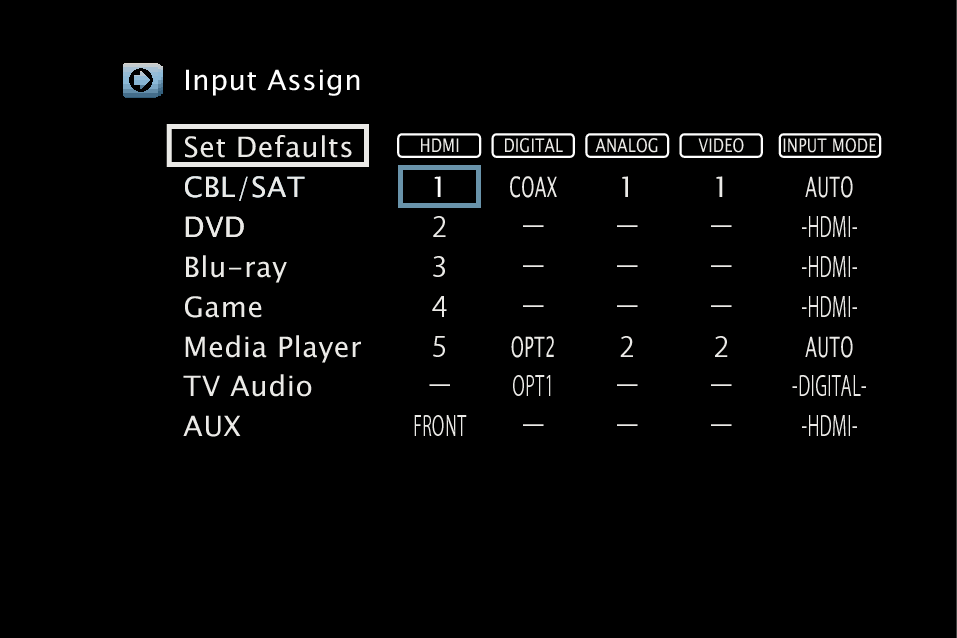
6. Final Question: Is there a way for me to select digital optical input for the same video channel? eg. channel 1: media box with HDMI audio default intpu. Channel 2: Media box video input via HDMI but audio using Optical in.

I tried but does not seems to work this way.

Your input will be greatly appreciated.
peter32
post Jan 4 2022, 05:06 PM

心旷神怡
******
Senior Member
1,162 posts

Joined: Sep 2008
From: PJ


QUOTE(SSJBen @ Jan 4 2022, 04:17 PM)
1) Surround speakers don't have to perfectly at your ear level it's not music. In fact I've found that having it about 1ft above ear level creates a more enveloping experience instead of the speakers being very distinctive and calling attention to themselves.

2) Well try to acoustically treat it as well as you can, at least deal with the first reflection points.

3) Are you sure your old AVR has multi-channel input? If it does, I assume you're aware to know how to level match it to your current AVR so that you don't get volume misbalancing.

4) The expensive (and silly) way is to just buy those AC infinity enclosure fans. The better but not as nice looking way is to buy Noctua or Be Quiet! fans, zip tie them to the top of the AVR.

5) Yes the pre-out is active at all times for ALL channels. Only the latest 2020 models has an option to entirely shut off the internal amplifiers for a real pre-pro configuration.

6) I don't think you can mix audio channels with different HDMI inputs.
*
1. Tks for the idea. Bipole does give the faint surround sound when it works, so slightly higher is better. Will see if I will need to adjust the height when it runs atmos.

2. Never thought of acoustic treatment for sitting room. Option is quite limited.

3. Old AVR is an NAD with torroidal transformer with 7 channel power amp capability, so its rather handy in times like this. Its also reasonable to drive all three front channels via this as well. This is why I opted for Denon 4300 that specially comes with Pre-amp out and capacity for 11 channels processing.

4. Pre-outs are active will be good, I can mix and match which channels to outsource ext amps so to speak.

5-6. : I was thinking of linking audio optical output from Media box when listening to music, send to another DAC for processing (third party SMSL DAC) and send analogue audio signal to Either Denon or my old Amp for amplification. Thats for pure music listening to only front 2 dhannels. Looks like I will have to shut off video signal to listen to the music if I still want the denon to amplify it. If not, I will have to opt for old AVR for that function. That makes it complicated for user (my wife) if she want to listen to music alone.
peter32
post Jan 4 2022, 08:49 PM

心旷神怡
******
Senior Member
1,162 posts

Joined: Sep 2008
From: PJ


QUOTE(ktek @ Jan 4 2022, 07:22 PM)
user posted image
liek this can or not
*
Did it work for you? I tried to set up another HDMI 5 but using Opt1, but it can only set up one HDMI 5. Once you set up, eg. AUX as HDMI 5 with Opt1, the original HDMI 5 (Media Player) will be deleted. So I can't set up one for movie, another one for music (optical in).

Edit:

In this set up of yours, what happen when you switch to Media Player? Do they adopt HDMI as default audio input or others? Is there a way to set up priority on which audio input will be adopted?

This post has been edited by peter32: Jan 4 2022, 08:59 PM
peter32
post Jan 4 2022, 11:11 PM

心旷神怡
******
Senior Member
1,162 posts

Joined: Sep 2008
From: PJ


QUOTE(ktek @ Jan 4 2022, 10:30 PM)
the key is audio input mode= auto
if remember correctly ya. rca will take priority over hdmi audio
*
Just realised that my unit of the same setup page does not come with Input Mode, only the hdmi, digital, analog, composite and video.

Edit: Confirmed. Input select is a common button that enabled me to select either digital audio input, analog or HDMI for any channel that I am in. Its troublesome to go into Setup to do that whenever I need to select audio input but the option is there. There is no such INPUT Select button on the remote that I knew of.

This post has been edited by peter32: Jan 5 2022, 12:00 AM
peter32
post Jan 5 2022, 01:41 PM

心旷神怡
******
Senior Member
1,162 posts

Joined: Sep 2008
From: PJ


I like subwoofer in general, esp those with controlled bass. I actually have one cheap infinity sub lying around without being used, because its bass is not well controlled. So for now simple stereo speaker bass should be sufficient for own use.

I finally ordered a Mecool mk2 online to replace the Mi Box. Only recent few days I got to know about the zidoo (like you mentioned) and another high end media streamer. Not cheap at all... For now I will stick to budget set up and see how it goes.
peter32
post Jan 5 2022, 04:59 PM

心旷神怡
******
Senior Member
1,162 posts

Joined: Sep 2008
From: PJ


You are right, its only capable of doing Lossy audio passthrough, not lossless. Besides, my Tv is still an old LED, not yet the newer type, but serves us very well so far. Until we got a new one, then I will consider an upgrade. Now our usage is still on local playback, but mostly on disney hotstar, astro playback, youtube viewing & bluetooth music playback.

I still do not have 4K TV as yet.. but no harm getting something future proof somewhat.
peter32
post Jan 12 2022, 09:49 PM

心旷神怡
******
Senior Member
1,162 posts

Joined: Sep 2008
From: PJ


My Denon x4300h - exhibit lip sync issue for both Media player and Astro.

Both Media input lip sync setting has been set off or zero. This is definitely due to the Amp. While I can set the amp to auto lip sync, which still failed to sort the problem out, is there anything I need to look at from the Amp or this is a common issue for Denon?

Any feedback from the anyone will be greatly appreciated.
peter32
post Jan 12 2022, 11:27 PM

心旷神怡
******
Senior Member
1,162 posts

Joined: Sep 2008
From: PJ


QUOTE(ktek @ Jan 12 2022, 10:48 PM)
hdmi cable
*
You mean from Source to Amp, or Amp to TV, or both?

peter32
post Jan 13 2022, 12:42 PM

心旷神怡
******
Senior Member
1,162 posts

Joined: Sep 2008
From: PJ


Local playback - minor lag noticed.
Astro ultrabox HDMI connection: lagged.
Media box: Youtube, Kodi, etc, lagged as well.
peter32
post Jan 13 2022, 01:02 PM

心旷神怡
******
Senior Member
1,162 posts

Joined: Sep 2008
From: PJ


I test both media player and astro ultrabox using old amp, connect only by Optical cable for audio, but direct Video connection from source to TV instead (my old amp has no HDMI in/out), there is no lag.

So the issue must have been from the Amp or HDMI cable. Recently I upgraded HDMI cable betw Media box and Denon using high speed rated one. So cable maybe unlikely.

I didn't know Denon player can test cable. How to do that ? Or maybe later I google and see.

Edit: Found the shortcut for HDMI test from youtube, will try that tonight and see if that helps. Thanks for the heads up.

This post has been edited by peter32: Jan 13 2022, 01:29 PM
peter32
post Feb 15 2023, 01:42 PM

心旷神怡
******
Senior Member
1,162 posts

Joined: Sep 2008
From: PJ


QUOTE(voscar @ Feb 14 2023, 09:41 PM)
Gone are the years AVR + Bookshelf Speaker RM3k, nowadays ok AVR  alone already exceeded RM4k
*
Do look into used market. Its very much worth it.
peter32
post May 27 2025, 02:13 PM

心旷神怡
******
Senior Member
1,162 posts

Joined: Sep 2008
From: PJ


QUOTE(Blinklime @ May 23 2025, 06:51 PM)
it is possible to setup a decent 5.1 home theater setup for 4k budget.
including avr.

doing some quick research q990d seems like a good deal. 11 plus small speakers.

4k-ish 5.1 setup vs q990d/f. can fight anot.

now using 2 pairs of active speakers 4.0 setup. both swans.
my htpc, does not allow both dedicated sub or center to work at the same time.
its a realtek virtual surround thing. but seems to work while playing surround content.

now planning 2 upgrade something better. got pipu recommend i all in on a receiver. later slowly buy speakers.

my price references mostly from shopee choy store. no audio retailer in my area.

small room. maybe 3m x 5m. source volume 30-40%. speakers 50%
*
Its possible, but need to go for used AV Amp, and used speakers. If not, import small size speakers from China. Spend more on front 3 speakers (LFC), the rest can be of lower quality.


Change to:
| Lo-Fi Version
0.0285sec    0.43    7 queries    GZIP Disabled
Time is now: 1st December 2025 - 10:14 PM