Welcome Guest ( Log In | Register )

5 Pages < 1 2 3 4 > » Bottom

Outline · [ Standard ] · Linear+

 Xiaomi Router Mini with full Unifi support, turn into a beast with custom asus rom!

views
     
muncheno
post Nov 11 2016, 08:45 PM

Enthusiast
*****
Senior Member
736 posts

Joined: Jun 2006
From: Ipoh
The same.screen that connected and then u login and key password.

If you on windows, I presume you are using putty and if u on Linux than it is the terminal.

Once you successful logon, the will prompt something like command prompt for u to key in Linux commands.

Those are the command list in step 7 onward that should key in accordingly.

This post has been edited by muncheno: Nov 11 2016, 08:48 PM
muncheno
post Nov 11 2016, 09:02 PM

Enthusiast
*****
Senior Member
736 posts

Joined: Jun 2006
From: Ipoh
QUOTE(eugene88 @ Nov 11 2016, 08:54 PM)
Thanks, managed to flash my router after skipping partition backup

For the latest commits, do I still have to use Padavan or I can just use firmware upgrade to flash it?
*
The way I did it.now is build the firmware then I flash via padavan web GUI from the router.

I only use the scripts to build firmware.

muncheno
post Nov 11 2016, 09:27 PM

Enthusiast
*****
Senior Member
736 posts

Joined: Jun 2006
From: Ipoh
QUOTE(eugene88 @ Nov 11 2016, 09:21 PM)
For the trx file you provided above, can I flash it via the firmware upgrade feature?
*
Not sure I understand ur question here.

1st time, I would recommend using Prometheus and subsequently okay via padavan.

Why? Because i been told xiaomi firmware and padavan have different partitioning. 1st time to make Prometheus will partition and flash it.

Subsequently you and run using padavan from router web page (firmware upgrade) and check the log to see the flashing. You will able find from the log which partition is flashed.

This post has been edited by muncheno: Nov 11 2016, 09:28 PM
muncheno
post Nov 11 2016, 10:36 PM

Enthusiast
*****
Senior Member
736 posts

Joined: Jun 2006
From: Ipoh
QUOTE(bran-d @ Nov 11 2016, 09:58 PM)
very sorry, i am very new to all this... lol... no idea on how to get all this work...
i require to SSH to the router? any beginner guide to use putty and all? btw, i am using win 10 64bit.
*
Sorry if I given the impression to be rude here.

I think it is easier if you are following the STEPs in the 1st post than u try asking steps that u not even there yet.

Remember Google is ur best friend, hint given and all u need is Google it if u don't understand.

This post has been edited by muncheno: Nov 11 2016, 10:36 PM
muncheno
post Nov 11 2016, 11:30 PM

Enthusiast
*****
Senior Member
736 posts

Joined: Jun 2006
From: Ipoh
QUOTE(bran-d @ Nov 11 2016, 11:08 PM)
ok.thanks. done.
i reach until step 13 of installation of  custom bootloader - Breed and Rebooting...
i proceed to next step where off the router and reset, the color of the LED is  blinking in blue and NOT orange or yellow.. cannot enter with 192.168.1.1.. what should i do now?
*
If you can't get it on 192.168.1.1
try also 192.168.31.1 (make sure your computer also 192.168.31.X)


If not mistaken your router in a state only Breed bootloader is running which is part of the process.

You need boot the bootloader mode with reset button press while powering. Release only when you see the orange light is blinking.

Lastly, you are having Xiaomi Mini right?

This post has been edited by muncheno: Nov 11 2016, 11:33 PM
muncheno
post Nov 12 2016, 08:19 PM

Enthusiast
*****
Senior Member
736 posts

Joined: Jun 2006
From: Ipoh
QUOTE(bran-d @ Nov 12 2016, 02:45 PM)
Succeeded. some how i find my reset is quite different. when i reset the router, the LED change from pink to blue blinking and that its, login into 192.168.1.1.

once again thanks to muncheno so much for guiding.
*
Welcome and enjoy smile.gif

QUOTE(lala_cai @ Nov 12 2016, 03:27 PM)
guys a quick one.
If i keep using the Prometheus to flash/upgrade the firmware, do i need to keep making backup?
i'm afraid the router will be out of storage.
*
U only need one backup and u can move the backup to other location.

The backup should be your on PC and not your router if you are using the scripts.


muncheno
post Nov 13 2016, 07:01 AM

Enthusiast
*****
Senior Member
736 posts

Joined: Jun 2006
From: Ipoh
QUOTE(silrave @ Nov 12 2016, 11:21 PM)
any sensei here success flash asus rom in xiaomi router 3
*
Yes, pls read this thread from 1st post and few pages back.
Flashing Asus firmware does not come easy for beginner.
muncheno
post Nov 13 2016, 03:46 PM

Enthusiast
*****
Senior Member
736 posts

Joined: Jun 2006
From: Ipoh
QUOTE(silrave @ Nov 13 2016, 01:29 PM)
wan to ask how to reset root password?
because i find out i keep on fail on this

http://192.168.31.1/cgi-bin/luci/;stok=<...<NEWPASS>

i try to reset router still the same
*
Not sure you at which step or what did u do.

Read urself.

https://forum.lowyat.net/topic/3828356/+180

This post has been edited by muncheno: Nov 13 2016, 03:48 PM
muncheno
post Nov 13 2016, 05:05 PM

Enthusiast
*****
Senior Member
736 posts

Joined: Jun 2006
From: Ipoh
QUOTE(silrave @ Nov 13 2016, 05:01 PM)
haiz try my best
yesterday i manage to change the root password
then today i wan to change the root password also fail
*
R u running a developer firmware and make sure it is older version.

If u on xiaomi firmware, just reset it and you will ask to set password again. Choose not the same password for router.


muncheno
post Nov 13 2016, 06:06 PM

Enthusiast
*****
Senior Member
736 posts

Joined: Jun 2006
From: Ipoh
QUOTE(jianwei87 @ Nov 13 2016, 05:32 PM)
I'm still unable to telnet the router. I'm getting this error message in step 6 "{"code":1523,"msg":"参数错误"}"
*
U r trying to flash ur Mi-mini router?
Are you on correct developer firmware? Never one might not work.

Without much details here, I can only tell you not to telnet, instead use SSH method. Telnet is a mistake.
muncheno
post Nov 13 2016, 09:36 PM

Enthusiast
*****
Senior Member
736 posts

Joined: Jun 2006
From: Ipoh
QUOTE(jianwei87 @ Nov 13 2016, 09:26 PM)
Ya, I'm trying to flash my Mi Mini router. But I'm not able to telnet or SSH follow the method. Even I get the SSH from Xiaomi website to gain the SSH access I still unable to get into the router SSH.
*
Care to provide details?

Are on developer firmware? which version?
You flash miwifissh.bin file or not? or you using <STOK> code method?

Good night.
muncheno
post Nov 14 2016, 06:28 AM

Enthusiast
*****
Senior Member
736 posts

Joined: Jun 2006
From: Ipoh
QUOTE(jianwei87 @ Nov 14 2016, 12:38 AM)
I stuck at the install the Breed step. I did do everything with this final instruction

"mtd -r write breed-mt7620-xiaomi-mini.bin Bootloader" and it show
Writing from breed-mt7620-xiaomi-mini.bin to Bootloader ...   
Rebooting ...
and also downloaded the Padavan firmware but I'm not able to get

"power off your router, look for a pinhole on the back, power on your router while pressing and holding the button inside the pinhole;"

But I didn't see any orange/yellow light blinking, I just see the blue light blinking.

Even I try to restart the router without doing the pinhole, I still able to get into the XiaoMi router page which is 192.168.31.1
*
Run 2 separate command prompt cmd with these
Ping -t 192.168.1.1
Ping -t 192.168.31.1

Then off your router.
Press and hold on the reset button then power on your router.
Do not release the reset button until it start blinking, it take ATLEAST 15-20sec for it to start blinking.

Check from the ping see which address responsed.

If you r very sure that u already have the breed bootloader, now you only need to boot into Breed to flash padavan.
Keep trying.


muncheno
post Nov 14 2016, 09:00 AM

Enthusiast
*****
Senior Member
736 posts

Joined: Jun 2006
From: Ipoh
QUOTE(jianwei87 @ Nov 14 2016, 08:51 AM)
Get response at 192.168.31.1 only and timeout 192.168.1.1

Also did the step you told me to turn off the router and hold the reset button then power on the router. But it show the blinking blue LED light.
*
If you are able to login into there router with 192.168.31.1 and it is still Xiaomi's firmware, then you did not flash the Breed bootloader correctly.

2 options, I would suggest.
Option 1 - repeat the steps.

or

Option 2 - since you can ssh into your router, you can use Prometheus scripts to build the firmware and flash your router without changing the Uboot to Breed bootloader.

Just my 2-cents, reminder here, do at your own-risk.
muncheno
post Nov 14 2016, 02:50 PM

Enthusiast
*****
Senior Member
736 posts

Joined: Jun 2006
From: Ipoh
QUOTE(jianwei87 @ Nov 14 2016, 01:43 PM)
OMG I couldn't login via SSH it said I'm not enter correct password.

Permission denied (publickey,password).

What happen?
*
I suggest you to start the steps all over.

Secondly not sure I could understand your feedback here as I do not exactly which steps you are in.
Very confuses for someone who read your post with a short note not knowing which steps

First you inform that you already flashed the Breed bootloader.
Then you now you can't access SSH anymore.

If you can't get into Breed bootloader and you also can't access via SSH.
I could only advice you to start over or ask someone else to help.

I'm not an expect here, I 'm just help with my experience I did on my Mi routers and share here.

muncheno
post Nov 15 2016, 08:21 PM

Enthusiast
*****
Senior Member
736 posts

Joined: Jun 2006
From: Ipoh
QUOTE(silrave @ Nov 15 2016, 07:44 PM)
yes
3 days at least i done finish flash to asus rom
but problem is on how to configure id and password for unifi ?
because i saw website all is easy configuration
but i login all is manual input
*
I'm Time user.

My guess is at below if you using hipptv, hopefully others help correct this.


Edited: correct image
.Attached Image

This post has been edited by muncheno: Nov 15 2016, 08:25 PM
muncheno
post Nov 16 2016, 01:11 AM

Enthusiast
*****
Senior Member
736 posts

Joined: Jun 2006
From: Ipoh
QUOTE(hellfire_my @ Nov 16 2016, 12:07 AM)
There was a lot of bashing on xiaomi wifi router 3 on its 5G wifi signal. I wonder after flash with the Padavan custom firmware, will it improve the wifi signal stability?
*
To me, no regret on using Padavan firmware definite more stable here. Before that on mi firmware I have set schedule to reboot the routers on every week to avoid any stability issue.
Then again problem mostly due my Mi-mini router.

Maybe try set reboot schedule with ur miwifi app first and see if that improve.
I would recommend to u to flash Padavan, just that it is not ease. It take times and effort.

muncheno
post Nov 16 2016, 10:06 AM

Enthusiast
*****
Senior Member
736 posts

Joined: Jun 2006
From: Ipoh
QUOTE(hellfire_my @ Nov 16 2016, 09:12 AM)
There are some people complain on 5G wifi signal suddenly will disappear even in a very close distance and the download speed measure on 2.4G or 5G is not quite fast compare with other different brand of router.

It was suspect due to the original firmware have flaw or not stable. I haven't got my self the device yet, still considering to get the mini version or the latest router 3 version, so does any of the above happen to you before Padavan was flash? While after Padavan flash any of those happened?
*
Not for me, I got no such issue even on default firmware.
I suggest you go read yourself rather u just listen me as others that tell u stuff which you can't judge.

Edited:
The sudden disappear situation, I could only image if user who choose the wrong region therefore router running at the channels does not support by old devices.

This post has been edited by muncheno: Nov 16 2016, 10:08 AM
muncheno
post Nov 16 2016, 04:14 PM

Enthusiast
*****
Senior Member
736 posts

Joined: Jun 2006
From: Ipoh
QUOTE(silrave @ Nov 16 2016, 02:59 PM)
so far after i flash my xiaomi router 3 to asus firmware
need to learn how to use qos and how to do transmission of download torrent
*
No QOS function here.
https://forum.lowyat.net/index.php?act=ST&f...post&p=82062443


https://bitbucket.org/padavan/rt-n56u/wiki/EN/Transmission
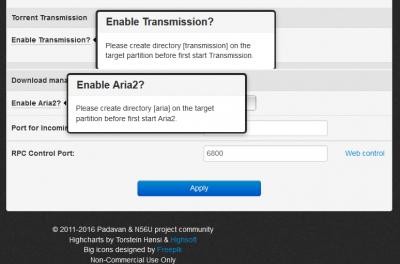
Attached Image

This post has been edited by muncheno: Nov 16 2016, 04:31 PM
muncheno
post Nov 17 2016, 07:40 PM

Enthusiast
*****
Senior Member
736 posts

Joined: Jun 2006
From: Ipoh
QUOTE(silrave @ Nov 17 2016, 07:31 PM)
so far test till today
xiao mi router no issue
the only issue is tm modem > <
it suddenly dont have voip then i dont have internet
restart modem without restart xiaomi router
still work fine ^^
*
Can you share your uniform setting on vlan here again?
How about hippytv?
Thanks.
muncheno
post Nov 17 2016, 09:11 PM

Enthusiast
*****
Senior Member
736 posts

Joined: Jun 2006
From: Ipoh
QUOTE(silrave @ Nov 17 2016, 08:31 PM)
sorry a
i have no idea you share that link
is it means
it does not support QOS except disable nat features?
*
It has been disable, and if you must have then you need to disable QOS and install it yourself.

No idea on how to install it, my hint is google about ddwrt and QOS.


5 Pages < 1 2 3 4 > » Top
 

Change to:
| Lo-Fi Version
0.0412sec    1.07    7 queries    GZIP Disabled
Time is now: 21st December 2025 - 10:55 AM