Welcome Guest ( Log In | Register )

Outline · [ Standard ] · Linear+

Unifi Best router for UNIFI 30 mbps, Budget around 400 to 500

views
     
TSGearX_SaM
post Nov 14 2015, 01:39 AM, updated 10y ago

Casual
***
Junior Member
473 posts

Joined: Feb 2009


Recently just upgraded my unifi from 5 mbps to 30mbps.

However I am still using the old dlink dir615 router and it has been almost 4 years.

Besides I am constantly getting 20mbps speed when connecting to wifi and very low signal for a floor above.

I am thinking to get asus RT-N66U. Is it a good buy?

_____________________________________________

TS has been using ASUS AC66U for many months. Got it from GEMFive during a 150 or 200 discount . Total damage for ASUS AC66u around RM600.

So far the router has been working in a superb condition. Getting constant 30mpbs on wifi.

This post has been edited by GearX_SaM: Aug 17 2016, 01:54 PM
TBJ
post Nov 14 2015, 01:46 AM

Casual
***
Junior Member
374 posts

Joined: Sep 2014


many good router from china like xiaomi, letv, youku etc, good and cheap
zher4883
post Nov 14 2015, 07:20 AM

Look at all my stars!!
*******
Senior Member
4,490 posts

Joined: Oct 2014


QUOTE(TBJ @ Nov 14 2015, 01:46 AM)
many good router from china like xiaomi, letv, youku etc, good and cheap
*
Most of them doesn't support vlan tagging out of the box which is required by maxis fiber and unifi
Khalid21
post Nov 14 2015, 10:32 AM

Regular
******
Senior Member
1,138 posts

Joined: May 2010
QUOTE(GearX_SaM @ Nov 14 2015, 01:39 AM)
Recently just upgraded my unifi from 5 mbps to 30mbps.

However I am still using the old dlink dir615 router and it has been almost 4 years.

Besides I am constantly getting 20mbps speed when connecting to wifi and very low signal for a floor above.

I am thinking to get asus RT-N66U. Is it a good buy?
*
below 500
rt ac 55uhp
rt n56u
rt n18u
MEngineer
post Nov 14 2015, 11:30 AM

...Look at my stars...
*****
Senior Member
888 posts

Joined: Mar 2011


Tplink 1043 and flash to Open WRT
TSGearX_SaM
post Nov 14 2015, 12:24 PM

Casual
***
Junior Member
473 posts

Joined: Feb 2009


QUOTE(Khalid21 @ Nov 14 2015, 10:32 AM)
below 500
rt ac 55uhp
rt n56u
rt n18u
*
what abput RT N66u? IS this router better than the 3 above mentioneed?
Khalid21
post Nov 14 2015, 02:39 PM

Regular
******
Senior Member
1,138 posts

Joined: May 2010
QUOTE(GearX_SaM @ Nov 14 2015, 12:24 PM)
what abput RT N66u? IS this router better than the 3 above mentioneed?
*

rt n66u price more than 500 as per your budget
if you got more budget better go rt ac66u..

i prefer rt ac55uhp 400 ++
tomastan4134
post Nov 14 2015, 02:57 PM

Enthusiast
*****
Senior Member
830 posts

Joined: Mar 2014
can try n18u am currently using in for my streamyx
TSGearX_SaM
post Nov 14 2015, 02:58 PM

Casual
***
Junior Member
473 posts

Joined: Feb 2009


QUOTE(Khalid21 @ Nov 14 2015, 02:39 PM)
rt n66u price more than 500 as per your budget
if you got more budget  better go rt ac66u..

i prefer rt ac55uhp  400 ++
*
I got a deal that N66u around RM450.

Ac55u out of stock. While ac66u and ac68 is abit out of budget.
lc12-x
post Nov 14 2015, 02:59 PM

New Member
*
Junior Member
33 posts

Joined: Dec 2008
From: Putrajaya, MY


Currenctly using D-LINK DIR-850L for my 30mbps
acbc
post Nov 14 2015, 03:03 PM

Look at all my stars!!
*******
Senior Member
9,052 posts

Joined: Jan 2003
N66U tends to overheats and auto reboot without warning. Mine does. Annoying as hell.
TSGearX_SaM
post Nov 14 2015, 03:20 PM

Casual
***
Junior Member
473 posts

Joined: Feb 2009


QUOTE(acbc @ Nov 14 2015, 03:03 PM)
N66U tends to overheats and auto reboot without warning. Mine does. Annoying as hell.
*
Oh really? Hmmm
TBJ
post Nov 14 2015, 05:34 PM

Casual
***
Junior Member
374 posts

Joined: Sep 2014


QUOTE(zher4883 @ Nov 14 2015, 07:20 AM)
Most of them doesn't support vlan tagging out of the box which is required by maxis fiber and unifi
*
lo, don't know what's vlan tagging. never know router also have such incompatibility issue. thanks for enlightening me.
lwk523
post Nov 14 2015, 05:37 PM

Premium Q Trader
******
Senior Member
1,040 posts

Joined: Mar 2006


GearX_SaM
Can you read chinese ?


zher4883
post Nov 14 2015, 06:07 PM

Look at all my stars!!
*******
Senior Member
4,490 posts

Joined: Oct 2014


QUOTE(TBJ @ Nov 14 2015, 05:34 PM)
lo, don't know what's vlan tagging. never know router also have such incompatibility issue. thanks for enlightening me.
*
QUOTE
VLAN Tagging is the practice of inserting a VLAN ID into a packet header in order to identify which VLAN (Virtual Local Area Network) the packet belongs to. More specifically, switches use the VLAN ID to determine which port(s), or interface(s), to send a broadcast packet to.
giggs_509
post Nov 14 2015, 09:15 PM

Regular
******
Senior Member
1,475 posts

Joined: Nov 2005


QUOTE(Khalid21 @ Nov 14 2015, 02:39 PM)
rt n66u price more than 500 as per your budget
if you got more budget  better go rt ac66u..

i prefer rt ac55uhp  400 ++
*
Bought mine used ac66 for rm350. smile.gif
fuadfadz
post Nov 14 2015, 09:39 PM

Enthusiast
*****
Senior Member
795 posts

Joined: Jun 2009

i'm also looking for one.when using 30mbpps always disconnect on dota2

ad2000
post Nov 14 2015, 09:44 PM

Casual
***
Junior Member
405 posts

Joined: Jul 2005


QUOTE(acbc @ Nov 14 2015, 03:03 PM)
N66U tends to overheats and auto reboot without warning. Mine does. Annoying as hell.
*
really? my 4yr old N66U on 24\7 since first bought only switched off when cuti balik kampung. No problem at all well worth the RM spent thumbup.gif

This post has been edited by ad2000: Nov 14 2015, 09:45 PM
blacktubi
post Nov 14 2015, 09:56 PM

-
Group Icon
Elite
8,430 posts

Joined: Jul 2008

Asus RT-AC55UHP is a great choice on that price range. smile.gif

Check out my list
http://www.blacktubi.com/unifi/unifi-repla...nt-router-list/
Kanuki
post Nov 17 2015, 01:31 PM

Getting Started
**
Junior Member
123 posts

Joined: Jun 2005


QUOTE(acbc @ Nov 14 2015, 03:03 PM)
N66U tends to overheats and auto reboot without warning. Mine does. Annoying as hell.
*
Did you try to flash Shibby's TomatoUSB?

fuadfadz
post Nov 17 2015, 03:51 PM

Enthusiast
*****
Senior Member
795 posts

Joined: Jun 2009

i'm using 30mbps unifi now. but at my room, i only able to get up until 20mbps (asus rt-n12). if i buy better router, will it solve? even when i'm only using 150mbps usb wifi?

plan to buy asus RT-AC55UHP.
Colonel Cabuk
post Nov 19 2015, 09:27 AM

Casual
***
Junior Member
388 posts

Joined: Mar 2008
From: Western Front, Soviet Sarawak

Thoughts on the Archer C7?
Shaney
post Nov 19 2015, 09:43 PM

Getting Started
**
Junior Member
279 posts

Joined: Nov 2008
From: Heart <3


QUOTE(Colonel Cabuk @ Nov 19 2015, 09:27 AM)
Thoughts on the Archer C7?
*
value for money at AC1750 range smile.gif

sHawTY
post Nov 20 2015, 12:36 PM

Frequent Reporter
********
All Stars
14,909 posts

Joined: Jul 2005

QUOTE(Colonel Cabuk @ Nov 19 2015, 09:27 AM)
Thoughts on the Archer C7?
Piece of crap
earlofclarendon
post Nov 22 2015, 02:26 PM

Getting Started
**
Junior Member
195 posts

Joined: Jan 2009
Recommend n66u dark knight been using 2 year plus no prob good signal
shamsay
post Nov 24 2015, 06:06 PM

On my way
****
Senior Member
606 posts

Joined: Jan 2003
From: Deep Beach


ASUS have router price below 200 ? supported unifi30mbps..?
Khalid21
post Nov 25 2015, 08:55 AM

Regular
******
Senior Member
1,138 posts

Joined: May 2010
QUOTE(shamsay @ Nov 24 2015, 06:06 PM)
ASUS have router price below 200 ? supported unifi30mbps..?
*
https://forum.lowyat.net/topic/2651405
Colonel Cabuk
post Nov 25 2015, 09:09 AM

Casual
***
Junior Member
388 posts

Joined: Mar 2008
From: Western Front, Soviet Sarawak

QUOTE(Shaney @ Nov 19 2015, 09:43 PM)
value for money at AC1750 range smile.gif
*
QUOTE(sHawTY @ Nov 20 2015, 12:36 PM)
Piece of crap
*
So both then. Ok.
ericlawyh
post Nov 26 2015, 11:24 AM

Getting Started
**
Junior Member
116 posts

Joined: Oct 2015
QUOTE(sHawTY @ Nov 20 2015, 12:36 PM)
Piece of crap
*
Mind to share your points against the SNB reviews? whistling.gif

http://www.smallnetbuilder.com/tools/ranke...g/AC1750/rev7/6
ericlawyh
post Nov 26 2015, 11:27 AM

Getting Started
**
Junior Member
116 posts

Joined: Oct 2015
QUOTE(Colonel Cabuk @ Nov 19 2015, 09:27 AM)
Thoughts on the Archer C7?
*
My personal opinion, if I didn't purchase the ASUS RT-AC1200HP, I'll definitely go after the below one:
http://www.lazada.com.my/tp-link-ac1750-wi...c7-1046813.html
Khalid21
post Nov 26 2015, 02:19 PM

Regular
******
Senior Member
1,138 posts

Joined: May 2010
QUOTE(ericlawyh @ Nov 26 2015, 11:24 AM)
Mind to share your points against the SNB reviews?  whistling.gif

http://www.smallnetbuilder.com/tools/ranke...g/AC1750/rev7/6
*
malaysia model archer C7 v2 much lower result
squall0833
post Nov 26 2015, 07:06 PM

Regular
******
Senior Member
1,473 posts

Joined: Oct 2006
From: Jupiter


Slower internet on wifi isnt router faulty it just the wifi wireless N 2.4ghz bottlenecks for internet over 20Mbps when wifi signal not full or got inteference

To go faster ,u better upgrade to 5Ghz or Wireless AC

And better signal

This post has been edited by squall0833: Nov 26 2015, 07:07 PM
kingsora
post Nov 26 2015, 09:10 PM

Louis Litttt
******
Senior Member
1,407 posts

Joined: Jul 2009
i guys,

Stock router D Link 615 can use for 30 mbps or not?

Just upgraded yesterday, connection through port reach 30 mbps. Connection over wifi same speed as 10 mbps only.

Anything I can do to fix this?

Khalid21
post Nov 27 2015, 08:53 AM

Regular
******
Senior Member
1,138 posts

Joined: May 2010
QUOTE(kingsora @ Nov 26 2015, 09:10 PM)
i guys,

Stock router D Link 615 can use for 30 mbps or not?

Just upgraded yesterday, connection through port reach 30 mbps. Connection over wifi same speed as 10 mbps only.

Anything I can do to fix this?
*
just connect this to existing router
for rm 250+ you got dual band ac1200
very good wifi signal(my setup 2.4ghz(disable) only used 5ghz (better than my asus router)


http://www.lelong.com.my/d-link-access-poi...7-01-Sale-I.htm
soonwai
post Nov 29 2015, 01:37 AM


********
All Stars
11,460 posts

Joined: Oct 2007
From: KL


Mikrotik routers quite good. Been using it for many years now. Currently using RB2011UAS
TSGearX_SaM
post Dec 1 2015, 10:34 AM

Casual
***
Junior Member
473 posts

Joined: Feb 2009


Every since i change to ASUS AC66U i am constantly getting 30mbps via wifi smile.gif love it
rjflyguy
post Dec 1 2015, 05:43 PM

Casual
***
Junior Member
324 posts

Joined: Jan 2006


I am still using the stock router DLink-615 now even after I upgraded to 30Mbps from 5Mbps.

Using Wifi, I still can get 30++Mbps using speedtest.net and 5++ Mbps upload from 3-5 meters from the router. If I go upstairs, I can get only 15-20Mbps.

Thinking of extending the range and Wifi speed in the house. Thinking of getting Archer C7. Who is using Archer C7 now and your review please....

-RJ-

This post has been edited by rjflyguy: Dec 1 2015, 05:43 PM
ReginaJune
post Dec 2 2015, 02:49 PM

Getting Started
**
Junior Member
106 posts

Joined: May 2010
From: Kepong, Kuala Lumpur

Dear all, one very important question need your all help me to clarify

Let say now i changed my Unifi wifi router to other brand, will i still be able to watch the HyppTV after the wifi router changed ?

becoz currently I noticed that the network cable using for the HyppTV is connecting to the TM unifi router on the red color Ethernet port, my laptop is connected to the blue color Ethernet port, not sure about what is the different or requirement on it, scare that if I have changed the router, the HyppTv will not be able to work on other brand of router.

Thanks in advance.
maudermunty
post Dec 2 2015, 02:59 PM

Getting Started
**
Junior Member
65 posts

Joined: Nov 2009


For routers, avoid TPLink if you still want to use your hypptv. I made the mistake of using one, and now cannot watching anything except TV1, TV2 and TV9 on hypptv.

There is a compatibility issue for the TPLink to decode the signal.

Asus is the best brand, says the TM installer who came to try to solve my TPLink prob.
maudermunty
post Dec 2 2015, 03:03 PM

Getting Started
**
Junior Member
65 posts

Joined: Nov 2009


QUOTE(ReginaJune @ Dec 2 2015, 02:49 PM)
Dear all, one very important question need your all help me to clarify

Let say now i changed my Unifi wifi router to other brand, will i still be able to watch the HyppTV after the wifi router changed ?

becoz currently I noticed that the network cable using for the HyppTV is connecting to the TM unifi router on the red color Ethernet port, my laptop is connected to the blue color Ethernet port, not sure about what is the different or requirement on it, scare that if I have changed the router, the HyppTv will not be able to work on other brand of router.

Thanks in advance.
*
Now most routers that can support Hypptv will say UNIFI READY on the the packaging. When first time want to set up, just call Unifi customer servis and they will be guide you from A to Z.
redsixths
post Dec 2 2015, 03:07 PM

Getting Started
**
Junior Member
56 posts

Joined: Oct 2011
From: Kuala Lumpur


park 1st,
lots of info here
Khalid21
post Dec 2 2015, 05:17 PM

Regular
******
Senior Member
1,138 posts

Joined: May 2010
QUOTE(ReginaJune @ Dec 2 2015, 02:49 PM)
Dear all, one very important question need your all help me to clarify

Let say now i changed my Unifi wifi router to other brand, will i still be able to watch the HyppTV after the wifi router changed ?

becoz currently I noticed that the network cable using for the HyppTV is connecting to the TM unifi router on the red color Ethernet port, my laptop is connected to the blue color Ethernet port, not sure about what is the different or requirement on it, scare that if I have changed the router, the HyppTv will not be able to work on other brand of router.

Thanks in advance.
*
not to worry about cable color, all same function ..... buy router with good technical support

https://forum.lowyat.net/topic/2651405
Khalid21
post Dec 2 2015, 06:13 PM

Regular
******
Senior Member
1,138 posts

Joined: May 2010
QUOTE(rjflyguy @ Dec 1 2015, 05:43 PM)
I am still using the stock router DLink-615 now even after I upgraded to 30Mbps from 5Mbps.

Using Wifi, I still can get 30++Mbps using speedtest.net and 5++ Mbps upload from 3-5 meters from the router. If I go upstairs, I can get only 15-20Mbps.

Thinking of extending the range and Wifi speed in the house. Thinking of getting Archer C7. Who is using Archer C7 now and your review please....

-RJ-
*
if you got budget rm400 ++ for archer 7 for extending wifi .. why dont you upgrade existing router to asus rt ac 55uhp

price below rm 500... rt n 56 u/ rt n18u below rm400

if you still want access point/repeater https://www.ubnt.com/unifi/unifi-ap-ac-lite/ rm 450+-


my 2 sen
esma_ezhar
post Dec 2 2015, 06:55 PM

Getting Started
**
Junior Member
100 posts

Joined: May 2009
From: kelana/subang jaya.


guys, if i bought a ac68u or ac87u, will it (wifi) cover my double story house? 5ghz is important for me. did i still need a repeater or powerline? currently im using an old dir825 Xtreme router.
zher4883
post Dec 2 2015, 07:59 PM

Look at all my stars!!
*******
Senior Member
4,490 posts

Joined: Oct 2014


QUOTE(esma_ezhar @ Dec 2 2015, 06:55 PM)
guys, if i bought a ac68u or ac87u, will it (wifi) cover my double story house? 5ghz is important for me. did i still need a repeater or powerline? currently im using an old dir825 Xtreme router.
*
5GHz had smaller coverage especially when penetrating wall in between floors. You will need a repeater.

This post has been edited by zher4883: Dec 2 2015, 07:59 PM
TSGearX_SaM
post Dec 2 2015, 08:08 PM

Casual
***
Junior Member
473 posts

Joined: Feb 2009


QUOTE(esma_ezhar @ Dec 2 2015, 06:55 PM)
guys, if i bought a ac68u or ac87u, will it (wifi) cover my double story house? 5ghz is important for me. did i still need a repeater or powerline? currently im using an old dir825 Xtreme router.
*
I used to have very low signal on my ground floor ( modem and router and 1st floor)
30mbps could only get around 18mbps @ ground floor.

After I change to asus ac66u. I am getting solid 30mbps at ground floor.
esma_ezhar
post Dec 2 2015, 08:10 PM

Getting Started
**
Junior Member
100 posts

Joined: May 2009
From: kelana/subang jaya.


QUOTE(GearX_SaM @ Dec 2 2015, 08:08 PM)
I used to have very low signal on my ground floor ( modem and router and 1st floor)
30mbps could only get around 18mbps @ ground floor.

After I change to asus ac66u. I am getting solid 30mbps at ground floor.
*
how about the 5ghz ?
esma_ezhar
post Dec 2 2015, 08:18 PM

Getting Started
**
Junior Member
100 posts

Joined: May 2009
From: kelana/subang jaya.


QUOTE(zher4883 @ Dec 2 2015, 07:59 PM)
5GHz had smaller coverage especially when penetrating wall in between floors. You will need a repeater.
*
maybe my old router will be the repeater smile.gif
kingsora
post Dec 6 2015, 12:38 PM

Louis Litttt
******
Senior Member
1,407 posts

Joined: Jul 2009
QUOTE(rjflyguy @ Dec 1 2015, 05:43 PM)
I am still using the stock router DLink-615 now even after I upgraded to 30Mbps from 5Mbps.

Using Wifi, I still can get 30++Mbps using speedtest.net and 5++ Mbps upload from 3-5 meters from the router. If I go upstairs, I can get only 15-20Mbps.

Thinking of extending the range and Wifi speed in the house. Thinking of getting Archer C7. Who is using Archer C7 now and your review please....

-RJ-
*
That's better for you. For mine upstairs can only get around 10 Mbps.

Just got Archer C7 yesterday. Wireless speed much better now. 5 GHz lower signal upstairs. Got a Range Extender before but don't think it works for 5 GHz. So far only my iPad and Note 4 can use 5 GHz.

My speedtest after Archer C7. Before this can only get max around 7-10 mbps.

user posted image
zlewe
post Dec 8 2015, 10:42 AM

Getting Started
**
Junior Member
191 posts

Joined: Apr 2012
From: Sungai Petani, Kedah.


Guys is tplink wr1043nd good for unifi 30mbps? Might get it to replace the crappy trg212m. Pros: got ddwrt support, cheap; Cons: not dual band
xproc
post Jan 4 2016, 11:05 PM

free for all
*******
Senior Member
4,470 posts

Joined: Sep 2007
From: Kuala Lumpur


i go sg see my friend got free router support up to 200mbps ul/dl... why tm give us crap router
toytoy
post Jan 5 2016, 01:05 AM

Enthusiast
*****
Senior Member
875 posts

Joined: Jan 2003


QUOTE(zlewe @ Dec 8 2015, 10:42 AM)
Guys is tplink wr1043nd good for unifi 30mbps? Might get it to replace the crappy trg212m. Pros: got ddwrt support, cheap; Cons: not dual band
*
Im using TPLink 1043nd since few years back. From 5Mbps to 30Mbps. No problem at all. Check the speedtest result on my signature below.
babycry123
post Jan 5 2016, 06:50 AM

Nothing~
******
Senior Member
1,223 posts

Joined: Mar 2010


using stock router can get full speed with wifi
Supergoola
post Jan 6 2016, 10:58 AM

Getting Started
**
Junior Member
82 posts

Joined: Apr 2012
I have been using asus rt56u from day one for unifi 30mbps (upload :5mbps)
Approximately 8 months now..

From scale 1(easiest)- 10(hardest)

Setup : 1
Hyptv setup : 2
Router gui : 2
Price : 5 (rm375 at lowyat)
Uptime : 100% (never off my router even since)

Edit: im living in a small apartment 836sq. Which is quite small and from my point of view, utilising 100% the capabilty of this router in terms of coverage, speed and interference..

This post has been edited by Supergoola: Jan 6 2016, 11:01 AM
Khalid21
post Jan 6 2016, 02:44 PM

Regular
******
Senior Member
1,138 posts

Joined: May 2010
QUOTE(Asia Jaya @ Jan 6 2016, 10:50 AM)
rt ac 55uhp can be <Rm500?  blink.gif Any dealer recommended?  hmm.gif
*
http://www.lelong.com.my/asus-rt-n56u-dual...6-06-Sale-P.htm

http://www.lazada.com.my/asus-rt-n56u-wire...ter-734655.html
Khalid21
post Jan 6 2016, 02:50 PM

Regular
******
Senior Member
1,138 posts

Joined: May 2010
QUOTE(Supergoola @ Jan 6 2016, 10:58 AM)
I have been using asus rt56u from day one for unifi 30mbps (upload :5mbps)
Approximately 8 months now..

From scale 1(easiest)- 10(hardest)

Setup : 1
Hyptv setup : 2
Router gui : 2
Price : 5 (rm375 at lowyat)
Uptime : 100% (never off my router even since)

Edit: im living in a small apartment 836sq. Which is quite small and from my point of view, utilising 100% the capabilty of this router in terms of coverage, speed and interference..
*
been using a year plus... so far no complaint
i just add 5ghz repeater to cover another floor
for 2.4ghz it can cover for 2 floor
XxlicolexX
post Jan 21 2016, 02:18 AM

Getting Started
**
Junior Member
95 posts

Joined: Aug 2006
Hi all expert, I am new for router , I am thinking to upgrade my 1043 to rt ac68u, but dunno the ac68u is good or not ?? Why I want to upgrade is I put my 1043-v1 on 3rd floor , when I at ground floor the WiFi coverage and speed is low and always disconnect. Or any recommend router
Thanks
Xefron
post Jan 21 2016, 09:25 AM

Look at all my stars!!
*******
Senior Member
2,507 posts

Joined: Jan 2003


if u don't mind TPLink and no need much features like VPN Server

WR1043ND/WDR3600/WDR4300

if u think TPLink is crap and want ASUS

i like ASUS RTAC56U...but this one already discontinue.RTN18U/RTAC1200HP/RTN14UHP are not bad either

anyway i don't spend too much on router but invest more in dedicated access point like Apple Extreme....more than 1 year i don't even restart that AP.
XxlicolexX
post Jan 21 2016, 10:38 AM

Getting Started
**
Junior Member
95 posts

Joined: Aug 2006
QUOTE(Xefron @ Jan 21 2016, 09:25 AM)
if u don't mind TPLink and no need much features like VPN Server

WR1043ND/WDR3600/WDR4300

if u think TPLink is crap and want ASUS

i like ASUS RTAC56U...but this one already discontinue.RTN18U/RTAC1200HP/RTN14UHP are not bad either

anyway i don't spend too much on router but invest more in dedicated access point like Apple Extreme....more than 1 year i don't even restart that AP.
*
What is apple extreme? Sorry I am newbie
Xefron
post Jan 21 2016, 10:56 AM

Look at all my stars!!
*******
Senior Member
2,507 posts

Joined: Jan 2003


QUOTE(XxlicolexX @ Jan 21 2016, 10:38 AM)
What is apple extreme? Sorry I am newbie
*
hahaha should be Apple Airport Extreme.

Apple own version of wireless router.

soonwai
post Jan 22 2016, 05:33 PM


********
All Stars
11,460 posts

Joined: Oct 2007
From: KL


Must put in a word here for Mikrotik. Too many Asus fanpeople already. :-)

This post has been edited by soonwai: Jan 22 2016, 05:33 PM
SUSGatsbyIT
post Jan 23 2016, 12:43 AM

New Member
*
Junior Member
44 posts

Joined: Jan 2016


If thats me with the budget for a router , Archer C7 u cant go wrong biggrin.gif
tslim2531
post Mar 30 2016, 10:14 AM

Getting Started
**
Junior Member
237 posts

Joined: Nov 2005
From: Big Hill Leg
Hi all Sifu, Is the D-Link DIR-850L recommended? Can it use for HyppTV? Any Comment? Planning to get a Wifi Router to replace the shitty stock Innotec router. Thanks.
yushin
post Mar 30 2016, 03:38 PM

Look at all my stars!!
*******
Senior Member
3,329 posts

Joined: Jan 2003
From: Selangor


QUOTE(soonwai @ Jan 22 2016, 05:33 PM)
Must put in a word here for Mikrotik. Too many Asus fanpeople already. :-)
*
+1 for mikrotik. biggrin.gif
OKLY
post Mar 30 2016, 03:55 PM

The Penguin Vader
Group Icon
Staff
12,090 posts

Joined: Dec 2004
From: Malaysia


However if you're really not tech savvy enough and require a very user friendly interface then better avoid Mikrotik. No doubt Mikrotik products are very good for its price but it definitely requires some reading on configuring it for first time users.
TheDeadlySins420
post Mar 30 2016, 05:02 PM

Getting Started
**
Junior Member
288 posts

Joined: Nov 2013
From: Autonomous State of Sarawak

Just got unifi at my home
Anyone can recommend me a router?
I prefer asus with dual band. My house is 3 storey so need a router that have large coverage.
Budget 300-500
soonwai
post Mar 30 2016, 06:51 PM


********
All Stars
11,460 posts

Joined: Oct 2007
From: KL


QUOTE(OKLY @ Mar 30 2016, 03:55 PM)
However if you're really not tech savvy enough and require a very user friendly interface then better avoid Mikrotik. No doubt Mikrotik products are very good for its price but it definitely requires some reading on configuring it for first time users.
*
Very true if you want to get into the depths of the router. For basic setup, Mikrotik now has Quickset which simplifies things a lot. Everything is set here except for VLAN which will still need to be done manually.

TS, check my Mikrotik UniFi Guide and see how easy it is now.
soonwai
post Mar 30 2016, 10:38 PM


********
All Stars
11,460 posts

Joined: Oct 2007
From: KL


QUOTE(TheDeadlySins420 @ Mar 30 2016, 05:02 PM)
Just got unifi at my home
Anyone can recommend me a router?
I prefer asus with dual band. My house is 3 storey so need a router that have large coverage.
Budget 300-500
*
Get one with low gain antennas (say, not more than 4dBi) and high output power and put in the middle floor. 2.4Ghz will be best for this. If your house is big, you'll still get blindspots here and there. Also keep in mind that your router's signal may reach your device but the device might not be able to reach back to the router. Also need to check for congestion, if congested then use multiple lower power APs in strategic locations.

My router is on the 1st floor back room and covers the entire house including ground floor quite well. If I had a 2nd floor, it'll probably cover that as well. But mine is not too big, typical 20x70 DS terrace. See the speedtests around the house in my sig.

ps: Asus should have quite good power output. They got sued by Linksys for it a few years back. Not sure if current models are like that.
Xefron
post Mar 30 2016, 10:52 PM

Look at all my stars!!
*******
Senior Member
2,507 posts

Joined: Jan 2003


Mikrotik is good but mostly is overkill for most users.i prefer edge router by ubiquity.
soonwai
post Mar 30 2016, 11:38 PM


********
All Stars
11,460 posts

Joined: Oct 2007
From: KL


QUOTE(Xefron @ Mar 30 2016, 10:52 PM)
Mikrotik is good but mostly is overkill for most users.i prefer edge router by ubiquity.
*
That's true. The thing with Mikrotik is that their software is the same from their cheapest USD22 wifi router to their highest end CCR routers. Hopefully one day they'll come out with a dumbed down version for consumers.

I love Ubiquiti's UAP-ACs but the ERL is priced quite high here. I was looking at it at one time. There's also ERX which is cheaper but honestly I'm out of touch with their routers.
TheDeadlySins420
post Mar 31 2016, 12:01 AM

Getting Started
**
Junior Member
288 posts

Joined: Nov 2013
From: Autonomous State of Sarawak

QUOTE(soonwai @ Mar 30 2016, 10:38 PM)
Get one with low gain antennas (say, not more than 4dBi) and high output power and put in the middle floor. 2.4Ghz will be best for this. If your house is big, you'll still get blindspots here and there. Also keep in mind that your router's signal may reach your device but the device might not be able to reach back to the router. Also need to check for congestion, if congested then use multiple lower power APs in strategic locations.

My router is on the 1st floor back room and covers the entire house including ground floor quite well. If I had a 2nd floor, it'll probably cover that as well. But mine is not too big, typical 20x70 DS terrace. See the speedtests around the house in my sig.

ps: Asus should have quite good power output. They got sued by Linksys for it a few years back. Not sure if current models are like that.
*
Will take note thank you smile.gif
R4yMoNd
post Mar 31 2016, 12:16 AM

Regular
******
Senior Member
1,139 posts

Joined: Aug 2006
But with that router u still need to purchase another access point
junclj
post Mar 31 2016, 10:15 AM

Look at all my stars!!
*******
Senior Member
2,348 posts

Joined: Apr 2008


QUOTE(soonwai @ Jan 22 2016, 05:33 PM)
Must put in a word here for Mikrotik. Too many Asus fanpeople already. :-)
*
guy, this is not about fanboys or haters. I have no choice to choose Asus, do you know why?

it is because of this feature,
user posted image

you don't understand what is this?
perhaps you should install CCTV and alarm at your home in the future. You should know why we need Asus router.

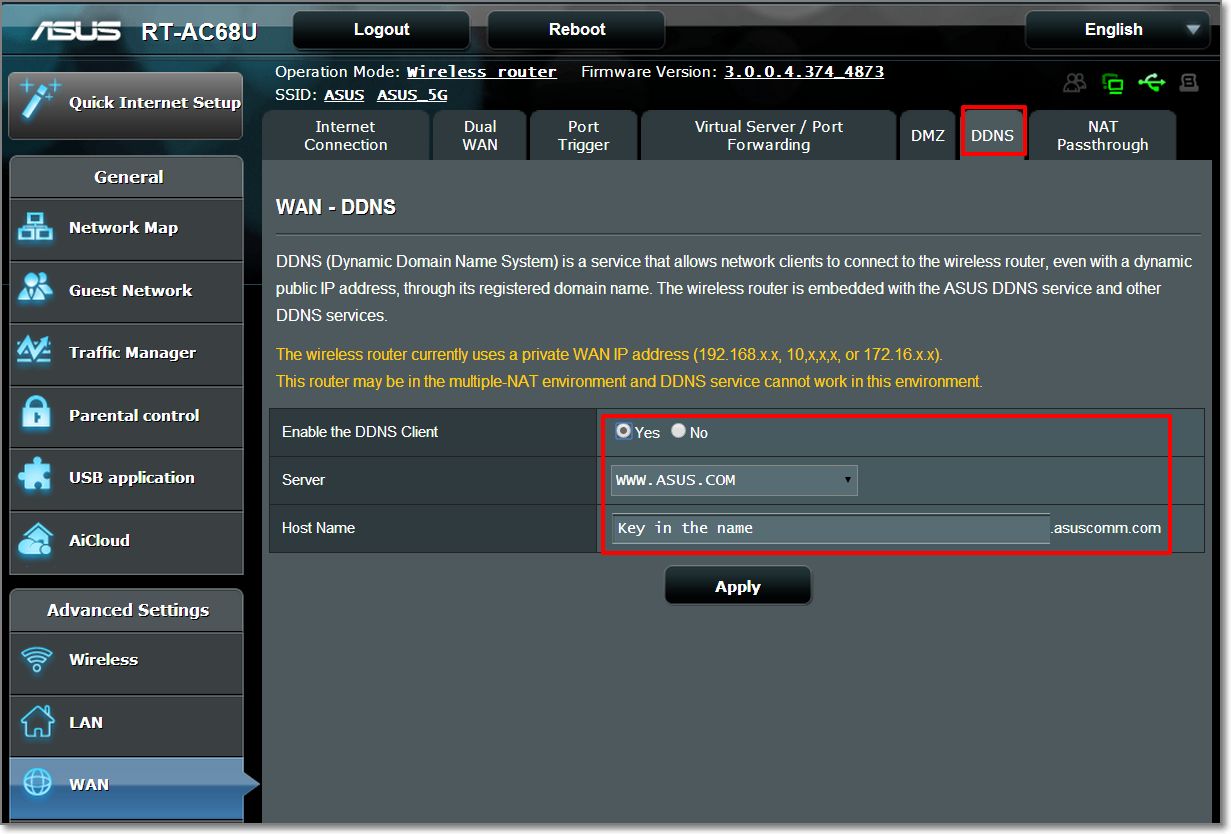
perhaps there still many people just blindly purchase a router by following the brand. Then just blindly become as a fanboy of Asus. However, Asus has a great "FREE" feature that others router don't have. Asus has their own DDNS, its totally free. If you use Dyndns.org, you need to pay the monthly DDNS subscriptions. However, for Asus, their DDNS is free and fast.

That's why I need to buy an Asus router (or modem for streamyx user) to do my own CCTV and alarm settings on my own smartphone.

I'm using Paradox and this is the sample. I need to set the DDNS to the app in order to connect my home alarm by 3G/4G or by outdoor wifi.
user posted image

same as also with my home CCTV.

This post has been edited by junclj: Mar 31 2016, 10:55 AM
Madgeiser
post Mar 31 2016, 11:20 AM

Casual
***
Junior Member
433 posts

Joined: Jan 2003


IMHO, Mikrotik is more of an enthusiast router.

Asus is more of a mainstream router, you buy, plug in, set in username and the rest is quite frankly automated. Up and running in 10 minutes.

All these name calling is really unwarranted for. Your money, how you spent it is your choice. Nothing to do with anyone.


abubin
post Mar 31 2016, 11:38 AM

10k Club
********
All Stars
10,429 posts

Joined: Jan 2003


mikrotik hAP ac lite
Dual-Concurrent 2.4/5GHz AP, 802.11ac, Five Ethernet ports, POE-out on port 5, USB for 3G/4G support

I am waiting for this to arrive in Malaysia.
mohamadfaris99
post Mar 31 2016, 11:39 AM

Getting Started
**
Junior Member
56 posts

Joined: Jun 2015
QUOTE(GearX_SaM @ Nov 14 2015, 02:39 AM)
Recently just upgraded my unifi from 5 mbps to 30mbps.

However I am still using the old dlink dir615 router and it has been almost 4 years.

Besides I am constantly getting 20mbps speed when connecting to wifi and very low signal for a floor above.

I am thinking to get asus RT-N66U. Is it a good buy?
*
good router. I'm using the asus n14uhp. Good price and performance smile.gif
soonwai
post Mar 31 2016, 12:13 PM


********
All Stars
11,460 posts

Joined: Oct 2007
From: KL


QUOTE(junclj @ Mar 31 2016, 10:15 AM)
guy, this is not about fanboys or haters. I have no choice to choose Asus, do you know why?
...
perhaps you should install CCTV and alarm at your home in the future. You should know why we need Asus router.
...
perhaps there still many people just blindly purchase a router by following the brand. Then just blindly become as a fanboy of Asus. However, Asus has a great "FREE" feature that others router don't have. Asus has their own DDNS, its totally free. If you use Dyndns.org, you need to pay the monthly DDNS subscriptions. However, for Asus, their DDNS is free and fast.
...
Right on, dude, in my book there're no haters just fanboys. I like Asus routers, I have 2 (rt-n12 & rt-n16) in my house and love Mikrotik, Apple, TP-Link & D-Link too, for their own respective reasons.

As for dynamic dns, if you're informed then you'll have more choices. Almost all routers have a free ddns option. DLink is the best because they have give you a free dyndns account. Asus & Mikrotik provide their own. TP-Link can use afraid.

I don't use CCTV so perhaps I'm missing something. I use ddns for Plex. Watching parts of 'Patriot Games' from the coffee shop is kinda like watching your own CCTV except my house is not that big.
junclj
post Mar 31 2016, 02:47 PM

Look at all my stars!!
*******
Senior Member
2,348 posts

Joined: Apr 2008


QUOTE(soonwai @ Mar 31 2016, 12:13 PM)
Right on, dude, in my book there're no haters just fanboys. I like Asus routers, I have 2 (rt-n12 & rt-n16) in my house and love Mikrotik, Apple, TP-Link & D-Link too, for their own respective reasons.

As for dynamic dns, if you're informed then you'll have more choices. Almost all routers have a free ddns option. DLink is the best because they have give you a free dyndns account. Asus & Mikrotik provide their own. TP-Link can use afraid.

I don't use CCTV so perhaps I'm missing something. I use ddns for Plex. Watching parts of 'Patriot Games' from the coffee shop is kinda like watching your own CCTV except my house is not that big.
*
no, others modem does not offers free ddns. Dyndns have to pay monthly subscription. However, asus modem just type in your decided username then use directly without doing any registration process from website.
paddylam
post Mar 31 2016, 03:23 PM

New Member
*
Junior Member
25 posts

Joined: Mar 2016
From: KL
should i upgrade to 30mpbs? mine now is 5
junclj
post Mar 31 2016, 05:13 PM

Look at all my stars!!
*******
Senior Member
2,348 posts

Joined: Apr 2008


QUOTE(paddylam @ Mar 31 2016, 03:23 PM)
should i upgrade to 30mpbs?  mine now is 5
*
I think you should first ask TM before you upgrade. The most problem usually that we are facing is penalty. You should ask TM to double confirm your contract status.

I was too upgraded from 8mbps streamyx to unifi 30mbps at two days ago. Actually that time I am quite worry about the penalty. My streamyx account was 6 years ago. Last time got upgrade from 1mbps to 2mbps, until last year December I request for upgrade to 8mbps again. So I am worried about whether the penalty impose if two years contract is really existed.

After visit TMpoint to double confirm my streamyx termination, the TM officer was checked my streamyx account was confirmed automatic terminated after my unifi installation. No penalty impose but just need to pay aditional RM1.xx monthly to keep my old phone number due to some reason about my home alarm was bound with my old phone number.
blacktubi
post Mar 31 2016, 10:55 PM

-
Group Icon
Elite
8,430 posts

Joined: Jul 2008

QUOTE(Madgeiser @ Mar 31 2016, 11:20 AM)
IMHO, Mikrotik is more of an enthusiast router.

Asus is more of a mainstream router, you buy, plug in, set in username and the rest is quite frankly automated. Up and running in 10 minutes.

All these name calling is really unwarranted for. Your money, how you spent it is your choice. Nothing to do with anyone.
*
This.

Even configuring an Asus router is difficult for some people. Mikrotik produce great hardware but it is for the power users.
soonwai
post Mar 31 2016, 11:16 PM


********
All Stars
11,460 posts

Joined: Oct 2007
From: KL


QUOTE(paddylam @ Mar 31 2016, 03:23 PM)
should i upgrade to 30mpbs?  mine now is 5
*
If you don't mind paying the little bit extra definitely yes, 5 to 30 is a huge difference. If you're in a contract, there's no penalty for upgrading but your contract is renewed. TM always happy to take more of your money. However due to contradictory experiences and as junclj suggested, it's always a good idea to check with TM when it comes to money.

QUOTE(junclj @ Mar 31 2016, 02:47 PM)
no, others modem does not offers free ddns. ...
*
I believe you're right! It's been awhile since I used my modem but IIRC my Aztech DSL-600 modem does not offers free ddns.

This post has been edited by soonwai: Apr 1 2016, 12:34 AM
alcali
post Apr 7 2016, 12:48 PM

On my way
****
Senior Member
566 posts

Joined: Jan 2005
From: KL


Hi Sifu, is all Asus router has free ddns service?
I'm leaving in 900+ sq apartment with 3 bedroom. each bedroom has pc and laptop connected wireless to TM stock router and also 5+ mobile phone connected when everyone at home. And we also game (WoW,Dota2,CS,mmorg).

Lately speed seems to slow down (i'm on 30mb package). Not to mention constant disconnection. ie, the router seems like hang and need to restart. Modem is ok.

I'm thinking to replace the stock router to help with the wireless speed.

I'm interested with Asus free ddns feature. Does it have capability to assign certain speed limit to the ssid? Can it create multiple ssid? ie. each room will have its own ssid to connect to.

Any good suggestion with reasonable pricing?

This post has been edited by alcali: Apr 7 2016, 12:59 PM
sHawTY
post Apr 7 2016, 03:22 PM

Frequent Reporter
********
All Stars
14,909 posts

Joined: Jul 2005

QUOTE(alcali @ Apr 7 2016, 12:48 PM)
Hi Sifu, is all Asus router has free ddns service?
I'm leaving in 900+ sq apartment with 3 bedroom. each bedroom has pc and laptop connected wireless to TM stock router and also 5+ mobile phone connected when everyone at home. And we also game (WoW,Dota2,CS,mmorg).

Lately speed seems to slow down (i'm on 30mb package). Not to mention constant disconnection. ie, the router seems like hang and need to restart. Modem is ok.

I'm thinking to replace the stock router to help with the wireless speed.

I'm interested with Asus free ddns feature. Does it have capability to assign certain speed limit to the ssid? Can it create multiple ssid? ie. each room will have its own ssid to connect to.

Any good suggestion with reasonable pricing?
RT-AC68U
And yes, they do provide free DDNS
soonwai
post Apr 8 2016, 01:49 AM


********
All Stars
11,460 posts

Joined: Oct 2007
From: KL


QUOTE(alcali @ Apr 7 2016, 12:48 PM)
I'm interested with Asus free ddns feature. Does it have capability to assign certain speed limit to the ssid? Can it create multiple ssid? ie. each room will have its own ssid to connect to.

Any good suggestion with reasonable pricing?
*
Mikrotik routers can set multiple SSIDs and assign a speed limit to each of them. and have free DDNS also. Starts from around RM180 to RM12000. The features are the same from the lowest to the highest priced routers but you're limited to what you can do by the available RAM and CPU of the router. You can also build your own like building a PC by buying a case, motherboard, ram, wifi cards, power supply, etc... Basic setup is easy but gets complicated for more advanced configurations.

This post has been edited by soonwai: Apr 8 2016, 01:50 AM
yawnz8
post Apr 9 2016, 01:03 PM

New Member
*
Junior Member
38 posts

Joined: Oct 2012


Hi guys planning on upgrading to unifis new 30mbps plan. Currently im on 5mbps plan and my router and modem is at the middle floor of my three storey house. I get bad connection at my 50% of the time since the coverage sometimes cant reach my room which is at the top floor. What modem should i get so that the whole house gets a stable connection?
sHawTY
post Apr 9 2016, 01:13 PM

Frequent Reporter
********
All Stars
14,909 posts

Joined: Jul 2005

QUOTE(yawnz8 @ Apr 9 2016, 01:03 PM)
Hi guys planning on upgrading to unifis new 30mbps plan. Currently im on 5mbps plan and my router and modem is at the middle floor of my three storey house. I get bad connection at my 50% of the time since the coverage sometimes cant reach my room which is at the top floor. What modem should i get so that the whole house gets a stable connection?
How much are you willing to spend?
yawnz8
post Apr 9 2016, 02:00 PM

New Member
*
Junior Member
38 posts

Joined: Oct 2012


maybe around 500
yawnz8
post Apr 9 2016, 02:04 PM

New Member
*
Junior Member
38 posts

Joined: Oct 2012


QUOTE(sHawTY @ Apr 9 2016, 01:13 PM)
How much are you willing to spend?
*
maybe around 500
nikaizad
post Apr 9 2016, 03:07 PM

Carl Jung Enthusiast
****
Senior Member
610 posts

Joined: Jun 2010
From: Tabung Simpanan Najib
Whats all this fuss about. i never change router also 35mbps all the time.

Using Huawei modem with Maritime trg212m.

but Ping like shit in dota/cs cause ya know TM nut sux

btw why you people cant setup Asus router? i thought this is Lowyat.net not PavillionFashionDesign.net


alcali
post Apr 11 2016, 11:06 AM

On my way
****
Senior Member
566 posts

Joined: Jan 2005
From: KL


QUOTE(sHawTY @ Apr 7 2016, 03:22 PM)
RT-AC68U
And yes, they do provide free DDNS
*
thanks alot sHawTY
alcali
post Apr 11 2016, 11:07 AM

On my way
****
Senior Member
566 posts

Joined: Jan 2005
From: KL


QUOTE(soonwai @ Apr 8 2016, 01:49 AM)
Mikrotik routers can set multiple SSIDs and assign a speed limit to each of them. and have free DDNS also. Starts from around RM180 to RM12000. The features are the same from the lowest to the highest priced routers but you're limited to what you can do by the available RAM and CPU of the router. You can also build your own like building a PC by buying a case, motherboard, ram, wifi cards, power supply, etc... Basic setup is easy but gets complicated for more advanced configurations.
*
thanks alot soonwai
firdausbhari
post Apr 11 2016, 02:59 PM

Look at all my stars!!
*******
Senior Member
2,283 posts

Joined: Feb 2012


QUOTE(yawnz8 @ Apr 9 2016, 01:03 PM)
Hi guys planning on upgrading to unifis new 30mbps plan. Currently im on 5mbps plan and my router and modem is at the middle floor of my three storey house. I get bad connection at my 50% of the time since the coverage sometimes cant reach my room which is at the top floor. What modem should i get so that the whole house gets a stable connection?
*
for multi floor, i suggest u get AC55UHP or if dont need 5ghz, then N12UHP or N14UHP should be good for u. multi floor needs a high dbi antenna. im staying in 3 story house. and currently using AC55UHP
zhuoyang
post Apr 11 2016, 03:25 PM

Getting Started
**
Junior Member
197 posts

Joined: Jul 2011
If your DIR-615 is still working you can use any router you want by using this guide

https://web.archive.org/web/20121028145502/...tom_routers.php

Old but gold biggrin.gif
Currently using Mi router mini with openwrt
soonwai
post Apr 11 2016, 07:28 PM


********
All Stars
11,460 posts

Joined: Oct 2007
From: KL


QUOTE(alcali @ Apr 11 2016, 11:07 AM)
thanks alot  soonwai
*
No probs, do let us know which router you decide on eventually.

QUOTE(firdausbhari @ Apr 11 2016, 02:59 PM)
for multi floor, i suggest u get AC55UHP or if dont need 5ghz, then N12UHP or N14UHP should be good for u. multi floor needs a high dbi antenna. im staying in 3 story house. and currently using AC55UHP
*
What's the antenna gain of the AC55UHP? It's better to use low gain if you want to reach more vertically. High gain antennas will concentrate the Wifi signal horizontally.
zhuoyang
post Apr 11 2016, 10:51 PM

Getting Started
**
Junior Member
197 posts

Joined: Jul 2011
QUOTE(soonwai @ Apr 11 2016, 07:28 PM)
No probs, do let us know which router you decide on eventually.
What's the antenna gain of the AC55UHP? It's better to use low gain if you want to reach more vertically. High gain antennas will concentrate the Wifi signal horizontally.
*
Want hear something mindblowing ?
If you turn your antenna horizontally , it will concentrate WiFi signal vertically rclxm9.gif rclxm9.gif

(I actually not sure if that's how it works , just joking around biggrin.gif biggrin.gif )
soonwai
post Apr 11 2016, 10:57 PM


********
All Stars
11,460 posts

Joined: Oct 2007
From: KL


QUOTE(zhuoyang @ Apr 11 2016, 10:51 PM)
Want hear something mindblowing ?
If you turn your antenna horizontally , it will concentrate WiFi signal vertically  rclxm9.gif  rclxm9.gif

(I actually not sure if that's how it works , just joking around biggrin.gif  biggrin.gif )
*
You're right, actually. Think of low gain vs high gain as a doughnut vs a douhgnut you just stepped on.
firdausbhari
post Apr 12 2016, 02:20 PM

Look at all my stars!!
*******
Senior Member
2,283 posts

Joined: Feb 2012


QUOTE(soonwai @ Apr 11 2016, 10:57 PM)
You're right, actually. Think of low gain vs high gain as a doughnut vs a douhgnut you just stepped on.
*
tired low gain. doesnt work for me. high gain for better coverage.
alcali
post Apr 15 2016, 12:56 AM

On my way
****
Senior Member
566 posts

Joined: Jan 2005
From: KL


i found that my TM stock router can create 5 ssid. and then there's QoS option. So i created 3 ssid, then i go into the QoS option and i saw the 3 ssid that i created earlier. then i enable the QoS on each ssid. i set Committed Rate:10240, Peak Rate:10240. does this means the router has the capability to do what i wanted originally which is to control bandwidth (download/upload) on ssid?
soonwai
post Apr 16 2016, 01:57 AM


********
All Stars
11,460 posts

Joined: Oct 2007
From: KL


QUOTE(firdausbhari @ Apr 12 2016, 02:20 PM)
tired low gain. doesnt work for me. high gain for better coverage.
*
If it works for you in practice, that's what's most important.
firdausbhari
post Apr 16 2016, 02:12 AM

Look at all my stars!!
*******
Senior Member
2,283 posts

Joined: Feb 2012


QUOTE(soonwai @ Apr 16 2016, 01:57 AM)
If it works for you in practice, that's what's most important.
*
yeah. my signal improved a lot after installed this router. previously im using repeater to improve signal, need none now hahaha rclxms.gif
yuio188
post Apr 18 2016, 12:44 AM

New Member
*
Junior Member
28 posts

Joined: Apr 2006
Archer C7 v2 is good enough for AIO home usage .
There is not much different among SME range , unless compare with ruckus/Aruba/Meraki..... Xiaomi Ac Nas router will be a good option as well if support VLAN.
mrjacknjill
post Apr 21 2016, 02:20 AM

New Member
*
Junior Member
17 posts

Joined: Mar 2011
From: Kuala Lumpur


Planning to buy ASUS RT-N12HP, is this router good for double storey house? Help me sifu
soulseeker6187
post Apr 21 2016, 12:39 PM

Look at all my stars!!
*******
Senior Member
2,774 posts

Joined: Jun 2009


QUOTE(mrjacknjill @ Apr 21 2016, 02:20 AM)
Planning to buy ASUS RT-N12HP, is this router good for double storey house? Help me sifu
*
ive been using this router for a while for maxis fiber. good enough coverage for my double storey house. and more stable than the default maxis technicolor router.
mrjacknjill
post Apr 21 2016, 04:30 PM

New Member
*
Junior Member
17 posts

Joined: Mar 2011
From: Kuala Lumpur


QUOTE(soulseeker6187 @ Apr 21 2016, 12:39 PM)
ive been using this router for a while for maxis fiber. good enough coverage for my double storey house. and more stable than the default maxis technicolor router.
*
done setup asus wifi...damn nice router..very satisfied
overpass
post May 9 2016, 07:41 AM

New Member
*
Junior Member
16 posts

Joined: Mar 2015
QUOTE(Shaney @ Nov 19 2015, 09:43 PM)
value for money at AC1750 range smile.gif
*
1300Mbps wifi speed for 5Ghz,2 USB port for file sharing and printer sharing.Quad comm Atheros chipset.
sepulse
post May 9 2016, 09:47 AM

Casual
***
Junior Member
434 posts

Joined: Dec 2008
hi,

planning to get a new router for my 30mbps unifi.

usage:
- wifi only
- minix neo (iptv & kodi)

can recommend me a good 1? i dont need any other features like ddns etc. so any value for money router? reading this thread, asus is the popular brand here, but im kinda new to this so would glad to hear some experts advise

thanks
nambtr
post May 17 2016, 02:35 PM

Getting Started
**
Junior Member
189 posts

Joined: Feb 2007
From: Kuala Lumpur


Recommended to go for AC router.
wanttotree
post May 20 2016, 10:15 AM

On my way
****
Junior Member
677 posts

Joined: Apr 2008
QUOTE(Xefron @ Mar 30 2016, 10:52 PM)
Mikrotik is good but mostly is overkill for most users.i prefer edge router by ubiquity.
*
Surprising somebody mentioned edgerouter here. Are you using one though? I am looking for ubnt community here locally. Maybe share experience and performance? Did u set it up yourself sir? With dhcpv6 and vlans working?
dannielshazmeer
post May 20 2016, 12:13 PM

On my way
****
Senior Member
628 posts

Joined: Apr 2016
QUOTE(lc12-x @ Nov 14 2015, 03:59 PM)
Currenctly using D-LINK DIR-850L for my 30mbps
*
ping so high
FortuneClub
post May 21 2016, 03:45 AM

Getting Started
**
Junior Member
271 posts

Joined: Aug 2013
QUOTE(nikaizad @ Apr 9 2016, 03:07 PM)
Whats all this fuss about. i never change router also 35mbps all the time.

Using Huawei modem with Maritime trg212m.

but Ping like shit in dota/cs cause ya know TM nut sux

btw why you people cant setup Asus router? i thought this is Lowyat.net not PavillionFashionDesign.net
*
damn its lag like shit, were you staying apartments ?
nikaizad
post May 22 2016, 11:40 AM

Carl Jung Enthusiast
****
Senior Member
610 posts

Joined: Jun 2010
From: Tabung Simpanan Najib
QUOTE(FortuneClub @ May 21 2016, 03:45 AM)
damn its lag like shit, were you staying apartments ?
*
nah. double storey house, router placed in the center of the house up stairs.

my pc uses ethernet to the router. perfect
squall0833
post May 23 2016, 03:41 PM

Regular
******
Senior Member
1,473 posts

Joined: Oct 2006
From: Jupiter


QUOTE(GearX_SaM @ Nov 14 2015, 01:39 AM)
Recently just upgraded my unifi from 5 mbps to 30mbps.

However I am still using the old dlink dir615 router and it has been almost 4 years.

Besides I am constantly getting 20mbps speed when connecting to wifi and very low signal for a floor above.

I am thinking to get asus RT-N66U. Is it a good buy?
*
Wifi 2.4ghz N usually has strong impact signal lost vs distance or wall blocks

Normally internet 20mbps or below u wont see bottleneck, since u upgrade to 30mbps or higher, u will see slowdown on wifi

Unless you have 80% above signal


Solution is to get a wireless router with Wireless AC 5Ghz

lionelchia1986
post Jun 6 2016, 08:26 PM

Getting Started
**
Junior Member
172 posts

Joined: Apr 2013
Currently unifi 30, Tm giving client dir-850L, any feedback on this router?
NielWooWoo1205
post Jun 7 2016, 02:46 AM

Getting Started
**
Junior Member
81 posts

Joined: Apr 2014
From: Bora-Bora Island


Can anyone suggest me the goodest and the cheapest and can support HyppTv?
Spectre.KL
post Jun 7 2016, 08:20 PM

New Member
*
Junior Member
26 posts

Joined: Apr 2011
what stock router model is TM providing now, with NEW 30Mbps UNIFI connection
fareast87
post Jun 11 2016, 11:13 PM

Getting Started
**
Junior Member
82 posts

Joined: Nov 2008


QUOTE(Spectre.KL @ Jun 7 2016, 08:20 PM)
what stock router model is TM providing now, with NEW 30Mbps UNIFI connection
*
This

http://us.dlink.com/products/connect/wirel...outer-dir-850l/
Maniacguys
post Jun 30 2016, 02:52 PM

Casual
***
Junior Member
446 posts

Joined: Oct 2008
From: Venice, Perak, or PJ


Saw alot of mixed reviews for TP-Link Archer C7 with Unifi & HyppTV.....some say workable, some say avoid it at any possible reason........

But is there any user using TP-Link Archer C7 with Unifi & HyppTV can share their story here?
awiekupo
post Jul 18 2016, 07:13 PM

Lucky to be coming home again..
******
Senior Member
1,481 posts

Joined: Jan 2003
From: Kuala Lumpur


Hi guys, appreciate some advice if possible. Here's the situation;

1) Upgraded to 30MB unifi but rarely get 20mb. Mostly 10-15mb only on wifi.
2) Staying in small apartment (850sqf). Router is located in living room while my room is just behind the living room wall - I dont close my door at all.
3) My router sometimes restart by itself and sometimes internet connection is very slow (talking bout dload speed of 100kpbs) - I have to restart my modem/router to solve this on daily basis.
4) Called unifi technical team and they attend twice but problem recurring again after few days. One of the technician advise me to get a better router as the set that I'm using is more than 3 years old already.

My question is, what should I get to a good 30mb connection in my room? I'm using a pc with a tp-link wifi adapter connected to it in my room.

Been reading a few post and few member mentioned about Asus RT-n66u as a router replacement. Is this a good solution? My budget is around Rm700-Rm1000 to fix this issue if possible.

Many thanks in advance.

My Current Device
user posted image

My Current Device
user posted image

My Current Device
user posted image

The curtain is door to my room
user posted image


SUSTXSim
post Jul 18 2016, 07:15 PM

TIME Fibre Assistant and Wi-Fi Router Assistant
*******
Senior Member
2,137 posts

Joined: Oct 2015


TP-Link all supported.

Asus is the way too expensive.

Some china router don't support.
matiko95
post Jul 18 2016, 07:16 PM

Enthusiast
*****
Senior Member
922 posts

Joined: Dec 2006
i buy ac3200 asus. never ever regret that shit burm rm 1.5k

SUSTXSim
post Jul 18 2016, 07:52 PM

TIME Fibre Assistant and Wi-Fi Router Assistant
*******
Senior Member
2,137 posts

Joined: Oct 2015


QUOTE(matiko95 @ Jul 18 2016, 07:16 PM)
i buy ac3200 asus. never ever regret that shit burm rm 1.5k
*
How's the performance?

matiko95
post Jul 19 2016, 12:39 AM

Enthusiast
*****
Senior Member
922 posts

Joined: Dec 2006
QUOTE(TXSim @ Jul 18 2016, 07:52 PM)
How's the performance?
*
good grace . mf jesus. can sniff lagging way ahead of time. can even block torrent and streaming...

now2 dont take my word. jsut buy it and experience it yourself.
SUSTXSim
post Jul 19 2016, 12:55 AM

TIME Fibre Assistant and Wi-Fi Router Assistant
*******
Senior Member
2,137 posts

Joined: Oct 2015


QUOTE(matiko95 @ Jul 19 2016, 12:39 AM)
good grace . mf jesus. can sniff lagging way ahead of time. can even block torrent and streaming...

now2 dont take my word. jsut buy it and experience it yourself.
*
OK. Bro

sepulse
post Jul 19 2016, 02:21 PM

Casual
***
Junior Member
434 posts

Joined: Dec 2008
https://forum.lowyat.net/topic/3996634 for now
kevinchong2003
post Jul 21 2016, 11:42 AM

New Member
*
Junior Member
43 posts

Joined: Jun 2013
maybe you can look for mikrotik router, have been used for few years no problem and vy stable. no reboot require/slow/hang.
the important thing is you no need take the risk to flash third-party firmware to get the best performance router.

This post has been edited by kevinchong2003: Jul 21 2016, 11:53 AM
Troller
post Jul 26 2016, 09:29 AM

New Member
*
Junior Member
24 posts

Joined: Mar 2012
guys ... seems like the RT-AC68U or any AC range routers is the recommended item here ... but does our device support that range already??

i.e 2 year old laptop, 3 year old smartphone,

and another question, RT-AC68U is a modem also ?? can key in unifi username and pw?
BlueWind
post Jul 26 2016, 09:33 AM

Sianzation
*******
Senior Member
2,901 posts

Joined: Jan 2007


It's not a modem. It's a wireless router that needs gateway aka modem to function. You need to input your unifi username and password to get connected.
Troller
post Jul 26 2016, 09:35 AM

New Member
*
Junior Member
24 posts

Joined: Mar 2012
QUOTE(BlueWind @ Jul 26 2016, 09:33 AM)
It's not a modem. It's a wireless router that needs gateway aka modem to function. You need to input your unifi username and password to get connected.
*
yea i mean can i input the username and pw into that RT-AC68U unit? if not ...

what you mean is ... like this? :

TM fiber to that greybox thingy -> a modem with unifi username and pw -> then only to RT-AC68U?

This post has been edited by Troller: Jul 26 2016, 09:36 AM
BlueWind
post Jul 26 2016, 09:38 AM

Sianzation
*******
Senior Member
2,901 posts

Joined: Jan 2007


TM BTU grey box thingy (Modem) > AC68U (input username and password)
Troller
post Jul 26 2016, 09:40 AM

New Member
*
Junior Member
24 posts

Joined: Mar 2012
QUOTE(BlueWind @ Jul 26 2016, 09:38 AM)
TM BTU grey box thingy (Modem) > AC68U (input username and password)
*
thanks !

so back to the AC question, if devices does not support AC .. still can connect no problem right?
BlueWind
post Jul 26 2016, 09:41 AM

Sianzation
*******
Senior Member
2,901 posts

Joined: Jan 2007


Yes no issue. It's backwards compatible.
Troller
post Jul 26 2016, 09:51 AM

New Member
*
Junior Member
24 posts

Joined: Mar 2012
QUOTE(BlueWind @ Jul 26 2016, 09:41 AM)
Yes no issue. It's backwards compatible.
*
ok thanks for the prompt responses !! notworthy.gif
darkddly
post Jul 26 2016, 10:49 PM

Casual
***
Junior Member
432 posts

Joined: Jan 2007
From: i can haz cheezburger
hey guys,

need ur suggestion and recommendation on which router should i buy for unifi 30mb.

Asus RT-N14UHP or DIR-850L?

requirements:
1) connect up to 5-8 devices (smartphones & laptops)
2) gaming
3) streaming videos
4) house (2 floors)

This post has been edited by darkddly: Jul 26 2016, 10:54 PM
x3cream
post Aug 8 2016, 02:33 PM

Casual
***
Junior Member
391 posts

Joined: Mar 2012


QUOTE(Khalid21 @ Jan 6 2016, 02:44 PM)
is the asus rt-n56u same as the asus rt-ac55u? sorry newbie here
pl95077
post Aug 8 2016, 05:05 PM

Getting Started
**
Junior Member
245 posts

Joined: Feb 2010
QUOTE(x3cream @ Aug 8 2016, 03:33 PM)
is the asus rt-n56u same as the asus rt-ac55u? sorry newbie here
*
Hi,

different.
RT-N56U --> N600
RT-AC56U --> AC1200

you may google it

x3cream
post Aug 8 2016, 08:38 PM

Casual
***
Junior Member
391 posts

Joined: Mar 2012


QUOTE(pl95077 @ Aug 8 2016, 05:05 PM)
Hi,

different.
RT-N56U --> N600
RT-AC56U --> AC1200

you may google it
*
Oh okay thanks, erm if i cant afford asus rt-ac55u then is the tp-link archer c7 good for double story house and can connect up to 15 devices? my house using the default modem for about 4 years already, always get lag spike
Khalid21
post Aug 9 2016, 07:10 AM

Regular
******
Senior Member
1,138 posts

Joined: May 2010
QUOTE(x3cream @ Aug 8 2016, 08:38 PM)
Oh okay thanks, erm if i cant afford asus rt-ac55u then is the tp-link archer c7 good for double story house and can connect up to 15 devices? my house using the default modem for about 4 years already, always get lag spike
*
https://forum.lowyat.net/topic/3996634

ws880 now price 299 at sri com
loon1983
post Aug 9 2016, 02:34 PM

Regular
******
Senior Member
1,205 posts

Joined: Sep 2007


hi. just receive call n up to 30m
but do i need to change the old modem or router?
i used it few years back from 5m to 10m. now 30m

my speed test is around 9m
loon1983
post Aug 9 2016, 02:35 PM

Regular
******
Senior Member
1,205 posts

Joined: Sep 2007


is it normal for 30m user via wifi?


Attached thumbnail(s)
Attached Image
firdausbhari
post Aug 9 2016, 03:08 PM

Look at all my stars!!
*******
Senior Member
2,283 posts

Joined: Feb 2012


Guys, i just got a new router from TM. DLink Dir850L. For free. Just call TM and complaint bout ur current router. They will give u new one.


This post has been edited by firdausbhari: Aug 9 2016, 05:39 PM
x3cream
post Aug 9 2016, 05:03 PM

Casual
***
Junior Member
391 posts

Joined: Mar 2012


QUOTE(Khalid21 @ Aug 9 2016, 07:10 AM)
https://forum.lowyat.net/topic/3996634

ws880 now price 299 at sri com
*
Thanks for the info bro, appreciate it notworthy.gif
wira_se
post Aug 9 2016, 06:08 PM

New Member
*
Junior Member
24 posts

Joined: Jun 2006


QUOTE(firdausbhari @ Aug 9 2016, 04:08 PM)
Guys, i just got a new router from TM. DLink Dir850L. For free. Just call TM and complaint bout ur current router. They will give u new one.
*
Can shared what you told TM until they can replace this new router for you?
firdausbhari
post Aug 9 2016, 07:17 PM

Look at all my stars!!
*******
Senior Member
2,283 posts

Joined: Feb 2012


QUOTE(wira_se @ Aug 9 2016, 06:08 PM)
Can shared what you told TM until they can replace this new router for you?
*
well, im not actually using the stock router which is DIR 615. using other router.

i just told them my wireless is weak and keep disconnecting. every time got issue need to restart. and then, straight away they said they will replace router for me.

then today the technician came to my house and i just ask him to leave the router with me. i'll configure it myself.

therefore, i got an extra dual band router in hand which im using it as AP.
tuo850
post Aug 10 2016, 09:55 PM

Enthusiast
*****
Senior Member
756 posts

Joined: Jan 2003
From: Kuala Lumpur


QUOTE(firdausbhari @ Aug 9 2016, 03:08 PM)
Guys, i just got a new router from TM. DLink Dir850L. For free. Just call TM and complaint bout ur current router. They will give u new one.
*
i did but they keep replacing it with the same model. pfffttt..
firdausbhari
post Aug 11 2016, 03:34 PM

Look at all my stars!!
*******
Senior Member
2,283 posts

Joined: Feb 2012


QUOTE(tuo850 @ Aug 10 2016, 09:55 PM)
i did but they keep replacing it with the same model. pfffttt..
*
what model is that? dir 615?
nodeffect
post Aug 11 2016, 03:50 PM

Your past does not equal your future.
******
Senior Member
1,281 posts

Joined: Jan 2003
From: Private


QUOTE(firdausbhari @ Aug 9 2016, 07:17 PM)
well, im not actually using the stock router which is DIR 615. using other router.

i just told them my wireless is weak and keep disconnecting. every time got issue need to restart. and then, straight away they said they will replace router for me.

then today the technician came to my house and i just ask him to leave the router with me. i'll configure it myself.

therefore, i got an extra dual band router in hand which im using it as AP.
*
wtf, u so lucky !
firdausbhari
post Aug 11 2016, 04:26 PM

Look at all my stars!!
*******
Senior Member
2,283 posts

Joined: Feb 2012


QUOTE(nodeffect @ Aug 11 2016, 03:50 PM)
wtf, u so lucky !
*
why lucky? haha i think u guys also can call them and complain about the damn crappy 615 router.
tuo850
post Aug 11 2016, 05:59 PM

Enthusiast
*****
Senior Member
756 posts

Joined: Jan 2003
From: Kuala Lumpur


QUOTE(firdausbhari @ Aug 11 2016, 03:34 PM)
what model is that? dir 615?
*
worst trg212m
firdausbhari
post Aug 11 2016, 09:10 PM

Look at all my stars!!
*******
Senior Member
2,283 posts

Joined: Feb 2012


QUOTE(tuo850 @ Aug 11 2016, 05:59 PM)
worst trg212m
*
U staying in high rise building?
tuo850
post Aug 11 2016, 10:33 PM

Enthusiast
*****
Senior Member
756 posts

Joined: Jan 2003
From: Kuala Lumpur


QUOTE(firdausbhari @ Aug 11 2016, 09:10 PM)
U staying in high rise building?
*
its for my office. i resort to buying TP-LINK TL-WR1043ND
wira_se
post Aug 14 2016, 11:06 PM

New Member
*
Junior Member
24 posts

Joined: Jun 2006


QUOTE(firdausbhari @ Aug 9 2016, 08:17 PM)
well, im not actually using the stock router which is DIR 615. using other router.

i just told them my wireless is weak and keep disconnecting. every time got issue need to restart. and then, straight away they said they will replace router for me.

then today the technician came to my house and i just ask him to leave the router with me. i'll configure it myself.

therefore, i got an extra dual band router in hand which im using it as AP.
*
Thanks. Btw which model of router they replaced for u?
firdausbhari
post Aug 15 2016, 01:14 AM

Look at all my stars!!
*******
Senior Member
2,283 posts

Joined: Feb 2012


QUOTE(wira_se @ Aug 14 2016, 11:06 PM)
Thanks. Btw which model of router they replaced for u?
*
D-Link DIR850L

This post has been edited by firdausbhari: Aug 15 2016, 01:18 AM


Attached thumbnail(s)
Attached Image
wira_se
post Aug 15 2016, 09:50 PM

New Member
*
Junior Member
24 posts

Joined: Jun 2006


QUOTE(firdausbhari @ Aug 15 2016, 02:14 AM)
D-Link DIR850L
*
Good. Thanks :-)
junclj
post Aug 17 2016, 09:55 AM

Look at all my stars!!
*******
Senior Member
2,348 posts

Joined: Apr 2008


QUOTE(GearX_SaM @ Nov 14 2015, 02:58 PM)
I got a deal that N66u around RM450.

Ac55u out of stock. While ac66u and ac68 is abit out of budget.
*
RT-N the "N" series are only support 802.11n. N is 2.4GHz.
RT-AC the "AC" series are support both 802.11n and 802.11ac which have 2.4GHz and 5GHz.

So if your budget is below RM500, go to RT-AC55UHP.
deathTh3Cannon
post Aug 17 2016, 10:39 AM

Getting Started
**
Junior Member
248 posts

Joined: Aug 2011
any good and cheap repeater to recommend? already give up on asus n12hp because of auto disconnect and reboots..
Xefron
post Aug 17 2016, 11:00 AM

Look at all my stars!!
*******
Senior Member
2,507 posts

Joined: Jan 2003


QUOTE(deathTh3Cannon @ Aug 17 2016, 10:39 AM)
any good and cheap repeater to recommend? already give up on asus n12hp because of auto disconnect and reboots..
*
N12HP is crap,doesn't mean it is ASUS it will be good.

For less than RM200 = TPLINK-WDR1043ND

Less than RM250 = TPLINK-WDR3600

Less than RM300 = DLINK DIR850L/TPLINK-WDR4300/Huawei WS880

if got lot of money ASUS-RTAC88U. wub.gif but if wanna buy ASUS but not enough money tries hunt ASUS AC-56U.

brows.gif this is from personal experience.super stable.for less than RM250,don't buy any TP-LINK models other than these 2. cool2.gif

This post has been edited by Xefron: Aug 17 2016, 11:07 AM
SUSraynman
post Aug 17 2016, 11:02 AM

Look at all my stars!!
*******
Senior Member
4,333 posts

Joined: Jan 2003


You forgot the RT-AC68U class Huawei WS880 at less than RM200. biggrin.gif
Xefron
post Aug 17 2016, 11:03 AM

Look at all my stars!!
*******
Senior Member
2,507 posts

Joined: Jan 2003


QUOTE(raynman @ Aug 17 2016, 11:02 AM)
You forgot the RT-AC68U class Huawei WS880 at less than RM200. biggrin.gif
*
that one sudah naek harga. tongue.gif anyway Huawei WS880 is more to RT-AC56U instead of AC68U.
sHawTY
post Aug 17 2016, 11:29 AM

Frequent Reporter
********
All Stars
14,909 posts

Joined: Jul 2005

QUOTE(Xefron @ Aug 17 2016, 11:03 AM)
that one sudah naek harga. tongue.gif
Naik sikit je. RM299 now
Still very cheap for it's performance thumbsup.gif
firdausbhari
post Aug 17 2016, 01:38 PM

Look at all my stars!!
*******
Senior Member
2,283 posts

Joined: Feb 2012


QUOTE(sHawTY @ Aug 17 2016, 11:29 AM)
Naik sikit je. RM299 now
Still very cheap for it's performance thumbsup.gif
*
went to Sri Computer. unfortunately, they dont have WS880 anymore.....

sad.gif
SUSraynman
post Aug 17 2016, 02:06 PM

Look at all my stars!!
*******
Senior Member
4,333 posts

Joined: Jan 2003


QUOTE(firdausbhari @ Aug 17 2016, 01:38 PM)
went to Sri Computer. unfortunately, they dont have WS880 anymore.....

sad.gif
*
What a shame!

It is a very good router, especially with custom firmware like Xwrt-Vortex.

firdausbhari
post Aug 17 2016, 03:55 PM

Look at all my stars!!
*******
Senior Member
2,283 posts

Joined: Feb 2012


QUOTE(raynman @ Aug 17 2016, 02:06 PM)
What a shame!

It is a very good router, especially with custom firmware like Xwrt-Vortex.
*
ya. rugi lah.....
wira_se
post Aug 25 2016, 04:11 PM

New Member
*
Junior Member
24 posts

Joined: Jun 2006


Tp-link ac1200 C5 good?
kevinchong2003
post Aug 25 2016, 10:30 PM

New Member
*
Junior Member
43 posts

Joined: Jun 2013
try to look for mikrotik router, is a best router with affordable price.
using few years with 24*7, without any issue.
the brand has most of the enterprise feature such as QOS, VPN and etc....

wira_se
post Aug 25 2016, 11:16 PM

New Member
*
Junior Member
24 posts

Joined: Jun 2006


QUOTE(kevinchong2003 @ Aug 25 2016, 11:30 PM)
try to look for mikrotik router, is a best router with affordable price.
using few years with 24*7, without any issue.
the brand has most of the enterprise feature such as QOS, VPN and etc....
*
What is the price range?
kevinchong2003
post Aug 26 2016, 09:06 AM

New Member
*
Junior Member
43 posts

Joined: Jun 2013
QUOTE(wira_se @ Aug 25 2016, 11:16 PM)
What is the price range?
*
price range from 170 and above, depend on what model and performance you want to.
the more feature you enable it required more CPU and RAM resources.


wira_se
post Aug 26 2016, 12:08 PM

New Member
*
Junior Member
24 posts

Joined: Jun 2006


QUOTE(wira_se @ Aug 25 2016, 05:11 PM)
Tp-link ac1200 C5 good?
*
So, member experience with tp link c5?

wira_se
post Aug 26 2016, 12:15 PM

New Member
*
Junior Member
24 posts

Joined: Jun 2006


QUOTE(kevinchong2003 @ Aug 26 2016, 10:06 AM)
price range from 170 and above, depend on what model and performance you want to.
the more feature you enable it required more CPU and RAM resources.
*
K. Tq
briangan
post Sep 27 2016, 07:44 PM

Getting Started
**
Junior Member
211 posts

Joined: Jan 2003
From: Kuala Lumpur


any routers suggestion to replace the default Dlink DIR-850L that Unifi gave?
this router sucks in coverage and always got some kind of lag before loading pages, FB, apps, etc.
in a 3 storey home where the router is in right in the middle.
previous Maxis Technicolor is better than this Dlink.
lacusclynee
post Dec 10 2016, 08:09 PM

New Member
*
Junior Member
8 posts

Joined: Jul 2015
QUOTE(briangan @ Sep 27 2016, 08:44 PM)
any routers suggestion to replace the default Dlink DIR-850L that Unifi gave?
this router sucks in coverage and always got some kind of lag before loading pages, FB, apps, etc.
in a 3 storey home where the router is in right in the middle.
previous Maxis Technicolor is better than this Dlink.
*
right now there's a new one tm upgraded one, Archer C5, not bad though.

but im using archer C60 atm, speed not that big different ohmy.gif
westlife
post Dec 10 2016, 08:46 PM

10k Club
********
All Stars
14,323 posts

Joined: Jan 2011
QUOTE(awiekupo @ Jul 18 2016, 07:13 PM)
Hi guys, appreciate some advice if possible. Here's the situation;

1) Upgraded to 30MB unifi but rarely get 20mb. Mostly 10-15mb only on wifi.
2) Staying in small apartment (850sqf). Router is located in living room while my room is just behind the living room wall - I dont close my door at all.
3) My router sometimes restart by itself and sometimes internet connection is very slow (talking bout dload speed of 100kpbs) - I have to restart my modem/router to solve this on daily basis.
4) Called unifi technical team and they attend twice but problem recurring again after few days. One of the technician advise me to get a better router as the set that I'm using is more than 3 years old already.

My question is, what should I get to a good 30mb connection in my room? I'm using a pc with a tp-link wifi adapter connected to it in my room.

Been reading a few post and few member mentioned about Asus RT-n66u as a router replacement. Is this a good solution? My budget is around Rm700-Rm1000 to fix this issue if possible.

Many thanks in advance.

My Current Device
user posted image

My Current Device
user posted image

My Current Device
user posted image

The curtain is door to my room
user posted image
*
wow. This wifi router model had been given by TM since more than 3 years ago.
westlife
post Dec 10 2016, 08:53 PM

10k Club
********
All Stars
14,323 posts

Joined: Jan 2011
QUOTE(briangan @ Sep 27 2016, 07:44 PM)
any routers suggestion to replace the default Dlink DIR-850L that Unifi gave?
this router sucks in coverage and always got some kind of lag before loading pages, FB, apps, etc.
in a 3 storey home where the router is in right in the middle.
previous Maxis Technicolor is better than this Dlink.
*
This one looks nice in appearance but I have used many dlink wireless routers in the past.i hate it. Their UI is poor. Overheat. I am not sure if this particular model is good for unifi. but I can confirm the new tp-link wifi router that is given by TM for new installation now is good. Coverage is quite strong and speed wise no problem.
slacx
post Dec 13 2016, 10:37 AM

Casual
***
Junior Member
398 posts

Joined: Dec 2004
From: Am Neckar


edited

This post has been edited by slacx: Dec 13 2016, 01:07 PM
demetry
post Dec 14 2016, 02:51 PM

Casual
***
Junior Member
302 posts

Joined: Dec 2014
QUOTE(GearX_SaM @ Nov 14 2015, 01:39 AM)
Recently just upgraded my unifi from 5 mbps to 30mbps.

However I am still using the old dlink dir615 router and it has been almost 4 years.

Besides I am constantly getting 20mbps speed when connecting to wifi and very low signal for a floor above.

I am thinking to get asus RT-N66U. Is it a good buy?

_____________________________________________

TS has been using ASUS AC66U for many months. Got it from GEMFive during a 150 or 200 discount . Total damage for ASUS AC66u around RM600.

So far the router has been working in a superb condition. Getting constant 30mpbs on wifi.
*
hw much u paying for 30mbps?
Skeuomorphic
post Dec 14 2016, 08:21 PM

On my way
****
Junior Member
671 posts

Joined: Jul 2015
From: Shah Alam


Can anyone recommend me a good cheap router to replace my aging DIR-615 that can only get this kind of speed on wifi, via LAN I can easily get 32Mbps and 10Mbps.

user posted imageuser posted image

Let's say I terminate and resubscribe, will they provide me the new router, DIR-850L?

This post has been edited by Skeuomorphic: Dec 14 2016, 09:02 PM
Skeuomorphic
post Dec 14 2016, 08:22 PM

On my way
****
Junior Member
671 posts

Joined: Jul 2015
From: Shah Alam


accidental double post

This post has been edited by Skeuomorphic: Dec 14 2016, 08:22 PM
muncheno
post Dec 14 2016, 11:27 PM

Enthusiast
*****
Senior Member
736 posts

Joined: Jun 2006
From: Ipoh
For me, my choice for unifi up to 50mbps with budget below rm100, I would recommend Xiaomi Mini or Mi-3 router.

Of coz, no pain no gain, it need to flash with padavan firmware.

fireproof
post Dec 20 2016, 06:55 PM

New Member
*
Junior Member
28 posts

Joined: Jul 2015
can definitely try archer c7. works best la
Boy96
post Dec 21 2016, 01:35 AM

That's a tripod.
*******
Senior Member
3,848 posts

Joined: Dec 2009
From: Ampang


QUOTE(deathTh3Cannon @ Aug 17 2016, 10:39 AM)
any good and cheap repeater to recommend? already give up on asus n12hp because of auto disconnect and reboots..
*
What router are u using now? Replaced the n12hp already?
kevinchong2003
post Dec 21 2016, 08:07 AM

New Member
*
Junior Member
43 posts

Joined: Jun 2013
Selling this router. Vy stable, try and believe it.
https://forum.lowyat.net/index.php?act=ST&f=11&t=4000319
Vannus
post Dec 25 2016, 09:44 PM

Geeks
*****
Senior Member
909 posts

Joined: Jan 2003
From: Subang Jaya


Got a new archer c7 v2. Perfect 2.4g and 5g on speedtest 29mbps to 30 mbps downlink/ 10mbps uplink on unifi30. Tested hyppytv all channels working like a charm. No lag or disconnections so far. Thumbs up for such a good value router
Skeuomorphic
post Dec 29 2016, 10:36 PM

On my way
****
Junior Member
671 posts

Joined: Jul 2015
From: Shah Alam


Is the tp-link Archer C20, AC900 dual band router good? it's currently only rm160 on lazada. It was rm329 before the 51% discount. Should I get this router to replace my dir-615?

This post has been edited by Skeuomorphic: Dec 29 2016, 10:59 PM
pluginbaby
post Dec 30 2016, 08:21 AM

Look at all my stars!!
*******
Senior Member
2,661 posts

Joined: Apr 2007


QUOTE(Skeuomorphic @ Dec 29 2016, 10:36 PM)
Is the tp-link Archer C20, AC900 dual band router good? it's currently only rm160 on lazada. It was rm329 before the 51% discount. Should I get this router to replace my dir-615?
*
If you are entitled for upgrading to 50mbps next year, get a better router for advanced preparation. Asus55uhp can get at viewnet lowyat plaza for 499 after GST. Quite decently priced and the wifi coverage is indeed awesome. I am able to cover my whole double story house with the router placed in 1st floor room at back of the house. Had to upgrade wifi receiver using Asus USB-N14 of my desktop tho to get full speed of 26-28mbps, before I change, can only hit 3-5mbps as the desktop location is at ground floor front of the house and it was a PCIe card with short antennae lol
jaijaidin
post Dec 30 2016, 03:14 PM

New Member
*
Junior Member
40 posts

Joined: Mar 2015


QUOTE(GearX_SaM @ Dec 1 2015, 10:34 AM)
Every since i change to ASUS AC66U i am constantly getting 30mbps via wifi smile.gif love it
*
chief, i am a novice on tech stuffs and have 30mbps unifi package at home. Having trouble like you experienced before. Wifi speed is 10mbps or below.
Even i go 10/15 feet away to any room, speed decreases. And strangely every day 11pm internet down for 10 minutes. Recently i have some guest stay over and i shared my wifi password....they don't get connected (later got). Is there any unser access limitations? or device sensitivities (iphone/iPad etc)?

How to check and maximize user number in router?
if i buy a good router (please recommend) can you help me how to install and configure?

you can inbox me

kcking
post Dec 31 2016, 07:08 PM

New Member
*
Newbie
14 posts

Joined: Jul 2015
Bought archer C5 to test it out. Seems fine to me.
westlife
post Dec 31 2016, 07:14 PM

10k Club
********
All Stars
14,323 posts

Joined: Jan 2011
QUOTE(kcking @ Dec 31 2016, 07:08 PM)
Bought archer C5 to test it out. Seems fine to me.
*
It is a good wifi router.
-oc-gassa
post Jan 3 2017, 01:04 PM

Enthusiast
*****
Senior Member
967 posts

Joined: Jan 2003
From: setapak
im having issue with TP-Link Archer C5 always hang then restart on daily basis... what i see when i push max speed in download let say 3.8MBps then router seems unable to handle the hang and restart happen..

got any firmware issue?

Unifi 30 pacgkage
Using 2.4ghz wifi
Sky.Live
post Jan 3 2017, 02:02 PM

Proctected Species
*******
Senior Member
4,390 posts

Joined: Oct 2004
From: Cheras, Malaysia


Archer C5 is standard unifi given router now
fireproof
post Jan 3 2017, 06:51 PM

New Member
*
Junior Member
28 posts

Joined: Jul 2015
QUOTE(-oc-gassa @ Jan 3 2017, 02:04 PM)
im having issue with TP-Link Archer C5 always hang then restart on daily basis... what i see when i push max speed in download let say 3.8MBps then router seems unable to handle the hang and restart happen..

got any firmware issue?

Unifi 30 pacgkage
Using 2.4ghz wifi
*
ive tried using the archer c5 with me too, no hangs or anything. try to contact their tm to see what's wrong?
jio
post Jan 3 2017, 11:44 PM

Casual
***
Junior Member
383 posts

Joined: May 2005
QUOTE(-oc-gassa @ Jan 3 2017, 01:04 PM)
im having issue with TP-Link Archer C5 always hang then restart on daily basis... what i see when i push max speed in download let say 3.8MBps then router seems unable to handle the hang and restart happen..

got any firmware issue?

Unifi 30 pacgkage
Using 2.4ghz wifi
*
Are you sure the router itself hang & restarted by itself? Check the system log of your router. The most common for unstable router nowadays is actually the power supply/adapter or the internal power circuitry (especially on lower cost products). It could be the power supply is faulty & unable to provide the sufficient voltage/current during heavy load.
-oc-gassa
post Jan 3 2017, 11:53 PM

Enthusiast
*****
Senior Member
967 posts

Joined: Jan 2003
From: setapak
QUOTE(jio @ Jan 3 2017, 11:44 PM)
Are you sure the router itself hang & restarted by itself? Check the system log of your router. The most common for unstable router nowadays is actually the power supply/adapter or the internal power circuitry (especially on lower cost products). It could be the power supply is faulty & unable to provide the sufficient voltage/current during heavy load.
*
when internet became unresponsive/hang i go check the only device that restart or not having normal working condition LED is this Archer C5.. as today no downloading and the router not hanging/restart.. i tired view log.. but only available for today log only.. will try see log is router restart.. my firmware is 3.17.1 Build 20160317 Rel. 4317

will try change plug to to single port
DellMalaysia
post Jan 4 2017, 12:15 AM

Kindly look at my previous successful threads
*****
Senior Member
735 posts

Joined: Sep 2013
From: IYD ~ In Your Dream


QUOTE(GearX_SaM @ Nov 14 2015, 01:39 AM)
Recently just upgraded my unifi from 5 mbps to 30mbps.

However I am still using the old dlink dir615 router and it has been almost 4 years.

Besides I am constantly getting 20mbps speed when connecting to wifi and very low signal for a floor above.

I am thinking to get asus RT-N66U. Is it a good buy?

_____________________________________________

TS has been using ASUS AC66U for many months. Got it from GEMFive during a 150 or 200 discount . Total damage for ASUS AC66u around RM600.

So far the router has been working in a superb condition. Getting constant 30mpbs on wifi.
*
did you manage to get a new router? or else you can ask TM to give you a free upgrade to 850L dlink router.
reaper0810
post Jan 4 2017, 03:19 AM

New Member
*
Junior Member
26 posts

Joined: Feb 2011


WTA

Good Day to all, notworthy.gif

I apologize if someone already asked the question I am about to ask here, hope you could advice and share some techniques. blush.gif


the question is : I'm currently on Unifi Advance 30 plan which eventually will be upgraded to Unifi 50 soon. I am using the stock standard routers which unfortunately ain't meeting the expectation quite well. mega_shok.gif

So,can someone advice what is a good router I could get price range below RM500? sweat.gif

I'm into d/loads and iptv...staying in double storey house, so yeah need something that penetrate to higher level of the house as the router is placed at the hall. nod.gif


Hope someone could provide me with some assistance. Appreciate it so much. icon_question.gif
Skeuomorphic
post Jan 4 2017, 06:55 AM

On my way
****
Junior Member
671 posts

Joined: Jul 2015
From: Shah Alam


QUOTE(DellMalaysia @ Jan 4 2017, 12:15 AM)
did you manage to get a new router? or else you can ask TM to give you a free upgrade to 850L dlink router.
*
How do you ask tm to give you a free upgrade to 850L router? I've been using dir-615 since I was on VIP 5 around 3/4 years ago
Vannus
post Jan 4 2017, 08:11 AM

Geeks
*****
Senior Member
909 posts

Joined: Jan 2003
From: Subang Jaya


QUOTE(reaper0810 @ Jan 4 2017, 03:19 AM)
WTA

Good Day to all, notworthy.gif

I apologize if someone already asked the question I am about to ask here, hope you could advice and share some techniques.   blush.gif
the question is : I'm currently on Unifi Advance 30 plan which eventually will be upgraded to Unifi 50 soon. I am using the stock standard routers which unfortunately ain't meeting the expectation quite well.  mega_shok.gif

So,can someone advice what is a good router I could get price range below RM500?  sweat.gif

I'm into d/loads and iptv...staying in double storey house, so yeah need something that penetrate to higher level of the house as the router is placed at the hall. nod.gif
Hope someone could provide me with some assistance. Appreciate it so much. icon_question.gif
*
If you are just expecting 30mbps around your house up floor and ground floor, a router with wireless N 2.4ghz and 8dbi antenna should cover that range and give you enough speed so you don't fall behind 30mbps.
A wifi wireless N rated 450mbps on the box will give you around 100-130mbps in real life scenario on a distance like 10-20feets. On the bad side of course on your 2.4ghz, your wifi router will be fighting to broadcast on a busy frequency range channels with interference with neighbours' wifi, this will slow down your real life speed further.

If you are expecting like 300mbps-350mbps speed on your wifi lan at the range of 10ft to 15ft, then you have to get wireless AC 5ghz. I supposed on today's new modern phone like ip6 ip7 s7 and etc, the max speed of these clients are rated 866mbps and so in real life you get about half or less around 300mbps -350mbps. And when you are sitting on 5ghz band you don't get interference as it's much much less congested. Sometimes you will using the whole 5ghz band yourself alone. smile.gif However if you want to cover the whole house double storey say your router at downstairs living hall, then your upstairs back room will be suffering very low 5ghz signal. You need to get an AC repeater to and say put at your upstairs living hall to boost the signal to the end back room upstairs. smile.gif

I suggest once your 5ghz coverage is strong around the house, and assuming you are using all newer wifi client devices (less than 4 years old) then you better to switch off 2.4ghz band that comes with your router. Just my opinion.

This post has been edited by Vannus: Jan 4 2017, 08:25 AM

zzzhhhzzz
post Jan 4 2017, 08:36 AM

Regular
******
Senior Member
1,671 posts

Joined: Apr 2012
hi guys... what router will you recommend as an additional access point (will be connecting to Archer C5 using LAN) ?Looking for something decent and cheap biggrin.gif
westlife
post Jan 4 2017, 08:49 AM

10k Club
********
All Stars
14,323 posts

Joined: Jan 2011
QUOTE(-oc-gassa @ Jan 3 2017, 01:04 PM)
im having issue with TP-Link Archer C5 always hang then restart on daily basis... what i see when i push max speed in download let say 3.8MBps then router seems unable to handle the hang and restart happen..

got any firmware issue?

Unifi 30 pacgkage
Using 2.4ghz wifi
*
No issue, my archer c5 never restart unless I do it myself. thumbup.gif
DellMalaysia
post Jan 4 2017, 09:09 AM

Kindly look at my previous successful threads
*****
Senior Member
735 posts

Joined: Sep 2013
From: IYD ~ In Your Dream


QUOTE(Skeuomorphic @ Jan 4 2017, 06:55 AM)
How do you ask tm to give you a free upgrade to 850L router? I've been using dir-615 since I was on VIP 5 around 3/4 years ago
*
if u upgraded from the old unifi to the latest unifi then you can request for a router replacement.
de_ghost
post Jan 4 2017, 12:09 PM

Casual
***
Junior Member
424 posts

Joined: Jul 2011
hi wanna ask anyone tried D-Link DIR-868L? is it good?
mindtracker
post Jan 4 2017, 09:02 PM

New Member
*
Newbie
9 posts

Joined: Jul 2011


Hi Everyone,

I would like to seek your suggestion and opinion what is the different between range extender TL-WA855RE and TL-WA860RE.. the only different i do see is the AC pass-through but nothing much different..

Can you advise if the device has greater performance or any other significant item that need to take note?

I have 850L D-link router provided by TM but my range at 2nd floor is poor.

What options i should consider?

reaper0810
post Jan 5 2017, 12:50 AM

New Member
*
Junior Member
26 posts

Joined: Feb 2011


QUOTE(Vannus @ Jan 4 2017, 08:11 AM)
If you are just expecting 30mbps around your house up floor and ground floor, a router with wireless N 2.4ghz and 8dbi antenna should cover that range and give you enough speed so you don't fall behind 30mbps.
A wifi wireless N rated 450mbps on the box will give you around 100-130mbps in real life scenario on a distance like 10-20feets. On the bad side of course on your 2.4ghz, your wifi router will be fighting to broadcast on a busy frequency range channels with interference with neighbours' wifi, this will slow down your real life speed further.

If you are expecting like 300mbps-350mbps speed on your wifi lan at the range of 10ft to 15ft, then you have to get wireless AC 5ghz. I supposed on today's new modern phone like ip6 ip7 s7 and etc, the max speed of these clients are rated 866mbps and so in real life you get about half or less around 300mbps -350mbps. And when you are sitting on 5ghz band you don't get interference as it's much much less congested. Sometimes you will using the whole 5ghz band yourself alone. smile.gif However if you want to cover the whole house double storey say your router at downstairs living hall, then your upstairs back room will be suffering very low 5ghz signal. You need to get an AC repeater to and say put at your upstairs living hall to boost the signal to the end back room upstairs. smile.gif

I suggest once your 5ghz coverage is strong around the house, and assuming you are using all newer wifi client devices (less than 4 years old) then you better to switch off 2.4ghz band that comes with your router. Just my opinion.
*
I really appreciate you taking the time to explain and advising upon this matter. notworthy.gif

is there a specific router that i should look into for changing my current standard router?

as what you explained,what is the recommended ac repeater should i get which is stable and strong connection?


Vannus
post Jan 5 2017, 08:30 PM

Geeks
*****
Senior Member
909 posts

Joined: Jan 2003
From: Subang Jaya


QUOTE(reaper0810 @ Jan 5 2017, 12:50 AM)
I really appreciate you taking the time to explain and advising upon this matter. notworthy.gif 

is there a specific router that i should look into for changing my current standard router?

as what you explained,what is the recommended ac repeater should i get which is stable and strong connection?
*
Asus wireless AC router is the best in term features, interface performance anz stability but its the most expensive. Linksys and Netgear is good router in term of performance but not so rich features. D-Link and TP-Link sama sama only ok performance, low features but very budget friendly.

Dont get AC repeater first. Buy the router set it up then do some analysis using phone apps like wifi-analyzer (wifi signal strength and neigbour interferences) and wifi sweet-spot (wifi speed tester). If your 5ghz is good in term of speed, strength, no need to spend extra to buy repeater

This post has been edited by Vannus: Jan 5 2017, 11:28 PM
reaper0810
post Jan 6 2017, 05:02 AM

New Member
*
Junior Member
26 posts

Joined: Feb 2011


QUOTE(Vannus @ Jan 5 2017, 08:30 PM)
Asus wireless AC router is the best in term features, interface performance anz stability but its the most expensive. Linksys and Netgear is good router in term of performance but not so rich features. D-Link and TP-Link sama sama only ok performance, low features but very budget friendly.

Dont get AC repeater first. Buy the router set it up then do some analysis using phone apps like wifi-analyzer (wifi signal strength and neigbour interferences) and wifi sweet-spot (wifi speed tester). If your 5ghz is good in term of speed, strength, no need to spend extra to buy repeater
*
Appreciate the advise. Will look for it and keep you posted once I have changed the wireless router. notworthy.gif
de_ghost
post Jan 6 2017, 10:11 AM

Casual
***
Junior Member
424 posts

Joined: Jul 2011
i'm going to get UNIFI 30 soon , question is assuming I get archer C5 from TM, and i have a Dlink 868L, overall which is better between these 2
(aside that the obvious 1 dlink 868 is AC1750 and C5 is AC1200)?
SUSnoos
post Jan 6 2017, 10:22 AM

On my way
****
Junior Member
577 posts

Joined: Feb 2006


Hi guys, I currently aiming to get a high coverage router & found out TP-Link TL-WR941HP and Asus RT-N14UHP.

Which 1 is more recommended?
The price difference is huge for both.....
sgpdsmss
post Jan 6 2017, 07:35 PM

Regular
******
Senior Member
1,704 posts

Joined: Jan 2005
QUOTE(de_ghost @ Jan 6 2017, 10:11 AM)
i'm going to get UNIFI 30 soon , question is assuming I get archer C5 from TM, and i have a Dlink 868L, overall which is better between these 2
(aside that the obvious 1 dlink 868 is AC1750 and C5 is AC1200)?
*
hi..

868l better....


may i know whats your 868l firmware?
how long you have been using this router?


thanks..

de_ghost
post Jan 9 2017, 09:47 AM

Casual
***
Junior Member
424 posts

Joined: Jul 2011
QUOTE(sgpdsmss @ Jan 6 2017, 07:35 PM)
hi..

868l better....
may i know whats your 868l firmware?
how long you have been using this router?
thanks..
*
Hey thanks for the reply

not using yet. i have it because get it from friend brand new 1.Anyway still waiting for my unifi. lol
sgpdsmss
post Jan 9 2017, 01:49 PM

Regular
******
Senior Member
1,704 posts

Joined: Jan 2005
QUOTE(de_ghost @ Jan 9 2017, 09:47 AM)
Hey thanks for the reply

not using yet. i have it because get it from friend brand new 1.Anyway still waiting for my unifi. lol
*
Bottom of the router got show hardware version and firmware version...

Thanks..
maswan86
post Jan 18 2017, 10:57 PM

Getting Started
**
Junior Member
129 posts

Joined: Apr 2011


Hye all sifu, just upgrd my 5mbps to 30mbps unifi, so all equipmnt are new n TM giving the d-link850L, my prob is if connect to 2.4 or 5ghz have same delay(s.phone) to open a webpage like almost 1min n aftr tht the page load(fast as 30mbps pckge right), openning insta apps, download pic or upload pic with whatapps, open clash of clan. So is there a setting or channel tht i need to change to get rid of the delay? Check using speed test download avrg 29mbps n upload 10mbps so i guess it normal. Tq in advance for helping me as dont no what to do(setting of the routr done by installer)
calvinlaw510
post Jan 18 2017, 11:05 PM

Enthusiast
*****
Senior Member
766 posts

Joined: Oct 2007
From: Penang Island


QUOTE(maswan86 @ Jan 18 2017, 10:57 PM)
Hye all sifu, just upgrd my 5mbps to 30mbps unifi, so all equipmnt are new n TM giving the d-link850L, my prob is if connect to 2.4 or 5ghz have same delay(s.phone) to open a webpage like almost 1min n aftr tht the page load(fast as 30mbps pckge right), openning insta apps, download pic or upload pic with whatapps, open clash of clan. So is there a setting or channel tht i need to change to get rid of the delay? Check using speed test download avrg 29mbps n upload 10mbps so i guess it normal. Tq in advance for helping me as dont no what to do(setting of the routr done by installer)
*
If your smartphone is android smartphone, turn off ipv6 on your router will solve your problem

You refer to this thread

https://forum.lowyat.net/index.php?showtopic=4110128&hl=

This post has been edited by calvinlaw510: Jan 18 2017, 11:11 PM
maswan86
post Jan 19 2017, 01:16 AM

Getting Started
**
Junior Member
129 posts

Joined: Apr 2011


QUOTE(calvinlaw510 @ Jan 18 2017, 11:05 PM)
If your smartphone is android smartphone, turn off ipv6 on your router will solve your problem

You refer to this thread

https://forum.lowyat.net/index.php?showtopic=4110128&hl=
*
So far so good will try it first will update later tq so much cheers
firdausbhari
post Jan 19 2017, 11:40 AM

Look at all my stars!!
*******
Senior Member
2,283 posts

Joined: Feb 2012


Dont waste money on wireless repeater, especially 5ghz band repeater. It works but not the best solution. Get an access point.
ben3003
post Jan 22 2017, 02:41 PM

10k Club
********
All Stars
10,860 posts

Joined: Jan 2003
From: Sarawak


anyone using synology ac1900? is this router good? the interface seems cool but i am worried about the range and distance. Can asus 68u provide decent interface with all the nice setup?
junsheng
post Jan 22 2017, 04:04 PM

---> pokemon ftw <---
******
Senior Member
1,258 posts

Joined: Apr 2011
From: Penang Malaysia, sometime KL


QUOTE(ben3003 @ Jan 22 2017, 02:41 PM)
anyone using synology ac1900? is this router good? the interface seems cool but i am worried about the range and distance. Can asus 68u provide decent interface with all the nice setup?
*
the range for AC is bad to average and asus 68u also equally average
wat kind of setup u r looking 4?
ben3003
post Jan 22 2017, 04:10 PM

10k Club
********
All Stars
10,860 posts

Joined: Jan 2003
From: Sarawak


QUOTE(junsheng @ Jan 22 2017, 04:04 PM)
the range for AC is bad to average and asus 68u also equally average
wat kind of setup u r looking 4?
*
hmm, actually just wanna upgrade my current wireless n setup for the coming unifi50mb upgrade.. i saw review saying 68u is alot better compare to synology one. My home not much ppl using tho, maybe max 5-8 at 1 time..

I wanna cover my 2 storey house, not a big house, semi d only. Currently using tplink n750 looking for an upgrade that can last for few years.
junsheng
post Jan 22 2017, 04:19 PM

---> pokemon ftw <---
******
Senior Member
1,258 posts

Joined: Apr 2011
From: Penang Malaysia, sometime KL


QUOTE(ben3003 @ Jan 22 2017, 04:10 PM)
hmm, actually just wanna upgrade my current wireless n setup for the coming unifi50mb upgrade.. i saw review saying 68u is alot better compare to synology one. My home not much ppl using tho, maybe max 5-8 at 1 time..

I wanna cover my 2 storey house, not a big house, semi d only. Currently using tplink n750 looking for an upgrade that can last for few years.
*
synology ac1900 is good if u r looking 2 share and manage files over the router by attaching USB device

tplink n750 is sufficient
if u are looking 4 those kind of upgrade thn u should not by any router so soon in 2017
look for router tat support ACwave2 currently they have those tat support AC wave 2 draft but very expensive
i think if u only use the router 4 wifi access, the only worthy upgrade is AC wave 2 devices only
ben3003
post Jan 22 2017, 05:06 PM

10k Club
********
All Stars
10,860 posts

Joined: Jan 2003
From: Sarawak


QUOTE(junsheng @ Jan 22 2017, 04:19 PM)
synology ac1900 is good if u r looking 2 share and manage files over the router by attaching USB device

tplink n750 is sufficient
if u are looking 4 those kind of upgrade thn u should not by any router so soon in 2017
look for router tat support ACwave2 currently they have those tat support AC wave 2 draft but very expensive
i think if u only use the router 4 wifi access, the only worthy upgrade is AC wave 2 devices only
*
but my n750 not so nice for the usb storage, cannot use at all.. my n750 also use for 3yrs already. Cos i wan connect my Av receiver to my router by using wifi extender, but i scare it will kacau my wifi becos i know if use extender the speed will cut half right? Anyway to setup my extender not to share out wifi and only become like a usb adapter for my av receiver? i using tplink TL-WA850RE

This post has been edited by ben3003: Jan 22 2017, 05:07 PM
junsheng
post Jan 22 2017, 05:14 PM

---> pokemon ftw <---
******
Senior Member
1,258 posts

Joined: Apr 2011
From: Penang Malaysia, sometime KL


QUOTE(ben3003 @ Jan 22 2017, 05:06 PM)
but my n750 not so nice for the usb storage, cannot use at all.. my n750 also use for 3yrs already. Cos i wan connect my Av receiver to my router by using wifi extender, but i scare it will kacau my wifi becos i know if use extender the speed will cut half right? Anyway to setup my extender not to share out wifi and only become like a usb adapter for my av receiver? i using tplink TL-WA850RE
*
not sure i'm not familiar with tis tplink product, but most of the time they come with disk or app tat allow more control, have u try tat?
ben3003
post Jan 22 2017, 06:05 PM

10k Club
********
All Stars
10,860 posts

Joined: Jan 2003
From: Sarawak


QUOTE(junsheng @ Jan 22 2017, 05:14 PM)
not sure i'm not familiar with tis tplink product, but most of the time they come with disk or app tat allow more control, have u try tat?
*
hmm not too sure. but if im going to connect my usb drive to the router, and i use it for file storage or direct stream movie from the drive, i think N750 wont be powerful enough right? i am thinking of a router that i can remotely control it while i outstation, becos i saw this new synology or ac68u can have pc-less download/torrent function which is interesting. But not sure whether i can control it while im outstation or not..

This post has been edited by ben3003: Jan 22 2017, 06:06 PM
junsheng
post Jan 22 2017, 06:21 PM

---> pokemon ftw <---
******
Senior Member
1,258 posts

Joined: Apr 2011
From: Penang Malaysia, sometime KL


QUOTE(ben3003 @ Jan 22 2017, 06:05 PM)
hmm not too sure. but if im going to connect my usb drive to the router, and i use it for file storage or direct stream movie from the drive, i think N750 wont be powerful enough right? i am thinking of a router that i can remotely control it while i outstation, becos i saw this new synology or ac68u can have pc-less download/torrent function which is interesting. But not sure whether i can control it while im outstation or not..
*
nope not for asus, possible for synology
ben3003
post Jan 22 2017, 06:59 PM

10k Club
********
All Stars
10,860 posts

Joined: Jan 2003
From: Sarawak


QUOTE(junsheng @ Jan 22 2017, 06:21 PM)
nope not for asus, possible for synology
*
i just checked, can do ddns and switch on access via WAN can get full access of the router.. i think i will get ac68u. if ac wave2 device is like ac87u?
toytoy
post Jan 23 2017, 01:11 AM

Enthusiast
*****
Senior Member
875 posts

Joined: Jan 2003


Just bought TP-LINK touch P5 yesterday. AC1900 at RM459 Only. Usual price RM729 IINM.

It replaced my 1st gen 1043nd. 5-6 years ady.

Anyway the 2.4Ghz reception wasn't as good as the old 1043 and 5Ghz is worse. Used to get full bar in my room on 2nd floor. Now fluctuating between 2-3 bars.

Haven't run any file transfer tests. But today wifi only can get 15Mbps. Both 2.4 and 5Ghz. Not sure what's the problem. Didn't try ethernet though.

Will do more tests but AC1900 for RM 459 is a steal. And it comes with touch screen. Lolz.

Anyone using same router? Any problem?
liquidvamp
post Jan 24 2017, 01:12 PM

★★★★
*****
Senior Member
774 posts

Joined: Sep 2008
From: dusk till dawn.
will this be sufficient for 30mbps unifi? got the free upgrade to 50mbps soon as well. jsut wanted to know whether this can support up to 50mbps or not.

user posted image
MeToo
post Mar 28 2017, 12:15 AM

Look at all my stars!!
*******
Senior Member
9,338 posts

Joined: May 2009
QUOTE(toytoy @ Jan 23 2017, 01:11 AM)
Just bought TP-LINK touch P5 yesterday. AC1900 at RM459 Only. Usual price RM729 IINM.

It replaced my 1st gen 1043nd. 5-6 years ady.

Anyway the 2.4Ghz reception wasn't as good as the old 1043 and 5Ghz is worse. Used to get full bar in my room on 2nd floor. Now fluctuating between 2-3 bars.

Haven't run any file transfer tests. But today wifi only can get 15Mbps. Both 2.4 and 5Ghz. Not sure what's the problem. Didn't try ethernet though.

Will do more tests but AC1900 for RM 459 is a steal. And it comes with touch screen. Lolz.

Anyone using same router? Any problem?
*
Bro. I got the same router but seems there are issues in trying to get it to work with the old black unifi modem. Ethernet all OK wifi can connect with all my devices. LAN cable to my PC works fine.

I used quick setup should be idiot proof pppoe username and password... but somehow it doesn't work. Any advance setting I need to tweak to get it to work with unifi?

toytoy
post Apr 2 2017, 12:13 PM

Enthusiast
*****
Senior Member
875 posts

Joined: Jan 2003


Hi Bro, I checked the settings and no advanced settings are required.
phyzoul
post Jun 18 2020, 11:25 PM

Casual
***
Junior Member
351 posts

Joined: Apr 2009
From: Selangor


Its 2020! What is the Best router for UNIFI 30 mbps? Thanx!
phyzoul
post Jun 18 2020, 11:25 PM

Casual
***
Junior Member
351 posts

Joined: Apr 2009
From: Selangor


Double Post! sweat.gif

This post has been edited by phyzoul: Jun 18 2020, 11:27 PM
SUSceo684
post Jun 19 2020, 02:32 PM

Component Burner
********
All Stars
11,667 posts

Joined: Jan 2003
From: Klang/Subang


QUOTE(phyzoul @ Jun 18 2020, 11:25 PM)
Its 2020! What is the Best router for UNIFI 30 mbps? Thanx!
*
The free router.. will work great as long as the wireless is disabled.

Then plug in AP mode wireless routers such as Huawei WS5200 / Aruba AP11 using LAN cable to it
Xanxeviera.
post Jun 24 2020, 02:23 PM

Getting Started
**
Junior Member
203 posts

Joined: Jun 2020
QUOTE(phyzoul @ Jun 18 2020, 11:25 PM)
Its 2020! What is the Best router for UNIFI 30 mbps? Thanx!
*
Mine use Tp-link Archer A6, Priced under Rm200, the performance is outstanding despite the budget price
mroctopus
post Jan 18 2022, 06:31 PM

Getting Started
**
Junior Member
232 posts

Joined: Nov 2005


hi, i am using unifi 100mbp. is ac1200 router suitable or do I need higher end router to fully utilise the speed.?
BenYeeHua
post Jan 18 2022, 09:26 PM

Regular
******
Senior Member
1,873 posts

Joined: Nov 2010


QUOTE(mroctopus @ Jan 18 2022, 06:31 PM)
hi, i am using unifi 100mbp. is ac1200 router suitable or do I need higher end router to fully utilise the speed.?
*
If you means the old black TPlink AC1200 v2, no, it will auto reboot randomly, better grab a good router for better 100M.
For orange NETIS, it is enough for 100M, just a bit unstable for WiFi because lack of external antenna.

And, please seek helps on this one, look at first post, already got recommendation there. icon_rolleyes.gif
https://forum.lowyat.net/topic/4658096
pretty23
post Apr 27 2022, 09:02 PM

Regular
******
Senior Member
1,791 posts

Joined: Jul 2011
QUOTE(BenYeeHua @ Jan 18 2022, 09:26 PM)
If you means the old black TPlink AC1200 v2, no, it will auto reboot randomly, better grab a good router for better 100M.
For orange NETIS, it is enough for 100M, just a bit unstable for WiFi because lack of external antenna.

And, please seek helps on this one, look at first post, already got recommendation there. icon_rolleyes.gif
https://forum.lowyat.net/topic/4658096
*
how about the tp-link c6 ac1200?


Change to:
| Lo-Fi Version
0.2290sec    0.97    6 queries    GZIP Disabled
Time is now: 24th December 2025 - 10:53 PM