Welcome Guest ( Log In | Register )

Outline · [ Standard ] · Linear+

Q&A how to setup a surround pc, 5.1 setup but only 2 speaker working.

views
     
TSjackmok5489
post Oct 22 2015, 01:47 PM, updated 11y ago

Getting Started
**
Junior Member
60 posts

Joined: Mar 2012
From: Malaysia


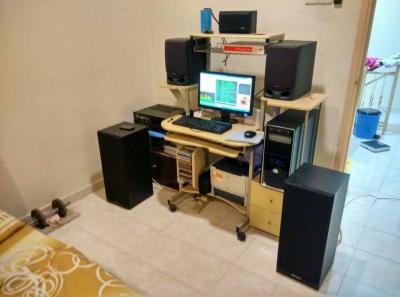
I am using Yamaha emx-200+mordaunt short floor stage,aiwa bookshelf spk and Kenwood center...this audio setup I am using for my PC desktop,unfortunately when I ply any thing from my PC thy is only 2 speaker or 4 speaker working...and I Dolby test my system the speaker seems like can't identify the correct device(when it shows the Left front speaKer suppose to working but the both front speaker voice out)a...need help...
Zot
post Oct 22 2015, 01:52 PM

Look at all my stars!!
*******
Senior Member
7,938 posts

Joined: Mar 2014
QUOTE(jackmok5489 @ Oct 22 2015, 01:47 PM)
I am using Yamaha emx-200+mordaunt short floor stage,aiwa bookshelf spk and Kenwood center...this audio setup I am using for my PC desktop,unfortunately when I ply any thing from my PC thy is only 2 speaker or 4 speaker working...and I Dolby test my system the speaker seems like can't identify the correct device(when it shows the Left front speaKer suppose to working but the both front speaker voice out)a...need help...
*
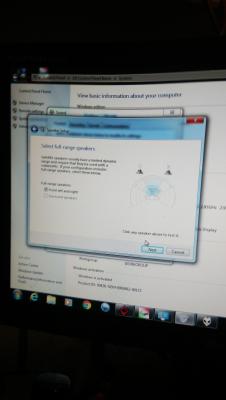
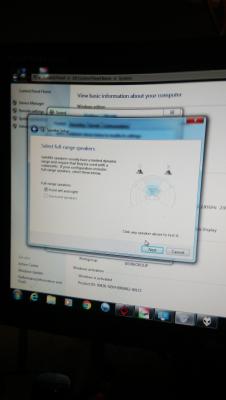
Go to Control Panel -> Speaker --> Speaker Setting Advance. Make sure you select 5.1 not Stereo ..... something like that cool.gif
JimbeamofNRT
post Oct 22 2015, 01:52 PM

the Original Lanji@_ Chicken Rice Shop Since 2002
******
Senior Member
1,902 posts

Joined: Sep 2012

QUOTE(jackmok5489 @ Oct 22 2015, 01:47 PM)
I am using Yamaha emx-200+mordaunt short floor stage,aiwa bookshelf spk and Kenwood center...this audio setup I am using for my PC desktop,unfortunately when I ply any thing from my PC thy is only 2 speaker or 4 speaker working...and I Dolby test my system the speaker seems like can't identify the correct device(when it shows the Left front speaKer suppose to working but the both front speaker voice out)a...need help...
*
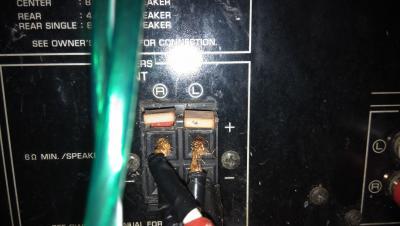
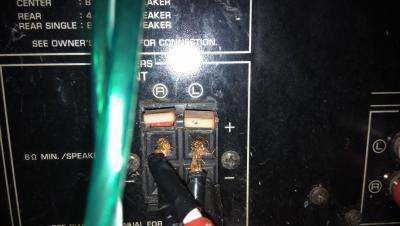
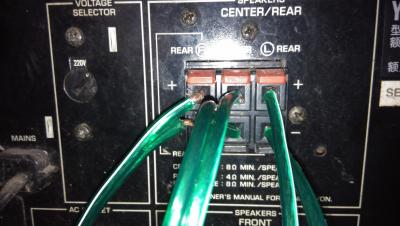
got pics of the installation? rear side
Elgore
post Oct 22 2015, 01:52 PM

Getting Started
**
Junior Member
113 posts

Joined: Apr 2011
From: Seven Nation


user posted image
SUSchokia
post Oct 22 2015, 01:55 PM

Chartered Member
*******
Senior Member
3,617 posts

Joined: Oct 2010
>5.1
>2 speakers

Kolos
+3kk!
post Oct 22 2015, 02:00 PM

Look at all my stars!!
*******
Senior Member
8,275 posts

Joined: May 2006
QUOTE(jackmok5489 @ Oct 22 2015, 01:47 PM)
I am using Yamaha emx-200+mordaunt short floor stage,aiwa bookshelf spk and Kenwood center...this audio setup I am using for my PC desktop,unfortunately when I ply any thing from my PC thy is only 2 speaker or 4 speaker working...and I Dolby test my system the speaker seems like can't identify the correct device(when it shows the Left front speaKer suppose to working but the both front speaker voice out)a...need help...
*
wait wait wait

you have a mixer, 3 different brand of speakers and you want 5.1?

doesnt work that way bro, you need a 5.1 decoder, this can be a small sound card or something bigger like a home theatre system. without this decoder you can only get a simulated surround sound, through using software emulation.

also you need the format of the song/movie in 5.1 format, downloaded stuff from internet normally dont have.

TSjackmok5489
post Oct 22 2015, 03:39 PM

Getting Started
**
Junior Member
60 posts

Joined: Mar 2012
From: Malaysia


Like tis


Attached thumbnail(s)
Attached Image
TSjackmok5489
post Oct 22 2015, 03:40 PM

Getting Started
**
Junior Member
60 posts

Joined: Mar 2012
From: Malaysia


QUOTE(Zot @ Oct 22 2015, 01:52 PM)
Go to Control Panel -> Speaker --> Speaker Setting Advance. Make sure you select 5.1 not Stereo ..... something like that  cool.gif
*
The PC can't detect the 5.1CH it only avialable for stereo...I saw it but I can't select...is it bcoz I am using onbiard sound chip?
Zot
post Oct 22 2015, 03:54 PM

Look at all my stars!!
*******
Senior Member
7,938 posts

Joined: Mar 2014
QUOTE(jackmok5489 @ Oct 22 2015, 03:40 PM)
The PC can't detect the 5.1CH it only avialable for stereo...I saw it but I can't select...is it bcoz I am using onbiard sound chip?
*
I think even on board chip also 5.1 nowadays. Maybe you try to update the sound driver on mobo.
power911
post Oct 22 2015, 04:18 PM

Misguided Angel of Death
*******
Senior Member
6,513 posts

Joined: May 2009
From: I'll follow wherever Tira goes

can I request a pic of your pc back panel ports?
TSjackmok5489
post Oct 22 2015, 04:23 PM

Getting Started
**
Junior Member
60 posts

Joined: Mar 2012
From: Malaysia


QUOTE(Zot @ Oct 22 2015, 03:54 PM)
I think even on board chip also 5.1 nowadays. Maybe you try to update the sound driver on mobo.
*
My mobo only LGA775 is old mobo
Zot
post Oct 22 2015, 04:29 PM

Look at all my stars!!
*******
Senior Member
7,938 posts

Joined: Mar 2014
QUOTE(jackmok5489 @ Oct 22 2015, 04:23 PM)
My mobo only LGA775 is old mobo
*
I check on Internet that the spec for audio is still 5.1. You should be able to find the 5.1 selection in drop down list. Why not reinstall audio driver

ICH5 built-in audio controller + AC97 Codec ALC655 (5.1 channel) hmm.gif
Zot
post Oct 22 2015, 04:37 PM

Look at all my stars!!
*******
Senior Member
7,938 posts

Joined: Mar 2014
QUOTE(jackmok5489 @ Oct 22 2015, 04:23 PM)
My mobo only LGA775 is old mobo
*
oooo I think it is not about the pc. Actually how do you connect to your audio system? Thru Yamaha emx-200? Will the Yamaha accept the S/PDIF output of your motherboard?

If it does, then still you need to go to Control Panel>Sound>Playbak Device .... blah blah blah and select 5.1 output

This post has been edited by Zot: Oct 22 2015, 04:39 PM
Zot
post Oct 22 2015, 04:49 PM

Look at all my stars!!
*******
Senior Member
7,938 posts

Joined: Mar 2014
I think this mixer accept stereo signals only, i.e. stereo signals from several source. Anyway, the mixer is to mix sounds from multiple source. It is not meant to mix FrontLeft:FrontRight, RearLeft:RearRight and Center:Sub. Did not work like that like +3kk! said smile.gif
TSjackmok5489
post Oct 22 2015, 05:29 PM

Getting Started
**
Junior Member
60 posts

Joined: Mar 2012
From: Malaysia


Here


Attached thumbnail(s)
Attached Image Attached Image
TSjackmok5489
post Oct 22 2015, 05:31 PM

Getting Started
**
Junior Member
60 posts

Joined: Mar 2012
From: Malaysia


Back view


Attached thumbnail(s)
Attached Image
TSjackmok5489
post Oct 22 2015, 05:41 PM

Getting Started
**
Junior Member
60 posts

Joined: Mar 2012
From: Malaysia


Check tis


Attached thumbnail(s)
Attached Image
TSjackmok5489
post Oct 22 2015, 05:42 PM

Getting Started
**
Junior Member
60 posts

Joined: Mar 2012
From: Malaysia


Tis
TSjackmok5489
post Oct 22 2015, 05:43 PM

Getting Started
**
Junior Member
60 posts

Joined: Mar 2012
From: Malaysia


Tis one


Attached thumbnail(s)
Attached Image Attached Image
TSjackmok5489
post Oct 22 2015, 05:44 PM

Getting Started
**
Junior Member
60 posts

Joined: Mar 2012
From: Malaysia


Check tis


Attached thumbnail(s)
Attached Image
TSjackmok5489
post Oct 22 2015, 08:05 PM

Getting Started
**
Junior Member
60 posts

Joined: Mar 2012
From: Malaysia


Guys,THX for helping I had solve the prob...but the next prob I coming...nw I had set the mic jack,audio jack and the line in jack for 5.1 setup,but the point is my amplifier had only one pair of aux in how can I pair with 3 pair of RCA?
power911
post Oct 22 2015, 08:18 PM

Misguided Angel of Death
*******
Senior Member
6,513 posts

Joined: May 2009
From: I'll follow wherever Tira goes

QUOTE(jackmok5489 @ Oct 22 2015, 09:05 PM)
Guys,THX for helping I had solve the prob...but the next prob I coming...nw I had set the mic jack,audio jack and the line in jack for 5.1 setup,but the point is my amplifier had only one pair of aux in how can I pair with 3 pair of RCA?
*
I'm still curious if the Yamaha emx-200 is a 5.1 channel receiver or a 8 slot mixer rclxub.gif
I'm just gonna assume it's a Yamaha emx-200 vcd receiver

If it really is the vcd receiver you're just gonna get stereo surround which isn't really a 5.1 surround setup.
and you can only use aux in (or tape in or tv in but they're gonna be the same)

This post has been edited by power911: Oct 22 2015, 08:27 PM
TSjackmok5489
post Oct 22 2015, 08:52 PM

Getting Started
**
Junior Member
60 posts

Joined: Mar 2012
From: Malaysia


QUOTE(power911 @ Oct 22 2015, 08:18 PM)
I'm still curious if the Yamaha emx-200 is a 5.1 channel receiver or a 8 slot mixer rclxub.gif
I'm just gonna assume it's a Yamaha emx-200 vcd receiver

If it really is the vcd receiver you're just gonna get stereo surround which isn't really a 5.1 surround setup.
and you can only use aux in (or tape in or tv in but they're gonna be the same)
*
Its vcd version.. may is tat any solution?
sonerin
post Oct 22 2015, 09:00 PM

Look at all my stars!!
*******
Senior Member
8,739 posts

Joined: Aug 2009
QUOTE(jackmok5489 @ Oct 22 2015, 08:52 PM)
Its vcd version.. may is tat any solution?
*
Come on.... Go and buy a proper 5.1 setup
TSjackmok5489
post Oct 22 2015, 09:38 PM

Getting Started
**
Junior Member
60 posts

Joined: Mar 2012
From: Malaysia


QUOTE(power911 @ Oct 22 2015, 08:18 PM)
I'm still curious if the Yamaha emx-200 is a 5.1 channel receiver or a 8 slot mixer rclxub.gif
I'm just gonna assume it's a Yamaha emx-200 vcd receiver

If it really is the vcd receiver you're just gonna get stereo surround which isn't really a 5.1 surround setup.
and you can only use aux in (or tape in or tv in but they're gonna be the same)
*
Bro what's diff wif tat...if I wana make it 5 speaker works how to make it?
+3kk!
post Oct 22 2015, 09:45 PM

Look at all my stars!!
*******
Senior Member
8,275 posts

Joined: May 2006
QUOTE(jackmok5489 @ Oct 22 2015, 08:52 PM)
Its vcd version.. may is tat any solution?
*
you are getting things messed up, i googled your EMX200 and its a mixer, looking at your picture thats not a mixer

i did manage to find video showing what you have, but that has no input pictures so what input you are using to your amp?

also knowing vcd players unless it has an optical in (which im almost certain you are not using) its not a 5.1, and its even more unlikely you have usb to it

this comes to my next suspicion when you mention the motherboard, motherboards with built in opticals are very very rare, hence my suspicion is that you are using the 3.5 jack out, from your motherboard to one input (normally mic) into your amp.

which comes to the next problem, why you cant seem to fit 3 RCA's, in a 5.1 system you dont need 3 RCA's you need 1 optical. having 3 RCA's means something is wrong somewhere as RCA's are stereo.

tldr, you dont have 5.1, get a proper decoder or forget about it
TSjackmok5489
post Oct 22 2015, 11:18 PM

Getting Started
**
Junior Member
60 posts

Joined: Mar 2012
From: Malaysia


Tis is the amp I using


Attached thumbnail(s)
Attached Image
+3kk!
post Oct 23 2015, 12:38 AM

Look at all my stars!!
*******
Senior Member
8,275 posts

Joined: May 2006
QUOTE(jackmok5489 @ Oct 22 2015, 11:18 PM)
Tis is the amp I using
*
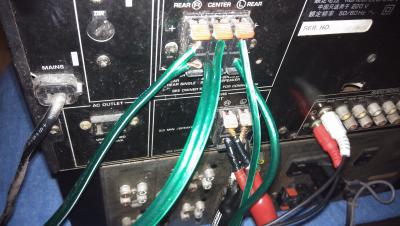
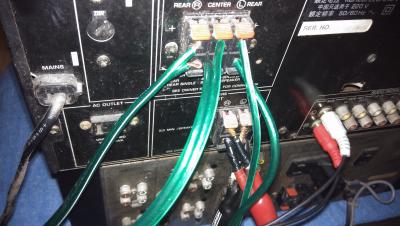
and can you take a picture of your connection from the computer to the amp?
TSjackmok5489
post Oct 23 2015, 05:05 PM

Getting Started
**
Junior Member
60 posts

Joined: Mar 2012
From: Malaysia


Connection
TSjackmok5489
post Oct 23 2015, 05:05 PM

Getting Started
**
Junior Member
60 posts

Joined: Mar 2012
From: Malaysia


Connection


Attached thumbnail(s)
Attached Image Attached Image
+3kk!
post Oct 23 2015, 10:58 PM

Look at all my stars!!
*******
Senior Member
8,275 posts

Joined: May 2006
you dont really know hwat you are doing do you?
ktek
post Oct 24 2015, 08:48 AM

小喇叭
********
All Stars
13,204 posts

Joined: Jul 2006
u should have connect 1 speaker at a time to check the amp working good?
then u need ori remote to enable dolby prologic(virtual surround).
it only accept rca aux in, so pointless to set 5.1 from pc.

if u plan to upgrade, its easier to setup.
bad2928
post Oct 24 2015, 12:35 PM

On my way
****
Senior Member
628 posts

Joined: Apr 2010


QUOTE(jackmok5489 @ Oct 23 2015, 05:05 PM)
Connection
*
the only chance you want surround only with multi channel analog input from your pc to amp.3 pair of 3.5jack to RCA is need it icon_rolleyes.gif


Change to:
| Lo-Fi Version
0.0263sec    0.48    6 queries    GZIP Disabled
Time is now: 12th December 2025 - 05:13 AM