Outline ·
[ Standard ] ·
Linear+
Unifi Official TM UniFi High Speed Broadband Thread V22, ( -_・) ︻デ═一▸ Maxis & Time
|
SUSsumyt
|
 Oct 19 2015, 01:06 PM Oct 19 2015, 01:06 PM
|
Getting Started


|
Just got called from TM , upgraded the second time in 2 years LOL , VIP 5 --> VIP 10 --> now to Unifi Advance 30 . (contract renewed to 24 months)
- 30mbps down , 5mbps up
- Free call (600min to all network, TM to TM always free)
- Free HyppTV aneka package (some Malaysian/Malay channel)
- Free HyppTV Everywhere for 2 devices
- Free TM WiFi 500mb quota daily
Quite happy with the value it packed now , among all competitor in Malaysia , however it's definitely not a cheap plan , hope to get kinda full stable speed then really thumbs up to TM .
|
|
|
|
|
|
SUSsumyt
|
Oct 19 2015, 01:08 PM
|
Getting Started
|
BTW just noticed this TM WiFi things included in my Unifi even in old VIP packages .
Anyone has any insight how to I register or get my ID, Password ? To entitle the TM WiFi daily 500mb quota outside .
|
|
|
|
|
|
SUSsumyt
|
Oct 19 2015, 01:11 PM
|
Getting Started
|
QUOTE(Xefron @ Oct 19 2015, 01:08 PM)  so u got Voice STD RM 20 Free.Nice.but only TM Sales can give this to customer not reseller or TMPoint. I am kinda fake ha-ha , at first no one call me . I called CS (1300...) and tell them someone from TM called me about package upgrade but I was not available for call back then . Then CS told me they will get Sales Team call me again . Waited 3-4 working days , today just received call and all going smooth . the person in charge told me everything in details and keep asking me am I understood with the terms . quite helpful and informative . |
|
|
|
|
|
SUSsumyt
|
Oct 19 2015, 07:22 PM
|
Getting Started
|
QUOTE(goldenway @ Oct 19 2015, 06:28 PM) Sorry, RM229 for 50Mbps package.......does it include the free calls option ? Thanks Unless u got called by TM sales team to offer FREE bundle call package , which kinda means u are "selected customer" . This post has been edited by sumyt: Oct 19 2015, 07:22 PM |
|
|
|
|
|
SUSsumyt
|
Oct 20 2015, 12:18 PM
|
Getting Started
|
QUOTE(gildan2020 @ Oct 20 2015, 06:23 AM) How much are you paying now for the Unifi Advance 30? RM 179 + GST? Yep its RM179+6% GST |
|
|
|
|
|
SUSsumyt
|
Oct 23 2015, 12:52 AM
|
Getting Started
|
OK so , finally my processing 30mbps upgrade package done , waited 3-4 working days . RM179 with free call + aneka hypptv .
Tested LAN , always stable 29-36mbps .
IDM max download speed up to 5.09 mb/sec on WiFi .
Play store getting 4.x mb/sec on WiFi .
YouTube 4k streaming smooth on WiFi .
Problem appeared when using WiFi , even next to router get max also 23mbps (always at 20mbps) . *cheapo unifi default router issue*
Kinda solution : go to router *192.168.0.1* , click "wireless settings" , click "manual wireless network setup" , 1) check " enable auto channel scan" , 2) choose "802.11n only" , 3) channel width 20mhz .
After above settings applied , not just next to router but get good coverage at same floor as well 8-10 meter , WiFi stable at 29-36mbps . not getting quite as much coverage at second floor but still quite respectable at 20-26mbps (always fluctuating) .
This post has been edited by sumyt: Oct 23 2015, 12:54 AM
|
|
|
|
|
|
SUSsumyt
|
Oct 23 2015, 01:27 AM
|
Getting Started
|
QUOTE(Mr Leo @ Oct 23 2015, 01:02 AM) Do you mind show your package with free call in OCC ? Here u go , hope this can help , with residential call , RM179 total stated at bill section . This post has been edited by sumyt: Oct 23 2015, 01:28 AM Attached thumbnail(s)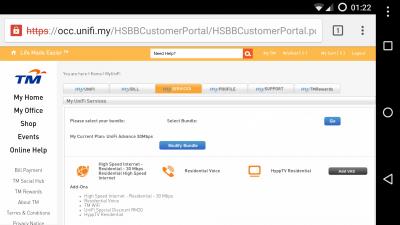
|
|
|
|
|
|
SUSsumyt
|
Oct 23 2015, 01:38 AM
|
Getting Started
|
QUOTE(fruitie @ Oct 23 2015, 01:33 AM) It's the same as mine. I was told when I upgraded mine in July, I will lose my free calls. Looks like it was there all this while. I will check with CS soon if mine comes with free calls, not that it matters to me because I never install my phone but curiosity kills the cat.  I was hoping they can squeeze in at least Ruby pack for me at 179 with free call , but the demand done quite half heartedly , anyway I am the one that desperate to get 30mbps so I guess "I lose the negotiation" haha |
|
|
|
|
|
SUSsumyt
|
Oct 23 2015, 01:56 AM
|
Getting Started
|
QUOTE(tritonite @ Oct 23 2015, 01:48 AM) Mine looks exactly like yours, but I am still curious as to whether that actually means we have the free calls thrown in without being charged RM20. 'Residential Voice' probably just means that there's a line with a number - I.e. VOIP. Isn't exactly clear if calls are charged or not. Doesn't actually say anywhere that there was a RM20 waived for the Voice Pack of 600mins. It's late. Paranoia creeping in  I would actually be interested to see the OCC bundle screens of someone who explicitly opted into the Voice Pack and someone who explicitly opted out of it. This should mean free call included I think . Attached thumbnail(s)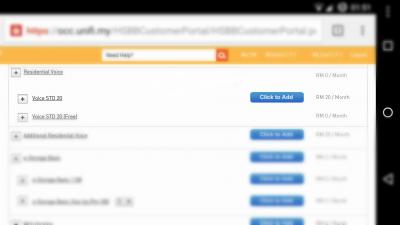
|
|
|
|
|
|
SUSsumyt
|
Oct 23 2015, 02:11 AM
|
Getting Started
|
QUOTE(tritonite @ Oct 23 2015, 02:06 AM) Ahh ok, it's hiding in the Bundle VAS screen. Entirely my fault for not checking deeper down. Just expected it to be on the Bundle summary screen right under the 'Unifi Special Discount RM20'. Thanks. So do u get that free call too ? |
|
|
|
|
|
SUSsumyt
|
Oct 23 2015, 02:26 AM
|
Getting Started
|
QUOTE(tritonite @ Oct 23 2015, 02:16 AM) Yes, I found it. Thanks. Up until then, I just had the word of the TMpoint supervisor. Now, it's black and white. Now, I just hope they don't renege on the new equipment he promised to give me on Monday. Now, I feel even more sheepish  Huh , u mean they offer u free equipment upgrade ? I tot new equipment for new subscriber only ? |
|
|
|
|
|
SUSsumyt
|
Oct 23 2015, 02:49 AM
|
Getting Started
|
QUOTE(tritonite @ Oct 23 2015, 02:46 AM) Yeah, mine wasn't a straightforward case, and the main reason why I went to TMpoint and ended up needing to speak to a supervisor there. I wanted to retain my number and free calls due to it being for my home office. I also wanted new equipment since mine is from the first batch of Unifi. At first, the frontline customer service personnel just said no outright claiming, like you said, it was for new subscribers only. I then asked to speak to a supervisor, and then told him quite firmly to check my account details where it showed my equipment was more than 4 years old, and can be assumed to have due wear and tear. I also pointed out that I have a flawless payment record all these years, which I think clinched it. Frankly, I already have a replacement 3rd party router, but I intend to swap back in the crappy DIR-615 before the Unifi guy arrives on Monday. I also heard the new routers are terrible and worse than the DIR-615 anyway, but it's always nice to have a spare one to 'zombify' into a switch/AP. But I do need a new HyppTV STB, though. My current one is dead as a doornail after years of neglect due to the poor quality of HyppTV programme offerings  Understood . Glad to hear ur case being handle quite well , I think I should request new equipment after 1/2 more years  |
|
|
|
|
|
SUSsumyt
|
Oct 23 2015, 10:34 AM
|
Getting Started
|
QUOTE(fruitie @ Oct 23 2015, 09:01 AM) Mine is the Alcatel equipment which is said not good, but so far works well for me. I also added another router as an Access Point. Hi , are u on 30mbps package ? I have a wireless repeater which actually works fine with VIP10, but once switch to Unifi advance 30 it became quite crappy , wireless fluctuate between 5-15mbps . Even I connect downstairs default router also getting 20-22mbps . But what's weird with the case is if I use LAN between Repeater and PC , I get a good 22-30mbps , so maybe the signal output by the Repeater is culprit ? No idea , its a RTN13U-B1 router . and yeah tried run speedtest just beside repeater same 5-15mbps . This post has been edited by sumyt: Oct 23 2015, 10:35 AM |
|
|
|
|
|
SUSsumyt
|
Oct 23 2015, 05:11 PM
|
Getting Started
|
QUOTE(shinchan^^ @ Oct 23 2015, 05:05 PM) so this is with free call? 179 one no free call? Depends , some RM179 no free call , some RM179 with free call , see what TM offer u , in my case , I pretty sure mine with free call , tested it and check bill at OCC account (calling some frens, no charge being shown at bill) . |
|
|
|
|
|
SUSsumyt
|
Oct 27 2015, 12:50 PM
|
Getting Started
|
QUOTE(plumberly @ Oct 27 2015, 08:15 AM) » Click to show Spoiler - click again to hide... « My 2 cents here as I bought a LAN cable recently for connecting from my router to my TV. Only found out the 2 types after I bought the cable. Luckily I bought the right type. Ha. Initially I could not stream data and thus investigated the problem and found the 2 types. No streaming as I did not complete the software side. Some infor below for you to digest. Straight Cable
You usually use straight cable to connect different type of devices. This type of cable will be used most of the time and can be used to:
1) Connect a computer to a switch/hub's normal port.
2) Connect a computer to a cable/DSL modem's LAN port.
3) Connect a router's WAN port to a cable/DSL modem's LAN port.
4) Connect a router's LAN port to a switch/hub's uplink port. (normally used for expanding network)
5) Connect 2 switches/hubs with one of the switch/hub using an uplink port and the other one using normal port.
Crossover Cable
Sometimes you will use crossover cable, it's usually used to connect same type of devices. A crossover cable can be used to:
1) Connect 2 computers directly.
2) Connect a router's LAN port to a switch/hub's normal port. (normally used for expanding network)
3) Connect 2 switches/hubs by using normal port in both switches/hubs.http://www.home-network-help.com/straight.htmlCan I use straight cable for network expansion ? I mean connect my access point to my main router . I always run into this problem , that after 1-2 days using . network just hang . found out culprit is the AP , after turn it off never have network issue again , after turn on normal for 1-2 days then the network hang again . solved right after I switch the AP off . |
|
|
|
|
|
SUSsumyt
|
Oct 29 2015, 12:47 PM
|
Getting Started
|
QUOTE(Xefron @ Oct 29 2015, 10:58 AM) Does An AC Router Improve N Device Performance? Yes.  *ASUS RT-N66U as the reference N router to provide nice high N results as a comparison baseline Example: Linksys WRT1900AC is 58% better than RT-N66U can i assume this theory is right ? get the cheapest AC router (prefer with Gigabit WAN) , better than getting higher end & more expensive N router . |
|
|
|
|
|
SUSsumyt
|
Oct 29 2015, 12:49 PM
|
Getting Started
|
btw Wireless AC Wave 2 version router just launched , so feel like buying the first gen AC router kinda wasting (not the right timing) .
|
|
|
|
|
|
SUSsumyt
|
Oct 29 2015, 10:34 PM
|
Getting Started
|
Anyone have comment on TP-Link TL-WR1043ND router ?
RM150-180 range
- 3x 5dbi antenna
- 1 Gigabyte WAN , 4 Gigabyte LAN
- Factory Unifi compatible
- 1 USB2.0
- Wireless N 450mbps 2.4Ghz
Seemed like a very good value router ? Any bad on it or any TP link router worth checking out ? Asus quite pricey
|
|
|
|
|
|
SUSsumyt
|
Oct 30 2015, 07:04 AM
|
Getting Started
|
QUOTE(kaizer_x @ Oct 29 2015, 11:18 PM) I'm using it..so far so good QUOTE(prs516 @ Oct 29 2015, 11:21 PM) I'm using it now. No problem for the time being. QUOTE(zher4883 @ Oct 30 2015, 06:02 AM) I am ujsing this model and i can say this model is much better than tm stock router Thx for the feedback guys , may I ask how's the coverage of the signal of this router ? A medium sized double storey house , stock router actually did OK , but the signal drop significantly when it comes to second floor (router at ground floor) . |
|
|
|
|



 Quote
Quote

 0.0459sec
 1.36
1.36
 7 queries
 GZIP Disabled