Welcome Guest ( Log In | Register )

Bump Topic Topic Closed RSS Feed

Outline · [ Standard ] · Linear+

Unifi Official TM UniFi High Speed Broadband Thread V22, ( -_・) ︻デ═一▸ Maxis & Time

views
     
ntah_le
post Sep 23 2015, 08:26 AM

New Member
*
Junior Member
22 posts

Joined: May 2007
QUOTE(audiocool @ Sep 23 2015, 08:23 AM)
slow in download app in iOS AppStore. TM still not solve this issue yet.
*
as I know, MCMC regulation is up to international gateway.. so, I dont think TM shall responsible to fix this issue.. just want to be fair to ISP.. thats out of their control..

ntah_le
post Sep 23 2015, 08:32 AM

New Member
*
Junior Member
22 posts

Joined: May 2007
check with appstore whether any issue on their side.

http://www.thestar.com.my/News/World/2015/...t-major-attack/


ntah_le
post Sep 23 2015, 08:03 PM

New Member
*
Junior Member
22 posts

Joined: May 2007
QUOTE(jolmy @ Sep 23 2015, 05:37 PM)
Well, I guess you better get TM to check.

About speedtest to overseas servers, well, with the international bandwidth being shared by thousands of users, it's rather impossible to get the full speed per TCP connection. This is a known fact and we all just gotta live with it. However, if you are using download managers or P2P, if you can max out total download speed at 30Mbps (or 3 MB/s), then your connection is actually fine
*
wau.. you expected to get full speed to international.. no ISP in the world can guarantee the international speed for consumer package (as I know). the international is sharing.. the ethernet is best effort technology..

ntah_le
post Sep 23 2015, 08:05 PM

New Member
*
Junior Member
22 posts

Joined: May 2007
QUOTE(audiocool @ Sep 23 2015, 08:35 AM)
The slowness in downloading in Appstore is happened before malware attack. download using Maxis is not an issue.
*
maybe routing or international congestion at TM's gateway.. nothing they will change for you due to their commitment based on Mcmc just to local.. so my suggestion.. change to maxis..
ntah_le
post Sep 23 2015, 08:08 PM

New Member
*
Junior Member
22 posts

Joined: May 2007
QUOTE(jusbella @ Sep 23 2015, 12:11 PM)
Asus N12HP should be ok.
*
I experienced WAN-LAN issue with this router.. just up to 45Mbps.. so if you subscribed higher than 40Mbps.. better find GE port router.. n66 is far better in terms of coverage and stability

ntah_le
post Sep 24 2015, 12:14 PM

New Member
*
Junior Member
22 posts

Joined: May 2007
QUOTE(kebeckham7 @ Sep 23 2015, 10:24 PM)
what is the maximum length for fiber optic cable from the cabinet to a customer house. and what kind of fiber do TM use....the single mode or multi mode optic fibre? TM build a fibre Cabinet about 530m from my house...just curios.. ...i wont be dreaming to subscribe unifi if any of u guys can confirm me the cabinet cannot support more that 500meters for example.
*
they implement FTTH bro.. up to 20km from access element.. ftth equipment @central office not @cabinet.
ntah_le
post Sep 24 2015, 12:17 PM

New Member
*
Junior Member
22 posts

Joined: May 2007
QUOTE(selinix @ Sep 24 2015, 11:28 AM)
sigh, when are they going to fix the slow speed to appstore.. It's really annoying when i have tons of apps stucked and takes forever to update
*
international connection bro.. not their responsibility.. out of their reach.. the possibility why maxis ok and good speed to appstore due to their partner has good connectivity to the appstore..

ntah_le
post Sep 24 2015, 07:45 PM

New Member
*
Junior Member
22 posts

Joined: May 2007
QUOTE(geek8585 @ Sep 24 2015, 04:19 PM)
is really crap with the connection to apps store by using Unifi...

at first i thought the iOS9 cause the server slow, but after one entire week... i guess something is wrong with the unifi  sad.gif
*
good luck then.. I just wrote that mcmc requirement just up to myIX... for sure appstore beyond that..
ntah_le
post Oct 17 2015, 01:57 PM

New Member
*
Junior Member
22 posts

Joined: May 2007
QUOTE(Moogle Stiltzkin @ Oct 17 2015, 01:37 PM)
why malaysia server ? the majority of the content i download is US server. And even some european servers.

Only local caching stuff like akamai etc, or local website care about local speeds. And local gaming like fps where low latency is required.
Think of it this way....

i download torrent (linux iso COUGH  laugh.gif ) but only US peers...... no local peers like singapore or malaysia.... so i get maxed out at 20mbps dl..... at most.

but another torrent got mix of both us, sg, my users.... because some of users is local, so i can get up to 30mbps ..... (because some of that bandwidth is local which is maxed out at 30...)
basically... in limited situations you can get max speed (either local caching or local peers)..... but how often does this happen ? For me most of my download this is situation doesn't happen most of the time.... especially for torrent.
Not even getting between 24-27 mbps (80-90%) either which is the bare minimum you'd expect  shakehead.gif  Look at SKMM Throughput or Bandwidth Utilisation customers should be expecting for their broadband subscription

http://www.skmm.gov.my/Sectors/Broadband/Q...of-Service.aspx

So entitlement alone based on SKMM's own rules, i'm legitimately undercapped.

Also since other users 30mbps to US to begin with (based on user feedback on the forum so far), i don't see why i need to settle for less  sweat.gif so this is definitely a real not imagined issue.
Also for your reference

Local bandwidth, international bandwidth, download bandwidth and upload bandwidth.
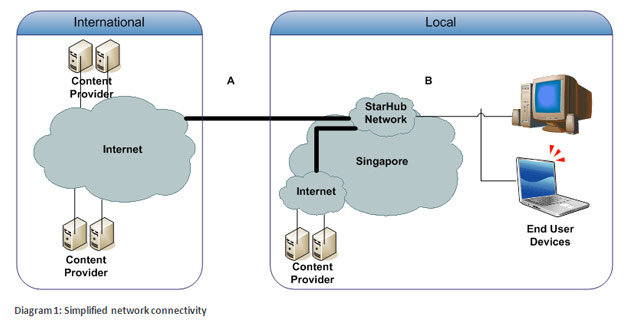
user posted image

http://www.starhub.com/personal/support/br...h-vs-speed.html
*
bro.. mcmc msqos only up to domestic network.. you want full bw like you subscribed.. go for super expensive metro ethernet bro.. i believe TM already make a good job in terms of pairing with akamai/google.. not like maxis and others.. more or less.. more than 40% of the traffic currently local content..

you torrent and want to complaint to MCMC... better make sure your do legal download.. hopefully openoffice or linux dist.. if not.. MCMC can charge you.. good luck

This post has been edited by ntah_le: Oct 17 2015, 02:05 PM
ntah_le
post Oct 17 2015, 05:13 PM

New Member
*
Junior Member
22 posts

Joined: May 2007
QUOTE(Moogle Stiltzkin @ Oct 17 2015, 02:19 PM)
for latency i agree the "Not more than 85ms " is definitely local. But as for overseas where does it say this ?

not to mention i already said is hard capped, which is not the same as fluctuating performance due to distance. theres a difference...

yes is legal linux iso don't worry.

main issue of discussion is that speed is subpar to what many others here are getting on same 30mbps to US servers (not to be confused with local speed... lel) rolleyes.gif  so lets not digress into non related matters and baseless speculations/accussations without proof thx.
*
you can email to mcmc to clarify.. as far i mention here.. based on my experienced work with them.. no isp outside us can guarantee the full speed to speedo @US.. how you can so sure the link from the US gateway to the Speedometer server host by Verizon(maybe) not congest that will definitely disturb you so called performance to US.. Internet Protocol itself is a best effort.. its not time switching bro..

if you think TM network to US not sufficient to you.. switch to maxis or time..
ntah_le
post Oct 19 2015, 01:32 PM

New Member
*
Junior Member
22 posts

Joined: May 2007
QUOTE(jusbella @ Oct 19 2015, 12:43 PM)
Pro: Faster download/upload (10mbps) speed, NO FORCE to take Hyyptv package, Symmetric tech, FREE fixed line to fixed line call.

Cons: Slower upload speed (5mbps), FORCE to take Hyytv package, Asymmetric tech, NO MORE FREE fixed line to fixed line call.
*
its not about symmetrical or asymmetrical tech.. actually both UniFi access technology (FTTH PON and VDSL) are asymmetrical tech. its how TM design the offering. Previously symmetric.. but now, they follow others ISP around the world that give asymmetrical for consumer broadband..
ntah_le
post Oct 21 2015, 04:47 PM

New Member
*
Junior Member
22 posts

Joined: May 2007
QUOTE(^Ware^wolf @ Oct 21 2015, 03:39 PM)
i m having the same question as well.currently im using RT-N12 , and i find out that RT-N18U have "download master" feature , where i can BT using the router and usb drive only .... is this feature stable ? i dont need 3g/4g usb modem feature on RT-N18U.

my apartment only 1200sf with 3rooms ...plenty of wifi connection around my block , i can detect like 8wifi SSID

any cheaper solution for asus router ?
*
since actually the interference not only came from others wifi channel.. more on others signal that riding on same 2.4GHz. for examples, wifi camera, microvawe, dect phone, zigbee.. and more.. so better for you to get dual band.. i do believe that tp link also produce some good and excellent router with better price compare to asus.

http://thewirecutter.com/reviews/best-wi-fi-router/

but make sure the version support unifi.


Topic ClosedOptions
 

Change to:
| Lo-Fi Version
0.0457sec    0.25    7 queries    GZIP Disabled
Time is now: 5th December 2025 - 02:32 PM