First, we need information from AVI. Use GSpot. Write down the info (we need this later) :

* Original bitrate - 855kb/s
* Runtime (hh:mm:ss) - 23:10
* FPS (frame per second) - 23.976
* Audio bitrate - 160kbps, 48kHz, CBR
In this guide, I will resize the sample movie from 640 x 480 to 640 x 440.
Launch VirtualDubMod & load AVI. I assume you have AVI with CBR (Constant Bitrate) audio. If you get msg like below, click "
No".

Click "
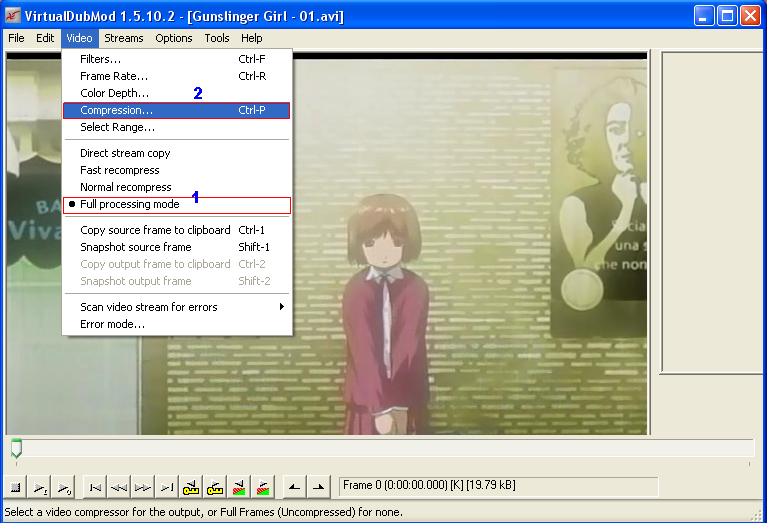
Video". Ensure "
Full processing mode" is selected. Then click "
Filters" :

You'll see the blank dialog box. Click "
Add"

Scroll down for "
Resize". Double click it or click "
Ok".

Put the size here. As earlier, I want to resize into 640 x 440. Select "
Bicubic". For more info about filter mode, use Google. Click "
Ok".

List of the "
Filter" you're going to use. Click "
Ok" to proceed.

You'll back to the VirtualDubMod windows. Select "
Video". Then "
Compression" (ensure "
Full processing mode" is selected).

List of available compression on my system. You can use
DivX or
XviD.
 This post has been edited by keyz: Nov 22 2006, 10:47 PM

 Nov 21 2006, 02:19 PM, updated 20y ago


 Quote
Quote




 0.0125sec
 0.55
0.55
 5 queries
 GZIP Disabled