Welcome Guest ( Log In | Register )

22 Pages « < 19 20 21 22 >Bottom

Outline · [ Standard ] · Linear+

 Skylake/Kaby/Coffee/Comet/Rocket Lake OC V1, Show off your OC here

views
     
TSowikh84
post Jun 4 2021, 09:57 PM

i7 Clan
Group Icon
Elite
8,711 posts

Joined: Nov 2007
From: Butterworth, PG / Machang, Kelantan


QUOTE(Bonchi @ Jun 4 2021, 08:07 PM)
400% should be good enough.

vdimm 1.48v, vccsa 1.35v vccio 1.3v
My CPU IMC wasnt a really good one. So dont think I will push anymore. (also kinda lazy haha)
cheapest Bdie in the market from amazon (now out of stock also seems Bdie very rare or very expensive now), 270USD shipped 3200c14 2X16 tridentz rgb.

but it looks like the RGB very not in sync.... is there a way to set it properly?
user posted image
*
This is my 4133C17 @ 1.40v with 2x16GB TridentZ Royal 4KC17:
user posted image

You might also want to play around with MSI's Memory Try It! feature, as a starting point for optimizing your RAM OC.
user posted image
user posted image
Source: https://www.msi.com/blog/Boost-Gaming-Perfo...560-Motherboard

So far RGB from my TridentZ RGB (except one stick below) and Royal kits has been syncing correctly with ASUS Aura software.
Previously got one TridentZ RGB stick that stuck at red colour permanently, I RMA'ed it after that.


TSowikh84
post Jun 6 2021, 12:02 PM

i7 Clan
Group Icon
Elite
8,711 posts

Joined: Nov 2007
From: Butterworth, PG / Machang, Kelantan


QUOTE(Bonchi @ Jun 6 2021, 07:13 AM)
further optimization to drop voltage because felt previous one was quite high, decided to drop to 4000c16. Now SA/IO/DIMM  1.28/1.28/1.45v. Gaming performance not affected.

finally broke the 40ns wall
*

Nice try but I'd recommend rechecking your RTL/IOL and tRDWR.
RTL should be no more than 2 apart and IOL should be no more than 1 apart.
tRDWR should be straight values eg. 12-12-12-12 or 11-11-11-11 etc.
You may try auto tRDWR first and check the RTL/IOL if it can fulfil the rule above.
Bad RTL/IOL can also be caused by incorrect vDIMM/SA/IO, either too low or too high.
Also, tWR can still be possibly reduced down to 8, try notch by notch method until stability is achieved.

TSowikh84
post Jun 6 2021, 01:49 PM

i7 Clan
Group Icon
Elite
8,711 posts

Joined: Nov 2007
From: Butterworth, PG / Machang, Kelantan


QUOTE(Bonchi @ Jun 6 2021, 12:47 PM)
thanks for advice. my tRDWR was 12-12-12-12 but the mobo changed to those values on its own. TWR is 8 but the mobo changes it to 10. RTL/IOL is auto.
im slowly dropping my SA/IO at the moment. currently at 1.25... since already gotten a 400% stable baseline.

edit: when i enable PPD=0 trdwr_dd = auto, the RTL/IOL seems to behave better. VSA/IO/DIMM 1.2/1.2/1.44. will be running memtest now.

is it ok to have ppd=0?

*

In most cases, setting PPD = 0 will reduce latency by 2-3ns.
I'm using TXP 4 and PPD 0, so far so good.

This post has been edited by owikh84: Jun 6 2021, 01:50 PM
TSowikh84
post Jun 7 2021, 10:23 AM

i7 Clan
Group Icon
Elite
8,711 posts

Joined: Nov 2007
From: Butterworth, PG / Machang, Kelantan


QUOTE(Bonchi @ Jun 6 2021, 02:13 PM)
Yeah, i read it's something about idle states. Somehow when i ppd=1, the RTL/IOL becomes messy. Right now it looks perfect, just that ppd is 0. Well, got an extra 20fps on F1 2020 from DJR@4133c18. Cant complain. This tridentz is meant to be a cosmetic upgrade over the klevv bolt XR haha.

Currently memtest passed 100% already. Thanks for the advice.

Edit: error at 120% need to up SA/IO sweat.gif

Done 600% memtest. Now end up with 1.3 SA/1.25 IO/1.45 Dimm.
*

Well done bro rclxms.gif

TSowikh84
post Jun 7 2021, 03:47 PM

i7 Clan
Group Icon
Elite
8,711 posts

Joined: Nov 2007
From: Butterworth, PG / Machang, Kelantan


QUOTE(Bonchi @ Jun 7 2021, 02:28 PM)
I really dont understand this mobo... this morning try to push abit. end up SA/IO/VDIMM 1.3/1.3/1.45, I got it to 4266c17 but cant get to boot at 4133c17 at 1.35/1.3/1.48.
although not below 40ns anymore but gain alot more bandwidth and gaming benchmark scores improvement over 4000c16.
*

Enable Round Trip Latency Optimize.
Save, reboot and check your RTL & IOL to make sure they are good (follow that rule that i mentioned earlier). If yes, memorize/write down the RTL/IOL.
MSI boards tend to fluctuate in RTL training, so you might want to manually insert these RTL &. IOL. Reboot.

user posted image
TSowikh84
post Jun 9 2021, 07:12 AM

i7 Clan
Group Icon
Elite
8,711 posts

Joined: Nov 2007
From: Butterworth, PG / Machang, Kelantan


4000C14 DR anyone? drool.gif

Royal Elite F4-4000C14D-32GTEG: $570
https://www.memoryc.com/memory/f4-4000c14d-32gteg.html
https://www.newegg.com/g-skill-32gb-288-pin...N82E16820374257

TridentZ RGB F4-4000C14D-32GTZR: $520
https://www.memoryc.com/memory/f4-4000c14d-32gtzr.html
https://www.newegg.com/g-skill-32gb-288-pin...N82E16820374229

Ripjaws V F4-4000C14D-32GVK: $490
https://www.newegg.com/g-skill-32gb-288-pin...N82E16820374239
TSowikh84
post Jun 9 2021, 09:30 PM

i7 Clan
Group Icon
Elite
8,711 posts

Joined: Nov 2007
From: Butterworth, PG / Machang, Kelantan


QUOTE(Chiggah @ Jun 9 2021, 01:19 PM)
Have a 6700k that can reach 4.5 @ 1.325

But temps can peak up to 85c

Thinking to delid - Does anyone have a delidding tool I can loan ?
*
This guy is doing delid service.
https://forum.lowyat.net/index.php?showtopic=4231294

This post has been edited by owikh84: Jun 29 2021, 08:42 AM
TSowikh84
post Jun 20 2021, 11:37 AM

i7 Clan
Group Icon
Elite
8,711 posts

Joined: Nov 2007
From: Butterworth, PG / Machang, Kelantan


Thermal and power consumption of 11900K vs 10900K vs 5900X...

Realbench v2.56 (15 mins) - CPU Core Temperature
CPU Idle (°C) Load (°C)
11900K @ 5.1 GHz All-Core 39.6 90.3
10900K @ 5.1 GHz All-Core 40.9 89.4
5900X @ 4.5 GHz All-Core 44.8 88.6
5900X @ CO -30/25 +200 MHz 44.0 91.5

Realbench v2.56 (15 mins) - CPU Package Power
CPU Idle (W) Load (W)
11900K @ 5.1 GHz All-Core 71.4 267.1
10900K @ 5.1 GHz All-Core 29.5 210.2
5900X @ 4.5 GHz All-Core 63.4 209.0
5900X @ CO -30/25 +200 MHz 37.3 221.6

Realbench v2.56 (15 mins) - Total System Power Consumption (CPU+GPU)
CPU Idle (W) Load (W)
11900K @ 5.1 GHz All-Core 172.0 816.0
10900K @ 5.1 GHz All-Core 132.0 744.0
5900X @ 4.5 GHz All-Core 144.0 692.0
5900X @ CO -30/25 +200 MHz 116.0 704.0

Battlefield V 1920x1080 Ultra DX12 (10 mins) - CPU Core Temperature
CPU Idle (°C) Load (°C)
11900K @ 5.1 GHz All-Core 41.3 76.5
10900K @ 5.1 GHz All-Core 40.3 73.5
5900X @ 4.5 GHz All-Core 44.8 71.3
5900X @ CO -30/25 +200 MHz 44.8 77.0

Battlefield V 1920x1080 Ultra DX12 (10 mins) - Total System Power Consumption (CPU+GPU)
CPU Idle (W) Load (W)
11900K @ 5.1 GHz All-Core 176.0 660.0
10900K @ 5.1 GHz All-Core 132.0 596.0
5900X @ 4.5 GHz All-Core 148.0 556.0
5900X @ CO -30/25 +200 MHz 124.0 564.0

11900K PC specs:
11900K @ 5.1 GHz All-Core: vCore auto | LLC2 | SVID Trained | C-state off
Maximus XIII EXTREME, BIOS 0902
2x16GB TridentZ Royal 4000C17 B-die @ 3866 14-15-15-34-2T (Gear 1) @ 1.55V
TUF 3080 BIOS V5, OC +150/1100 | driver 466.77 | Rebar off
Custom WC: by EK-Supremacy EVO RGB + 2x RX360 + 12x GT + 1x D5
AX1200i
Dimastech EasyDual V2.5

10900K PC specs:
10900K @ 5.1 GHz All-Core: vCore auto | LLC6 | SVID Trained | C-state off
Maximus XII FORMULA, BIOS 2005
2x16GB TridentZ Royal 4000C17 B-die @ 3800 14-15-15-28-2T @ 1.55V
TUF 3080 BIOS V2, OC +150/1100 | driver 461.81 | Rebar off
Custom WC: by EK-Supremacy EVO RGB + 2x RX360 + 12x GT + 1x D5
AX1200i
Dimastech EasyDual V2.5

5900X PC specs:
1) 5900X @ 4.5 GHz All-Core: vCore BIOS set 1.35v | LLC auto | C-state off
2) 5900X @ @ CO -30/25 +200 MHz: PBO Mobo | CO - ve 25,25,25,25,25,25,30,30,30,25,30,25 | OCOV +200MHz| C-state off
ROG Strix B550-I, BIOS 2007
2x16GB TridentZ Royal 4000C17 B-die @ 3800 14-15-15-28-1T (IF 1900 1:1) @ 1.55V
TUF 3080 BIOS V2, OC +150/1100 | driver 461.81 | Rebar off
Custom WC: by EK-Supremacy EVO RGB + 2x RX360 + 12x GT + 1x D5
AX1200i
Dimastech EasyDual V2.5

This post has been edited by owikh84: Jun 21 2021, 08:53 PM
TSowikh84
post Jun 27 2021, 02:50 PM

i7 Clan
Group Icon
Elite
8,711 posts

Joined: Nov 2007
From: Butterworth, PG / Machang, Kelantan


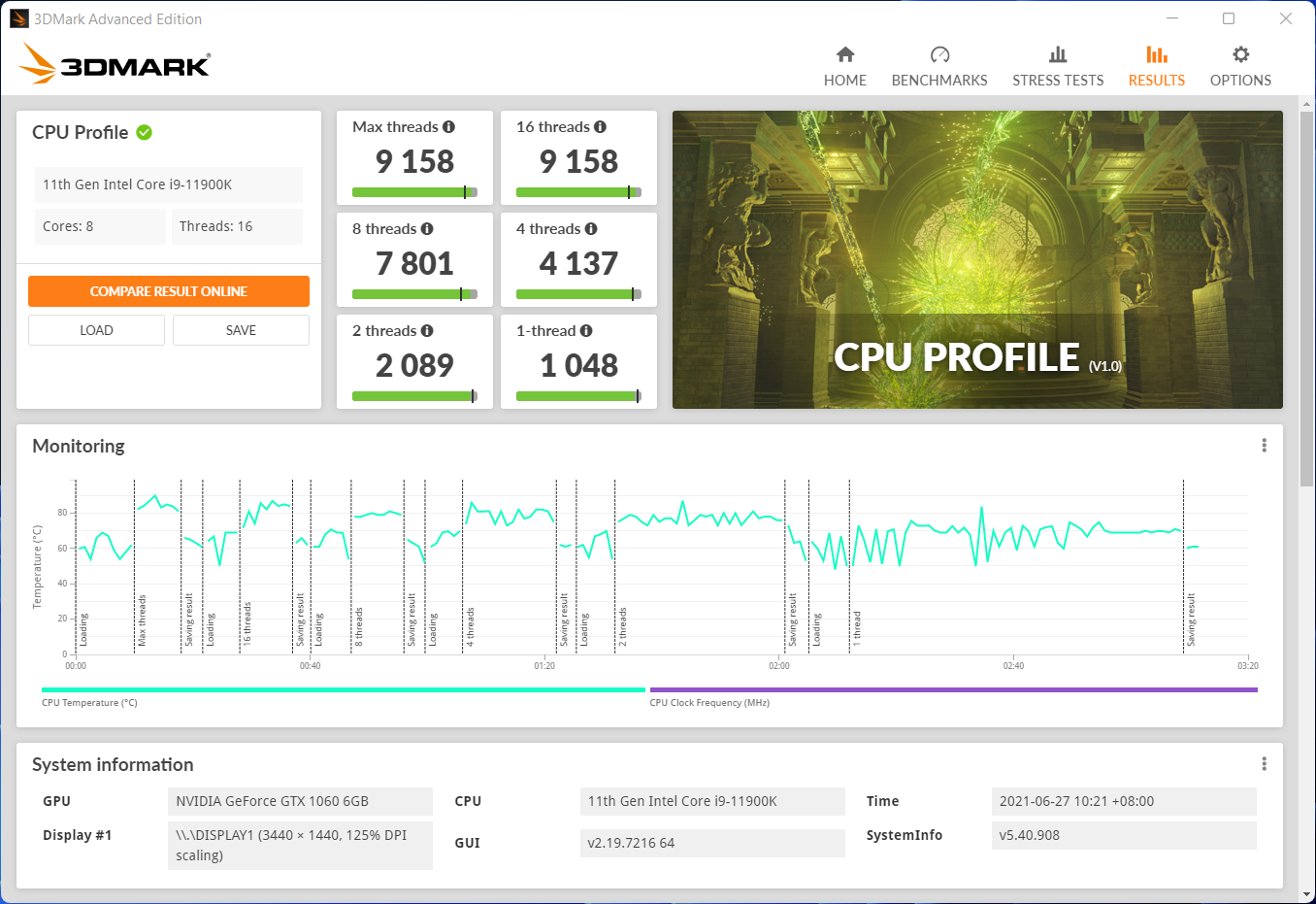
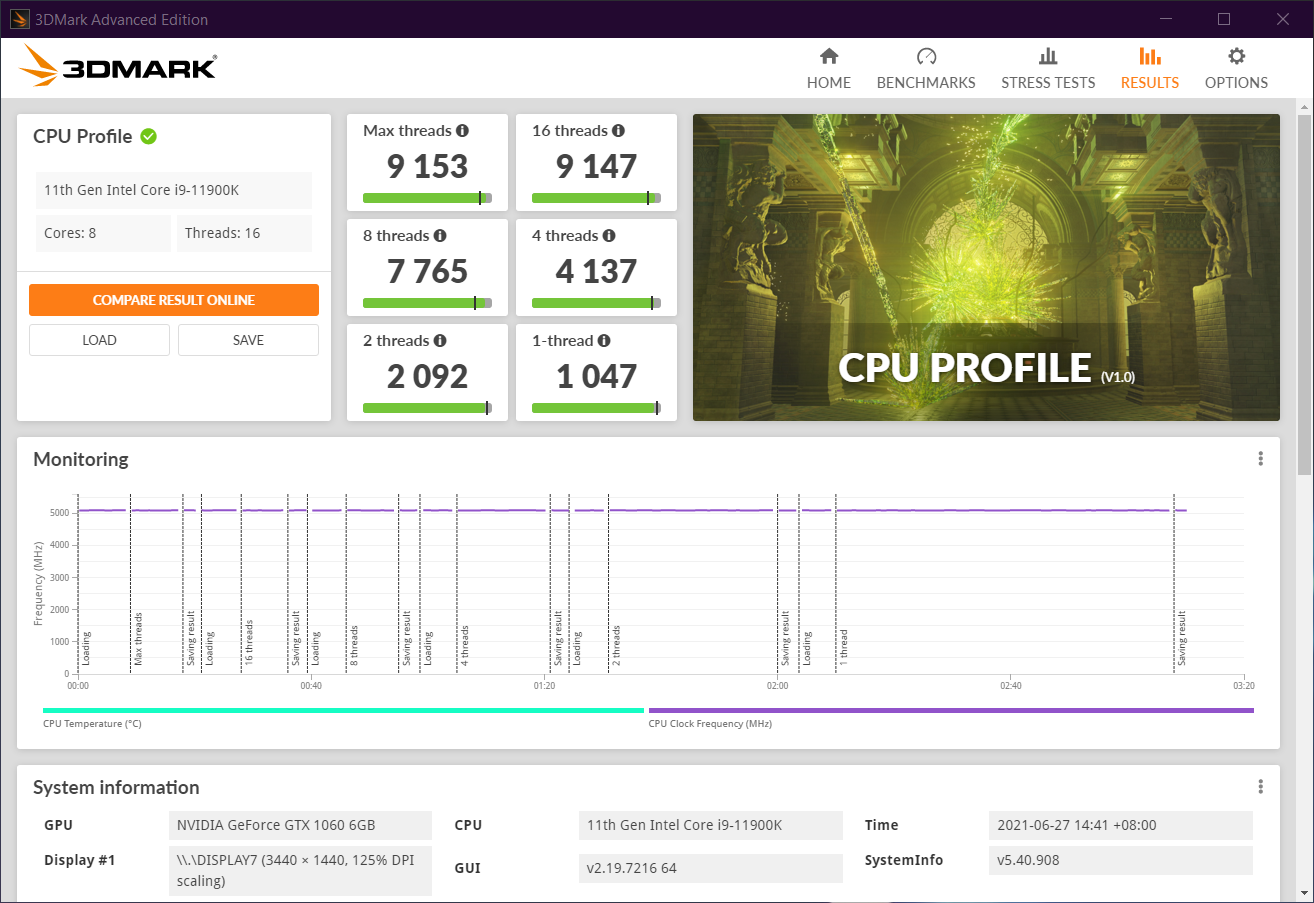
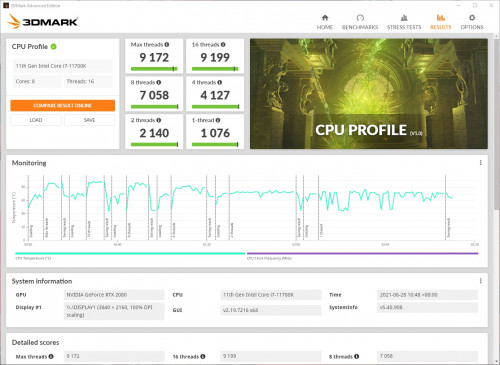
New benchmark for CPU! biggrin.gif

11900K SP76 @ 5.1 GHz
Maximus XIII EXTREME | BIOS 0902
2x16GB B-Die DR 3866 14-15-15-28-2T @ 1.55V Gear1
ZOTAC GTX 1060 DUAL MINI | NV 471.11


Win 11:
» Click to show Spoiler - click again to hide... «


Win 10:
» Click to show Spoiler - click again to hide... «


This post has been edited by owikh84: Jun 28 2021, 09:27 PM
TSowikh84
post Jun 27 2021, 08:33 PM

i7 Clan
Group Icon
Elite
8,711 posts

Joined: Nov 2007
From: Butterworth, PG / Machang, Kelantan


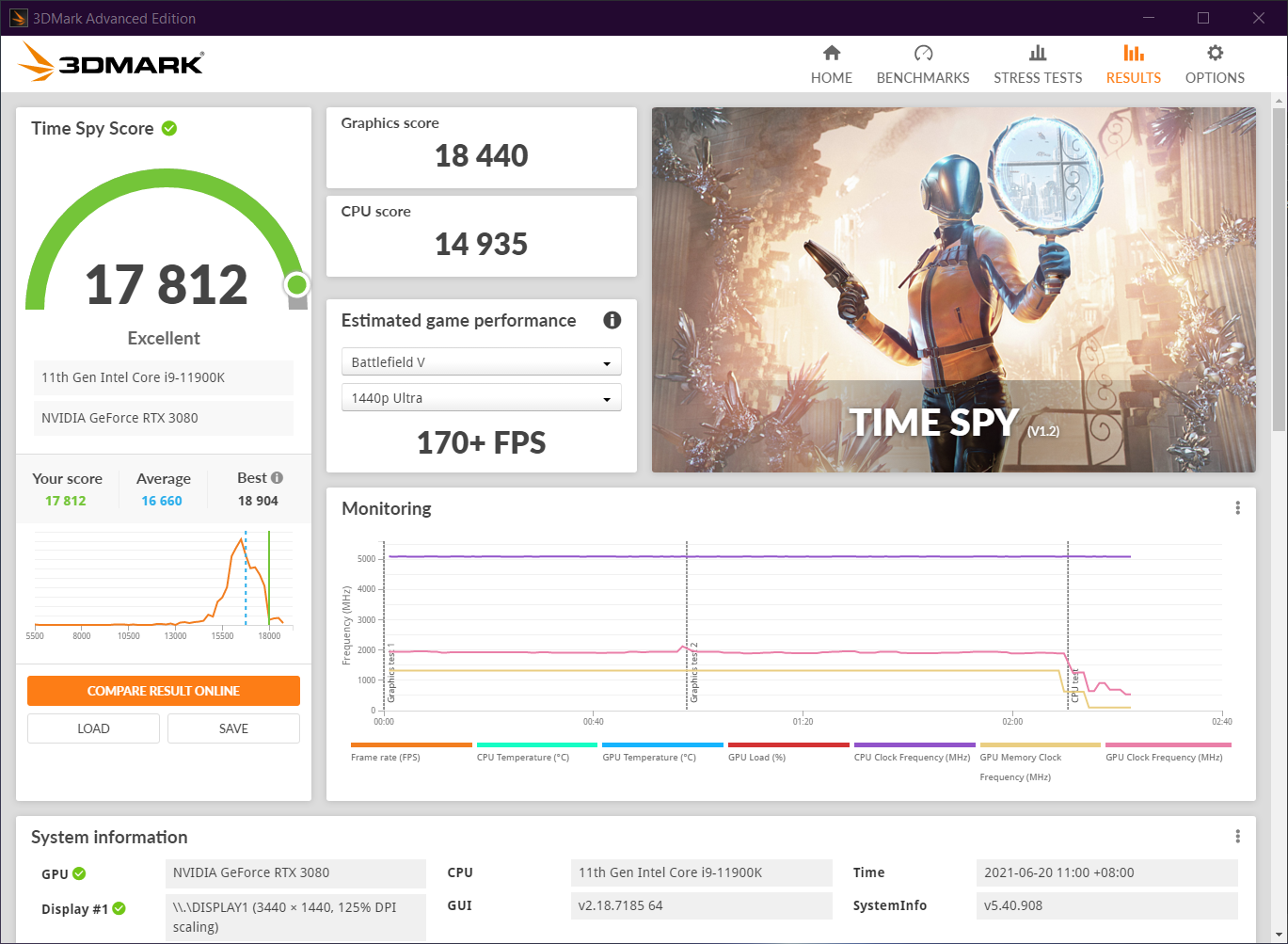
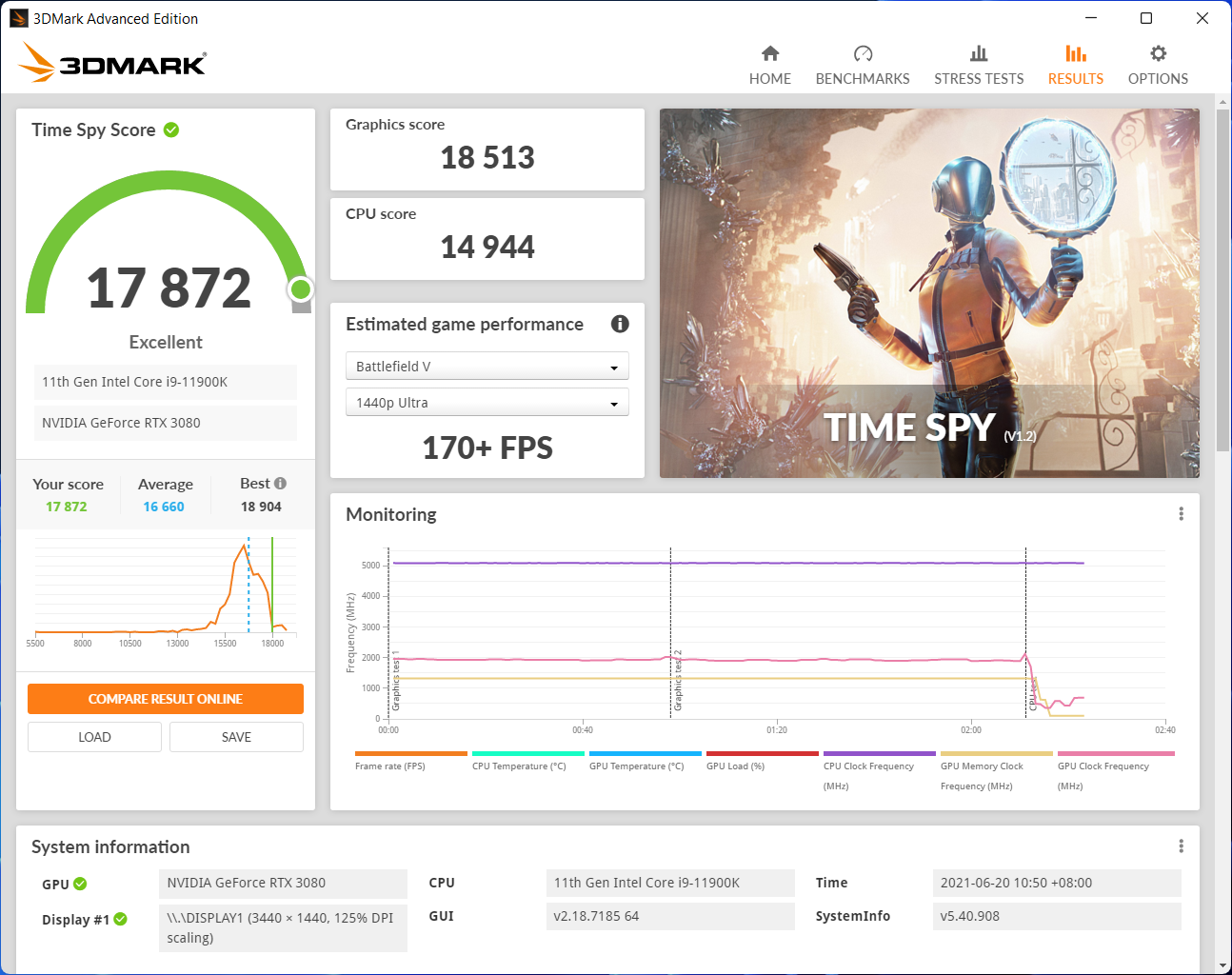
Time Spy Win11 vs Win10 thumbsup.gif

11900K SP76 @ 5.1 GHz
Maximus XIII EXTREME | BIOS 0902
2x16GB B-Die DR 3866 14-15-15-28-2T @ 1.55V Gear1
TUF 3080 OC +150/1100 | NV 466.77


Win10:
» Click to show Spoiler - click again to hide... «


Win11:
» Click to show Spoiler - click again to hide... «

TSowikh84
post Jun 28 2021, 11:59 AM

i7 Clan
Group Icon
Elite
8,711 posts

Joined: Nov 2007
From: Butterworth, PG / Machang, Kelantan


QUOTE(llaw @ Jun 28 2021, 10:57 AM)
Overclocking my 11700K just for the numbers biggrin.gif

» Click to show Spoiler - click again to hide... «
*
Nice bro. What are your OC for CPU and RAM?
Cooling?
TSowikh84
post Jun 28 2021, 09:01 PM

i7 Clan
Group Icon
Elite
8,711 posts

Joined: Nov 2007
From: Butterworth, PG / Machang, Kelantan


QUOTE(nrw @ Jun 28 2021, 07:34 PM)
damn owi, ur 8 threads are strong. wth happened there  hmm.gif
*
No idea bro, I don't even know how this new benchmark works lol. What score did you get with your CPU?

btw, this are my results on Win10 hmm.gif :
» Click to show Spoiler - click again to hide... «


Win 11:
» Click to show Spoiler - click again to hide... «


This post has been edited by owikh84: Jun 28 2021, 09:11 PM
TSowikh84
post Jun 29 2021, 10:15 PM

i7 Clan
Group Icon
Elite
8,711 posts

Joined: Nov 2007
From: Butterworth, PG / Machang, Kelantan


Might be useful for those who care about choice of PSU.

Battlefield V 3440x1440 Ultra DX12 (10 mins) - Total System Power Consumption (CPU+GPU)
CPU + GPU Idle (W) Load (W)
11900K @ 5.1 + Strix 3090 OC 480W 188.0 808.0
11900K @ 5.1 + Strix 3090 Stock 390w 188.0 712.0

Realbench v2.56 (15 mins) - Total System Power Consumption (CPU+GPU)
CPU + GPU Idle (W) Load (W)
11900K @ 5.1 + Strix 3090 OC 480W 188.0 964.0
11900K @ 5.1 + Strix 3090 Stock 390w 188.0 884.0

My Setup:
11900K @ 5.1 GHz All-Core: vCore auto | LLC4 | SVID Trained | C-state off
Maximus XIII EXTREME, BIOS 0902
2x16GB TridentZ Royal 4000C17 B-die @ 3866 14-15-15-34-2T (Gear 1) @ 1.55V
ROG Strix 3090 BIOS V4, Stock (390W)/OC +120/1000 (480W) | driver 471.11 | Rebar on
Custom WC: by EK-Supremacy EVO RGB + 2x RX360 + 12x GT + 1x D5
AX1200i
Dimastech EasyDual V2.5

TSowikh84
post Jul 3 2021, 06:49 PM

i7 Clan
Group Icon
Elite
8,711 posts

Joined: Nov 2007
From: Butterworth, PG / Machang, Kelantan


QUOTE(llaw @ Jul 3 2021, 05:57 PM)
Joining the Samsung B-die club now tongue.gif

2x16GB Acer Predator Apollo (Samsung B-Die DR) 4266MHz 17-18-18-38 @ 1.55V Gear2
Initial finding is this RAM kit max can reach till 4266MHz without any error, 4400MHz onwards will have error even with loosen timing or increased voltage.
Slightly harder to get it stabilized compared to Hynix DJR kit.
*
Nice!
1.50V can or not?
Try to match this B-die DR kit biggrin.gif https://www.gskill.com/specification/165/29...B-Specification
TSowikh84
post Jul 4 2021, 08:36 AM

i7 Clan
Group Icon
Elite
8,711 posts

Joined: Nov 2007
From: Butterworth, PG / Machang, Kelantan


QUOTE(llaw @ Jul 4 2021, 12:38 AM)
Strangely on this mobo, I can't seem to change the RTL value directly.  Have to set RTL training to enable under memory training page to get the RTL value to be fixed.
*

Yeah you're right, manual RTL doesn't work on Z590.

TSowikh84
post Jul 4 2021, 09:34 AM

i7 Clan
Group Icon
Elite
8,711 posts

Joined: Nov 2007
From: Butterworth, PG / Machang, Kelantan


QUOTE(llaw @ Jul 4 2021, 09:09 AM)
So it's a known issue for Z590?
*
Yes, not a big problem as you can enable that RTL training in algo page like you already done.
TSowikh84
post Aug 31 2021, 12:20 PM

i7 Clan
Group Icon
Elite
8,711 posts

Joined: Nov 2007
From: Butterworth, PG / Machang, Kelantan


QUOTE(arifjohn @ Aug 31 2021, 10:54 AM)
Issue with games that use AVX.

CPU: 8086K 5GHz
Mobo: MPG Z390 Gaming Plus
RAM: 8x2 GB 3600MHz Corsair
PSU: 600W bronze Corsair
GPU: 2070 Super

I managed to get a stable 1.3V for 5GHz with -2 AVX offsets. If i set offset to 0 i need to bump my voltage more than 1.37V which I'm not comfortable so i decided to stick with 5GHz -2 AVX offset.

Stable as in:
Prime 95 ok
Cinebench R23 ok
Realbench ok

Prior to -2 AVX offset, i used -3.

I read somewhere that there are some games that use AVX or some which are poorly optimized like FIFA21.

Other game that I tried which was FFXIV was rock solid. However, using my -3, FIFA21 crash to windows after 5 games played. It gave a stutter before crashing.

Does offset affects games stability?
*
Related: https://forums.tomshardware.com/threads/upg...7/post-22256738

Your OC is unstable from what I see. How about CPU at stock clocks, crashed or not?
Need to see how you run your p95 (what version and with AVX instruction enabled?), RB v2.43 (without AVX) or v2.56 (with AVX), CB R23 cannot represent stability btw.
TSowikh84
post Sep 12 2021, 08:58 AM

i7 Clan
Group Icon
Elite
8,711 posts

Joined: Nov 2007
From: Butterworth, PG / Machang, Kelantan


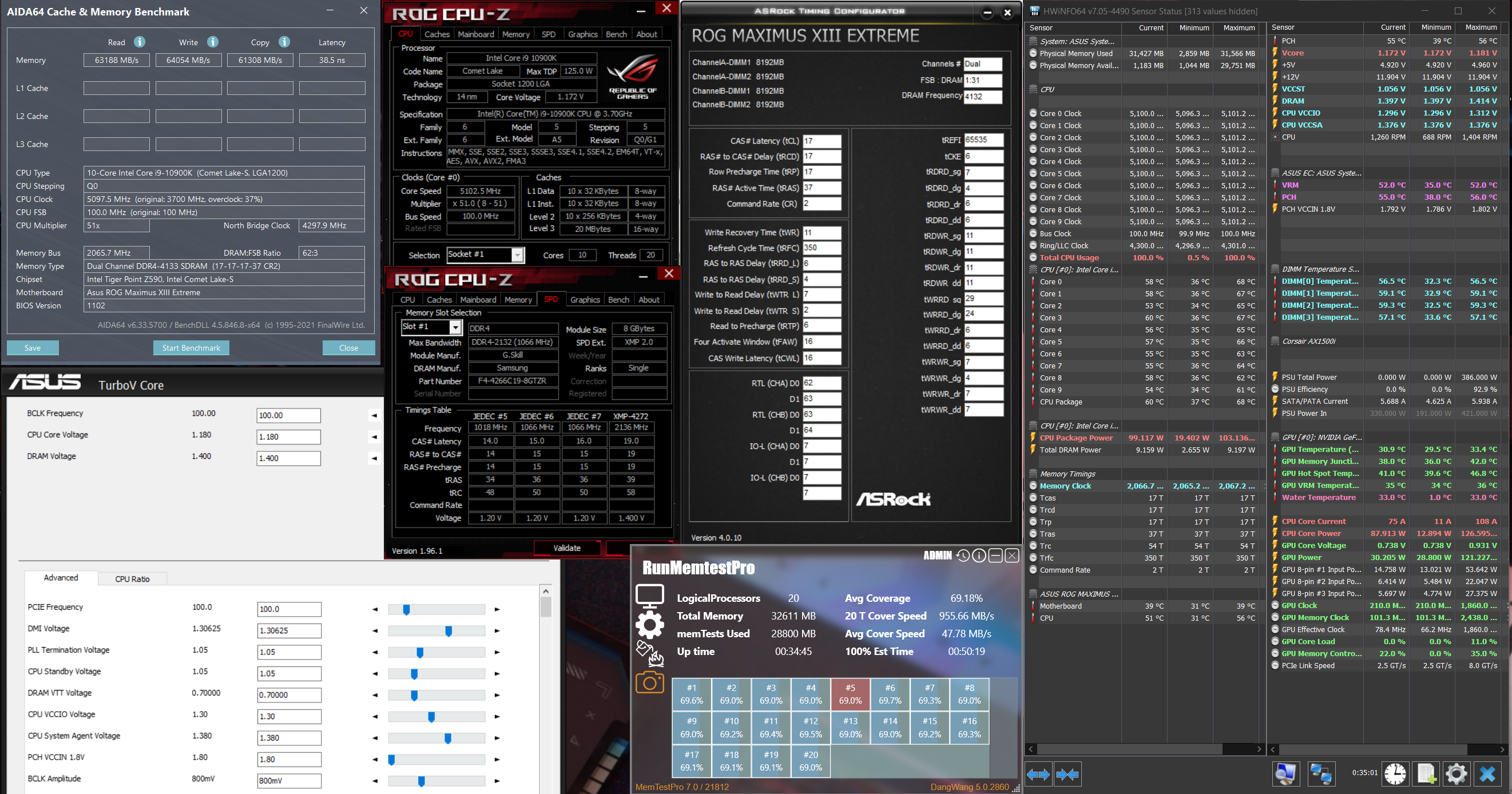
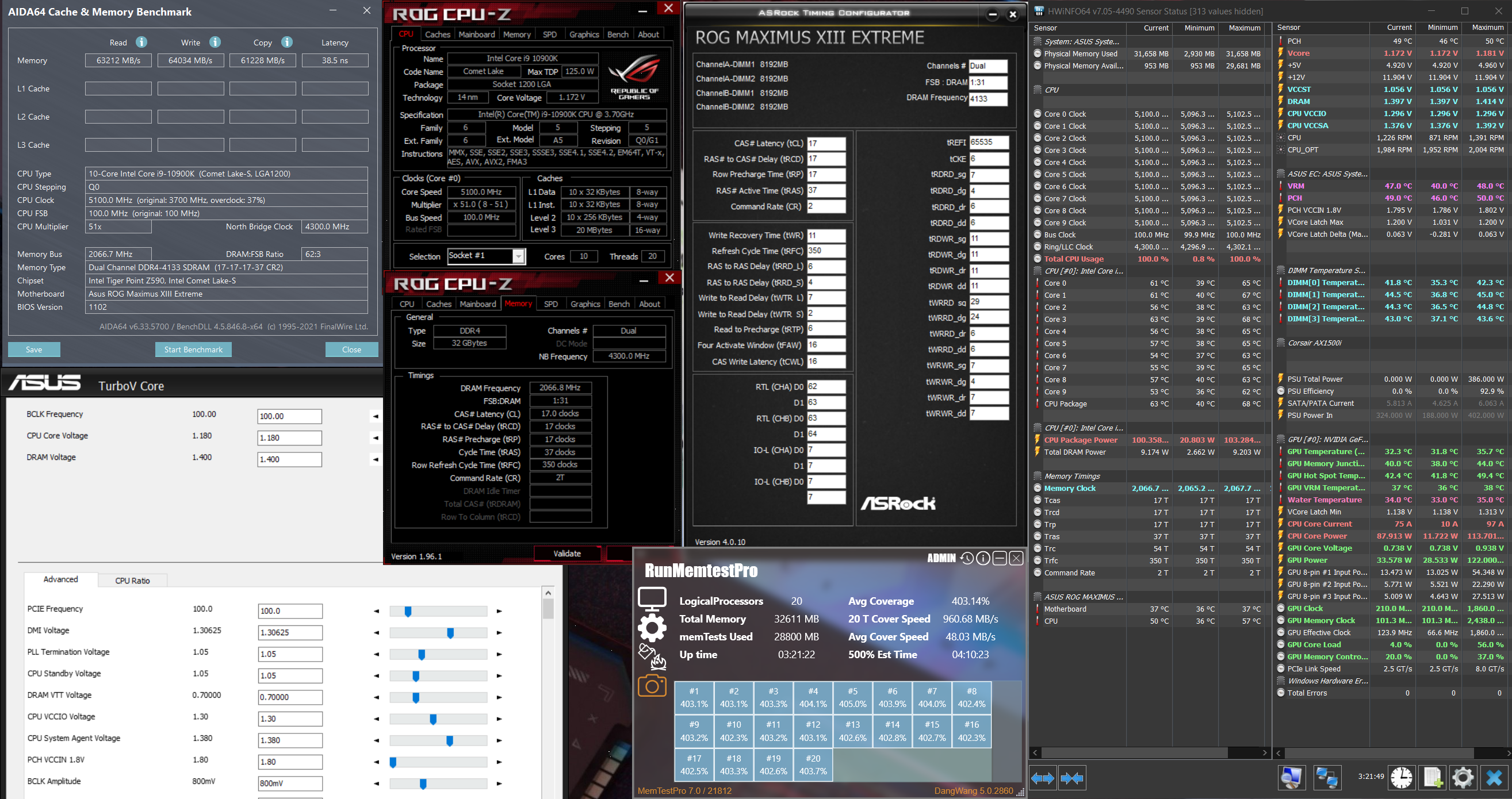
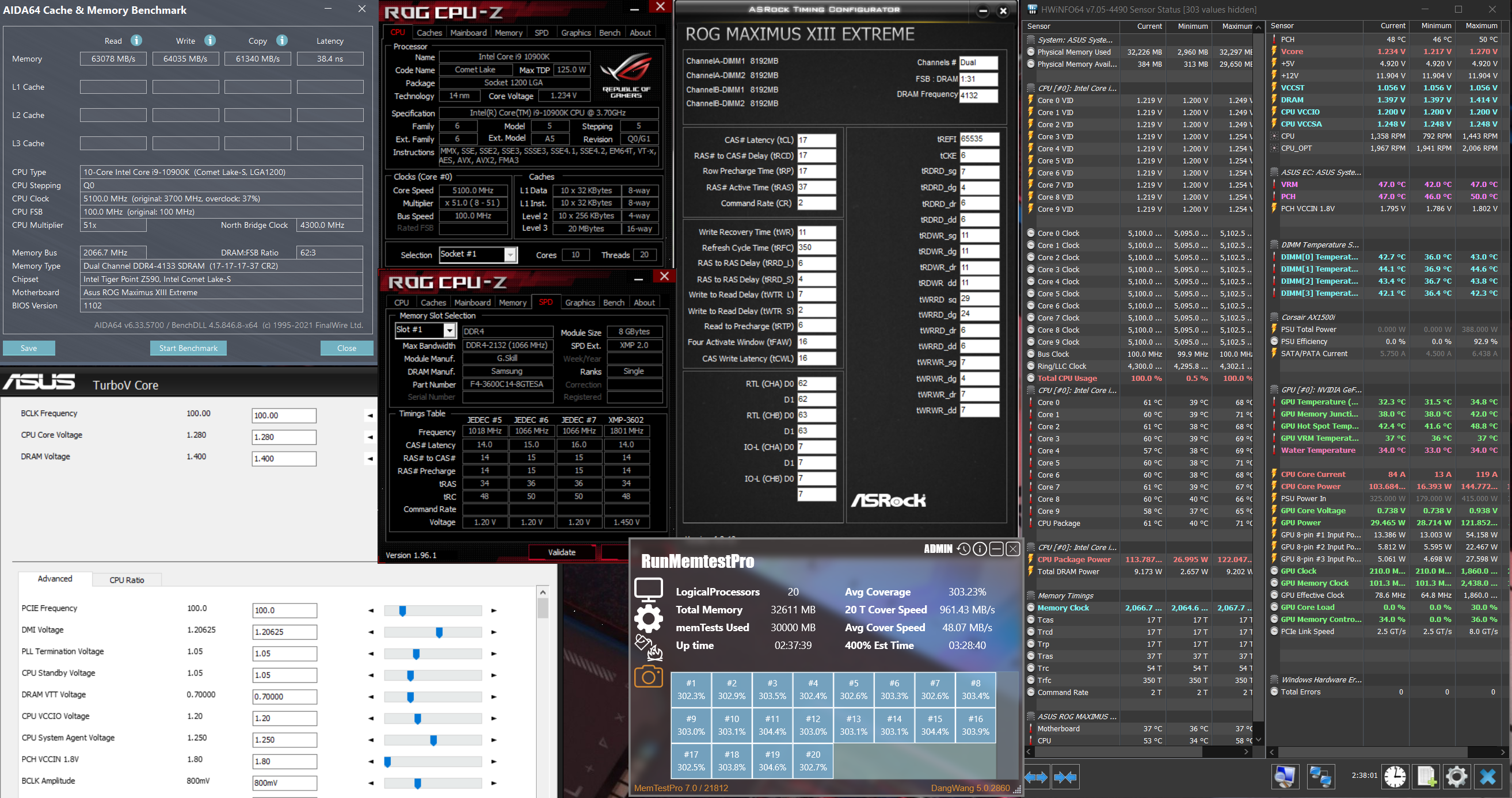
Redoing my 4x8GB 4133 CL17 with the new M13E BIOS 1102, now inside my main rig instead of open-air test bench biggrin.gif
4 DIMM B-die SR is hot, middle sticks could reach 60c without RAM cooling and this affects stability.

10900K SP94
M13E BIOS 1102
G.Skill Trident Z RGB F4-4299C19D-16GTZR (2 kits)

CPU - 5.1 all-core | LLC8
4x8GB 4133 CL17-17-17-37-2T @1.40V
VCCSA/VCCIO - 1.38/1.30V
TXP 4, PPD 0


Without RAM cooling:
user posted image

With RAM cooling (One Noctua A12x25 blowing towards RAMs):
user posted image

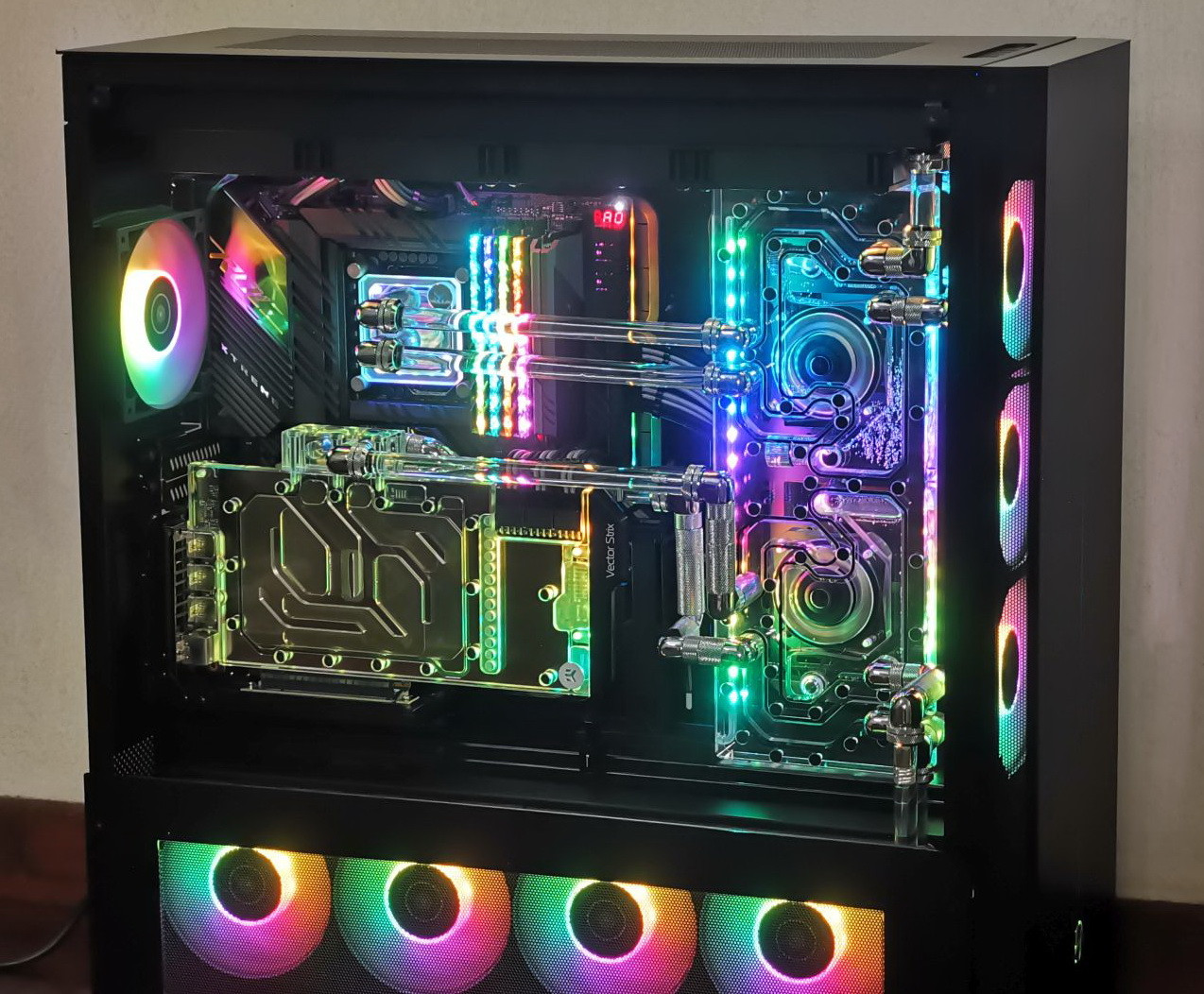
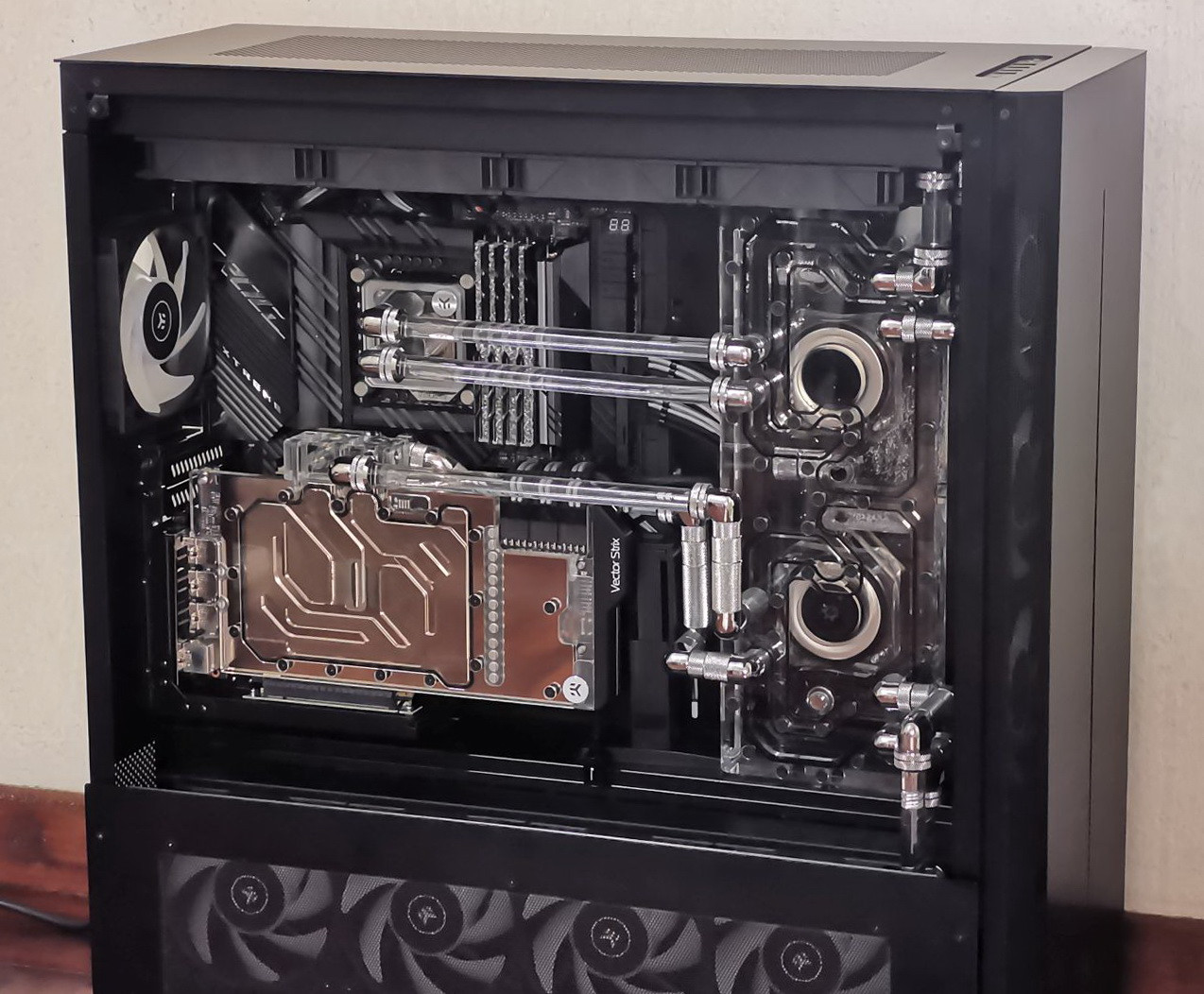
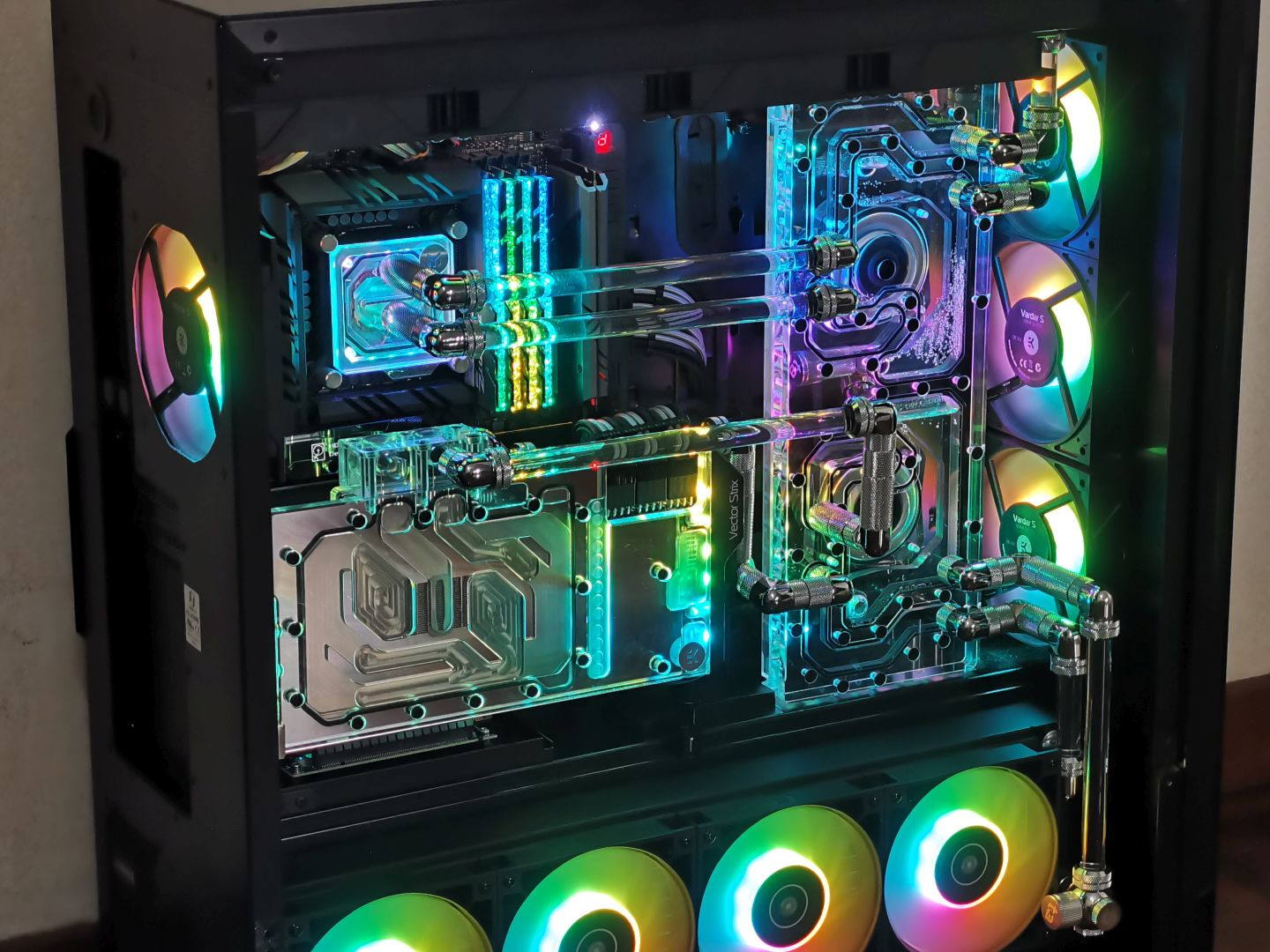
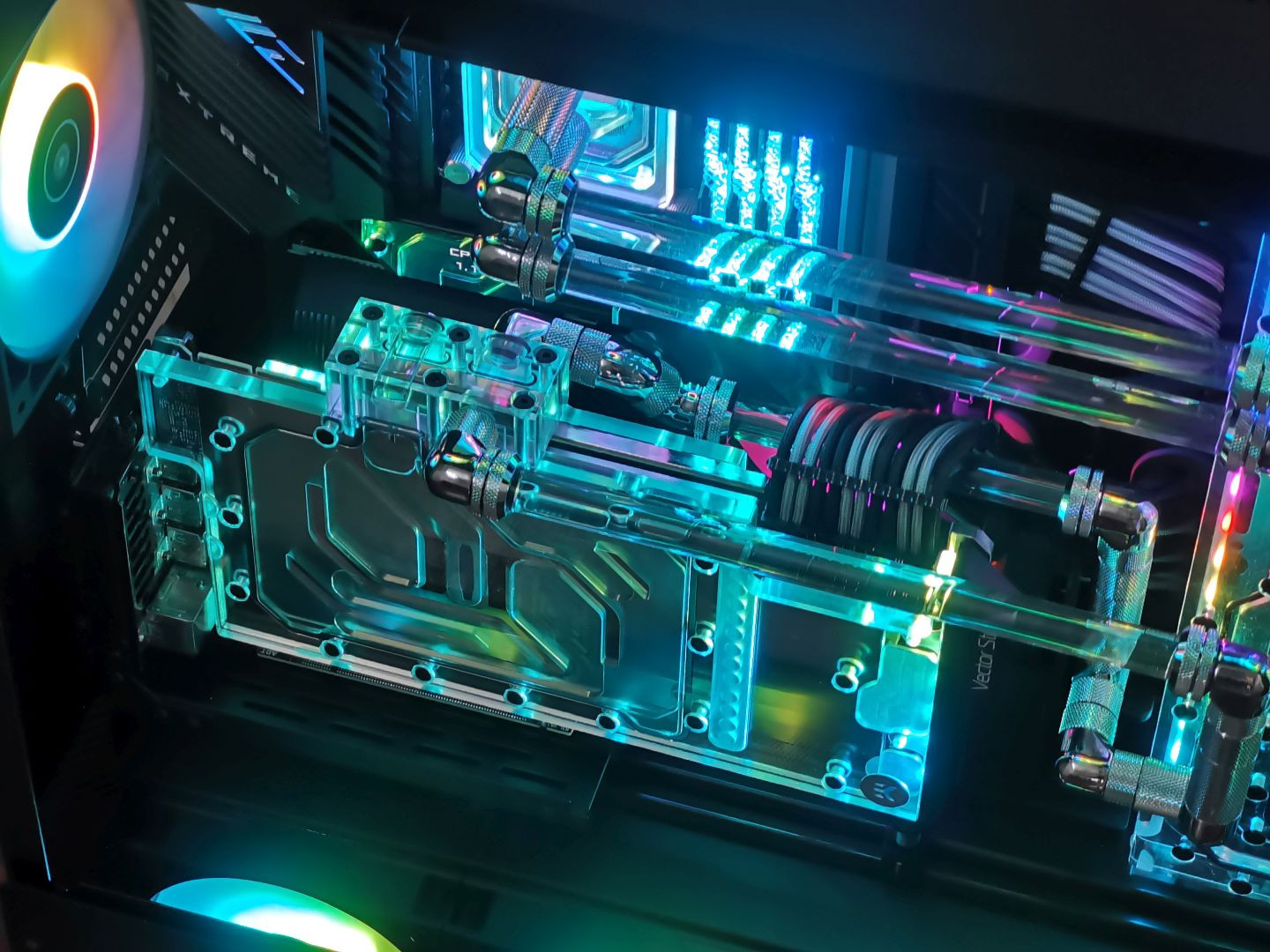
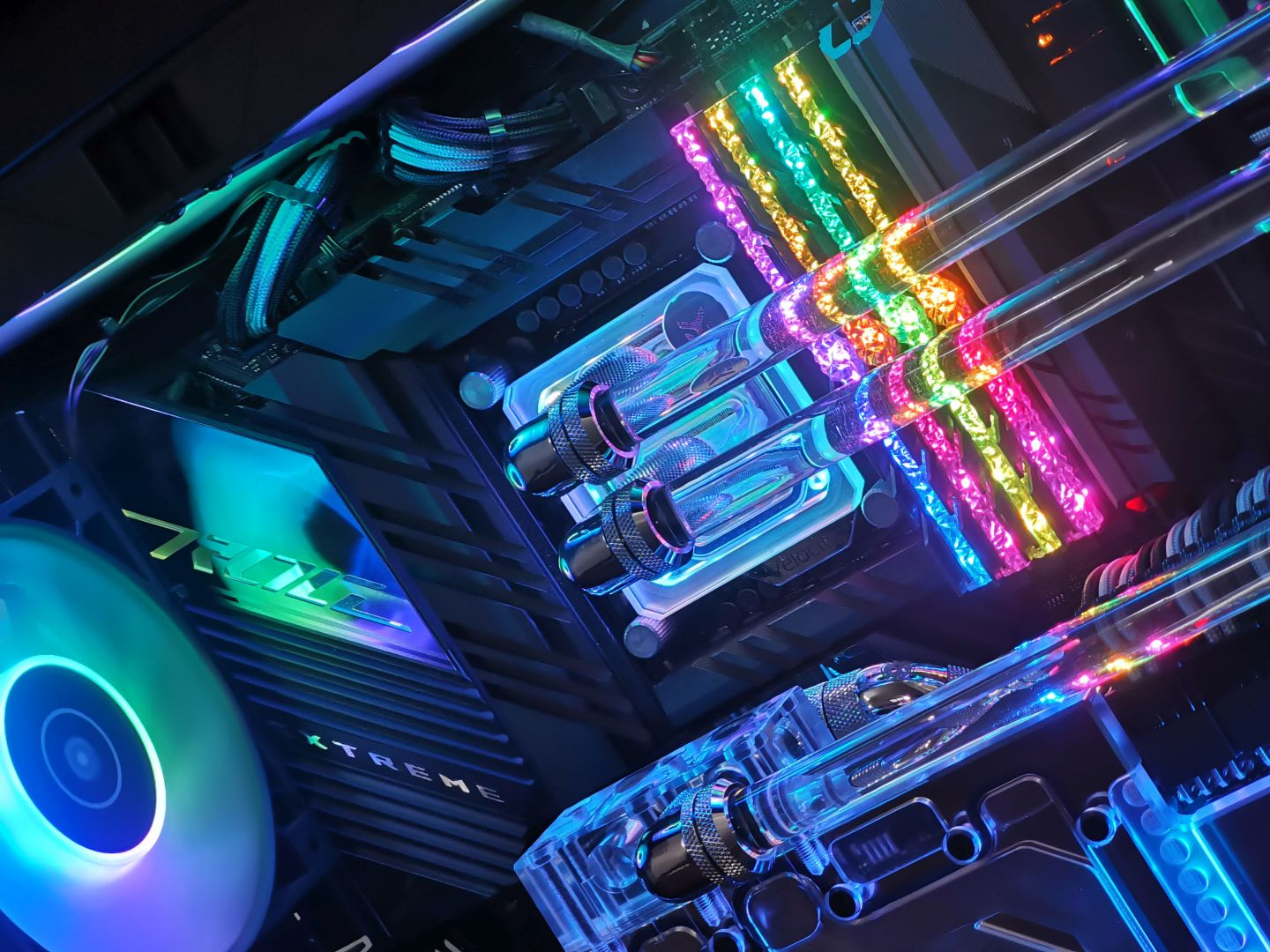
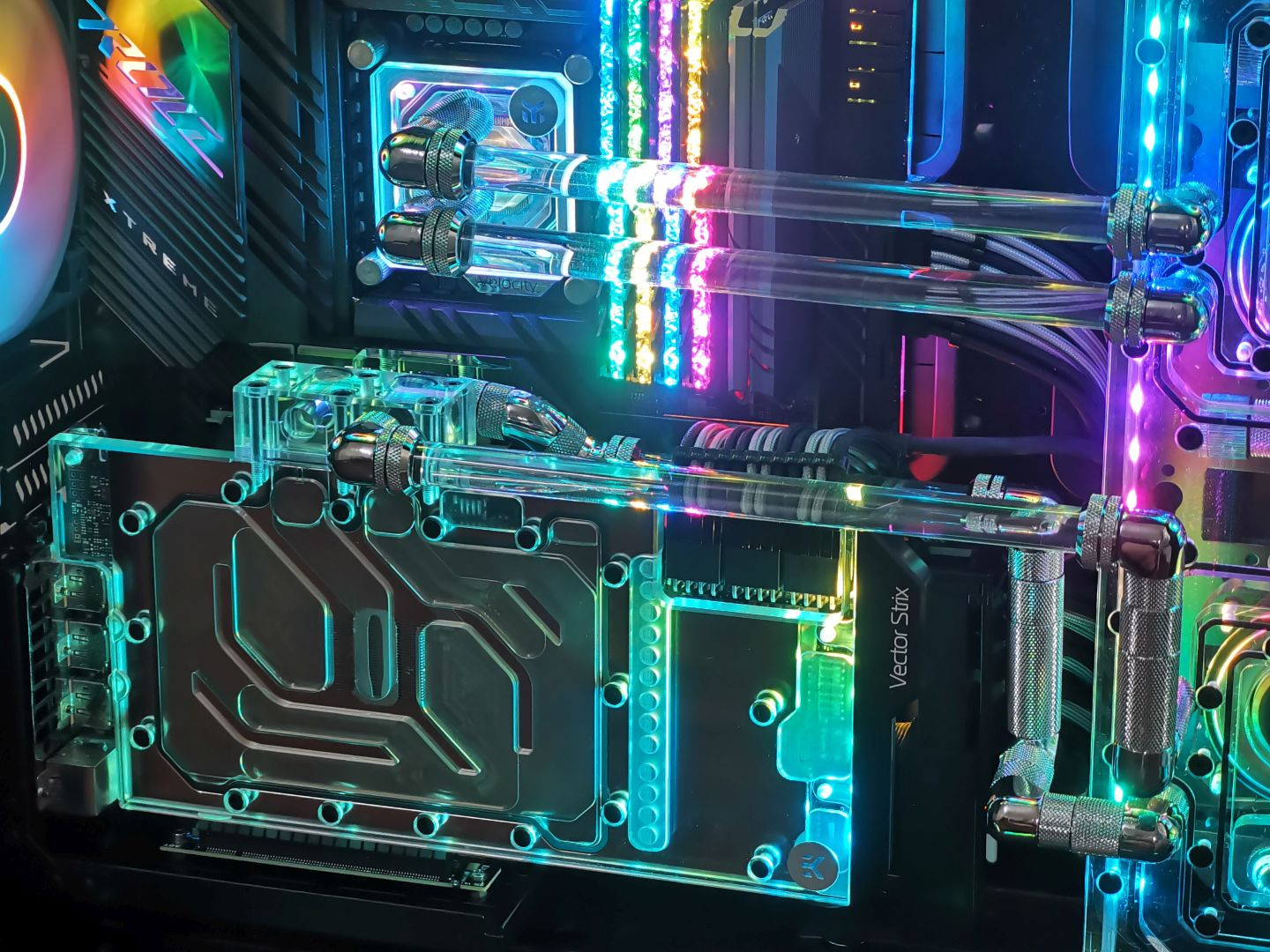
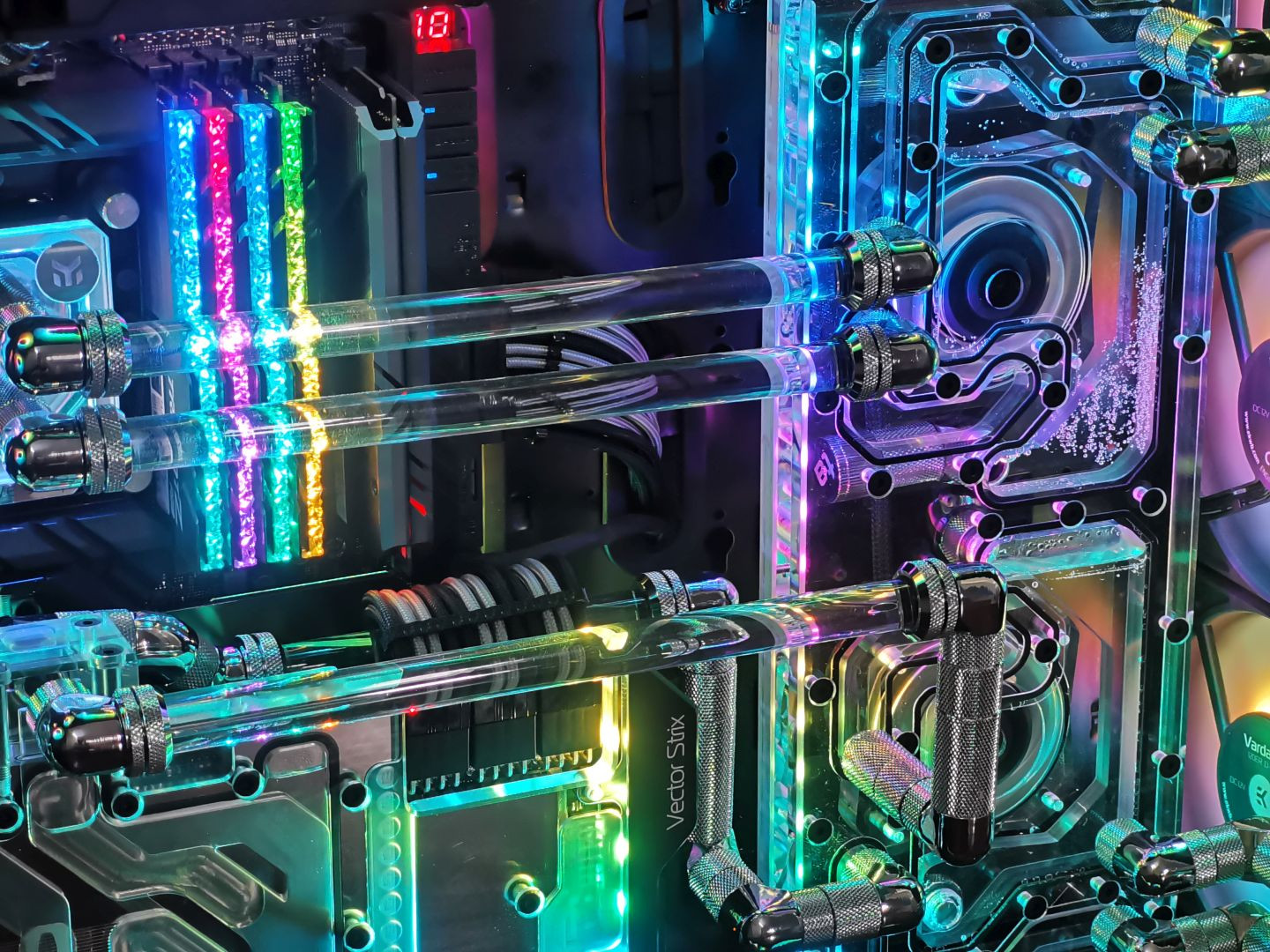
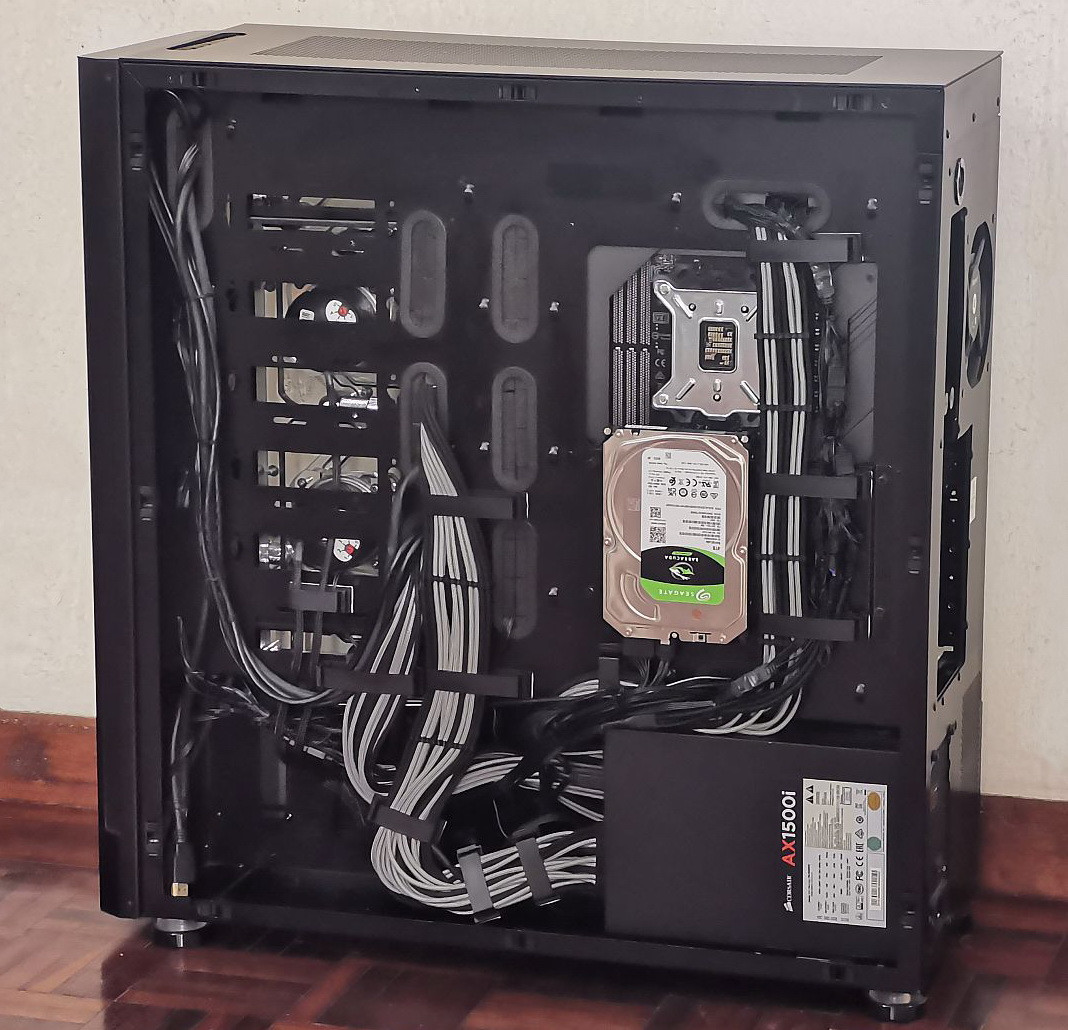
Some pictures of my main rig:
user posted image

» Click to show Spoiler - click again to hide... «


My hardware setup:
CPU: 10900K SP94 @ 5.1GHz
M/B: ASUS ROG Maximus XIII Extreme BIOS 1102
RAM: 4x8GB G.Skill TridentZ RGB DDR4-4266C19 @ 4133 CL17 1.40v
SSD: WD SN850 1TB + SN750 2TB
HDD: Seagate Barracuda 4TB
GPU: ASUS ROG Strix 3090 vBIOS V4 Driver 471.96 Rebar ON
PSU: Corsair AX1500i + CableMod ModFlex Carbon/Black full cable set
Case: Lian Li V3000
Others: Lancool Vertical GPU Mount Bracket (modded) + ADT PCIe4 15cm Riser Cable + Jonsbo VC-20 Mini GPU Stand

Custom loop setup:
CPU: EK-Velocity Nickel+Plexi D-RGB + TG Kryonaut
GPU: EK-Vector Strix + Active Backplate Nickel+Plexi D-RGB + TG Kryonaut paste + TR Extreme Odyssey pads
Rad: 2x EK PE 480mm
Pump: 2x Laing D5 Vario
Distro plate: WV Mech D5 Dual Loop
Fans: 12x EK Vardar-S 120mm D-RGB
Fittings: Bitspower+Barrow+Bykski
Tubing: Barrow PETG 14mm

This post has been edited by owikh84: Nov 3 2021, 10:59 PM
TSowikh84
post Sep 12 2021, 10:57 PM

i7 Clan
Group Icon
Elite
8,711 posts

Joined: Nov 2007
From: Butterworth, PG / Machang, Kelantan


QUOTE(cstkl1 @ Sep 12 2021, 03:09 PM)
11900k @51|46 
Maximus XIII Apex - Bios 1102
2x8gb @3866 14-14-14-28 1T @1.475 
SA|MCIO - 1.35|1.35
1T easy on Asus Bios 1102

QUOTE(cstkl1 @ Sep 12 2021, 07:25 PM)
11900k @51|45
Maximus XIII Apex - Bios 1102
2x8gb @5000 17-17-17-34 1T @1.575
SA|MCIO - 1.4|1.35

Well done bro.
Watercooled B-die FTW thumbup.gif

TSowikh84
post Oct 23 2021, 03:05 PM

i7 Clan
Group Icon
Elite
8,711 posts

Joined: Nov 2007
From: Butterworth, PG / Machang, Kelantan


Last bench before DDR5 biggrin.gif

New Royal Elite is stronger than my previous B-die.

10900K SP94 5.1 all-core GHz LLC6
M13E BIOS 1102
G.Skill Trident Z Royal Elite F4-3600C14-16GTES (2 kits)

4x8GB 4133 CL17-17-17-37-2T @1.40V
VCCSA/VCCIO - 1.25/1.20V
TXP 4, PPD 0

user posted image

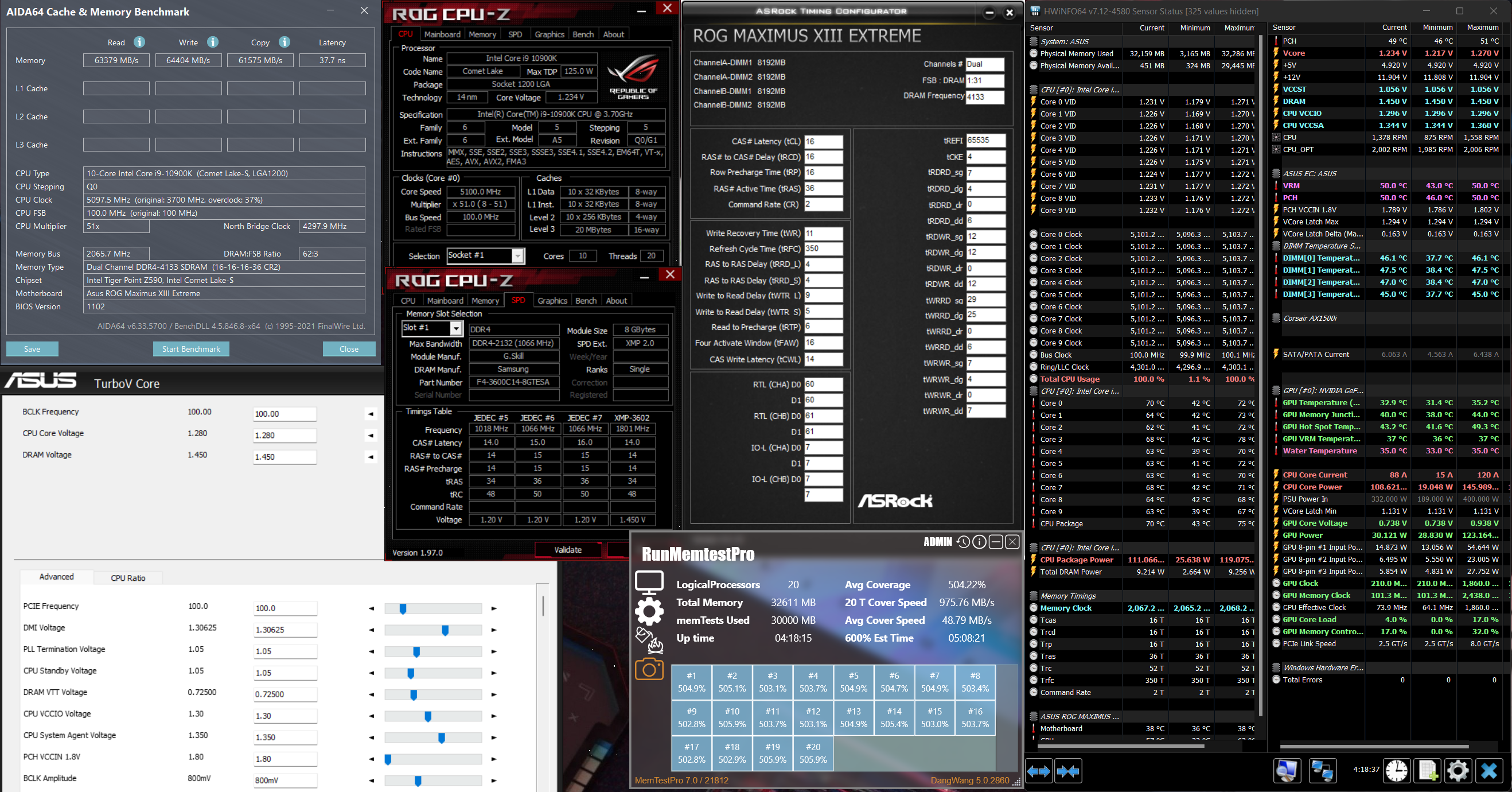
4x8GB 4133 CL16-16-16-36-2T @1.45V
VCCSA/VCCIO - 1.35/1.30V
TXP 4, PPD 0

user posted image

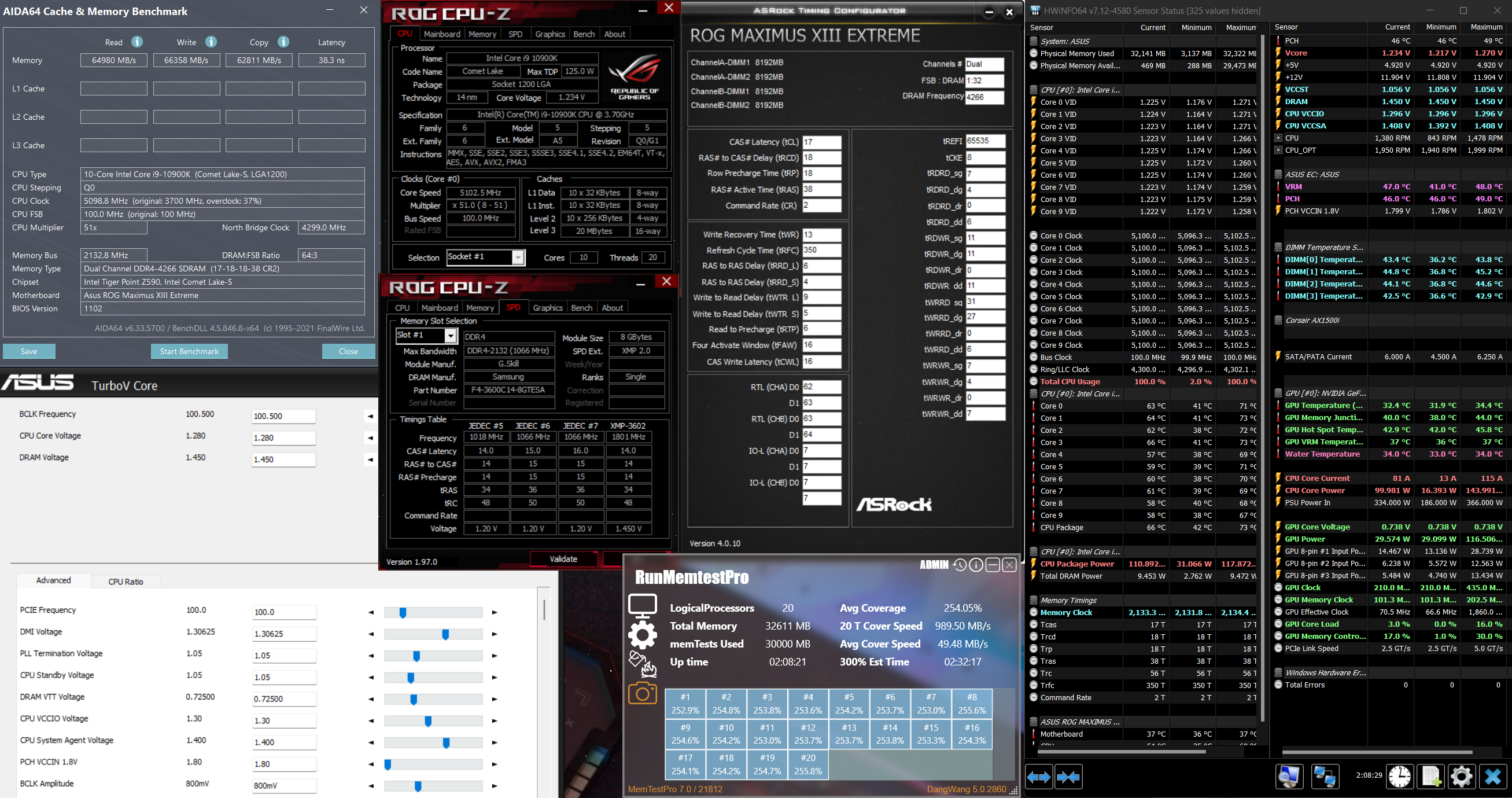
4x8GB 4266 CL17-18-18-38-2T @1.45V
VCCSA/VCCIO - 1.40/1.30V
TXP 4, PPD 0

user posted image

This post has been edited by owikh84: Oct 26 2021, 11:04 PM

22 Pages « < 19 20 21 22 >Top
 

Change to:
| Lo-Fi Version
0.0721sec    0.48    7 queries    GZIP Disabled
Time is now: 11th December 2025 - 08:39 PM