Outline ·
[ Standard ] ·
Linear+
Setting up home karaoke
|
shinchan^^
|
 Sep 2 2015, 07:16 AM Sep 2 2015, 07:16 AM
|

|
QUOTE(decypher @ Aug 30 2015, 12:03 PM) I have a modest 42" Samsung TV and have recently bought a Sony Home Theatre (BDV-E2100). Both devices are connected to a desktop. On the HT, I noticed there are two microphone ports so I dream of setting up my own karaoke system. I have loads of KTV version MTVs that can be played using VLC player and switching audio channels to mute vocals, but I just can't seem to make it work for the HT. When I plug in a mic, it says NOT.USE that probably means karaoke is not supported when audio input is from a computer. Something that the salesman did not tell me when I made the purchase. With this setup, how can I proceed to realize my dream of having a home karaoke set? I am OK to spend more to finish the setup, and something like an Android KTV box thing comes to mind. Any pros have any suggestions or recommendations? Thanks in advance. have u try mic with audio from TV via digital out? 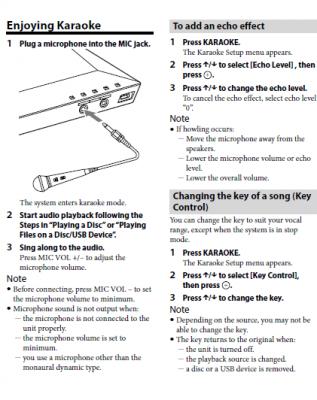 This post has been edited by shinchan^^: Sep 2 2015, 08:40 AM
 |
|
|
|
|
|
shinchan^^
|
Sep 2 2015, 08:29 AM
|
|
|
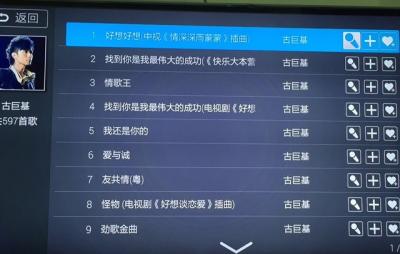
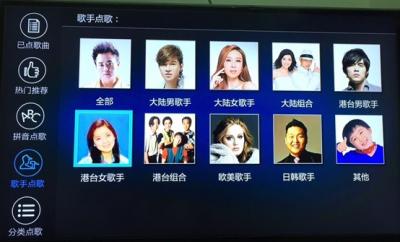
QUOTE(decypher @ Aug 30 2015, 02:28 PM) Hmm OK. I probably need an amplifier to go along with this. I have also been searching around for an Android box that can also has KTV functions. Can you tell me if I'm too ambitious?  QUOTE(sonerin @ Aug 30 2015, 02:40 PM) Don't think android has this function as well I am using mi box  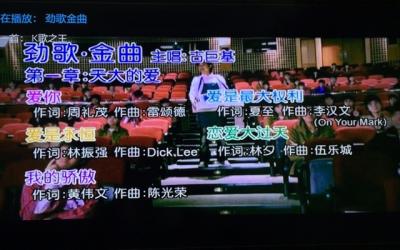
|
|
|
|
|
|
shinchan^^
|
Sep 2 2015, 11:28 AM
|
|
|
QUOTE(decypher @ Sep 2 2015, 11:27 AM) that price is for minibox or xiaomi box? lazada shot up to 249 today This post has been edited by shinchan^^: Sep 2 2015, 11:29 AM |
|
|
|
|
|
shinchan^^
|
Sep 3 2015, 04:36 PM
|
|
|
QUOTE(muncheno @ Sep 3 2015, 04:32 PM) Shinchan, What app are you using for the Karaoke? Thanks, Muncheno |
|
|
|
|
|
shinchan^^
|
Sep 3 2015, 04:54 PM
|
|
|
QUOTE(Zot @ Sep 3 2015, 04:51 PM) I downloaded the manual but it has no mic input. Getting confused  I want to find the spec ya I checked the manual too. weird  TS's BDV-E2100 has MIC 1 & 2 in the pic |
|
|
|
|
|
shinchan^^
|
Sep 4 2015, 09:34 AM
|
|
|
QUOTE(decypher @ Sep 3 2015, 10:26 PM) Sorry what is Line Input from PC? ... Do you mean Audio Input? If I remove the Yellow/White-to-USB cable and use BD-DVD/USB/Bluetooth mode, the mic can work. But the mic cannot work when the audio is coming from PC. looks like sony restriction liao |
|
|
|
|
|
shinchan^^
|
Sep 7 2015, 10:45 AM
|
|
|
QUOTE(decypher @ Sep 7 2015, 10:35 AM) [attachmentid=4909708] Please refer to the attachment for an illustration. It is just a simple diagram of how my devices are connected. The connection between my PC and HT is via a USB to Audio cable. One end is a USB jack, and the other end has White and Red wire. No Yellow, thus no Audio. My PC does not have a HDMI port, so I could only use a VGA cable. It connects to the TV. The HT is connected to the TV via a HDMI port. So basically the Karaoke function on the HT only works for BD-DVD, USB and Bluetooth. It does not work with the USB to Audio Cable. When I plug it in, the console on HT says "NOT.USE". I can watch movies on the TV using the PC for selection and HT for audio. I also tried plugging the mic directly to the PC, no good. what if audio cable plug to TV instead? |
|
|
|
|
|
shinchan^^
|
Sep 7 2015, 11:37 AM
|
|
|
QUOTE(Zot @ Sep 7 2015, 11:32 AM) Ohh! I'm forgetting something here  . You still need music sound from PC, not just your beautiful voice  Shame on me. Let me see what other option I can suggest audio to TV mic to HT but not mix together  |
|
|
|
|
|
shinchan^^
|
Sep 10 2015, 09:01 AM
|
|
|
QUOTE(Zot @ Sep 7 2015, 11:54 AM) Hey! Since your BDV-E2100 is DLNA capable devices, why not fully utilize that. You can let your HT discover the files from you hard drive and controlled it directly from the HT instead of separately from PC. Then no need to use stereo Line input  I just tried out the karaoke function, it only works when input is from the HT ( TV showing HT screen) if switch other input from TV the karaoke function is off |
|
|
|
|
|
shinchan^^
|
Sep 14 2015, 10:18 AM
|
|
|
QUOTE(decypher @ Sep 7 2015, 10:35 AM) [attachmentid=4909708] Please refer to the attachment for an illustration. It is just a simple diagram of how my devices are connected. The connection between my PC and HT is via a USB to Audio cable. One end is a USB jack, and the other end has White and Red wire. No Yellow, thus no Audio. My PC does not have a HDMI port, so I could only use a VGA cable. It connects to the TV. The HT is connected to the TV via a HDMI port. So basically the Karaoke function on the HT only works for BD-DVD, USB and Bluetooth. It does not work with the USB to Audio Cable. When I plug it in, the console on HT says "NOT.USE". I can watch movies on the TV using the PC for selection and HT for audio. I also tried plugging the mic directly to the PC, no good. I think you RCA to TV, TV set output to TV Speaker HT set USB -> unmute Mic haha but two difference channel  |
|
|
|
|
|
shinchan^^
|
Sep 18 2015, 08:32 AM
|
|
|
QUOTE(HMMaster @ Sep 17 2015, 11:06 PM) Based on the info provided in the manual, I think the karaoke function will only work when the video files are played from the player itself. Most likely external sources are not supported. DLNA is just like network file sharing (not Bluetooth). If you have a DLNA server running (windows 7 and above have built-in), your player should be able to access the files. But if you need karaoke functionality (ie queue songs, search singer, etc), then the USB drive and DLNA might not be able to fulfill your requirement. You'll need a dedicated karaoke machine for that. buy the RCA mixer with mic will solve it  |
|
|
|
|



 Quote
Quote
 0.0219sec
 0.99
0.99
 7 queries
 GZIP Disabled