Outline ·
[ Standard ] ·
Linear+
Setting up home karaoke
|
TSdecypher
|
 Aug 30 2015, 12:03 PM, updated 11y ago Aug 30 2015, 12:03 PM, updated 11y ago
|

|
I have a modest 42" Samsung TV and have recently bought a Sony Home Theatre (BDV-E2100). Both devices are connected to a desktop. On the HT, I noticed there are two microphone ports so I dream of setting up my own karaoke system.
I have loads of KTV version MTVs that can be played using VLC player and switching audio channels to mute vocals, but I just can't seem to make it work for the HT. When I plug in a mic, it says NOT.USE that probably means karaoke is not supported when audio input is from a computer. Something that the salesman did not tell me when I made the purchase.
With this setup, how can I proceed to realize my dream of having a home karaoke set? I am OK to spend more to finish the setup, and something like an Android KTV box thing comes to mind.
Any pros have any suggestions or recommendations?
Thanks in advance.
|
|
|
|
|
|
sonerin
|
Aug 30 2015, 01:44 PM
|
|
|
QUOTE(decypher @ Aug 30 2015, 12:03 PM) I have a modest 42" Samsung TV and have recently bought a Sony Home Theatre (BDV-E2100). Both devices are connected to a desktop. On the HT, I noticed there are two microphone ports so I dream of setting up my own karaoke system. I have loads of KTV version MTVs that can be played using VLC player and switching audio channels to mute vocals, but I just can't seem to make it work for the HT. When I plug in a mic, it says NOT.USE that probably means karaoke is not supported when audio input is from a computer. Something that the salesman did not tell me when I made the purchase. With this setup, how can I proceed to realize my dream of having a home karaoke set? I am OK to spend more to finish the setup, and something like an Android KTV box thing comes to mind. Any pros have any suggestions or recommendations? Thanks in advance. If not mistaken this function never work. Why not you call Sony to verify |
|
|
|
|
|
TSdecypher
|
Aug 30 2015, 02:28 PM
|
|
|
QUOTE(sonerin @ Aug 30 2015, 01:44 PM) If not mistaken this function never work. Why not you call Sony to verify Hmm OK. I probably need an amplifier to go along with this. I have also been searching around for an Android box that can also has KTV functions. Can you tell me if I'm too ambitious?  |
|
|
|
|
|
sonerin
|
Aug 30 2015, 02:40 PM
|
|
|
QUOTE(decypher @ Aug 30 2015, 02:28 PM) Hmm OK. I probably need an amplifier to go along with this. I have also been searching around for an Android box that can also has KTV functions. Can you tell me if I'm too ambitious? Don't think android has this function as well |
|
|
|
|
|
TSdecypher
|
Sep 1 2015, 07:18 PM
|
|
|
QUOTE(chokia @ Aug 30 2015, 03:28 PM) Where is the mic port?   Right here bro  |
|
|
|
|
|
TSdecypher
|
Sep 1 2015, 07:21 PM
|
|
|
QUOTE(sonerin @ Aug 30 2015, 02:40 PM) Don't think android has this function as well Hmm OK. I meant something like this: http://www.vnnmall.com/ktv6000hd-professio...ed-p-17165.htmlBut I am unsure where to find it. Maybe Lowyat got kot... |
|
|
|
|
|
sonerin
|
Sep 1 2015, 07:28 PM
|
|
|
QUOTE(decypher @ Sep 1 2015, 07:21 PM) Hmm OK. I meant something like this: http://www.vnnmall.com/ktv6000hd-professio...ed-p-17165.htmlBut I am unsure where to find it. Maybe Lowyat got kot... Oh.....you can search Lelong website should have few sellers |
|
|
|
|
|
shinchan^^
|
Sep 2 2015, 07:16 AM
|
|
|
QUOTE(decypher @ Aug 30 2015, 12:03 PM) I have a modest 42" Samsung TV and have recently bought a Sony Home Theatre (BDV-E2100). Both devices are connected to a desktop. On the HT, I noticed there are two microphone ports so I dream of setting up my own karaoke system. I have loads of KTV version MTVs that can be played using VLC player and switching audio channels to mute vocals, but I just can't seem to make it work for the HT. When I plug in a mic, it says NOT.USE that probably means karaoke is not supported when audio input is from a computer. Something that the salesman did not tell me when I made the purchase. With this setup, how can I proceed to realize my dream of having a home karaoke set? I am OK to spend more to finish the setup, and something like an Android KTV box thing comes to mind. Any pros have any suggestions or recommendations? Thanks in advance. have u try mic with audio from TV via digital out? 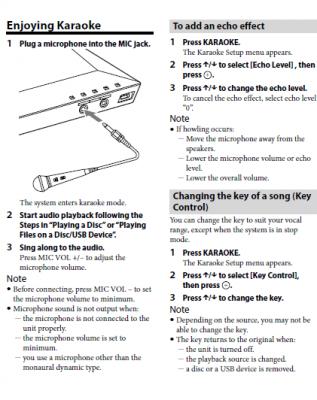 This post has been edited by shinchan^^: Sep 2 2015, 08:40 AM
 |
|
|
|
|
|
shinchan^^
|
Sep 2 2015, 08:29 AM
|
|
|
QUOTE(decypher @ Aug 30 2015, 02:28 PM) Hmm OK. I probably need an amplifier to go along with this. I have also been searching around for an Android box that can also has KTV functions. Can you tell me if I'm too ambitious? QUOTE(sonerin @ Aug 30 2015, 02:40 PM) Don't think android has this function as well I am using mi box  
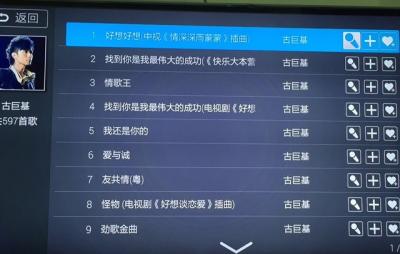
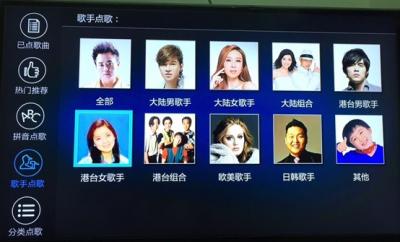
|
|
|
|
|
|
TSdecypher
|
Sep 2 2015, 11:27 AM
|
|
|
QUOTE(shinchan^^ @ Sep 2 2015, 08:29 AM) You are my hero. Is it this one? http://www.lelong.com.my/xiaomi-tv-mibox-b...7-01-Sale-I.htm |
|
|
|
|
|
shinchan^^
|
Sep 2 2015, 11:28 AM
|
|
|
QUOTE(decypher @ Sep 2 2015, 11:27 AM) that price is for minibox or xiaomi box? lazada shot up to 249 today This post has been edited by shinchan^^: Sep 2 2015, 11:29 AM |
|
|
|
|
|
TSdecypher
|
Sep 2 2015, 11:32 AM
|
|
|
QUOTE(shinchan^^ @ Sep 2 2015, 07:16 AM) have u try mic with audio from TV via digital out?
Yes, Sir I have tried this. I read the manual as well. However it assumes I am playing Karaoke BD/DVD. I actually have a lot of AVI... |
|
|
|
|
|
TSdecypher
|
Sep 2 2015, 01:22 PM
|
|
|
QUOTE(shinchan^^ @ Sep 2 2015, 11:28 AM) that price is for minibox or xiaomi box? lazada shot up to 249 today XiaoMi TV MiBox Box Enhanced 3rd Gen 5G Android TV 4k Full HD UNLOCK I feel like I am helping the seller to advertise...  |
|
|
|
|
|
muncheno
|
Sep 3 2015, 04:32 PM
|
|
|
Shinchan, What app are you using for the Karaoke? Thanks, Muncheno QUOTE(shinchan^^ @ Sep 2 2015, 08:29 AM) I am using mi box
|
|
|
|
|
|
shinchan^^
|
Sep 3 2015, 04:36 PM
|
|
|
QUOTE(muncheno @ Sep 3 2015, 04:32 PM) Shinchan, What app are you using for the Karaoke? Thanks, Muncheno |
|
|
|
|
|
Zot
|
Sep 3 2015, 04:51 PM
|
|
|
QUOTE(decypher @ Sep 2 2015, 11:32 AM) Yes, Sir I have tried this. I read the manual as well. However it assumes I am playing Karaoke BD/DVD. I actually have a lot of AVI... I downloaded the manual but it has no mic input. Getting confused  I want to find the spec |
|
|
|
|
|
shinchan^^
|
Sep 3 2015, 04:54 PM
|
|
|
QUOTE(Zot @ Sep 3 2015, 04:51 PM) I downloaded the manual but it has no mic input. Getting confused I want to find the spec ya I checked the manual too. weird  TS's BDV-E2100 has MIC 1 & 2 in the pic |
|
|
|
|
|
Zot
|
Sep 3 2015, 05:00 PM
|
|
|
QUOTE(decypher @ Aug 30 2015, 12:03 PM) I have a modest 42" Samsung TV and have recently bought a Sony Home Theatre (BDV-E2100). Both devices are connected to a desktop. On the HT, I noticed there are two microphone ports so I dream of setting up my own karaoke system. I have loads of KTV version MTVs that can be played using VLC player and switching audio channels to mute vocals, but I just can't seem to make it work for the HT. When I plug in a mic, it says NOT.USE that probably means karaoke is not supported when audio input is from a computer. Something that the salesman did not tell me when I made the purchase. With this setup, how can I proceed to realize my dream of having a home karaoke set? I am OK to spend more to finish the setup, and something like an Android KTV box thing comes to mind. Any pros have any suggestions or recommendations? Thanks in advance. Have you ever disconnect the Line Input from the PC and use only the mic just to confirm this? |
|
|
|
|
|
muncheno
|
Sep 3 2015, 05:34 PM
|
|
|
Thank you shinchan. QUOTE(shinchan^^ @ Sep 3 2015, 04:36 PM) |
|
|
|
|



 Quote
Quote




 0.0225sec
 0.85
0.85
 6 queries
 GZIP Disabled