

I've followed steps from other forums to add it to the Startup folder and registry but still not working.
What else can be done?
Attached thumbnail(s)

Avira System Tray Icon not showing
|
|
 Aug 2 2015, 07:38 PM, updated 11y ago Aug 2 2015, 07:38 PM, updated 11y ago
Show posts by this member only | Post
#1
|
 
Senior Member
1,016 posts Joined: Nov 2008 From: Subang Jaya  
|
As the title suggests...
I've followed steps from other forums to add it to the Startup folder and registry but still not working. What else can be done? Attached thumbnail(s)
|
|
|
|
|
|
Aug 3 2015, 01:17 PM
Show posts by this member only | Post
#2
|

Junior Member
245 posts Joined: Feb 2010
|
people what age now still using Avira
|
|
|
Aug 9 2015, 12:31 AM
Show posts by this member only | Post
#3
|

Senior Member
7,616 posts Joined: Mar 2009
|
QUOTE(RigerZ @ Aug 2 2015, 07:38 PM) As the title suggests... this is the problem of windows 10 scaling. If my guess is right, ur DPI u put higher than 100%, right? I also face the same problem, my YES 4G connect and hard disk sentinal is not showing on the tray icon.I've followed steps from other forums to add it to the Startup folder and registry but still not working. What else can be done?  |
|
|
Aug 17 2015, 02:11 PM
Show posts by this member only | Post
#4
|

Senior Member
2,399 posts Joined: Jul 2009 From: /dev/null
|
Mine works well, um, I use Windows 10 Pro English UK,
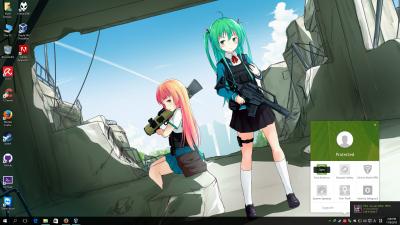
I use offline installer, here: https://www.avira.com/en/download/product/a...-free-antivirus |
|
|
Aug 19 2015, 09:21 PM
Show posts by this member only | Post
#5
|
|
Senior Member
1,016 posts Joined: Nov 2008 From: Subang Jaya
|
QUOTE(annoymous1234 @ Aug 9 2015, 12:31 AM) this is the problem of windows 10 scaling. If my guess is right, ur DPI u put higher than 100%, right? I also face the same problem, my YES 4G connect and hard disk sentinal is not showing on the tray icon. DPI =Dots per Inch? Where can I find this setting? |
| Change to: |  0.0141sec 0.0141sec
 0.36 0.36
 6 queries 6 queries
 GZIP Disabled GZIP Disabled
Time is now: 10th December 2025 - 07:37 PM |
 Quote
Quote