Welcome Guest ( Log In | Register )

4 Pages < 1 2 3 4 >Bottom

Outline · [ Standard ] · Linear+

 Official Microsoft Surface Thread V4

views
     
funny duck
post Apr 14 2016, 10:41 PM

#Icebear for President
*****
Senior Member
739 posts

Joined: Dec 2010


QUOTE(eddmecha @ Apr 14 2016, 10:22 PM)
yeah fold the keyboard the other way round..i was initially use to do that bcoz it will makes it more comfortable to hold the back of the keyboard instead of the keys itself...bcoz the magnet will lock in as well.
*
Come across this https://www.reddit.com/r/Surface/comments/4...sort=confidence

on reddit. I hope this will help.
funny duck
post Apr 15 2016, 04:35 PM

#Icebear for President
*****
Senior Member
739 posts

Joined: Dec 2010


QUOTE(exkaizen @ Apr 15 2016, 02:03 PM)
I just received my SP4 from Senheng... Where can I register my SP4?
The windows is auto activate?
*
Go here and register.
https://www.microsoft.com/surface/en-us/sup.../check-warranty
funny duck
post Apr 16 2016, 08:45 PM

#Icebear for President
*****
Senior Member
739 posts

Joined: Dec 2010


QUOTE(exkaizen @ Apr 16 2016, 06:41 PM)
My 1 days old SP4 keep having audio driver issue.. Decide to reset SP4... and it stuck at 7%...

Now it's bootlooping... Damn it... Downloading recovery from the web...

Hopefully able to reinstall from recovery and no more audio issue.
*
Good luck downloading the system recovery. It took me overnight to download the file. The file is quite big 5.9gb and Microsoft purposely cap the download speed.


funny duck
post Apr 16 2016, 08:53 PM

#Icebear for President
*****
Senior Member
739 posts

Joined: Dec 2010


I just wanna share my story of 1st time doing the system image restoration.

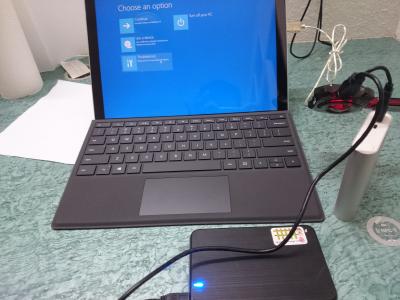
So i reinstall windows and wanted to do the system image restoration which consume me so much time..zzz the 1st time I did the restoration I accidentally unplugged my external hard disk which connects to a power bank to supply the external hard disk power cause I was using a USB hub which can't supply much power for the hard disk . So have to use system recovery to recovery back the wipe windows data .

So after recovering the device, I did the restoration again for the 2nd time . Took me 16 hours to restore , it left just a little bit to finish restoring but stupid me go and unplugged the charging cable cause i scared my battery will overcharged manatau just 1 hour,JUST 1 HOUR!!! The battery drained to 0% from 100% while it was still restoring for the last few minutes... I was like what theee

Then have to use system recovery to recover back the system to factory... Cause system image wipe all the data including windows.


Have to use system recovery for the 2 times and 3rd time for the image restore which again took me another 16 hours to restore. And finally the restoration completed on the 3rd attempt. But b4 the restoration completed it showed system failed to restore then give me error 00x00 bla bla bla. So I went back to start windows as normal. And I got back my restoration even with the error. Total 32 hours to restore back my 50gb system image.


B4 all these there's even more difficult part on trying to start the system image restoration. Cause our surface only has 1 USB port. System restore needs an external hard disk which store the backup in it and a bootable recovery thumb drive. So I was using a USB hub to connects both the hard disk and the thumb drive. But the USB hub couldn't supply much power for the external hard drive like I said earlier. So I tried power bank to supply power to the hard disk but my power bank not enough juice. So in the end I just use my phone charging adapter to supply the power.

Sorry for the long reads...phewww

This post has been edited by funny duck: Apr 16 2016, 08:56 PM
funny duck
post Apr 25 2016, 04:08 PM

#Icebear for President
*****
Senior Member
739 posts

Joined: Dec 2010


QUOTE(kingsman69 @ Apr 25 2016, 03:03 PM)
anyone got a recommended usb3.0 hub to go for??? scared it does not have enough power to juice the hub up
*
I use a self powered USB 2.0 hub. For the hard disk I use an external cable that has two heads one connecting to the power adapter/power bank the other head connecting to the hub. I advice u to find 3.0 hub cause 2.0 transfer and read speed really slow...

The problem with self powered USB hub is that it can't supply enough power for the hard disk. So if u only use it for multiple thumb drive it should be fine. If u don't want so ma huan, u can just buy an AC adapter USB hub.

This post has been edited by funny duck: Apr 25 2016, 04:12 PM


Attached thumbnail(s)
Attached Image
funny duck
post Aug 5 2016, 12:50 PM

#Icebear for President
*****
Senior Member
739 posts

Joined: Dec 2010


Anyone updated to anniversary update? I have updated mine, the phone notification mirroring is an awesome feature!
funny duck
post Aug 5 2016, 02:26 PM

#Icebear for President
*****
Senior Member
739 posts

Joined: Dec 2010


QUOTE(evofantasy @ Aug 5 2016, 12:58 PM)
you are using a windows phone?
updated it and loving the new ink workplace
*
Nope, using an android phone. Just install cortana apk on yr android phone then sign in with yr Microsoft account. Then on yr surface activate the cortana and give permission for using the feature.
funny duck
post Aug 5 2016, 05:41 PM

#Icebear for President
*****
Senior Member
739 posts

Joined: Dec 2010


QUOTE(Rusty Nail @ Aug 5 2016, 03:11 PM)
How's cortana on android?
Ive used one note android and there seems to be sync issues . Surface --> phone  OK
Phone --> surface super slow. Emailing back to myself is way faster
*
It doesn't sync right away, it delayed quite a few minutes.

QUOTE(mrl @ Aug 5 2016, 03:36 PM)
do we need specific version of the APK for it to work?
*
Note sure about tat. But my version 1.9.5.1195 there's a feature inside the setting which let u enable the sync notification.
funny duck
post Dec 1 2016, 03:06 PM

#Icebear for President
*****
Senior Member
739 posts

Joined: Dec 2010


Anyone know where to get sp4 skins in Malaysia?
funny duck
post Mar 2 2017, 01:29 PM

#Icebear for President
*****
Senior Member
739 posts

Joined: Dec 2010


Hey everyone, my sp4 screen suddenly jumping up and down creating screen flicker every 4 seconds.. But for now it disappear again.. I'm thinking of sending it for warranty but not sure how to do it. Does penang have like a Microsoft service center I could go for?
funny duck
post Mar 24 2017, 02:22 PM

#Icebear for President
*****
Senior Member
739 posts

Joined: Dec 2010


QUOTE(Rusty Nail @ Mar 24 2017, 01:35 PM)
I got a replacement Surface thanks to warranty  rclxm9.gif  thumbup.gif

RMA Process
login to microsoft account
got "Your devices"
goto your surface (if you've registered your surface you'll should be able to see it here)
select "Schedule Repair"
fill in the form and wait for further instructions in your inbox

My surface was picked up on Tuesday
Replacement arrived today

Replacement Unit
Most likely it's a re-flashed refurbished unit.
Have to setup like a new device
noticed kick stand texture is slightly rougher than the magnesium body, my old surface, both feels smooth.
slight blemish on the back cover, hardly noticeable from far.

Now I'm updating windows and installing other software
will keep this thread updated
*
What happened to yr surface? I'm thinking of sending it for warranty also, having the screen flickers problem whenever my surface is hot...
Btw does yr surface able to put into sleep mode? My surface always shut down itself after inactive or whenever I put it to sleep using the power button.

You use what backup to clone yr drive to the new surface? Macrium?

This post has been edited by funny duck: Mar 24 2017, 02:24 PM
funny duck
post Mar 25 2017, 02:18 AM

#Icebear for President
*****
Senior Member
739 posts

Joined: Dec 2010


QUOTE(Rusty Nail @ Mar 24 2017, 02:33 PM)
dropped it over the weekend
immediately after drop, very bad ghosting

after reboot the device, noticed that picture is not crisp anymore, especially excel sheet, horizontal lines goes missing unless i scrool
yes, it auto shutdown when close the typecover or the power button. but if i wake it up right after that, the following closure of type cover or power button will put it into sleep mode
Press no 1 > shut down
Press no 2 > power on
Press no 3 > sleep
Press no 4 > wake
Press no 5 > sleep
Press no 6 > wake

my backup is in onecloud, and dropbox though i don't really rely on it. I made it sure that data stored can easily be backed up onto SD card. Furthermore all of the work is stored on NAS. Most of the software can work off server. Except for autocad2002 which requires me to copy onto desktop to work.
*
You got Microsoft Complete?

wow you actually counted that? laugh.gif Isn't that weird that they would do such thing to it? I prefer it to stay sleep mode whenever i press the button/close type cover or even the screen goes off itself. But thanks to the ssd turning on the surface isn't really a suffer..

How about the computer settings and the software you have downloaded? Why don't you just clone the hard drive and restore it exactly like it was before?


funny duck
post Apr 10 2017, 12:08 AM

#Icebear for President
*****
Senior Member
739 posts

Joined: Dec 2010


QUOTE(amirasri89 @ Apr 10 2017, 12:00 AM)
hey guys, i have a problem with my surface pro 4.

My screen keep flickering. Ive tried disable hyper-v but it still the same. It happens on and off battery.

Ive reset my surface, updated all the updates but the outcome is same.

What should i do guys?
*
Same problem here. A lot of Reddit users face this issue oso. Not sure is it the previous update that triggers it.
funny duck
post Apr 10 2017, 12:22 AM

#Icebear for President
*****
Senior Member
739 posts

Joined: Dec 2010


QUOTE(amirasri89 @ Apr 10 2017, 12:15 AM)
That's the thing, i have googled and read everything but it seems there is no solution as for now. So i gave up and come here for help.
*
Nothing you can do about it at the moment. I did the same thing also but in the end yeah you know... In my case it happens when I use it for a long time or even when it is warm.

Another issue that nobody bats an eye on is the video player whenever I skip or rewind the video, the video will go crazy. It happens in Microsoft edge as well when watching YouTube. Bit it doesn't happen in chrome.
funny duck
post Apr 30 2017, 09:50 AM

#Icebear for President
*****
Senior Member
739 posts

Joined: Dec 2010


QUOTE(black_orphen @ Apr 30 2017, 09:02 AM)
Yes agreed, the screen issue that being risen in internet may be just a vocal of minority. But it doesn't mean the issue is not existed.
Most of the time, the issue that I've usually heard from internet, i did not seen it with my own eyes. But, this time 2 out of 5 display unit that i have seen got a similar issue. Although it might still consider a minor, but still worrying. Because this SP4 is consider a premium device and I am sure everyone who investing their money to this device would expect a great reliability and durability(not only 1 or 2 years of usage).

Anyway, I am happy that the issue did not happen on your beloved SP4.  biggrin.gif
Without intending to haunt you, but from I have read, this screen shaking issue start happen on ~>1years old SP4.
That is the reason why I decided not to buy it, because I don't want get haunted with this kind of thing.

Apart from the issue that I have seen above, I think SP4 is still a very good device. I hope your SP4 will have a very good reliability too.

Cheers.. smile.gif
Update:
Just in case, some readers did not know what the issue that i have mentioned. It is pretty exact as per video shown in this link:
https://www.youtube.com/results?search_quer...+screen+shaking
*
Yes, I do have that problem. Not really sure what causes that to happen. But it always happen when the device is very warm. It didn't happen before it just came like out of nowhere.

But now I don't think I face it anymore, but any time could happen.
funny duck
post May 24 2017, 01:44 PM

#Icebear for President
*****
Senior Member
739 posts

Joined: Dec 2010


QUOTE(Rusty Nail @ May 24 2017, 01:29 PM)
If i don't have a surface, yeah. I'll be super excited.

since I already own an SP4, all the cool features like surface pen, tablet mode are just gimmick that I fell for.
personally, i don't have any practical use for them. for my needs, i'm better off with a laptop
but the SP4 display is stunning though. no laptop comes close.
*
+1 kinda agree with u. After owning the SP4, the excitement for a new successor not really there anymore. All the features and then pen which are cool.. But in the long run I would use it no different than other normal laptop.
funny duck
post Aug 8 2017, 04:50 PM

#Icebear for President
*****
Senior Member
739 posts

Joined: Dec 2010


If warranty by Microsoft over but still got sen heng extended warranty, so the unit send back to microsoft? Thinking of sending it for warranty because of the screen flickers everytime it is on for a while...
funny duck
post Sep 21 2017, 03:11 PM

#Icebear for President
*****
Senior Member
739 posts

Joined: Dec 2010


QUOTE(xXAaronXx @ Sep 20 2017, 09:40 PM)
My 1.5years old Surface Pro 4 screen started to shake when in high load. Used to not have such problem before I did a reset. Anyone facing this problem?
*
Yes very common, I have already sent it for a warranty. Couldn't really use it at all for long hours of usage
funny duck
post Sep 21 2017, 03:40 PM

#Icebear for President
*****
Senior Member
739 posts

Joined: Dec 2010


QUOTE(xXAaronXx @ Sep 21 2017, 03:23 PM)
Yours still under warranty? Mine they say want to charge me RM2.1k to replace the whole device which I think is stupid for a defective product. I never drop it or anything and it just end up like that. Microsoft Surface Pro 4 is really a overprice joke product. I got a first Gen iPad took still work fine today even drop 1-2 time.
*
Mine still under extended warranty from sen heng, Microsoft warranty already expired. Yeah..tbh it's really ridiculous consider that Microsoft didn't acknowledge the problem while atleast half of the SP4 users are experiencing this problem.
funny duck
post Sep 27 2017, 03:19 PM

#Icebear for President
*****
Senior Member
739 posts

Joined: Dec 2010


QUOTE(Lego Warfare @ Sep 27 2017, 11:34 AM)
Did you claim through Senheng extended warranty? How long did it take them for them to send you back a replacement? (they sent a refurbished?)
And was it easy or a troublesome process? Previously I was told it could take 1-2 months by the Senheng counter staff...

I did mine in the 1st year direct with MS, which was a very fast process (within a week received the replacement), but now that my warranty expired, have to rely on Senheng extended warranty. But considering my 1st replacement was done direct with MS, the serial number for my SP4 replacement is different than the one stated in the Senheng receipt. Not sure how it'll complicate the extended warranty with Senheng this time..
*
I sent it in the end of previous month, but until now I still haven't received... The staff told me that it will take 1 month or longer also. So i will just patiently wait for it.

Owhhh I think about the serial number they will refer your device with the one on the sen heng receipt to know whether your device is still on warranty or not. In my case it was like that, maybe your case will be different.

4 Pages < 1 2 3 4 >Top
 

Change to:
| Lo-Fi Version
0.0861sec    0.17    7 queries    GZIP Disabled
Time is now: 7th December 2025 - 03:51 AM