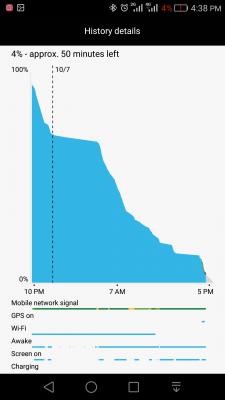
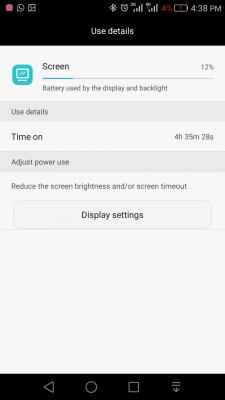
Battery Report No. 4: Age : 4th charging cycle starting from 100%. Mode : 100% dual SIM active with WiFi+ Bluetooth : 100% paired with Sony Smartband Talk SWR30. Google map/GPS : 30 minutes. YouTube & NAS streaming : 2 hours. Gaming : None. Camera pix : None. Camera vids : None. Browsing, social apps & others : ~ 2 hours. Screen brightness : Auto @ 50% slider. Special tweaks : Rooted with L-Speed tweaks.
I meant, wished that no need to register any finger to wake up the phone
Don't like the finger print scanner can use your voice loohhh...or Retina scanner ...or face recognition scanner...LOL...
The design to locate the finger print scanner at the back is actually very bad. To me it is design mistake...it should be in the front like iPhone and Sammy...
I meant, wished that no need to register any finger to wake up the phone
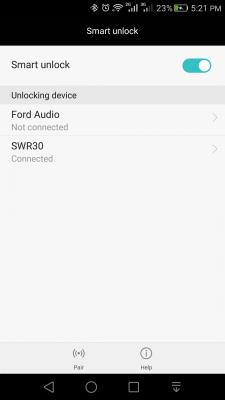
I use smart lock, no need to use finger print scanner:
Only those who have my Sony Smartband Talk SWR30 can unlock my phone. No need to pick up the phone to scan the finger as the scanner is located at the back is a totally design flaw to me. I just put the phone on the desk and swipe the screen to unlock.
This post has been edited by azeemzuhair: Oct 8 2015, 05:27 PM
This Honor 7 looks excellent based on azeem battery report... Somemore running dualsim...
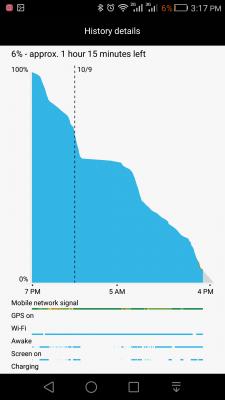
Notice the flat graph during my sleep hours? During this idle period (6 hours), battery dropped 1%. This is after flash the European ROM B121 and re flash back to Malaysian ROM B100. The B121 ROM does not support dual SIM hardware. After flashed back to B100, the battery performance seems way better than before. Although the "Awake" activity is actively happening all night and day, but that seems to be a bug in the battery report.
Sorry noob question. Meaning H7 will detect your Smartband only will unlock? If your Smartband not detected then will not unlock is it?
Pretty much like car keyless entry?
If let's say I lost my Smartband, I can still log in either via; 1) use the PIN (Which I don't like...LOL...), or 2) use finger print scanner (again the scanner is at the back of the phone, totally bad design IMO). My wrist hurts everytime trying to unlock via back-finger-scanner. May be my hands/palm are too big and not very ergonomic for my usage...LOL...
This post has been edited by azeemzuhair: Oct 8 2015, 08:43 PM
Actually, LeMoto ZUK Z1 scanner is in front and also can navigate (like in H7) using the scanner itself... this is the best finger-print scanner implementation IMO. They call it U-Touch scanner/tech...
The main reason my point I emphasize the back scanner is bad design is because when we type using one-hand method, we already hold the phone more than half LOWER body in order to type or swipe the on-screen keyboard. Furthermore, the "menu" and "back" icon in Android interface is "usually" located at the top of the screen which makes one-hand operation is totally a bizarre experience. Therefore, having the finger-scanner in the front enable the user to tap it and invoke either "menu" command or "back" command AS SOON AS after typing.
If the scanner is at the back, after typing a word, we have to "pull" back the phone in order to reach the scanner/menu icon. So, typing-menu-typing-menu-typing-menu experience will make the hand sore and possibility dropping the phone too (if totally using one-handed)....so pity I look those people when while eating using right hand and the phone is on the left hand struggling to type and reach the menu/back icon because they are located at the top of the screen (usually). Unless a very small 4.7" phone, one-hand operation is a win.
May be my hands are too big for ergonomic design if scanner is at the back. If smaller hands maybe feel more comfortable if scanner is at the back.
This post has been edited by azeemzuhair: Oct 8 2015, 10:51 PM
Hence, the usage of scanner at the back for navigation (up-down-left-right gesture) is a total failure....LOL...or redundant I would say...
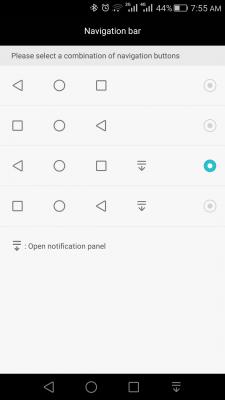
Now, most of the capacitive keys in the front is "Recent app" + "Home"+ "Back" key combo... It should be "Menu" + "Home" + "Back". I do agree customisation is a win altogether... Just like in Xiaomi MIUI, tap-and-hold the "Recent app" key will invoke "Menu" command. This is a good implementation for one-hand operation.
"Menu" command is vital.... more important than "Recent apps"...
Hopefully in Android "N" (after Mallow is "N"utella....?LOL...) they revamp the "Menu" command from top to bottom of every apps/settings page... However, the best one-hand operation experience is from the Sailfish OS inventor who has one hand functioning (Orang Kurang Upaya...) below:
This post has been edited by azeemzuhair: Oct 8 2015, 11:09 PM
Sometimes there would be three little dots on the softkey black bar, but rarely seen those....wonder why nobody adopt that design, since softkey can be whatever it wants(notification shade, keyboard menu, menu key, etc). and yea, i disable most of the gesture on scanner, some of it just gimmick
Agree... the "Three-dots" or "Hamburger" icon is a little annoying because they are located at the top of the screen... kasi bawa turun at the bottom of the screen lah...
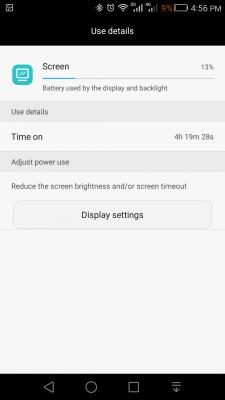
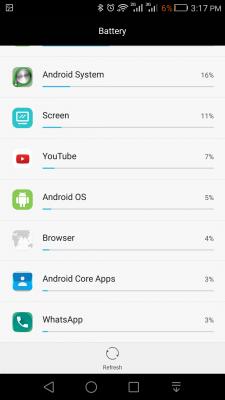
Battery Report No. 6: Age : 6th charging cycle starting from 100%. Mode : 100% dual SIM active with WiFi+ Bluetooth : 100% paired with Sony Smartband Talk SWR30. Google map/GPS : None. YouTube & NAS streaming : ~ 2.5 hours. Gaming : None. Camera pix : None. Camera vids : None. Browsing, social apps & others : ~ 2 hours. Screen brightness : Auto @ 50% slider. Special tweaks : Rooted with L-Speed tweaks.



 Oct 7 2015, 08:12 PM


 Quote
Quote










 0.1319sec
 0.65
0.65
 7 queries
 GZIP Disabled