

Hi, i'm thinking to replace my existing Klipsch Promedia 2.1, can anyone recommend any 2.1 speaker which having better sound output, my budget around RM1500.
PC Audio Please Recommend... a 2.1 or 5.1 speaker set V6,, Comparison and Advice
PC Audio Please Recommend... a 2.1 or 5.1 speaker set V6,, Comparison and Advice
|
|
 Oct 28 2018, 06:29 PM Oct 28 2018, 06:29 PM
Return to original view | Post
#1
|
 
Senior Member
4,158 posts Joined: Jan 2003 From: KL 
|
Hi, i'm thinking to replace my existing Klipsch Promedia 2.1, can anyone recommend any 2.1 speaker which having better sound output, my budget around RM1500.
|
|
|
|
|
|
Jun 26 2020, 10:15 PM
Return to original view | Post
#2
|
|
Senior Member
4,158 posts Joined: Jan 2003 From: KL
|
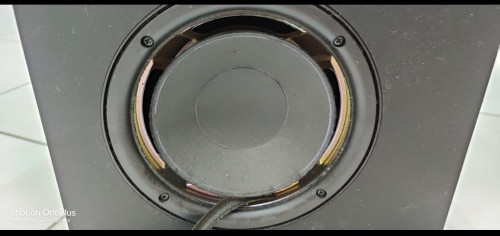
Perhaps someone can enlighten me, my Klipsch Promedia 2.1 subwoofer speaker unit has damaged, anyone can suggest which speaker unit should i buy to replace.?
 |
|
|
Jun 27 2020, 03:28 PM
Return to original view | Post
#3
|
|
Senior Member
4,158 posts Joined: Jan 2003 From: KL
|
QUOTE(xxboxx @ Jun 27 2020, 03:10 PM) Only the foam around the driver that's damaged right? Thanks for your suggestion. If you feeling adventurous you can try yourself or else find some shops that can do re-foaming https://www.instructables.com/id/re-foam-your-old-speakers/  I'm also thinking might just buy a new set of 2.1, Edifier S730 & S360DB are in my mind, i saw your above reply, do you think S360DB will be better than S730? |
|
|
Jul 16 2020, 05:41 PM
Return to original view | Post
#4
|
|
Senior Member
4,158 posts Joined: Jan 2003 From: KL
|
Wanna check with you guys i bought the Edifier S360DB recently and after run in for about a week i found the left satellite speaker is louder and pitch is higher than the right side, any method to balance the sound level other than adjust the balance in sound setting?
|
|
|
Jul 16 2020, 08:52 PM
Return to original view | Post
#5
|
|
Senior Member
4,158 posts Joined: Jan 2003 From: KL
|
QUOTE(power911 @ Jul 16 2020, 08:23 PM) Are you running it via analog minijack cable? It shouldn't happen like this. Thanks for your suggestion. I have tried below, results still same, on PC i can adjust the balance with 100% on left 85% on right in order to balance the sound level. I thought my ear got problem so i take out my previous Klipsch Promedia 2.1 the issue gone so prove that my ear should be good. I tried messaging Edifier Malaysia but no single response received. Do double check connection in case its the port not contacting well. If all checked and it happens even on bluetooth then better send back for warranty The S360DB don't have a L/R balance control 1. RCA to 3.5mm minijack with Creative soundblasterX AE5 sound card 2. Optical to Creative soundblasterX AE5 sound card 3. RCA to 3.5mm minijack with motherboard onboard sound 4. Optical to motherboard onboard sound 5. Bluetooth to PC 6. RCA to 3.5mm minijack on Samsung Note 8 7. Bluetooth to Oneplus 8 Pro This post has been edited by llk: Jul 16 2020, 08:53 PM |
|
|
Jul 16 2020, 10:33 PM
Return to original view | Post
#6
|
|
Senior Member
4,158 posts Joined: Jan 2003 From: KL
|
QUOTE(Edifier @ Jul 16 2020, 10:22 PM) Sorry for the problem caused, please send your speaker to Inter-Asia for warranty claim. Do i need to send in whole set or just the satellite pair? If possible i wish without bring in subwoofer. Also i wish to know how are you going to handle? Repair? Replace the whole set or just replace the speaker driver? Since this is newly purchased it is such an unfortunate required RMA so fast. |
|
|
Jul 23 2020, 07:52 PM
Return to original view | Post
#7
|
|
Senior Member
4,158 posts Joined: Jan 2003 From: KL
|
QUOTE(Skylinestar @ Jul 23 2020, 01:17 PM) If you think one side feels a bit weird, it's definitely the speaker. Probably something wrong with the tweeter. I have experienced something similar until I confirmed the defect via frequency response with REW. How to test the frequency response with REW? Any tools or software required? How do you resolved the problem?------- Need recommendation for budget (below RM1000) subwoofer for music.  |
|
|
Jul 23 2020, 08:49 PM
Return to original view | Post
#8
|
|
Senior Member
4,158 posts Joined: Jan 2003 From: KL
|
QUOTE(power911 @ Jul 23 2020, 08:20 PM) any mic plugged to pc will work with REW Ahhh...installed the REW software but not really know how to play with it But for best performance use a RTA mic (especially the usb type) for consistent measurement. (XLR if you need to measure crazy long distance like concert PA speaker and may differ from preamp to preamp) Play a test frequency sweep or a pink tone up to see frequency graph. Compare your left speaker n right. Etc..  |
| Change to: |  0.1013sec 0.1013sec
 0.74 0.74
 7 queries 7 queries
 GZIP Disabled GZIP Disabled
Time is now: 12th December 2025 - 04:56 AM |
 Quote
Quote