Welcome Guest ( Log In | Register )

Outline · [ Standard ] · Linear+

 New Unifi IPTV Box - Huawei EC6108V8, Need some help on configuration and tips

views
     
ShawnSotong
post Oct 31 2018, 08:57 AM

New Member
*
Newbie
0 posts

Joined: Oct 2018
QUOTE(kickent @ Oct 10 2018, 08:48 PM)
installed play store and play services and tested it works like charm. thanks man  :thumbsup:
*
Hi Bro, i also same intention to use AstroGo 8.2.4 on my recent signed TM HyppTV STP. Research and tried many time still cannot make it yet thus wish can ask expert for this.

To make AstroGo 8.2.4 able to run need both Google Play Store and Google Play Services installed together to make it happen right? You used Google Play Store 12.1.18, how about Google Play Services which version you used? I tried to installed both Google play Store and Google Play Services (maybe certain version required) both cannot use on my STB.
Thus cannot run AstroGo8.2.4 too.

I research and tried many times, but many tutorial is all abt previous STB FW version that still haven’t been updated. What i need is to make AstroGo 8.2.4 able to run on my STB only.

Hope expert can help me on this. Many thanks (^^)
ShawnSotong
post Nov 2 2018, 12:25 PM

New Member
*
Newbie
0 posts

Joined: Oct 2018
QUOTE(kickent @ Nov 2 2018, 11:46 AM)
hi bro,

i'm using google play services ver 14.3.66 and playstore ver 12.1.18.

btw mind to describe what error you facing with aotg?
*
Hi bro, thanks for your kindness try to help me on this.

My HyppTV STB don’t have Google Play Store and Google Play Services. Although i installed both but cannot use (i suspect becos of STB newest version of FW and it is original without root). I searched online AstroGo should be working fine at unroot devices.

My error is:
1.When i click AstroGo, it prompt me “purchase service is temporarily unavailable” and jump out to Menu Screen. But i use my iphone AstroGo is working fine.

2. I suspected becos my STB don’t have Google Setting (Google Play & Google Services). Then i installed both but cannot use, Google Play also jump out to Menu Screen.

Bro, since your AstroGo is working charm on your hypptv STB, may i know is it your STB still previous version FW before force update (which still able to install Google Play & Services)? While mine 1 ald not compatible?

How u install Google Play Store & Google Service?
I believe a lot of ppl struggling how to make AstroGo 8.2.4 work on their new version of Hypptv STB.

Thanks bro.

ShawnSotong
post Nov 3 2018, 01:43 AM

New Member
*
Newbie
0 posts

Joined: Oct 2018
QUOTE(kickent @ Nov 3 2018, 01:05 AM)
i dont remember exact FW version..but its TM updated box...., i also have same issue jump out to menu screen when launching aotg before install google ps..just clicked ok when prompt “purchase service is temporarily unavailable”

you can download from apk pure from pc, copy to usb and use es file explorer to install..hope this works
*
Haha, when i want to install google ps it prompt me this..
I am thinking that is it not compatible?

My HyppTV STB: Android 4.4.2
Google ps v14.3.66 requirement: Android 6.0+

?? Too bad, feel like so close..

This post has been edited by ShawnSotong: Nov 3 2018, 02:12 AM


Attached thumbnail(s)
Attached Image
ShawnSotong
post Nov 3 2018, 04:01 PM

New Member
*
Newbie
0 posts

Joined: Oct 2018
QUOTE(voncrane @ Nov 3 2018, 08:29 AM)
Try re-downloading the file using a proper browser on a PC and transfer via USB. In many cases, that error is thrown when the apk file is corrupted from a bad download. Good luck.
*
Hi thanks bro.
Yes, i used proper platform by google chrome on pc to download apk.

Ytd i tried install and uninstall a lot different version of google play services. Smth new happen, suddenly it prompt out ‘ x App not installed ’. After this i can’t install anymore google play services apk although the same apk the 1st time i tried installed ok

Anyone expert have this experience?
Thus i cant carry on my ‘testing’ of AstroGo anymore..😅

This post has been edited by ShawnSotong: Nov 3 2018, 04:03 PM


Attached thumbnail(s)
Attached Image
ShawnSotong
post Nov 6 2018, 10:42 PM

New Member
*
Newbie
0 posts

Joined: Oct 2018
QUOTE(neocyke @ Nov 5 2018, 05:50 PM)
Regular case of app going missing in installed apps register. This one is a peculiar problem that happens when an expected system app is installed as user app. You will need to use an uninstaller app to remove it. That will be the tricky part, getting an app that will be able to uninstall something that is there but not there at the same time.

Regarding the google play services apk itself, for the tm stb you need to get the correct supportable version. That means, 4.0 and up, and no dpi. This is what determines whether it will be able to install or not. And it must be No DPI. Apkmirror will be best for getting the exact variant required. Also note, in a lot of cases, outdated versions will install correctly compared to latest ones.
*
Hi bro thanks for explaination.
Uninstaller might be hard for my case becos uninstalled the apps. Thus nw there is no more google ps in the menu unless there is file crashed / unknown file in the system whick blocked me to install it.

Thus, i am thinking to factory reset my TM STB. Anyone have experience any impact will happend to the STB? After factory reset still working OK just all apps disappeared?

Thanks for helping all ‘guru’ expert(^^)
ShawnSotong
post Nov 9 2018, 02:56 AM

New Member
*
Newbie
0 posts

Joined: Oct 2018
QUOTE(gaikon @ Nov 8 2018, 11:00 AM)
hi fren, maybe this can help a bit, am using this for OTG to work with SPC01 box (latest firmware) just to remind the playstore wont work but OTG need these files. Do get the OTG form else not from this playstore installed [attachmentid=10098800][attachmentid=10098801]
[attachmentid=10098803][attachmentid=10098804][attachmentid=10098805]
*
Bro, thanks for your help.

Finally i successfully run smooth of AstroGo 8.2.4.
These info is quite direct and useful. But finally i run it on my MiBox instead of Unifi STB because i still cant solve the ‘x app is not installed’ although i tried few days after all help given to me and researched the method of apk editor, but still fail.

My case summary:
1. I only want to run AstroGo 8.2.4 in my Unifi STB ( but finally is MiBox, if other bro got see my thread frm up to down).

2. AstroGo 8.2.4 need to run with Google Setting (Google PS). But it really need appropriate version to your box only can run.

3. I used the version proven by bro Gaikon, and it works in my MiBox.

To do a summary of my case, hope ppl have same intention like me can save time and easily can run AstroGo on your box.

But if possible, i still hope my Unifi STB can run AstroGo because i have Unifi cable tv (Hypptv). Then i no need to switch to my MiBox. Any expert still have other way to make the phantom Google Play Services to be reinstall?

*To buddy Voncrane & neocyke, thanks for the expert technical sharing. And i totally agree that Unifi STB is ‘xxcks’ & higher grade of tvbox is the better choice. But because of 30mpbs Unifi registration must c/w this ’xxcking’ STB just to make it to be more useful than ori.

Thanks buddies!!! (^^)

This post has been edited by ShawnSotong: Nov 9 2018, 08:54 AM
ShawnSotong
post Nov 10 2018, 09:20 AM

New Member
*
Newbie
0 posts

Joined: Oct 2018
QUOTE(voncrane @ Nov 9 2018, 10:50 AM)
Haha.. Glad you got what you needed in the end. That's most important.. You are welcome..  notworthy.gif
*
😆Bro, you still have any other idea how to solve ‘x app not installed’?
I help my friend to install AstroGo on his Unifi STB and it works.
Still feel very bo song because my Unifi STB cant install AstroGo anymore. My heart not balance like ‘dai yi ma’ come 😤

*I already tried apk editor, lucky patcher to rebuild apk and check anymore visible google setting. But all still fail 😵

This post has been edited by ShawnSotong: Nov 10 2018, 09:25 AM
ShawnSotong
post Nov 13 2018, 08:48 PM

New Member
*
Newbie
0 posts

Joined: Oct 2018
QUOTE(gaikon @ Nov 12 2018, 06:16 PM)
1. Install aptoide tv
2. Search google play store. If found do install or update
3. Install google play services also found in search for google playstore earlier. Do the same
4. Then search Astrogo and install the AOG
Do start from scratch, hope will work for u. Clear All  the cache first.
Never giveup.
*
Bro, thanks for motivation (^^)!!!
But alamak, non of the google playstore + google play services i can install from aptoide, so can’t install nor update...

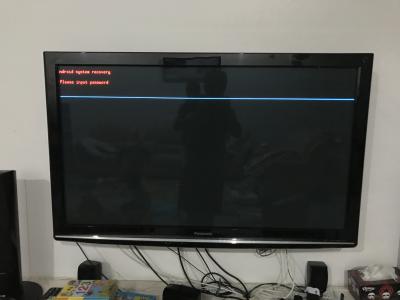
Anyone tried this? Use unifi STB to do ‘android system recovery? Dunno it will help or not, better i get info from expert 1st. Does it affect cable tv (hypptv)?

Haha, again need expert advise liao 🤗
Thanks yar guys 🙏🏻 🙏🏻


Attached thumbnail(s)
Attached Image
ShawnSotong
post Nov 15 2018, 08:37 PM

New Member
*
Newbie
0 posts

Joined: Oct 2018
QUOTE(gaikon @ Nov 14 2018, 10:24 AM)
- no need to do recovery or reset the box its not necessary. you will have to set your hypptv id login once more if u do so.
- do you use aptoide mobile or aptoide TV? must use aptoide TV to get all those mention in earlier post
- please enable developer mode, get into android native setting not the hypptv setting
- just tried yesterday with a new spc01 updated box confirmed working, weird yours not.
- and make sure u have @least 300 above mb left, some time when the box is full its a bit hard to install apps.

^ chill bro.. am sure it can be done.
*
Bro, is true.
1. I check storage OK, i still have 1gb.
1. I installed ‘aptoide tv’.
2. Then enable developer mode.
3. Try to install google play store, OK.
4. Try to install google play services, NG ( ‘x app not install’ again ).

Mine case still the ‘x app not install’ (should be dur to phantom file), i believe Unifi STB able to install successfully because i tried it on other Unifi TV and it’s working.

You tried and test OK? Your case also ‘x app not install’?

*Bro Voncrane, i tried use SD Maid and cleared those coarpse file. Still fail with ‘x app not install’.

This post has been edited by ShawnSotong: Nov 15 2018, 08:38 PM


Change to:
| Lo-Fi Version
0.0951sec    0.37    7 queries    GZIP Disabled
Time is now: 6th December 2025 - 07:03 AM