Welcome Guest ( Log In | Register )

Outline · [ Standard ] · Linear+

 Ultrawide monitor fan's club, Ultrawide master race

views
     
hz32290
post Jul 17 2022, 02:07 PM

Getting Started
**
Junior Member
95 posts

Joined: Mar 2008
hey fellow UW monitor gurus, I am currently looking for a new UW monitor (first time!) and I was wondering what will you recommend?

I use it mainly for 3D/visual work (maybe gaming, soon?)

If anything, I am quite used to 27inch 1080p display. I've read some of this forum threads about uw monitor, in order to have similar pixel density, it is recommended to have 32 inch UW at 1440p. So I think my range would be 32~34 inch, 1440p.

Budget wise, I do prefer cheaper, but color and resolution (eye comfort) is far more important.
hz32290
post Jul 17 2022, 02:56 PM

Getting Started
**
Junior Member
95 posts

Joined: Mar 2008
QUOTE(Andrewtst @ Jul 17 2022, 02:19 PM)
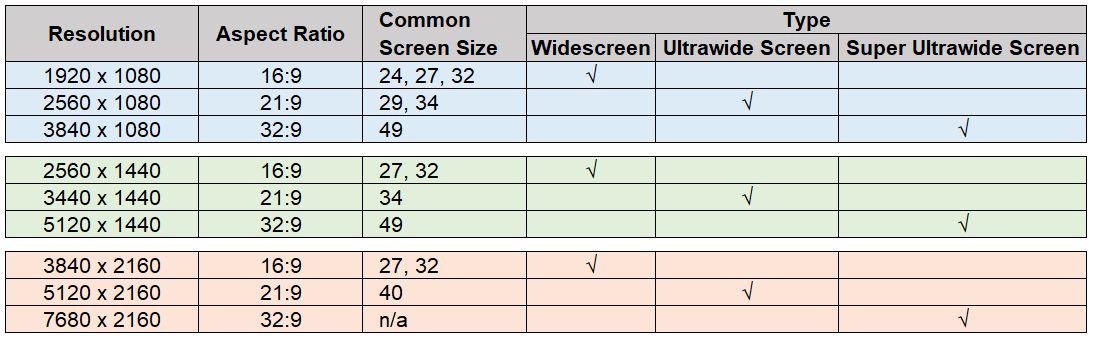
Please check following image for common screen size of Wide, Ultrawide and Super Ultrawide.
32" is Wide not Ultrawide.
Recommended to get 34" in 3440 x 1440 resolution for Ultrawide.

user posted image
*
Sweet! Thanks, this is very helpful biggrin.gif

So do you have recommendation for a 34" with 3440 x 1440 curved monitor?
hz32290
post Jul 17 2022, 10:07 PM

Getting Started
**
Junior Member
95 posts

Joined: Mar 2008
QUOTE(Andrewtst @ Jul 17 2022, 03:26 PM)
Here is Top 5 Best Ultrawide monitor 2022 by Rtings.

https://www.rtings.com/monitor/reviews/best/ultrawide-gaming

My personal preferable is LG 34GP950G-B as I own before LG 34GN850G-B and it was great. It still with me but now I move to office for productivity usage.
This is high-end model and it is not cheap though. Around RM 4.4k (Shopee).

The alternative by Rtings is Dell S3422DWG (official RM 1.9k). This model is cheap but it got some issue, dark smearing issue and also out of the box color accuracy issue. The color accuracy rating is very low and many user complain over saturation and it also white balance off. This model required professional calibrator tools to fixed the bad color accuracy issue. https://www.rtings.com/monitor/reviews/dell/s3422dwg If you got professional color calibrator tools or any of your friend have, it is a good monitor after calibration. Not worth to buy the calibrator tools as it mostly will over this monitor cost. If you are not very important to color accuracy, this model is great to choose and maybe just use eye to try tune a bit the color to reduce the over saturation issue.

Rtings give best budget to Acer Nitro XV340CK (RM 1.7k) but this model is not curved and also have poor SDR brightness and HDR is basically disaster, I will not consider at all.
Gigabyte M34WQ vote the best but this is also not curved. Not my preferable as well. Around RM 2.3k (Shopee)
They is another model which is curve - Gigabyte G34WQC but this is old model release in year 2020, it is quite cheap now around RM 2.1k, this is VA panel which means not suitable for screen sharing due to poor viewing angle and it may have dark smearing issue which is common of VA panel.

Currently Samsung do successful eliminate the VA dark smearing issue, this included following model.

  • Samsung Odyssey Neo G9 Super Ultrawide (you can get around RM 6.7k (Shopee), official RM 8k) - This is Super Ultrawide which is 2 unit of 27" Wide screen combine. It maybe too wide for you.
  • Samsung Odyssey Neo G8 Wide (official RM 6.7k), this is Wide not Ultrawide.
  • Samsung Odyssey Neo G7 Wide (official RM 5.7k), this is also Wide not Ultrawide.
  • Samsung Odyssey G7 Wide, G7 had 3 model, G7 27" Curved Wide and 32" Curved Wide is VA panel 1440p, G7 Flat 28" is 4k IPS. No price in either as Samsung already replace it with Neo G7 (4k Curved Wide VA). All G7 is Wide as well not Ultrawide.
But too bad the only Ultrawide in this series which is Samsung Odyssey G5 (official RM 2,488) is older VA panel and had dark smearing issue.

They is another great monitor for gaming and watching movie but not in list as it got some drawback where the text clarity is not good with purple fringing issue - Dell Alienware AW3423DW (official RM 5.6k) - https://www.rtings.com/monitor/reviews/dell...enware-aw3423dw
The reason it got text clarity issue was due to this the only OD-OLED Ultrawide monitor is Triangular RGB arrangement instead of traditional RGB arrangement - three subpixels in a line.
This Triangular RGB  alignment is a diamond pattern where it is 2x Green pixel with 1x Red and 1x Blue, the reduce of Red and Blue make this monitor had text clarity issue. I am not buying this at the end due to this.
*
Thanks for the recommendations! But dang these curved screens sure is priced on the higher end. I might get flat screen instead =/ I supposed it doesn't make too much of a difference for 1x 34 UW monitor vs 2x 27 W monitor, in terms of viewing experience, yes?
hz32290
post Jul 18 2022, 09:34 PM

Getting Started
**
Junior Member
95 posts

Joined: Mar 2008
QUOTE(Andrewtst @ Jul 17 2022, 11:32 PM)
If money concern issue, I recommended following two.

  • Dell S3422DWG (official RM 1.9k) - I personally never seen this monitor before, I had no idea how bad the color accuracy are but from review and some user feedback, it is over saturation. Saturation not Vivid, to me use saturation means crazy vivid color. Beside color accuracy issue, this monitor is awesome in nearly every part for such low price.
  • Gigabyte G34WQC (Shopee RM 2.1k) - Everything is comparable with Dell S3422DWG except the HDR performance where Dell better. But this Gigabyte with good color accuracy out of the box.
Here is the comparison of both https://www.rtings.com/monitor/tools/compar...&threshold=0.10

Two monitor cannot let you play games in immersive feel on Ultrawide screen.
Two monitor also cannot let you have more column view for excel or database for productivity.
Two monitor screen also cannot have better working space for video and photo editing.

1x 34" Ultrawide is around 1.5x units of 27" wide.
1x 49" Super Ultrawide is just the exact of 2x units of 27" wide. (It is not 54" because of the way how monitor calculate the screen size).

Ultrawide not in curve may have issue on viewing due to it longer screen, also not immersive feel.
But off course certain people prefer flat especially some said curved not suitable for productivity due to the distortion on side, but I did not have those feel in all curved monitor I use.

If you are ok with Flat, then this Gigabyte M34WQ (Shopee RM 2.4k) is actually a great Ultrawide monitor with great color accuracy out of the box.
This is IPS, so no worried of dark smearing issue or bad viewing angle issue of VA but it come with IPS issue like uniformity, light bleeding and blooming issue. In short IPS is awesome but not suitable to use in dark room (except they came with local dimming then the price is double or triple up).
https://www.rtings.com/monitor/reviews/gigabyte/m34wq
*
I see.. Thank you very much for your enthusiastic sharing biggrin.gif I just ordered Dell S3422DWG!! I've seen some reviews of the monitor and the smearing issue sure is pretty obvious, but it can be reduced, and the settings recommended by reviewers gives a reasonable result, so I think I can live with that smile.gif

For the color wise, maaaaaaaaybe it won't bother me much. I usually tune my color/contrast to a point where it doesn't strain or hurt my eye over a long period of usage, so it's usually some what washed out. (Also I am a bit color blind so... =/ )

Anyway, thanks again!!
hz32290
post Jul 22 2022, 09:55 PM

Getting Started
**
Junior Member
95 posts

Joined: Mar 2008
QUOTE(Andrewtst @ Jul 18 2022, 10:46 PM)
Congratulation for the order, give some review / comment after you received it. biggrin.gif
*
aaaaaaaand it arrived today!!

I have no picture to show, but here's what I thought (First Impression from a non-gamer).

Build Quality =
A bit filmsy. When I use menu buttons and all that, the whole thing kinda wobble. I'm not sure which is better, V-stand or big fat flat stand, but I think V-stand might give better support. Then what is bad in my book? Back in the days, Samsung sell a very wobbly LCD monitor. That is bad. I'll never forget it, because that's what most CC uses.

Things in box =
I am a big fan when supplier/manufacturer includes display cables. This comes with 1x DP, and 2x HDMI. +1 in my book <3

Ports on monitor =
Again, big fan. Saves me the trouble plugging in-n-out from CPU case. +1

Screen real estate =
It's (almost) edge-to-edge display. I like it!

Curvy screen =
It's my first time using it, and my daily driver is a macbook pro. Scrolling window side-to-side is very... comfortable. It feels like Spider-Man scrolling an interface when he's making a new suit.

Screen quality/color =
Ah, the elephant in the room! Honestly, it is true that the color setting out of the box is pretty bad (Standard setting). But I find the default custom settings are quite good, at least the white looks pretty white to me! (default custom setting has everything in 50%. 50%RGB 50%CMY etc )
Black is very black. My MBP can only output 1080p via HDMI, so I have leftover screen real estate on both sides, and I get to compare the black on the side. It looks like they're the same (97% ish or more, I feel)
I am getting a Thunderbolt2 DP cable, and that should allow me to use the entire glory of this monitor.
Then what about black smearing?!
I haven't experience anything like that just yet :/ It wasn't as obvious to me.

Verdict:
At a RM1900(Dell Malaysia website) price point, it is actually a decent buy. I like how it looks, how it feels, and the extra functions it provided. Getting the right color can be a pain in the ass, but it is definitely not the end of the world.

 

Change to:
| Lo-Fi Version
0.1264sec    0.88    7 queries    GZIP Disabled
Time is now: 14th December 2025 - 01:04 AM