

hi guys, just want to know, is the mibox able to passthrough audio to an amp to enable DTS?
Xiaomi Mi Box User Club, let's talk mi box!
Xiaomi Mi Box User Club, let's talk mi box!
|
|
 Aug 14 2017, 03:50 PM Aug 14 2017, 03:50 PM
|
 
Junior Member
132 posts Joined: Sep 2009 
|
hi guys, just want to know, is the mibox able to passthrough audio to an amp to enable DTS?
|
|
|
|
|
|
Aug 14 2017, 04:45 PM
|
|
Senior Member
3,026 posts Joined: Oct 2004 From: KL, Penang & JB 
|
QUOTE(van_dyke @ Aug 14 2017, 03:50 PM) hi guys, just want to know, is the mibox able to passthrough audio to an amp to enable DTS? I tried with Kodi, it's working for both DTS and Dolby 5.1 |
|
|
Aug 14 2017, 07:59 PM
|

Junior Member
218 posts Joined: Apr 2010 From: Petaling Jaya
|
QUOTE(mikeeeee @ Aug 14 2017, 04:45 PM) I tried with Kodi, it's working for both DTS and Dolby 5.1 hi, i'm using mibox 3s, kodi v17.3but cant seem to passthrough DD5.1/AAC5.1/DTS5.1 to by pioneer HTiB. may i know how you do it? |
|
|
Aug 14 2017, 11:28 PM
|
|
Senior Member
3,026 posts Joined: Oct 2004 From: KL, Penang & JB
|
QUOTE(eehong @ Aug 14 2017, 07:59 PM) hi, i'm using mibox 3s, kodi v17.3 Yea, all 3 passthru works for mebut cant seem to passthrough DD5.1/AAC5.1/DTS5.1 to by pioneer HTiB. may i know how you do it? My connection is like this mibox --> Sony hitb--> tv In Kodi my settings is like this 
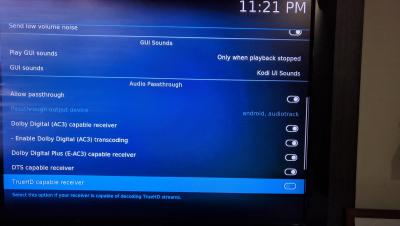
|
|
|
Aug 15 2017, 01:41 PM
|
|
Junior Member
132 posts Joined: Sep 2009
|
awesome bro. thanks! will check my settings.
QUOTE(mikeeeee @ Aug 14 2017, 11:28 PM) Yea, all 3 passthru works for me My connection is like this mibox --> Sony hitb--> tv In Kodi my settings is like this
|
|
|
Aug 21 2017, 09:06 PM
|

Senior Member
1,352 posts Joined: Dec 2008 From: Tatooine
|
My mibox is connected to wifi, but after a while the speed will slowly decrease to 10kbps lol, may I know how to fix this?
|
|
|
|
|
|
Aug 22 2017, 10:54 AM
|

Senior Member
4,672 posts Joined: Nov 2016
|
QUOTE(oOoproz @ Aug 21 2017, 09:06 PM) My mibox is connected to wifi, but after a while the speed will slowly decrease to 10kbps lol, may I know how to fix this? How do u monitor the speed? What is the signal strength u get? |
|
|
Aug 23 2017, 01:16 AM
|
|
Senior Member
1,352 posts Joined: Dec 2008 From: Tatooine
|
QUOTE(#Victor @ Aug 22 2017, 11:54 AM) How do u monitor the speed? What is the signal strength u get? I'd run the diagnostic thru mibox setting and it is good. And the worst part is also when I turn on the next day, I cant even connect to my wifi which I have to change the router wifi parameter setting like mhz and channel only can connect again, so frustrating  |
|
|
Aug 23 2017, 01:29 AM
|

Senior Member
4,776 posts Joined: Jan 2003
|
QUOTE(oOoproz @ Aug 23 2017, 01:16 AM) I'd run the diagnostic thru mibox setting and it is good. And the worst part is also when I turn on the next day, I cant even connect to my wifi which I have to change the router wifi parameter setting like mhz and channel only can connect again, so frustrating Dunno your mibox problem or router problem. Have you tested your mibox with phone wifi hotspot? |
|
|
Aug 23 2017, 10:28 AM
|
|
Senior Member
2,262 posts Joined: Jul 2013
|
QUOTE(oOoproz @ Aug 23 2017, 01:16 AM) I'd run the diagnostic thru mibox setting and it is good. And the worst part is also when I turn on the next day, I cant even connect to my wifi which I have to change the router wifi parameter setting like mhz and channel only can connect again, so frustrating do you tried this?1) only use 2.4GHz 2) disable IPv6 in router there are another possibility where wireless network attacks happen http://searchsecurity.techtarget.com/featu...network-attacks |
|
|
Aug 24 2017, 05:29 PM
|
|
Senior Member
1,352 posts Joined: Dec 2008 From: Tatooine
|
QUOTE(kmrdeva @ Aug 23 2017, 02:29 AM) Dunno your mibox problem or router problem. Have you tested your mibox with phone wifi hotspot? Hmm no issue when connecting to my phone hotspot, I'm gonna bring it to the shop since it is still under warranty |
|
|
Aug 24 2017, 06:19 PM
|
|
Senior Member
1,352 posts Joined: Dec 2008 From: Tatooine
|
QUOTE(elmond @ Aug 23 2017, 11:28 AM) do you tried this? I've done that, so far no issue, I've changed all the setting from Auto to a fix number, hopefully it will maintained, btw is it ok to use Google DNS?1) only use 2.4GHz 2) disable IPv6 in router there are another possibility where wireless network attacks happen http://searchsecurity.techtarget.com/featu...network-attacks |
|
|
Aug 25 2017, 05:27 PM
|

Junior Member
563 posts Joined: Apr 2009 From: Where the music plays... 
|
QUOTE(oOoproz @ Aug 24 2017, 06:19 PM) I've done that, so far no issue, I've changed all the setting from Auto to a fix number, hopefully it will maintained, btw is it ok to use Google DNS? Use OpenDNS. It's more stable and safer as well. |
|
|
|
|
|
Aug 26 2017, 03:04 PM
Show posts by this member only | IPv6 | Post
#1694
|

Senior Member
559 posts Joined: Apr 2008
|
anyone can recommend any seller for Mi Box 3S Enhance with all the apps to watch movies from different countries and yearly subscription for Astrox service?
|
|
|
Sep 1 2017, 04:10 PM
Show posts by this member only | IPv6 | Post
#1695
|

Senior Member
5,968 posts Joined: Jan 2003 From: KL, Malaysia
|
I'm using the old MI BOX 2 (Kit Kat version 1GB RAM)
QUESTION 1: I tried to uninstall some default app from XIAOMI i.e. CIBN News etc from the android os setting page. However, the app will reinstall itself after a day i.e. CIBN, some news app, video player, album gallery. How to prevent this from happening? As the app eats a lot of storage space. QUESTION 2: Mi box will turn on by itself ^^|| after power off using remote. I think the mi box is not fully off if turning it off using the remote. And will turn on by itself to do some sync at night. How to prevent this from happening? |
|
|
Sep 1 2017, 04:53 PM
|

Junior Member
78 posts Joined: May 2007
|
hi guys,
Planning to buy Mibox 3 from xiaomi malaysia which is global firmware and unrooted Questions: 1. Can we sideload any apk without root? specifically myiptv apk 2. Can it side load kodi? |
|
|
Sep 1 2017, 05:00 PM
|
|
Senior Member
4,776 posts Joined: Jan 2003
|
QUOTE(rudit @ Sep 1 2017, 04:53 PM) hi guys, The official unit? APK sideload is ok, root not needed. Kodi is available in the Android TV play store, no need to sideload.Planning to buy Mibox 3 from xiaomi malaysia which is global firmware and unrooted Questions: 1. Can we sideload any apk without root? specifically myiptv apk 2. Can it side load kodi? |
|
|
Sep 1 2017, 09:02 PM
|
|
Junior Member
78 posts Joined: May 2007
|
QUOTE(kmrdeva @ Sep 1 2017, 05:00 PM) The official unit? APK sideload is ok, root not needed. Kodi is available in the Android TV play store, no need to sideload. yup, the official one. just looking around reasons to root. This post has been edited by rudit: Sep 1 2017, 09:48 PM |
|
|
Sep 1 2017, 09:07 PM
|

Senior Member
1,200 posts Joined: Feb 2006 From: Wangsa Maju
|
QUOTE(rudit @ Sep 1 2017, 04:53 PM) hi guys, 1. im using myitpv, dont need root. but u need to install sideload launcherPlanning to buy Mibox 3 from xiaomi malaysia which is global firmware and unrooted Questions: 1. Can we sideload any apk without root? specifically myiptv apk 2. Can it side load kodi? 2. kodi is ok. |
|
|
Sep 1 2017, 09:48 PM
|
|
Junior Member
78 posts Joined: May 2007
|
QUOTE(nazman @ Sep 1 2017, 09:07 PM) 1. im using myitpv, dont need root. but u need to install sideload launcher Orait...thanks2. kodi is ok. |
| Change to: |  0.0218sec 0.0218sec
 0.52 0.52
 6 queries 6 queries
 GZIP Disabled GZIP Disabled
Time is now: 4th December 2025 - 04:31 AM |
 Quote
Quote