Outline ·
[ Standard ] ·
Linear+
Smart Home, Let's discuss
|
ZeneticX
|
 Sep 9 2023, 04:12 PM Sep 9 2023, 04:12 PM
|

|
QUOTE(simmarjit @ Sep 9 2023, 02:47 PM) Dont have that lock but if no other option, you could put some nfc tag or something near your exit and it triggers that way? Door lock + NFC then you make that case as you leaving the home and trigger whatever lights etc. Or some cheap wireless button on the inside of your door, press that and if it detects door is locked then turn off whatever. Seems like its the only way to go for now Because eventhough the door lock does detect and log every open activity from outside, the most straightforward way Tuya does its automation is by using location detection based on GPS, which is not ideal for me since I live in condo Anyone on Tuya ecosystem can share their automation scenario or routines? |
|
|
|
|
|
ZeneticX
|
Sep 9 2023, 06:01 PM
|
|
|
QUOTE(alucard89 @ Sep 9 2023, 04:27 PM) I think i got similar lock, yours wifi version and someone need to press unlock from outside, then receive notification on your app for unlock request? Or different one Yes wifi version. Not sure about the unlock request thing though, never tried. There is no unlock button or any buttons on the lock, just a fingerprint scanner outside https://www.evasmart.co/m5/This post has been edited by ZeneticX: Sep 9 2023, 06:02 PM |
|
|
|
|
|
ZeneticX
|
Sep 10 2023, 05:19 AM
|
|
|
QUOTE(alucard89 @ Sep 9 2023, 07:46 PM) On the manual, guest or visitor can request unlock by hitting some numbers (forget which one) and would pop up request on your tuya app. You also can’t remote unlock it right? Just check the manual and yes you are right. Need to key in a combination to send a request to the app, then remote unlocking will work This post has been edited by ZeneticX: Sep 10 2023, 05:19 AM |
|
|
|
|
|
ZeneticX
|
Sep 10 2023, 02:39 PM
|
|
|
QUOTE(alucard89 @ Sep 10 2023, 10:53 AM) Yeah, not much automation option with the wifi version Did u manage to figure out anything? NFC tags or scene buttons? |
|
|
|
|
|
ZeneticX
|
Sep 12 2023, 03:56 PM
|
|
|
QUOTE(ZeneticX @ Sep 9 2023, 02:19 PM) Anyone using those handle style Tuya smart lock? I'm currently using Eva M5. Want to check is it normal that any unlock activity from inside house (exiting from house) is not logged? A bit dissapointed with this because due to this now, I'm having a hard time figuring out how to do my automation (eg: exit house switch off all lights etc) So I checked with the lock supplier. Turns out there is really no way to create any exit automation using the lock alone. Usually exit automation will be done via a scene switch + tap to run or using sensors / tags. I checked with my friend who is using Xiaomi lock, there is a button on the inside panel where you press to indicate you are leaving the house, then it will do the automation. Maybe there's a way to replicate this with the Tuya lock For entry automation, there's actually a straightforward way without relying on location, which is using the "Device status change" trigger, then selecting your door lock > fingerprint unlock The drawback I can see with this is what if you are just going out for a moment eg: throwing rubbish. Haven't played with the triggers yet This post has been edited by ZeneticX: Sep 12 2023, 03:57 PM |
|
|
|
|
|
ZeneticX
|
Sep 22 2023, 04:57 PM
|
|
|
QUOTE(WildChai @ Sep 22 2023, 04:18 PM) Anyone here is controlling their led strip lights based on time of day? I have a question about that. Say i wake up in the night to go toilet...sensor picked me up, sets the lights in toilet to 25% brightness. To do this does the led strip needs to be constantly powered? and if the light switch is a dumb rocker type...if already in off position, totally no light. My method to solve this is too complicated. Smart switch -> zigbee dimmable driver (12/24V) -> led strip. automation: Sensor detects, sets led strip brightness to 25%, sets smart switch to ON. any better solution? I'm not sure if its similar to your use case, mine is magnetic rail led. Basically i skip using smart switch and just go for a standard non smart switch as the main power switch for the light. The on and off will be controlled by the driver / led itself. So the non smart switch is at constant on position basically. So far no issues. I only turn it off when im away for some period For me, if your led strip / driver is already smart type, then its a bit redundant having a smart switch. Of course you can still use it, but it just adds another step in your automation This post has been edited by ZeneticX: Sep 22 2023, 05:18 PM |
|
|
|
|
|
ZeneticX
|
Sep 23 2023, 01:06 AM
|
|
|
QUOTE(WildChai @ Sep 22 2023, 09:45 PM) Yep... Same challenge. If just my wife and I OK lah. But many ppl in house. Difficult to avoid someone accidentally flick it. I want to use the regular switch but the new aqara Z1.. Banyak premium feel ohhh... Haha Haiya if regular switch you can find even more premium looking ones like Schneider Avataron series  |
|
|
|
|
|
ZeneticX
|
Sep 24 2023, 04:49 PM
|
|
|
QUOTE(ideaplus @ Sep 24 2023, 02:46 PM) May I ask if it is necessary to use N to connect the ceiling fan? What happens if I use a smart switch without N? I'm using smart switch without N for all my ceiling fans. So far no issues |
|
|
|
|
|
ZeneticX
|
Sep 25 2023, 02:43 PM
|
|
|
QUOTE(amduser @ Sep 25 2023, 01:56 PM) recently i bought a set of magnetic smart track light from china taobao for my new house the track light can be connected to xiaomi home, but when i try to pair it with the app in my phone, it always show device is offline, when i contact their customer service, they recommend me to use 小爱音箱, or the xiaomi bluetooth mesh thingy does anyone has experience connecting smartphone to those magnetic track light? I have already changed my xiaomi home region to china, and the track light seems to only be able to pair with my phone bluetooth when using batch connect, if try to connect individually it always fail Your magnetic smart track light is wifi or zigbee? I'm using magnetic smart track light also, but mine is under tuya zigbee. So far no issues connecting everything to the app |
|
|
|
|
|
ZeneticX
|
Sep 29 2023, 04:54 AM
|
|
|
QUOTE(lankorn @ Sep 29 2023, 12:46 AM) Hi,is there any smart switch that can be switched normally(physical) and by apps.Im asking because want to install for my uncle which is old.So you know,old peoples dont have much knowledge or understand the modern technologies.The switch must have few wireless option to be operated(Bluetooth,zigbee or RF) and not only IOT. You just described a smart switch. So far all smart switches I've seen and known can be controlled physically and via app This post has been edited by ZeneticX: Sep 29 2023, 04:55 AM |
|
|
|
|
|
ZeneticX
|
Oct 2 2023, 08:40 PM
|
|
|
What does this mean? On smart life app 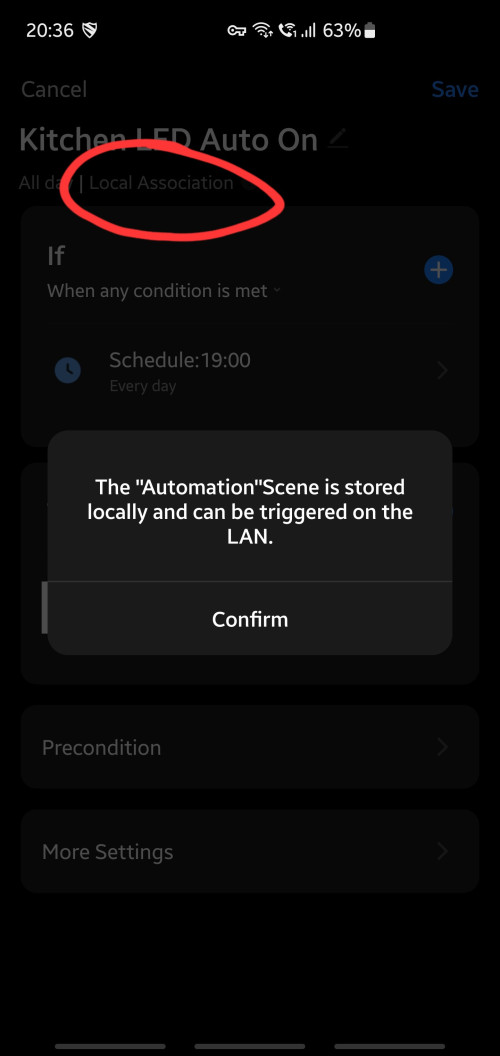 |
|
|
|
|
|
ZeneticX
|
Oct 2 2023, 10:10 PM
|
|
|
QUOTE(Oltromen Ripot @ Oct 2 2023, 09:17 PM) This using Zigbee Gateway, right? I sometimes meet this. I assume if the trigger condition is simple, the zigbee gateway can perform it without instructed from Internet. If you add another condition making it "a AND b" or "a OR b", then it becomes complex and zigbee gateway unable to perform on its own. Yes using zigbee I noticed as long you dont use Pre Condition then this will show Hopefully they able to improve on this further so we dont need rely on cloud in the future. But I know its unlikely |
|
|
|
|
|
ZeneticX
|
Oct 2 2023, 11:45 PM
|
|
|
QUOTE(Oltromen Ripot @ Oct 2 2023, 10:50 PM) I toyed around just now with just time condition, like yours. But I cannot get the local association to appear. (shrug) This was how I set it up. Very straightforward on @ time 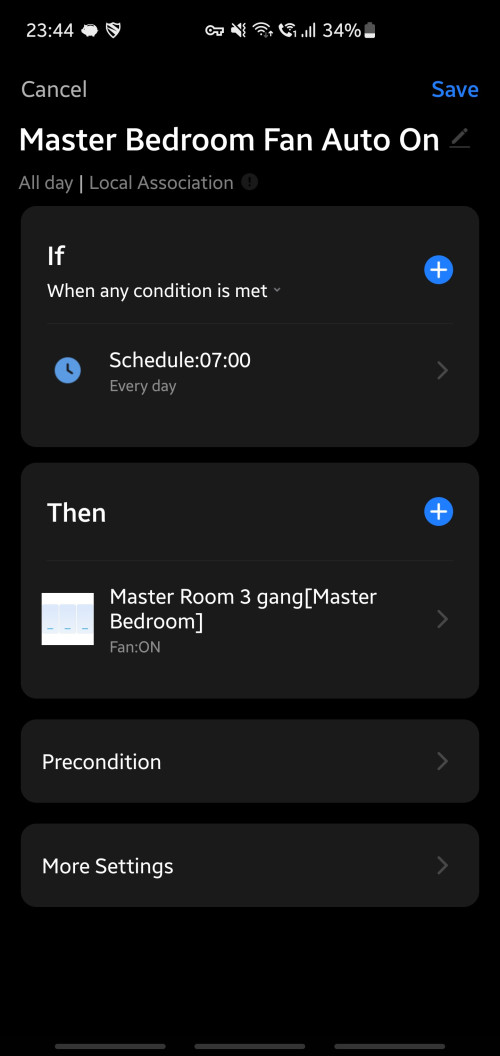 Works for triggering tap to run scenes as well 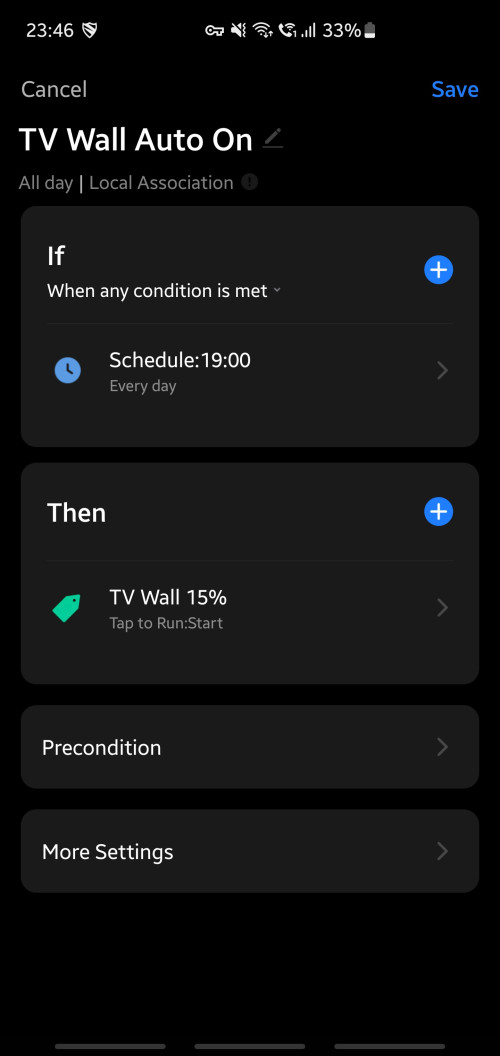 This post has been edited by ZeneticX: Oct 2 2023, 11:47 PM This post has been edited by ZeneticX: Oct 2 2023, 11:47 PM |
|
|
|
|
|
ZeneticX
|
Oct 15 2023, 07:06 PM
|
|
|
QUOTE(WildChai @ Oct 14 2023, 03:24 PM) Hey peeps, Anyone here using smart home speakers? Multi rooms for music and possible PA style also? Want to double up to yell at my kids remotely. Any ideas or anyone using multi room speakers? I just got my Google Nest Mini gen 2 few days ago. For the price i think its loud enough. Usually just set my volume to 60 - 70%. QUOTE(celciuz @ Oct 15 2023, 08:49 AM) Updates on my Aqara S1E screen issue, so originally I had 2 out of 3 problematic... and since it was eye sore so I set it to blackout whenever not in used. Today I tried the remaining last one surviving... it was also faulty ugh... now the whole screen flickers. S1E really not recommended  How long gave you been using them? My Tuya panel *touch wood* almost 3 months now no issues yet |
|
|
|
|
|
ZeneticX
|
Oct 17 2023, 02:46 PM
|
|
|
QUOTE(epicure @ Oct 17 2023, 09:10 AM) I’m impatiently waiting for my Zemismart M1 hub Tryna hit few birds with one stone Features:- 1. Matter Hub - brings all child-devices over to google. (Some of my tuya smart devices dont work in google, only amazon) 2. Zigbee Hub - can connect to tuya zigbee devices 3. Thread border router - apparently it works as one. So, it can extend the thread network - im looking to add more thread coverage too - currently have 2 zemismart matter over thread curtain motors. I notice that thread devices may go offline in homekit from time to time. The remedy is to reboot the curtains. But with the M1 hub, it will allow me to control the curtains (thread devices) in Tuya app, so if it goes offline in Homekit, then i can still have another option. Will post up a short first impression once i get it and set it up Currently all my Tuya Zigbee devices are connected to a Tuya touch panel as the Zigbee hub. If I wanted to use this M1 hub instead to make use of Matter, I need to redo the setup from scratch (eg: remove all devices and reconnect to the new hub) or is there a shortcut?  |
|
|
|
|
|
ZeneticX
|
Oct 17 2023, 03:13 PM
|
|
|
QUOTE(epicure @ Oct 17 2023, 02:54 PM) If you want to bring all to Google, you have to re-pair everything to the M1. Cos this touch panel doesnt work with homekit/google. For my case, ill be replacing my Zemismart homekit hub with the Neo homekit hub to cater for my first floor. Fortunately all tuya zigbee switches at the first floor are google compatible. Then the ground floor shall be served by the M1 hub as some of the ground floor tuya switches arent google compatible. Not sure if you have a workaround for your case though. You may (not sure) end up using it to control all tuya switches within the switch itself, much like the Aqara S1E can control aqara devices in the same user account. Actually I dont have issues with my switches or lights with Google, all of them are compatible with Google home. Just my smart lock and cctv which are both Tuya as well but doesnt support Google, both these are wifi instead of zigbee. In this case would you say there's not much benefit for me to get a Matter hub? I was just thinking along the line of future proofing but then zigbee had worked fine all these while. |
|
|
|
|
|
ZeneticX
|
Oct 17 2023, 03:45 PM
|
|
|
QUOTE(epicure @ Oct 17 2023, 03:20 PM) Oh those wifi devices are stuck. They cant be paired to the M1, which only uses either thread or zigbee. Im afraid youre out of luck, unless you go with the Tuya plugins on home assistant or homebridge (if youre using homekit only). Yeah I figured so... So actually I dont really need Matter unless I have tons of devices which I cannot integrate onto Google Home but they need to be Zigbee devices at least |
|
|
|
|
|
ZeneticX
|
Oct 28 2023, 12:25 PM
|
|
|
QUOTE(ChinKoon.Nau @ Oct 28 2023, 09:19 AM) Can help to advise roughly where the wall socket shall install for smart curtain purpose? Don't want to make it too obvious spoilt the view. Hopefully, someone can share their existing curtain wall socket photo to me. Thanks........ Usually on the wall nearest to where the curtain motor will be. Install as high as possible if you want to hide it better |
|
|
|
|
|
ZeneticX
|
Nov 12 2023, 04:48 AM
|
|
|
QUOTE(-kytz- @ Nov 11 2023, 12:35 PM) Hisense or Midea aircon WiFi app has better integration with Samsung things or Google home? Dont know about these 2 but my Daikin is pretty 'dumb' in google home. Just simple On and Off function available there |
|
|
|
|
|
ZeneticX
|
Dec 22 2023, 07:11 PM
|
|
|
this may sound like a stupid question, let's say if i change my router to a diff model but maintain the same SSID and password, will all my smart home devices still auto connect to it and work as usual?
|
|
|
|
|





 Quote
Quote
 0.1889sec
 0.19
0.19
 7 queries
 GZIP Disabled