Outline ·
[ Standard ] ·
Linear+
Smart Home, Let's discuss
|
zzzhhhzzz
|
 Nov 16 2018, 12:40 PM Nov 16 2018, 12:40 PM
|

|
QUOTE(idoblu @ Nov 16 2018, 12:21 PM) you want to replace your momentary switch with a smart switch that works like a momentary switch?  maybe you should tell us what you are trying to achieve so that I can control the auto gate from my handphone.. sometimes if I forget to shut the auto gate.. can see from my cctv then can use the app to shut it |
|
|
|
|
|
zzzhhhzzz
|
Nov 19 2018, 08:52 AM
|
|
|
hi all.. just wondering.. once you have integrated xiaomi gateway and their switches into Home Assistant, can you still control your xiaomi switch through Mi App ?
|
|
|
|
|
|
zzzhhhzzz
|
Nov 21 2018, 05:13 PM
|
|
|
QUOTE(Fubar20 @ Nov 20 2018, 06:47 PM)  Oh, fellow HA enthusiast. Just curious that why u say that HA can't do "In MiHome, I setup the switch single press to toggle the gateway light " and others Care to elaborate? Hi bro.. just wonderng... If i flash my sonoff t1 switch using ftdi usb controller.. do i need to do soldering ? My sonoff switch came in firmware 2.6.0... So i dun thin SonOta will work... Any recommendarion on good ftdi usb programmer ? |
|
|
|
|
|
zzzhhhzzz
|
Nov 23 2018, 04:51 PM
|
|
|
hi guys.. for the xiaomi gateway.... if it is the one with the radio function it can be assume that it is the latest version of gateway 2 ?
|
|
|
|
|
|
zzzhhhzzz
|
Dec 2 2018, 03:20 AM
|
|
|
Hi to thode who sre running ur automation in Home Assitant using raspberry pi..since you need to run it 24/7,any reliabiity issue so far ? I heard that the weakest part here is the sd card.... Any real tme experienve on this so far ?
|
|
|
|
|
|
zzzhhhzzz
|
Dec 6 2018, 10:06 PM
|
|
|
hi sifus.. im trying to use xiaomi cube to turn on my sonoff-tasmota switch in home assistant.. apparently not able to get it to work.. I have put the following lines in my configuration.yaml : automation: - alias: Cube event tap_twice trigger: platform: event event_type: xiaomi_aqara.cube_action event_data: entity_id: binary_sensor.cube_158d0002794b5b action_type: tap_twice action: service: homeassistant.turn_on entity_id: switch.sonoffTest1 can anyone point out to me where im doing it wrong ? 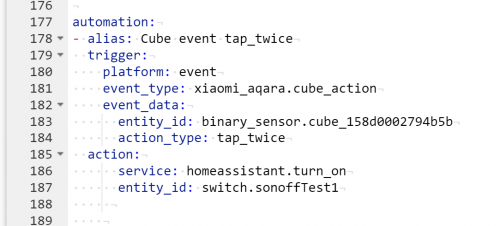 This post has been edited by zzzhhhzzz: Dec 6 2018, 10:08 PM This post has been edited by zzzhhhzzz: Dec 6 2018, 10:08 PM |
|
|
|
|
|
zzzhhhzzz
|
Dec 7 2018, 08:10 AM
|
|
|
QUOTE(Fubar20 @ Dec 6 2018, 10:18 PM) U didn't check the config after adding the changes? Looks like the gap after action: which is service: and entity_id: is too far. Should be just 2 spaces below action: corrected the indentation.. config check show valid... but my cube is still not triggering my sonoff switch  am I using any wrong codes here ? |
|
|
|
|
|
zzzhhhzzz
|
Dec 10 2018, 08:41 AM
|
|
|
QUOTE(Fubar20 @ Dec 7 2018, 08:39 AM) When you press Trigger on the automation card at frontend, does it switch on? Try change to switch.turn_on instead of homeassistant.turn_on. And are you on 0.83 for HA version? There were some breaking changes. All events are prefixed now by "xiaomi_aqara". Please update your automations: motion -> xiaomi_aqara.motion click -> xiaomi_aqara.click cube_action -> xiaomi_aqara.cube_action 0.83i didnt use the automation front end.. I put the codes directly in my configuration.yaml the automation front end doest seems to recognize the even from xiaomi.aqara sienz... |
|
|
|
|
|
zzzhhhzzz
|
Dec 10 2018, 02:44 PM
|
|
|
QUOTE(Fubar20 @ Dec 10 2018, 08:51 AM) Not the yaml codinglah. The trigger in this photo here 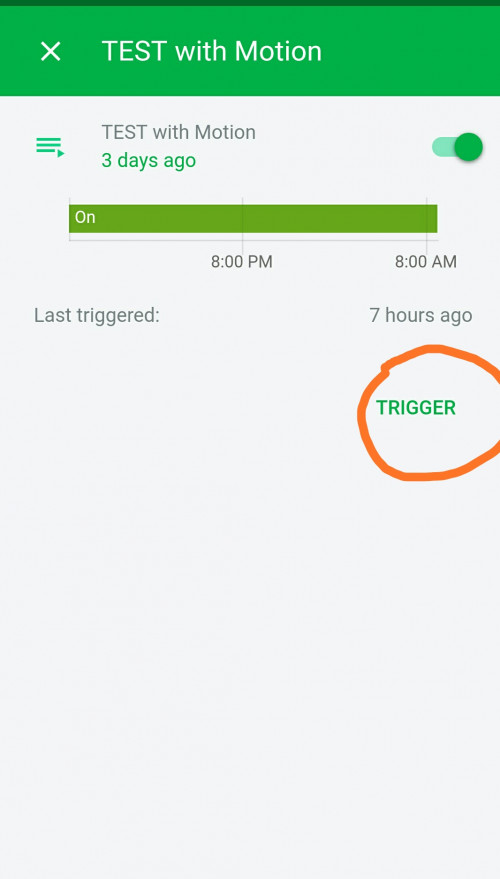 If not ok, then the trigger section got issues where do you find this trigger button ? I have put my coding in the configuration.yaml but cant see the automation anywhere .... |
|
|
|
|
|
zzzhhhzzz
|
Dec 10 2018, 03:01 PM
|
|
|
QUOTE(Fubar20 @ Dec 10 2018, 02:51 PM) The automation code I put at automations.yaml. It will link back to configuration.yaml by this line "automation: !include automations.yaml" After creating the automation, normally will check the config and reload the automations at Configuration/General page The automation created will appear at the frontend with the alias created inside the Automation card. Click on the alias name and it will go to a card with the Trigger button. ok let me try again tonight... im suspecting that the aqara cube is the problem ... seems to have some firmware issue with the gateway earlier... but a lot of forums reported that it has been fix.. but I have a even newer firmware for my gateway... was wondering if that is the culprit... hmmm |
|
|
|
|
|
zzzhhhzzz
|
Dec 11 2018, 02:12 PM
|
|
|
Hmm guys...between google mini and echo dot 3... Whats your pick and why ?
|
|
|
|
|
|
zzzhhhzzz
|
Dec 11 2018, 11:30 PM
|
|
|
QUOTE(idoblu @ Dec 11 2018, 08:17 PM) hei bro.. i recall you mention that there is update version of xiaomi switch wireless version one and also the body sensor.. do you have the model name of the updated version ? so many version in shopee dunno which is the correct one... thx |
|
|
|
|
|
zzzhhhzzz
|
Dec 12 2018, 12:38 AM
|
|
|
QUOTE(idoblu @ Dec 11 2018, 11:51 PM) Model number the same ? Cuz a lot of seller selling the same model number |
|
|
|
|
|
zzzhhhzzz
|
Dec 12 2018, 08:37 AM
|
|
|
QUOTE(idoblu @ Dec 12 2018, 12:40 AM) New and old uses the same number You buy from the link I gave guaranteed correct one la. I bought mine from there too the new wireless switch support double click, long press, and short press right ? What is new in the motion sensor ? |
|
|
|
|
|
zzzhhhzzz
|
Jan 4 2019, 01:16 PM
|
|
|
QUOTE(Fubar20 @ Jan 3 2019, 04:42 PM) Added a Sonoff T1 UK 3 gang with stock firmware 2.6 and connected by Ewelink app. Now it can be controlled using Home Assistant without needing to flash with Tasmota. Just follow the link here and restart Home Assistant. Works for stock Sonoff Basic, 4CH Pro (R2), S20 and S26.  so with this way of integration can you still use xiaomi wireless switches/cube to turn on/off sonoff switches ? |
|
|
|
|
|
zzzhhhzzz
|
Mar 22 2019, 09:49 AM
|
|
|
hi all... anyone of you using Yeelight voice assistant ?
|
|
|
|
|
|
zzzhhhzzz
|
Jun 10 2019, 09:04 AM
|
|
|
hi anyone here using sonoff L1 led strip ? does it have both warm white and cool white ?
|
|
|
|
|
|
zzzhhhzzz
|
Jun 27 2019, 10:14 AM
|
|
|
hi sifu.. I have a sonoff SV .. Is it possible for me to wire it up to my auto gate board so that I can open my gate using ewelink ?
|
|
|
|
|
|
zzzhhhzzz
|
Jul 3 2019, 02:54 PM
|
|
|

Hi all, i am trying to connect power supply to my sonoff SV. Above is the picture of my auto gate circuit board. The circuit board receive electricity after going through a step down transformer.. it has 0 12 24v pin.. may i know which pin should i tap for sonoff ? it has a + and - input on my sonoff sv |
|
|
|
|
|
zzzhhhzzz
|
Nov 26 2019, 11:14 AM
|
|
|
hi guys.. anyone sucessfully implemented using Xiaomi smart motion detector to turn on Sonoff switch ?
|
|
|
|
|



 Quote
Quote
 0.2099sec
 0.54
0.54
 7 queries
 GZIP Disabled