Welcome Guest ( Log In | Register )

Outline · [ Standard ] · Linear+

 Smart Home, Let's discuss

views
     
cdspins
post Jul 20 2021, 03:32 AM

Look at all my stars!!
*******
Senior Member
2,714 posts

Joined: May 2008


QUOTE(vcheewei @ Jul 19 2021, 09:18 PM)
Yes, I wanted to do that. But first I need to terminate it from 2 way switch to 1 way. Any idea how to convert it to 1 way switch..? And from there I can fix a RF switch with battery at the other end.
*
You can either just leave it (the other switch will still have control)
Or you can remove the switch and connect one of the terminal together, the other one just tape and leave it.
cdspins
post Jul 20 2021, 05:57 PM

Look at all my stars!!
*******
Senior Member
2,714 posts

Joined: May 2008


QUOTE(vcheewei @ Jul 20 2021, 10:47 AM)
If I choose to remove the switch by connecting 2 together and leave 1 alone. What about the another switch?

Actually I bought wrongly. I bought a 2 gang 1 way WiFi RF smart switch. If I want to use back that switch, how do I connect the wires?
*
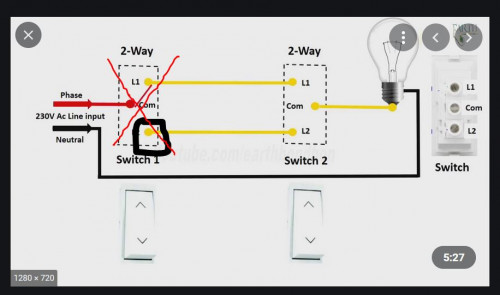
So I simply copy some photo from google and edit, let's say you remove switch 1 and tape L2 while permanently connect com with L1 wire. This means that L2 wires does not function. On Switch 2, you will need a test pen to identified L1 or L2, basically the one with Live will be L1 and then you connect your RF smart switch for L1 and Com.
user posted image

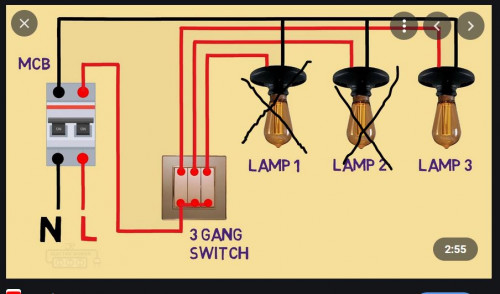
2 Gang 1 Way should not affect your operation, just that 1 of the gang is not connected. The below example show 3 gang 1 way, noticed that 2 of the lamp is not operational. Basically number of gang means output. So it is a single input, multiple output control switch. As you only need 1 control switch, so the other one will be idle

user posted image
cdspins
post Jul 22 2021, 02:45 AM

Look at all my stars!!
*******
Senior Member
2,714 posts

Joined: May 2008


QUOTE(vcheewei @ Jul 21 2021, 06:20 PM)
Hi sifu, I just tried ur method. But the light can’t turn off, it’s on all the way.
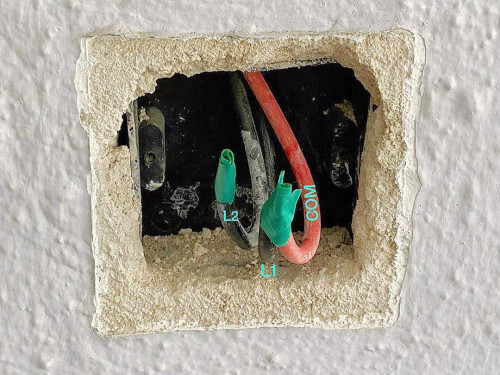
user posted image
This is switch 1 after taped either one L and another L with com.

Just to confirm, do you test with a test pen? So the comm is live for switch 1? Do identify the live wire.

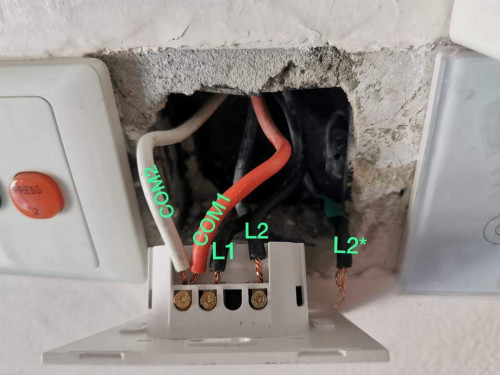
user posted image
This is switch 2, before changing.

Similarly, you need to identify when the switch is on, which one is the live wire.

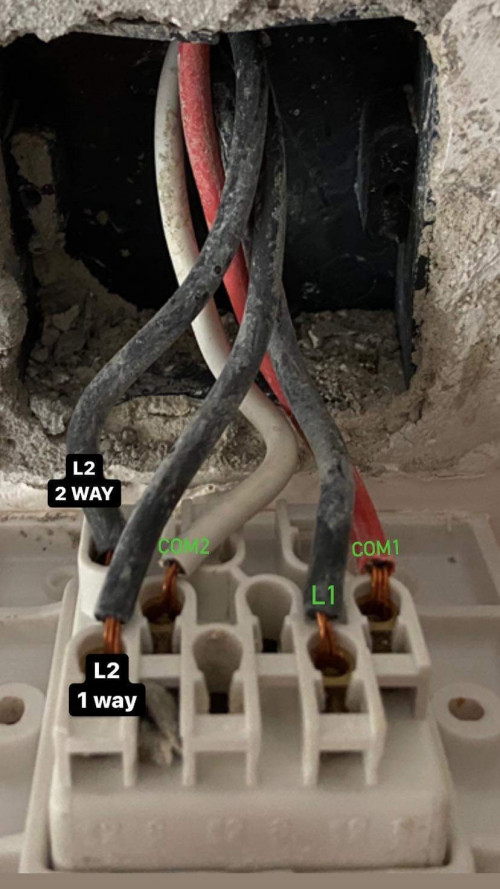
user posted image
This is to switch 2 after changing to smart switch. L1 is doing fine as it’s 1 way switch (straight forward). L2 is the 2 way switch, the label of L2 & L2* might terbalik.

Any wiring diagram for your switch 2? or what is the model?

Any pros out there can help?
*
cdspins
post Jul 23 2021, 02:35 AM

Look at all my stars!!
*******
Senior Member
2,714 posts

Joined: May 2008


QUOTE(zr125 @ Jul 22 2021, 03:33 PM)
would like to ask if there's any 20A switch with power monitoring that is compatible with tuya/smart life?
*
Didn't find any switch but maybe you can consider DIN rail energy meter since appliances that need 20A (water heater, oven, air-cond) usually is non looping and usually directly connect to the junction box.
cdspins
post Jul 23 2021, 02:20 PM

Look at all my stars!!
*******
Senior Member
2,714 posts

Joined: May 2008


QUOTE(zr125 @ Jul 23 2021, 12:56 PM)
Can't seem to find as well for 10A/16A.
It doesn't work as circuit breaker right? I found it on shopee but cost almost twice for normal wifi switch.  cry.gif
*
If you need to support high current, there is a price to pay tongue.gif
It is not a circuit breaker. It is a smart power meter
https://shopee.com.my/%E2%98%85MK-90-250V-W...1&stm_referrer=
cdspins
post Jul 28 2021, 02:04 PM

Look at all my stars!!
*******
Senior Member
2,714 posts

Joined: May 2008


QUOTE(vcheewei @ Jul 28 2021, 12:50 PM)
Sifu, I’ve tested and identified the Live with test pen.
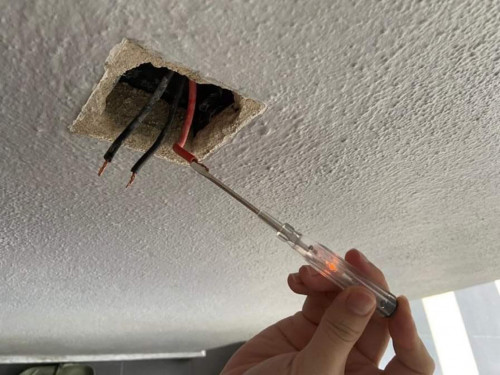
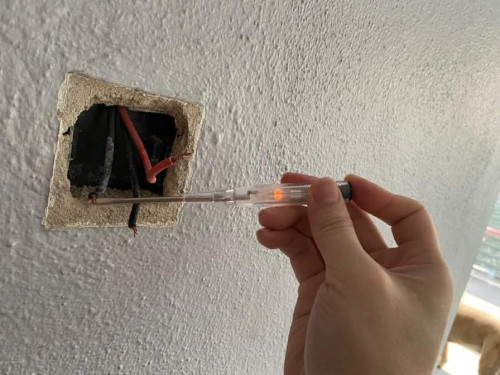
user posted image
user posted image

On switch 1, One of the black and the red wire lighted.
So which one I should taped together?
On switch 2, I think I’ve put the live wrongly. Should I put the live wire together with the red wire (live for another lighting) on COM?
Any idea on how to remove the 2 way switch ?
*
When you run the test using test pen, both switch 1 and switch 2 you already open up and not connected? seems to me that is not the case and your 2 way switch is connected differently then the diagram I provided in the earlier post

This is the other way your switch maybe connected and if I assume you did not disconnect both switch, your switch may have 2 live which is from com from the other switch and L1 as you observed in the diagram below:
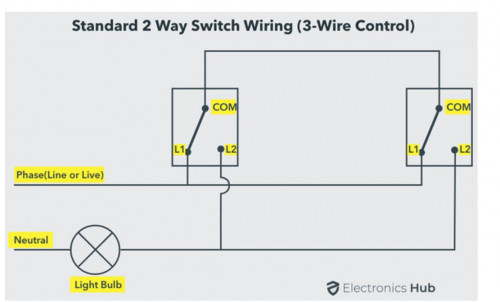
user posted image

In this circuitry, you may not be able to keep both switch to be functioning (unless you are able to make a connection from switch 1 to switch 2). The best option is to remove one of the switch, as there are identical, you get to choose which 1 you want to turn to smart switch.

To identified Live is easy, under the condition of both switch fully open and no wires connect. your test pen can tell which is live. Then labelled it.
To identify the neutral, connect the live to one of the wires, if your light switches on, then it is the neutral and this automatically make the 3rd wire com.

Once you identify this, the switch you are not using, tape all the wires and leave it.
For the switch to be turn to smart switch, just ignored the com and connect the live and neutral accordingly.

cdspins
post Aug 7 2021, 03:56 AM

Look at all my stars!!
*******
Senior Member
2,714 posts

Joined: May 2008


QUOTE(vcheewei @ Aug 7 2021, 12:35 AM)
The seller said this switch can either connect to Neutral or I can use it as single fire line but has to connect to capacitor.
*
The seller is not honest. The switch required neutral, by connecting a capacitor to the load, you are basically bypassing the switch and it may not guarantee to work. Does the seller advice on capacitance required.

Just change it to a model without neutral is a better way
cdspins
post Aug 7 2021, 11:44 AM

Look at all my stars!!
*******
Senior Member
2,714 posts

Joined: May 2008


QUOTE(adamw @ Aug 7 2021, 10:49 AM)
Yes, already tested last year the Zigbee switch that can work with or without neutral but havaing a lots of issues until I have given up. Also some of the no neutral switches I tested does not seems to last more than 18 months doh.gif
*
Yes, totally agreed on this.
For those that modified neutral requiring switch to bypass by capacitor. You need to ensure the correct capacitance.
As AC switch at 50Hz, the connection and wiring should be solder, a loose connection will kill your device in the long run.

PS: IN reality, non neutral switch also use capacitor to bypass (some advance model have even complicated circuitry to stabilize the power)... but as the whole thing is integrated and solder as 1 piece, it is better and last longer

cdspins
post Aug 7 2021, 06:28 PM

Look at all my stars!!
*******
Senior Member
2,714 posts

Joined: May 2008


QUOTE(vcheewei @ Aug 7 2021, 01:28 PM)
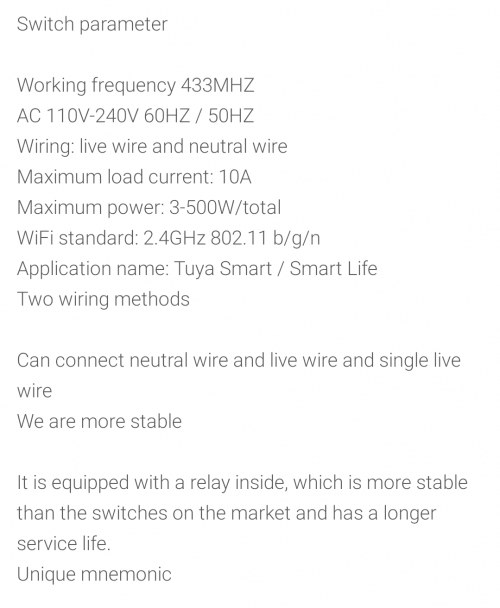
Sifu, this is the description he stated and before purchase he mentioned to me, this can use without neutral.
I texted him to confirm again.

user posted image
Wan to know, if a smart switch with no neutral connected to the light without putting the capacitor. What will happen actually? Totally no light or flicker or how?
And why it has to connect to L1 and can’t be L2 or L3? If say I have 3 gang switch
*
when you mean connect to the light... do you connect the neutral or just leave it.
If you connect the neutral directly... I think it will be on always on... your light will always be on.

If you leave the neutral out, my guess is that the switch operate as normal switch, no smart function as there is no power.
cdspins
post Aug 8 2021, 04:02 PM

Look at all my stars!!
*******
Senior Member
2,714 posts

Joined: May 2008


QUOTE(vcheewei @ Aug 7 2021, 06:34 PM)
I was saying, when there’s no neutral wire in the switch box and connect to a no neutral smart switch without putting the capacitor. Isn’t it a must to put capacitor when using a smart switch without neutral?
*
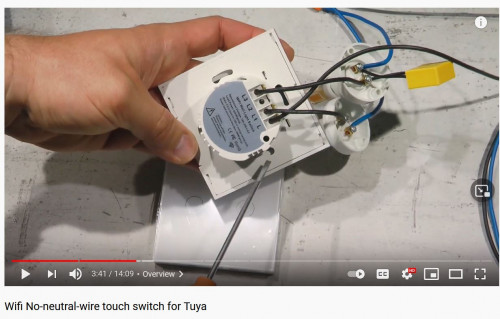
For those, they provide capacitor which is to be install on the light itself or the load. Not at the switch.

user posted image

The video link is
https://www.youtube.com/watch?v=I3PprtrPHPg
cdspins
post Aug 9 2021, 04:11 AM

Look at all my stars!!
*******
Senior Member
2,714 posts

Joined: May 2008


QUOTE(vcheewei @ Aug 8 2021, 08:48 PM)
Yes yes, they provided me a similar capacitor like the video.
What I mean was putting it on the light not switch. Sorry for confusing you.
According to the seller, the capacitor has to put on L1, and L1 cannot be fluorescent light. But the problem is, the 3 gang, 1 is connected to fluorescent light, another one is to a power socket for an exhaust fan plug and the last one is LED tube light.

Is it possible to put the capacitor on the exhaust fan plug or LED tube light? If can, how?
*
Hmm... I don't understand why you cannot put LED tube light as L1? Just switch the wires of these 2 at the switch socket for the fluorescent light and LED tube light will do. Is the arrangement of the switch that important? hmm.gif

For the capacitor, it is best install on LED tube light, the exhaust may or may not work, there is no guarantee as it is a motor.


cdspins
post Aug 9 2021, 02:24 PM

Look at all my stars!!
*******
Senior Member
2,714 posts

Joined: May 2008


QUOTE(vcheewei @ Aug 9 2021, 12:54 PM)
Of course sequence not important. Just want to get confirmation from sifu before doing the job 😁😁😁
I will put LED tube light as L1, but My original switch has 5 wires. How to connect them? I know red is at L, then other 4 macam mana?
*
You never take photo or identified the wires when you disconnected them? doh.gif
Oh.... you are going to waste a lot of time on this. tongue.gif

Ideally, you should have 4 wires. 1 lives and 3 loads (assuming it is a 3 gang switch). As for the last wire, it maybe ground, or it maybe looping for lives....

So... first identify the Live with test pen.
Next, identify your loads 1 by 1....just connect the live to the load and see which of them turned on...
Finally, the wire that when you connect, if your house electricity trip, then it is ground.
Else, it is live looping. (I think, maybe others sifu can confirm) If you leave this wire out, one of your switch else where will not have power (or previously you mention this is a 2 way switch? then this maybe the com to the other switch)

Anyway have fun doing try and error and make sure to be safe. Have another people around you and wear protective gears. flex.gif
cdspins
post Aug 10 2021, 11:36 AM

Look at all my stars!!
*******
Senior Member
2,714 posts

Joined: May 2008


QUOTE(Max @ Aug 9 2021, 03:40 PM)
that 1 loop to another nearby switch.
u can find which switch 'unusable' by disconnecting the looping.

nope. we live in development where we can cut cost here and there..  whistling.gif  tongue.gif
*
Yup... it is very common and if it is for lighting, there is not much issue with such looping.
Imagine if we have to have each switch run to the junction switch box... Your house switch box will need to accommodate up to 50 to 100 MCB tongue.gif
cdspins
post Aug 10 2021, 11:41 AM

Look at all my stars!!
*******
Senior Member
2,714 posts

Joined: May 2008


QUOTE(vcheewei @ Aug 10 2021, 10:21 AM)
This one is another switch..
Thank you sifu… Kao dim Liao… another pro in this forum…

Gonna change another smart switch in my room later. Hopefully everything goes smoothly 😬😬😬

By the way, are u using any motion sensors? Which one u recommend?

Need a reasonable price with shorter interval time between each detection. I couldn’t find any good one and I bought one OEM motion sensor. Not so good, interval time not fixed,sometimes few secs, sometimes few mins.
*
What is the purpose of the motion sensors... to turn on light? Where will the light be installed? Indoor or outdoor? How will it interface with your system, through WIFI (smart) or directly connected to the light?

In my neighborhood, one of my neighbor uses this. It seems quite reliable. At night, when I walk pass, the light turns on immediately

https://shopee.com.my/PHILIPS-MOTION-SENSOR...AiABEgLUpPD_BwE


cdspins
post Aug 17 2021, 01:13 PM

Look at all my stars!!
*******
Senior Member
2,714 posts

Joined: May 2008


QUOTE(cablesguy @ Aug 17 2021, 09:34 AM)
Zot
I wouldnt know. Anyway dont hv to believe me, doesnt matter. Just saying what I saw.
*
I employed different air cond cleaning service before, some did not dismount the indoor unit, but some will... Maybe depends on the "dirtiness" of the unit.For the refilling of the gas, it is done when they install back the indoor unit, then they will start the air-cond and check the pressure and also if the air cond is cold, if there is a need to refill, they can refill through the check gauge...
cdspins
post Aug 17 2021, 02:19 PM

Look at all my stars!!
*******
Senior Member
2,714 posts

Joined: May 2008


QUOTE(Zot @ Aug 17 2021, 01:50 PM)
Great you are a DIY-er.

But once every 1 to 2 years, it is better to employ professional to check the aircond.
Mainly they will check the compressor current draw to determine the state of the compressor motor as well as the capacitors, the pressure of the gas... and finally cleaning (but I think this part you handle yourself far better) laugh.gif
cdspins
post Aug 17 2021, 02:32 PM

Look at all my stars!!
*******
Senior Member
2,714 posts

Joined: May 2008


QUOTE(cablesguy @ Aug 17 2021, 02:21 PM)
Something abt cleaning more thorough by dismounting or something, I did see some black stuff coming out when he cleaned the indoor units, I cant be certain if its due to dismounting, but this guy seems quite thorough so no complains.
*
There is pro and cons on dismounting the indoor unit for cleaning.

The pro is that by dismounting it to wash under running water and soap, the coils can be clean far better. The black stuff is probably dust+water+oil that accumulate overtimes.

But the down side is that the technician need to be professional, the circuits and blower motor need to be protected so that it does not get wet.

When installing it back, the connection needs to be reconnected back securely both the electrical and also the coolant piping.


cdspins
post Aug 17 2021, 04:52 PM

Look at all my stars!!
*******
Senior Member
2,714 posts

Joined: May 2008


QUOTE(Zot @ Aug 17 2021, 04:16 PM)
The exterior unit usually has fin& blower side separated from the compressor, and wiring side. I use water to spray direct to the fin and use brush to clean. No need to dismantle anything actually. It is quite safe.

I've done this few time. The fan side also also sprayed together with the fin. It is and inductive motor with no brush. I would not worry if it get wet a bit.

I think no need to worry much about capacitor. Just replace if you think it is bad. If faulty, compressor will not turned on. The price is cheaper than the technician labor fee.

If vibration too bad and make so much noise, it is normally the rubber bushes need replacement (usually 3 bushes). The cost for 1hp is less than RM10. I replaced it once before. Sounds like new air-cond  thumbsup.gif
*
You are the man bruce.gif

Yes... if you know what you are doing, or at least learnt about it, then you can service it by yourself.
But for general public, I would advise against it as electrical appliances servicing poses certain danger. For example, short circuit, fire, electrocute, height... etc.
cdspins
post Aug 27 2021, 12:08 PM

Look at all my stars!!
*******
Senior Member
2,714 posts

Joined: May 2008


Use a test pen to confirmed that both L1A and L1BC is live... your next question is how to turn it into a smart switch without neutral?
cdspins
post Oct 28 2021, 10:25 AM

Look at all my stars!!
*******
Senior Member
2,714 posts

Joined: May 2008


QUOTE(cablesguy @ Oct 28 2021, 10:15 AM)
The newer Zigbee switches dont need capacitors, have option to not connect neutral if none present,  I bought a few but havent tried so cant comment further, anyone here tried?
*
Wonder how it gets power without neutral or capacitor? Battery operated? hmm.gif

3 Pages < 1 2 3 >Top
 

Change to:
| Lo-Fi Version
0.3732sec    0.50    7 queries    GZIP Disabled
Time is now: 17th December 2025 - 08:59 PM