Welcome Guest ( Log In | Register )

Bump Topic Topic Closed RSS Feed

Outline · [ Standard ] · Linear+

 [V27] Lowyat.Net Mechanical Keyboard Club

views
     
justnits
post Aug 5 2015, 01:14 PM

Mechanical Keyboard Addict
*******
Senior Member
2,968 posts

Joined: Jan 2003
From: Penang, Malaysia


QUOTE(dlwk1988 @ Aug 4 2015, 03:31 PM)
Hi sifus want to ask your expertise on this.

i saw this IBM Terminal keyboard Model M 1397000 or 1397003 few days ago at my workplace and they are willing to let go off it for cheap. Pic for reference user posted image

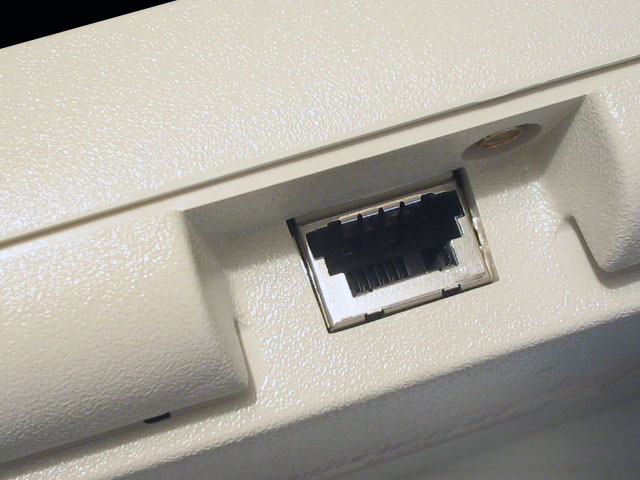
but i notice its port is using some sort jack that looked like LAN cable (i think its RJ45). is there anyway i could make it to run with the current gen PC?
*
got gambar of the port?
got cable kah?
justnits
post Aug 5 2015, 05:50 PM

Mechanical Keyboard Addict
*******
Senior Member
2,968 posts

Joined: Jan 2003
From: Penang, Malaysia


QUOTE(dlwk1988 @ Aug 5 2015, 04:09 PM)
currently the keyboard is not with me, will try to get few pics later.
it should look like this
user posted image

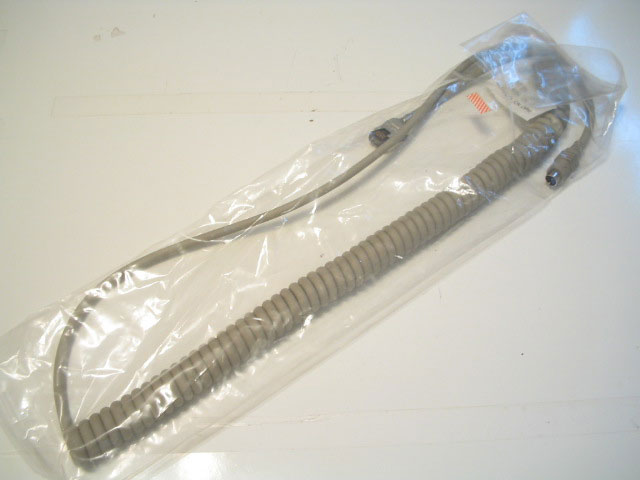
the cord itself is similar to telephone line cord.

user posted image
*
it's similar to my IBM Model M SSK.
if you have that cable, then you just need a PS/2 to USB converter (not the cheap ones)

this type works for me.
» Click to show Spoiler - click again to hide... «


This post has been edited by justnits: Aug 5 2015, 05:51 PM
justnits
post Aug 7 2015, 12:30 AM

Mechanical Keyboard Addict
*******
Senior Member
2,968 posts

Joined: Jan 2003
From: Penang, Malaysia


QUOTE(DarkSilver @ Aug 6 2015, 11:08 PM)
---In General---
Ducky Shine 2, 3, 4, 5(by numbers) are higher-end models. Price ranged from RM 4XX-5XX for standard ones.
Ducky ZERO series are lower-end models. Price ranged from RM 2XX-3XX for standard ones.
Ducky G2Pro is like crazily cheap, rival those china lousy brand price, lower than RM 200. tongue.gif  laugh.gif
*
doh.gif
you got it cheap because of stock clearance sale.
quality is on par with the Shine series, which is their flagship series, just without full led.
jangan keliru orang2 sweat.gif
justnits
post Aug 11 2015, 01:57 PM

Mechanical Keyboard Addict
*******
Senior Member
2,968 posts

Joined: Jan 2003
From: Penang, Malaysia


QUOTE(misterAy @ Aug 11 2015, 01:48 PM)
Can anyone suggest a good mkb based their own experience.

So many choices to choose from. Already test a few switch, I'm comfortable with brown type.

Sorry, I've no idea regarding which one a good or which one to avoid mkb.  icon_question.gif
*
if possible, do visit the first page of this thread smile.gif

otherwise, read on.

i can vouch for ducky brand but unfortunately, i'm not too sure about their latest range.

if you don't mind having no led backlight, then go for filco.

if you are a bit tight on budget (RM250-RM300), i'd recommend ducky zero.

any lower than that you might have to resort to 2nd hand keyboards or china boards (some of them are not cherry mx switch, but compatible/clone mx switch which some are pretty good and can stand toe to toe with cherry, sometimes better.)
justnits
post Aug 11 2015, 02:33 PM

Mechanical Keyboard Addict
*******
Senior Member
2,968 posts

Joined: Jan 2003
From: Penang, Malaysia


QUOTE(misterAy @ Aug 11 2015, 02:10 PM)
I do read read several pages from start, except that i need feedback from experience user.
My budget around 450 max..
From that price view, for a new mkb what possible i might get and for 2nd mkb what the best i might get.
I dont mind about backlighting..I do need several extra programmable key as it assist me in work.
*
while i'm sure razer, corsair and logitech has keyboards that has macro functions, i'm still putting the ability to change keycaps with standard layout keys as one of the priority in my recommendations.
there's keymapping software out there, such as AutoHotKey.
use this with any keyboard, you get yourself a keyboard with the ability to keymap or macro it.

you can't go wrong with filco if what you are looking for is quality.
HOWEVER, one downside about filco is the stabs they use, which is COSTAR stabs, which i'll explain briefly later.
otherwise the other best option would be ducky.
i have ducky shine 2 and filco majestouch 2 tkl, hopefully that makes my explanation slightly more reliable HAHA! tongue.gif

Pros of COSTAR stabs - Keypress feeling is very natural for the big modifier keys.
Cons of COSTAR stabs - Changing keycaps will take more time compared to CHERRY stabs, and sometimes have the risk of breaking the inserts (or losing it). So if you like to change keycaps often, you will get pissed off with COSTAR stabs.

Pros of CHERRY stabs - Changing keycaps is a breeze, won't risk losing any part of the stabs or breaking it.
Cons of CHERRY stabs - Keypress feeling can be mushy and annoying for the big modifier keys. HOWEVER, this can be fixed by doing leg clipping mod on the stabs (but this requires you to open up the keyboard and desolder some keys, if not all, to remove the stabilizers and mod it.)



justnits
post Aug 11 2015, 02:49 PM

Mechanical Keyboard Addict
*******
Senior Member
2,968 posts

Joined: Jan 2003
From: Penang, Malaysia


QUOTE(Nursh @ Aug 11 2015, 02:26 PM)
Hey guys i got a problem with my Ducky Shine 3. Please do refer to my image here : http://imgur.com/a/L43m5
The problem i got is that when i press FN+F9 , the F5 LED will light up while F1-F4 & F6-F8 didnt light up. At 1st only 17 LED r dead, i do the soldering but even more LED die. I dont even know why, probably because i got shocked a few time during soldering process? will this cause more led to die?
*
» Click to show Spoiler - click again to hide... «


that doesn't look like a clean solder sweat.gif
also, when soldering LED, you must not "solder" it for too long (over 4 seconds on 300 degree) as what alpha001 mentions, heat will kill off the led.
best practice is solder one of the leg first, then proceed with other led before soldering the second leg, this is to give it time to cool off first before the 2nd burn.

if you desolder the led and then resolder it back, chances are some of the led might have died in the process since to desolder the factory solder requires high temp.

you can get new leds to replace the old ones or those which is not working, or just go to this link WTS Mechanical Keyboard & Accessories & Repair rclxms.gif


EDIT:
eh, i baru nampak your statement saying that you kena shock a few times when soldering sweat.gif
sounds like electro static discharge to me.

1) you need to invest in a good soldering station with variable temperature and with ESD safe feature.
2) practice some soldering first before going in for the board.
3) i hope that you didn't connect your keyboard to your pc usb when soldering?


This post has been edited by justnits: Aug 11 2015, 02:55 PM
justnits
post Aug 11 2015, 04:05 PM

Mechanical Keyboard Addict
*******
Senior Member
2,968 posts

Joined: Jan 2003
From: Penang, Malaysia


QUOTE(misterAy @ Aug 11 2015, 03:19 PM)
Sure i'll look into that. Thank for the great explanation.  thumbup.gif

From what i understand :
1. Filco for quality
2. Ducky for backlit
3. Others were costly bcause of branding

IINM, majestouch 2 doesnt have numpad. Or does it come with full size?
Which one of your kb that you use most?
*
partially true, but also because:-
1) they are using non-standard layout, thus causing difficulties in getting full keycaps replacement for it. but who knows, over time, things might change in the keycaps industries smile.gif
2) some are using cheap switches

quovadis123 has already answer your question regarding whether filco comes in full size or not. yes they do come in full size.

hmm, how to say ah, i use them all quite equally?
my ducky shine 2 (also my first mkb back in 2013!) had gone through some major overhaul (change switch to gateron red, led, nonslip mat and spray mod) and it's still working wonderfully.
i'm using this in my main office.
my filco majestouch 2 mx blue just gone through some minor mods (spray and non-slip mat mod) and i'm using it in my 2nd office.
at my home i'm using nerd tkl.
justnits
post Aug 13 2015, 09:46 AM

Mechanical Keyboard Addict
*******
Senior Member
2,968 posts

Joined: Jan 2003
From: Penang, Malaysia


QUOTE(wyncent911203 @ Aug 13 2015, 09:43 AM)
Inserted the keycaps to my K70 RGB, looked like this smile.gif

[attachmentid=4738608]
*
a moment of silence for the win key, menu/fn key and spacebar.

justnits
post Aug 13 2015, 09:58 AM

Mechanical Keyboard Addict
*******
Senior Member
2,968 posts

Joined: Jan 2003
From: Penang, Malaysia


QUOTE(wyncent911203 @ Aug 13 2015, 09:52 AM)
i wonder how this guy modified the spacebar to fit in..

http://deskthority.net/f-o-r-s-a-l-e-f58/k...aps-t10704.html
*
your corsair is a 6.5u spacebar and that DT post probably used a 6.25u spacebar and modify the stems at the bottom to fit corsair's 6.5u stem.
that probably involved some surgery to the stem at the bottom of the spacebar, removing it with a cutter, and reposition it and stick it with glue or epoxy or something.
justnits
post Aug 13 2015, 06:03 PM

Mechanical Keyboard Addict
*******
Senior Member
2,968 posts

Joined: Jan 2003
From: Penang, Malaysia


QUOTE(sai86 @ Aug 13 2015, 05:17 PM)
OH..dirt can do this.....
well, warranty is over years ago. and its in the store for more than 1 years since i gotten the filco  tongue.gif
will try to crack it open and do what you suggested.
*
hmm, which reminds me, my old Keycool 87 using cherry mx blue also has double tap issue...
i had to swap the switch altogether.
justnits
post Aug 15 2015, 12:09 PM

Mechanical Keyboard Addict
*******
Senior Member
2,968 posts

Joined: Jan 2003
From: Penang, Malaysia


QUOTE(kingdomdemon @ Aug 15 2015, 07:08 AM)
warranty period already over. i still prefer my Ducky 1  blush.gif

it can be used, i dont use that key often also. just trying my luck to see if there anyone to help to repair it tongue.gif
*
what switch is that?


6 Pages « < 4 5 6Top
Topic ClosedOptions
 

Change to:
| Lo-Fi Version
0.0524sec    0.75    7 queries    GZIP Disabled
Time is now: 3rd December 2025 - 02:41 PM