

Hi guys,
I don't know where to ask, can my laptop model Toshiba Satellite P745 compatible with any SSD apart from the 2.5".
The SSD Thread V5, Solid State Drive
The SSD Thread V5, Solid State Drive
|
|
 Jul 4 2016, 11:44 AM Jul 4 2016, 11:44 AM
Return to original view | Post
#1
|
 
Junior Member
179 posts Joined: Sep 2008 From: Petaling Jaya  
|
Hi guys,
I don't know where to ask, can my laptop model Toshiba Satellite P745 compatible with any SSD apart from the 2.5". |
|
|
|
|
|
Jul 4 2016, 11:54 AM
Return to original view | Post
#2
|
|
Junior Member
179 posts Joined: Sep 2008 From: Petaling Jaya
|
QUOTE(sHawTY @ Jul 4 2016, 11:51 AM) Satellite P745 doesn't have neither an mSATA slot nor an M.2 slot sigh.. tq for infoYour only choice is the 2.5" HDD slot  |
|
|
Jul 11 2016, 08:43 PM
Return to original view | IPv6 | Post
#3
|
|
Junior Member
179 posts Joined: Sep 2008 From: Petaling Jaya
|
Hi guys,
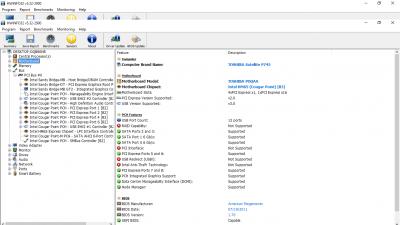
Need your help whether my motherboard only has 1 or 2 port for 6gbs and it is necessary to update the BIOS? For the 2nd screenshot, it's show there's two port of 6gbs but the 1st screenshot only show 1. 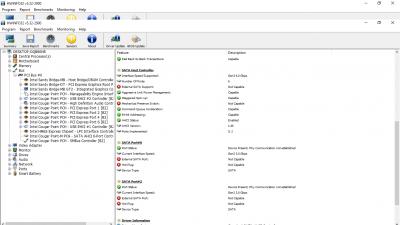
This post has been edited by kcirdenk: Jul 11 2016, 08:57 PM |
|
|
Jul 12 2016, 09:25 AM
Return to original view | Post
#4
|
|
Junior Member
179 posts Joined: Sep 2008 From: Petaling Jaya
|
QUOTE(horns @ Jul 12 2016, 02:08 AM) sandy bridge should have 2x sata3 ports. you should look at sata ports instead of sata host controller. in your case it's likely that the current hardware (hdd, dvdrom?) limit the current sata speed (hardware that run at sata2 speed only), hence you saw my current hdd (boot) is using sata2 while the dvdrom convert to caddy is using sata3.i only wanted to change the hdd (boot) to ssd while the caddy remain as it is. is it possible to change the sata3 back to hdd (boot)? |
|
|
Jul 12 2016, 03:28 PM
Return to original view | Post
#5
|
|
Junior Member
179 posts Joined: Sep 2008 From: Petaling Jaya
|
QUOTE(horns @ Jul 12 2016, 02:58 PM) the reason why i said you have sata2 hardware limiting max speed of existing sata3 ports was because in your first image, it showed that both current interface speed were at sata2. that means your hdd and dvdrom/caddy actually runs at sata2 speed. tq for the info. appreciate it.yes you can replace the hdd with ssd, and i think the new ssd should run at sata3 speed. i don't get the last question. |
|
|
Jul 21 2017, 07:21 PM
Return to original view | IPv6 | Post
#6
|
|
Junior Member
179 posts Joined: Sep 2008 From: Petaling Jaya
|
is m.2 ssd tend to get very hot? planning to get one for steam games.
|
|
|
|
|
|
Jul 22 2017, 12:45 PM
Return to original view | IPv6 | Post
#7
|
|
Junior Member
179 posts Joined: Sep 2008 From: Petaling Jaya
|
[quote=horns,Jul 22 2017, 12:00 AM]
m.2 sata ssd is not that hot compared to m.2 nvme hi, dont mind me asking again. is this Kingston m.2 can slot into my Asus Prime B250M-A motherboard? Tq. https://www.lelong.com.my/kingston-m-2-120g...8-02-Sale-P.htm |
|
|
Jul 22 2017, 05:26 PM
Return to original view | IPv6 | Post
#8
|
|
Junior Member
179 posts Joined: Sep 2008 From: Petaling Jaya
|
QUOTE(horns @ Jul 22 2017, 01:15 PM) according to specs here, https://www.asus.com/us/Motherboards/PRIME-...specifications/ yes you can use this m.2 sata ssd on one of the m.2 slots. Thanks mate.consult your mobo manual the location of the sata_1 port, because if you plugged in a sata hdd on that port, the hdd will not work. |
|
|
Jul 25 2017, 08:14 PM
Return to original view | IPv6 | Post
#9
|
|
Junior Member
179 posts Joined: Sep 2008 From: Petaling Jaya
|
Hi, is the benchmark for my Kingston UV400 120GB ok?
This post has been edited by kcirdenk: Jul 25 2017, 08:18 PM Attached thumbnail(s) 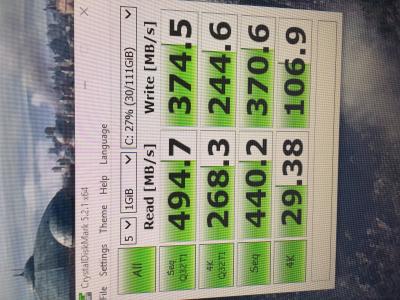
|
|
Topic ClosedOptions
|
| Change to: |  0.0481sec 0.0481sec
 0.50 0.50
 7 queries 7 queries
 GZIP Disabled GZIP Disabled
Time is now: 5th December 2025 - 10:41 PM |
 Quote
Quote