Welcome Guest ( Log In | Register )

Outline · [ Standard ] · Linear+

Review Edifier R2730DB Studio Speaker Unboxing and Review, Successor of R2700. Bluetooth + Digital!

views
     
TSasunakirito
post Feb 8 2015, 11:33 AM, updated 7y ago

Regular
******
Senior Member
1,068 posts

Joined: Oct 2012
Author's Note: The original review is found at tech.ayumilove.net, please head to the site to show us your support as well. Click here to view all my product reviews!

Hi guys! Today I'll be performing an unboxing and review of the latest Edifier Studio series speaker and its the Edifier R2730DB (D = Digital, B = Bluetooth). Doesn't it look similar to the R2700? Yes it does and its the successor of that speaker! It's an upgraded version with some cool features from R2000DB that I reviewed last year. The SRP (Suggested Retail Price) is RM689, which places it between R2700 (RM599) and R2800 (RM799).

user posted image

The R2730DB is a 2.0 speaker system which offers a 3-way Tri-amp audio solution. It has an abundance of connectivity which includes Bluetooth, Coaxial, Optical, RCA to allow you to connect to multiple audio sources simultaneously. Total watt output is 136 watts, more than sufficient to produce deep ground shaking bass from its 6½ inch Bass Driver, crystal clear treble from its ¾ inch tweeter, and great mids from its mid-range 4 inch driver. This great audio quality is achieved by utilizing Texas Instrument professional audio processor for sophisticated processing which includes electronic crossover, speaker compensation and dynamic range control in audio DSP.

Before diving deeper into the content, let's take a step back and get a quick glance of the overall features that R2730DB provides and the specifications of the speaker.

Features
1. Active bookshelf speaker with Bluetooth pairing capability for music playback
2. Dual Digital (optical, coaxial) and dual analogue (RCA and 3.5mm) audio inputs for versatile source connection
3. 6½ inch (178mm) bass driver, 4 inch (116mm) mid-range and ¾ inch (19mm) NdFeB tweeter drivers
4. Calibrated, front mounted bass reflect port effectively extands bass response
5. Professional 5 pin XLR canon type speaker connecting cable with angled connector
6. Class D amplifier with DSP based electronic crossover and dynamic range control minimize system distortion
7. Stand-alone bass signal output available for connection to external active subwoofer
8. Multi-functional wireless remote control and side panel control on active speaker
9. All MDF wooden enclosures to minimize acoustic resonance
10. Universal 100V-240V power supply

Specifications
1. Total power output: RMS 14Wx2 (treble) + 14Wx2 (mid-range) + 40Wx2(bass) (DRC ON)
2. Signal to noise ratio: ≥85 dBA
3. Frequency Response: 45Hz-20KHz(@+/-6db)
4. Input sensitivity: Line in 1: 700 mV ± 50 mVLine in 2: 500 mV ± 50 mV OPT/COX: 350mFFs ± 50mFFs
5. Input Type: RCA/Bluetooth/Optical/Coaxial
6. Bass Unit: 6½ inch (178mm)
7. Mid-Range unit: 4 inch (116mm)
8. Treble unit: Φ19 mm silk dome tweeter

Packaging

Packaging-1: Here is an overview look of the entire box. Very large indeed! biggrin.gif
user posted image

Packaging-2: Starting from the front, it has a black-and-white image of the R2730DB speaker along with the remote control for a comparison in the size. However, when I did a real comparison, it should be approximately 4.5 times the height of the remote control. smile.gif
user posted image

Packaging-3: The box's left side describes the speaker specifications and and the box's right side describes the speaker features as listed in the above introduction of this review. Both descriptions are translated into 6 languages (English, French, Spanish, Danish, Italian, Portuguese)
user posted image

This post has been edited by asunakirito: Jun 21 2017, 09:13 AM
TSasunakirito
post Feb 8 2015, 11:36 AM

Regular
******
Senior Member
1,068 posts

Joined: Oct 2012
Unboxing

Unboxing-1: Let's start opening up the box! The top seal is cut open with a pen knife.
user posted image

Unboxing-2: Opening up the box, I noticed there is additional information which isn't presented on the exterior.
user posted image

Unboxing-3: Taking a closer look, the left box's flap reveals a guide on connecting your speaker, whereas the right box's flap is a list of items contained within this box.
user posted image
user posted image

Unboxing-4: Upon opening the box, you will be greeted with the speaker's accessories placed on top of the protective thick white foam.
user posted image

Unboxing-5: Taking out the top foam reveal our active and passive speaker, both wrapped nicely with a plastic bag.
user posted image

Unboxing-6: Both speakers are kinda heavy but the active speaker is a little more heavier as it contains the electronic components. The XLR speaker cable hardwired to the active speaker is wrapped in a separate plastic bag as shown in the image.
user posted image

Unboxing-7: After extracting the core component, nothing is left except for the bottom protective foam.
user posted image

This post has been edited by asunakirito: Feb 8 2015, 04:45 PM
TSasunakirito
post Feb 8 2015, 11:36 AM

Regular
******
Senior Member
1,068 posts

Joined: Oct 2012
Accessories

Here is an overview look of all the accessories that comes in the box. Starting from top left to bottom right: (warranty card, user manual, environment friendly note) + (power cable) + (remote control) + (optical cable) + (RCA to RCA, RCA to 3.5mm audio jack). Coaxial cable and subwoofer cable are not provided.
user posted image

Accessory-1: Optical cable measures 1.4 meters in length. It has these little plastic cubs to protect the cable end points. If using optical cable (PC to Speaker), these protective plastic must be removed first!
user posted image

Accessory-2: This is an important component for the speaker. Without the power cable, you will not be able to power the speaker up! The length of this 2-pin power cable measures 1.66 meters.
user posted image

Accessory-3: Next is the RCA-to-RCA cable coded in red-white and its 1.62 meters in length. This can be used for connecting to your TV system.
user posted image

Accessory-4: The packaging also provides RCA-to-3.5mm audio jack commonly used to connect your audio devices sources such as smartphone or music player, same length as the RCA-to-RCA (1.62 meters).
user posted image

Accessory-5: Here is a close up on the R2730DB Remote Control (RC10D1). It's uses CR2025 3V Lithium Cell Battery. The button control starting from top left to bottom right: Mute, Power On-Off, Volume Decrease, Volume Increase, Auxiliary 1 Input, Auxiliary 2 Input, Optical Input, Coaxial Input, Bluetooth. Based from my testing, this remote can be used on the latest speaker R2000DB too! However, it does not work on the older model R2700 and R2800. The R2700 remote is much larger and uses AA battery instead. There is a thin plastic provided to prevent battery slipped in between the battery and remote to prevent battery consumption.
user posted image

Accessory-6: L-shaper XLR Speaker Cable connection is used. It has a lock to prevent the cable from accidentally pulled out. I was expecting something similar to the R2000DB (modular XLR cannon cable) but they hardwired to the active speaker. In exchange, the made the power cable modular but the R2000DB has it hardwired. I find it a little strange, perhaps there is some reasoning to this. The cable measures 2.74 meters + 0.06 meters (6 cm) for the length of the L-shape metal.
user posted image

This post has been edited by asunakirito: Feb 8 2015, 05:25 PM
TSasunakirito
post Feb 8 2015, 11:37 AM

Regular
******
Senior Member
1,068 posts

Joined: Oct 2012
Speaker Design

Design-1: Alright! Let's move on to the speaker design. The front of the speakers has a black mesh grill installed. Gives a nice professional minimalistic appearances to it.
user posted image

Design-2: Here is a close up of the mesh grill both front and rear. It's made of soft-thin cloth and wood structure. The cloth and wood is glued with brownish glue. Edifier logo is placed on the bottom center of the grill. Noticed that the design is the opposite of R2000DB? The 4 pillar/standoff is now on the mesh grill, so you have to plug them into the 4 mini holes on the speakers.
user posted image

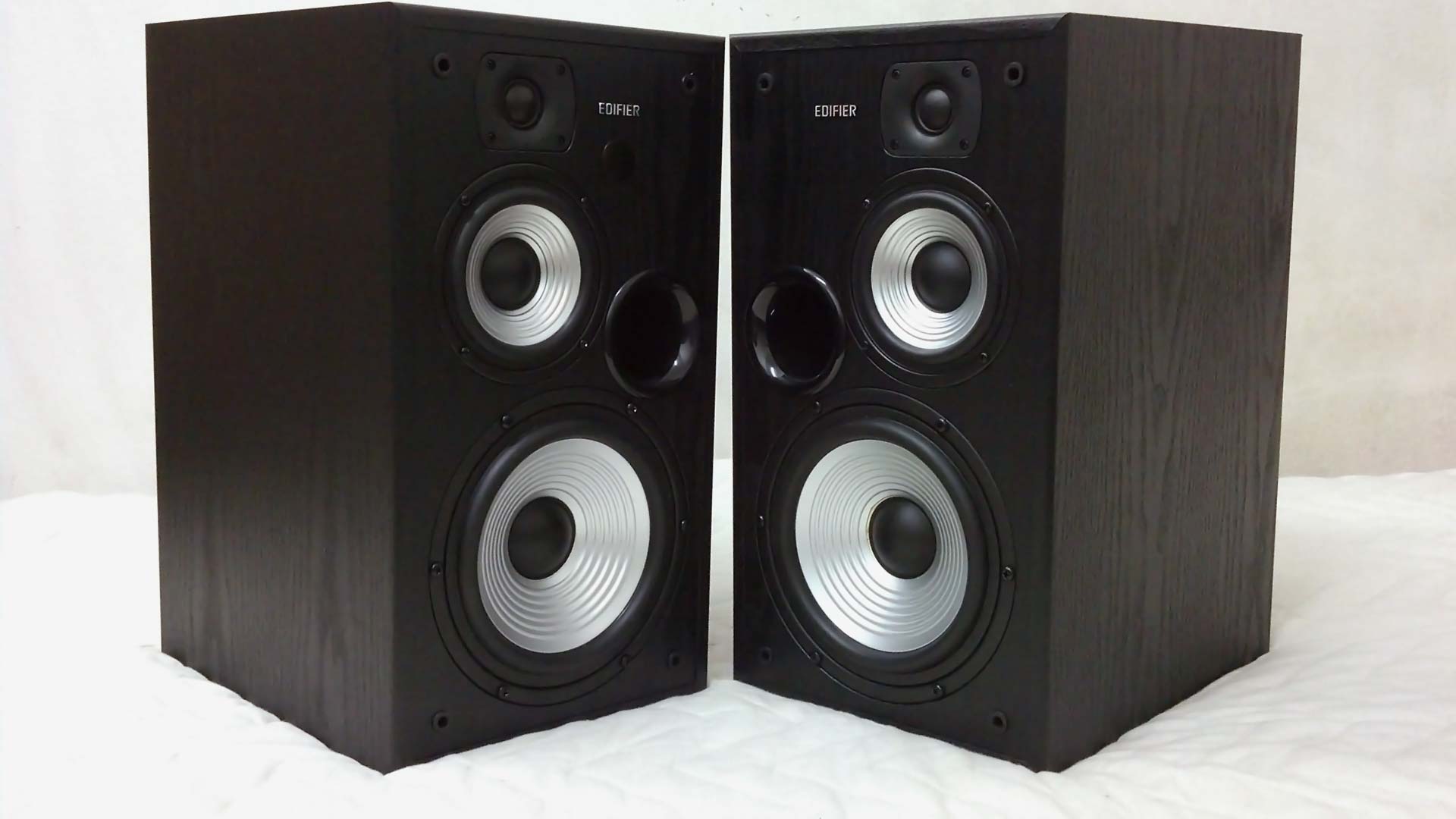
Design-3: Here are the 3-way speaker tri-amp system. From the top to bottom, we can find a tweeter, mid driver and the woofer. Edifier logo is placed near the top on both speaker. The bass reflex system port is located in the front instead of the rear of the speaker.
user posted image

Design-4: The exterior side of the speaker is plain. The texture of the speaker has a wood grain feel to it, similar to wooden furniture. Be careful though, the surface can be scratched with sharp objects.
user posted image

Design-5: The interior side of the speaker is same as the exterior. Just that the active speaker has the treble, bass and volume controller. The controllers uses potentiometer, more details will be shown in the functionality section!
user posted image

Design-6: Here is a look at the top of the speaker! It is flat, therefore you can put anything on it safely without rolling off. Perhaps a cloth cover when unused to prevent dust from collecting above it.
user posted image

Design-7: At the rear, we can find the connectivity interface located on the active speaker whereas the passive speaker has the input connection for the XLR L-pin cable.
user posted image

Design-8: Here is a close up of the rear for the passive speaker. Before and after installing the XLR L-pin cable. To unplug the L-shape cable, remember to press and hold the button to unlock before removing it. Do take note that the L shape can only point downwards, it cannot in other direction such as turning it to the left side to the speaker to get that extra 6 cm length.
user posted image

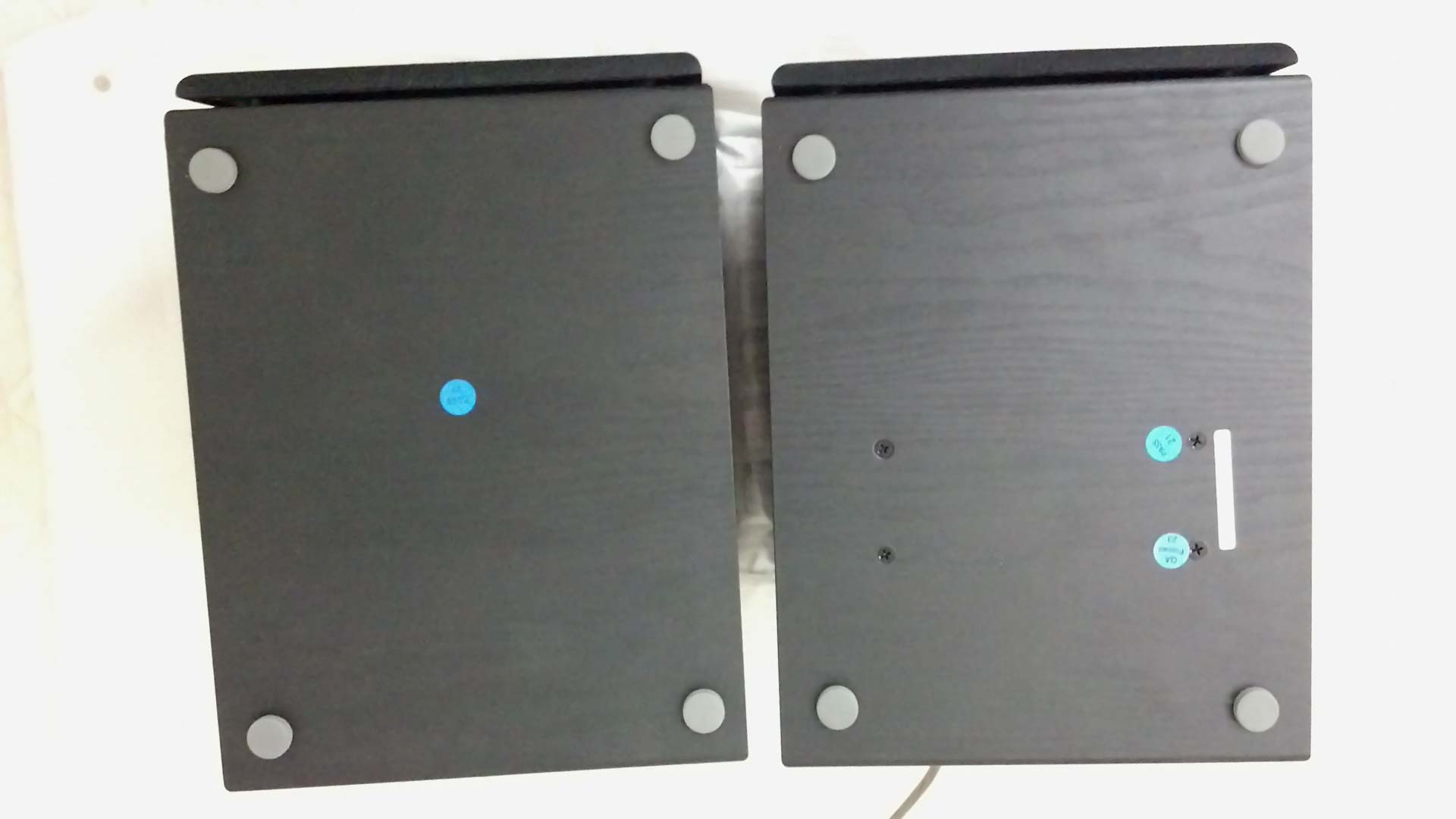
Design-9: Looking at the bottom of the speakers, it has 4 hard rubberized padded feet on each speaker. The blue stickers are the QC (Quality Check) approval from the testers from factory I believe.
user posted image

A closer inspection reveals the rubberized hard feet is approximately 5mm thick. Note: After using the speaker for several weeks, I noticed these rubberized feet are somewhat easy to be detachable since it uses glue and it occurs on both speakers (active + passive). The temporary solution to fixed the detached rubberized feet is to use super glue and put some weight on it to secure it in place. shakehead.gif
user posted image

This post has been edited by asunakirito: Feb 23 2015, 07:57 PM
TSasunakirito
post Feb 8 2015, 11:38 AM

Regular
******
Senior Member
1,068 posts

Joined: Oct 2012
Functionality

Function-1: On the active speaker's right side, there is an interface where user can control the treble, bass, volume and input type. Pressing the volume like a button will switch to different mode (Red = Optical, Orange = Coaxial, Blue = Bluetooth, Green = Line 1/2 input). The volume can be increased up to 50 times (each time increases volume by 2%) When increasing or decreasing volume, the LED light will blink. LED will also blink every second during mute which is a very useful indicator! Treble and bass can be increase/decrease 6 times.
user posted image


Function-2: The connectivity section, its separated in 2 categories (Analog In, Digital In). Digital In are the Optical and Coaxial (Yellow) whereas the Analog In are the white and red inputs. If you are using Optical like me, remove the black plastic cover from the optical before inserting the fiber optic cable.
user posted image

Function-3: Looking below the connectivity section is the subwoofer out (sub out) and left speaker out (the hardwired L-shape XLR cable to be connected to the left speaker). There is a button for on/off, very useful when remote control is out of battery or misplaced. Below the power button is the input for the power cable.
user posted image

This post has been edited by asunakirito: Feb 8 2015, 09:58 PM
TSasunakirito
post Feb 8 2015, 11:38 AM

Regular
******
Senior Member
1,068 posts

Joined: Oct 2012
First Impression
At first glance, it physically looks the same as the older model R2700. Black theme and rectangular design. But wait! A closer inspection reveals the subtle changes in its remote control and the interface behind the active speaker. The remote control is now replaced with a smaller version similar to the R2000DB (without the classic/dynamic preset) and the rear of the active speaker now has a subwoofer output!

Discoveries

Sub out aka Subwoofer Output
I performed a quick test by connecting it to a 2.0 stereo speaker to the sub out. The result? No sound emitted at all. Moving on to the next equipment is the headphone. Plugging into it also produces the same result as the first. No sound too. Finally, I connected a wireless 2.1 Hi-Fi active speaker to it and bass started to play out of its subwoofer but the satellite speaker is silent as a mouse. When I adjust the bass, the subwoofer plugged to the R2730DB will be synchronize to the changes that I made. Very convenient.

New Test on Subwoofer Output (February 26, 2015):
I noticed that pairing an active subwoofer speaker to the R2730DB via the Sub output produces very low volume bass (approximately 1/5 the bass volume). If it's done the other way around which is the active dedicated subwoofer is the one that gets the audio source and passes the Left+Right audio channel to the R2730DB speaker and the subwoofer plays the bass is much more louder (louder than R2730DB Sub out by 500%). This makes the Edifier R2730DB sub out not that ideal though. Probably should go with R2700 in the first place to save the extra cash unless users wants the Bluetooth capabilities. hmm.gif

Temperature
Running the speakers for few hours with random music genre (techno, trance, K-pop, J-pop, instrumental, rock, etc) generated some heat behind the active speaker. The warmth is similar to a 2TB Western Black Caviar on load at 40 degree Celsius, less warmer than the R2000DB speaker. So have no worries about heat as it will much be cooler compared to a loaded gaming laptop.

No hissing noise on Idle or Mute + No pop on power up/down
As expected from a high-end speaker, there isn't any hissing/electrostatic noise emitted when the speaker is on idle, mute and standby. When the speaker is power up or power down from the power plug, it does not emit any annoying popping noise like most lower-end speakers.

Speakers Magnetically Shielded
The one thing that annoys me about speaker is that they emit weird blip-blip noise when a SMS/call is received if the phone is placed close to the speaker. This common speaker issue doesn't occur to the R2730DB as all the drivers are magnetically shielded. Thumbs up! No issues when placing side by side to the monitor with the strong magnets as its not faced directly.

Bluetooth Coverage + Volume
I played a FLAC music via my smartphone using Bluetooth connection to the R2730DB and measured the distance the speaker can receive the signal. The speaker is capable of receiving the audio signal up to 4 meters with direct line-of-sight. I found out that the R2730DB volume cannot be adjusted through the Bluetooth Volume of my smartphone. Other Bluetooth speaker that I used previously such as Logitech, AudioBox and Ellysium is capable of this Bluetooth volume control feature. The strange thing is, when using RCA to 3.5mm (speaker to smartphone), I am able to control the volume using my smartphone instead of the speaker remote control.

New Bluetooth Volume Test (March 7, 2015):
Tested Edifier R2730DB Bluetooth volume again using Android KitKat 4.4.4 MiUI OS (previous test was with Android JellyBean) and found out the Bluetooth volume is not able to control the speaker volume. However, it must be done via the Media volume (the volume that controls music, video games, etc). Pretty strange.

New Bluetooth Volume Test (May 23, 2015):
Tested Edifier R2730DB Bluetooth volume again using a high-end smartphone OnePlus One Cyanogen 11S Android KitKat 4.4.4 and discovered the Bluetooth volume is able to control the speaker volume. Perhaps this issue varies independently on the smartphone OS.

Speaker Volume
If the volume is set below 10 (example: 5), turning off and on via the remote control or behind the active speaker will reset it to volume 10. However, if its set above 10 (example: 35), turning it off and on will not reset it to volume 10. It will memorize that volume setting. This should apply for all input (tested with Line 1 and Bluetooth).

Remote Control Coverage
The remote control is capable of controlling the speaker functionality up to 4 meters too, similar to the Bluetooth signal. The buttons is large and are well-spaced from each other, making it easy to press with large fingers. Many other speaker remote controls that I used tend to make the buttons tightly-knit with one another and makes it too easy to press the incorrect button.

Power Consumption
I used a digital power energy meter to calculate the power consumption of the speakers. My findings revealed the R2730DB consumes 0W on standby (power off) and 9.3~9.5W on idle and mute. The following tests below are done with the speaker volume set at 60% which is sufficiently loud for near-field speaker usage (By default, the speaker is set at 80% volume which is too loud when listening to rock+bass music) The music used for testing is rock bass music (lots of drums, kicks, vocals).

Test-1: With the treble and bass set at -6dB, the power usage hovers approximately 11.2~11.8W. Increasing the treble from -6dB to +6dB does not increase the power usage at all based from my observation on the digital meter.

Test-2: With the treble and bass set at maximum +6dB, 23.6~31.8W and occasionally spikes up to 50W when the low deep bass kicks in. You can feel the some tight pressure in the lungs and the desk is vibrating a lot. The vibration can be avoided if the speaker are placed on a speaker stand separated from the table!

Sound Default Format
What sound default format can these speakers play? I have tested 2 connections using my PC and they are Optical cable (Digital) and RCA-to-3.5mm (Analog). The result "PASS" means there is sound coming out from speaker and "FAIL" means there is no sound emitted. The analog is able to play sound on all format whereas digital can play all except 192KHz (Studio Quality).

Optical (Digital Input)
2 channel, 16 bit, 44100 Hz (CD Quality) = PASS
2 channel, 16 bit, 48000 Hz (DVD Quality) = PASS
2 channel, 16 bit, 96000 Hz (Studio Quality) = PASS
2 channel, 16 bit, 192000 Hz (Studio Quality) = FAIL
2 channel, 24 bit, 44100 Hz (CD Quality) = PASS
2 channel, 24 bit, 48000 Hz (DVD Quality) = PASS
2 channel, 24 bit, 96000 Hz (Studio Quality) = PASS
2 channel, 24 bit, 192000 Hz (Studio Quality) = FAIL

RCA-to-3.5mm (Analog Input)
2 channel, 16 bit, 44100 Hz (CD Quality) = PASS
2 channel, 16 bit, 48000 Hz (DVD Quality) = PASS
2 channel, 16 bit, 96000 Hz (Studio Quality) = PASS
2 channel, 16 bit, 192000 Hz (Studio Quality) = PASS
2 channel, 24 bit, 44100 Hz (CD Quality) = PASS
2 channel, 24 bit, 48000 Hz (DVD Quality) = PASS
2 channel, 24 bit, 96000 Hz (Studio Quality) = PASS
2 channel, 24 bit, 192000 Hz (Studio Quality) = PASS


Sound Quality
When comparing this studio speaker with non-studio speakers that I have auditioned (R2000DB, C2X, Spinnaker E30 and Eclipse E25), I find it very neutral cool sounding. It does not have the sparkly warmth feeling to it. It takes sometime to get used to it. You might be wondering, would it sound better with the treble and bass turned up to the max? In my experience, it does not. This same applies with the R2700 Studio Speaker. However, increasing the volume does overall boost the treble and bass, but the overall sound gets a little loud to bear. At 50% volume is just nice if you are sitting approximately 30 inches away. The R2800 speaker does sound somewhat different when its bass and treble is set above 0dB, feels a little warm to the sound.

Playing music at a high volume (50% to 80% volume) with treble and bass maxed out at 6dB does not distort at all! It's pretty amazing as cheaper speaker tends to emit pop/crackling noise or doesn't sound pleasant with ear piercing noise, but the R2730DB treble is very clear and smooth to the ears whereas the bass gets stronger without sounding harsh.

Regarding the treble and bass boost, increasing the treble to +6dB doesn't sound much different (perhaps 5% change). I wished that the treble can increase a tiny bit more so it feels much clearer for entertainment listening when not in use for audio engineering. The treble sounded confined in the R2730DB. The solution I used to solve that is to install a DFX Audio Enhancer (Free version) to increase the Fidelity, Ambience, Dynamic Boost and Hyperbass. With this enhancement, now it sounds like your regular treble sharp but smooth speakers! The bass is a different story. It gets much stronger at +6dB, vibrates the desk while pushing lots of air. The bass from is solid and punchy but does not provide the deep wide bass from the 2.1 speaker subwoofer. It does react quite quickly to fast beat music, so that is an added advantage of having a smaller woofer. No muddiness detected in the bass, its filled with energetic beats. Regarding the mids, the mids sound thick and rich.


Verdict
For those who are looking to buy this speaker R2730DB or the older model R2700 for music listening and movies/shows, I would recommend other Edifier Speaker series (e.g. Edifier Signature, Edifier Component, Edifier Multimedia with 2.1 speaker setup) unless you are a audio engineer creating music for a living/hobby (e.g. soundtrack for games, opening/ending music for shows, AMV, etc). This speaker is much more suitable purely for listening to music than watching movies/shows or playing games.

I would stress again that is flat neutral sounding with tested with optical cable (treble sounded more recessed) but has a tinge of sharper treble with RCA-to-3.5mm cable (treble sounded a little more airy/openness) Treble lovers or bass lovers may not find it enjoyable as it lacks the sparkly warmth and deep wide bass. However, do take note that the R2730DB has an option for a subwoofer out, so you can connect it to an active subwoofer (powered independently from the R2730DB speaker) to a achieve a deeper wider bass.

Another thing I would like to emphasize is, this speaker will easily allow you to pinpoint whether that song is mixed badly or nice. When testing several songs, it easily helps me determine the music created is lacking bass or it has too much bass, same applies with the treble in the areas it need to shine or it sounded too dull even in neutral balance mode. Finally, if you are listening on this speaker, you can easily tell a good/bad music source (128kbps below or higher) which might tempt you to upgrade your entire music collection to a higher bitrate 192~320kbps MP3/OGG (lossy compression), or FLAC (lossless compression).

Expectations
If there is a 3rd revision to the Studio Speaker lineup (perhaps in 3-5 years time), I wished that the LED is place in the front instead of the side as its easier to see whether the speaker is turned on from the front if you are sitting far away from the speaker. Secondly, is the ability to turn the studio speaker to an entertainment version with higher adjustment to the treble. Currently turning the treble down/up, the changes aren't significant at all compared to the bass that vibrates much stronger when turned up. Also, would like to see a longer cable for the optical, so I could place the active speaker on the left side where I can see the knobs/potentiometer with LED light as its troublesome to have to stand up and move to the right side to view the controls. Another good feature that I can think of for future enhancement would be going on auto-standby (0 Watt) when no song is played for a period of time.

Disclosure: This review was made using my own Edifier R2730DB, duly purchased at the retail price.

This post has been edited by asunakirito: May 23 2015, 08:43 PM

TSasunakirito
post Feb 8 2015, 11:39 AM

Regular
******
Senior Member
1,068 posts

Joined: Oct 2012
Reserved for video audio for user references.

Edifier R2730DB Monitor Speaker Closeup


Edifier R2730DB Monitor Speaker Audio Sound Test


This post has been edited by asunakirito: Mar 11 2017, 12:37 PM
TSasunakirito
post Feb 8 2015, 05:08 PM

Regular
******
Senior Member
1,068 posts

Joined: Oct 2012
*** End of Review ***

This post has been edited by asunakirito: Feb 12 2015, 08:35 PM
GearRevolution
post Feb 10 2015, 07:11 AM

Getting Started
**
Junior Member
164 posts

Joined: Oct 2014
So much different from my studio 6 sad.gif
TSasunakirito
post Feb 11 2015, 10:15 PM

Regular
******
Senior Member
1,068 posts

Joined: Oct 2012
QUOTE(GearRevolution @ Feb 10 2015, 07:11 AM)
So much different from my studio 6 sad.gif
*
Do you mean the physical appearances or features?
sugarhigh
post Feb 12 2015, 04:22 PM

New Member
*
Junior Member
10 posts

Joined: Aug 2005
From: Butterworth


Thanks for posting the review. How does the bluetooth sound compare to RCA or digital input?
TSasunakirito
post Feb 12 2015, 09:36 PM

Regular
******
Senior Member
1,068 posts

Joined: Oct 2012
QUOTE(sugarhigh @ Feb 12 2015, 04:22 PM)
Thanks for posting the review. How does the bluetooth sound compare to RCA or digital input?
*
When connecting the R2730DB to my smartphone using:
1. RCA to 3.5mm jack, the sound quality is a little poor and sound volume is weak.
2. Bluetooth, the sound quality is much better, sound volume is much louder (approximately 40~50% louder)
Note: Probably need a DAC to provide ample juice/power when using the RCA cable. Currently I do not have a DAC to test it out.

When connecting the R2730DB to my computer Z77X-D3H equipped with VIA VT2021 audio codec using:
1. RCA to 3.5mm jack, the sound quality is loud and clear, but the treble sound a little piercing, bass a little bit shallow.
2. Fiber Optic, Optical Cable, the sound quality is loud and clear, treble is smoother and bass is richer + deeper (vibrates more, packs lots of energy)

When comparing Bluetooth against Optical:
The result for Bluetooth and Optical connection is same, pure digital audio.

If you are thinking of having it placed in the living room to listen to music from your smartphone, grab the R2730DB (bluetooth) instead of R2700 (non-bluetooth), you will thank yourself for the convenience and easy plug-n-play, but more importantly the sound quality you get is so much better than RCA-to-3.5mm cable.

Oh and you made me realize one thing, the Bluetooth connection to my smartphone device is pretty quick!
Switching from non-bluetooth input (e.g. optical) to Bluetooth takes approximately 5 second for my phone to auto-detect it laugh.gif
When comparing other Bluetooth speakers, it will take longer or sometimes connection timeout (have to retry 2-3 time for it to work).

This post has been edited by asunakirito: Feb 12 2015, 09:55 PM
andrekua2
post Feb 13 2015, 12:21 AM

10k Club
********
All Stars
13,477 posts

Joined: Jan 2012


QUOTE(asunakirito @ Feb 12 2015, 09:36 PM)
When connecting the R2730DB to my smartphone using:
1. RCA to 3.5mm jack, the sound quality is a little poor and sound volume is weak.
2. Bluetooth, the sound quality is much better, sound volume is much louder (approximately 40~50% louder)
Note: Probably need a DAC to provide ample juice/power when using the RCA cable. Currently I do not have a DAC to test it out.

When connecting the R2730DB to my computer Z77X-D3H equipped with  VIA VT2021 audio codec using:
1. RCA to 3.5mm jack, the sound quality is loud and clear, but the treble sound a little piercing, bass a little bit shallow.
2. Fiber Optic, Optical Cable, the sound quality is loud and clear, treble is smoother and bass is richer + deeper (vibrates more, packs lots of energy)

When comparing Bluetooth against Optical:
The result for Bluetooth and Optical connection is same, pure digital audio.

If you are thinking of having it placed in the living room to listen to music from your smartphone, grab the R2730DB (bluetooth) instead of R2700 (non-bluetooth), you will thank yourself for the convenience and easy plug-n-play, but more importantly the sound quality you get is so much better than RCA-to-3.5mm cable.

Oh and you made me realize one thing, the Bluetooth connection to my smartphone device is pretty quick!
Switching from non-bluetooth input (e.g. optical) to Bluetooth takes approximately 5 second for my phone to auto-detect it  laugh.gif
When comparing other Bluetooth speakers, it will take longer or sometimes connection timeout (have to retry 2-3 time for it to work).
*
Bluetooth has to be one of the worse audio quality one could get.

Everything that went through bluetooth was compressed and decompress at the receiving side. Acceptable but anyone who were aiming for SQ, should avoid bluetooth period.
TSasunakirito
post Feb 13 2015, 09:40 PM

Regular
******
Senior Member
1,068 posts

Joined: Oct 2012
QUOTE(andrekua2 @ Feb 13 2015, 12:21 AM)
Bluetooth has to be one of the worse audio quality one could get.

Everything that went through bluetooth was compressed and decompress at the receiving side. Acceptable but anyone who were aiming for SQ, should avoid bluetooth period.
*
I'll post a video later to show the RCA vs Bluetooth vs Optical sound quality.
From there you can compare the differences between them smile.gif
kennethkee93
post Feb 24 2015, 09:22 PM

Wooooo!
******
Senior Member
1,522 posts

Joined: Sep 2008
From: Everywhere.


asunakirito

I'm interested with this speaker but I can't find much review on the internet thus wanted to ask;

The speaker has has flat sound signature, what do you think about its performance in term of speed, clarity, soundstage and sound separation?

For this price tag, do you think it's worth buying or do you have other recommendation for 2.0 setup within this price range?

Thanks. biggrin.gif
TSasunakirito
post Feb 25 2015, 05:23 PM

Regular
******
Senior Member
1,068 posts

Joined: Oct 2012
QUOTE(kennethkee93 @ Feb 24 2015, 09:22 PM)
asunakirito

I'm interested with this speaker but I can't find much review on the internet thus wanted to ask;

The speaker has has flat sound signature, what do you think about its performance in term of speed, clarity, soundstage and sound separation?

For this price tag, do you think it's worth buying or do you have other recommendation for 2.0 setup within this price range?

Thanks. biggrin.gif
*
It depends on your usage! icon_idea.gif

Here are some questions to help you in your speaker purchasing decision:

1. Do you just listen to music or create music/sound-effects or watch movies or all of them?
My Answer: All of it.

2. Whats your desk/table size?
My Answer: Medium. Barely fit the R2730DB with 2 inches space left. With the R2800, very difficult to fit side by side with a 27 inch monitor.

3. Where will you place the speaker?
My Answer: Living Room (listening to music) and Bedroom (audio editing music).

4. Do you need Bluetooth capabilities? R2730DB has Bluetooth whereas R2700 has no Bluetooth.
My Answer: Yes, I find it inconvenient plugging RCA-to-3.5mm cable from my phone to my speaker when playing music in the living room. Sound 50% better via Bluetooth compared to RCA-to-3.5mm if you connecting to portable devices that has no DAC. Some say Bluetooth make the sound quality worse, but upon listening it to test this theory (based on my experience), it sounded much better.

For this price tag, I would recommend the Edifier R2800 (after price bargain + top up).
The 8 inch woofer really makes it a whole difference compared to the 6 inch.
To give an example, listening to the R2800 gives an overall feeling,
excellent for movies whereas R2700/R2730DB, the sound emitted is like a coned V-shape, best for music listening.

Another recommendation would be checking out HiVi Swan Speaker (their sound quality matches similar to the R2700, R2800; smoother trebles but lack a little in the bass area). I like the minimalistic design of Edifier compared to HiVi Swan speaker though.

-----------------------------------------

Performance

Clarity
Crystal Clear and smooth. Does not pierce your ear unless the audio source itself has too much treble-boost in it.

Soundstage
In my opinion, it would be something like X, Y, Z axis (Width, Height and Depth). Can hear the birds+crows on high above in the trees chirping, sound of wave washing across the shore/bay (moving from the right to left speaker), animals rushing towards you. I used a sample audio to test this @ http://www.naturespace.com/index.php (you can use this to test your headphone too!). 2 words to summarize this = Amazingly Real. However, the raining/thunder part does seem a little artificial (probably the bass could not do the lower/deeper rumble sound). The only speaker that I have tested that made rain sound like real rain was the Armaggeddon Panzer III (unbelivable) just that the other bass sections is hollow and a little blaring.

Sound Separation
Not sure what you meant by this. Could you enlighten me?

kennethkee93
post Feb 25 2015, 07:52 PM

Wooooo!
******
Senior Member
1,522 posts

Joined: Sep 2008
From: Everywhere.


QUOTE(asunakirito @ Feb 25 2015, 05:23 PM)
It depends on your usage!  icon_idea.gif

Here are some questions to help you in your speaker purchasing decision:

1. Do you just listen to music or create music/sound-effects or watch movies or all of them?
My Answer: All of it.

2. Whats your desk/table size?
My Answer: Medium. Barely fit the R2730DB with 2 inches space left. With the R2800, very difficult to fit side by side with a 27 inch monitor.

3. Where will you place the speaker?
My Answer: Living Room (listening to music) and Bedroom (audio editing music).

4. Do you need Bluetooth capabilities? R2730DB has Bluetooth whereas R2700 has no Bluetooth.
My Answer: Yes, I find it inconvenient plugging RCA-to-3.5mm cable from my phone to my speaker when playing music in the living room. Sound 50% better via Bluetooth compared to RCA-to-3.5mm if you connecting to portable devices that has no DAC. Some say Bluetooth make the sound quality worse, but upon listening it to test this theory (based on my experience), it sounded much better.

For this price tag, I would recommend the Edifier R2800 (after price bargain + top up).
The 8 inch woofer really makes it a whole difference compared to the 6 inch.
To give an example, listening to the R2800 gives an overall feeling,
excellent for movies whereas R2700/R2730DB, the sound emitted is like a coned V-shape, best for music listening.

Another recommendation would be checking out HiVi Swan Speaker (their sound quality matches similar to the R2700, R2800; smoother trebles but lack a little in the bass area). I like the minimalistic design of Edifier compared to HiVi Swan speaker though.

-----------------------------------------

Performance

Clarity
Crystal Clear and smooth. Does not pierce your ear unless the audio source itself has too much treble-boost in it.

Soundstage
In my opinion, it would be something like X, Y, Z axis (Width, Height and Depth). Can hear the birds+crows on high above in the trees chirping, sound of wave washing across the shore/bay (moving from the right to left speaker), animals rushing towards you.  I used a sample audio to test this @ http://www.naturespace.com/index.php (you can use this to test your headphone too!). 2 words to summarize this = Amazingly Real. However, the raining/thunder part does seem a little artificial (probably the bass could not do the lower/deeper rumble sound). The only speaker that I have tested that made rain sound like real rain was the Armaggeddon Panzer III (unbelivable) just that the other bass sections is hollow and a little blaring.

Sound Separation
Not sure what you meant by this. Could you enlighten me?
*
Thanks for your long reply. My intended usage is only for music, and I prefer sound to be as original as the original recording are (without coloration/flat response).

Since that you stated that this speaker has the flat sound signature, thus the next factors to consider are:

speed (able to produce sound without sounding muffled or mixed?),

clarity (as you said, crystal clear, checked),

soundstage (does the speaker able to project sound giving an image wide or narrow. example imagine you're in a concert hall. Not sure this applies to speakers or not, headphone does tongue.gif) and;

sound separation (Meaning the separation of different instrument example, guitar and drum and piano, each can be heard clearly. You'd just answered in soundstage section, checked). biggrin.gif

Btw, your review is done in 0 bass and treble setting right?


This post has been edited by kennethkee93: Feb 25 2015, 07:57 PM
TSasunakirito
post Feb 25 2015, 11:59 PM

Regular
******
Senior Member
1,068 posts

Joined: Oct 2012
QUOTE(kennethkee93 @ Feb 25 2015, 07:52 PM)
Thanks for your long reply. My intended usage is only for music, and I prefer sound to be as original as the original recording are (without coloration/flat response).

Since that you stated that this speaker has the flat sound signature, thus the next factors to consider are:

speed (able to produce sound without sounding muffled or mixed?),
*
The only time I hear muffled sound (similarly to sound coming from next room with shut doors) is with lower end speakers.
The R2730DB does not exhibit this muffle sound issue, same applies with the older model R2700 and R2800.


QUOTE(kennethkee93 @ Feb 25 2015, 07:52 PM)
clarity (as you said, crystal clear, checked),

soundstage (does the speaker able to project sound giving an image wide or narrow. example imagine you're in a concert hall. Not sure this applies to speakers or not, headphone does tongue.gif) and;
*
Tested with the naturesound, the sound image is wide, but feels the sound is directed in your face rather than front+rear.

QUOTE(kennethkee93 @ Feb 25 2015, 07:52 PM)
Sound separation (Meaning the separation of different instrument example, guitar and drum and piano, each can be heard clearly. You'd just answered in soundstage section, checked). biggrin.gif
*
Sound separation: Listening to classical instrumental music especially oldies that uses various music instruments, every piece can be heard distinctively (even when the instrument played further behind from the one in front). Comparing against the lower end speaker, the front instrument completely overpowers it (making it difficult to be heard) or sometimes the back instruments just disappears/fades completely or sound something else than what it was originally sound like (e.g. muffled).


QUOTE(kennethkee93 @ Feb 25 2015, 07:52 PM)
Btw, your review is done in 0 bass and treble setting right?
*
The speaker review is tested with the following combinations before wrapping up:
1. Treble (0) + Bass (0)
2. Treble (+6dB) + Bass (+6dB = bass is very strong and energetic)
3. Treble (-6dB) + Bass (-6dB = basically very little bass or can't be felt much vibration)


Btw, you could audition the speakers in Lowyat 3rd Floor (Sri Computers, or Viewnet) before deciding your purchase. icon_idea.gif

This post has been edited by asunakirito: Feb 26 2015, 12:04 AM
kennethkee93
post Feb 26 2015, 07:11 AM

Wooooo!
******
Senior Member
1,522 posts

Joined: Sep 2008
From: Everywhere.


QUOTE(asunakirito @ Feb 25 2015, 11:59 PM)
The only time I hear muffled sound (similarly to sound coming from next room with shut doors) is with lower end speakers.
The R2730DB does not exhibit this muffle sound issue, same applies with the older model R2700 and R2800.

Tested with the naturesound, the sound image is wide, but feels the sound is directed in your face rather than front+rear.
Sound separation: Listening to classical instrumental music especially oldies that uses various music instruments, every piece can be heard distinctively (even when the instrument played further behind from the one in front). Comparing against the lower end speaker, the front instrument completely overpowers it (making it difficult to be heard) or sometimes the back instruments just disappears/fades completely or sound something else than what it was originally sound like (e.g. muffled).
The speaker review is tested with the following combinations before wrapping up:
1. Treble (0) + Bass (0)
2. Treble (+6dB) + Bass (+6dB = bass is very strong and energetic)
3. Treble (-6dB) + Bass (-6dB = basically very little bass or can't be felt much vibration)


Btw, you could audition the speakers in Lowyat 3rd Floor (Sri Computers, or Viewnet) before deciding your purchase.  icon_idea.gif
*
Alright, thanks for your review. Will go to Lowyat plaza to try the speakers. biggrin.gif
TSasunakirito
post Mar 6 2015, 01:21 AM

Regular
******
Senior Member
1,068 posts

Joined: Oct 2012
QUOTE(kennethkee93 @ Feb 26 2015, 07:11 AM)
Alright, thanks for your review. Will go to Lowyat plaza to try the speakers. biggrin.gif
*
Have you managed to audition the speakers in Lowyat and made your purchase yet? smile.gif

This post has been edited by asunakirito: Mar 6 2015, 01:23 AM
kennethkee93
post Mar 6 2015, 06:53 AM

Wooooo!
******
Senior Member
1,522 posts

Joined: Sep 2008
From: Everywhere.


QUOTE(asunakirito @ Mar 6 2015, 01:21 AM)
Have you managed to audition the speakers in Lowyat and made your purchase yet?  smile.gif
*
Not yet, might go this weekend. Hopefully there's stock for me to carry back a unit. laugh.gif
kennethkee93
post Mar 7 2015, 06:01 PM

Wooooo!
******
Senior Member
1,522 posts

Joined: Sep 2008
From: Everywhere.


asunakirito Just bought a unit. Just noticed that the volume reset everytime it's on. No way to save the previous volume setting?
TSasunakirito
post Mar 7 2015, 10:18 PM

Regular
******
Senior Member
1,068 posts

Joined: Oct 2012
QUOTE(kennethkee93 @ Mar 7 2015, 06:01 PM)
asunakirito Just bought a unit. Just noticed that the volume reset everytime it's on. No way to save the previous volume setting?
*
Great finding you found there. What volume did you set it on?

On mine, if i set below 10 out of 50, (example: volume 9), turn it off and on will reset to volume 10. If I set the volume within 11-50, it will remain the same regardless turning it off/on via the remote control or behind the speaker.

If I set the volume to 35, it will be the same for all input (Bluetooth, Line 1, Optical).

This post has been edited by asunakirito: Mar 7 2015, 10:24 PM
kennethkee93
post Mar 8 2015, 09:23 AM

Wooooo!
******
Senior Member
1,522 posts

Joined: Sep 2008
From: Everywhere.


QUOTE(asunakirito @ Mar 7 2015, 10:18 PM)
Great finding you found there. What volume did you set it on?

On mine, if i set below 10 out of 50, (example: volume 9), turn it off and on will reset to volume 10. If I set the volume within 11-50, it will remain the same regardless turning it off/on via the remote control or behind the speaker.

If I set the volume to 35, it will be the same for all input (Bluetooth, Line 1, Optical).
*
I see, volume 10 is kinda loud for me too. laugh.gif How do you see the current volume number? laugh.gif
TSasunakirito
post Mar 8 2015, 01:10 PM

Regular
******
Senior Member
1,068 posts

Joined: Oct 2012
QUOTE(kennethkee93 @ Mar 8 2015, 09:23 AM)
I see, volume 10 is kinda loud for me too.  laugh.gif How do you see the current volume number? laugh.gif
*
Volume 10 is kinda soft volume for me. Barely can hear it. cool.gif
I just count number of times the potentiometer ticks. Max volume would be 50. The volume applies with all of the Edifier speaker I have tested ranging from RM150-RM800).

What type of input are you on and your connection setup? I wonder what makes it so loud hmm.gif

This post has been edited by asunakirito: Mar 8 2015, 01:11 PM
kennethkee93
post Mar 8 2015, 02:45 PM

Wooooo!
******
Senior Member
1,522 posts

Joined: Sep 2008
From: Everywhere.


QUOTE(asunakirito @ Mar 8 2015, 01:10 PM)
Volume 10 is kinda soft volume for me. Barely can hear it.  cool.gif
I just count number of times the potentiometer ticks. Max volume would be 50. The volume applies with all of the Edifier speaker I have tested ranging from RM150-RM800).

What type of input are you on and your connection setup? I wonder what makes it so loud  hmm.gif
*
Using RCA to 3mm with external DAC, volume control is only on speaker side. Maybe because the speaker is too close to my ear.. laugh.gif I barely got space for it, luckily didn't being back R2800 sweat.gif
TSasunakirito
post Mar 8 2015, 04:13 PM

Regular
******
Senior Member
1,068 posts

Joined: Oct 2012
QUOTE(kennethkee93 @ Mar 8 2015, 02:45 PM)
Using RCA to 3mm with external DAC, volume control is only on speaker side. Maybe because the speaker is too close to my ear.. laugh.gif I barely got space for it, luckily didn't being back R2800  sweat.gif
*
Could you try connecting the audio source directly to the EdifierR2730DB speaker without the DAC and test whether the volume is less louder?

I'm sitting just 15-20 inches away from the speaker and volume 10 is soft as a mice laugh.gif How close are you to the speaker?

What DAC are you using? Does it not have any volume control?

kennethkee93
post Mar 8 2015, 04:20 PM

Wooooo!
******
Senior Member
1,522 posts

Joined: Sep 2008
From: Everywhere.


QUOTE(asunakirito @ Mar 8 2015, 04:13 PM)
Could you try connecting the audio source directly to the EdifierR2730DB speaker without the DAC and test whether the volume is less louder?

I'm sitting just 15-20 inches away from the speaker and volume 10 is soft as a mice laugh.gif How close are you to the speaker?

What DAC are you using? Does it not have any volume control?
*
Just DAC itself with no control at all. About the same distance, in living room. DAC is Wolfson WM8501. DAC volume should be the same as plugging to PC soundcard with 100% volume.

Oh btw, how do you usually turn off the speaker? Using remove on/off or turn the switch at the back? I currently using the remote to turn on/off.

This post has been edited by kennethkee93: Mar 8 2015, 04:23 PM
TSasunakirito
post Mar 9 2015, 10:39 PM

Regular
******
Senior Member
1,068 posts

Joined: Oct 2012
QUOTE(kennethkee93 @ Mar 8 2015, 04:20 PM)
Just DAC itself with no control at all. About the same distance, in living room. DAC is Wolfson WM8501. DAC volume should be the same as plugging to PC soundcard with 100% volume.

Oh btw, how do you usually turn off the speaker? Using remove on/off or turn the switch at the back? I currently using the remote to turn on/off.
*
I turn the speaker off via the power switch when there is no sound being played.
Does it sound softer without the DAC connected to the Edifier R2730DB?

This post has been edited by asunakirito: Mar 9 2015, 10:42 PM
kennethkee93
post Mar 10 2015, 07:08 AM

Wooooo!
******
Senior Member
1,522 posts

Joined: Sep 2008
From: Everywhere.


QUOTE(asunakirito @ Mar 9 2015, 10:39 PM)
I turn the speaker off via the power switch when there is no sound being played.
Does it sound softer without the DAC connected to the Edifier R2730DB?
*
DAC sound much softer in volume compared to PC soundcard at full volume. My DAC (plug and play, no control) sounds about 70% of soundcard volume.
ronron
post Mar 13 2015, 03:20 PM

Casual
***
Junior Member
423 posts

Joined: Dec 2011
From: Kota Kinabalu, Sabah


would this model better than edifier C3?
TSasunakirito
post Mar 13 2015, 07:35 PM

Regular
******
Senior Member
1,068 posts

Joined: Oct 2012
QUOTE(ronron @ Mar 13 2015, 03:20 PM)
would this model better than edifier C3?
*
This 2 speakers are different beasts. C3 is 2.1 speaker whereas Edifier R2730DB is 2.0 speaker + studio type (flat sound)

C3 subwoofer (8 inch) hit lower bass harder and deeper compared to R2730DB.
The R2730DB woofer (6.5 inch) is similar to a subwoofer but in stereo mode. Pretty strange experience though.

For regular usage such as movies, gaming, music, pick C3 (save some cash too!) or higher end 2.1 speaker such as 530D.
If you lack table space, or you table is occupied with monitors in Eyefinity setup. Go with 2.1 speaker (satellite speaker are small)
For music editing, go with R2730DB.

From the Edifier R2730DB perspective, you can listen to the original sound of the music author creates from without the additional treble/bass that the speaker colors with.
If the music developer creates music from C3 that has extra bass in it, when played with other speaker, that extra bass will be not existent there.

This post has been edited by asunakirito: Mar 13 2015, 07:36 PM
ronron
post Mar 14 2015, 11:53 PM

Casual
***
Junior Member
423 posts

Joined: Dec 2011
From: Kota Kinabalu, Sabah


QUOTE(asunakirito @ Mar 13 2015, 07:35 PM)
This 2 speakers are different beasts. C3 is 2.1 speaker whereas Edifier R2730DB is 2.0 speaker + studio type (flat sound)

C3 subwoofer (8 inch) hit lower bass harder and deeper compared to R2730DB.
The R2730DB woofer (6.5 inch) is similar to a subwoofer but in stereo mode. Pretty strange experience though.

For regular usage such as movies, gaming, music, pick C3 (save some cash too!) or higher end 2.1 speaker such as 530D.
If you lack table space, or you table is occupied with monitors in Eyefinity setup. Go with 2.1 speaker (satellite speaker are small)
For music editing, go with R2730DB.

From the Edifier R2730DB perspective, you can listen to the original sound of the music author creates from without the additional treble/bass that the speaker colors with.
If the music developer creates music from C3 that has extra bass in it, when played with other speaker, that extra bass will be not existent there.
*
Thank you for the explanation.
nonobody
post Apr 22 2015, 09:10 PM

Getting Started
**
Junior Member
61 posts

Joined: May 2012
Is the speaker connected directly into the mobo audio jack or sondcard of any sorts?
TSasunakirito
post Apr 25 2015, 07:33 AM

Regular
******
Senior Member
1,068 posts

Joined: Oct 2012
QUOTE(nonobody @ Apr 22 2015, 09:10 PM)
Is the speaker connected directly into the mobo audio jack or sondcard of any sorts?
*
The speaker is connected via the motherboard audio jack.
wim1983
post May 31 2015, 11:59 AM

Whiz
******
Senior Member
1,531 posts

Joined: Oct 2010


Looks really big, hmm but that cable to speakers is balanced XLR?

How about the Wharfedale Diamond DS-1? Looks gorgeous too
david_advocate
post Jun 2 2015, 09:52 PM

New Member
*
Newbie
1 posts

Joined: Jun 2015


Good morning guys, the premise that own a dedicated sound card, an Asus Xonar Dx 7.1 PCI-e, I wanted to know what I should connect an active subwoofer to edifier, as far as I ricaverei sound quality?And I benefit, how should I connect the output (RCA, SPDIF, coaxial)?
TSasunakirito
post Jun 6 2015, 02:56 PM

Regular
******
Senior Member
1,068 posts

Joined: Oct 2012
QUOTE(wim1983 @ May 31 2015, 11:59 AM)
Looks really big, hmm but that cable to speakers is balanced XLR?

How about the Wharfedale Diamond DS-1? Looks gorgeous too
*
I think 2 pins are balanced, 1 for common ground, the other 2 for something else.
Perhaps Edifier could provide us more details on the XLR 5 pin cable.

I have yet to auditioned Whafedale Diamond DS-1. Not much speaker shops carried it.
What speaker are you currently using?
TSasunakirito
post Jun 6 2015, 02:57 PM

Regular
******
Senior Member
1,068 posts

Joined: Oct 2012
QUOTE(wim1983 @ May 31 2015, 11:59 AM)
Looks really big, hmm but that cable to speakers is balanced XLR?

How about the Wharfedale Diamond DS-1? Looks gorgeous too
*
I think 2 pins are balanced, 1 for common ground, the other 2 for something else.
Perhaps Edifier could provide us more details on the XLR 5 pin cable.

I have yet to auditioned Whafedale Diamond DS-1. Not much speaker shops carried it.
What speaker are you currently using?
wim1983
post Jun 6 2015, 04:38 PM

Whiz
******
Senior Member
1,531 posts

Joined: Oct 2010


QUOTE(asunakirito @ Jun 6 2015, 03:57 PM)
I think 2 pins are balanced, 1 for common ground, the other 2 for something else.
Perhaps Edifier could provide us more details on the XLR 5 pin cable.

I have yet to auditioned Whafedale Diamond DS-1. Not much speaker shops carried it.
What speaker are you currently using?
*
You can check the speakers that I'm using from my signature section whistling.gif

I think Wharfedale Diamond DS-1 will be a little bit expensive, but it looks pretty stunning modern, soundwise I'm not sure though hmm.gif
TSasunakirito
post Jun 8 2015, 08:44 AM

Regular
******
Senior Member
1,068 posts

Joined: Oct 2012
QUOTE(wim1983 @ Jun 6 2015, 04:38 PM)
You can check the speakers that I'm using from my signature section whistling.gif

I think Wharfedale Diamond DS-1 will be a little bit expensive, but it looks pretty stunning modern, soundwise I'm not sure though hmm.gif
*
How much you bought that speaker for and from which shop?
Is it this particular model ? http://www.wharfedale.co.uk/product.php?pid=74
It has similar features like the Edifier R2730DB (Bluetooth) but not with the NFC.

This post has been edited by asunakirito: Jun 8 2015, 08:45 AM
wim1983
post Jun 8 2015, 09:03 AM

Whiz
******
Senior Member
1,531 posts

Joined: Oct 2010


QUOTE(asunakirito @ Jun 8 2015, 09:44 AM)
How much you bought that speaker for and from which shop?
Is it this particular model ? http://www.wharfedale.co.uk/product.php?pid=74
It has similar features like the Edifier R2730DB (Bluetooth) but not with the NFC.
*
oh, I din buy it, I just see it. I got a better look speakers, Denton 80th Anniversary Limited Edition, cannot be more enjoyable than this thumbup.gif

How do you feel about the look of DS-1? Nice? Soundwise I'm not sure though hmm.gif
TSasunakirito
post Jun 8 2015, 09:58 AM

Regular
******
Senior Member
1,068 posts

Joined: Oct 2012
QUOTE(david_advocate @ Jun 2 2015, 09:52 PM)
Good morning guys, the premise that own a dedicated sound card, an Asus Xonar Dx 7.1 PCI-e, I wanted to know what I should connect an active subwoofer to edifier, as far as I ricaverei sound quality?And I benefit, how should I connect the output (RCA, SPDIF, coaxial)?
*
You can try all 3 first and listen to which sounds much better to your ears.
In my case, SPDIF sounds a little better than RCA. I have yet to try coaxial though.
http://www.avsforum.com/forum/91-audio-the...-bandwidth.html
chelebin
post Aug 6 2015, 05:34 PM

Getting Started
**
Junior Member
54 posts

Joined: Oct 2010
better this r2730 or r2800???
TSasunakirito
post Aug 7 2015, 01:25 PM

Regular
******
Senior Member
1,068 posts

Joined: Oct 2012
QUOTE(chelebin @ Aug 6 2015, 05:34 PM)
better this r2730 or r2800???
*
r2800 sound a little bit better in its sound department but does not have Bluetooth feature. Also R2800 is kinda large for my table, so you need to take this into consideration


am3
post Sep 20 2015, 11:14 PM

Regular
******
Senior Member
1,352 posts

Joined: Aug 2007
Can the bluetooth be turned off? Or is it always on?
am3
post Sep 20 2015, 11:20 PM

Regular
******
Senior Member
1,352 posts

Joined: Aug 2007
Can we turn off the bluetooth or is it always on?
TSasunakirito
post Sep 21 2015, 08:52 AM

Regular
******
Senior Member
1,068 posts

Joined: Oct 2012
QUOTE(am3 @ Sep 20 2015, 11:20 PM)
Can we turn off the bluetooth or is it always on?
*
The bluetooth is one of the mode offered by R2730DB.
If you do not want the bluetooth to be activated, you could either:
1) switch to a different mode (e.g. Line 1 = Orange, Line 2 = Yellow, SPDIF Digital = Red)
2) Turn off the speaker itself (put into standby mode)
am3
post Sep 21 2015, 10:28 AM

Regular
******
Senior Member
1,352 posts

Joined: Aug 2007
QUOTE(asunakirito @ Sep 21 2015, 08:52 AM)
The bluetooth is one of the mode offered by R2730DB.
If you do not want the bluetooth to be activated, you could either:
1) switch to a different mode (e.g. Line 1 = Orange, Line 2 = Yellow, SPDIF Digital = Red)
2) Turn off the speaker itself (put into standby mode)
*
If I listen to the speaker using wired connection is the bluetooth signal still detectable using your smartphone?

Can you check?
TSasunakirito
post Sep 21 2015, 11:02 PM

Regular
******
Senior Member
1,068 posts

Joined: Oct 2012
QUOTE(am3 @ Sep 21 2015, 10:28 AM)
If I listen to the  speaker using wired connection is the bluetooth signal still detectable using your smartphone?

Can you check?
*
When I listen to the speaker with wired (manually switching the mode with my remote or from speaker), the Bluetooth is not detected on my smartphone.

Just curious, do you have any issues with this Bluetooth before?
am3
post Sep 22 2015, 10:47 AM

Regular
******
Senior Member
1,352 posts

Joined: Aug 2007
No. I haven't bought it. B now in thinking Bettendorf this or r2800 just for music. Or I might Walt for the new model s1000.

What speaker do you user nowadays?
air_pull91
post Sep 24 2015, 09:47 AM

Getting Started
**
Junior Member
275 posts

Joined: Sep 2011
how much is the retail price right now and how does it perform compared to logitech z623?
andrea11
post Sep 27 2015, 06:46 AM

New Member
*
Newbie
1 posts

Joined: Sep 2015
thank ou for your instructive review! I was almost purchasing this system when I fumbled in your post and realized it would have not been what I was looking for: a bluetooth system with two active speaker (with no cable between them) with justa an AC cord each speaker. Long time ago I had a parrot sound system which have been now discontinued. do you know anything like that? (by the way I would be just listening music). thanks in advance. andrea
TSasunakirito
post Sep 28 2015, 02:13 PM

Regular
******
Senior Member
1,068 posts

Joined: Oct 2012
QUOTE(andrea11 @ Sep 27 2015, 06:46 AM)
thank ou for your instructive review! I was almost purchasing this system when I fumbled in your post and realized it would have not been what I was looking for: a bluetooth system with two active speaker (with no cable between them) with justa an AC cord each speaker. Long time ago I had a parrot sound system which have been now discontinued. do you know anything like that? (by the way I would be just listening music). thanks in advance. andrea
*
the parrot speaker yo described above is kinda rare.
the common ones I see is 1 active pair with 1 passive.

I have yet to try purchasing 2 x R2730db and only use the active speaker Bluetooth connected to my Bluetooth dongle. it would be an interesting experiment smile.gif
am3
post Oct 6 2015, 11:51 PM

Regular
******
Senior Member
1,352 posts

Joined: Aug 2007
A silly question. Is the speaker carryable for one person? What alt the r2800? Need two person?
TSasunakirito
post Oct 7 2015, 08:37 PM

Regular
******
Senior Member
1,068 posts

Joined: Oct 2012
QUOTE(am3 @ Oct 6 2015, 11:51 PM)
A silly question.  Is the speaker carryable  for one person?  What alt the r2800? Need two person?
*
It could be carried by 1 person. If it's a long distance, it's preferably better to use a Heavy Duty Folding Platform Truck smile.gif
am3
post Oct 8 2015, 07:33 AM

Regular
******
Senior Member
1,352 posts

Joined: Aug 2007
QUOTE(asunakirito @ Oct 7 2015, 08:37 PM)
It could be carried by 1 person. If it's a long distance, it's preferably better to use a Heavy Duty Folding Platform Truck smile.gif
*
Thanks!

ktek
post Oct 8 2015, 06:27 PM

小喇叭
********
All Stars
13,207 posts

Joined: Jul 2006
QUOTE(asunakirito @ Oct 7 2015, 08:37 PM)
It could be carried by 1 person. If it's a long distance, it's preferably better to use a Heavy Duty Folding Platform Truck smile.gif
*
err.. we call it trolley bro, no need fork lift tongue.gif
TSasunakirito
post Oct 8 2015, 09:22 PM

Regular
******
Senior Member
1,068 posts

Joined: Oct 2012
QUOTE(ktek @ Oct 8 2015, 06:27 PM)
err.. we call it trolley bro, no need fork lift tongue.gif
*
haha, yeah "trolley" would be a common term for the item.

I googled that word, and it sounds scientific brows.gif .

http://www.walmart.com/ip/Olympia-Tools-60...85-182/20998905

Attached Image

This post has been edited by asunakirito: Oct 8 2015, 09:24 PM
Hotter
post Oct 14 2015, 05:24 AM

New Member
*
Newbie
3 posts

Joined: Oct 2015
Is it possible to turn off/on with bluetooth?
Or is there something like turning it on and it saves power while no bluetooth devices are connected?
Or you must to turn it on and off manualy?
TSasunakirito
post Oct 15 2015, 10:56 PM

Regular
******
Senior Member
1,068 posts

Joined: Oct 2012
QUOTE(Hotter @ Oct 14 2015, 05:24 AM)
Is it possible to turn off/on with bluetooth?
Or is there something like turning it on and it saves power while no bluetooth devices are connected?
Or you must to turn it on and off manualy?
*
It is possible to turn off the Edifier R2730DB with the provided remote control.

However, you can't turn off the speaker via Bluetooth Devices such as your smart phone or computer.

When its turned off by remote control, Edifier R2730DB speaker consumes 0W (0 Watts = checked with my power meter).

You have the option to turn on/off by remote control or flipping the switch behind the active speaker.
Hotter
post Oct 18 2015, 03:56 AM

New Member
*
Newbie
3 posts

Joined: Oct 2015
QUOTE(asunakirito @ Oct 15 2015, 10:56 PM)
It is possible to turn off the Edifier R2730DB with the provided remote control.

However, you can't turn off the speaker via Bluetooth Devices such as your smart phone or computer.

When its turned off by remote control, Edifier R2730DB speaker consumes 0W (0 Watts = checked with my power meter).

You have the option to turn on/off by remote control or flipping the switch behind the active speaker.
*
Sad that there is no such feature yet.
It would be a good feature to turn on/off speakers with a bluetooth device which will be used to play music...
What if you leave speakers on with bluetooth mode (no device connected)? Maybe it goes to "sleep mode" and doesnt consume much power just waits for bluetooth device to connect (only bluetooth is using the power)?
That would remove the need to use remote and also would be useful if you go to sleep and your bluetooth device turns off automaticaly after some time.
I wish they would add such feature if it doesnt exist...

This post has been edited by Hotter: Oct 18 2015, 04:24 AM
TSasunakirito
post Oct 20 2015, 10:54 PM

Regular
******
Senior Member
1,068 posts

Joined: Oct 2012
QUOTE(Hotter @ Oct 18 2015, 03:56 AM)
Sad that there is no such feature yet.
It would be a good feature to turn on/off speakers with a bluetooth device which will be used to play music...
What if you leave speakers on with bluetooth mode (no device connected)? Maybe it goes to "sleep mode" and doesnt consume much power just waits for bluetooth device to connect (only bluetooth is using the power)?
That would remove the need to use remote and also would be useful if you go to sleep and your bluetooth device turns off automaticaly after some time.
I wish they would add such feature if it doesnt exist...
*
I'm not sure if there are such speakers exist that allows a Bluetooth device to turn off the speaker.
What I can confirm is we can use the remote to turn the speaker off and on without relying on pairing with it using bluetooth.
Hotter
post Oct 28 2015, 06:36 AM

New Member
*
Newbie
3 posts

Joined: Oct 2015
QUOTE(asunakirito @ Oct 20 2015, 10:54 PM)
I'm not sure if there are such speakers exist that allows a Bluetooth device to turn off the speaker.
What I can confirm is we can use the remote to turn the speaker off and on without relying on pairing with it using bluetooth.
*
My friend said that even his old speakers (Grundig hifi-box 40) goes to sleep if no music is played for some time.
I am interested to know does edifier r2700/r2730/r2800 have such feature.

This post has been edited by Hotter: Oct 28 2015, 12:33 PM
TSasunakirito
post Oct 30 2015, 07:07 AM

Regular
******
Senior Member
1,068 posts

Joined: Oct 2012
QUOTE(Hotter @ Oct 28 2015, 06:36 AM)
My friend said that even his old speakers (Grundig hifi-box 40) goes to sleep if no music is played for some time.
I am interested to know does edifier r2700/r2730/r2800 have such feature.
*
The Edifier R2730DB does not have this auto standby aka automatic sleep mode if no music is being played.
This feature is good for reducing electricity if you have not turn it off manually.

eligible
post Nov 15 2015, 01:58 AM

Enthusiast
*****
Senior Member
858 posts

Joined: Nov 2011
dont boom your neighbour icon_rolleyes.gif
TSasunakirito
post Nov 21 2015, 10:20 AM

Regular
******
Senior Member
1,068 posts

Joined: Oct 2012
QUOTE(eligible @ Nov 15 2015, 01:58 AM)
dont boom your neighbour icon_rolleyes.gif
*
Will not be playing loud music all the time brows.gif
Leon be here now
post Dec 22 2015, 09:37 AM

Casual
***
Junior Member
466 posts

Joined: Oct 2015
UPDATE i have re-posted this Edifier Fan Club V7

RM471 Edifier R1900TV 120W
RM588 Edifier R2700 128W
RM630 Edifier R2000DB 120W
RM640 Edifier R2730DB 128W
RM672 Edifier R2800 140W

All prices includes shipping from lelong 22.12.14
seller cwchoo85 or Chocobozz

Hi First of all thanks for all your reviews.
May I ask for your expert advise

Living area approx 25*25ft,
for my dad I was thinking of R1900TV or above.
Edifier with BT would be nice but its expensive

Are those cheap stand alone RM20-30 BT attachment any good?
BT would be nice but if those cheap RM20-30 works then I will get an non BT edifier instead to save money.
I was thinking of connecting the TV, Karaoke, CD player to this, is that possible?

R2000DB price very similar to R2730DB does this make it obsolete?

You mention:
"For this price tag, I would recommend the Edifier R2800 (after price bargain + top up).
The 8 inch woofer really makes it a whole difference compared to the 6 inch"

Again we dont like heavy base, we usually turn it way down. so does it make any difference with the 6 or 8" woofer then? R2800 vs R2730DB in mids/hi.

what about the cheaper R1900TV vs R2700 RM117 worth topup for the mids/hi

This post has been edited by Leon be here now: Dec 22 2015, 03:15 PM
Leon be here now
post Dec 22 2015, 09:43 AM

Casual
***
Junior Member
466 posts

Joined: Oct 2015
UPDATE i have re-posted this Edifier Fan Club V7

RM222 Edifier M3200 2.1 34W

RM185 Edifier R1000T llll 16W
RM257 Edifier R1280T 42W
RM370 Edifier R1700BT 66W

All prices includes shiping from lelong 22.12.14
seller cwchoo85 or Chocobozz

For my 12*10ft room to used with PC.

I was initially going to get Edifier M3200 coz its slim and sexy plus the metal volume with audio in/out is convenient.
But then people on this forum recommenced a bookshelf speakers instead as it provides better music.
I dont like base, usually turn the base to really low anyway.
Initially I settle on buying R1000T, I assume the mid/hi will be similar or better then M3200

but then might as well pay the RM72 difference and get R1280T instead.
Then I though I may need bt so R1700BT is the next choice +RM113

R1280T vs R1700BT mid/hi much different? worth the upgrade?

I was thinking to save money I could get R1280T and get the bt attachment.

This post has been edited by Leon be here now: Dec 22 2015, 03:18 PM
TSasunakirito
post Dec 24 2015, 12:08 PM

Regular
******
Senior Member
1,068 posts

Joined: Oct 2012
QUOTE(Leon be here now @ Dec 22 2015, 09:37 AM)
Living area approx 25*25ft,
for my dad I was thinking of R1900TV or above.
Edifier with BT would be nice but its expensive

Are those cheap stand alone RM20-30 BT attachment any good?
BT would be nice but if those cheap RM20-30 works then I will get an non BT edifier instead to save money.
I was thinking of connecting the TV, Karaoke, CD player to this, is that possible?

R2000DB price very similar to R2730DB  does this make it obsolete?

You mention:
"For this price tag, I would recommend the Edifier R2800 (after price bargain + top up).
The 8 inch woofer really makes it a whole difference compared to the 6 inch"

Again we dont like heavy base, we usually turn it way down. so does it make any difference with the 6 or 8" woofer then? R2800 vs R2730DB in mids/hi.

what about the cheaper R1900TV vs R2700 RM117 worth topup for the mids/hi
*
I have not tried the external third party bluetooth dongle that connects to your speaker.
It would be advisable to just spend extra to get the in-built bluetooth rather than external.
Reason being, the 3rd party bluetooth dongle will also need an additional power plug to be connected along with the speaker, so it might be inconvenient too.

The R2000DB and R2730DB targets different market audience.
Some may want a more compact better quality speaker at higher price (VS) a speaker with larger size but more affordable price.

Regarding the R2000DB, the dynamic range it offers is slightly lower than R2730DB considering that it lacks a subwoofer, and its woofer have to deal with both bass and mids.

You will also need to take into consideration about other features/specifications of the speaker between R2730DB and R2800.
R2730DB comes with Bluetooth, smaller size makes it easier to place in tight places, lighter than R2800, and comes with an output connection that allows it to connect to an external subwoofer.

R2800 is generally has better 3D sound effect (fills up the room pretty well, sound coming from front and rear even though I am standing in front of the speaker) compared to R2730DB but lacks those feature those mentioned above.

Edifier provides different price range of speaker to meet user's budget.
Those with higher price range will pretty much sound definitely better.

Usually speaker with larger speaker will sound much better (e.g. R2800 sounds much better in terms of dynamic range compared to a more expensive, compact, well-featured Luna Eclipse, Spinnaker - However, R2800 is so bulky and hard to place in confined places + lack of nice technological features (e.g. wireles/etc). In short, there are tradeoffs between and it all comes down to your decision as the buyer). Different speaker cater for different needs and Edifier has done well in that aspect, providing various options for users.

TSasunakirito
post Dec 24 2015, 12:15 PM

Regular
******
Senior Member
1,068 posts

Joined: Oct 2012
QUOTE(Leon be here now @ Dec 22 2015, 09:43 AM)
UPDATE i have re-posted this Edifier Fan Club V7

RM222 Edifier M3200 2.1 34W

RM185 Edifier R1000T llll 16W
RM257 Edifier R1280T 42W
RM370 Edifier R1700BT 66W

All prices includes shiping from lelong 22.12.14
seller cwchoo85 or Chocobozz

For my 12*10ft room to used with PC.

I was initially going to get Edifier M3200 coz its slim and sexy plus the metal volume with audio in/out is convenient.
But then people on this forum recommenced a bookshelf speakers instead as it provides better music.
I dont like base, usually turn the base to really low anyway.
Initially I settle on buying R1000T, I assume the mid/hi will be similar or better then M3200

but then might as well pay the RM72 difference and get R1280T instead.
Then I though I may need bt so R1700BT is the next choice +RM113

R1280T vs R1700BT mid/hi much different? worth the upgrade?

I was thinking to save money I could get R1280T and get the bt attachment.
*
I would highly recommend you to save up until RM350+ and get an Edifier Speaker around RM350-650.
That is the sweet spot for Edifier speaker based on my experience for price-to-performance.
The sweet spot applies for both 2.0 and 2.1 speaker system in terms of Edifier speaker (I can't speak for other brands since I did not auditioned them)
You will get better highs and mids for your money.

Sound Quality: R1700BT (RM 370-390) > R1280T (RM250-290) > R1000T (RM170-200)

This post has been edited by asunakirito: Dec 24 2015, 12:16 PM
Leon be here now
post Jan 3 2016, 04:57 PM

Casual
***
Junior Member
466 posts

Joined: Oct 2015
Ops just saw your reply, Thanks for that
No one has responded in Edifier Fan Club V7
KenDiriwan
post Jan 4 2016, 02:35 PM


*******
Senior Member
2,277 posts

Joined: Sep 2007
From: It's a tarp


Also, audition is crucial. Head to any larger store has wide range of display unit. Bring your own music, hear them out.
Frosty_Mintz
post Jan 21 2016, 09:46 PM

Getting Started
**
Junior Member
115 posts

Joined: Oct 2011


Really interested in this speaker smile.gif . Nice review btw.
xMarkdSpot
post Jan 22 2016, 09:04 AM

New Member
*
Newbie
2 posts

Joined: Jan 2016


QUOTE(asunakirito @ Mar 6 2015, 01:21 AM)
Have you managed to audition the speakers in Lowyat and made your purchase yet?  smile.gif
*
thanks!
beetch
post Feb 24 2016, 08:57 PM

Casual
***
Junior Member
429 posts

Joined: Jan 2003
man, it sounds really bad. Not sure what's wrong but just wrong.
TSasunakirito
post Feb 26 2016, 09:04 AM

Regular
******
Senior Member
1,068 posts

Joined: Oct 2012
QUOTE(beetch @ Feb 24 2016, 08:57 PM)
man, it sounds really bad. Not sure what's wrong but just wrong.
*
Hi, have you bought Edifier R2730DB?

If yes, what speaker you own when comparing against R2730DB?

This post has been edited by asunakirito: Feb 26 2016, 09:05 AM
TSasunakirito
post Feb 26 2016, 09:07 AM

Regular
******
Senior Member
1,068 posts

Joined: Oct 2012
QUOTE(Frosty_Mintz @ Jan 21 2016, 09:46 PM)
Really interested in this speaker smile.gif . Nice review btw.
*
If you are not into audio engineering, I would recommend you the latest Edifier speaker S1000DB speaker.

The S1000DB is overall better for music listening , gaming and watching movie + you don't get the weird vibe when listening from a neutral studio speaker monitor such as the R2730DB.

The review can be found at https://forum.lowyat.net/topic/3780617/all for S1000DB Edifier.
Til
post Mar 5 2016, 09:55 PM

New Member
*
Newbie
4 posts

Joined: Mar 2016
First I'd like to thank the reviewer for this very informative and nicely illustrated post.
I was wondering if the Bluetooth module of the speakers is purely a receiver? I doubt it can act as a transmitter but if anyone could clarify I would appreciate.
The reason I'm asking is because I am trying to find a pair of monitor speakers such as the R2730DB but with the possibility of having my headphones hooked up on them when I need. As the R2730DB do not have a headphones jack I thought the Bluetooth could be an option.
Finding other monitor speakers with a headphone jack output is not an issue but it seems more difficult to find some with a remote control.
What are your views on this matter?

TSasunakirito
post Mar 5 2016, 10:47 PM

Regular
******
Senior Member
1,068 posts

Joined: Oct 2012
QUOTE(Til @ Mar 5 2016, 09:55 PM)
First I'd like to thank the reviewer for this very informative and nicely illustrated post.
Thanks for your feedback smile.gif

QUOTE(Til @ Mar 5 2016, 09:55 PM)
I was wondering if the Bluetooth module of the speakers is purely a receiver? I doubt it can act as a transmitter but if anyone could clarify I would appreciate. The reason I'm asking is because I am trying to find a pair of monitor speakers such as the R2730DB but with the possibility of having my headphones hooked up on them when I need. As the R2730DB do not have a headphones jack I thought the Bluetooth could be an option.
Based from my findings, it's purely a Bluetooth receiver. It receives the audio signal either from your smart phone or your Bluetooth dongle connected to your PC USB port.

QUOTE(Til @ Mar 5 2016, 09:55 PM)
Finding other monitor speakers with a headphone jack output is not an issue but it seems more difficult to find some with a remote control. What are your views on this matter?
*
There are high end speakers that has remote controls such as Edifier and Micro Lab speakers.
The one that i have tested with that has both remote control and headphone jack is the Edifier C3X 2.1 speaker system.

This post has been edited by asunakirito: Mar 5 2016, 11:38 PM
Til
post Mar 5 2016, 11:06 PM

New Member
*
Newbie
4 posts

Joined: Mar 2016
Thanks for your reply and your recommendations.
Ideally I'm looking for rather powerful (woofer>6") 2.0 monitor speakers with digital optical input, equipped with headphones jack and a remote control.
I used to own the R2000T and I was very pleased with its sound so hopefully the R2730DB will suit my needs.. the neighbors will just have to forgive me for the lack of headphones jack tongue.gif

TSasunakirito
post Mar 5 2016, 11:57 PM

Regular
******
Senior Member
1,068 posts

Joined: Oct 2012
QUOTE(Til @ Mar 5 2016, 11:06 PM)
Thanks for your reply and your recommendations.
Ideally I'm looking for rather powerful (woofer>6") 2.0 monitor speakers with digital optical input, equipped with headphones jack and a remote control.
I used to own the R2000T and I was very pleased with its sound so hopefully the R2730DB will suit my needs.. the neighbors will just have to forgive me for the lack of headphones jack tongue.gif
*
What's your reason of having a headphone jack on the speaker?
Is it due to headphone's cable length is too short to connect to your computer?
Til
post Mar 6 2016, 12:06 AM

New Member
*
Newbie
4 posts

Joined: Mar 2016
For the computer it is ok as I have two audio out, so one for the speaker and the other to headphones.
Main reason I want to have an headphones output on the speakers is because I also intend to use them plugged into a TV which only has optical output.
I would like to have a way to use headphones on the TV when I need to be quiet around the house.
If you think of an alternative solution I will be happy to hear about it.

TSasunakirito
post Mar 6 2016, 08:56 AM

Regular
******
Senior Member
1,068 posts

Joined: Oct 2012
QUOTE(Til @ Mar 6 2016, 12:06 AM)
For the computer it is ok as I have two audio out, so one for the speaker and the other to headphones.
Main reason I want to have an headphones output on the speakers is because I also intend to use them plugged into a TV which only has optical output.
I would like to have a way to use headphones on the TV when I need to be quiet around the house.
If you think of an alternative solution I will be happy to hear about it.
*
What TV model and brand are you using?
Also, what media-player model and brand are you connecting to the TV?

The media player might have other audio-input that could connect to your speaker and headphone.

This post has been edited by asunakirito: Mar 6 2016, 08:57 AM
Til
post Mar 7 2016, 04:42 AM

New Member
*
Newbie
4 posts

Joined: Mar 2016
Until recently I had a LG TV, not sure of the model anymore but anyway I will be getting a new one soon and that should resolve the problem.
I have been using a chromecast to stream my video content to the TV, so no extra audio output there.
Still considering buying the R2730DB (230 euros) as it can be difficult to find the other models around here in Europe.
ccspokai
post May 22 2016, 06:21 PM

New Member
*
Junior Member
8 posts

Joined: Jul 2012


After read your review I also picked up a unit to replaced my old HCS 2330. I am very happy to have this sound quality that I personally think can compare with a lot high end speakers.
ccspokai
post May 22 2016, 06:22 PM

New Member
*
Junior Member
8 posts

Joined: Jul 2012


After read your review I also picked up a unit to replaced my old HCS 2330. I am very happy to have this sound quality that I personally think can compare with a lot high end speakers.
ezryezan
post Jun 26 2016, 09:10 AM

New Member
*
Junior Member
19 posts

Joined: May 2014


Hello may i know where can i get this speakers ?
TSasunakirito
post Jun 26 2016, 03:50 PM

Regular
******
Senior Member
1,068 posts

Joined: Oct 2012
QUOTE(ezryezan @ Jun 26 2016, 09:10 AM)
Hello may i know where can i get this speakers ?
*
You can purchase them at Lowyat Viewnet store or you can order them via Lelong http://www.lelong.com.my/catalog/all/list?...b&Sort=priceasc
Buying from local shop is better, since you can send them to their shop for warranty in case got any issues.

This post has been edited by asunakirito: Jun 26 2016, 03:52 PM
ezryezan
post Jun 26 2016, 10:42 PM

New Member
*
Junior Member
19 posts

Joined: May 2014


QUOTE(asunakirito @ Jun 26 2016, 03:50 PM)
You can purchase them at Lowyat Viewnet store or you can order them via Lelong http://www.lelong.com.my/catalog/all/list?...b&Sort=priceasc
Buying from local shop is better, since you can send them to their shop for warranty in case got any issues.
*
Thank you ! Really need it but in viewnet website doesnt provide how much the price. Do you know how much ?
TSasunakirito
post Jun 26 2016, 10:48 PM

Regular
******
Senior Member
1,068 posts

Joined: Oct 2012
QUOTE(ezryezan @ Jun 26 2016, 10:42 PM)
Thank you ! Really need it but in viewnet website doesnt provide how much the price. Do you know how much ?
*
The price is similar to Lelong price (without the shipping cost).
Try bargain with seller in Viewnet, you can get good price nod.gif
UJil
post Jun 28 2016, 02:27 PM

Getting Started
**
Junior Member
140 posts

Joined: Nov 2010
From: kajang, bangi


i confuse, which one is right and which is left?
the one with volume control is left or right?
TSasunakirito
post Jun 30 2016, 12:45 PM

Regular
******
Senior Member
1,068 posts

Joined: Oct 2012
QUOTE(UJil @ Jun 28 2016, 02:27 PM)
i confuse, which one is right and which is left?
the one with volume control is left or right?
*
right speaker has the volume control. it's the active speaker.
Artass
post Jul 4 2016, 06:52 PM

New Member
*
Newbie
1 posts

Joined: Jul 2016
Hi. Could you help me pick one of those- Edifier R2000DB 2.0 or Edifier Studio R2730DB. I will use them basically for music listening. Thanks.
TSasunakirito
post Jul 4 2016, 10:01 PM

Regular
******
Senior Member
1,068 posts

Joined: Oct 2012
* Duplicate Post *

This post has been edited by asunakirito: Jul 4 2016, 10:02 PM
TSasunakirito
post Jul 4 2016, 10:02 PM

Regular
******
Senior Member
1,068 posts

Joined: Oct 2012
QUOTE(Artass @ Jul 4 2016, 06:52 PM)
Hi. Could you help me pick one of those- Edifier R2000DB 2.0  or  Edifier Studio R2730DB. I will use them basically for music listening. Thanks.
*
R2730DB for both music listening , audio-editing, movies.

If don't want audio-editing, grab the S1000DB (if budget is not a concern).
trazex
post Sep 16 2016, 08:56 PM

New Member
*
Newbie
1 posts

Joined: Sep 2016


QUOTE(asunakirito @ Feb 12 2015, 04:36 PM)
When connecting the R2730DB to my smartphone using:
1. RCA to 3.5mm jack, the sound quality is a little poor and sound volume is weak.
2. Bluetooth, the sound quality is much better, sound volume is much louder (approximately 40~50% louder)
Note: Probably need a DAC to provide ample juice/power when using the RCA cable. Currently I do not have a DAC to test it out.

When connecting the R2730DB to my computer Z77X-D3H equipped with  VIA VT2021 audio codec using:
1. RCA to 3.5mm jack, the sound quality is loud and clear, but the treble sound a little piercing, bass a little bit shallow.
2. Fiber Optic, Optical Cable, the sound quality is loud and clear, treble is smoother and bass is richer + deeper (vibrates more, packs lots of energy)

When comparing Bluetooth against Optical:
The result for Bluetooth and Optical connection is same, pure digital audio.

If you are thinking of having it placed in the living room to listen to music from your smartphone, grab the R2730DB (bluetooth) instead of R2700 (non-bluetooth), you will thank yourself for the convenience and easy plug-n-play, but more importantly the sound quality you get is so much better than RCA-to-3.5mm cable.

Oh and you made me realize one thing, the Bluetooth connection to my smartphone device is pretty quick!
Switching from non-bluetooth input (e.g. optical) to Bluetooth takes approximately 5 second for my phone to auto-detect it  laugh.gif
When comparing other Bluetooth speakers, it will take longer or sometimes connection timeout (have to retry 2-3 time for it to work).
*
I got a bit confused. I will most likely use these on my computer and I will plug them through RCA to 3.5mm cable. My question is, are they going to sound less louder with the RCA to 3.5mm cable than the Optical for example?
TSasunakirito
post Sep 16 2016, 09:09 PM

Regular
******
Senior Member
1,068 posts

Joined: Oct 2012
QUOTE(trazex @ Sep 16 2016, 08:56 PM)
I got a bit confused. I will most likely use these on my computer and I will plug them through RCA to 3.5mm cable. My question is, are they going to sound less louder with the RCA to 3.5mm cable than the Optical for example?
*
Based on my experience using the speaker, the RCA is a little softer compared to Optical and Bluetooth.
If you have a dedicated powerful audio card (not the one in midrange motherboard), the RCA may sound much louder than Optical.
razrstudio
post Oct 3 2016, 01:11 PM

New Member
*
Newbie
2 posts

Joined: Jun 2012
any idea when the s2000 MKii coming to msia? and how much? smile.gif
wanakin
post Nov 28 2016, 08:40 PM

Getting Started
**
Junior Member
246 posts

Joined: Jun 2008
From: Darul Takzim


This speaker suitable for karaoke?
TSasunakirito
post Nov 28 2016, 09:22 PM

Regular
******
Senior Member
1,068 posts

Joined: Oct 2012
QUOTE(wanakin @ Nov 28 2016, 08:40 PM)
This speaker suitable for karaoke?
*
It's a decent speaker for karaoke.
If you want more bass, can get a 2.1 speaker system.
TSasunakirito
post Nov 28 2016, 09:24 PM

Regular
******
Senior Member
1,068 posts

Joined: Oct 2012
QUOTE(razrstudio @ Oct 3 2016, 01:11 PM)
any idea when the s2000 MKii coming to msia? and how much? smile.gif
*
EDIFIER S2000 PRO 2.0 is now available for RM1600.00
wanakin
post Nov 29 2016, 03:06 AM

Getting Started
**
Junior Member
246 posts

Joined: Jun 2008
From: Darul Takzim


QUOTE(asunakirito @ Nov 28 2016, 09:22 PM)
It's a decent speaker for karaoke.
If you want more bass, can get a 2.1 speaker system.
*
decent is enuf for me as im not a pro karaoke singer... tongue.gif

lgs
post Dec 9 2016, 04:10 AM

Certified Noob
*******
Senior Member
2,374 posts

Joined: Jun 2005
From: Subang / PJ


QUOTE(asunakirito @ Mar 13 2015, 07:35 PM)
This 2 speakers are different beasts. C3 is 2.1 speaker whereas Edifier R2730DB is 2.0 speaker + studio type (flat sound)

C3 subwoofer (8 inch) hit lower bass harder and deeper compared to R2730DB.
The R2730DB woofer (6.5 inch) is similar to a subwoofer but in stereo mode. Pretty strange experience though.

For regular usage such as movies, gaming, music, pick C3 (save some cash too!) or higher end 2.1 speaker such as 530D.
If you lack table space, or you table is occupied with monitors in Eyefinity setup. Go with 2.1 speaker (satellite speaker are small)
For music editing, go with R2730DB.

From the Edifier R2730DB perspective, you can listen to the original sound of the music author creates from without the additional treble/bass that the speaker colors with.
If the music developer creates music from C3 that has extra bass in it, when played with other speaker, that extra bass will be not existent there.
*
QUOTE(asunakirito @ Jul 4 2016, 10:02 PM)
R2730DB for both music listening , audio-editing, movies.

If don't want audio-editing, grab the S1000DB (if budget is not a concern).
*
Based on the above, I understand C3x is a better option for regular usage compare to R2730DB.

How about S1000DB vs C3x or S530D ?

I am planning to use it in regular bedroom, any thoughts?

This post has been edited by lgs: Dec 9 2016, 04:10 AM
kevinlim001
post Dec 9 2016, 11:55 AM

Ethical Hacker
*******
Senior Member
6,142 posts

Joined: May 2006
From: Planet called "EARTH"


QUOTE(lgs @ Dec 9 2016, 04:10 AM)
Based on the above, I understand C3x is a better option for regular usage compare to R2730DB.

How about S1000DB vs C3x or S530D ?

I am planning to use it in regular bedroom, any thoughts?
*
depends on your needs actually.. C3x got external amp you might want to consider the placing of the amp. S series have better bass if you r a bass freak. S1000DB have the bluetooth connectivity.

It may help if you can advise the connection type and what kind of audio you are looking at

lgs
post Dec 9 2016, 10:39 PM

Certified Noob
*******
Senior Member
2,374 posts

Joined: Jun 2005
From: Subang / PJ


QUOTE(kevinlim001 @ Dec 9 2016, 11:55 AM)
depends on your needs actually.. C3x got external amp you might want to consider the placing of the amp. S series have better bass if you r a bass freak. S1000DB have the bluetooth connectivity.

It may help if you can advise the connection type and what kind of audio you are looking at
*
Not looking for extra bass or external amp, bluetooth can have or don't have.

Just PC Setup, output from my computer laugh.gif
TSasunakirito
post Dec 20 2016, 09:56 AM

Regular
******
Senior Member
1,068 posts

Joined: Oct 2012
QUOTE(lgs @ Dec 9 2016, 04:10 AM)
Based on the above, I understand C3x is a better option for regular usage compare to R2730DB.

How about S1000DB vs C3x or S530D ?

I am planning to use it in regular bedroom, any thoughts?
*
it depends on your needs and room size.

s1000db is good for close range listening and far range music listening.

those with subwoofer (c3x and s530d), need some extra legroom.
medium to big room is recommended for 2.1 speaker setup.
small room tends to echo the bass.
subwoofer one are good for movie with lots of explosion or bass.

if 80% is music listening (s1000db or the latest s2000 pro from Edifier).
if 80% is movie watching (explosion) and gaming (explosions), then c3x or s530d.
lambdadelta
post Nov 14 2017, 02:58 AM

New Member
*
Newbie
9 posts

Joined: Nov 2017


@asunakirito

Hey there!

Been reading your compairons and impressions for a while now

Can you help me with this one?

I need a comparison, as detailed as possible, between R2730DB and R2000DB!

I am currently rocking a pair of Edifier Luna Speakers and I am loving them, but I need another pair for my other home and it is a rule of thumb for me to not get two pieces of the same thing!

I'd love your help, if you can help!

Thank you!

Best regards!
lambdadelta
post Nov 14 2017, 03:48 AM

New Member
*
Newbie
9 posts

Joined: Nov 2017


QUOTE(asunakirito @ Dec 20 2016, 03:56 AM)
it depends on your needs and room size.

s1000db is good for close range listening and far range music listening.

those with subwoofer (c3x and s530d), need some extra legroom.
medium to big room is recommended for 2.1 speaker setup.
small room tends to echo the bass.
subwoofer one are good for movie with lots of explosion or bass.

if 80% is music listening (s1000db or the latest s2000 pro from Edifier).
if 80% is movie watching (explosion) and gaming (explosions), then c3x or s530d.
*
Seems like 2.0 setups are better for music then, no?

Sorry, I'm considering all Edifier speakers at the moment and I want to make sure.
TSasunakirito
post Nov 14 2017, 08:36 AM

Regular
******
Senior Member
1,068 posts

Joined: Oct 2012
QUOTE(lambdadelta @ Nov 14 2017, 02:58 AM)
@asunakirito

Hey there!

Been reading your compairons and impressions for a while now

Can you help me with this one?

I need a comparison, as detailed as possible, between R2730DB and R2000DB!

I am currently rocking a pair of Edifier Luna Speakers and I am loving them, but I need another pair for my other home and it is a rule of thumb for me to not get two pieces of the same thing!

I'd love your help, if you can help!

Thank you!

Best regards!
*
If you are used to Edifier Luna Speakers, there is a possibility where you may not like the R2730DB (or any of the Edifier studio monitors lineup such as the R2700, R2730DB or R2800). Reason being, the highs on the studio monitor is significantly much lower and does not feel "forward" enough even after maxing the treble to its max. I discover this after comparing between the S1000DB, S2000DB ad other non-studio Edifier bookshelf speakers. Personally for me, listening to studio doesn't make my ears fatigue compared to non-studio, perhaps I'm so used to studio speakers (using it for approximately 2 years) :-)

The interesting thing I love about Edifier's studio speakers is gives a feeling of a 2.2 speaker (as if dual stereo bass projecting towards me instead of a single strong bass from a subwoofer)

R2000DB bass is super strong and hard, and treble can go very high to satisfy treble-lovers. For me, I'm favor mellow bass and R2000DB plays bass really hard which I feel is not as natural compared to Edifier studio's speaker and 2.1 speaker system. Both speaker R2730DB and R2000DB has Bluetooth and optical, so its good.

Since you have a 2.0 speaker, why not a 2.1 speaker? (something different a bit) The one I would highly recommend would be Edifier latest 2.1 speaker which is Edifier S350DB. I found this speaker on promo on the 11.11 Single event for around RM850 which is a great bargain (MSRP RM1,1K+)

You can audition Edifier speakers in Lowyat IT stores such as Viewnet or Sri Computers as they have demo units there OR visit https://www.facebook.com/StarsPickerAudio (Star Picker Audio Cafe) as they have demo units for Edifier higher end speakers.

This post has been edited by asunakirito: Nov 14 2017, 09:05 AM
TSasunakirito
post Nov 14 2017, 08:44 AM

Regular
******
Senior Member
1,068 posts

Joined: Oct 2012
QUOTE(lambdadelta @ Nov 14 2017, 03:48 AM)
Seems like 2.0 setups are better for music then, no?

Sorry, I'm considering all Edifier speakers at the moment and I want to make sure.
*
Yeah, 2.0 setups for music and if you are a bass lover, I would recommend the 2.1 speaker route.
Currently the Edifier S350DB 2.1 speaker system is one of the setup that I recommend for music and movie/TV as well.

Here is the link to Edifier S350DB Speaker Review https://forum.lowyat.net/index.php?showtopi...33760&hl=s350db

This post has been edited by asunakirito: Nov 14 2017, 08:47 AM
lambdadelta
post Nov 17 2017, 03:57 AM

New Member
*
Newbie
9 posts

Joined: Nov 2017


QUOTE(asunakirito @ Nov 14 2017, 02:36 AM)
If you are used to Edifier Luna Speakers, there is a possibility where you may not like the R2730DB (or any of the Edifier studio monitors lineup such as the R2700, R2730DB or R2800). Reason being, the highs on the studio monitor is significantly much lower and does not feel "forward" enough even after maxing the treble to its max. I discover this after comparing between the S1000DB, S2000DB ad other non-studio Edifier bookshelf speakers. Personally for me, listening to studio doesn't make my ears fatigue compared to non-studio, perhaps I'm so used to studio speakers (using it for approximately 2 years) :-)

The interesting thing I love about Edifier's studio speakers is gives a feeling of a 2.2 speaker (as if dual stereo bass projecting towards me instead of a single strong bass from a subwoofer)

R2000DB bass is super strong and hard, and treble can go very high to satisfy treble-lovers. For me, I'm favor mellow bass and R2000DB plays bass really hard which I feel is not as natural compared to Edifier studio's speaker and 2.1 speaker system. Both speaker R2730DB and R2000DB has Bluetooth and optical, so its good.

Since you have a 2.0 speaker, why not a 2.1 speaker? (something different a bit) The one I would highly recommend would be Edifier latest 2.1 speaker which is Edifier S350DB. I found this speaker on promo on the 11.11 Single event for around RM850 which is a great bargain (MSRP RM1,1K+)

You can audition Edifier speakers in Lowyat IT stores such as Viewnet or Sri Computers as they have demo units there OR visit https://www.facebook.com/StarsPickerAudio (Star Picker Audio Cafe) as they have demo units for Edifier higher end speakers.
*
Woah, thank you very much for your advice!

I missed 11.11 already actually, but I were also considering something like A5+ from Audioengine or HD3 from Audioengine. I don't think there is any chance for me to go with 2.1 or 5.1, not really interested in having that kind of bass, more like, whatever is possible with a 2.0 setup.

It is interesting that you say that R2000DB has a good hard hitting bass, as I would love that. How about its treble? Does it have enough treble to satisfy an ultra-treble lover? Do you feel that S1000DB or S200DB would be better for me?

I need the most treble and hardest bass I can get actually, and I am increasing the treble of Luna via EQ by + 5 db at 16 kHz, so I guess I like treble quite a lot. I am asking your advice because you heard them and return is quite hard here....
Sky.Live
post Nov 17 2017, 10:25 AM

Proctected Species
*******
Senior Member
4,390 posts

Joined: Oct 2004
From: Cheras, Malaysia


I bought a S2000MK II from taobao, the bluetooth connection seems to have some problem, when my pc or devices lagged due to insufficient processing power, it will have a loud stuttering sound..

So far i really like this speaker in terms in musicality, but lacking in bass department when I need it for some movie
lambdadelta
post Nov 18 2017, 02:18 AM

New Member
*
Newbie
9 posts

Joined: Nov 2017


@asunakirito

I went ahead and ordered S1000DB to see how it sounds.

I have Luna right now connected with the subwoofer of a Logitech X-530 for better bass response.

I compared Edifier Luna with a HiFiMAN RE2000 IEM, and now I kinda wanted to upgrade.

Thank you for your help!

I'll let you know how it feels when I get them back

@Sky.Live You're using BT or normal cable? You shouldn't have lag unless you're using BT, which cannot be avoided regardless of what processing power you have
woxife
post Nov 20 2017, 04:23 PM

New Member
*
Newbie
6 posts

Joined: Nov 2017


I would recommend you to grab the S2000DB for casual music listening. Studio monitor speakers like the R2700, R2730DB and R2800 has not much high treble pitch. For me, I work on videos and music, therefore I use studio monitor speakers.
lambdadelta
post Nov 21 2017, 06:47 AM

New Member
*
Newbie
9 posts

Joined: Nov 2017


Hey @woxife

Thank you very much for your input

S2000DB is not available in Romania, and there was a sale on S1000DB, so I went with that.

If the R series doesn't have enough treble, that would be a problem, since I want them for music listening and movies and I love a strong top end!

Thank you very much for your input!

I should receive S1000DB sometime soon, along with some stands for it!


TSasunakirito
post Dec 13 2017, 12:56 PM

Regular
******
Senior Member
1,068 posts

Joined: Oct 2012
Edifier Lazada is currently having 12/12/2017 deals.

The R2730DB on Lazada is RM639 is not a good deal since it has been sold for the same price by other merchants previously.

user posted image

» Click to show Spoiler - click again to hide... «


This post has been edited by asunakirito: Dec 13 2017, 12:57 PM
KL_victor
post Jan 11 2018, 08:54 PM

New Member
*
Newbie
10 posts

Joined: Jun 2013
Hi, just wanna to find out anyone having the same problem. My S2000pro produce sort of cracking sound on heavy bass music when the bass EQ is turned more the +2.
yokemit
post Apr 29 2018, 02:43 PM

Getting Started
**
Junior Member
68 posts

Joined: Aug 2013
Just wondering if this still worth of purchase? I'm looking for decent speaker budget with 800
TSasunakirito
post May 1 2018, 09:09 AM

Regular
******
Senior Member
1,068 posts

Joined: Oct 2012
QUOTE(yokemit @ Apr 29 2018, 02:43 PM)
Just wondering if this still worth of purchase? I'm looking for decent speaker budget with 800
*
You might want to audition this speaker first.

It's a studio monitor speaker, and it sounds neutral.
Lacks of highs and deep bass that is found from the regular Edifier bookshelf speakers and 2.1 speaker system.

Personally for me, when I listen to the songs from Edifier R2730DB for a long period, my ears don't get fatigue compared to the normal speakers that has shaped the speaker to sound heavy bass and piercing high.

For RM800, you might want to consider the following speakers:

1. Edifier E25HD Luna Eclipse 2.0 Bluetooth Wireless Speaker (RM692)
https://www.lelong.com.my/genuine-edifier-e...9-04-Sale-P.htm

2. Edifier R2000DB 2.0 125w RMS Bluetooth Bookshelf Speakers Black/ Wood (RM539)
https://www.lelong.com.my/edifier-r2000db-2...7-01-Sale-I.htm
My Review: https://forum.lowyat.net/topic/3392529/all

3. EDIFIER Speaker 2.1 C3X BLACK (RM 502)
https://www.lelong.com.my/edifier-speaker-2...7-01-Sale-I.htm
My Review: https://forum.lowyat.net/topic/3740439/all

Or top up abit and get this 1...
4. EDIFIER SPEAKER 2.1 S350DB WOOD (RM961)
https://www.lelong.com.my/edifier-speaker-2...7-01-Sale-I.htm
I have reviewed this speaker, very good speaker nod.gif
My Review: https://forum.lowyat.net/topic/4333760/all

Or if you don't want 2.1 speaker system, can get bookshelf
EDIFIER S1000DB 2.0 Bluetooth Speakers with Aptx (RM883)
https://www.lelong.com.my/genuine-edifier-s...7-01-Sale-I.htm
My Review: https://forum.lowyat.net/topic/3780617/all

This post has been edited by asunakirito: May 1 2018, 09:26 AM
yokemit
post May 1 2018, 09:23 PM

Getting Started
**
Junior Member
68 posts

Joined: Aug 2013
QUOTE(asunakirito @ May 1 2018, 09:09 AM)
You might want to audition this speaker first.

It's a studio monitor speaker, and it sounds neutral.
Lacks of highs and deep bass that is found from the regular Edifier bookshelf speakers and 2.1 speaker system.

Personally for me, when I listen to the songs from Edifier R2730DB for a long period, my ears don't get fatigue compared to the normal speakers that has shaped the speaker to sound heavy bass and piercing high.

For RM800, you might want to consider the following speakers:

1. Edifier E25HD Luna Eclipse 2.0 Bluetooth Wireless Speaker (RM692)
https://www.lelong.com.my/genuine-edifier-e...9-04-Sale-P.htm

2. Edifier R2000DB 2.0 125w RMS Bluetooth Bookshelf Speakers Black/ Wood (RM539)
https://www.lelong.com.my/edifier-r2000db-2...7-01-Sale-I.htm
My Review: https://forum.lowyat.net/topic/3392529/all

3. EDIFIER Speaker 2.1 C3X BLACK (RM 502)
https://www.lelong.com.my/edifier-speaker-2...7-01-Sale-I.htm
My Review: https://forum.lowyat.net/topic/3740439/all

Or top up abit and get this 1...
4. EDIFIER SPEAKER 2.1 S350DB WOOD (RM961)
https://www.lelong.com.my/edifier-speaker-2...7-01-Sale-I.htm
I have reviewed this speaker, very good speaker  nod.gif
My Review: https://forum.lowyat.net/topic/4333760/all

Or if you don't want 2.1 speaker system, can get bookshelf
EDIFIER S1000DB 2.0 Bluetooth Speakers with Aptx (RM883)
https://www.lelong.com.my/genuine-edifier-s...7-01-Sale-I.htm
My Review: https://forum.lowyat.net/topic/3780617/all
*
Wow! Thank you for your effort of listing those speakers!
I will read all the reviews
TSasunakirito
post May 2 2018, 10:54 PM

Regular
******
Senior Member
1,068 posts

Joined: Oct 2012
QUOTE(KL_victor @ Jan 11 2018, 08:54 PM)
Hi, just wanna to find out anyone having the same problem. My S2000pro produce sort of cracking sound on heavy bass music when the bass EQ is turned more the +2.
*
Are you still experiencing the sound cracking issue with S2000Pro ?

For me, when I tested the S1000DB speaker, I also experienced some cracking sound too when playing heavy bass music with the bass EQ maxed +5.
zimou13
post Aug 6 2018, 07:58 PM

New Member
*
Newbie
8 posts

Joined: Jan 2018
what happens if I lose the remote control? am I still able to open the speakers without it? CCleaner Happy Wheels VLC

This post has been edited by zimou13: Aug 7 2018, 11:36 PM
William832
post Sep 8 2018, 06:19 PM

New Member
*
Newbie
1 posts

Joined: Sep 2018
thank you for you review! Just wondering what do you think if choosing between s2700 and s2000db? the main purpose of these speaker to me is just purely for music listening. Thanks in advance for your opinion and views on this as you had tried all these speakers before. you are bruce.gif . | vidmate | happy | music | nod.gif rclxm9.gif

This post has been edited by William832: Oct 6 2018, 02:49 PM
TSasunakirito
post Sep 9 2018, 10:43 AM

Regular
******
Senior Member
1,068 posts

Joined: Oct 2012
QUOTE(William832 @ Sep 8 2018, 06:19 PM)
thank you for you review! Just wondering what do you think if choosing between s2700 and s2000db? the main purpose of these speaker to me is just purely for music listening. Thanks in advance for your opinion and views on this as you had tried all these speakers before. you are  bruce.gif . | vidmate | happy | music | nod.gif  rclxm9.gif
*
Go with Edifier R2000DB speaker.

Currently Shopee 9.9 Sales Event is now running and have 15% discount voucher. (RM549 - RM 82.35 = RM 466.65)
https://shopee.com.my/Edifier-R2000DB-High-...46076.322010246

user posted image

This post has been edited by asunakirito: Sep 9 2018, 10:44 AM


Attached thumbnail(s)
Attached Image
galgomar
post Jan 20 2019, 03:59 AM

New Member
*
Newbie
1 posts

Joined: Jan 2019


Just bought R2730DB for mainly music listening and I am really satisfied with it. I read a lot about these speakers before buying it, and decided to go for this one over the S350BD and S530DB. Right now I am a bass lover, but in the past I rather liked rock, classical, indie stuff. I decided to buy this one because of reading comments about how balanced it is. For me it means decent highs, mids and bass.
Although these speakers in my experience are rather bass-heavy. Tried listening to classical and some instrument and singing heavy music, also movies with a lot of spoken words (no boom-boom shit), and it seemed muffled (bass +2, treble +4). Luckily I could correct it with DFX audio enhancer, so when I'm listening to music (mainly bass-oriented) I turn DFX off, otherwise (basically everything besides bass-oriented) I have to turn the fidelity to +3, so the speaking and instruments, vocals seem to be balanced with the bass.
Also, Im using it with the 3.5mm jack thing, what do you recommend, buying some converter thing to connect to PC (dont laugh, I dont know any of these things) or using it via bluetooth?

All in all Im really satisfied with it, love the bass so much, although I have to reconfigure DFX every time I want to switch from bass music to spoken word/movies/other kind of music.
jtan.pdr
post Mar 1 2019, 11:21 PM

Casual
***
Junior Member
464 posts

Joined: May 2009
QUOTE(galgomar @ Jan 20 2019, 03:59 AM)
Just bought R2730DB for mainly music listening and I am really satisfied with it. I read a lot about these speakers before buying it, and decided to go for this one over the S350BD and S530DB. Right now I am a bass lover, but in the past I rather liked rock, classical, indie stuff. I decided to buy this one because of reading comments about how balanced it is. For me it means decent highs, mids and bass.
Although these speakers in my experience are rather bass-heavy. Tried listening to classical and some instrument and singing heavy music, also movies with a lot of spoken words (no boom-boom shit), and it seemed muffled (bass +2, treble +4). Luckily I could correct it with DFX audio enhancer, so when I'm listening to music (mainly bass-oriented) I turn DFX off, otherwise (basically everything besides bass-oriented) I have to turn the fidelity to +3, so the speaking and instruments, vocals seem to be balanced with the bass.
Also, Im using it with the 3.5mm jack thing, what do you recommend, buying some converter thing to connect to PC (dont laugh, I dont know any of these things) or using it via bluetooth?

All in all Im really satisfied with it, love the bass so much, although I have to reconfigure DFX every time I want to switch from bass music to spoken word/movies/other kind of music.
*
where did u get this speaker???
all seem out of stock...
exdtan
post Mar 25 2019, 08:53 PM

Casual
***
Junior Member
332 posts

Joined: Mar 2010
Need to ask. My Edifier subwoofer cant go lower than 43hz. Is it the limitation of the speaker itself or it just needs tuning ?
TSasunakirito
post Apr 1 2019, 11:04 PM

Regular
******
Senior Member
1,068 posts

Joined: Oct 2012
QUOTE(exdtan @ Mar 25 2019, 08:53 PM)
Need to ask. My Edifier subwoofer cant go lower than 43hz. Is it the limitation of the speaker itself or it just needs tuning ?
*
What is the model of that Edifier subwoofer?
exdtan
post Apr 2 2019, 12:39 PM

Casual
***
Junior Member
332 posts

Joined: Mar 2010
QUOTE(asunakirito @ Apr 1 2019, 11:04 PM)
What is the model of that Edifier subwoofer?
*
edifier p3080m, its a 2.1 system.


Change to:
| Lo-Fi Version
0.0955sec    0.69    6 queries    GZIP Disabled
Time is now: 14th December 2025 - 11:42 AM