Welcome Guest ( Log In | Register )

Outline · [ Standard ] · Linear+

 The Official Maxis FTTH Thread | v5, Maxis Home Fibre Internet, from RM89

views
     
hjack
post Aug 11 2018, 10:39 AM

Getting Started
**
Junior Member
276 posts

Joined: May 2012
QUOTE(alexander3133 @ Aug 11 2018, 05:58 AM)
I realized that I have been assigned static public IP on IPv4, does anyone seeing this?
Rebooting router, or disconnect/reconnect won't get my IP changed.

[attachmentid=9965242]
*
So this is the "uniquely attractive value proposition" Maxis promised ? LOL
hjack
post Aug 20 2018, 10:19 PM

Getting Started
**
Junior Member
276 posts

Joined: May 2012
QUOTE(attw @ Aug 20 2018, 05:39 PM)
Does maxis still throttle P2P or torrent speed? If not, they can take my money now smile.gif

129 for 100MBPS is a steal
*
Unifi 300 for 139 is better deal. The only problem is unifi has no official package yet, not like maxis dare put it down in black and white.

If you want unifi 300mbps, you need to subscribe 139 and HOPE that you will get turbo in anytime for next 16 months.... really ridiculous !
hjack
post Aug 22 2018, 07:30 PM

Getting Started
**
Junior Member
276 posts

Joined: May 2012
QUOTE(ericng19 @ Aug 22 2018, 06:39 PM)
Sorry if this is question is being brought up before. Maxis is advertised their new plan with unlimited quota does that mean no throttle for p2p or p2p limitation is still their common practice?
*
Currenrly no but they did it before. They may throttle again since they have the bad record. Stay away from maxis if u scared p2p being throttled.

My concern is more on fast.com speed. Currenrly 9+ with 10mbps. Hope the 30mpbs will give at least 25+ rclxms.gif
hjack
post Sep 19 2018, 09:26 AM

Getting Started
**
Junior Member
276 posts

Joined: May 2012
QUOTE(titanmelvin @ Sep 18 2018, 06:12 PM)
30mbps can just buy a wireless N router? Much cheaper compared to wirelss AC router. In terms of range and signal, AC is it better?
*
For non-heavy users a single band router suffice. Less radiation rclxms.gif
hjack
post Dec 6 2018, 03:48 PM

Getting Started
**
Junior Member
276 posts

Joined: May 2012
My turn to have the Tplink router reset.
Off it during lunch just now, on back, settings went back to default. SSID became xxx-maxis-fiber-something. Luckily I could still poke into the router and change back. Only VOIP is still down with errors registration failed.

This Tplink really tak bleh pakai one. 6 years with maxis fiber, from Thomson > techcolor, this is the most shitty rclxub.gif ranting.gif
hjack
post Dec 6 2018, 03:56 PM

Getting Started
**
Junior Member
276 posts

Joined: May 2012
QUOTE(SerioseCat @ Dec 5 2018, 02:29 PM)
Hi guys,

I am on legacy Maxis Fibre 10mbps@Rm118 for >2 years and interested to upgrade to 30mbps@RM89 package.

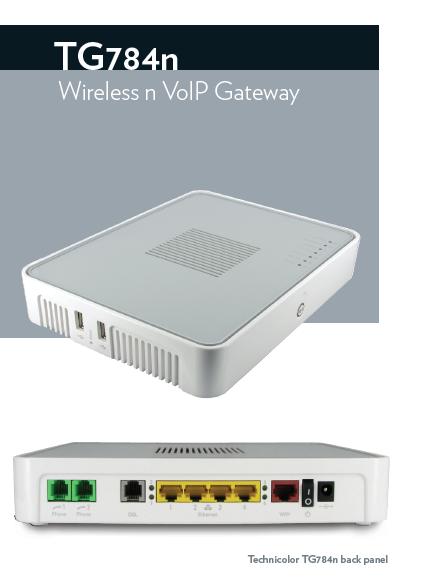
My current router is Technicolor TG784n.
user posted image

Is is worth the hassle to terminate my current package and reapply for a new application 30mbps just to get the TPlink new router?
*
Make sense to up speed at reduce $, but keep the router at all cost bro. So far it is the most stable for casual user like yours truly.
It only has 2 shorts: slow startup & no 5ghz.... but very stable.
hjack
post Jul 18 2019, 05:55 PM

Getting Started
**
Junior Member
276 posts

Joined: May 2012
QUOTE(AhBoy~~ @ Jul 18 2019, 05:08 PM)
alright. TQVM

actually still down until August  rclxub.gif
end up change my mobile plan to One Prime for "unlimited" data doh.gif
*
As a good gesture maxis should offer you the 4g dongle as backup. Why not try request it?
hjack
post Aug 27 2019, 07:27 PM

Getting Started
**
Junior Member
276 posts

Joined: May 2012
QUOTE(cactuscch2 @ Aug 27 2019, 05:37 PM)
Maxis reseller know my Unifi RM129 (100M down, 50M up) package is 23 months already. Landed house.

They keep calling me to switch. They offer RM100 (100M down, 30M up, free dect phone unlimited call to Malaysia landline & mobile number), they will change TM router to a new one. No installation fees.

Just slight drop in upload speed. Is the offer good?
*
Counter them, ask for 300mbps with unlimited calls for rm129.
hjack
post Feb 8 2020, 01:35 PM

Getting Started
**
Junior Member
276 posts

Joined: May 2012
Noticed my C5V router was upgraded to 191212 firmware recently.
I disable the 5Ghz wifi, left only 2.4. After restart the router, the 5Ghz will automatically be enable back. Before this upgrade it stays disable.

I dont need the 5Ghz band and aim to reduce radio pollution but this is annoying.
Have logged a tic to Maxis.
hjack
post Feb 9 2020, 10:10 PM

Getting Started
**
Junior Member
276 posts

Joined: May 2012
QUOTE(yongtjunkit @ Feb 8 2020, 07:32 PM)
5GHZ is less congested than 2.4ghz, and is required to achieve speeds like 100mbps other than using Ethernet

If all of your devices support 5GHZ then switch off 2.4ghz better

Btw got things like microwave, cordless phone which contributes to 2.4ghz congestion......
*
30Mbps line in a 2 stories link house, I prefer range more than speed.
If i do large file transfer via intranet, yes will enable the 5Ghz.

Maxis techie called 2 times, the issue is not recurring though.
hjack
post Apr 9 2020, 11:00 AM

Getting Started
**
Junior Member
276 posts

Joined: May 2012
QUOTE(silrave @ Apr 9 2020, 10:51 AM)
cause my unifi 800 mbps
they charge me rm 309
for me is super expensive
thinking change to maxis
*
Can try this new Isp from SG https://viewqwest.com.my/personal/
hjack
post Jun 2 2020, 12:31 PM

Getting Started
**
Junior Member
276 posts

Joined: May 2012
QUOTE(wyh @ Jun 2 2020, 10:41 AM)
installed maxis then they give u a slip to go unifi to settle with them

i recall both are prorated according to date installed. Maxis router just plugged into unifi btu
*
Sounds good. Can keep the existing Voip number?
hjack
post Jun 10 2020, 09:52 AM

Getting Started
**
Junior Member
276 posts

Joined: May 2012
QUOTE(Carlo J @ Jun 10 2020, 12:24 AM)
Idk if it's just me, but I'm experiencing connectivity issues the entire day using WiFi. Resetting the router didn't help.
*
PJ here ok.

If only your wifi is affected but not your LAN connection then the answer is obvious.
Maxis router is on leased. Report and they will send a replacement without charge.
hjack
post Jun 20 2020, 02:18 PM

Getting Started
**
Junior Member
276 posts

Joined: May 2012
QUOTE(Rad1234 @ Jun 19 2020, 04:28 PM)
hi all, just got a call from maxis rep. They offered me a 300mbps with RM149 per month w/o contract renewal.. next 2 month only pay RM129.. currently runs on 100mbps as my contract ending this Oct 2020, i switched to 300mbps. is this a good deal? and the the guy told me they will change the Unifi BTU modem to support the 300mbps speed.. is  this true?
*
Ask yourself if you need that 3x speed.

I am okay with 30mb at 89 so even if the 50@99 widely available I also wont change. I know what I need.
hjack
post Sep 24 2020, 11:20 AM

Getting Started
**
Junior Member
276 posts

Joined: May 2012
QUOTE(joshhd @ Sep 23 2020, 11:51 PM)
» Click to show Spoiler - click again to hide... «
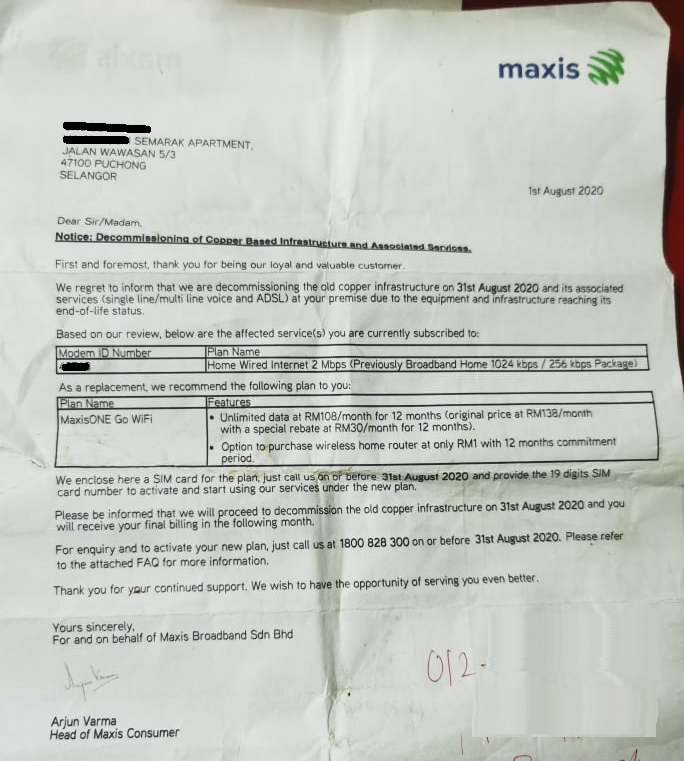
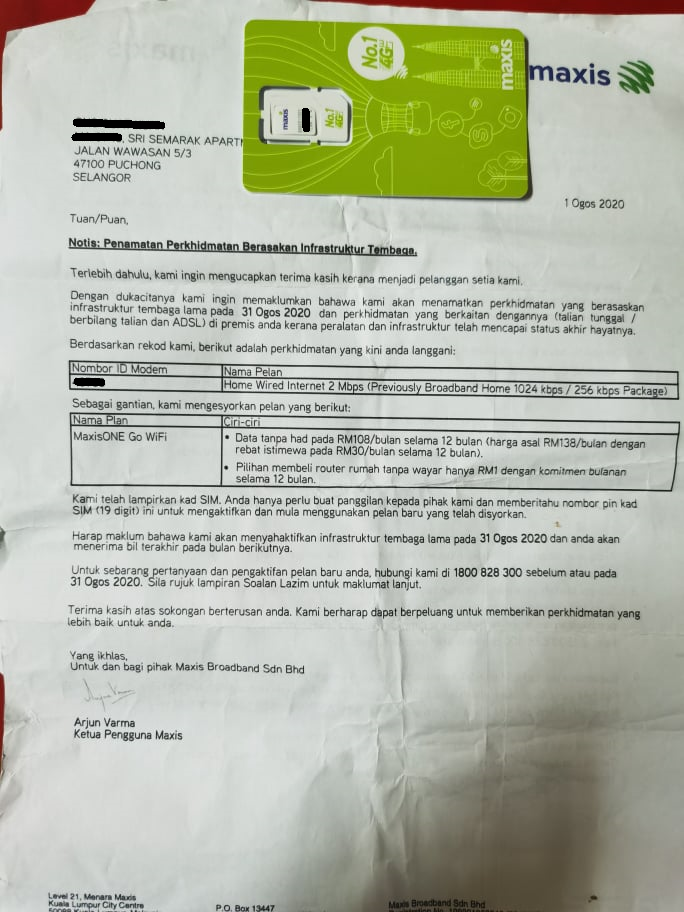
Try write to Multimedia ministry and your ADUN rep.

During Gorbind era, internet is classified as essential services.
Just imagine if one day TNB tells you your house electricity will be cut in a month, ask you to use generator onwards. Or Air Selangor wants you to dig your own well.
hjack
post Sep 24 2020, 03:31 PM

Getting Started
**
Junior Member
276 posts

Joined: May 2012
QUOTE(joshhd @ Sep 24 2020, 12:30 PM)
Got use meh?
Alternative solution is already stated there, use 4G wireless broadband service.
4G cellular signals around the area are already poor, let alone using 4G wireless broadband service?
*
All you need is a pegawai from somewhere tells Maxis CEO >> "Maintain the ADSL there, or pull fiber."
Never try never know.

However if you have accepted their proposed alternative then different story... by all mean stay quiet.
hjack
post Oct 5 2020, 10:23 AM

Getting Started
**
Junior Member
276 posts

Joined: May 2012
Me too received promotional calls with rm20 discount for a year if upgraded to higher package, without any contract.

I asked her to call me again when they are willing to bundle in a free 50" TV biggrin.gif
hjack
post Oct 10 2020, 03:41 PM

Getting Started
**
Junior Member
276 posts

Joined: May 2012
QUOTE(NagaK @ Oct 10 2020, 01:44 PM)
Invest on some good routers or try to upgrade you plan to 100mbps or if you want stuck with Maxis router means go for Mesh wifi system like similar to Airties 4830 that maxis offering for 500mbps and 800mbps customers it will help out. I’m using Maxis 500mbps at my shop plus maxis bundling me 2 unit of  Airties mesh WiFi for free Maxis staffs are just enables all WiFi signals from router and mesh WiFi. So what I did is I disabled both 2.4 and 5ghz WiFi from router and enable WiFi from mesh WiFi now I’m almost 300 to 400mbps even if I away 15 feet away from router
*
Just cirious, where does Maxis plug the VOIP phone to? The mesh unit, or ?
hjack
post Jan 28 2021, 04:48 PM

Getting Started
**
Junior Member
276 posts

Joined: May 2012
QUOTE(utusan@gmail @ Jan 28 2021, 09:05 AM)
Got Maxis Fiber (before this used Unifi)
Im really regret changing to Maxis...
My wifi always disconnect...
Suck and shit...
Worst desicion i made so far for this year...
After changing to my old router (ac68u)
Same problem... Facebook... Shoppe and lazada no fully load image... But much better from stock router Maxis give... Ac68u max wifi speed around 150-170...
Really annoying.
*
Do the usual stuff.... disable ipv6, check wifi chennel, stop unnecessary services etc.
Also wait for firmware upgrade. My c5v is much more stable after updates. In fact I have switched to other Isp now but still using it.
hjack
post Jan 29 2021, 08:41 AM

Getting Started
**
Junior Member
276 posts

Joined: May 2012
QUOTE(Skeuomorphic @ Jan 28 2021, 06:13 PM)
How do you get updates for the c5v? Have to manually update right?
*
On the contrary, dont off your c5v, in 1~2 weeks will be pushed by Maxis.
Mine is 191212.

2 Pages  1 2 >Top
 

Change to:
| Lo-Fi Version
0.0591sec    0.57    7 queries    GZIP Disabled
Time is now: 14th December 2025 - 08:19 AM