

If port over will maxis provide new modem / router ?
Is maxis better then UniFi now ?
Maxis 1Gbps - RM 159
UniFi 1Gbps - RM 219 (Currently)
This post has been edited by Raymond T.: Jul 17 2025, 09:31 PM
The Official Maxis FTTH Thread | v5, Maxis Home Fibre Internet, from RM89
|
|
 Jul 17 2025, 09:30 PM Jul 17 2025, 09:30 PM
Return to original view | IPv6 | Post
#1
|
 
Senior Member
1,368 posts Joined: Aug 2010 
|
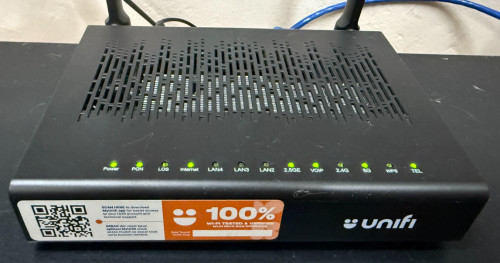
Currently using UniFi 1Gbps, planning to port over to maxis due to UniFi junk modem keep frequent disconnects.
If port over will maxis provide new modem / router ? Is maxis better then UniFi now ? Maxis 1Gbps - RM 159 UniFi 1Gbps - RM 219 (Currently) This post has been edited by Raymond T.: Jul 17 2025, 09:31 PM |
|
|
|
|
|
Jul 21 2025, 11:00 PM
Return to original view | IPv6 | Post
#2
|
|
Senior Member
1,368 posts Joined: Aug 2010
|
QUOTE(YoungMan @ Jul 18 2025, 01:53 PM) Unlike Unifi which uses AIO ONU +router combo, Maxis provides separate router and ONU. I'm not sure how's the performance of their router now, but you could easily replace with own better router with this setup. I see, just to check Maxis 1Gbps what's their upload speed ?My personal experience, I find Maxis has less congestion at night compare to Unifi.  |
|
|
Aug 11 2025, 10:59 PM
Return to original view | IPv6 | Post
#3
|
|
Senior Member
1,368 posts Joined: Aug 2010
|
Maxis Telesales called me today offering 500Mbps RM 89 & 1Gbps RM 119 lifetime price. Worth to transfer over from Unifi ? This post has been edited by Raymond T.: Aug 11 2025, 11:00 PM noien liked this post
|
|
|
Aug 12 2025, 12:45 AM
Return to original view | IPv6 | Post
#4
|
|
Senior Member
1,368 posts Joined: Aug 2010
|
QUOTE(fruitie @ Aug 11 2025, 11:04 PM) Bundle with postpaid I presume? Worth if you ask me, if you don’t have issue with UniFi, you shouldn’t have much issue with Maxis too since you will be using the same infra. They didn’t offer me new line since I’m using 199 plan already. Yup so far so good with unifi will opt for a try 😬 |
|
|
Aug 12 2025, 01:19 AM
Return to original view | IPv6 | Post
#5
|
|
Senior Member
1,368 posts Joined: Aug 2010
|
QUOTE(harrishkrishna1 @ Aug 12 2025, 12:51 AM) Nego more So far what's the lowest price can get haha |
|
|
Aug 18 2025, 03:56 PM
Return to original view | IPv6 | Post
#6
|
|
Senior Member
1,368 posts Joined: Aug 2010
|
QUOTE(Topet @ Aug 18 2025, 11:32 AM) nice, why maxis customer never get this promo. you mean existing maxis fiber customer or postpaid customer ? |
|
|
|
|
|
Aug 18 2025, 06:06 PM
Return to original view | IPv6 | Post
#7
|
|
Senior Member
1,368 posts Joined: Aug 2010
|
QUOTE(Topet @ Aug 18 2025, 04:08 PM) Both, as an existing customer I never get a call from sales to upgrade. Paying RM149 for 500mbps and RM79 for postpaid Try to transfer to another service provider then they will offer you |
|
|
Aug 20 2025, 06:52 PM
Return to original view | IPv6 | Post
#8
|
|
Senior Member
1,368 posts Joined: Aug 2010
|
Just transfer to maxis fiber today.
How to know if I’m on Public or Private IP ? Current IP 113.211.213.XXX 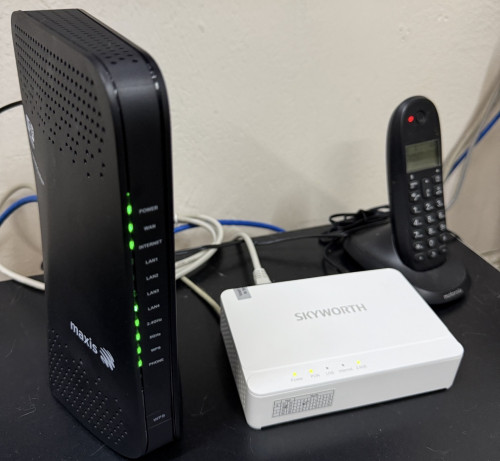 |
|
|
Aug 22 2025, 12:09 PM
Return to original view | IPv6 | Post
#9
|
|
Senior Member
1,368 posts Joined: Aug 2010
|
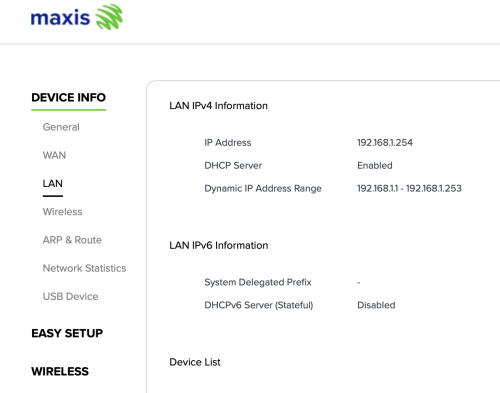 How to enable LAN IPv6 |
|
|
Aug 22 2025, 04:05 PM
Return to original view | IPv6 | Post
#10
|
|
Senior Member
1,368 posts Joined: Aug 2010
|
QUOTE(Keatsan @ Aug 22 2025, 02:12 PM) If I remember correctly, it's under WAN settings for ipv6 WAN. WAN IPv6 seems enabled but unsure is it my login account got any configuration restrictions.Not sure if you can only enable ipv6 without WAN ipv6. I'm using the user & password on the back of maxis router to access |
|
|
Aug 26 2025, 12:20 PM
Return to original view | IPv6 | Post
#11
|
|
Senior Member
1,368 posts Joined: Aug 2010
|
QUOTE(Keatsan @ Aug 25 2025, 01:26 PM) If it's the KAON wifi 6 router, the admin login should be either below. Thank you 😊 managed to access using option aOption A username: administrator password: router serial number Option B username: MaxARSysOpr password: !!bestHOME!!XXXX (last 4 s/n) Then try Enable the DHCP Server for both IPv4 & IPv6 Then use Stateless ipv6 Keatsan liked this post
|
| Change to: |  0.0257sec 0.0257sec
 0.54 0.54
 7 queries 7 queries
 GZIP Disabled GZIP Disabled
Time is now: 11th December 2025 - 05:47 AM |
 Quote
Quote