Welcome Guest ( Log In | Register )

Outline · [ Standard ] · Linear+

 The Official Maxis FTTH Thread | v5, Maxis Home Fibre Internet, from RM89

views
     
jusbella
post Jun 7 2025, 12:33 AM

Look at all my stars!!
*******
Senior Member
3,037 posts

Joined: Dec 2011


QUOTE(siang930615 @ Jun 6 2025, 08:51 PM)
Hey everyone, has anyone using Maxis Fibre experienced intermittent internet outages lasting a few hours every two weeks? When reporting the issue to Maxis customer service, they always blame TM. Where can I file a complaint about this unstable connection and the slow response from Maxis CS?
*
Mcmc
jusbella
post Jun 7 2025, 07:29 PM

Look at all my stars!!
*******
Senior Member
3,037 posts

Joined: Dec 2011


QUOTE(blacktubi @ Jun 7 2025, 01:57 PM)
Maxis changed their password nowadays

It's no longer username + 1
*
So what the new password format?
jusbella
post Aug 13 2025, 04:33 PM

Look at all my stars!!
*******
Senior Member
3,037 posts

Joined: Dec 2011


Anyone know maxis tv sooka premium rm25 billing got charge sst 6%?
jusbella
post Aug 30 2025, 07:54 PM

Look at all my stars!!
*******
Senior Member
3,037 posts

Joined: Dec 2011


QUOTE(QuantumEdge @ Aug 30 2025, 05:54 PM)
Because of the horrible routing, I considered taking Allo (either directly or Maxis under their infra) as my backup fibre plan while I serve Unifi's contract for another 18 months.
My area is covered by both Allo and Unifi's infra, after checking with Allo's CS they told me it is impossible for customer to have both Unifi and Allo service in the same premise despite they are on different infra.
*
blacktubi a new info, different infra also cannot had 2 different Fibre.
jusbella
post Sep 4 2025, 04:53 PM

Look at all my stars!!
*******
Senior Member
3,037 posts

Joined: Dec 2011


QUOTE(jkfoong @ Sep 4 2025, 03:30 PM)
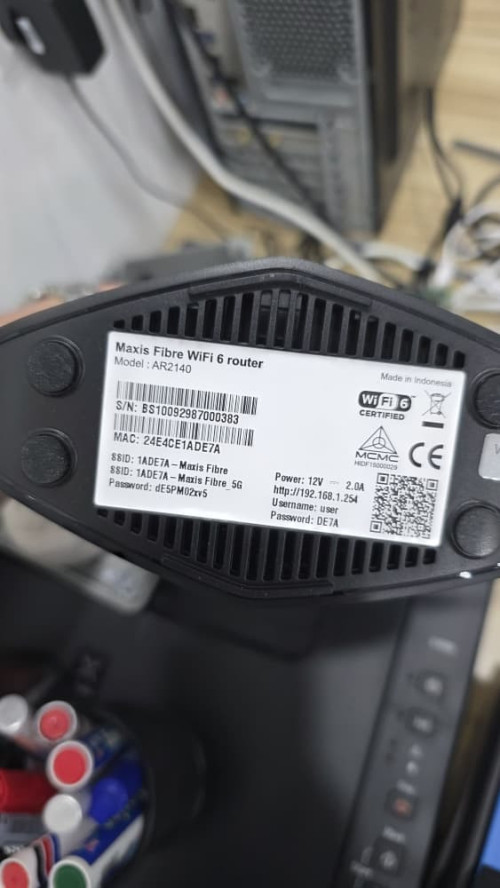
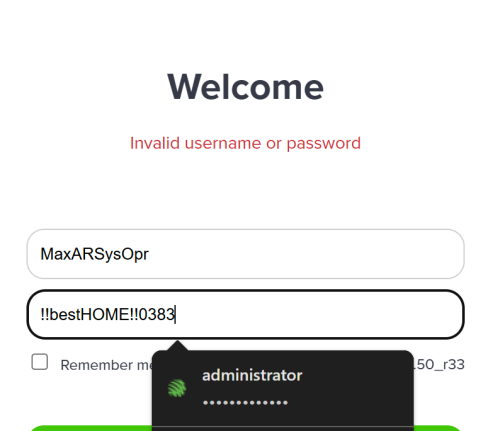
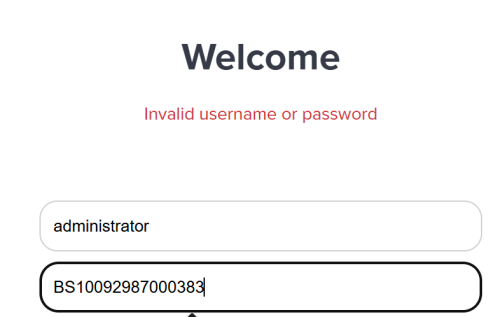
I couldn't login with these two credentials. What else could it be? Possible if the technician change the password?
Firmware version : 1.2.50_r33

user posted image

user posted image

user posted image
*
MaxDNSprUsr
!!bestHOME!!xxxx

Where xxxx is your last Mac address router
jusbella
post Oct 21 2025, 12:48 PM

Look at all my stars!!
*******
Senior Member
3,037 posts

Joined: Dec 2011


QUOTE(tianchoon @ Oct 21 2025, 12:21 PM)
Can't access https://store.apac.panasonic.com/my using home fobre but with mobile network.
Any idea?
*
Change dns to 1.1.1.1 or 8.8.8.8
jusbella
post Nov 11 2025, 12:00 PM

Look at all my stars!!
*******
Senior Member
3,037 posts

Joined: Dec 2011


QUOTE(C_ST @ Nov 11 2025, 11:25 AM)
Tried to call up Maxis at 1123, want to try my luck to get offer for my Fibre upon contract ended.
Keep trying different option/selection, yet all still routed and answer by bot-operator.
Any advise which option to choose, so that I can reach a live-human-agent?
*
Choose report technical / fiber fault. Then human agent will assist you.
jusbella
post Nov 22 2025, 12:23 PM

Look at all my stars!!
*******
Senior Member
3,037 posts

Joined: Dec 2011


QUOTE(rudat @ Nov 22 2025, 10:14 AM)
My 300 Mbps plan suddenly changed to 500 Mbps when I checked the Maxis app. I wasn’t aware of this upgrade until today. So far, my bill amount is still the same. Anyone else experiencing this?

Edit: Never mind, it is because of this https://www.maxis.com.my/en/terms-condition...xis-home-fibre/
*
This Offer is valid for twenty-four (24) months from activation date. Upon near expiry of this Offer, Maxis will review your eligibility for Offer renewal for next twenty-four (24) months. Renewal is not guaranteed.
jusbella
post Nov 27 2025, 04:12 PM

Look at all my stars!!
*******
Senior Member
3,037 posts

Joined: Dec 2011


QUOTE(tzjing99 @ Nov 27 2025, 04:06 PM)
Hi sifus,

I’m currently facing a very strange connectivity issue with Maxis Home Fibre. My internet suddenly went down, and since then I’ve been unable to reconnect using my own router.

What’s happening

My router log repeatedly shows PPPoE authentication failure, even though the discovery phase completes normally. Below is the relevant part of the log:

CODE

2025-11-27T15:14:31Z [Informational] InitAppComm successful! inst:0, encaps:0, diag:0(pppd:4931)
2025-11-27T15:14:31Z [Informational] fsm_open calling callback for starting,unit=0,prot=0xc021(pppd:4931)
2025-11-27T15:14:31Z [Notice] start Discovery, (pppd:4931)
2025-11-27T15:14:31Z [Notice] send PADI, (pppd:4931)
2025-11-27T15:14:31Z [Notice] recv PADO, (pppd:4931)
2025-11-27T15:14:31Z [Notice] send PADR, (pppd:4931)
2025-11-27T15:14:31Z [Notice] recv PADS, Session is 5730(pppd:4931)
2025-11-27T15:14:34Z [Informational] bas support lcp echo(pppd:4931)
2025-11-27T15:14:34Z [Informational] fsm_close Interface ppp0, fsm: 0, state: 9, reason: Failed to authenticate ourselves to peer(pppd:4931)
2025-11-27T15:14:34Z [Informational] fsm_close Interface ppp0, fsm: 0, state: 0, reason: LCP down(pppd:4931)
2025-11-27T15:14:34Z [Informational] Modem hangup(pppd:4931)
2025-11-27T15:14:34Z [Informational] Connection terminated.(pppd:4931)
2025-11-27T15:14:34Z [Warning] PADT Received


What I have tried

Called 123 to get a new PPPoE password → still authentication failed

Tried with my TP-Link BE65 (Maxis VLAN 621 on Unifi infra) → same error

Reconnected the original Maxis router → it can authenticate
BUT when I check the router UI, the PPPoE password field is blank

So I can’t retrieve the actual working password.
What Maxperts did

Maxperts came to my house, but unfortunately they could not resolve the issue.
Here’s what happened:

They noticed the PPPoE password shown in the Maxis router is blank

They also could not explain why the password is missing

They tried to push a fresh configuration from the Maxis backend
→ still failed

They suggested maybe it’s the router issue
→ but as a software engineer, I strongly believe this is not a hardware issue

To me, this clearly looks like a Maxis backend / PPPoE provisioning problem, not a configuration issue on my side.

My Temporary workaround (but not ideal)

Right now, the only way I can get online is:

Use Maxis router just to authenticate PPPoE

Disable WiFi on the Maxis router

Run my own router behind it in DHCP mode

This works, but it’s not optimal because:

I cannot achieve full 1Gbps throughput
(Maxis router LAN port is only 1Gbps, while my GPON and main router are 2.5Gbps)

My setup was running perfectly fine for months

I did not change any settings — it just suddenly stopped working
Current situation

Only Maxis router can authenticate PPPoE (even with blank password)

Any third-party router → fails authentication

New PPPoE password from 123 → also fails

Maxperts → unable to fix
At this point, I’m quite sure this is a backend authentication issue on Maxis’ side.

Has anyone encountered this before or know what might be causing it?

Any advice is appreciated!

If you need more details about my setup, I can share.
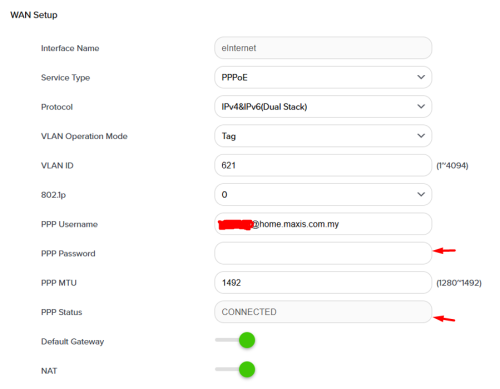
user posted image
*
Update us again if you ever solved the issue.

Sound like they bind Mac address of the router.

jusbella
post Dec 11 2025, 03:57 PM

Look at all my stars!!
*******
Senior Member
3,037 posts

Joined: Dec 2011


QUOTE(OlgaC4 @ Dec 11 2025, 01:10 PM)
My maxis 300mbps contract just ended on 9/12/2025. How to make the maxis retension team call you for counter offer?
*
Just stay, you'll get 500mbps free speed upgrade soon.

https://www.maxis.com.my/en/faq/products-se...-speed-upgrade/

23 Pages « < 21 22 23Top
 

Change to:
| Lo-Fi Version
0.0288sec    0.21    7 queries    GZIP Disabled
Time is now: 13th December 2025 - 10:38 PM