Outline ·
[ Standard ] ·
Linear+
The Official Maxis FTTH Thread | v5, Maxis Home Fibre Internet, from RM89
|
Oltromen Ripot
|
 Aug 29 2022, 10:47 PM Aug 29 2022, 10:47 PM
|

|
QUOTE(codex006 @ Aug 29 2022, 09:27 PM) Hello. I'm not sure if this is the right thread to ask. I'm using Maxis Fibre 300mbps plan. For the past 3 days, I'm experiencing intermittent signal loss (los goes red) throughout the day for few hours each time. It totally goes off during nighttime. I've called Maxis CS like 6 times and their technician has visited my house claiming he can't identify the issue ( It worked fine when he came). And it went off again now. I've contacted Maxis and they said they will send another guy tomorrow morning. To be honest, I don't believe that guy will solve this as well because this thing happens every month to me and this time is the worst. So can you guys advise me on what else I can do? I'm totally lost on this. Any help will be appreciated. Thanks. Put a clock next to your BTU/router, make surethe face is visible. Better if another smartphone that also displays date in addition to time. Take a picture of the clock face, red LOS, everything. Take the picture from time to time interval. Don't need to be frequent. Since you said it could be few hours, probably 30mins apart is sufficient. Or 20mins. Or 15mins. The CS laughs at you? Technician not convinced? Show them. Most importantly, show the one at the start, and the one at the end, to prove it did happened for that length of time. |
|
|
|
|
|
Oltromen Ripot
|
Aug 30 2022, 08:27 AM
|
|
|
QUOTE(khainiz94 @ Aug 30 2022, 07:49 AM) Edit: After comparing my screenshot, there is some settings on my router that is not shown like yours which is weird. WMM, Airtime Fairness gone. just a hunch; other than different firmware, it could also be different hardware version eventhough same model. |
|
|
|
|
|
Oltromen Ripot
|
Aug 30 2022, 07:23 PM
|
|
|
It arrived!!!! Feeling itchy to burst the packs eventhough I will only go to site 2 weeks later. 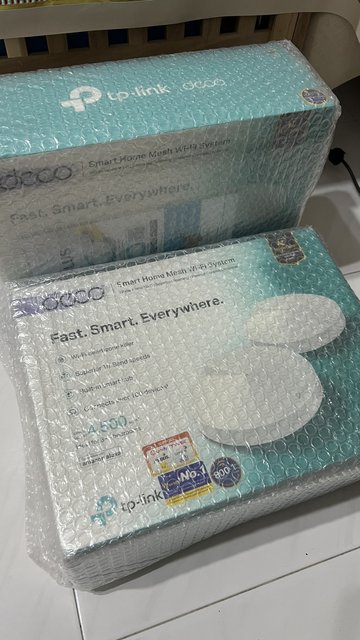 QUOTE(Oltromen Ripot @ Aug 29 2022, 02:06 PM) already ordered additional 2 pairs (4 units) of Deco M9 Plus through Unifi subscription. I probably just maintain the Huawei router for time being, and maybe dedicate the additional 2 Huawei units for home automation and CCTV devices. QUOTE(khainiz94 @ Aug 30 2022, 08:38 AM) BTW EasyMesh pairing is seamless. Kinda excited actually. First time using mesh router. |
|
|
|
|
|
Oltromen Ripot
|
Aug 30 2022, 08:06 PM
|
|
|
QUOTE(khainiz94 @ Aug 30 2022, 07:44 PM) Damn. I only get cheap mesh from Maxis. Better test now. Can try to get max speed from it. Already have 2 unit bundle-installed with Unifi-ed home. I fell in love with M9 Plus 'cause it have built-in speedtest. That's why I opt to have the same model installed at the Maxis-ed home, so I can really monitor the speed quality without being there. Having a dedicated speed testing utility cabled right next to router removes the "wireless" variable from equation. And testing [Unifi fibre against Unifi server] and [Maxis fibre against Maxis server] shows whether the network is even capable of what speed within the ISP itself. If it cannot achieve satisfactory speed even within own ISP, that is already red flag. 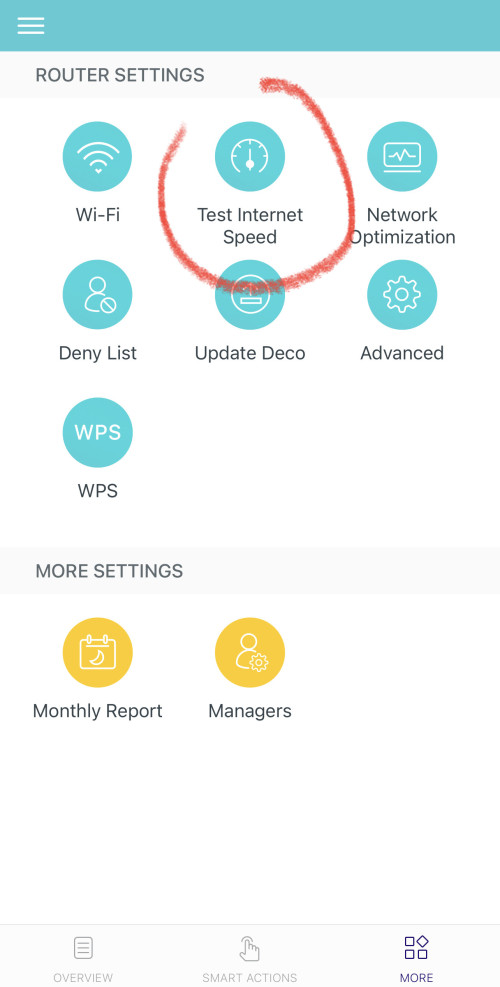 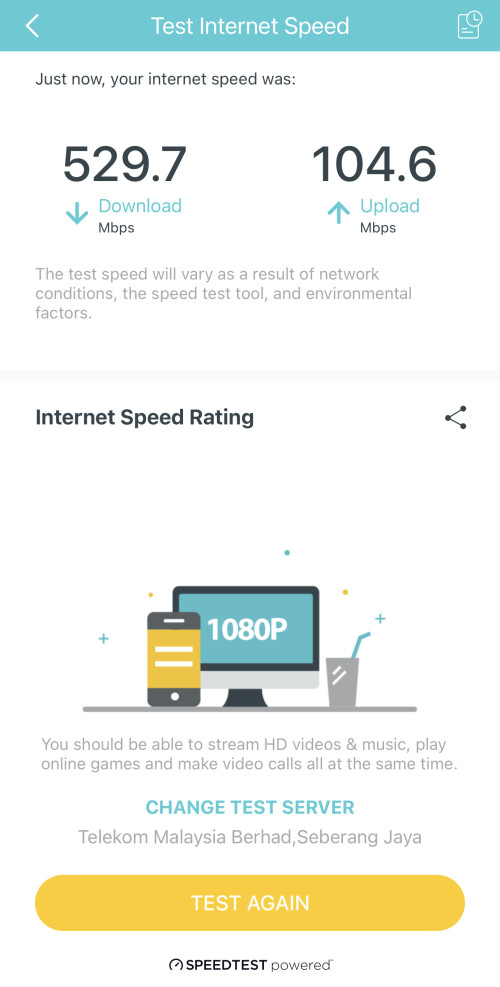 |
|
|
|
|
|
Oltromen Ripot
|
Sep 5 2022, 10:35 AM
|
|
|
QUOTE(waisang @ Sep 5 2022, 12:47 AM) Anyone has any tips of two routers running on Maxis home internet yet to keep the maxis stock router for home call use? Thanks. some says the maxis router can set to passthrough, but i guess that depends on router model and whether it supports so. (pass-through: both vlan 621 and 822 gets connected through maxis router, but, it only process the voip vlan 822, and as for the internet vlan 621, it does not process and just pass it as-is onwards to another router that is also connected to it.) the following are conventional ideas on how to set it up without passthrough. 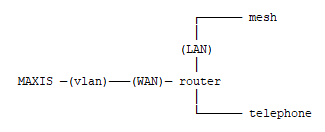 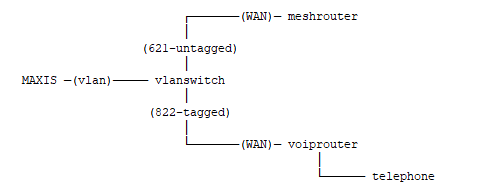 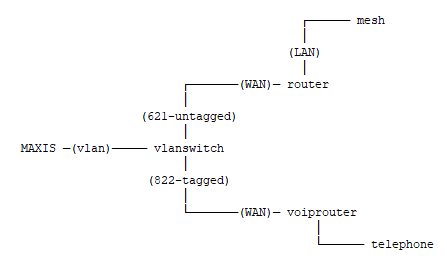 This post has been edited by Oltromen Ripot: Sep 5 2022, 10:38 AM This post has been edited by Oltromen Ripot: Sep 5 2022, 10:38 AM |
|
|
|
|
|
Oltromen Ripot
|
Sep 5 2022, 02:46 PM
|
|
|
QUOTE(Quanta @ Sep 5 2022, 01:43 PM) it drop speed again right now. Left with 28Mbps down i guess i'll go to install M9 Plus tonight. so i can run speedtest from remote and see if my site is affected by similar slowdowns that you guys are experiencing. |
|
|
|
|
|
Oltromen Ripot
|
Sep 6 2022, 11:00 AM
|
|
|
QUOTE(khainiz94 @ Aug 30 2022, 07:44 PM) Damn. I only get cheap mesh from Maxis. Better test now. Can try to get max speed from it. QUOTE(chtan @ Sep 4 2022, 01:34 PM) Maxis fiber is currently having a problem and whole PG is affected by this. It slows to a crawl since yesterday night. QUOTE(Quanta @ Sep 5 2022, 01:43 PM) it drop speed again right now. Left with 28Mbps down today is Sep6. Got my baseline reading and ready to test PG anytime 🫡 😅 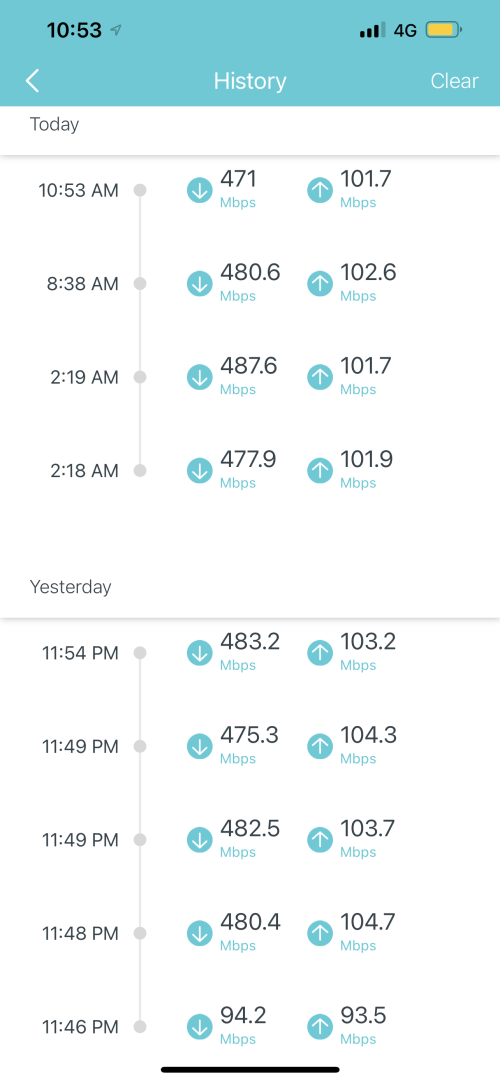 I would say a solid 480Mbps/100Mbps. Slightly lower than the subscriber 500Mbps/100Mbps but I console myself that it could be due to the pole-to-inlet-to-wall-to-BTU non-contiguous cabling. 1st reading was very low due to using a cable pretending to wear "CAT6e" badge. |
|
|
|
|
|
Oltromen Ripot
|
Sep 6 2022, 11:47 AM
|
|
|
QUOTE(chtan @ Sep 6 2022, 11:34 AM) Tested my yesterday. Only 150Mbps while I subscribe to 500Mbps. Complained many time already but no action taken. [attachmentid=11246966] This is about my normal speed. That day was even worse, battlenet/steam/youtube all refused to connect. I disagree with testing outside of the ISP network. When we t/shoot network issue, we start with the closest point, then move further out. Eliminate if it's our own cable or ISP itself is having problem. i.e. speedtest against your own ISP. Unifi (PG) against closest TM Seberang Prai. Maxis against closest Maxis Kuala Lumpur. Fast.com is Netflix-centric. Not totally useless, but the value of it is biased in the general scheme of things. So how is the speedtest to own ISP? This post has been edited by Oltromen Ripot: Sep 6 2022, 11:50 AM |
|
|
|
|
|
Oltromen Ripot
|
Sep 6 2022, 02:42 PM
|
|
|
QUOTE(chtan @ Sep 6 2022, 11:51 AM) Guess what, this is the link Maxis support given to me to perform the test. LOL. I did all sort of tests lar before. Be in speedtest from Umobile, Maxis themselves one or unifi one. All given the same result (of course +-a bit). Their technician was even came to my house to update the router firmware but ended up the same. if you had tested inside own Maxis ISP and it is already problematic, then the issue might be closer to home than being faraway on seabed and foreign soil. |
|
|
|
|
|
Oltromen Ripot
|
Sep 6 2022, 05:33 PM
|
|
|
QUOTE(khainiz94 @ Sep 6 2022, 04:25 PM) But I only able to get full speed 300/50+ on the main Maxis router AR2140. But on the satellite router, it depends. But mostly stable at 280/50+ Mbps. Overall I am satisfied with the mesh performance. The only reason i put the M9 Plus - and a single unit at that - is because I want the built-in speed tester cabled direct to the Maxis Huawei router 😅 maybe later i'll connect the rest of units, but at least now the first important purpose is already satisfied. |
|
|
|
|
|
Oltromen Ripot
|
Sep 12 2022, 12:25 PM
|
|
|
QUOTE(lilsparda @ Sep 12 2022, 12:15 PM) Hi guys, planning to port out from Unifi to Maxis fiber but is wondering if their Wifi 6 Router can be compatible with TP link mesh which i currently have running at home. Did some googling and it seems like theirs are using DLink routers if not wrong. Deco mesh? Deco mesh can run either in router mode or in AP mode. If in router mode, then you don't need to worry of Maxis-branded router. Straight away connect to BTU. If in AP mode, then you just hook Deco to any of the LAN ports on Maxis router. Let Maxis router handles establishing connection. I use this mode for both my Unifi site and Maxis site. Your VoIP line is taken care for by Maxis router. So if you choose to eliminate Maxis router from equation, ...... This post has been edited by Oltromen Ripot: Sep 12 2022, 12:26 PM |
|
|
|
|
|
Oltromen Ripot
|
Sep 12 2022, 12:49 PM
|
|
|
QUOTE(lilsparda @ Sep 12 2022, 12:41 PM) Yes, M4 Deco. Im currently using my Deco as AP from the stock router that is provided by Unifi as i need the router for CCTV. i was thinking if i can eliminate using Lan cable to connect to the router since it have EasyMesh Deco, in general, is incompatible with EasyMesh. Deco pre-dates EasyMesh. So if you opt for AP mode, then still need Ether et cable to link the main Deco. M4 is dual-band mesh. If you don't use cable, it will eat up 5Ghz bandwidth for inter-node. |
|
|
|
|
|
Oltromen Ripot
|
Sep 14 2022, 10:43 AM
|
|
|
QUOTE(salimbest83 @ Sep 14 2022, 09:04 AM) Im using Deco M4 from unifi connected to my maxis wifi6 router. currently run as AP mode connected to a LAN port on my maxis router since my tv cannot lock at wifi 6 maxis . dunno why it prefer the 2.4Ghz comparing between 2.4GHz and 5GHz, regardless abcdefghijklmnopqrstuvwxyz 2.4Ghz lower throughput, deeper penetration through, farther reach 5GHz higher throughput, lower penetration through, shorter reach .... somehow i feel like i had just written porn stuff. |
|
|
|
|
|
Oltromen Ripot
|
Sep 14 2022, 10:48 AM
|
|
|
QUOTE(salimbest83 @ Sep 14 2022, 09:04 AM) Im using Deco M4 from unifi dunno why it prefer the 2.4Ghz i had that with my E4, M4, M9 Plus. it just won't switch to better throughput on 5GHz. so i decided to make use of the Guest network feature in Deco app. The Main network is 5GHz-only with names like STEAMBOAT. The Guest network is 2.4GHz-only with names like STEAMBOAT2. Disable network isolation. Dame password for both. so all my devices stick to each of their own highest throughput band. |
|
|
|
|
|
Oltromen Ripot
|
Sep 16 2022, 09:36 PM
|
|
|
QUOTE(KHOdin @ Sep 16 2022, 08:43 PM) i just called maxis CS told me resend email bill will charge rm10 dafuq? then she say can waive for me first time, weird im able to get their resent bill but not auto bill email why not just get a copy through MyMaxis? (checked your spam directory yet?) |
|
|
|
|
|
Oltromen Ripot
|
Sep 16 2022, 09:48 PM
|
|
|
QUOTE(KHOdin @ Sep 16 2022, 09:42 PM) i am able to retrieve the bill from the online portal but i still need bill reminder monthly for me to pay the bill have done a thorough search, can confirm that i didnt receive it as i am able to receive the TQ note after paying 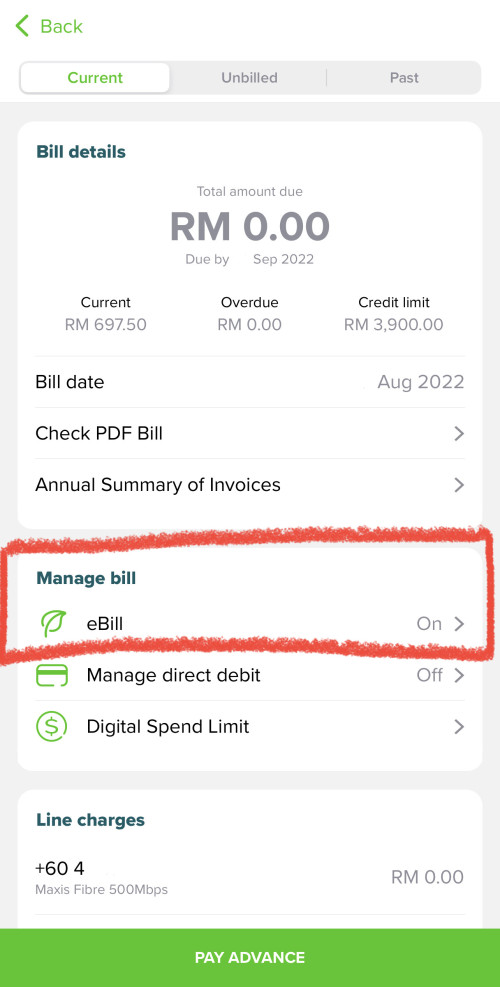 |
|
|
|
|
|
Oltromen Ripot
|
Sep 24 2022, 09:07 PM
|
|
|
RESOLVED: QUOTE(darthobiguan @ Aug 13 2022, 03:10 PM) User this credential instead MaxDNSprUsr !!bestHOME!!XXXX XXXX is the last 4 digit of the router SN EARLIER: Anyone knows what's the super duper password for Maxis' Huawei Optixstar LG8245X6-10 ? The above does not seem to work on 2 units. 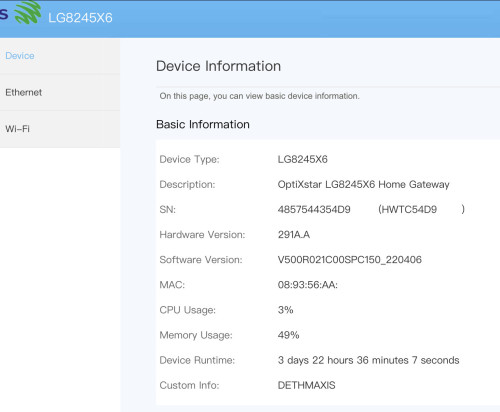 This post has been edited by Oltromen Ripot: Sep 24 2022, 09:25 PM This post has been edited by Oltromen Ripot: Sep 24 2022, 09:25 PM |
|
|
|
|
|
Oltromen Ripot
|
Oct 14 2022, 03:24 PM
|
|
|
QUOTE(epicure @ Oct 14 2022, 02:20 PM) Thanks for the reply bro. I managed to call Maxis, they will give me a troubleshooting when i am home tonight. If they cant fix it they will send a technician to check the router settings. By the way, I have a Maxis Huawei Wifi 6 router, the model is OptiXstar LG8245X6-10. Is there a way to remotely reboot this router? I checked in the configurations but doesnt seem to be a simple reboot/restart option. There is a restart option under maintenance, but doesnt seem like its that straightforward, cos it seems to be a scheduled restart setting. Anyone know how? For MyMaxis app (and Maxis itself) to be able to manage your router from remote - and tinker both settings and reboot -, you need to check TR-069 setting is enabled. I disabled my TR-069 in EACH of my Huawei LG8245x6-10 mesh unit using this login credential QUOTE(darthobiguan @ Aug 13 2022, 03:10 PM) User this credential instead MaxDNSprUsr !!bestHOME!!XXXX XXXX is the last 4 digit of the router SN |
|
|
|
|
|
Oltromen Ripot
|
Oct 15 2022, 04:52 PM
|
|
|
QUOTE(epicure @ Oct 15 2022, 04:35 PM) Hi Oltromen Ripot, thanks for the reply I managed to login to the router using the credentials that you gave me. I’ve clicked around and found this page, which contains a submenu for TR-069. Which one do i disable ? Im just looking to be able to reboot the router using the MMA. 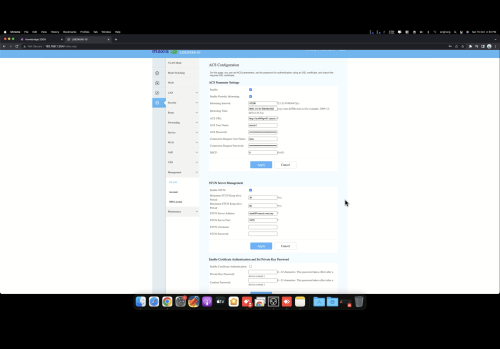 if you disable, then Maxis cannot access your router to do anything from remote. If you want MyMaxis to be able to reboot your router, check the box to enable. 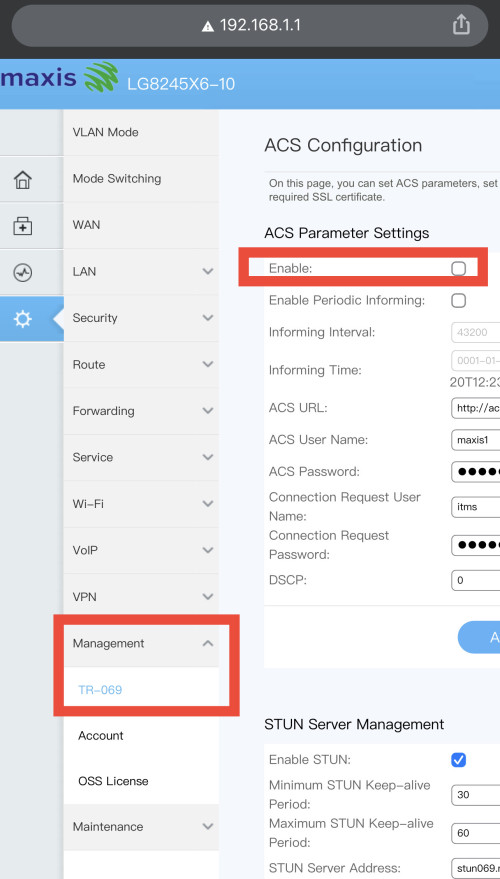 |
|
|
|
|
|
Oltromen Ripot
|
Oct 15 2022, 05:13 PM
|
|
|
QUOTE(epicure @ Oct 15 2022, 04:55 PM) Ah.. i see. well its enabled.. but maxis still can’t login to my account. They say its offline from their end. Something must be wrong. Ill just get them to have a look in person. If they need to reset everything then i cant let them.. cos.. ive already set so many static IP’s for my smart home devices. I’ve found a way to reboot remotely, which is to ssh into my home computer, login to the router’s web config and reboot from there. abit of a hassle but it works. Thanks for all the replies bro. Appreciate it Open the desktop web browser, list then copy all of the MAC and assignments. Later manual re-entry. -- That's why I have - all the fibre-related equipments on one smart power gang (A) connected through LTE, and - all LTE-related equipments on another smart power gang (B) connected through fibre. So if the either set became unresponsive and cannot login, i just power them off and on again from remote. |
|
|
|
|



 Quote
Quote
 0.0397sec
 0.48
0.48
 7 queries
 GZIP Disabled