Welcome Guest ( Log In | Register )

Bump Topic Topic Closed RSS Feed
4 Pages < 1 2 3 4 >Bottom

Outline · [ Standard ] · Linear+

Unifi Official TM UniFi High Speed Broadband Thread V20, ( -_・) ︻デ═一▸ Maxis & Time

views
     
Moogle Stiltzkin
post Jun 30 2015, 11:21 AM

Look at all my stars!!
*******
Senior Member
4,470 posts

Joined: Jan 2003
QUOTE(theberry @ Jun 29 2015, 03:17 PM)
100mbps RM70 + iflix RM8 per month
(assume iflix bringing more contents in the future)  whistling.gif
still need torrent?
for 4k netflix only 20-25mbps needed. 100mbps seems a bit overkill ;/

sure if it's rm70 i'd hop onto that, but sadly thats singapore.

Malaysia 100mbps only choice i see is maxis.... but there are questions regarding their service performance ..... and more importantly it's kinda overpriced. even i stick to unifi 10mbps though it's overpriced, not as badly as the higher mbps packages alternatives.

iflix is good, but people will still torrent. unless iflix can provide all content on the internet especially regarding movies and tv series, and possibly anime/cartoons as well smile.gif So no i don't think iflix is quite there yet. just remember now popcorntime is becoming very popular especially among the folks who aren't too tech savy. but then again iflix rm8 monthly is a pitance and is legal.
Moogle Stiltzkin
post Jun 30 2015, 11:24 AM

Look at all my stars!!
*******
Senior Member
4,470 posts

Joined: Jan 2003
QUOTE(Xefron @ Jun 30 2015, 08:23 AM)
u can try,i always get average of 18Mbps/18Mbps  with ping less than 10ms.
*
10ms is probably local ping to malaysia or maybe even singapore servers. i haven't played dota2 in a long while, so maybe they have a local server within the region for you to get that sort of low latency. But the issue with that is, your playerbase will be much smaller compared to say americas/europe.

ping to other locations like americas and europe is definitely not going to be 10ms smile.gif just to clarify for other readers. i would suspect it would then be either 200-300ms using ftth from malaysia.


Moogle Stiltzkin
post Jun 30 2015, 10:28 PM

Look at all my stars!!
*******
Senior Member
4,470 posts

Joined: Jan 2003
QUOTE(christina1 @ Jun 30 2015, 02:55 PM)
Agree with you 100mbps for home user is overkill...30mbps should be just fine. Wiating for Unifi to fully launch their 30 and 50mbps than will think to subscribe or not .

100mbps Maxis sadly in only available in Puchong area which has Maxis port...Places with Unifi port are unable to subscribe for Maxis 100mbps..

Good things about Maxis 100MB there is no capping for for peer 2 peer unlike other Maxis package 10,20 and 30mbps which has capping from 8pm -12am everday...
*
for the price their asking for 100mbps i'd be shocked if they did that sort of thing.

but heck.... 10,20,30mbps all got p2p cap ..... jesus..... good to know, and i'll reiterate yet again, it's due to maxis policies like this that i stay away from them. Seems they haven't changed rolleyes.gif

QUOTE(christina1 @ Jun 30 2015, 09:32 PM)
Its upload speed really important in ur case?
*
i stream sometimes so for me upload kinda important. otherwise i'd be very interested in the 30mbps download 5mbps upload package.

i also own 2 nas at home with storage spaces roughly 12tb+ so i too could benefit from better uploads. But i definitely would not pay under the current prices in malaysia for that sort of speed icon_question.gif


This post has been edited by Moogle Stiltzkin: Jun 30 2015, 10:32 PM
Moogle Stiltzkin
post Jul 2 2015, 01:40 PM

Look at all my stars!!
*******
Senior Member
4,470 posts

Joined: Jan 2003
QUOTE(giggs_509 @ Jul 2 2015, 01:16 PM)
Yep better stay at current speed vip10. And waiting for further reduced price since new vip10 in rm179.
*
yeah but when ? so far all i hear is rumors that with the intro of 30 and 50mbps broadband via the hypptv packages (cheaper than the 20mbps) that the other packages possibly 5/10/20 may get a price reduction.

but is that true ?

according to shabery he reckoned this price reduction would happened in a 3-4 month ish time frame. thats due around now which is currently july.

or has this already been done with that mocker of a 1mbps package which they used an example for broadband price reduction ..... rolleyes.gif
Moogle Stiltzkin
post Jul 3 2015, 11:11 AM

Look at all my stars!!
*******
Senior Member
4,470 posts

Joined: Jan 2003
QUOTE(christina1 @ Jul 1 2015, 09:17 AM)
ok you download/stream a lot of movies from your NAS server....

Is it expensive to setup NAS server?
buying nas is expensive.

probably cheapest is the DIY NAS and you install a free os like FREENAS using the hardware you bought.

I own both a qnap 509 pro and a 659 Pro II. are 5 and 6 bays respectively. use 1tb drives and 2tb drives.


NAS is good because it adds bays to keep your storage hard drives, and a easy to use raid solution (usually people use raid 5, as raid6 is too taxing on drive space). With NAS you can stream from it over the internet, and use it like a server even (e.g. web hosting, voip server, transmission etc....)


DIY NAS solution is more complex to setup, and needs homework to choose the right parts that work well together and fit it into a proper budget. premium nas brands like qnap, synology, netgear cost a lot more, but is a polished product and has an easy to use interface to let you manage your nas much easier. Also when i have technical issues i can refer back to my brand vendor for technical support and they can remote via teamviewer to assist. DIY solutions don't offer this kind of support.

Moogle Stiltzkin
post Jul 8 2015, 01:22 PM

Look at all my stars!!
*******
Senior Member
4,470 posts

Joined: Jan 2003
QUOTE(-oc-gassa @ Jul 8 2015, 11:00 AM)
my house 10mb not enuf.. even my father and mother streaming via their own ipad.. plus my siblings.. 10 gadget/pc/laptop are connected  at the same time..haha
*
if so many people streaming same time, of course not enough .....

usually when someone on my network is watching netflix, i usually just turn off my torrent download. or i could cap my torrent download speed to half or less.

Moogle Stiltzkin
post Jul 9 2015, 05:03 PM

Look at all my stars!!
*******
Senior Member
4,470 posts

Joined: Jan 2003
QUOTE(quasi @ Jul 8 2015, 08:31 PM)
Unifi called me today offering to upgrade.
199 for 30Mbps + Aneka pack + free calls to tm landlines not including GST
Ruby Pack package was extra 10 rm.
*
just remember that it's 30mbps download with 5mbps upload.


QUOTE(tommyfai @ Jul 9 2015, 01:56 PM)
wow.. download is good but upload is no good.. i would not upgrade it yet..
*
yeah but most users the download speed is much more important than download. even on torrent i think you can still max out on 30mbps.

the only concern for upload is if your regular activity is uploading remotely especially if your a streamer like me. I seriously doubt 5mbps is enough upload speed. even 10mbps i'm barely getting by streaming 720p and 1080p content doh.gif


This post has been edited by Moogle Stiltzkin: Jul 9 2015, 05:07 PM
Moogle Stiltzkin
post Jul 11 2015, 11:31 PM

Look at all my stars!!
*******
Senior Member
4,470 posts

Joined: Jan 2003
QUOTE(christina1 @ Jul 11 2015, 12:32 PM)
The question how many mbps is enough for a home user than downloads a lot of movies,tv series ..30mbps or 50mbps?
depends.... i consider myself heavy downloader. this is just an example of the kind of monthly bandwidth usage for a heavy downloader *cough brows.gif

user posted image


downloading something like say 4gb on a 10mbps can take like roughly an hour or so. If you want to download faster than that for that sort of filesize then 30-50mbps can net you i'd say roughly under 20 or 30 minutes.

most tv series media tend to be roughly around 300mb-1.2 gb depending on the quality of the media.

movies are around 2gb-15gb.


As for streaming is a different matter.

e.g. netflix there is a bottle neck, which is why 20-25 mbps is recommended for 4k streaming, otherwise you will get stutter. stutter is bad for streaming .... makes it less enjoyable if your show is pausing every now and then sweat.gif

for 1080p 10mbps should be fine.


5mbps is like bare minimum for just average internet, mostly get this if you only browse the web and little else. you also pay the less compared to other broadband packages.

10mbps works fine for everyone. this is what i use too. malaysian broadband is overpriced, so this at least is slightly bearable even if other countries can get much higher mbps for the same price ..... but what to do cry.gif

20mbps for netflix 4k. or if you want to download stuff faster, or even for increased upload speed.

30 and 50mbps download is very good. no quota either. only downside is the 5mbps, which in most cases isn't an issue for people that mostly download. if your a regular streamer, you may want to just stick with 10 or 20mbps for now doh.gif

100mbps time has a quota ...... which i heard reverts to 10mbps once reached, and only resets back to 100mbps at the end of the month. If you look at the sample bandwidth usage, it just goes to show how a heavy download can easily surpass the monthly quota rolleyes.gif

maxis 100mbps i don't think has a quota. but is damn expensive. and i haven't seen yet any reviews what the performance and latency is like. i never really hear any good things about maxis broadband rolleyes.gif


QUOTE(christina1 @ Jul 11 2015, 03:18 PM)
Ok...you also plan to upgrade to 50Mbps soon?

To watch 4K video on youtube you need at least 50mbps.
theres a chart here what youtube recommends in terms of mbps for smooth streaming on youtube for what resolution content
https://support.google.com/youtube/answer/1722171?hl=en


for netflix i'm pretty sure they said somewhere between 20-25mbps. i think they use some sort of compression for their streaming service.

https://help.netflix.com/en/node/306


PS: fcc in america raised the definition of broadband to 25mbps download to qualify
http://www.extremetech.com/mobile/198583-f...rman-mocks-isps

compared to Malaysia
QUOTE
The Malaysian Communications and Multimedia Commission sets a low threshold for broadband. It defined broadband as:

Any service beyond the scope of existing PSTN/ISDN and 2G cellular networks
With data rates that exceed the normal voice-related speed (56 kbit/s for PSTN and 64 kbit/s for ISDN)
This definition is far below the primary rate interface lower limit defined by the International Telecommunications Union in ITU-R F.1399.


and people wonder why i am so skeptical about our country's broadband management rolleyes.gif

This post has been edited by Moogle Stiltzkin: Jul 11 2015, 11:41 PM

Moogle Stiltzkin
post Jul 11 2015, 11:54 PM

Look at all my stars!!
*******
Senior Member
4,470 posts

Joined: Jan 2003
QUOTE(christina1 @ Jul 11 2015, 11:41 PM)
OK cool good explanation...How to used this Tomato Firmware and where can I download?
*
tomato is a custom router firmware, kinda like dd-wrt. the difference is tomato is simplified and easier to use compared to dd-wrt. also it has better bandwidth qos management.


there are few variants of tomato. i use shibby's cause he has the latest fixes, updates and features. This is a list of routers he supports with his firmware.
http://tomato.groov.pl/?page_id=69

the most highest end router he supports is the r7000 nighthawkor a Asus RT-AC68U, but those costs roughly rm700+ So a more cheaper but performance router he also supports is a Asus RT-AC56U. Or even cheaper there is a Asus RT-N18U for around rm400 ish


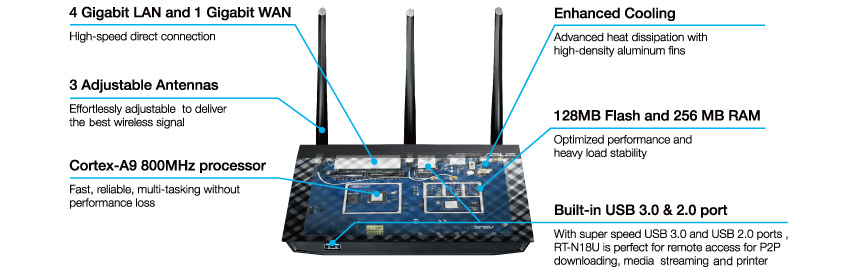
Asus RT-N18U - really nice router
Looks like RT-N66U, has CPU/RAM/NAND/USB3.0 like RT-AC68U but is single-band wireless router like RT-N16. What is it? Asus RT-N18U
user posted image
QUOTE
- CPU Broadcom-ARM dual-core 800MHz (same as in RT-AC56U and RT-AC68U)
- RAM 256MB (FSB 533MHz)
- NAND 128MB
- Gigabit switch
- 1x USB2.0 + 1x USB3.0
- 3x external antennas
- 2,4GHz radio N600 (single band router)

http://www.linksysinfo.org/index.php?threa...e-router.70178/


this is the latest shibby changelog
http://tomato.groov.pl/?page_id=78


Also i'm using a custom GUI for his firmware. you can browse it from this site
http://tomatothemebase.eu/?author=1


Why i also like using tomato shibby, i can keep an accurate log for my monthly banwidth usage. i can also monitor my download and upload speed, more accurately compared to speedtest. So if ever my broadband is below 70%, i have proof that this is the case, because my router keeps a log which is automatically saved to my QNAP Nas smile.gif


oh and compared to ddwrt, tomato has a graphical overlay like below. so don't know why people still use dd-wrt these days rolleyes.gif maybe they didn't look what else was available lel.

user posted image

This post has been edited by Moogle Stiltzkin: Jul 12 2015, 12:03 AM
Moogle Stiltzkin
post Jul 12 2015, 01:05 PM

Look at all my stars!!
*******
Senior Member
4,470 posts

Joined: Jan 2003
QUOTE(christina1 @ Jul 12 2015, 07:08 AM)
Thanks for the info really appreciate it....Is it straight forward to setup Tomato firmware?

Looks like you download a lot and ur pc is switch on 24X7....Thinking will be upgrading to 50mbps since the upload speed is 10mbps.
i use 2 NAS

6x2tb 5x1tb raid5 icon_idea.gif

can easily run out of space. waiting for 4tb or 6tb drives to get cheaper sweat.gif

The only reliable brand i'd get is hsgt, but those helium drives are too pricey. seagate is better than last time, but honestly based on the failure rates, i don't trust them rclxub.gif


upgrade tomato firmware is easy....

you install your default router firmware, do a factory reset. then upgrade firmware pointing to the shibby tomato firmware. once done, go to the shibby settings and do factory reset. NVRAM clear make sure this is on (for a clean reinstall).

Now you can start setup :] things you'd normall do, you can change the router lan ip range. also change the default router lan ip to a custom to obfuscate from hackers trying commonly used ips. then again if you don't enable remote router admin access, probably really needed imho.

then you can do portforwarding.

change dns to use googledns.

and alternatively you can setup QOS for bandwidth management. read the guides on how to :]

Moogle Stiltzkin
post Jul 12 2015, 02:22 PM

Look at all my stars!!
*******
Senior Member
4,470 posts

Joined: Jan 2003
QUOTE(christina1 @ Jul 12 2015, 02:13 PM)
okok thanks...so deciding to upgrade to 50mbps now?
if 50mbps download with 5mbps upload with unlimited quota (aka no policy to throttle to to any monthly bandwidth cap) for that price. then yeah get it. i doubt you do any streaming activity on twitch to warrant a higher upload ?

heck even 30mbps is good :] for an even cheaper price. get whichever fits better into your budget.

theres the hypptv package included (no choice here). i think for custom router there is an issue to get iptv working. so if you don't mind that, then get it :] (wish they offered the speeds without the iptv bundle but sadly can't. guess they want to justify the increase costs.... lel...)

Moogle Stiltzkin
post Jul 12 2015, 04:45 PM

Look at all my stars!!
*******
Senior Member
4,470 posts

Joined: Jan 2003
QUOTE(giggs_509 @ Jul 12 2015, 02:23 PM)
I thought default firmware also got QOS?
*
qos implementation is different for brands and firmware used.

usually the reviews at smallnetworkbuilder talk about qos implementation, you will sometimes not some shortcomings.....

tomato qos is famous for having an extensive qos that is quite capable smile.gif


here i found some info for you

QUOTE
The Nighthawk matches the Asus RT-AC68U almost feature for feature, and it’s superior in two respects: First, Netgear’s router offers downstream Quality of Service( QoS) , where most routers—including the Asus—support only upstream QoS. This means the Nighthawk can recognize network traffic such as a Netflix stream and assign it higher priority than other traffic, such as a BitTorrent upload. The Nighthawk also has better parental control features. In addition to supporting OpenDNS, you can block websites based on keywords, you can operate parental controls according to a schedule, you can exempt specific PCs from the parental controls, and it can send you email alerts when someone attempts to connect to blocked sites and services.

http://www.pcworld.com/article/2050761/net...ed-records.html


in summary depends on the routers qos capabilities.... seems for newbies the nighthawk qos more or less works and easy to use.

tomato is much more advance and quite capable. but requires a little more setting up to properly configure it.

user posted image


This post has been edited by Moogle Stiltzkin: Jul 12 2015, 04:57 PM
Moogle Stiltzkin
post Jul 12 2015, 05:00 PM

Look at all my stars!!
*******
Senior Member
4,470 posts

Joined: Jan 2003
QUOTE(christina1 @ Jul 12 2015, 04:49 PM)
There is no other software that we can know how much I have downloaded for the month?
*
actually pfense is an alternative to tomato i also recommend.


pros
------
can use good hardware to make a very powerful router. you choose the parts based on your budget. could be argued you can get a very good performing router at a cheaper price.


cons
------
a bit complicated to setup. you have to refer to guides to get an idea which parts to buy. installing also have to follow a guide carefully.

like the tomato also has a graphical chart for bandwidth monitoring.
user posted image


someone making their pfsense router :}


This post has been edited by Moogle Stiltzkin: Jul 12 2015, 05:07 PM
Moogle Stiltzkin
post Jul 14 2015, 09:33 AM

Look at all my stars!!
*******
Senior Member
4,470 posts

Joined: Jan 2003
QUOTE(christina1 @ Jul 14 2015, 09:24 AM)
How is the download speed for 50MB ?
*
here's a chart
http://www.uswitch.com/broadband/guides/br...download_times/


a 10gb bluray @ 50mbps = 26m 40s download time.

@10mbps it would be roughly around 2h 47m ish.


if i were to play 1 game of storm of heroes, after my game is done, i'd have finish downloading the movie to go watch laugh.gif


so thats the difference smile.gif


if you do get 50mbps, make sure to test with an actual torrent, as well as speedtest to international servers e.g. US and europe to see your download speed. Local malaysia download doesn't mean much when most of the content is usually on US or european locations.

This post has been edited by Moogle Stiltzkin: Jul 14 2015, 09:34 AM
Moogle Stiltzkin
post Jul 14 2015, 10:34 AM

Look at all my stars!!
*******
Senior Member
4,470 posts

Joined: Jan 2003
thinking of trying 30bps dl/5mbps ul .....

so price is rm199 monthly is it ?


how much for the 50mbps ?


Also if i upgrade my 10mbps to 30mbps, will they renew my contract ? it was already expired so not sure hmm.gif

also when i upgrade will they give a new btu unit and router ? or not ? and what will the username/password be for it hmm.gif ?

This post has been edited by Moogle Stiltzkin: Jul 14 2015, 10:36 AM
Moogle Stiltzkin
post Jul 14 2015, 10:52 AM

Look at all my stars!!
*******
Senior Member
4,470 posts

Joined: Jan 2003
QUOTE(OKLY @ Jul 14 2015, 10:37 AM)
30/5 with a HyppTV package - RM210.94 (incl GST)
50/10 with a HyppTV package - RM263.94 (incl GST)
*
ah 50ringgit more i see hmm.gif

donno why though but in the email they sent me, there was no mention of any hyptv package (cause i thought this speed only comes in a specific hyptv bundle). they only mention the broadband speed. weird.


*update

just to clarify this is what i mean
http://www.lowyat.net/wp-content/uploads/2...30compare01.jpg


they only mention in the email about the rm199 30mbps (which based on the jpg chart, seems to be the aneka ruby/varnam package. theres no mention of the other alternatives like jumbo pack :/

Their marketing department really sucks at communicating properly their packages. Then again, at least it's the cheapest 30mbps package. i'm not gonna use their shitty hypttv tongue.gif


QUOTE(sHawTY @ Jul 14 2015, 10:42 AM)
Yes, your contract will be renewed to a 24 month contract.
New BTU & new router is only provided for new registrations.
New BTU & new router will not be provided for recontracts / plan upgrades.
The username & password will remain the same.
ah ty for the info. so is it worth cancel, then register new ? or just upgrade ? bit confused here.

heard some horror stories that one guy he cancel, only to find that now there no available ports. and he had to wait like 2 weeks before he could internet back again shocking.gif

recently my bro register for new unifi, took them 3 weeks+ from the actual day they were suppose to come setup to even do it .... tmnut rolleyes.gif


*update

just found out some info
QUOTE
These new plans? Existing UniFi customers cannot upgrade from their current subscriptions, regardless whether they are on the cheapest 5Mbps or the RM249-per-month 20Mbps plan. Instead, those who want to upgrade are required to terminate their current UniFi plan and apply for the new 30Mbps plan. Those still on contract are presumably required to pay some form of compensation. Terminating your account also means having a new phone number, which is another hassle that’s totally unnecessary.


http://www.lowyat.net/2015/04/dendajar-tm-unifi-30mbps/


is this still the case ?


*update

also read someone 5 days ago posted
QUOTE
I got a call today from TM saying that I'm able to upgrade to VIP30 (+RM10/mo) from VIP10 without any technician on-site and seems like a seamless upgrade that will take effect in 5 days.


so now there is 2 different versions ;_; any ideas ?


This post has been edited by Moogle Stiltzkin: Jul 14 2015, 11:12 AM
Moogle Stiltzkin
post Jul 14 2015, 01:16 PM

Look at all my stars!!
*******
Senior Member
4,470 posts

Joined: Jan 2003
QUOTE(giggs_509 @ Jul 14 2015, 11:19 AM)
Previously current subscriber cannot upgrade and must terminate old subscription and start new. Only recently existing subscriber able to upgrade. I believe mostly upgrade upon receiving call from TM.
QUOTE(angel-girl @ Jul 14 2015, 11:24 AM)
i upgraded from vip10 to 50mbps. in 1 working day.

ps:they called me and i upgraded thru phone. 3 months contract waived and restart 24 months.
ah ty for the info. starting to see the picture now.

the 20mbps people got screwed over due to the nagging to upgrade to 20mbps, only to later find out 30mbps and 50mbps came out laugh.gif

doubt the same will happen for 30mbps. new package, doubt they'll change the price or suddenly got 100mbps for cheaper price hmm.gif

only thing i suspect is 5/10 and maybe even 20 may get a price reduction by august. but who knows, maybe not rolleyes.gif
Moogle Stiltzkin
post Jul 14 2015, 01:39 PM

Look at all my stars!!
*******
Senior Member
4,470 posts

Joined: Jan 2003
QUOTE(neooren @ Jul 14 2015, 01:21 PM)
received email 10mb for RM179 promo until 31/8/15
*
but thats before gst even added....if gst added is around 189 isn't it ? i may as well just get the 30mbps download 5mbps upload package for 199. 210 after gst included. overpriced but at least i'm getting more mbps per ringgit compared to 10mbps. basically only 21 ringgit more, not much for me.

the step up from 30mbps to 50mbps is 22.80 more. tempting but not really bothered. point is 21 ringgit more for 3 times the mbps compared to my current 10mbps. Basically more bang for my buck, even though i still think our broadband is still overpriced.

Here's a chart
http://www.lowyat.net/wp-content/uploads/2...30compare01.jpg


anyway be wary about their 10mbps and 20mbps promotions. you don't want to be locked in without considering first whether you want to go for 30 or 50mbps smile.gif

those people who previously signed up 20mbps especially recently, just got royally screwed when they noticed the 30mbps and 50 mbps was cheaper than their 20mbps package.

This post has been edited by Moogle Stiltzkin: Jul 14 2015, 01:41 PM
Moogle Stiltzkin
post Jul 14 2015, 07:04 PM

Look at all my stars!!
*******
Senior Member
4,470 posts

Joined: Jan 2003
QUOTE(neooren @ Jul 14 2015, 01:57 PM)
thanks for the comparison chart

do you think they will lower the price for 5/10/20 later?

eager to upgrade 30mb but now for me everything fine with 5mb (watch movies/tvseries via Kodi).
if no price reduction on 5mb, for me it worth it to upgrade to 30mb
*
honestly, when they made available 30/50 they really ought to have simultaneously reduced prices on 5/10/20 automatically for existing and new registers.

INSTEAD they didn't. so those who just signed up 20mbps because of their spam (update now for just a mere rm...) and now paying more for 20mbps compared to 30/50 !

shakehead.gif


QUOTE(cherroy @ Jul 14 2015, 03:08 PM)
It is almost same across many telco's plan or even banking promotion.

Newer customer get promotion sweet deal, while existing customer get nothing, as promotion is always aim to attract new and more customer instead of rewarding existing customer.
i know that to downgrade there is a penalty while on contract. but what about upgrading from say 20mbps to 30mbps, is there any penalty for that ?


QUOTE(christina1 @ Jul 14 2015, 03:32 PM)
Go for 50MB u wont regret it since you are heavy user downloading a lot of Bluray movies...smile.gif)
meh. if 50mbps becomes reasonably priced i would. i'm actually fine with 10mbps, but consider i get more value with 30mbps aka 3 times the download speed for only 20 ringgit extra, may as well. not gonna pay another 50 ontop of that just to get 50mbps. 30 is good enuff.


my tolerance threshold is like 10gig download in 2 hour 40 ishmins, is about right. sooner is always better but only at the right price smile.gif

long long time ago, downloading videos took a day or more.... it was hell back then rclxub.gif i didn't even bother watching anime, tv series or movies back then. maximum i only listen to music like most people did laugh.gif

This post has been edited by Moogle Stiltzkin: Jul 14 2015, 07:19 PM
Moogle Stiltzkin
post Jul 14 2015, 07:23 PM

Look at all my stars!!
*******
Senior Member
4,470 posts

Joined: Jan 2003
QUOTE(Icehart @ Jul 14 2015, 07:20 PM)
Now the 50Mbps for RM 219 is a good deal. I will patiently wait until September.
QUOTE
(mechakucha @ Jul 10 2015, 01:06 PM)
Went to TM point. This is the price they quote.

Unifi 30 internet + basic hypptv channel - RM169 (excl. GST)
Unifi 50 internet + basic hypptv channel - RM219 (excl. GST)
+ Jumbo Pack - RM60 (excl. GST)
+ Call Plan - RM20 (excl. GST)

Official launch sometime in September. Can upgrade directly for existing customer with VIP5/10/20 plan. No termination fee. Only contract renewal to 24 months.

Edited to correct "internet only" as "internet + basic hypptv channels" after checked with TM sales.


219 for 50mbps ? where yawn.gif ? what you mean september. i thought available now yawn.gif


This post has been edited by Moogle Stiltzkin: Jul 14 2015, 07:29 PM

4 Pages < 1 2 3 4 >Top
Topic ClosedOptions
 

Change to:
| Lo-Fi Version
0.0416sec    1.16    7 queries    GZIP Disabled
Time is now: 11th December 2025 - 12:43 AM